

Facebook Post Details Scraper - Reactions, Views & Shares
Pricing
from $2.10 / 1,000 posts
Facebook Post Details Scraper - Reactions, Views & Shares
Scrape public Facebook post details by URL: text, author, date, reactions by type, comment and share counts, exact video views and plays, photos, video files, captions and links. Posts, photos, videos, reels, group posts and share links. Track engagement changes between runs. No login or cookies.
Pricing
from $2.10 / 1,000 posts
Rating
0.0
(0)
Developer

Top Api
Maintained by CommunityActor stats
0
Bookmarked
22
Total users
15
Monthly active users
9 minutes ago
Last modified
Categories
Share
What does Facebook Post Details Scraper do?
Facebook Post Details Scraper turns a list of public Facebook post URLs into one structured row per post: the full text, the Page or person who posted it, the date, reactions by type, comment and share counts, exact video views and plays, photos, video files, captions, links, hashtags and tags. It reads Page posts, group posts, photos, albums, videos, reels and share links. Built for social media managers, agencies, brand and research teams who track Facebook post engagement without a login, cookies or an API key.
Facebook Post Scraper - Facebook Post Details - Facebook Reel Views Scraper - FB Post Engagement Export
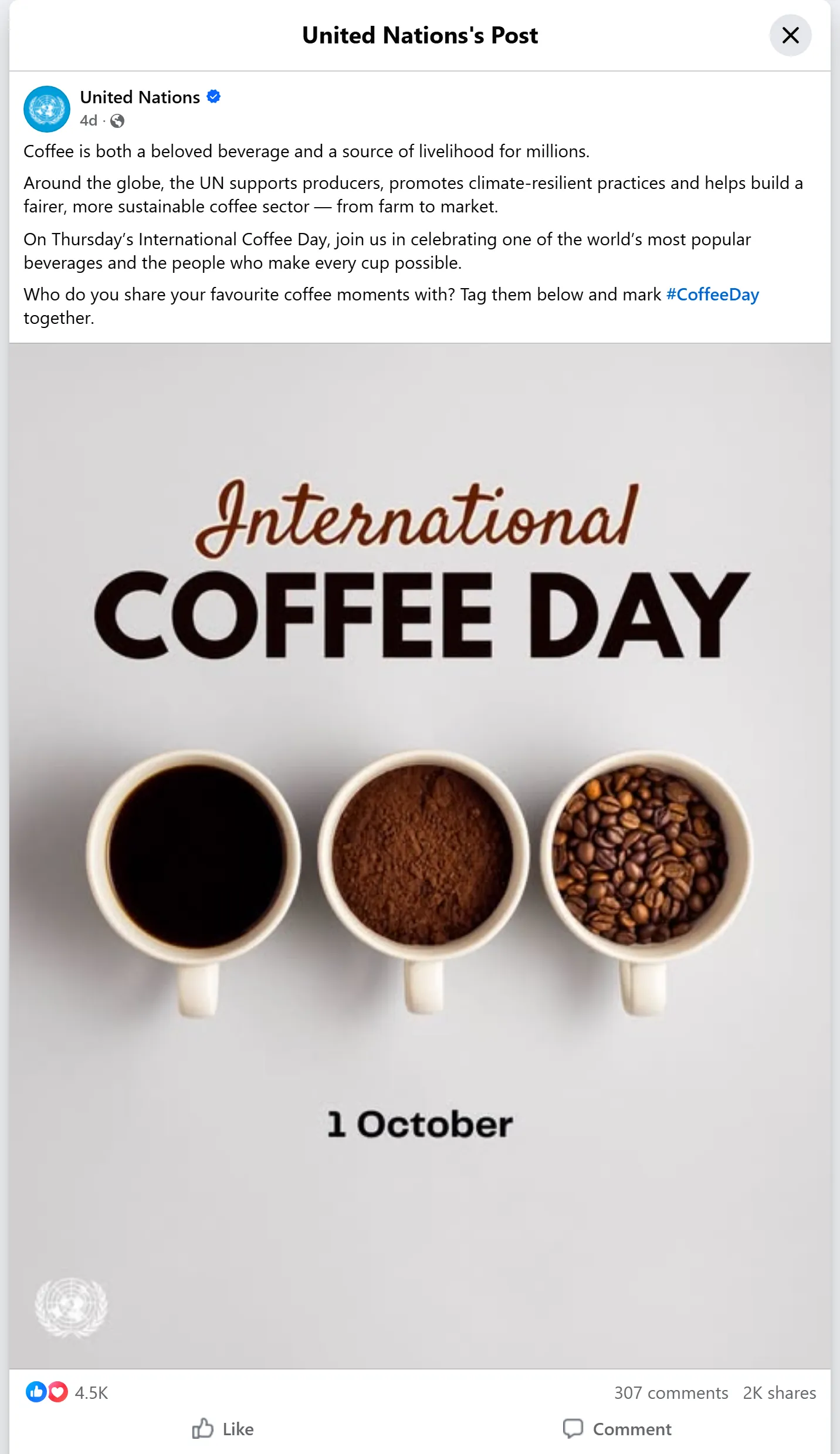
- Every post type, one row each:
/posts/,/groups/.../posts/,/photo/?fbid=,/videos/,watch?v=,/reel/,/share/p/,/share/r/,permalink.phpandm.facebook.comlinks. - Engagement in full: reactions total and by type (like, love, care, haha, wow, sad, angry), comments, shares, and for videos and reels the exact
video_view_countandplay_countFacebook keeps behind the rounded "1.2M views". - Media: photo URLs with size and alt text, every photo of an album, playable HD and SD video files, thumbnails, duration, the reel's soundtrack and its caption files.
- Track engagement between runs: with tracking on, every row carries the previous counts, the deltas and
changed_fields; "Only posts that changed" returns just the movers. - Optional add-ons: the top 10 comments of each post, the author's follower count and category, and the video transcript from Facebook's own captions.
- No login, cookies or Facebook API key: the actor reads what Facebook shows a signed-out visitor.
- Export anywhere: JSON, CSV, Excel, XML, RSS; schedules, webhooks, Make, Zapier, n8n, Google Sheets, Slack, the Apify API and MCP.
What data can you get from a Facebook post?
| 🆔 Post id and URL (`post_id`, `url`) | 🏷️ Post type (`type`: status, photo, album, video, reel, link, share) | 📝 Full text (`message`) |
| 📅 Date (`published_at`, `timestamp`) | 👤 Author name, id, URL, avatar (`author`) | ✔️ Verified badge, Page or person (`author.is_verified`, `author.type`) |
| ❤️ Reactions total and by type (`reactions_count`, `reactions`) | 💬 Comments (`comments_count`) | 🔁 Shares (`reshare_count`) |
| ▶️ Exact video views and plays (`video_view_count`, `play_count`) | 🎬 HD / SD video files, thumbnail, duration (`video_files`) | 🎵 Reel soundtrack (`music`) |
| 🖼️ Photos with size and alt text (`image`, `images`) | 🔗 Shared link and its card (`external_url`, `external_link`) | ↪️ Shared post (`attached_post`) |
| #️⃣ Hashtags, @mentions, tagged Pages (`hashtags`, `text_references`) | 👥 Group and place (`group`, `location`) | 📈 Changes since the last run (`deltas`, `changed_fields`) |
On a 24-post test run (Page posts, group posts, photos, albums, reels and videos) the author, date, reactions, comments and shares were filled on 100% of rows, the text on 96% (a NASA video has none), and views, plays and video files on 8 of 8 videos and reels.
How to scrape Facebook posts with Facebook Post Details Scraper
- Create a free Apify account. It comes with $5 of monthly credit and needs no card.
- Open Facebook Post Details Scraper and click Try for free.
- Paste your post, reel, video or photo URLs into Post URLs (or link a text file of URLs).
- Turn on any add-ons you want: Add top comments, Add author details, Add video transcript.
- Click Start. One row per post lands in the dataset.
- Open the Storage tab and Export as JSON, CSV or Excel, or schedule the run to track the same posts every day.
⬇️ Input
| Parameter | Type | Description |
|---|---|---|
| 🔍 What to scrape | ||
startUrls | List | Required. Public Facebook post URLs of any kind: Page and group posts, /photo/?fbid=, /videos/, watch?v=, /reel/, /share/p/ and /share/r/ links, permalink.php, a bare post id or pfbid. A remote text file of URLs works too. |
| ✂️ Refine results | ||
onlyPostsNewerThan | Date | Keep posts published on or after a date: 2026-09-01 or relative, 7 days. |
onlyPostsOlderThan | Date | Keep posts published on or before a date. Combine both for a window. |
postType | Select | all, status, photo (photos and albums), video (videos and reels), reel, link, share. Default: all |
minReactions | Integer | Keep posts with at least this many reactions. Default: 0 |
minViews | Integer | Keep videos and reels with at least this many views. Default: 0 |
| ➕ Extra data | ||
includeTopComments | Boolean | Add up to 10 comments per post in top_comments. Charged as the top-comments add-on per post that gets at least one. Default: false |
maxTopComments | Integer | Comments per post, 1-10. Default: 10 |
topCommentsSort | Select | most_relevant (Facebook's default) or newest. Default: most_relevant |
includeAuthorDetails | Boolean | Add the author's followers, following, talking about, verified badge, category and intro in author_details. Charged as the author-details add-on per post that gets it. Default: false |
includeTranscript | Boolean | Add the caption text of videos and reels that have captions in video_transcript. Free. Default: false |
| 🔁 Monitoring | ||
monitorMode | Boolean | Remember each post's counts and add previous, deltas and changed_fields to every row. Default: false |
onlyChanged | Boolean | With tracking on, return only posts seen for the first time or whose counts moved. Default: false |
monitorStoreName | Text | The named store that keeps the counts, one per tracked list. Default: facebook-post-details-monitor |
| 📦 Output | ||
maxItems | Integer | Stop after this many posts. 0 = every URL. Default: 0 |
compact | Boolean | 19 core fields per row, for AI agents, MCP and spreadsheets. Default: false |
| ⚙️ Advanced | ||
proxyConfiguration | Proxy | Default: Apify's own IP first, Apify Proxy when Facebook refuses or stalls, RESIDENTIAL for photo URLs. Pick a group to always use it. |
maxConcurrency | Integer | Posts read at the same time, 1-10. Default: 3 |
Input JSON
Input names of other Facebook post scrapers are accepted through the API too (direct_urls, postUrls, post_urls, urls, posts, postIds as plain strings, captionText, includeComments), so a saved call can switch without edits.
Paste the post URL, not the Page URL
Each URL must point to one post. Do: https://www.facebook.com/nasa/posts/pfbid0..., https://www.facebook.com/reel/1510975140138256. Don't: https://www.facebook.com/nasa (a Page lists posts; the run skips it, says so in the log and charges nothing). For a Page's latest posts use Facebook Page Posts Scraper or Facebook Search Posts Scraper, then pass the post URLs here.
Use tracking for engagement over time
Turn on monitorMode and schedule the same list hourly or daily. Every row then shows what moved since the previous run, for example "deltas": { "reactions_count": 7, "video_view_count": 1000 }. Add onlyChanged when you only want the movers: on a test poll five minutes after a full run, 5 of 24 posts had changed (all reels and videos still gaining views) and only those 5 were returned.
⬆️ Output
Every Facebook post becomes one dataset item. Here is the table view of a 24-post run (posts by organisations and brand Pages shown):
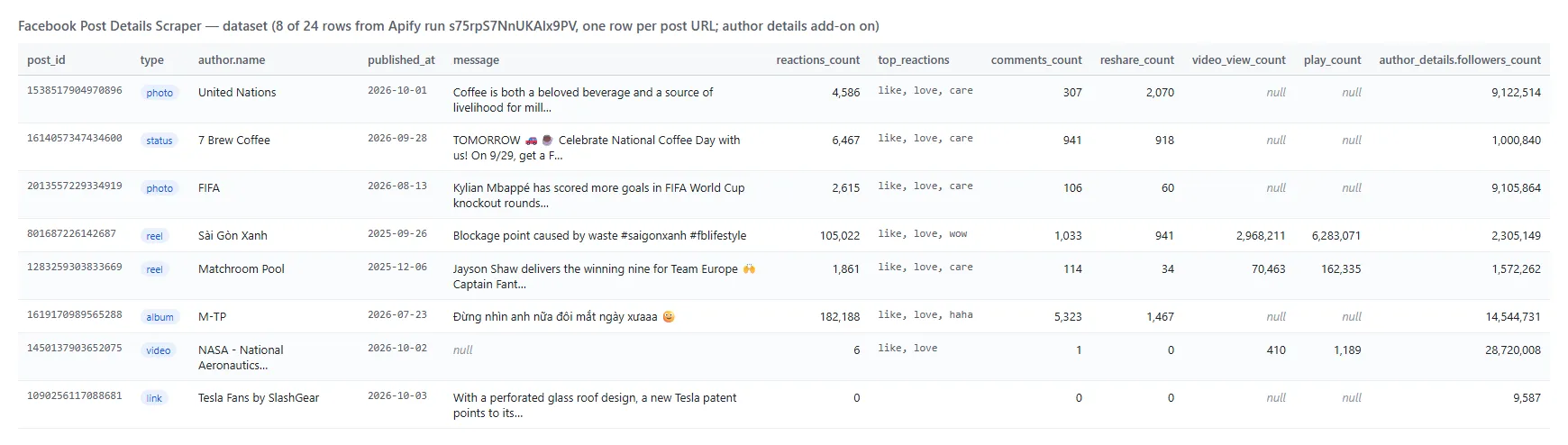
And a reel as JSON (shortened):
Facebook post fields
| Field | Type | What it is | Filled (24-post run) |
|---|---|---|---|
post_id, url, type, input_url, comments_id | string | Post ids, permalink, kind, the URL you passed | 100% |
message | string | Full text of the post | 96% |
published_at, timestamp | string, integer | Publish time, ISO 8601 and Unix seconds | 100% |
author | object | id, name, url, avatar, Page / person, verified badge | 100% (badge 75%) |
reactions_count, reactions, top_reactions | integer, object, list | Reactions total, by type, types in order | 100% |
comments_count, reshare_count, engagement_count | integer | Comments, shares, their sum with reactions | 100% |
video_view_count, play_count | integer | Exact views and plays | 8 of 8 videos and reels |
video, video_files, video_thumbnail, video_duration_ms, video_width, video_height, is_live | mixed | Video permalink, MP4 files, thumbnail, size, live flag | 8 of 8 videos and reels |
music, video_captions, video_transcript | object, list, string | Reel soundtrack, caption tracks, caption text | soundtrack 6 of 8, captions 3 of 8 |
image, images, album_count, image_alt | object, list | Photos with size and Facebook's alt text | 10 of 10 photo and album posts |
external_url, external_link, links, attached_post | mixed | Shared link, its card, every link in the text, a shared post | posts that have one |
group, location, privacy, author_title | mixed | Group, tagged place, audience label | 7 of 7 group posts; privacy 100% |
hashtags, mentions, text_references | list | Hashtags, @handles, tagged Pages and people | posts that have them |
top_comments | list | Add-on: id, text, date, author, reactions, replies | 21 of 24 (3 posts had none) |
author_details | object | Add-on: followers, following, talking about, badge, category, intro | 17 of 21 authors (the rest are personal profiles) |
monitor_status, previous, deltas, changed_fields, first_seen_at | mixed | Tracking: counts of the last run and what changed | with tracking on |
Not delivered: collaborators of a co-authored post and a Page's "likes" count. Neither appeared on any post or author Page measured for this actor, so the fields were left out rather than shipped empty.
How can I use Facebook post data?
- 📊 Social media managers and agencies: report reactions, comments, shares and video views per post for your Pages and your clients', on a schedule.
- 🥊 Competitive intelligence: track competitors' launch posts and reels day by day with
deltasand see which content keeps growing. - 🤝 Influencer and creator vetting: check a creator's real views, plays and engagement per reel, plus followers with Add author details.
- 📰 Brand, PR and research teams: archive viral posts with text, media and engagement for reports and studies.
- 🎬 Video teams: collect the HD file, duration, soundtrack and captions of reels and videos you are allowed to reuse.
- 🤖 AI and data teams: feed post text, transcripts and top comments to LLMs and dashboards;
compactkeeps rows small.
How much does it cost to scrape Facebook posts?
Facebook Post Details Scraper is pay-per-result: $2.10 per 1,000 Facebook posts, no start fee. You only pay for posts written to your dataset. Add-ons, when you turn them on: top comments $0.50 per 1,000 posts that receive comments, author details $0.50 per 1,000 posts that receive them; transcripts are free.
| Posts | Cost |
|---|---|
| 10 | $0.021 |
| 100 | $0.21 |
| 1,000 | $2.10 |
| 10,000 | $21.00 |
Apify platform usage (compute, proxy) is included in this price. Measured on the platform with 256 MB: 24 mixed posts in 11 seconds, 2 posts in 4 seconds; with top comments, author details and tracking on, 24 posts in 81 seconds. Memory peak under 85 MB.
Facebook posts in your tools: integrations, API, scheduling & MCP
- Schedules: run your list hourly or daily from the Schedules tab with
monitorMode: true(andonlyChanged: truefor movers only). - Webhooks: fire a URL when a run finishes and push the new numbers to a dashboard, CRM, Slack or a sheet.
- No-code: Make, Zapier, n8n, Google Sheets, Airtable, Slack via Apify integrations.
- API: call it from Node.js or Python with
apify-client. Code is on the API tab and in the Apify API reference. - MCP / AI agents: connect Claude, Cursor or any MCP client through the MCP tab and ask for a post's engagement in plain language. Set
compact: trueto keep rows small.
More social media scrapers by TopApi
| 💬 Facebook Comments Scraper - every comment and reply of a post | 🔎 Facebook Search Posts Scraper - find public posts by keyword | 🛒 Facebook Marketplace Scraper - listings and prices by keyword and city |
| 👤 Instagram Profile Scraper - followers, bio and latest posts | 📸 Instagram Scraper - posts, reels, hashtags and profiles | 🎵 TikTok Scraper - videos by profile, hashtag or keyword |
| 🎬 TikTok Video Scraper - stats, transcript and download by URL | 🐦 Twitter Profile Scraper - X followers, bio and verified badge | ▶️ YouTube Shorts Scraper - views, channels and transcripts |
| 📍 Google Maps Reviews Scraper - reviews, ratings and owner replies | 🧭 All TopApi actors |
Limits & empty runs
- One URL, one post: Page, profile and group home URLs are skipped (they list posts). Private groups, friends-only and age-restricted posts redirect a visitor to the login page and are reported as signed-in only.
- Photo URLs (
/photo/?fbid=) are sent to the login page for every datacenter IP, so the actor reads them on a RESIDENTIAL IP; they take a few seconds longer. - Reel shares are Facebook's rounded figure (
5.3Kbecomes5300, the original is inreshare_count_text); on Page posts and photos the share count is exact. - Views and plays exist for videos and reels only. A reel's views come from its video page, so a reel takes two page loads.
- Author details need a Page or a creator profile; personal profiles show visitors no counters and get none (not charged).
- Video files and image URLs are signed links that expire after a few hours. Download them promptly.
- Empty dataset: the URLs are not posts, the posts were removed or are private, your filters removed every post, or
onlyChangedfound nothing new. The status message and theRUN_SUMMARYrecord name the cause per URL; nothing is charged.
FAQ
How many Facebook posts can Facebook Post Details Scraper read in one run?
As many URLs as you pass. Posts are read 3 at a time by default (up to 10); 24 mixed posts took 11 seconds on a test run, and the actor saves its progress so a long run that restarts does not deliver or charge a post twice.
Can Facebook Post Details Scraper track post engagement over time?
Yes. Turn on monitorMode and run the same list on a schedule. Each row carries the previous counts, the deltas and changed_fields; onlyChanged returns only posts that moved.
Does Facebook Post Details Scraper get video and reel views?
Yes. video_view_count and play_count are Facebook's exact numbers (plays include replays), read from the video page; the page itself shows only a rounded "1.2M".
Can I get the comments of a Facebook post with Facebook Post Details Scraper?
Yes, the top 10 per post with Add top comments, ordered by relevance or newest. For every comment and reply of a post, use Facebook Comments Scraper.
Can I scrape Facebook group posts with Facebook Post Details Scraper?
Yes, posts in public groups, with the group's id, name and URL on the row. Posts in private groups are reported as signed-in only.
Can I integrate Facebook Post Details Scraper with other apps?
Yes. Make, Zapier, n8n, Google Sheets, Slack and more via Apify integrations, or use webhooks to act when a run finishes.
Can I use Facebook Post Details Scraper with the Apify API?
Yes. Use apify-client for Node.js or Python; the API tab has ready-to-paste code.
Can I use Facebook Post Details Scraper through an MCP server?
Yes. Open the MCP tab, connect your MCP client (Claude Desktop, Cursor, LibreChat) and ask for the engagement of a post. compact: true keeps the rows small.
Do I need a Facebook account, cookies or an API key for Facebook Post Details Scraper?
No. Facebook Post Details Scraper reads only what Facebook shows a signed-out visitor. You pass post URLs and nothing else.
Why did my Facebook Post Details Scraper run return no posts?
The most common causes, in order: the URL is a Page or profile rather than a post; the post is private or was removed; your date, type or reaction filters removed it; onlyChanged found no change since the last run. The status message names the cause for each URL.
Is it legal to scrape Facebook posts?
Facebook Post Details Scraper extracts only publicly available posts; it does not log in or collect private data. Posts may still contain personal data, which is regulated (for example by GDPR). Make sure you have a legitimate purpose before you store or reuse it.
Your feedback
We keep improving Facebook Post Details Scraper. Found a bug or missing a field? Open an issue on the Issues tab.


