| 🏨 Hotel name and type (`type`) |
⭐ Star class (`hotelClass`) |
👍 Google rating and review count |
| 📊 Rating histogram 5 to 1 stars |
🗣️ What guests mention (`reviewAspects`) |
📍 Latitude and longitude |
| 🗺️ Location scores (`locationScores`) |
🚇 Nearby transit, sights and airport minutes |
🛎️ Amenities |
| 💲 Nightly price, with and without taxes |
🧾 Stay total, taxes and fees |
🏷️ Price note (`priceInsight`) |
| 🕒 Check-in and check-out times |
🖼️ Photos and thumbnail |
🌐 Website (only with booking-site prices) |
| 🔗 Booking sites with deep links (`offers`) |
📍 Address and phone (only with booking-site prices) |
🧭 Google Maps ids: `cid`, `fid` (`placeId` with booking-site prices) |
| 🛏️ Rentals: sleeps, bedrooms, bathrooms, beds |
📅 Check-in, check-out, nights, guests |
💱 Currency of every price |
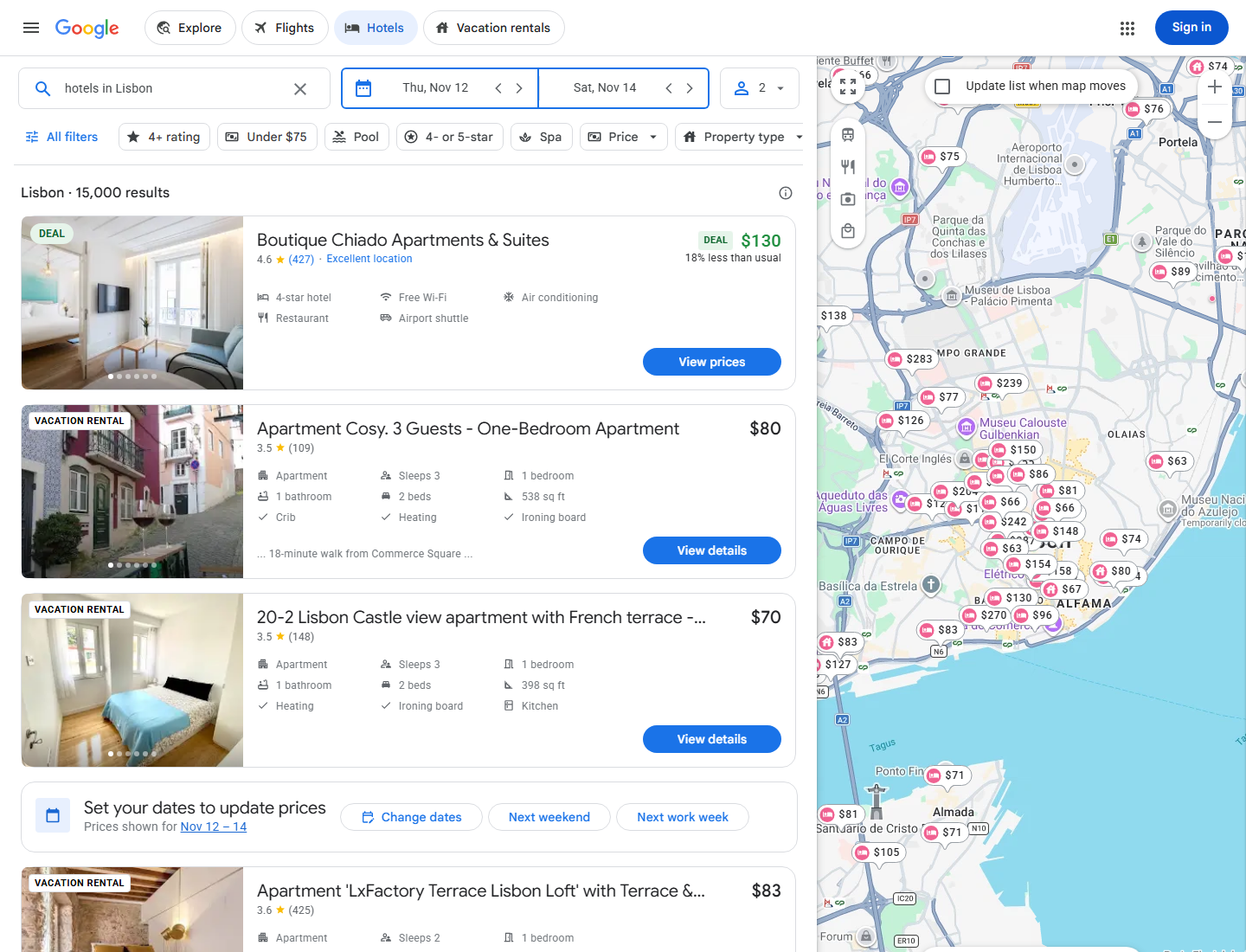
On a 100-hotel run for "hotels in Lisbon" every row had a name, coordinates, a nightly price and a Google Hotels link; 99% had a rating and amenities, 98% location scores and 77% a star class (Google mixes vacation rentals into city searches; those rows carry sleeps, bedrooms and bathrooms instead).
### How to scrape Google Hotels with Google Hotels Scraper
1. [Create a free Apify account](https://console.apify.com/sign-up): $5 of monthly credit, no card needed.
2. Open [Google Hotels Scraper](https://apify.com/topapi/google-hotels-scraper) and click **Try for free**.
3. Type a destination into **Destinations / searches**, e.g. `hotels in Lisbon`, and set the **Check-in date** and **Nights**.
4. Add filters if you need them, and set **Max hotels per search**.
5. Click **Start**. Rows appear in the dataset as Google answers.
6. Open the **Storage** tab and **Export** as JSON, CSV or Excel, or let a schedule run it for you.
### ⬇️ Input
| Parameter | Type | Description |
|---|---|---|
| **🔍 What to scrape** | | |
| `queries` | List | Destinations as you would type them into Google Hotels: `hotels in Lisbon`, `Paris`, `hotels near Times Square`. Prefilled with `hotels in Lisbon`. |
| `hotelUrls` | List | Specific hotels: a Google Hotels URL, the bare entity token (`ChgI…`), or the hotel name with its city. |
| `mode` | Select | `search` (one row per hotel, default) or `offers` (one row per booking site x check-in date). |
| `propertyKind` | Select | `hotels` (default) or `vacation_rentals`. |
| **🗓️ Stay** | | |
| `checkIn` | Date | `2026-11-12` or days from today (`30 days`). Default: 30 days from today. |
| `checkOut` / `nights` | Date / Integer | A check-out date, or the number of nights (1-30, default 1). |
| `adults`, `childrenAges` | Integer / List | Guests: adults 1-12 (default 2), one age per child (0-17). |
| `currency`, `language`, `country` | Select / Text | Price currency (56 to choose from, default USD), Google language `hl` (default `en`: names, descriptions and class labels follow it; `amenities` on hotel rows stay in English) and market `gl` (default `us`). |
| `device` | Select | `desktop` (default) or `mobile`, which adds booking sites' mobile-only rates to booking-site prices and price offers. |
| **🎯 Filters** (applied by Google Hotels) | | |
| `sortBy` | Select | Relevance (default), lowest price, highest rating, most reviewed. |
| `minPrice`, `maxPrice` | Integer | Nightly price range in your currency. |
| `hotelClass`, `minRating` | Multi-select / Select | Star classes 2-5; guest rating 3.5+, 4.0+, 4.5+. |
| `amenities`, `propertyTypes` | Multi-select | 19 amenities (pool, free breakfast, pet-friendly, EV charger…) and 9 property types (hostels, boutique hotels, apartment hotels…). |
| `freeCancellation`, `specialOffers`, `ecoCertified` | Boolean | Google's toggles of the same names. Default: off. |
| **✂️ Refine results** | | |
| `withPriceOnly`, `minReviews`, `excludeKeywords` | Boolean / Integer / Text | Skip hotels without a price for your dates, with too few reviews, or whose name contains a word. |
| `minBedrooms`, `minBathrooms` | Integer | Vacation rentals only: keep rentals with at least this many bedrooms / bathrooms (rentals that list no count are skipped when set). Hotel rows are not affected. |
| **➕ Extra data** | | |
| `includeDetails` | Boolean | Each hotel's booking-site prices and details, charged as **hotel-details** at $0.001 per hotel that gets them. Default: off. |
| `maxOffersPerHotel` | Integer | Keep the first N booking sites per hotel. `0` = all. |
| `sweepDays` | Integer | Offers mode: price the stay for this many consecutive check-in dates (1-60). |
| **🔁 Monitoring** | | |
| `monitorMode`, `monitorStoreName`, `priceDropPercent` | Boolean / Text / Integer | Return only hotels not delivered before, plus hotels whose nightly price fell by at least `priceDropPercent` (default 5). |
| **📦 Output** | | |
| `maxResults` | Integer | Hotels per search. Default `100` (prefill 20); `0` = everything Google lists (its list for a big city ends after about 550-650 hotels). In price offers mode: hotels taken per destination (`0` = the first 20). |
| `maxItems`, `maxPhotosPerHotel`, `compact` | Integer / Boolean | Total row cap; photos per hotel (default 10); core fields only for AI agents and MCP (price offers rows keep the booking site, its prices and link). |
| **⚙️ Advanced** | | |
| `proxyConfiguration`, `maxConcurrency` | Proxy / Integer | Defaults work for most runs: a direct connection first, the Apify proxy if Google blocks it. Pick RESIDENTIAL with a country to see that country's point of sale. |
 #### Input JSON
```json
{
"queries": ["hotels in Rome"],
"checkIn": "45 days",
"nights": 3,
"adults": 2,
"currency": "EUR",
"hotelClass": ["4", "5"],
"maxResults": 50,
"includeDetails": true
}
```
#### Type the destination the way you would on Google Hotels
`queries` is Google's own search box. `hotels in Lisbon`, `Lisbon`, `boutique hotels in Alfama` and `hotels near Times Square` all work. Google always answers with hotels: a misspelt or unknown place is matched to the nearest thing it recognises, so check the first rows of a new search.
#### Use relative dates for scheduled runs
`"checkIn": "30 days"` with `"nights": 2` always prices a stay 30 days ahead, so a daily schedule builds a price history for the same lead time. Absolute dates (`2026-11-12`) price one fixed stay.
#### Look up hotels by URL or token, not by Maps place id
`hotelUrls` takes a Google Hotels URL (`https://www.google.com/travel/hotels/entity/ChgI…`), the token alone, or a hotel name with its city. A hotel name resolves to Google's first match for it. A Google Maps place id (`ChIJ…`) cannot be opened on Google Hotels.
### ⬆️ Output
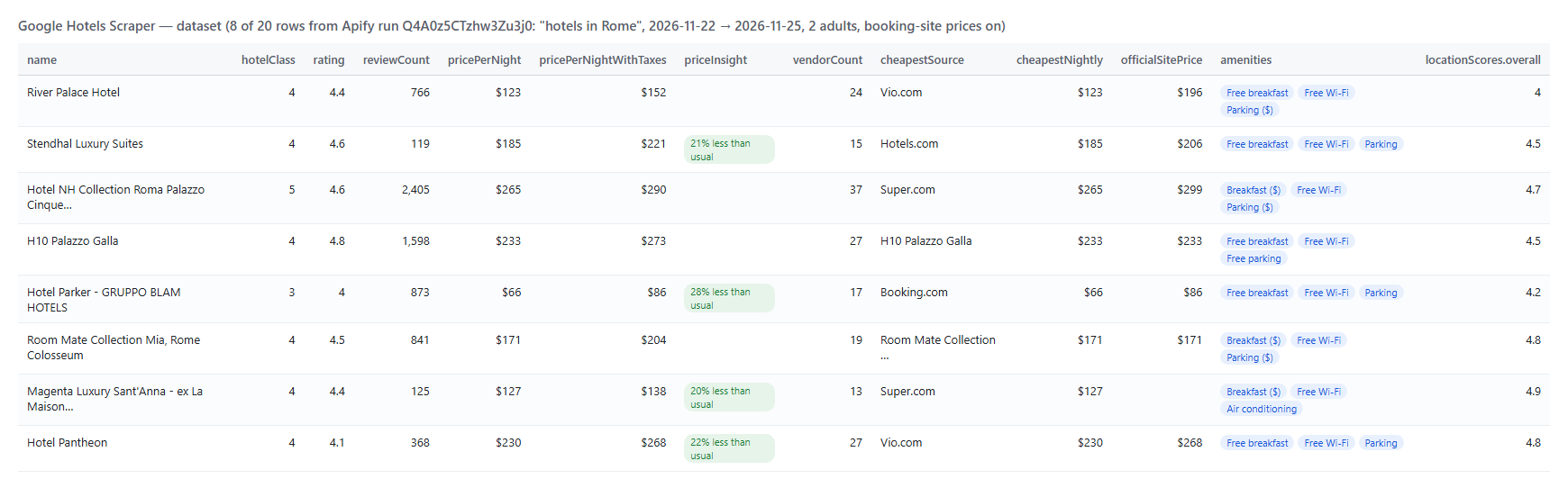
Every hotel becomes one dataset item. A hotel row from a run for "hotels in Rome" with booking-site prices on (shortened):
```json
{
"type": "hotel",
"name": "Stendhal Luxury Suites",
"entityToken": "ChkI7PTB7839_oJ_Gg0vZy8xMXJuY3d3bDY3EAE",
"hotelClass": 4,
"rating": 4.6,
"reviewCount": 119,
"locationScores": { "overall": 4.5, "thingsToDo": 4.9, "restaurants": 4.7, "airportAccess": 3.3 },
"latitude": 41.9036189,
"longitude": 12.4876103,
"address": "Via Sistina, 4, 00187 Roma RM, Italy",
"amenities": ["Free breakfast", "Free Wi-Fi", "Parking", "Air conditioning"],
"pricePerNight": 185.46,
"pricePerNightWithTaxes": 220.8,
"totalPriceWithTaxes": 662.41,
"currency": "USD",
"priceInsight": "21% less than usual",
"checkIn": "2026-11-22",
"checkOut": "2026-11-25",
"cid": "9596812607083390924",
"vendorCount": 15,
"cheapestSource": "Hotels.com",
"officialSitePrice": 205.78,
"offers": [{ "source": "Stendhal Luxury Suites", "official": true, "nightly": 205.78, "nightlyWithTaxes": 224.69, "partnerUrl": "https://www.reserve-online.net/?property=STENDSUI&checkin=2026-11-22…" }]
}
```
And one row of price offers mode (one booking site, one check-in date):
```json
{
"name": "Altis Grand Hotel",
"source": "Booking.com",
"official": false,
"rank": 9,
"checkIn": "2026-11-08",
"checkOut": "2026-11-10",
"currency": "USD",
"price": 280.98,
"priceWithTaxes": 306.8,
"totalWithTaxes": 613.61,
"freeCancellation": false,
"partnerUrl": "https://www.booking.com/searchresults.en.html?dest_id=38507&highlighted_hotels=38507…",
"device": "desktop"
}
```
#### Google Hotels fields
Fill is measured on Apify runs: hotel fields on 100 hotels in Lisbon (run KPeZSQPPPbJYoWXZA), booking-site fields on 20 hotels in Rome (Q4A0z5CTzhw3Zu3j0), offer fields on 678 offers (Lv0LXyJGweVKpwBMw).
| Field | Type | What it is | Fill |
|---|---|---|---|
| `name`, `entityToken`, `url` | string | Property name, Google Hotels id and page | 100% |
| `type`, `propertyType` | string | hotel or vacation_rental; Google's category or the rental type | 100% / 99% |
| `hotelClass`, `classLabel` | number, string | Star class 1-5 (hotels) | 77% |
| `rating`, `reviewCount` | number | Google rating and number of Google reviews | 99% |
| `ratingHistogram`, `reviewAspects` | object, array | Reviews per star; what reviews mention (aspect, mentions, positive, negative) | 85% / 84% |
| `locationScores` | object | Google's location score: overall, things to do, restaurants, transit, airport access | 98% |
| `latitude`, `longitude`, `countryCode` | number, string | Position | 100% |
| `nearby` | array | Nearby sights, transit stops and airports with walking, transit or driving minutes | 98% |
| `amenities`, `amenityCodes` | array | Amenities on the hotel card | 99% |
| `pricePerNight`, `pricePerNightWithTaxes` | number | Lead nightly price before / after taxes and fees | 100% |
| `totalPrice`, `totalPriceWithTaxes`, `taxesAndFees` | number | Stay totals | 100% |
| `priceInsight` | string | Google's price note, when Google shows one | 15% |
| `checkInTime`, `checkOutTime`, `description` | string | Hotel facts Google lists | 70% / 66% |
| `cid`, `fid`, `mapsUrl` | string | Google Maps ids and link | 100% / 85% / 100% |
| `sleeps`, `bedrooms`, `bathrooms`, `beds`, `listingSource` | number, string | Vacation rentals (15% of rows in that city search) | 15% |
| `offers`, `vendorCount`, `cheapestSource`, `cheapestNightly` | array, number, string | Booking-site prices (`includeDetails`) | 100% |
| `address`, `phone`, `placeId`, `website` | string | Street address, phone, Google place id and the hotel's own website; only on rows with booking-site prices (`includeDetails`), empty on plain hotel rows | 75% / 70% / 75% / 90% |
| `officialSitePrice`, `priceBreakdown`, `externalRatings` | number, object, array | Hotel's own site, stay base/taxes/fees, other sites' ratings | 55% / 100% / 100% |
| `price`, `priceWithTaxes`, `total`, `totalWithTaxes` | number | Offers mode: one booking site's price | 100% / 95% |
| `freeCancellation`, `deal`, `originalNightly` | boolean, string, number | Offers mode: cancellation flag and discounted rates | 23% / 4% |
### How can I use Google Hotels data?
- 🏨 **Hotel revenue managers:** rate shopping and rate parity, comparing your official-site price with every booking site for the same dates
- 📈 **Travel analysts:** price curves by city, star class and lead time, built from a daily schedule with relative dates
- 🧳 **Travel startups and agencies:** a hotel inventory for a destination with coordinates, ratings, amenities and live prices
- 🗺️ **Real-estate and tourism researchers:** where hotels and vacation rentals sit, what they charge and how Google scores their location
- 🔔 **Deal hunters:** monitor mode returns only new hotels and price drops for a watch list
- 🤖 **AI and data teams:** compact rows for LLM agents through the Apify API or MCP
### How much does it cost to scrape Google Hotels?
Google Hotels Scraper is pay-per-event, with no start fee:
| Event | Price |
|---|---|
| **hotel**: one hotel or rental row | $0.000095 ($0.095 per 1,000 hotels) |
| **hotel-details**: booking-site prices and details for one hotel (only when `includeDetails` is on) | $0.001 |
| **offer**: one booking-site row in price offers mode | $0.0008 ($0.80 per 1,000 offers) |
| Run | Rows | Cost |
|---|---:|---:|
| 20 hotels (one results page) | 20 | $0.0019 |
| 100 hotels | 100 | $0.0095 |
| 1,000 hotels | 1,000 | $0.095 |
| 100 hotels with booking-site prices | 100 | $0.1095 |
| 1 hotel x 30 check-in dates, offers mode (678 offers measured) | 678 | $0.54 |
There is nothing else to pay: Apify platform usage is included in these prices.
### Integrations, API, scheduling & MCP
- **Schedules:** run Google Hotels Scraper daily from the **Schedules** tab; with a relative check-in date and monitor mode each run returns only new hotels and price drops.
- **Webhooks:** fire a URL when a run finishes and push rows to a sheet, a database or Slack.
- **No-code:** Make, Zapier, n8n, Google Sheets, Airtable and Slack through [Apify integrations](https://docs.apify.com/integrations).
- **API:** call it from Node.js or Python with `apify-client`: code on the [API tab](https://apify.com/topapi/google-hotels-scraper/api/python) and in the [Apify API reference](https://docs.apify.com/api/v2).
- **MCP / AI agents:** connect Claude, Cursor or any MCP client through the [MCP tab](https://apify.com/topapi/google-hotels-scraper/api/mcp) and ask for hotel prices in plain language; turn on `compact` for shorter rows.
### More travel and maps scrapers by TopApi
#### Input JSON
```json
{
"queries": ["hotels in Rome"],
"checkIn": "45 days",
"nights": 3,
"adults": 2,
"currency": "EUR",
"hotelClass": ["4", "5"],
"maxResults": 50,
"includeDetails": true
}
```
#### Type the destination the way you would on Google Hotels
`queries` is Google's own search box. `hotels in Lisbon`, `Lisbon`, `boutique hotels in Alfama` and `hotels near Times Square` all work. Google always answers with hotels: a misspelt or unknown place is matched to the nearest thing it recognises, so check the first rows of a new search.
#### Use relative dates for scheduled runs
`"checkIn": "30 days"` with `"nights": 2` always prices a stay 30 days ahead, so a daily schedule builds a price history for the same lead time. Absolute dates (`2026-11-12`) price one fixed stay.
#### Look up hotels by URL or token, not by Maps place id
`hotelUrls` takes a Google Hotels URL (`https://www.google.com/travel/hotels/entity/ChgI…`), the token alone, or a hotel name with its city. A hotel name resolves to Google's first match for it. A Google Maps place id (`ChIJ…`) cannot be opened on Google Hotels.
### ⬆️ Output
Every hotel becomes one dataset item. A hotel row from a run for "hotels in Rome" with booking-site prices on (shortened):
```json
{
"type": "hotel",
"name": "Stendhal Luxury Suites",
"entityToken": "ChkI7PTB7839_oJ_Gg0vZy8xMXJuY3d3bDY3EAE",
"hotelClass": 4,
"rating": 4.6,
"reviewCount": 119,
"locationScores": { "overall": 4.5, "thingsToDo": 4.9, "restaurants": 4.7, "airportAccess": 3.3 },
"latitude": 41.9036189,
"longitude": 12.4876103,
"address": "Via Sistina, 4, 00187 Roma RM, Italy",
"amenities": ["Free breakfast", "Free Wi-Fi", "Parking", "Air conditioning"],
"pricePerNight": 185.46,
"pricePerNightWithTaxes": 220.8,
"totalPriceWithTaxes": 662.41,
"currency": "USD",
"priceInsight": "21% less than usual",
"checkIn": "2026-11-22",
"checkOut": "2026-11-25",
"cid": "9596812607083390924",
"vendorCount": 15,
"cheapestSource": "Hotels.com",
"officialSitePrice": 205.78,
"offers": [{ "source": "Stendhal Luxury Suites", "official": true, "nightly": 205.78, "nightlyWithTaxes": 224.69, "partnerUrl": "https://www.reserve-online.net/?property=STENDSUI&checkin=2026-11-22…" }]
}
```
And one row of price offers mode (one booking site, one check-in date):
```json
{
"name": "Altis Grand Hotel",
"source": "Booking.com",
"official": false,
"rank": 9,
"checkIn": "2026-11-08",
"checkOut": "2026-11-10",
"currency": "USD",
"price": 280.98,
"priceWithTaxes": 306.8,
"totalWithTaxes": 613.61,
"freeCancellation": false,
"partnerUrl": "https://www.booking.com/searchresults.en.html?dest_id=38507&highlighted_hotels=38507…",
"device": "desktop"
}
```
#### Google Hotels fields
Fill is measured on Apify runs: hotel fields on 100 hotels in Lisbon (run KPeZSQPPPbJYoWXZA), booking-site fields on 20 hotels in Rome (Q4A0z5CTzhw3Zu3j0), offer fields on 678 offers (Lv0LXyJGweVKpwBMw).
| Field | Type | What it is | Fill |
|---|---|---|---|
| `name`, `entityToken`, `url` | string | Property name, Google Hotels id and page | 100% |
| `type`, `propertyType` | string | hotel or vacation_rental; Google's category or the rental type | 100% / 99% |
| `hotelClass`, `classLabel` | number, string | Star class 1-5 (hotels) | 77% |
| `rating`, `reviewCount` | number | Google rating and number of Google reviews | 99% |
| `ratingHistogram`, `reviewAspects` | object, array | Reviews per star; what reviews mention (aspect, mentions, positive, negative) | 85% / 84% |
| `locationScores` | object | Google's location score: overall, things to do, restaurants, transit, airport access | 98% |
| `latitude`, `longitude`, `countryCode` | number, string | Position | 100% |
| `nearby` | array | Nearby sights, transit stops and airports with walking, transit or driving minutes | 98% |
| `amenities`, `amenityCodes` | array | Amenities on the hotel card | 99% |
| `pricePerNight`, `pricePerNightWithTaxes` | number | Lead nightly price before / after taxes and fees | 100% |
| `totalPrice`, `totalPriceWithTaxes`, `taxesAndFees` | number | Stay totals | 100% |
| `priceInsight` | string | Google's price note, when Google shows one | 15% |
| `checkInTime`, `checkOutTime`, `description` | string | Hotel facts Google lists | 70% / 66% |
| `cid`, `fid`, `mapsUrl` | string | Google Maps ids and link | 100% / 85% / 100% |
| `sleeps`, `bedrooms`, `bathrooms`, `beds`, `listingSource` | number, string | Vacation rentals (15% of rows in that city search) | 15% |
| `offers`, `vendorCount`, `cheapestSource`, `cheapestNightly` | array, number, string | Booking-site prices (`includeDetails`) | 100% |
| `address`, `phone`, `placeId`, `website` | string | Street address, phone, Google place id and the hotel's own website; only on rows with booking-site prices (`includeDetails`), empty on plain hotel rows | 75% / 70% / 75% / 90% |
| `officialSitePrice`, `priceBreakdown`, `externalRatings` | number, object, array | Hotel's own site, stay base/taxes/fees, other sites' ratings | 55% / 100% / 100% |
| `price`, `priceWithTaxes`, `total`, `totalWithTaxes` | number | Offers mode: one booking site's price | 100% / 95% |
| `freeCancellation`, `deal`, `originalNightly` | boolean, string, number | Offers mode: cancellation flag and discounted rates | 23% / 4% |
### How can I use Google Hotels data?
- 🏨 **Hotel revenue managers:** rate shopping and rate parity, comparing your official-site price with every booking site for the same dates
- 📈 **Travel analysts:** price curves by city, star class and lead time, built from a daily schedule with relative dates
- 🧳 **Travel startups and agencies:** a hotel inventory for a destination with coordinates, ratings, amenities and live prices
- 🗺️ **Real-estate and tourism researchers:** where hotels and vacation rentals sit, what they charge and how Google scores their location
- 🔔 **Deal hunters:** monitor mode returns only new hotels and price drops for a watch list
- 🤖 **AI and data teams:** compact rows for LLM agents through the Apify API or MCP
### How much does it cost to scrape Google Hotels?
Google Hotels Scraper is pay-per-event, with no start fee:
| Event | Price |
|---|---|
| **hotel**: one hotel or rental row | $0.000095 ($0.095 per 1,000 hotels) |
| **hotel-details**: booking-site prices and details for one hotel (only when `includeDetails` is on) | $0.001 |
| **offer**: one booking-site row in price offers mode | $0.0008 ($0.80 per 1,000 offers) |
| Run | Rows | Cost |
|---|---:|---:|
| 20 hotels (one results page) | 20 | $0.0019 |
| 100 hotels | 100 | $0.0095 |
| 1,000 hotels | 1,000 | $0.095 |
| 100 hotels with booking-site prices | 100 | $0.1095 |
| 1 hotel x 30 check-in dates, offers mode (678 offers measured) | 678 | $0.54 |
There is nothing else to pay: Apify platform usage is included in these prices.
### Integrations, API, scheduling & MCP
- **Schedules:** run Google Hotels Scraper daily from the **Schedules** tab; with a relative check-in date and monitor mode each run returns only new hotels and price drops.
- **Webhooks:** fire a URL when a run finishes and push rows to a sheet, a database or Slack.
- **No-code:** Make, Zapier, n8n, Google Sheets, Airtable and Slack through [Apify integrations](https://docs.apify.com/integrations).
- **API:** call it from Node.js or Python with `apify-client`: code on the [API tab](https://apify.com/topapi/google-hotels-scraper/api/python) and in the [Apify API reference](https://docs.apify.com/api/v2).
- **MCP / AI agents:** connect Claude, Cursor or any MCP client through the [MCP tab](https://apify.com/topapi/google-hotels-scraper/api/mcp) and ask for hotel prices in plain language; turn on `compact` for shorter rows.
### More travel and maps scrapers by TopApi