| ⭐ Star rating (`stars`) |
📝 Review text (`text`) + Google's translation (`textTranslated`) |
📅 Exact publish date (`publishedAtDate`) and edit date (`updatedAtDate`) |
| 💬 Owner reply (`responseFromOwnerText`) with date and language |
👍 Likes (`likesCount`) |
📷 Review photos (`reviewImageUrls`, `reviewPhotos` with size and upload day) |
| 👤 Reviewer name, profile URL, photo, ID |
🏅 Local Guide status and level (`isLocalGuide`, `localGuideLevel`) |
🔢 Reviewer's review and photo counts |
| 🍽️ Per-aspect stars (`reviewDetailedRating`: Food, Service, Atmosphere, Rooms, Location) |
🏷️ Guided answers (`reviewContext`: Order type, Meal type, Price per person, Trip type) |
🔗 Review URL (`reviewUrl`) and review ID |
| 🏢 Place name, rating and total review count |
📍 Address, coordinates, country, categories, phone, website |
🆔 Place ID, CID and feature id (`fid`) |
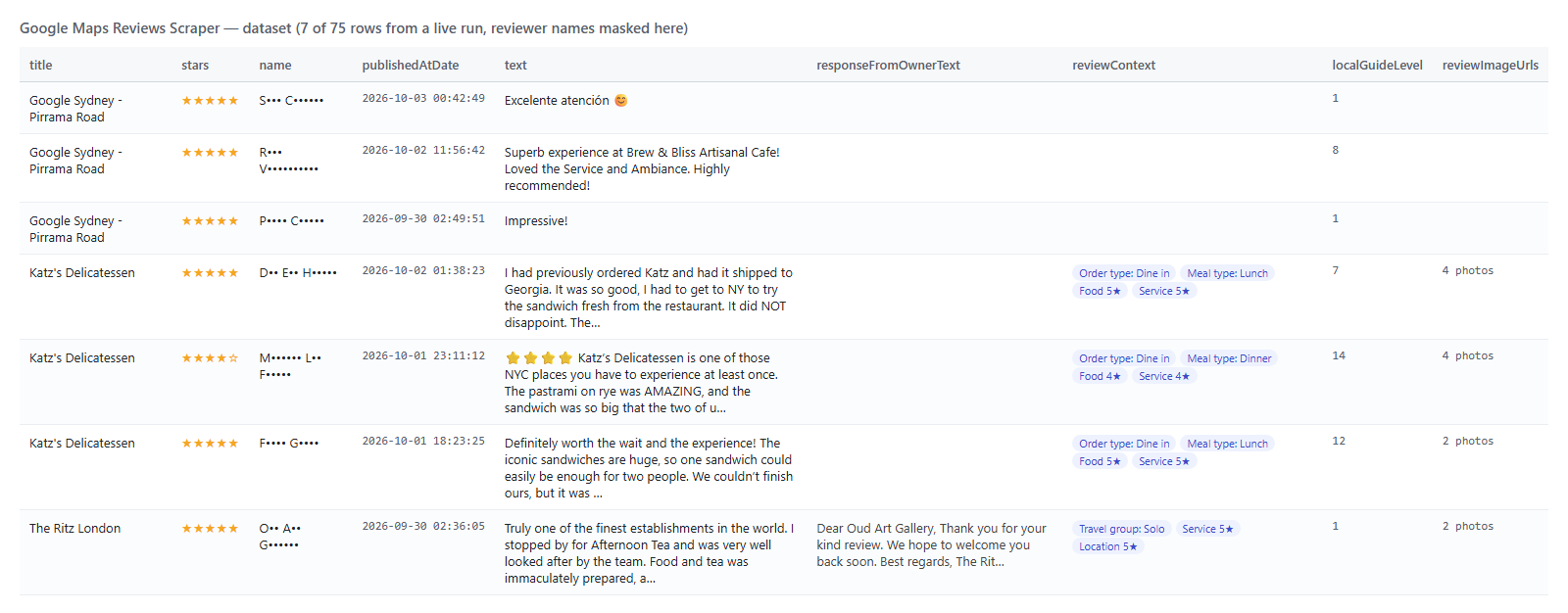
On a 75-review test run across three places (a corporate office, a New York deli and a London hotel) every row had stars, dates, reviewer details and place fields; 68% carried text, 24% an owner reply, 24% photos, 57% per-aspect ratings and 29% guided answers. The remaining reviews are star-only ratings, which Google Maps shows exactly the same way.
### How to scrape Google Maps reviews with Google Maps Reviews Scraper
1. [Create a free Apify account](https://console.apify.com/sign-up) - $5 of monthly credit, no card needed.
2. Open [Google Maps Reviews Scraper](https://apify.com/topapi/google-maps-reviews-scraper) and click **Try for free**.
3. Paste one or more place URLs, Place IDs or CIDs into **Place URLs, Place IDs or CIDs** (or type business names into **Business names to look up**) and set **Max reviews per place**.
4. Click **Start**. Reviews stream into the dataset newest first, 20 per request.
5. Open the **Storage** tab and **Export** as JSON, CSV or Excel - or let a schedule run it for you with **Only new reviews since the last run** switched on.
### ⬇️ Input
| Parameter | Type | Description |
|---|---|---|
| **🔍 What to scrape** | | |
| `placeUrls` | List | Place URLs, Place IDs (`ChIJN1t_tDeuEmsRUsoyG83frY4`), CIDs (`10281119596374313554`), feature ids (`0x89c2598f7ff4aa09:0x313547e757cb8cea`) or `maps.app.goo.gl` share links, one per line. Default: one demo Place ID |
| `searchQueries` | List | Business names with a city (`Katz's Delicatessen New York`); each resolves to its top Google Maps match |
| `mode` | Select | `full` (default): every review, newest first, 20 per request. `quick`: only the 5 to 8 reviews Google embeds in the place record (its most relevant), plain HTTP, no browser, about 2 seconds per place |
| **🎯 Filters** (applied by Google) | | |
| `reviewsSort` | Select | `newest` (default, complete and date-ordered), `mostRelevant`, `highestRanking`, `lowestRanking` |
| `language` | Select | Interface and translation language, e.g. `en`, `de`, `ja`. Default `en` |
| `region` | Text | Two-letter country Google is asked from. Default `us` |
| **✂️ Refine results** | | |
| `reviewsNewerThan` | Text | Absolute (`2026-09-01`) or relative (`7 days`, `3 months`). With `newest` the actor stops reading at this date |
| `reviewsOlderThan` | Text | Upper bound, same formats |
| `minStars` / `maxStars` | Integer | Keep only reviews in this star range, e.g. 1 to 3 for complaints. Default 1 to 5 |
| `withTextOnly` | Boolean | Skip star-only ratings with no written review. Default `false` |
| `reviewsFilterString` | Text | Keep reviews whose text or owner reply contains any of these comma-separated words |
| **➕ Extra data** | | |
| `includePlaceSummary` | Boolean | One extra row of type `place` per place (rating, total reviews, address, phone, website, categories, coordinates, IDs, reviews read and delivered) - included in the place fee |
| **🔁 Monitoring** | | |
| `monitorMode` | Boolean | Deliver only reviews not delivered by previous runs with the same memory name, newest first, then stop. Pair with a daily schedule; each place checked pays its place fee, new reviews pay per review |
| `monitorStoreName` | Text | Name of the key-value store that keeps the per-place memory. Default `google-maps-reviews-monitor` |
| **📦 Output** | | |
| `maxReviewsPerPlace` | Integer | Cap per place after filters. Default `100`; `0` = every review Google serves |
| `personalData` | Boolean | Include reviewer name, profile URL, photo and ID. Default `true` |
| `compact` | Boolean | Core fields only (id, stars, text, translation, date, reviewer, owner reply, URL, place), sized for AI agents and MCP |
| **⚙️ Advanced** | | |
| `proxyConfiguration` | Object | Apify Proxy, datacenter is enough. One session per run, rotated only when Google limits a page |
#### Input JSON
```json
{
"placeUrls": [
"https://www.google.com/maps/place/Katz%27s+Delicatessen/@40.7223,-73.9874,17z/data=!4m6!3m5!1s0x89c2598f7ff4aa09:0x313547e757cb8cea",
"ChIJN1t_tDeuEmsRUsoyG83frY4"
],
"searchQueries": ["The Ritz London"],
"reviewsSort": "newest",
"maxReviewsPerPlace": 100,
"reviewsNewerThan": "90 days",
"minStars": 1,
"maxStars": 3
}
```
#### Give it the place, not the search page
Any Google Maps URL that carries the place works: the long `/maps/place/...` URL from your browser, `?cid=`, `?q=place_id:`, a `maps.app.goo.gl` share link, or just the Place ID or CID. **Do:** `https://www.google.com/maps/place/Katz's+Delicatessen/@40.72,-73.98,17z/data=!4m6!3m5!1s0x89c2598f7ff4aa09:0x313547e757cb8cea` · **Don't:** `https://www.google.com/maps/search/delis+in+new+york` (a search for many places - this actor reads reviews of one place at a time; put the business name in `searchQueries` instead, and it takes the top match).
#### Pick quick mode for a snapshot of many places
`mode: quick` reads the place record only: rating, total review count, address, phone, website and the 5 to 8 reviews Google shows first (most relevant, with owner replies and photos). It needs no browser, so 100 places take about 100 HTTP requests and a couple of minutes at the smallest memory setting. Sorting, date filters and monitor mode need `full`; a quick run still applies your star, text and keyword filters.
#### Use newest-first for anything complete or scheduled
`newest` walks Google's complete, date-ordered feed, so `reviewsNewerThan` can stop early and `monitorMode` can stop at the first page it has already seen. `mostRelevant` is Google's ranking of a subset and is only reliable for small samples; `highestRanking` and `lowestRanking` are handy for pulling all 1-star complaints with `maxStars: 1`.
#### Name lookups take the top match
`searchQueries` resolves each line through Google Maps search and uses the first result. Add the city or street (`Katz's Delicatessen New York`, `The Ritz London`) so a chain or a common name lands on the right branch; for a generic query such as `plumber in Austin TX` only the first business is used.
### ⬆️ Output
Every review becomes one dataset item. Here is the table view of a run for three places:

 And one row as JSON (reviewer name shortened here):
```json
{
"type": "review",
"reviewId": "Ci9DQUlRQUNvZENodHljRjlvT2pKb1ZsbHRZM2xMTmpSMGEwbEJUVWRIUVRZeVNIYxAB",
"stars": 5,
"text": "We visited for afternoon tea. A lovely grand location with amazing hard working staff...",
"textTranslated": null,
"originalLanguage": "en",
"publishAt": "a day ago",
"publishedAtDate": "2026-10-01T07:06:00.450Z",
"updatedAtDate": "2026-10-01T07:06:00.450Z",
"isEdited": false,
"likesCount": 0,
"name": "Ken D.",
"reviewerNumberOfReviews": 5,
"isLocalGuide": false,
"responseFromOwnerText": "Dear Ken, Thank you for your kind review. We hope to welcome you back soon. Best regards, The Ritz London",
"responseFromOwnerDate": "2026-10-02T07:52:13.000Z",
"reviewContext": { "Trip type": "Vacation", "Travel group": "Family" },
"reviewDetailedRating": { "Rooms": 5, "Service": 5, "Location": 5 },
"title": "The Ritz London",
"placeId": "ChIJV8gP0ykFdkgRFEAEHoE1YVk",
"totalScore": 4.6,
"reviewsCount": 7894,
"reviewUrl": "https://www.google.com/maps/reviews/data=!4m8!14m7!1m6!2m5!1sCi9DQU...?hl=en"
}
```
#### Fields
| Field | Type | What it is | Fill on test run |
|---|---|---|---|
| `reviewId`, `reviewUrl` | string | Google's review id and the review's own Maps URL | 100% |
| `stars` | integer | 1-5 | 100% |
| `text`, `textTranslated` | string | Original text and Google's translation into `language` when the review is in another language | 68% / 11% |
| `originalLanguage`, `translatedLanguage` | string | ISO codes of the two texts | 68% / 11% |
| `publishAt` | string | Google's relative date ("3 months ago") | 100% |
| `publishedAtDate`, `updatedAtDate`, `isEdited` | string (ISO 8601) / boolean | Publish and last-edit timestamps to the millisecond | 100% |
| `likesCount` | integer | "Helpful" votes | 100% |
| `name`, `reviewerId`, `reviewerUrl`, `reviewerPhotoUrl` | string | Reviewer identity (blanked when `personalData` is off) | 100% |
| `reviewerNumberOfReviews`, `reviewerNumberOfPhotos` | integer | The reviewer's contribution counts | 100% |
| `isLocalGuide`, `localGuideLevel`, `reviewerBadge` | boolean / integer / string | Local Guide status and level 1-10, plus the badge text | 100% / 68% / 87% |
| `responseFromOwnerText`, `responseFromOwnerDate`, `responseFromOwnerLanguage` | string | The owner's reply | 24% |
| `reviewImageUrls`, `reviewPhotos` | array | Photo URLs; `reviewPhotos` adds width, height and upload day | 24% |
| `reviewContext` | object | Guided answers: Order type, Meal type, Price per person, Trip type, Travel group | 29% |
| `reviewDetailedRating` | object | Per-aspect stars: Food, Service, Atmosphere, Rooms, Location | 57% |
| `title`, `placeId`, `cid`, `fid`, `address`, `categoryName`, `categories`, `totalScore`, `reviewsCount`, `url`, `location`, `countryCode`, `phone`, `website` | place fields | Repeated on every row so each export stands alone | 100% |
| `searchString`, `language`, `scrapedAt` | string | The input line this row came from, the request language, the scrape time | 100% |
With `includePlaceSummary` on, one extra item per place has `type: "place"` and the place fields plus `reviewsRead`, `reviewsDelivered`, `reviewsAlreadyDelivered` and `reviewsFiltered`. It is included in the place fee.
### How can I use Google Maps reviews data?
- 🛎️ **Reputation and franchise managers** - pull every review of all your branches, filter `maxStars: 3`, and route the complaints with no `responseFromOwnerText` to the team that answers them.
- 🧭 **Local-SEO agencies** - track a client's and three competitors' review velocity and star mix week over week from the exact `publishedAtDate`.
- 🔎 **Market researchers** - export 5,000 restaurant reviews with `reviewDetailedRating` and `reviewContext` to see whether Food or Service drives the 2-star ratings.
- 🤖 **AI and research teams** - feed `text`, `stars`, `reviewDetailedRating` and `localGuideLevel` to an LLM for sentiment, topic and credibility scoring; use `compact` to keep the context small.
- 📈 **Product and CX teams** - run `monitorMode` daily and get only the new reviews, already deduplicated, into Slack or a sheet.
- 🏨 **Hospitality analysts** - compare `Rooms`, `Service` and `Location` aspect stars across hotels and trip types.
### How much does it cost to scrape Google Maps reviews?
Google Maps Reviews Scraper is pay-per-event with two prices (the Pricing tab always shows the live rates):
| Event | Price | When it is charged |
|---|---:|---|
| `place-scraped` | **$0.002 per place** | Once per place per run, when Google serves that place's reviews (opening the place). Includes the optional place summary row |
| `review-scraped` | **$0.000038 per review** ($0.038 per 1,000) | Each review written to the dataset after your filters |
There is no start fee. In monitor mode every place checked pays its place fee, even when it has no new review: the check is the service.
What one place costs:
| Reviews from one place | Place fee | Reviews | Total |
|---:|---:|---:|---:|
| 10 | $0.002 | $0.00038 | $0.00238 |
| 100 | $0.002 | $0.0038 | $0.0058 |
| 1,000 | $0.002 | $0.038 | $0.040 |
| 10,000 | $0.002 | $0.38 | $0.382 |
Worked examples:
- **1 place × 100 reviews** = $0.002 + 100 × $0.000038 = $0.002 + $0.0038 = **$0.0058**
- **50 branches × 10 reviews** = 50 × $0.002 + 500 × $0.000038 = $0.10 + $0.019 = **$0.119**
- **Quick mode, 100 places × 8 reviews with summary rows** = 100 × $0.002 + 800 × $0.000038 = $0.20 + $0.0304 = **$0.2304**
- **Daily monitor of 1 place with 3 new reviews** = $0.002 + 3 × $0.000038 = **$0.0021**; a day with nothing new costs **$0.002**
There is nothing else to pay: Apify platform usage (compute, proxy) is included in these prices. Measured on the Apify platform: a 20-review run finishes in about 7 seconds end to end and a 10-review monitor run in 6 seconds; a run reads 20 reviews per request, about 50 reviews per second once the place is open; quick mode (5 to 8 reviews per place, no browser) read 4 places in 19 seconds.
### Integrations, API, scheduling & MCP
- **Schedules:** run Google Maps Reviews Scraper hourly, daily or weekly from the **Schedules** tab; combine with `monitorMode` to receive only the reviews that are new since the last run.
- **Webhooks:** fire a URL when a run finishes - push new reviews to your CRM, Slack or a sheet.
- **No-code:** Make, Zapier, n8n, Google Sheets, Airtable, Slack via [Apify integrations](https://docs.apify.com/integrations).
- **API:** call it from Node.js or Python with `apify-client` - code on the [API tab](https://apify.com/topapi/google-maps-reviews-scraper/api/python) and the [Apify API reference](https://docs.apify.com/api/v2).
- **MCP / AI agents:** connect Claude, Cursor or any MCP client through the [MCP tab](https://apify.com/topapi/google-maps-reviews-scraper/api/mcp) and ask for Google Maps reviews in plain language; set `compact: true` to keep responses small.
### More TopApi scrapers
And one row as JSON (reviewer name shortened here):
```json
{
"type": "review",
"reviewId": "Ci9DQUlRQUNvZENodHljRjlvT2pKb1ZsbHRZM2xMTmpSMGEwbEJUVWRIUVRZeVNIYxAB",
"stars": 5,
"text": "We visited for afternoon tea. A lovely grand location with amazing hard working staff...",
"textTranslated": null,
"originalLanguage": "en",
"publishAt": "a day ago",
"publishedAtDate": "2026-10-01T07:06:00.450Z",
"updatedAtDate": "2026-10-01T07:06:00.450Z",
"isEdited": false,
"likesCount": 0,
"name": "Ken D.",
"reviewerNumberOfReviews": 5,
"isLocalGuide": false,
"responseFromOwnerText": "Dear Ken, Thank you for your kind review. We hope to welcome you back soon. Best regards, The Ritz London",
"responseFromOwnerDate": "2026-10-02T07:52:13.000Z",
"reviewContext": { "Trip type": "Vacation", "Travel group": "Family" },
"reviewDetailedRating": { "Rooms": 5, "Service": 5, "Location": 5 },
"title": "The Ritz London",
"placeId": "ChIJV8gP0ykFdkgRFEAEHoE1YVk",
"totalScore": 4.6,
"reviewsCount": 7894,
"reviewUrl": "https://www.google.com/maps/reviews/data=!4m8!14m7!1m6!2m5!1sCi9DQU...?hl=en"
}
```
#### Fields
| Field | Type | What it is | Fill on test run |
|---|---|---|---|
| `reviewId`, `reviewUrl` | string | Google's review id and the review's own Maps URL | 100% |
| `stars` | integer | 1-5 | 100% |
| `text`, `textTranslated` | string | Original text and Google's translation into `language` when the review is in another language | 68% / 11% |
| `originalLanguage`, `translatedLanguage` | string | ISO codes of the two texts | 68% / 11% |
| `publishAt` | string | Google's relative date ("3 months ago") | 100% |
| `publishedAtDate`, `updatedAtDate`, `isEdited` | string (ISO 8601) / boolean | Publish and last-edit timestamps to the millisecond | 100% |
| `likesCount` | integer | "Helpful" votes | 100% |
| `name`, `reviewerId`, `reviewerUrl`, `reviewerPhotoUrl` | string | Reviewer identity (blanked when `personalData` is off) | 100% |
| `reviewerNumberOfReviews`, `reviewerNumberOfPhotos` | integer | The reviewer's contribution counts | 100% |
| `isLocalGuide`, `localGuideLevel`, `reviewerBadge` | boolean / integer / string | Local Guide status and level 1-10, plus the badge text | 100% / 68% / 87% |
| `responseFromOwnerText`, `responseFromOwnerDate`, `responseFromOwnerLanguage` | string | The owner's reply | 24% |
| `reviewImageUrls`, `reviewPhotos` | array | Photo URLs; `reviewPhotos` adds width, height and upload day | 24% |
| `reviewContext` | object | Guided answers: Order type, Meal type, Price per person, Trip type, Travel group | 29% |
| `reviewDetailedRating` | object | Per-aspect stars: Food, Service, Atmosphere, Rooms, Location | 57% |
| `title`, `placeId`, `cid`, `fid`, `address`, `categoryName`, `categories`, `totalScore`, `reviewsCount`, `url`, `location`, `countryCode`, `phone`, `website` | place fields | Repeated on every row so each export stands alone | 100% |
| `searchString`, `language`, `scrapedAt` | string | The input line this row came from, the request language, the scrape time | 100% |
With `includePlaceSummary` on, one extra item per place has `type: "place"` and the place fields plus `reviewsRead`, `reviewsDelivered`, `reviewsAlreadyDelivered` and `reviewsFiltered`. It is included in the place fee.
### How can I use Google Maps reviews data?
- 🛎️ **Reputation and franchise managers** - pull every review of all your branches, filter `maxStars: 3`, and route the complaints with no `responseFromOwnerText` to the team that answers them.
- 🧭 **Local-SEO agencies** - track a client's and three competitors' review velocity and star mix week over week from the exact `publishedAtDate`.
- 🔎 **Market researchers** - export 5,000 restaurant reviews with `reviewDetailedRating` and `reviewContext` to see whether Food or Service drives the 2-star ratings.
- 🤖 **AI and research teams** - feed `text`, `stars`, `reviewDetailedRating` and `localGuideLevel` to an LLM for sentiment, topic and credibility scoring; use `compact` to keep the context small.
- 📈 **Product and CX teams** - run `monitorMode` daily and get only the new reviews, already deduplicated, into Slack or a sheet.
- 🏨 **Hospitality analysts** - compare `Rooms`, `Service` and `Location` aspect stars across hotels and trip types.
### How much does it cost to scrape Google Maps reviews?
Google Maps Reviews Scraper is pay-per-event with two prices (the Pricing tab always shows the live rates):
| Event | Price | When it is charged |
|---|---:|---|
| `place-scraped` | **$0.002 per place** | Once per place per run, when Google serves that place's reviews (opening the place). Includes the optional place summary row |
| `review-scraped` | **$0.000038 per review** ($0.038 per 1,000) | Each review written to the dataset after your filters |
There is no start fee. In monitor mode every place checked pays its place fee, even when it has no new review: the check is the service.
What one place costs:
| Reviews from one place | Place fee | Reviews | Total |
|---:|---:|---:|---:|
| 10 | $0.002 | $0.00038 | $0.00238 |
| 100 | $0.002 | $0.0038 | $0.0058 |
| 1,000 | $0.002 | $0.038 | $0.040 |
| 10,000 | $0.002 | $0.38 | $0.382 |
Worked examples:
- **1 place × 100 reviews** = $0.002 + 100 × $0.000038 = $0.002 + $0.0038 = **$0.0058**
- **50 branches × 10 reviews** = 50 × $0.002 + 500 × $0.000038 = $0.10 + $0.019 = **$0.119**
- **Quick mode, 100 places × 8 reviews with summary rows** = 100 × $0.002 + 800 × $0.000038 = $0.20 + $0.0304 = **$0.2304**
- **Daily monitor of 1 place with 3 new reviews** = $0.002 + 3 × $0.000038 = **$0.0021**; a day with nothing new costs **$0.002**
There is nothing else to pay: Apify platform usage (compute, proxy) is included in these prices. Measured on the Apify platform: a 20-review run finishes in about 7 seconds end to end and a 10-review monitor run in 6 seconds; a run reads 20 reviews per request, about 50 reviews per second once the place is open; quick mode (5 to 8 reviews per place, no browser) read 4 places in 19 seconds.
### Integrations, API, scheduling & MCP
- **Schedules:** run Google Maps Reviews Scraper hourly, daily or weekly from the **Schedules** tab; combine with `monitorMode` to receive only the reviews that are new since the last run.
- **Webhooks:** fire a URL when a run finishes - push new reviews to your CRM, Slack or a sheet.
- **No-code:** Make, Zapier, n8n, Google Sheets, Airtable, Slack via [Apify integrations](https://docs.apify.com/integrations).
- **API:** call it from Node.js or Python with `apify-client` - code on the [API tab](https://apify.com/topapi/google-maps-reviews-scraper/api/python) and the [Apify API reference](https://docs.apify.com/api/v2).
- **MCP / AI agents:** connect Claude, Cursor or any MCP client through the [MCP tab](https://apify.com/topapi/google-maps-reviews-scraper/api/mcp) and ask for Google Maps reviews in plain language; set `compact: true` to keep responses small.
### More TopApi scrapers