| 🔑 Job key and URL (`id`, `url`) |
📝 Title and normalised title |
🏢 Company name, Indeed page, website, industry, revenue, logo |
| ⭐ Company rating and review count |
💲 Salary text, min, max, exact, currency, period |
📈 Annualised salary (`salary.annual_min`, `salary.annual_max`) |
| 📍 Location: city, state, county, postal code, street, country, latitude, longitude |
🏠 Remote / hybrid / in-person (`is_remote`, `work_arrangement`) |
💼 Job types (`job_types`) |
| 🎁 Benefits, 🗓️ schedules and shifts |
🧠 Skills and requirements (`skills`), full Indeed taxonomy (`attributes`) |
🗂️ Occupation categories |
| 📄 Full description as text and HTML, 300-character snippet |
🔗 Apply URL, Indeed Apply flag, external-apply flag |
📅 Posted date, date on Indeed, days ago, expired flag |
| 🏷️ Reference number, language, source feed |
🚀 Urgent-hire and high-volume-hiring flags |
🔎 Search query, location, country, page and position |
On a 300-job test run across three searches (warehouse in Dallas, nurse in Austin, software engineer in London) every row had a title, company, location, coordinates, description and apply URL; 42% published a salary, 86% a job type, 66% benefits, 82% a company rating, 78% a company website, 70% a company revenue band and 66% a postal code.
### How to scrape Indeed jobs with Indeed Jobs Scraper
1. [Create a free Apify account](https://console.apify.com/sign-up) - $5 of monthly credit, no card needed.
2. Open [Indeed Jobs Scraper](https://apify.com/topapi/indeed-jobs-scraper) and click **Try for free**.
3. Type your keywords into **Search queries** (one per line), a **Location** and pick the **Indeed country site**.
4. Set **Max jobs per query**, optionally a date window, job type, remote or salary filter.
5. Click **Start**. Rows stream into the dataset as each page of 100 jobs arrives.
6. Open the **Storage** tab and **Export** as JSON, CSV or Excel - or let a schedule run it for you.
### ⬇️ Input
| Parameter | Type | Description |
|---|---|---|
| **🔍 What to scrape** | | |
| `searchQueries` | List | Keywords, one per line, e.g. `warehouse`, `registered nurse`, `company:Amazon`, `title:("data engineer") -intern`. An Indeed search URL also works and brings its own location and filters. Default: the sample search `warehouse` in Dallas, TX. |
| `location` | String | City, state, postal code or region as typed on Indeed, e.g. `Dallas, TX`, `75201`, `London`, `Remote`. Empty = the whole country site. |
| `country` | Select | Indeed country site: `US`, `UK`, `CA`, `AU`, `IN`, `DE`, `FR`, `JP`, `BR`, `MX` and 52 more. Default `US`. |
| `jobKeys` | List | Direct lookup instead of a search: job keys (`5e5dafc2a80c214d`) or job URLs. Returns the full job, expired postings included. |
| **🎯 Filters** (applied by Indeed) | | |
| `sortBy` | Select | `relevance` (default) or `date` (newest first - pairs with monitor mode). |
| `postedWithinDays` | Select | Any time, `1`, `3`, `7`, `14` or `30` days, by the date the job reached Indeed. |
| `jobType` | Select | Any, `fulltime`, `parttime`, `contract`, `temporary`, `internship`, `permanent`. |
| `remote` | Select | Any, `remote`, `hybrid`, `inperson`. |
| `radius` | Integer | Miles around the location. Default `25`. |
| `minSalary` | Integer | Minimum yearly base salary in the site's currency, e.g. `50000`. Jobs without a salary stay unless `withSalaryOnly` is on. |
| **✂️ Refine results** | | |
| `withSalaryOnly` | Boolean | Keep only jobs that publish a salary or hourly rate. Default `false`. |
| `titleKeywords` | String | Keep only titles containing one of these, e.g. `nurse, rn`. |
| `excludeKeywords` | String | Drop jobs whose title or company contains one of these, e.g. `staffing, recruiting, travel`. |
| **➕ Extra data** | | |
| `includeDescription` | Boolean | Adds `description_text`, `description_html` and `description_snippet` - charged as **job-description** at $0.01 per 1,000 jobs that carry one. Default `true`. |
| **🔁 Monitoring** | | |
| `monitorMode` | Boolean | Return only jobs not delivered by previous runs of the same search. Pair with a daily schedule. |
| `monitorStoreName` | String | Name of the key-value store that keeps the per-search memory. Default `indeed-jobs-monitor`. |
| **📦 Output** | | |
| `maxResultsPerQuery` | Integer | Default `100`; `0` = everything Indeed serves (at most 1,000 per search). |
| `maxItems` | Integer | Hard cap for the whole run. `0` = none. |
| `compact` | Boolean | Core fields only, sized for AI agents and MCP. |
| **⚙️ Advanced** | | |
| `proxyConfiguration` | Object | Default: Apify proxy. Indeed's job-search API answered Apify datacenter and residential proxies alike in testing. |
| `maxConcurrency` | Integer | Parallel searches, 1-8. Default `4`. |
#### Input JSON
```json
{
"searchQueries": ["registered nurse", "https://www.indeed.com/jobs?q=warehouse&l=Dallas%2C+TX&fromage=7"],
"location": "Austin, TX",
"country": "US",
"sortBy": "date",
"postedWithinDays": "7",
"jobType": "fulltime",
"withSalaryOnly": true,
"maxResultsPerQuery": 100
}
```
#### Use Indeed's search syntax for exact matches
Plain keywords use Indeed's broad matching and bring related roles. **Do:** `title:("registered nurse")` for the exact phrase in the title, `nurse -travel` to exclude a word, `company:Amazon` for one employer · **Don't:** paste a whole sentence (`looking for a nursing job in Austin`), which Indeed treats as loose keywords and returns unrelated jobs.
#### One run, one country site
`country` picks the Indeed site, its language and its currency. A search for `lager` with `country: "DE"` runs on de.indeed.com and returns EUR salaries and German labels (`Vollzeit`); the same keyword on `US` returns almost nothing. To search several countries, add one Indeed URL per country to `searchQueries` (`https://uk.indeed.com/jobs?q=warehouse&l=London`): the URL's host sets the site for that line.
#### Pick the date window from the date on Indeed
`postedWithinDays` and the `date_on_indeed` field use the moment the posting reached Indeed, which is what Indeed's own "Date posted" filter uses; `date_published` is the employer's date and can be a day earlier. A job is checked against the window again.
#### Monitor mode works best with newest-first sorting
Set `sortBy: "date"`, `monitorMode: true` and a cap at least as large as the daily volume of your search. Each run reads the newest jobs, delivers only the ones it has not delivered before and stops at the first page that is entirely known - a typical daily check costs one API request.
### ⬆️ Output
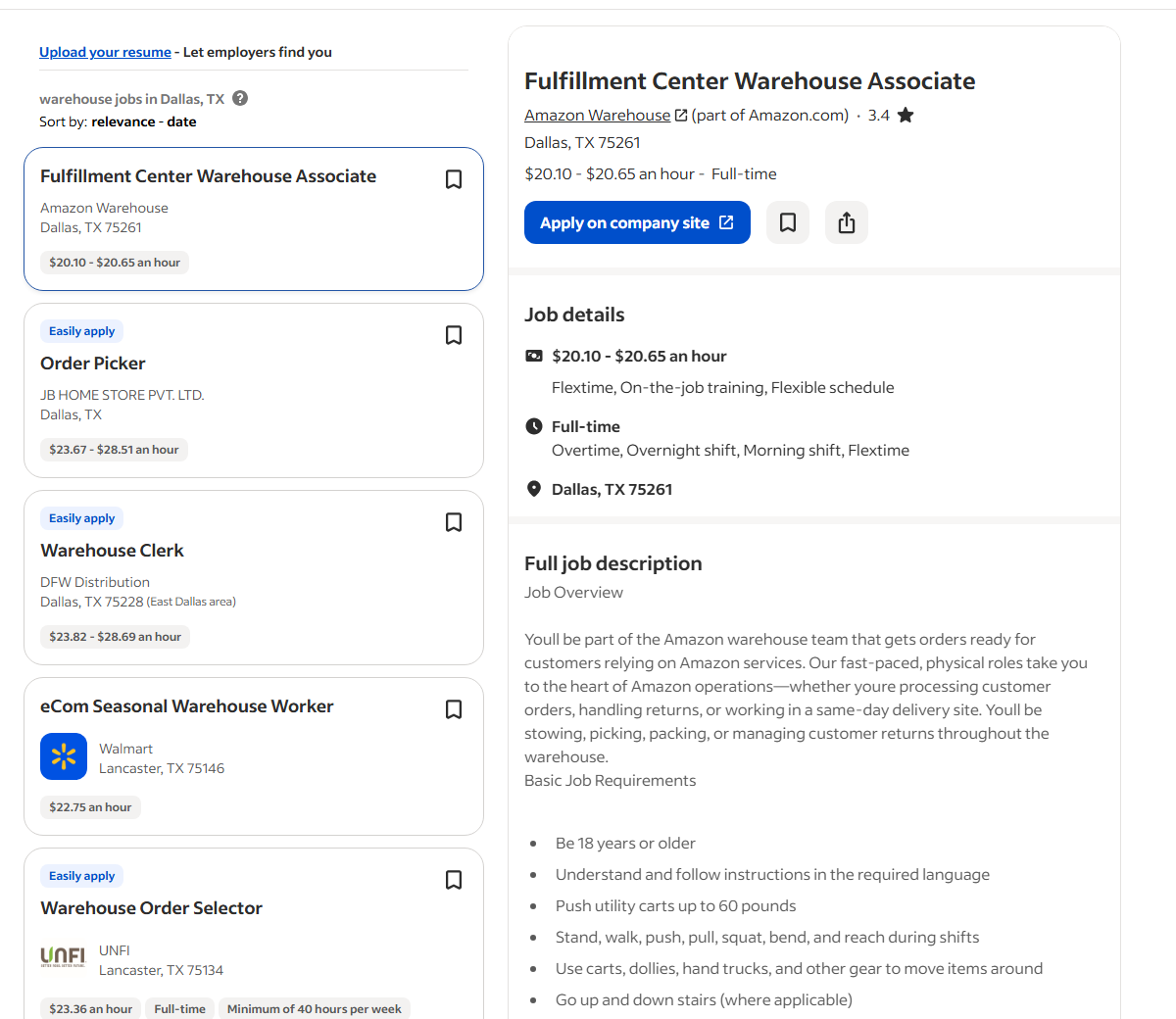
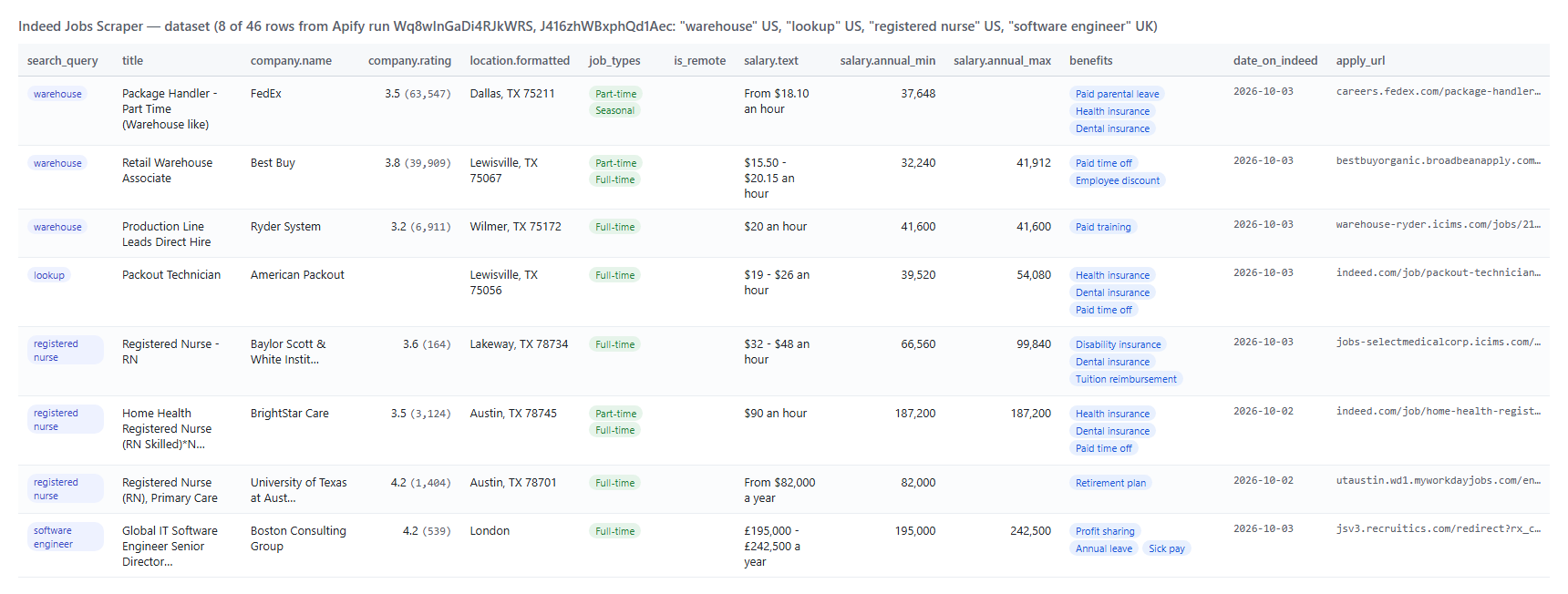
Every Indeed job becomes one dataset item. Here is the table view of a test run for `warehouse` in Dallas, TX and `registered nurse` in Austin, TX:
 And one row as JSON (description shortened):
```json
{
"id": "5891fd4c8516f38a",
"title": "Registered Nurse - RN",
"company": { "name": "Baylor Scott & White Institute for Rehabilitation", "rating": 3.6, "review_count": 164, "website": "https://www.bswrehab.com/", "industry": "Health Care", "indeed_url": "https://www.indeed.com/cmp/Baylor-Scott-&-White-Institute-For-Rehabilitation" },
"location": { "formatted": "Lakeway, TX 78734", "city": "Lakeway", "state": "TX", "postal_code": "78734", "country_code": "US", "latitude": 30.3711, "longitude": -97.8699 },
"is_remote": false,
"job_types": ["Full-time"],
"benefits": ["Disability insurance", "Dental insurance", "Tuition reimbursement", "Paid time off"],
"salary": { "text": "$32 - $48 an hour", "min": 32, "max": 48, "currency": "USD", "period": "hour", "annual_min": 66560, "annual_max": 99840 },
"description_snippet": "Overview: Baylor Scott & White Institute for Rehabilitation Location: Lakeway, TX Registered Nurse (RN) Inpatient Full Time Hours: Days 7a - 7p Compen ...",
"url": "https://www.indeed.com/viewjob?jk=5891fd4c8516f38a",
"apply_url": "https://jobs-selectmedicalcorp.icims.com/jobs/385837/job",
"is_external": true,
"date_on_indeed": "2026-10-03T09:02:21.814Z",
"posted_days_ago": 0,
"search_query": "registered nurse",
"country": "US"
}
```
#### Fields
| Field | Type | What it is | Fill on test run |
|---|---|---|---|
| `id`, `url`, `title` | string | Indeed job key, job page on the country site, title | 100% |
| `normalized_title` | string | Indeed's normalised title | 99% |
| `company.name`, `company.key`, `company.indeed_url` | string | Employer and its Indeed company page | 100% / 96% / 94% |
| `company.website`, `company.industry`, `company.revenue`, `company.description` | string | Company profile from Indeed's employer dossier | 78% / 26% / 70% / 66% |
| `company.logo_url`, `company.header_image_url` | string (URL) | Company images | 77% / 70% |
| `company.rating`, `company.rating_count`, `company.review_count` | number | Indeed company rating (0-5) and counts | 82% |
| `location.*` | object | formatted, city, state, county, postal_code, street_address, country_code, country, latitude, longitude | 100% (postal code 66%, street 51%) |
| `is_remote`, `work_arrangement` | boolean, string | Indeed's remote / hybrid / in-person tag | always / 17% tagged |
| `job_types`, `benefits`, `schedules`, `skills` | string\[] | Indeed's attributes split by taxonomy group | 86% / 66% / 37% / 100% |
| `attributes`, `occupations` | object\[] | Every attribute and occupation as key + label | 100% |
| `salary` | object | text, min, max, exact, currency, period, annual_min, annual_max; `null` when the posting has no salary | 42% |
| `description_text`, `description_html`, `description_snippet` | string | Full description (add-on) and its first 300 characters | 100% with the add-on |
| `apply_url`, `is_indeed_apply`, `is_external` | string, boolean | Where applying leads; Indeed Apply available; link leaves indeed.com | 100% / 57% true / 89% true |
| `source_name`, `source_type` | string | Feed the posting came from (`Indeed` or the employer / ATS) | 100% |
| `is_urgent_hire`, `is_high_volume_hiring`, `work_schedule` | boolean, string | Hiring signals when Indeed shows them | 0% / 19% / 13% |
| `date_published`, `date_on_indeed`, `posted_days_ago` | string (ISO 8601), integer | Employer date, date the job reached Indeed, age | 100% |
| `expired`, `expiration_date`, `ref_num`, `language` | boolean, string | Status and references | 100% / 2% / 100% / 100% |
| `search_query`, `search_location`, `country`, `sort`, `page`, `position`, `scraped_at` | string, integer | Where the row came from | 100% |
### How can I use Indeed jobs data?
- 🎯 **Recruiters and staffing agencies** - find companies hiring now for a role in a metro area, with the company website, rating and revenue band on the same row.
- 📊 **Job boards and aggregators** - publish fresh listings with full descriptions, parsed salaries, coordinates and the external apply link; run it hourly with `sortBy: "date"` and monitor mode.
- 💰 **Compensation analysts** - compare `salary.annual_min` / `salary.annual_max` by title, region and country without converting hourly and yearly pay by hand.
- 🏢 **Sales and partnership teams** - a company posting ten warehouse jobs this week is buying equipment, software and services; filter by `postedWithinDays` and group by `company.name`.
- 🤖 **AI and research teams** - feed `description_text`, `skills` and `benefits` to an LLM; use `compact` to keep the rows small.
- 📈 **Labor-market researchers** - run the same search on a schedule and track postings, salaries and remote share week over week across 62 countries.
### How much does it cost to scrape Indeed jobs?
Indeed Jobs Scraper is pay-per-result: **$0.037 per 1,000 jobs** plus **$0.01 per 1,000 jobs with the full description** (on by default, so $0.047 per 1,000 jobs with descriptions), no start fee.
| Jobs | With description (default) | Without description |
|---:|---:|---:|
| 100 | $0.0047 | $0.0037 |
| 1,000 | $0.047 | $0.037 |
| 10,000 | $0.47 | $0.37 |
| 100,000 | $4.70 | $3.70 |
There is nothing else to pay: Apify platform usage (compute, proxy) is included in these prices. On the test runs a 25-job search took 8 seconds on 256 MB; a 1,000-job search is 10 API requests.
### Integrations, API, scheduling & MCP
- **Schedules:** run Indeed Jobs Scraper hourly, daily or weekly from the **Schedules** tab; combine with `monitorMode` and `sortBy: "date"` to get only new jobs.
- **Webhooks:** fire a URL when a run finishes - push rows to your ATS, CRM, Slack or a sheet.
- **No-code:** Make, Zapier, n8n, Google Sheets, Airtable, Slack via [Apify integrations](https://docs.apify.com/integrations).
- **API:** call it from Node.js or Python with `apify-client` - code on the [API tab](https://apify.com/topapi/indeed-jobs-scraper/api/python) and the [Apify API reference](https://docs.apify.com/api/v2).
- **MCP / AI agents:** connect Claude, Cursor or any MCP client through the [MCP tab](https://apify.com/topapi/indeed-jobs-scraper/api/mcp) and ask for Indeed jobs in plain language; `compact: true` keeps the rows small.
### More TopApi scrapers
And one row as JSON (description shortened):
```json
{
"id": "5891fd4c8516f38a",
"title": "Registered Nurse - RN",
"company": { "name": "Baylor Scott & White Institute for Rehabilitation", "rating": 3.6, "review_count": 164, "website": "https://www.bswrehab.com/", "industry": "Health Care", "indeed_url": "https://www.indeed.com/cmp/Baylor-Scott-&-White-Institute-For-Rehabilitation" },
"location": { "formatted": "Lakeway, TX 78734", "city": "Lakeway", "state": "TX", "postal_code": "78734", "country_code": "US", "latitude": 30.3711, "longitude": -97.8699 },
"is_remote": false,
"job_types": ["Full-time"],
"benefits": ["Disability insurance", "Dental insurance", "Tuition reimbursement", "Paid time off"],
"salary": { "text": "$32 - $48 an hour", "min": 32, "max": 48, "currency": "USD", "period": "hour", "annual_min": 66560, "annual_max": 99840 },
"description_snippet": "Overview: Baylor Scott & White Institute for Rehabilitation Location: Lakeway, TX Registered Nurse (RN) Inpatient Full Time Hours: Days 7a - 7p Compen ...",
"url": "https://www.indeed.com/viewjob?jk=5891fd4c8516f38a",
"apply_url": "https://jobs-selectmedicalcorp.icims.com/jobs/385837/job",
"is_external": true,
"date_on_indeed": "2026-10-03T09:02:21.814Z",
"posted_days_ago": 0,
"search_query": "registered nurse",
"country": "US"
}
```
#### Fields
| Field | Type | What it is | Fill on test run |
|---|---|---|---|
| `id`, `url`, `title` | string | Indeed job key, job page on the country site, title | 100% |
| `normalized_title` | string | Indeed's normalised title | 99% |
| `company.name`, `company.key`, `company.indeed_url` | string | Employer and its Indeed company page | 100% / 96% / 94% |
| `company.website`, `company.industry`, `company.revenue`, `company.description` | string | Company profile from Indeed's employer dossier | 78% / 26% / 70% / 66% |
| `company.logo_url`, `company.header_image_url` | string (URL) | Company images | 77% / 70% |
| `company.rating`, `company.rating_count`, `company.review_count` | number | Indeed company rating (0-5) and counts | 82% |
| `location.*` | object | formatted, city, state, county, postal_code, street_address, country_code, country, latitude, longitude | 100% (postal code 66%, street 51%) |
| `is_remote`, `work_arrangement` | boolean, string | Indeed's remote / hybrid / in-person tag | always / 17% tagged |
| `job_types`, `benefits`, `schedules`, `skills` | string\[] | Indeed's attributes split by taxonomy group | 86% / 66% / 37% / 100% |
| `attributes`, `occupations` | object\[] | Every attribute and occupation as key + label | 100% |
| `salary` | object | text, min, max, exact, currency, period, annual_min, annual_max; `null` when the posting has no salary | 42% |
| `description_text`, `description_html`, `description_snippet` | string | Full description (add-on) and its first 300 characters | 100% with the add-on |
| `apply_url`, `is_indeed_apply`, `is_external` | string, boolean | Where applying leads; Indeed Apply available; link leaves indeed.com | 100% / 57% true / 89% true |
| `source_name`, `source_type` | string | Feed the posting came from (`Indeed` or the employer / ATS) | 100% |
| `is_urgent_hire`, `is_high_volume_hiring`, `work_schedule` | boolean, string | Hiring signals when Indeed shows them | 0% / 19% / 13% |
| `date_published`, `date_on_indeed`, `posted_days_ago` | string (ISO 8601), integer | Employer date, date the job reached Indeed, age | 100% |
| `expired`, `expiration_date`, `ref_num`, `language` | boolean, string | Status and references | 100% / 2% / 100% / 100% |
| `search_query`, `search_location`, `country`, `sort`, `page`, `position`, `scraped_at` | string, integer | Where the row came from | 100% |
### How can I use Indeed jobs data?
- 🎯 **Recruiters and staffing agencies** - find companies hiring now for a role in a metro area, with the company website, rating and revenue band on the same row.
- 📊 **Job boards and aggregators** - publish fresh listings with full descriptions, parsed salaries, coordinates and the external apply link; run it hourly with `sortBy: "date"` and monitor mode.
- 💰 **Compensation analysts** - compare `salary.annual_min` / `salary.annual_max` by title, region and country without converting hourly and yearly pay by hand.
- 🏢 **Sales and partnership teams** - a company posting ten warehouse jobs this week is buying equipment, software and services; filter by `postedWithinDays` and group by `company.name`.
- 🤖 **AI and research teams** - feed `description_text`, `skills` and `benefits` to an LLM; use `compact` to keep the rows small.
- 📈 **Labor-market researchers** - run the same search on a schedule and track postings, salaries and remote share week over week across 62 countries.
### How much does it cost to scrape Indeed jobs?
Indeed Jobs Scraper is pay-per-result: **$0.037 per 1,000 jobs** plus **$0.01 per 1,000 jobs with the full description** (on by default, so $0.047 per 1,000 jobs with descriptions), no start fee.
| Jobs | With description (default) | Without description |
|---:|---:|---:|
| 100 | $0.0047 | $0.0037 |
| 1,000 | $0.047 | $0.037 |
| 10,000 | $0.47 | $0.37 |
| 100,000 | $4.70 | $3.70 |
There is nothing else to pay: Apify platform usage (compute, proxy) is included in these prices. On the test runs a 25-job search took 8 seconds on 256 MB; a 1,000-job search is 10 API requests.
### Integrations, API, scheduling & MCP
- **Schedules:** run Indeed Jobs Scraper hourly, daily or weekly from the **Schedules** tab; combine with `monitorMode` and `sortBy: "date"` to get only new jobs.
- **Webhooks:** fire a URL when a run finishes - push rows to your ATS, CRM, Slack or a sheet.
- **No-code:** Make, Zapier, n8n, Google Sheets, Airtable, Slack via [Apify integrations](https://docs.apify.com/integrations).
- **API:** call it from Node.js or Python with `apify-client` - code on the [API tab](https://apify.com/topapi/indeed-jobs-scraper/api/python) and the [Apify API reference](https://docs.apify.com/api/v2).
- **MCP / AI agents:** connect Claude, Cursor or any MCP client through the [MCP tab](https://apify.com/topapi/indeed-jobs-scraper/api/mcp) and ask for Indeed jobs in plain language; `compact: true` keeps the rows small.
### More TopApi scrapers