| 👤 Username, name and profile URL |
👥 Followers and following (`followersCount`) |
✅ Verified badge, private flag |
| 🏢 Business category and account type |
🔗 Bio links and website (`externalUrls`) |
📘 Linked Facebook page (`facebookPage`) |
| 🖼️ 12 latest posts with likes and comments |
📈 Engagement rate and posts per week |
🏷️ Hashtag name and post count (`postsCount`) |
| 🔁 Related hashtags with counts (`related`) |
📊 Frequent / average / rare hashtags |
📍 Place name, category and location id |
| 🏠 Street address, zip and coordinates |
☎️ Place phone and price range |
🕒 Opening status (`hours`) |
| 📸 Top and recent posts tagged at the place |
🔎 Keyword, rank and source of every result |
🗓️ Date of the newest post (`lastPostAt`) |
On the test runs: 100% of account rows had followers and a bio, 86% a link in bio and 54% a business category; 100% of hashtag rows had a post count and 99% related hashtags; of 271 place rows 100% had a category, 94% coordinates, 87% top posts (12 per row on average), 77% an opening status, 60% a linked business account and 32% a phone.
### How to scrape Instagram search results with Instagram Search Scraper
1. [Create a free Apify account](https://console.apify.com/sign-up): $5 of monthly credit, no card needed.
2. Open [Instagram Search Scraper](https://apify.com/topapi/instagram-search-scraper) and click **Try for free**.
3. Type one or more keywords into **Search terms** (comma-separated) and pick what to **Search for**: places, accounts, hashtags or all three.
4. Set **Results per keyword**, and the filters you need.
5. Click **Start**. Results appear in the dataset as they are found.
6. Open the **Storage** tab and **Export** as JSON, CSV or Excel, or schedule the run.
### ⬇️ Instagram Search Scraper input
| Parameter | Type | Description |
|---|---|---|
| **🔍 What to scrape** | | |
| `search` | string | Keywords, comma-separated, e.g. `"cakes prague, dentist chicago"`. Without any keyword the run searches places for `"restaurant prague"`. |
| `searchType` | string | `place` (default), `user` (accounts), `hashtag`, or `all`. |
| `startUrls` | array | Instagram place pages or ids and hashtag pages to read directly. |
| `searchLimit` | integer | Results per keyword and type, 1-250. Default 20. |
| **🎯 Filters** | | |
| `countries` | array | Country codes the Meta Ad Library search is run in for accounts and places (each adds up to 15 matches). Default: ALL plus 9 large markets. |
| `placePosts` | string | `top` (default), `recent`, `both` or `none`: the posts nested in each place row. |
| `placeSourceOrder` | string | `adLibraryFirst` (default, more places) or `googleFirst` (pages about the keyword, usually closer to the city you typed). |
| **✂️ Refine results** | | |
| `minFollowers` / `maxFollowers` | integer | Accounts with at least / at most this many followers. |
| `verifiedOnly` | boolean | Accounts with the verified badge only. |
| `accountType` | string | `any`, `business`, `creator`, `professional` or `personal`. |
| `excludePrivate` | boolean | Leave out private accounts. |
| `minPosts` | integer | Minimum posts (a hashtag's or place's post count, an account's posts). |
| `keywordFilter` | string | Keep results whose name, username, category, bio or address contain one of these words. |
| `activeWithinDays` | integer | Accounts and places with a post in the last N days. |
| **➕ Extra data** | | |
| `enrichProfiles` | boolean | Add each account's full public profile (the profile add-on). Default on. |
| `includeRelated` | boolean | Add related hashtags with their counts to hashtag rows. Default on, no extra charge. |
| **🔁 Monitoring** | | |
| `monitorMode` | boolean | Only results not delivered by previous runs with the same memory name. |
| `monitorStoreName` | string | Name of the memory, one per watchlist. |
| **📦 Output** | | |
| `maxItems` | integer | Hard cap across the whole run. 0 = no total cap. |
| `compact` | boolean | Core fields only, for AI agents and MCP clients. |
| **⚙️ Advanced** | | |
| `proxyConfiguration` | object | Apify Proxy by default. |
| `maxConcurrency` | integer | Places or profiles read at once. Default 8. |
| `maxSerpPagesPerRun` | integer | Google searches the run may use to find places beyond the Ad Library matches (one per keyword). Default 10, 0 = none. |
The input names of the most-used Instagram search actor work unchanged: `search` as a comma-separated string, `searchType` `place` / `user` / `hashtag`, `searchLimit`.
#### Input JSON
```json
{
"search": "cakes prague, dentist chicago",
"searchType": "all",
"searchLimit": 20,
"minFollowers": 500,
"placePosts": "both"
}
```
#### Pick the search type before anything else
`place` returns Instagram locations (the businesses, venues and landmarks people tag), `user` returns accounts, `hashtag` returns hashtags. The same keyword gives different results per type: `cakes prague` finds bakeries and cafes as places, and cake makers and shops as accounts. `all` runs the three for every keyword, each with its own `searchLimit`.
#### Write keywords the way people name things
Accounts and places first come from Meta's own page search, which matches names: `yoga studio`, `dentist chicago` and `cakes prague` work better than long sentences. Because it matches names, `sushi tokyo` also finds restaurants called Sushi Tokyo outside Japan. When the city matters more than the name, set `placeSourceOrder` to `googleFirst`: Google's results are pages about the keyword (florists in Amsterdam, barbers in Toronto in testing). Hashtags match from the start of the word: `coffee` returns `coffeehouse`, `coffeelife` and 53 more.
#### Paste places you already know
A place URL (`https://www.instagram.com/explore/locations/270309914/bakeshop-praha/`) or a bare location id in `startUrls` returns that place's row with its posts, without a search.
### ⬆️ Instagram Search Scraper output
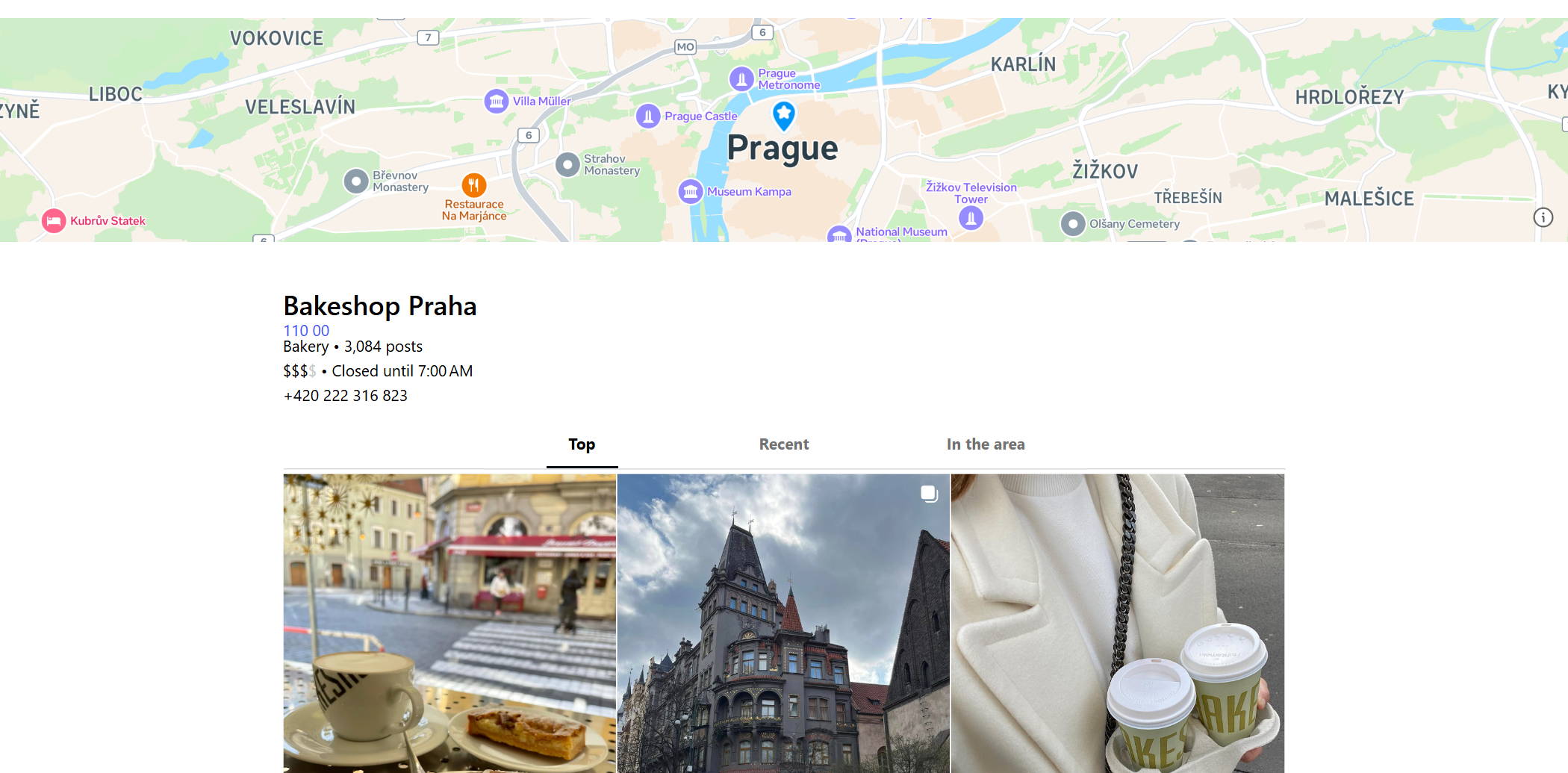
 Each row has `type` (`account`, `hashtag` or `place`), the `searchTerm` that found it, its `rank` for that keyword and the `searchSource` it came from.
#### Account row (profile add-on on)
From platform run `ficPeeY9etHPid13Y` (`"pilates studio"`, 100 accounts), long values shortened:
```json
{
"type": "account", "searchTerm": "pilates studio", "searchSource": "facebook-ads", "rank": 1,
"username": "studio_pilates", "fullName": "Studio Pilates",
"followersCount": 85509, "followsCount": 897, "postsCount": 3031, "verified": true,
"biography": "CHANGING THE WAY THE WORLD WORKS OUT ⚡️ Reformer Pilates classes for all levels ...",
"externalUrl": "http://linktr.ee/studiopilatesinternational",
"accountType": "business", "businessCategoryName": "Pilates Studio",
"facebookPage": { "page_id": "146085692104314", "name": "Studio Pilates", "category": "Local Business", "likes": 44526, "ig_username": "studio_pilates", "ig_followers": 85509 },
"latestPosts": ["... 6 posts (web profile)"], "engagementRate": 0.152, "enriched": true, "profileSource": "web"
}
```
#### Hashtag row
From platform run `AgScDxsRPkHTwAcdZ` (20 keywords, 951 hashtags):
```json
{
"type": "hashtag", "searchTerm": "coffee", "searchSource": "instagram", "rank": 4,
"name": "coffeelove", "postsCount": 5257410, "posts": "5.2M",
"url": "https://www.instagram.com/explore/tags/coffeelove/",
"related": [{ "hash": "#coffeelover", "info": "33M", "postsCount": 33096750 }],
"frequent": [{ "hash": "#coffeelover", "info": "33M", "postsCount": 33096750 }],
"average": [{ "hash": "#coffeeloversclub", "info": "280K", "postsCount": 280741 }],
"rare": [{ "hash": "#coffeelover☕❤️", "info": "1000+", "postsCount": 1025 }]
}
```
#### Place row
From platform run `Zb3lMMnxaQgE0oY18` (20 keywords, 271 places), posts shortened:
```json
{
"type": "place", "searchTerm": "florist amsterdam", "searchSource": "google", "rank": 24,
"location_id": "728466614156448", "name": "Amsterdam Flowers", "category": "Florist",
"phone": "+31 20 619 1818", "location_address": "Belgiëplein 68-70",
"lat": 52.350104, "lng": 4.815625, "media_count": 191,
"url": "https://www.instagram.com/explore/locations/728466614156448/amsterdam-flowers/",
"posts": ["... 15 top posts: shortCode, type, caption, likeCount, commentCount, displayUrl, ownerUsername, timestamp"]
}
```
The **Overview**, **Accounts**, **Hashtags** and **Places** views in the dataset show the fields of each type as a table.
### How can I use Instagram search data?
- 🎯 **Influencer and creator discovery:** find accounts by niche and city, filter by followers, keep the ones with a website.
- 🏪 **Local lead lists:** places with phone, address and the linked business account for a category in a city.
- \#️⃣ **Hashtag research:** post counts and related hashtags to plan captions and campaigns.
- 📍 **Location intelligence:** what is tagged where, how many posts a venue has, what was posted there this week.
- 🔁 **Brand and competitor watch:** a weekly monitor run returns only the new accounts, places or hashtags for your keywords.
- 🤖 **AI agents:** compact rows over the API or MCP for assistants that answer "find yoga studios in Austin on Instagram".
### How much does it cost to scrape Instagram search results?
Instagram Search Scraper is pay-per-result, with no start fee and Apify platform usage included:
| Result | Price per 1,000 |
|---|---:|
| Hashtag row | $0.27 |
| Account row | $1.30 |
| Profile add-on (on account rows that carry the full profile) | $1.10 |
| Place row (with its posts) | $1.80 |
| Run | Cost |
|---|---:|
| 50 hashtags | $0.0135 |
| 100 accounts with profiles | $0.24 |
| 100 accounts without profiles | $0.13 |
| 20 places | $0.036 |
| 1,000 places | $1.80 |
Free notice rows (a keyword that found nothing) are not charged.
### Integrations, API, scheduling & MCP
- **Schedules:** run the same keywords daily or weekly; with `monitorMode` each run returns only what is new.
- **Webhooks:** call a URL when a run finishes and push the rows to a CRM, Slack or a sheet.
- **No-code:** Make, Zapier, n8n, Google Sheets, Airtable and Slack through [Apify integrations](https://docs.apify.com/integrations).
- **API:** start runs and read datasets from Node.js or Python with `apify-client`; code is on the [API tab](https://apify.com/topapi/instagram-search-scraper/api/python).
- **MCP / AI agents:** connect Claude, Cursor or any MCP client through the [MCP tab](https://apify.com/topapi/instagram-search-scraper/api/mcp); `compact` keeps rows small.
### More TopApi scrapers
Each row has `type` (`account`, `hashtag` or `place`), the `searchTerm` that found it, its `rank` for that keyword and the `searchSource` it came from.
#### Account row (profile add-on on)
From platform run `ficPeeY9etHPid13Y` (`"pilates studio"`, 100 accounts), long values shortened:
```json
{
"type": "account", "searchTerm": "pilates studio", "searchSource": "facebook-ads", "rank": 1,
"username": "studio_pilates", "fullName": "Studio Pilates",
"followersCount": 85509, "followsCount": 897, "postsCount": 3031, "verified": true,
"biography": "CHANGING THE WAY THE WORLD WORKS OUT ⚡️ Reformer Pilates classes for all levels ...",
"externalUrl": "http://linktr.ee/studiopilatesinternational",
"accountType": "business", "businessCategoryName": "Pilates Studio",
"facebookPage": { "page_id": "146085692104314", "name": "Studio Pilates", "category": "Local Business", "likes": 44526, "ig_username": "studio_pilates", "ig_followers": 85509 },
"latestPosts": ["... 6 posts (web profile)"], "engagementRate": 0.152, "enriched": true, "profileSource": "web"
}
```
#### Hashtag row
From platform run `AgScDxsRPkHTwAcdZ` (20 keywords, 951 hashtags):
```json
{
"type": "hashtag", "searchTerm": "coffee", "searchSource": "instagram", "rank": 4,
"name": "coffeelove", "postsCount": 5257410, "posts": "5.2M",
"url": "https://www.instagram.com/explore/tags/coffeelove/",
"related": [{ "hash": "#coffeelover", "info": "33M", "postsCount": 33096750 }],
"frequent": [{ "hash": "#coffeelover", "info": "33M", "postsCount": 33096750 }],
"average": [{ "hash": "#coffeeloversclub", "info": "280K", "postsCount": 280741 }],
"rare": [{ "hash": "#coffeelover☕❤️", "info": "1000+", "postsCount": 1025 }]
}
```
#### Place row
From platform run `Zb3lMMnxaQgE0oY18` (20 keywords, 271 places), posts shortened:
```json
{
"type": "place", "searchTerm": "florist amsterdam", "searchSource": "google", "rank": 24,
"location_id": "728466614156448", "name": "Amsterdam Flowers", "category": "Florist",
"phone": "+31 20 619 1818", "location_address": "Belgiëplein 68-70",
"lat": 52.350104, "lng": 4.815625, "media_count": 191,
"url": "https://www.instagram.com/explore/locations/728466614156448/amsterdam-flowers/",
"posts": ["... 15 top posts: shortCode, type, caption, likeCount, commentCount, displayUrl, ownerUsername, timestamp"]
}
```
The **Overview**, **Accounts**, **Hashtags** and **Places** views in the dataset show the fields of each type as a table.
### How can I use Instagram search data?
- 🎯 **Influencer and creator discovery:** find accounts by niche and city, filter by followers, keep the ones with a website.
- 🏪 **Local lead lists:** places with phone, address and the linked business account for a category in a city.
- \#️⃣ **Hashtag research:** post counts and related hashtags to plan captions and campaigns.
- 📍 **Location intelligence:** what is tagged where, how many posts a venue has, what was posted there this week.
- 🔁 **Brand and competitor watch:** a weekly monitor run returns only the new accounts, places or hashtags for your keywords.
- 🤖 **AI agents:** compact rows over the API or MCP for assistants that answer "find yoga studios in Austin on Instagram".
### How much does it cost to scrape Instagram search results?
Instagram Search Scraper is pay-per-result, with no start fee and Apify platform usage included:
| Result | Price per 1,000 |
|---|---:|
| Hashtag row | $0.27 |
| Account row | $1.30 |
| Profile add-on (on account rows that carry the full profile) | $1.10 |
| Place row (with its posts) | $1.80 |
| Run | Cost |
|---|---:|
| 50 hashtags | $0.0135 |
| 100 accounts with profiles | $0.24 |
| 100 accounts without profiles | $0.13 |
| 20 places | $0.036 |
| 1,000 places | $1.80 |
Free notice rows (a keyword that found nothing) are not charged.
### Integrations, API, scheduling & MCP
- **Schedules:** run the same keywords daily or weekly; with `monitorMode` each run returns only what is new.
- **Webhooks:** call a URL when a run finishes and push the rows to a CRM, Slack or a sheet.
- **No-code:** Make, Zapier, n8n, Google Sheets, Airtable and Slack through [Apify integrations](https://docs.apify.com/integrations).
- **API:** start runs and read datasets from Node.js or Python with `apify-client`; code is on the [API tab](https://apify.com/topapi/instagram-search-scraper/api/python).
- **MCP / AI agents:** connect Claude, Cursor or any MCP client through the [MCP tab](https://apify.com/topapi/instagram-search-scraper/api/mcp); `compact` keeps rows small.
### More TopApi scrapers