 - **Any link shape you copied:** canonical `tiktok.com/@user/video/
| 🆔 Post id, canonical URL and the URL your link resolved to (`id`, `webVideoUrl`, `resolvedUrl`) | 📝 Caption and its language (`text`, `textLanguage`) | 📅 Publish time (`createTime`, `createTimeISO`) and country (`locationCreated`) |
| ▶️ Plays (`playCount`) | ❤️ Likes (`diggCount`) | 💬 Comments (`commentCount`) |
| 🔁 Shares and reposts (`shareCount`, `repostCount`) | 🔖 Saves (`collectCount`) | 📈 Engagement rate (`engagementRate`, percent of plays) |
| 👤 Author: username, nickname, verified, bio, avatar, account created (`authorMeta`) | 👥 Author stats: followers, following, total likes, videos (`authorMeta.fans`, `.heart`, `.video`) | 🎵 Sound: name, artist, original flag, sound id, duration, play URL (`musicMeta`) |
| 🎬 Video: duration, width, height, definition, format, bitrate, codec, file size, play and download URLs (`videoMeta`) | 🪜 Every encoding TikTok lists: gear, bitrate, codec, resolution, bytes, URLs (`videoQualityLadder`) | 🖼️ All cover and thumbnail URLs (`coverUrls`), photo-post images (`slideshowImageLinks`) |
| 🔤 Subtitle files per language (`videoMeta.subtitleLinks`) and the transcript text (`transcript`, add-on) | #️⃣ Hashtags with ids (`hashtags`), mentions (`mentions`, `detailedMentions`), TikTok's search keywords for the post (`suggestedWords`) | 📍 Tagged place (`poi`, `locationMeta`) |
| 📢 Ad and paid-partnership flags (`isAd`, `isSponsored`) | 🏷️ Content category labels (`diversificationLabels`, `categoryType`), AI-generated label (`isAIGC`) | ⚙️ Duet, stitch, share and comment settings; on-screen text stickers (`textStickers`) |
| ⬇️ Stored file from the download add-on (`mediaFile`: URL, bytes, image count) | 🔁 Monitor mode: `previousStats`, `statsDelta`, `isNew`, `previousScrapedAt` | 🚦 `status` on every row: ok, not_found, private, removed, restricted, unavailable |
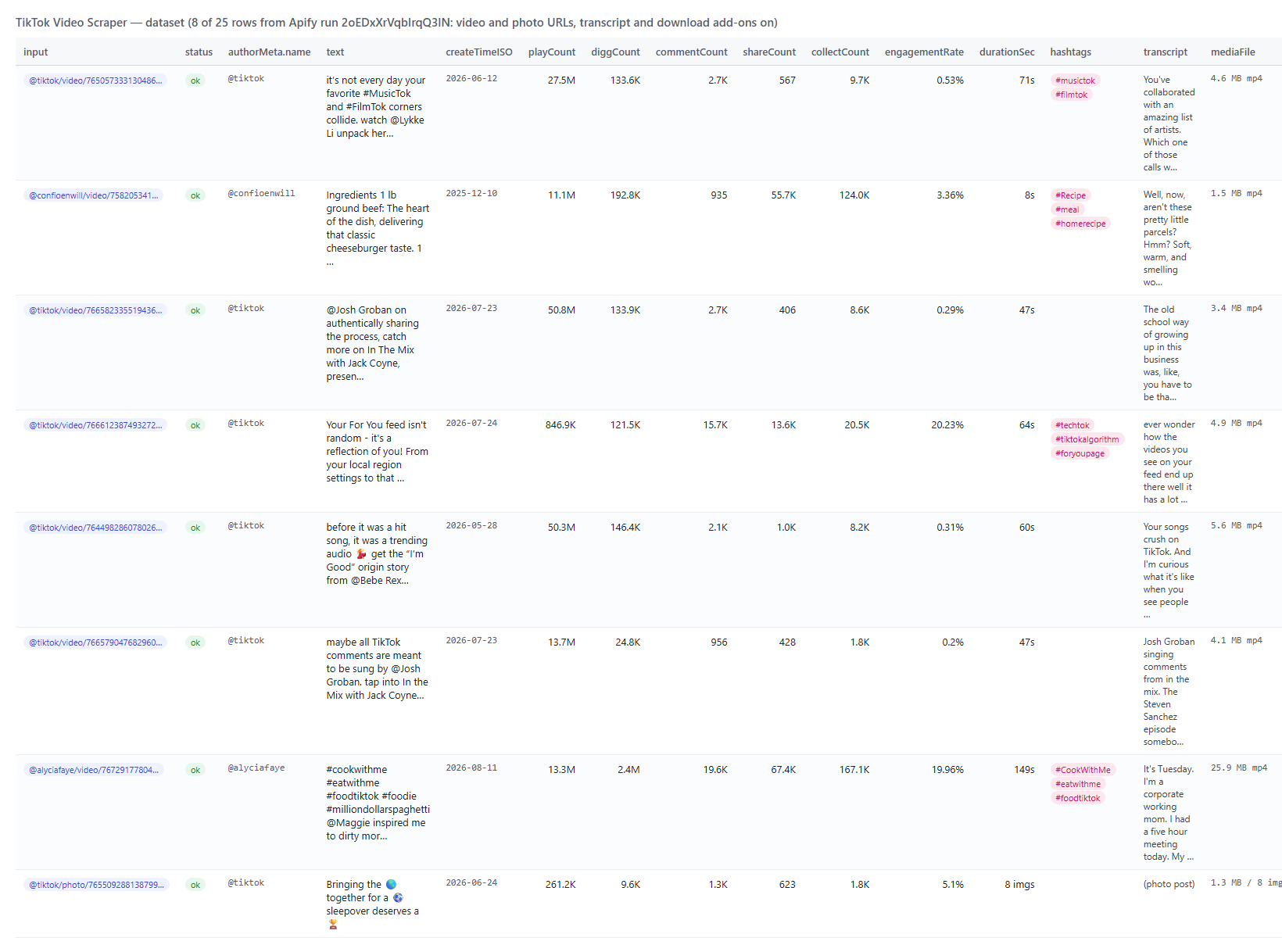 And one row as JSON (long URL fields shortened):
```json
{
"id": "7650573331304860958",
"status": "ok",
"text": "it’s not every day your favorite #MusicTok and #FilmTok corners collide. watch @Lykke Li unpack her David Lynch collab...",
"textLanguage": "en",
"createTimeISO": "2026-06-12T18:12:17.000Z",
"locationCreated": "US",
"isAd": true, "isSponsored": true, "isSlideshow": false,
"authorMeta": { "name": "tiktok", "nickName": "TikTok", "verified": true, "fans": 96000000, "heart": 464900000, "video": 1509, "createTimeISO": "2015-02-28T17:22:29.000Z", "profileUrl": "https://www.tiktok.com/@tiktok" },
"musicMeta": { "musicName": "original sound", "musicAuthor": "TikTok", "musicOriginal": true, "musicId": "7650573341283126047", "duration": 71 },
"webVideoUrl": "https://www.tiktok.com/@tiktok/video/7650573331304860958",
"videoMeta": { "height": 1280, "width": 720, "duration": 71, "definition": "720p", "format": "mp4", "bitrate": 628434, "codecType": "h264", "size": 5579713, "coverUrl": "https://p16-common-sign.tiktokcdn-us.com/...", "downloadAddr": "https://api.apify.com/v2/key-value-stores/.../records/7650573331304860958.mp4", "originalDownloadAddr": "https://v16-webapp-prime.us.tiktok.com/...", "downloadCookie": "ttwid=...; tt_csrf_token=...; tt_chain_token=...", "subtitleLinks": [{ "language": "eng-US", "source": "ASR", "downloadLink": "https://v16-webapp.tiktokcdn-eu.com/..." }] },
"videoQualityLadder": [{ "gear": "normal_720_0", "bitrate": 628434, "codec": "h264", "width": 720, "height": 1280, "sizeBytes": 5579713, "urls": ["..."] }],
"playCount": 27500000, "diggCount": 133600, "commentCount": 2663, "shareCount": 567, "collectCount": 9679, "repostCount": 0,
"engagementRate": 0.53,
"hashtags": [{ "id": "1598392089630725", "name": "musictok", "title": "Music on TikTok." }, { "id": "1639367069624326", "name": "filmtok", "title": "Celebrate the world of cinema with TikTok." }],
"mentions": ["@lykkeli", "@tmobile"],
"diversificationLabels": ["Celebrity Clips & Variety Show", "Entertainment Culture", "Entertainment"],
"transcript": "You've collaborated with an amazing list of artists.\nWhich one of those calls was the most surprising to get?\nDavid Lynch...",
"transcriptLanguage": "eng-US", "transcriptSource": "automatic speech recognition",
"mediaFile": { "url": "https://api.apify.com/v2/key-value-stores/.../records/7650573331304860958.mp4", "bytes": 4847592, "contentType": "video/mp4" },
"submittedVideoUrl": "https://www.tiktok.com/@tiktok/video/7650573331304860958"
}
```
#### Fields
| Field | Type | What it is | Fill on the 25-post platform run |
|---|---|---|---|
| `id`, `webVideoUrl`, `resolvedUrl`, `submittedVideoUrl`, `input` | string | Post id, canonical URL (`/photo/` for slideshows), the URL the input resolved to, the input line | 100% |
| `status` | string | `ok` on delivered rows; `not_found`, `private`, `removed`, `restricted`, `unavailable`, `invalid` on the status rows | 100% |
| `text`, `textLanguage`, `createTime`, `createTimeISO`, `locationCreated` | string, integer | Caption, its language, publish time (Unix and ISO 8601), country code the post was created in | 100% |
| `playCount`, `diggCount`, `commentCount`, `shareCount`, `collectCount`, `repostCount` | integer | Plays, likes, comments, shares, saves, reposts | 100% |
| `engagementRate` | number | (likes + comments + shares + saves) / plays, in percent | 100% |
| `authorMeta` | object | `id`, `name`, `nickName`, `profileUrl`, `verified`, `signature`, `avatar`, `secUid`, `privateAccount`, `createTime`, `createTimeISO`, `downloadSetting`, `following`, `friends`, `fans`, `heart`, `video`, `digg` (`bioLink`, `region`, `ttSeller`, `commerceUserInfo` when TikTok prints them on the video page) | 100% (verified 56%) |
| `musicMeta` | object | `musicName`, `musicAuthor`, `musicOriginal`, `musicAlbum`, `musicId`, `duration`, `playUrl`, `coverMediumUrl`, `isCopyrighted`, `isCommerceMusic` | 100% (artist and cover 92%) |
| `videoMeta` | object | `height`, `width`, `duration`, `ratio`, `coverUrl`, `originalCoverUrl`, `dynamicCoverUrl`, `definition`, `format`, `bitrate`, `codecType`, `size`, `videoQuality`, `vqScore`, `loudness`, `peak`, `playAddr`, `downloadAddr`, `originalDownloadAddr`, `downloadCookie`, `subtitleLinks[]`, `captionInfo` | 100% (file links and resolution 92% = every video; photo posts have no video file) |
| `durationSec` | integer | Video length in seconds, 0 for photo posts | 100% |
| `videoQualityLadder` | array | Every encoding TikTok lists: `gear`, `qualityType`, `bitrate`, `codec`, `width`, `height`, `sizeBytes`, `urls[]`, largest first (2-5 per video) | 92% |
| `coverUrls` | array | Every static, animated and zoom-size cover URL (6-7 per video) | 100% |
| `mediaUrls` | array | TikTok's signed download and play URLs (fetch them with `videoMeta.downloadCookie` as the Cookie header) | 92% |
| `hashtags`, `mentions`, `detailedMentions`, `suggestedWords` | array | Hashtags with ids and descriptions; mentioned accounts with id and profile URL; the search keywords TikTok attaches to the post | 44% / 52% / 52% / 40% |
| `isSlideshow`, `slideshowImageLinks` | boolean, array | Photo posts and their images with width and height | 2 of 25 |
| `isAd`, `isSponsored` | boolean | TikTok's ad flag and paid-partnership flag | 6 of 25 flagged |
| `poi`, `locationMeta` | object | The tagged place (id, name, address, city, country, category), also in the `locationMeta` shape other TikTok scrapers use | 16% |
| `subtitleLanguages`, `transcript`, `transcriptLanguage`, `transcriptSource` | array, string | Caption languages; the transcript text (add-on) with its language and source (creator caption, speech recognition, machine translation) | 72% |
| `mediaFile` | object | Download add-on: `kvStoreId`, `key`, `url`, `bytes`, `contentType`, `imageCount` (and `urls[]` for photo posts) | 100% with the add-on on |
| `diversificationLabels`, `categoryType`, `isAIGC`, `aigcLabel` | array, integer, boolean, string | TikTok's content category labels and the AI-generated-content label | 88% / 100% / 0 of 25 labelled |
| `duetEnabled`, `stitchEnabled`, `shareEnabled`, `commentsDisabled`, `playlistId` | boolean, string | Interaction settings and the playlist the post sits in | 88% / 88% / 100% / 100% / 12% |
| `textStickers`, `effectStickers` | array | On-screen text stickers; effects used | 20% / 0 of 25 |
| `previousStats`, `previousScrapedAt`, `statsDelta`, `isNew` | object, string, boolean | Monitor mode only: the counts stored by the previous run, when, the difference, and whether the post is new to the store | monitor runs |
| `errorCode`, `error`, `url` | string | Status rows only: `POST_NOT_FOUND`, `POST_PRIVATE`, `POST_REMOVED`, `POST_RESTRICTED`, `POST_UNAVAILABLE`, `SHORT_LINK_DEAD`, `FETCH_BLOCKED`, `INVALID_URL` and TikTok's message | status rows |
Not on this surface, so not shipped: `isPinned`, attached links (`anchors`) and the TikTok Shop flag are properties of a creator's feed, and TikTok's video page carried none of them on the 34 posts captured for this build; TopApi/tiktok-scraper delivers them from profile and hashtag feeds. Related videos and comments are separate products.
### How can I use TikTok video data?
- 📊 **Campaign and sponsorship reporting** - paste the 40 creator posts of a campaign, run daily with `monitorMode`, and chart `statsDelta.playCount` per post in Google Sheets.
- 🎯 **Influencer vetting** - check a creator's last five posts you were sent: `engagementRate`, `authorMeta.fans`, `isSponsored` and whether `transcript` matches the brief.
- 🔎 **Social listening** - feed `text`, `hashtags`, `suggestedWords` and `transcript` of the posts your team collects into a classifier or an LLM; `compact` keeps a thousand posts inside a context window.
- 🗂️ **Archiving and evidence** - switch on `downloadVideos` with a named `mediaStoreName` to keep the MP4 and the counts as they were on a given day.
- 🎬 **Media and trend research** - compare duration, `videoQualityLadder`, `diversificationLabels` and `musicMeta` across the posts of a trend.
- 🤖 **AI agents** - an agent that is handed a TikTok link calls the actor through MCP and answers with the caption, counts and transcript.
### How much does it cost to scrape TikTok videos?
TikTok Video Scraper is pay-per-result: **$1.40 per 1,000 videos**, no start fee (the Pricing tab always shows the live rate). The transcript add-on is **$1.00 per 1,000 posts that receive one**, the download add-on **$1.20 per 1,000 posts whose file was stored**.
| Videos | Cost | With transcripts | With transcripts and files |
|---:|---:|---:|---:|
| 10 | $0.014 | $0.024 | $0.036 |
| 100 | $0.14 | $0.24 | $0.36 |
| 1,000 | $1.40 | $2.40 | $3.60 |
| 10,000 | $14.00 | $24.00 | $36.00 |
There is nothing else to pay: Apify platform usage (compute, storage, transfer) is included in these prices. Measured on the platform on 2026-10-03 with the default 256 MB: 2 posts in 5.7 seconds; 25 posts with 18 transcripts and 25 stored files (255 MB of video) in 315 seconds (most of it storing the files); without downloads a page takes 0.5-1.5 seconds and 5 are read in parallel.
### Integrations, API, scheduling & MCP
- **Schedules:** run TikTok Video Scraper hourly, daily or weekly from the **Schedules** tab; combine with `monitorMode` so each run returns only the posts whose counts moved.
- **Webhooks:** fire a URL when a run finishes - push rows to your CRM, Slack or a sheet.
- **No-code:** Make, Zapier, n8n, Google Sheets, Airtable, Slack via [Apify integrations](https://docs.apify.com/integrations).
- **API:** call it from Node.js or Python with `apify-client` - code on the [API tab](https://apify.com/topapi/tiktok-video-scraper/api/python) and the [Apify API reference](https://docs.apify.com/api/v2).
- **MCP / AI agents:** connect Claude, Cursor or any MCP client through the [MCP tab](https://apify.com/topapi/tiktok-video-scraper/api/mcp) and ask for the details of a TikTok video in plain language; switch on `compact` to keep the answer small.
### More TikTok video and social scrapers from TopApi
And one row as JSON (long URL fields shortened):
```json
{
"id": "7650573331304860958",
"status": "ok",
"text": "it’s not every day your favorite #MusicTok and #FilmTok corners collide. watch @Lykke Li unpack her David Lynch collab...",
"textLanguage": "en",
"createTimeISO": "2026-06-12T18:12:17.000Z",
"locationCreated": "US",
"isAd": true, "isSponsored": true, "isSlideshow": false,
"authorMeta": { "name": "tiktok", "nickName": "TikTok", "verified": true, "fans": 96000000, "heart": 464900000, "video": 1509, "createTimeISO": "2015-02-28T17:22:29.000Z", "profileUrl": "https://www.tiktok.com/@tiktok" },
"musicMeta": { "musicName": "original sound", "musicAuthor": "TikTok", "musicOriginal": true, "musicId": "7650573341283126047", "duration": 71 },
"webVideoUrl": "https://www.tiktok.com/@tiktok/video/7650573331304860958",
"videoMeta": { "height": 1280, "width": 720, "duration": 71, "definition": "720p", "format": "mp4", "bitrate": 628434, "codecType": "h264", "size": 5579713, "coverUrl": "https://p16-common-sign.tiktokcdn-us.com/...", "downloadAddr": "https://api.apify.com/v2/key-value-stores/.../records/7650573331304860958.mp4", "originalDownloadAddr": "https://v16-webapp-prime.us.tiktok.com/...", "downloadCookie": "ttwid=...; tt_csrf_token=...; tt_chain_token=...", "subtitleLinks": [{ "language": "eng-US", "source": "ASR", "downloadLink": "https://v16-webapp.tiktokcdn-eu.com/..." }] },
"videoQualityLadder": [{ "gear": "normal_720_0", "bitrate": 628434, "codec": "h264", "width": 720, "height": 1280, "sizeBytes": 5579713, "urls": ["..."] }],
"playCount": 27500000, "diggCount": 133600, "commentCount": 2663, "shareCount": 567, "collectCount": 9679, "repostCount": 0,
"engagementRate": 0.53,
"hashtags": [{ "id": "1598392089630725", "name": "musictok", "title": "Music on TikTok." }, { "id": "1639367069624326", "name": "filmtok", "title": "Celebrate the world of cinema with TikTok." }],
"mentions": ["@lykkeli", "@tmobile"],
"diversificationLabels": ["Celebrity Clips & Variety Show", "Entertainment Culture", "Entertainment"],
"transcript": "You've collaborated with an amazing list of artists.\nWhich one of those calls was the most surprising to get?\nDavid Lynch...",
"transcriptLanguage": "eng-US", "transcriptSource": "automatic speech recognition",
"mediaFile": { "url": "https://api.apify.com/v2/key-value-stores/.../records/7650573331304860958.mp4", "bytes": 4847592, "contentType": "video/mp4" },
"submittedVideoUrl": "https://www.tiktok.com/@tiktok/video/7650573331304860958"
}
```
#### Fields
| Field | Type | What it is | Fill on the 25-post platform run |
|---|---|---|---|
| `id`, `webVideoUrl`, `resolvedUrl`, `submittedVideoUrl`, `input` | string | Post id, canonical URL (`/photo/` for slideshows), the URL the input resolved to, the input line | 100% |
| `status` | string | `ok` on delivered rows; `not_found`, `private`, `removed`, `restricted`, `unavailable`, `invalid` on the status rows | 100% |
| `text`, `textLanguage`, `createTime`, `createTimeISO`, `locationCreated` | string, integer | Caption, its language, publish time (Unix and ISO 8601), country code the post was created in | 100% |
| `playCount`, `diggCount`, `commentCount`, `shareCount`, `collectCount`, `repostCount` | integer | Plays, likes, comments, shares, saves, reposts | 100% |
| `engagementRate` | number | (likes + comments + shares + saves) / plays, in percent | 100% |
| `authorMeta` | object | `id`, `name`, `nickName`, `profileUrl`, `verified`, `signature`, `avatar`, `secUid`, `privateAccount`, `createTime`, `createTimeISO`, `downloadSetting`, `following`, `friends`, `fans`, `heart`, `video`, `digg` (`bioLink`, `region`, `ttSeller`, `commerceUserInfo` when TikTok prints them on the video page) | 100% (verified 56%) |
| `musicMeta` | object | `musicName`, `musicAuthor`, `musicOriginal`, `musicAlbum`, `musicId`, `duration`, `playUrl`, `coverMediumUrl`, `isCopyrighted`, `isCommerceMusic` | 100% (artist and cover 92%) |
| `videoMeta` | object | `height`, `width`, `duration`, `ratio`, `coverUrl`, `originalCoverUrl`, `dynamicCoverUrl`, `definition`, `format`, `bitrate`, `codecType`, `size`, `videoQuality`, `vqScore`, `loudness`, `peak`, `playAddr`, `downloadAddr`, `originalDownloadAddr`, `downloadCookie`, `subtitleLinks[]`, `captionInfo` | 100% (file links and resolution 92% = every video; photo posts have no video file) |
| `durationSec` | integer | Video length in seconds, 0 for photo posts | 100% |
| `videoQualityLadder` | array | Every encoding TikTok lists: `gear`, `qualityType`, `bitrate`, `codec`, `width`, `height`, `sizeBytes`, `urls[]`, largest first (2-5 per video) | 92% |
| `coverUrls` | array | Every static, animated and zoom-size cover URL (6-7 per video) | 100% |
| `mediaUrls` | array | TikTok's signed download and play URLs (fetch them with `videoMeta.downloadCookie` as the Cookie header) | 92% |
| `hashtags`, `mentions`, `detailedMentions`, `suggestedWords` | array | Hashtags with ids and descriptions; mentioned accounts with id and profile URL; the search keywords TikTok attaches to the post | 44% / 52% / 52% / 40% |
| `isSlideshow`, `slideshowImageLinks` | boolean, array | Photo posts and their images with width and height | 2 of 25 |
| `isAd`, `isSponsored` | boolean | TikTok's ad flag and paid-partnership flag | 6 of 25 flagged |
| `poi`, `locationMeta` | object | The tagged place (id, name, address, city, country, category), also in the `locationMeta` shape other TikTok scrapers use | 16% |
| `subtitleLanguages`, `transcript`, `transcriptLanguage`, `transcriptSource` | array, string | Caption languages; the transcript text (add-on) with its language and source (creator caption, speech recognition, machine translation) | 72% |
| `mediaFile` | object | Download add-on: `kvStoreId`, `key`, `url`, `bytes`, `contentType`, `imageCount` (and `urls[]` for photo posts) | 100% with the add-on on |
| `diversificationLabels`, `categoryType`, `isAIGC`, `aigcLabel` | array, integer, boolean, string | TikTok's content category labels and the AI-generated-content label | 88% / 100% / 0 of 25 labelled |
| `duetEnabled`, `stitchEnabled`, `shareEnabled`, `commentsDisabled`, `playlistId` | boolean, string | Interaction settings and the playlist the post sits in | 88% / 88% / 100% / 100% / 12% |
| `textStickers`, `effectStickers` | array | On-screen text stickers; effects used | 20% / 0 of 25 |
| `previousStats`, `previousScrapedAt`, `statsDelta`, `isNew` | object, string, boolean | Monitor mode only: the counts stored by the previous run, when, the difference, and whether the post is new to the store | monitor runs |
| `errorCode`, `error`, `url` | string | Status rows only: `POST_NOT_FOUND`, `POST_PRIVATE`, `POST_REMOVED`, `POST_RESTRICTED`, `POST_UNAVAILABLE`, `SHORT_LINK_DEAD`, `FETCH_BLOCKED`, `INVALID_URL` and TikTok's message | status rows |
Not on this surface, so not shipped: `isPinned`, attached links (`anchors`) and the TikTok Shop flag are properties of a creator's feed, and TikTok's video page carried none of them on the 34 posts captured for this build; TopApi/tiktok-scraper delivers them from profile and hashtag feeds. Related videos and comments are separate products.
### How can I use TikTok video data?
- 📊 **Campaign and sponsorship reporting** - paste the 40 creator posts of a campaign, run daily with `monitorMode`, and chart `statsDelta.playCount` per post in Google Sheets.
- 🎯 **Influencer vetting** - check a creator's last five posts you were sent: `engagementRate`, `authorMeta.fans`, `isSponsored` and whether `transcript` matches the brief.
- 🔎 **Social listening** - feed `text`, `hashtags`, `suggestedWords` and `transcript` of the posts your team collects into a classifier or an LLM; `compact` keeps a thousand posts inside a context window.
- 🗂️ **Archiving and evidence** - switch on `downloadVideos` with a named `mediaStoreName` to keep the MP4 and the counts as they were on a given day.
- 🎬 **Media and trend research** - compare duration, `videoQualityLadder`, `diversificationLabels` and `musicMeta` across the posts of a trend.
- 🤖 **AI agents** - an agent that is handed a TikTok link calls the actor through MCP and answers with the caption, counts and transcript.
### How much does it cost to scrape TikTok videos?
TikTok Video Scraper is pay-per-result: **$1.40 per 1,000 videos**, no start fee (the Pricing tab always shows the live rate). The transcript add-on is **$1.00 per 1,000 posts that receive one**, the download add-on **$1.20 per 1,000 posts whose file was stored**.
| Videos | Cost | With transcripts | With transcripts and files |
|---:|---:|---:|---:|
| 10 | $0.014 | $0.024 | $0.036 |
| 100 | $0.14 | $0.24 | $0.36 |
| 1,000 | $1.40 | $2.40 | $3.60 |
| 10,000 | $14.00 | $24.00 | $36.00 |
There is nothing else to pay: Apify platform usage (compute, storage, transfer) is included in these prices. Measured on the platform on 2026-10-03 with the default 256 MB: 2 posts in 5.7 seconds; 25 posts with 18 transcripts and 25 stored files (255 MB of video) in 315 seconds (most of it storing the files); without downloads a page takes 0.5-1.5 seconds and 5 are read in parallel.
### Integrations, API, scheduling & MCP
- **Schedules:** run TikTok Video Scraper hourly, daily or weekly from the **Schedules** tab; combine with `monitorMode` so each run returns only the posts whose counts moved.
- **Webhooks:** fire a URL when a run finishes - push rows to your CRM, Slack or a sheet.
- **No-code:** Make, Zapier, n8n, Google Sheets, Airtable, Slack via [Apify integrations](https://docs.apify.com/integrations).
- **API:** call it from Node.js or Python with `apify-client` - code on the [API tab](https://apify.com/topapi/tiktok-video-scraper/api/python) and the [Apify API reference](https://docs.apify.com/api/v2).
- **MCP / AI agents:** connect Claude, Cursor or any MCP client through the [MCP tab](https://apify.com/topapi/tiktok-video-scraper/api/mcp) and ask for the details of a TikTok video in plain language; switch on `compact` to keep the answer small.
### More TikTok video and social scrapers from TopApi
| 🎵 TikTok Scraper - a creator's videos, a hashtag feed or a search, when you do not have the links yet | 🎬 TikTok Video Scraper - this actor: full detail of the posts you already have links for | 📸 Instagram Scraper - posts, reels and profiles |
| 📘 Facebook Search Posts Scraper - public posts by keyword | ⭐ Google Maps Reviews Scraper - every review of a place with owner replies | 💼 Indeed Jobs Scraper - job postings by keyword and location |
| 🧭 All TopApi social-media and lead-gen actors | ||