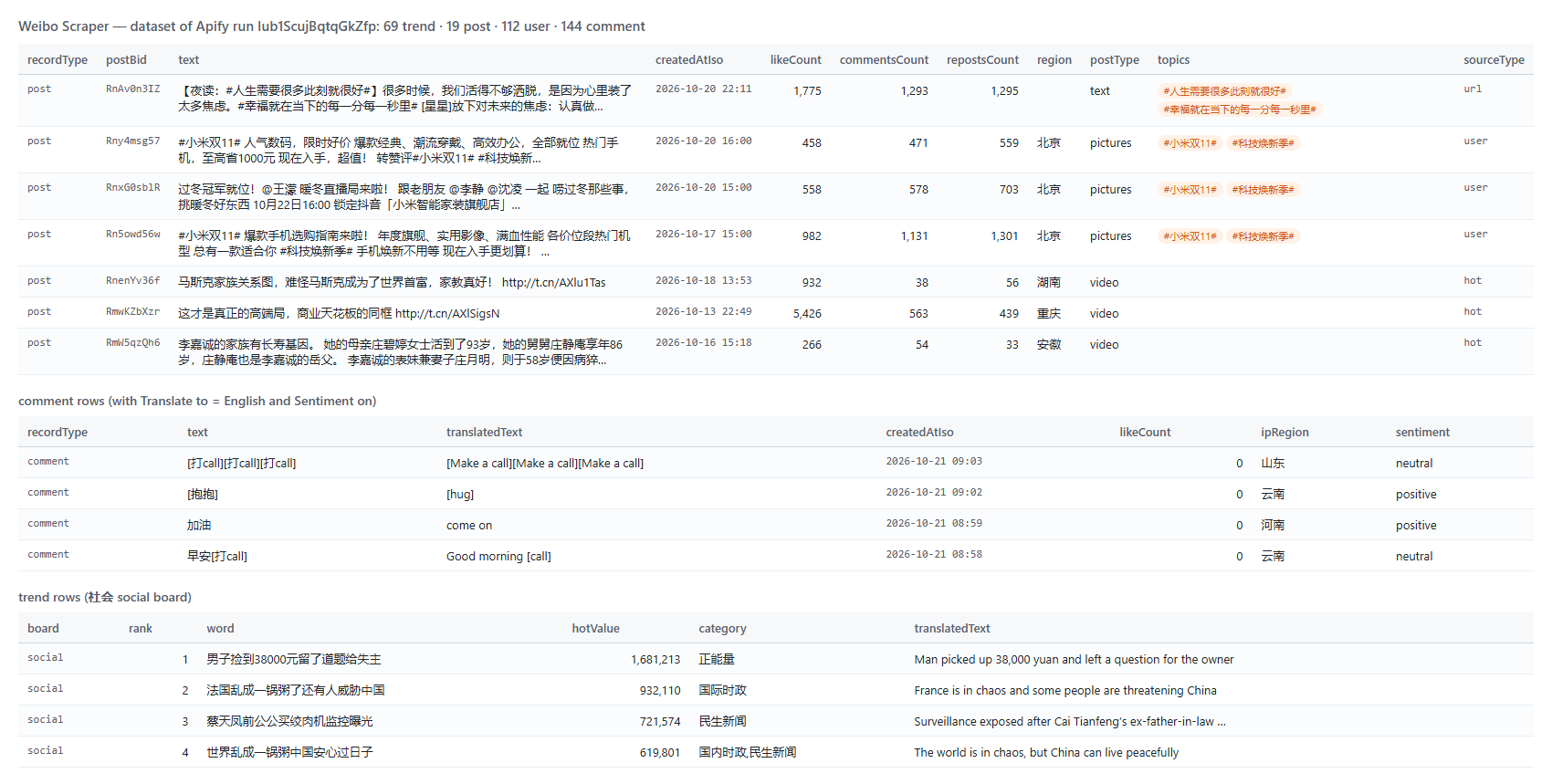
📝 Post text (text) | 🔗 Post link (postUrl, postBid) | 📅 Posted at, Beijing time (createdAtIso) |
❤️ Likes (likeCount) | 💬 Comments (commentsCount) | 🔁 Reposts (repostsCount) |
📍 Posted from (region, 发布于) | #️⃣ Topics, @mentions, links | 👀 Reads (readsCount) |
🖼️ Pictures (images) | 🎬 Video URL, length, views | 📣 Promoted flag (isPromoted) |
| 👤 Author, followers, verification | 🪪 Profile: bio, birthday, company, credit | 👥 Fans, following, likers |
💬 Comment + IP region (ipRegion) | ↩️ Replies (parentCommentId) | 🔥 Hot-search rank + hot value |
| 🏷️ Board label (新 / 热 / 沸) and category | 🙂 Sentiment (sentiment) | 🌐 Translation (translatedText) |
On a 1,000-post run for 新能源汽车, 100% of posts had text, date, likes, comments, reposts and author follower count; 80.7% had the place they were posted from; 66% had topics; 55.7% had pictures and 25.6% a video.
### How to scrape Weibo with Weibo Scraper
1. [Create a free Apify account](https://console.apify.com/sign-up) - $5 of monthly credit, no card needed.
2. Open [Weibo Scraper](https://apify.com/topapi/weibo-scraper) and click **Try for free**.
3. Type keywords into **Search keywords** (or paste account or post links), and set **Posted after** for a date window.
4. Switch on the extras you want: **Comments**, **Author profiles**, **Translate to**, **Hot-search boards**.
5. Click **Start**. Rows stream into the dataset as they are found.
6. Open **Storage** and **Export** as JSON, CSV or Excel - or put the run on a schedule with **Only new rows** on.
### ⬇️ Input
| Parameter | Type | Description |
|---|---|---|
| **🔍 What to scrape** | | Fill any of these; every box takes links, ids or names. |
| `searchKeywords` | List | Keywords or `#topics#`, e.g. `咖啡`, `#新能源汽车#`. Posts newest first, back through your date window. |
| `profileUrls` | List | Accounts: `https://weibo.com/u/2803301701`, `2803301701`, `人民日报` or a custom address like `rmrb`. |
| `postUrls` | List | Posts: `https://weibo.com/2803301701/RnAv0n3IZ`, `https://m.weibo.cn/detail/5356218505495865`, a mid or a bid. |
| `hotBoards` | Multi-select | `realtime` 热搜 (~50 + pinned), `entertainment` 文娱, `life` 生活, `social` 社会 (50 each). |
| `hotTimelineChannels` | Multi-select | The 热门 hot-post feed and its channels (社会, 财经, 科技, 汽车, 美食, ... 40 in all). |
| `searchUsers` | List | Account search by keyword (Weibo shows the first 20 accounts). |
| `searchTopics` | List | Topic search: `#topic#` names with discussions and reads. |
| `searchSuggestions` | List | What Weibo suggests under the search box, with its count. |
| `startUrls` | List | Any mix of s.weibo.com searches, m.weibo.cn links, profile, post and t.cn links. |
| **🎯 Filters** (applied by Weibo) | | |
| `searchSort` | Select | `realtime` 实时 latest first (default), `comprehensive` 综合, `hot` 热门. |
| `postedAfter` / `postedBefore` | Text | Date window, Beijing time: `2026-09-01`, `7 days`, `24 hours`, a day count. |
| **✂️ Refine results** (checked before a row is delivered) | | |
| `originalOnly`, `verifiedOnly` | Boolean | Drop reposts; keep V-verified authors only. |
| `contentType` | Select | `all`, `pictures`, `videos`, `media`, `links`, `text`. |
| `adFilter` | Select | `all`, `organic_only` (drop promoted), `promo_only`. |
| `minLikes`, `minReposts`, `minComments`, `minFollowers` | Integer | Minimums, 0 = none. |
| `provinces`, `excludeKeywords`, `matchAllWords` | List / Boolean | Posted-from places (北京, 广东, 海外), words to drop, every search word must appear. |
| **➕ Extra data** | | |
| `includeComments`, `maxComments`, `commentSort` | Boolean / Integer / Select | Comments of every delivered post; `time` = whole thread newest first (default), `hot` = hottest first. Default 20 per post. |
| `includeReplies`, `maxRepliesPerComment` | Boolean / Integer | Replies under each comment. Default 10. |
| `commentsOnly` | Boolean | Only the comments of the posts found (post rows not delivered or charged). |
| `maxLikersPerPost` | Integer | Accounts that liked each post, up to ~150. |
| `maxFollowersPerUser`, `maxFollowingPerUser` | Integer | First page of fans / followed accounts (up to 20). |
| `includeAuthorProfiles` | Boolean | One full profile row per post author. |
| `fetchFullText` | Boolean | Full text of long posts. Default on, free. |
| `sentimentAnalysis`, `extractContacts`, `geoRollup` | Boolean | Sentiment label + score; e-mail / phone / WeChat / QQ in bios; a `GEO_ROLLUP` record of posts per province. Free. |
| `translateTo` | Select | `en`, `es`, `pt`, `fr`, `de`, `ru`, `ja`, `ko`, `vi`, `id`, `th`, `ar`, `tr`, `it` - adds `translatedText`. |
| **🔁 Monitoring** | | |
| `monitorMode`, `monitorStoreName`, `followUpComments` | Boolean / Text / Boolean | Only rows earlier runs did not deliver; boards report NEW / CHANGED / EXPIRED; follow-up comments on the last 20 posts per keyword. |
| **📦 Output** | | |
| `maxResults` | Integer | All rows together; 0 = no total cap. |
| `maxPostsPerSearch`, `maxPostsPerUser`, `maxHotTimelinePosts`, `maxTopicsPerBoard` | Integer | Per keyword (default 100), per account (20), per channel (50), per board (60). |
| `includeProfile`, `includeMediaPosts` | Boolean | Profile row per account; older video and picture posts past the newest 10. |
| `compact`, `includeRaw` | Boolean | Core fields only (for AI agents); Weibo's own object as `raw`. |
| **⚙️ Advanced** | | |
| `proxyConfiguration`, `residentialFallback`, `maxConcurrency` | Proxy / Boolean / Integer | Apify datacenter proxy by default, then the container's own IP; your own proxy URLs work too. |
| 🎵 Douyin Scraper - 抖音 videos, creators, comments, hot search |
🏭 1688.com Wholesale Scraper - Chinese suppliers, prices, MOQ |
🎬 TikTok Scraper - videos, hashtags, profiles |
| 📸 Instagram Scraper - posts, reels, hashtags, profiles |
🐦 Twitter Profile Scraper - X followers, bio, verified |
🗽 Truth Social Scraper - posts, replies, profiles |
| 🔎 Facebook Search Posts Scraper - keyword, date, location |
🧭 All TopApi actors |
### Limits & empty runs
- **An account's posts:** Weibo shows a signed-out visitor an account's newest 10 posts; Weibo Scraper adds the account's older video and picture posts from its video and album tabs (3 accounts x 50 posts measured). Older text-only posts are shown to signed-in users only.
- **Lists Weibo shows signed-out visitors only in part:** account search 20 per keyword, fans and following the first page (some large accounts hide their fans), likers about 150 per post. Repost lists are not offered: Weibo shows them to signed-in users only.
- **Comments:** newest-first reads a whole thread (1,277 of 1,288 measured); hottest-first stops after about 250-300.
- **Speed:** about 2-3 posts a second for a single keyword on 256 MB; several keywords run side by side.
- **Empty dataset:** no post matched your filters or date window, the account or post does not exist (a free note in the status message and run summary), or nothing is new in monitor mode. Nothing is charged for any of these.
### FAQ
#### How many posts can Weibo Scraper get for one keyword?
As many as Weibo has in your date window: it reads newest first and steps back in time until `postedAfter` or `maxPostsPerSearch` stops it. A 3-day window for 新能源汽车 returned 1,000 posts in one run.
#### Can Weibo Scraper get Weibo comments and replies?
Yes. Switch on **Comments** (and **Replies**). Newest-first reads a whole thread; each comment carries likes, reply count, floor number and the commenter's IP region.
#### Can I track Weibo hot search (微博热搜) with Weibo Scraper?
Yes. Pick the realtime, 文娱, 生活 or 社会 board. With **Only new rows** on, each scheduled run returns topics that are NEW, CHANGED (moved rank) or EXPIRED, with rank and hot-value changes.
#### Can I run Weibo Scraper on a schedule?
Yes. Save your input as a task, open **Schedules**, pick the cadence and switch on **Only new rows**. A run that finds nothing new delivers nothing and charges nothing.
#### Can I use Weibo Scraper with the Apify API?
Yes. Use `apify-client` for [Node.js](https://apify.com/topapi/weibo-scraper/api/javascript) or [Python](https://apify.com/topapi/weibo-scraper/api/python), or call the REST API directly; the API tab has ready-to-paste code.
#### Can I use Weibo Scraper through an MCP server?
Yes. Open the [MCP tab](https://apify.com/topapi/weibo-scraper/api/mcp), connect your MCP client and ask in plain language. Switch on **Compact rows** to keep answers short.
#### Do I need a Weibo account, cookies or an API key for Weibo Scraper?
No. Weibo Scraper reads what Weibo shows any signed-out visitor; you pass keywords, links or account names and nothing else.
#### Can Weibo Scraper translate Weibo posts into English?
Yes. Set **Translate to** and each post, comment and board topic gets a `translatedText` field next to the original.
#### Why did my Weibo Scraper run return no rows?
Usually a filter or date window removed everything (the status message names the filter and the count), the account or post id does not exist, or monitor mode found nothing new since the last run.
#### Is it legal to scrape Weibo?
Weibo Scraper reads only public posts and profiles, the ones any visitor sees, and never signs in. Results can contain personal data; make sure you have a legitimate purpose for how you use them.
#### Your feedback
Found a bug or missing a field? Open an issue on the [Issues tab](https://apify.com/topapi/weibo-scraper/issues/open) - we read every one.
# Actor input Schema
## `searchKeywords` (type: `array`):
Posts that match each keyword, newest first, going back in time as far as your date window or Max posts per keyword allows. e.g. "咖啡", "#新能源汽车#", "iPhone 17".
## `profileUrls` (type: `array`):
e.g. "https://weibo.com/u/2803301701", "2803301701", "人民日报" or a custom address like "rmrb". Returns the account's profile row and posts (see Max posts per account).
## `postUrls` (type: `array`):
e.g. "https://weibo.com/2803301701/RnAv0n3IZ", "https://m.weibo.cn/detail/5356218505495865", a 16-digit mid or a 9-character bid. One full post row each (long text included).
## `hotBoards` (type: `array`):
Weibo's live boards: rank, topic, hot value, label (新/热/沸), category. Leave empty for none.
## `hotTimelineChannels` (type: `array`):
Weibo's 热门微博 feed and its channels: the posts Weibo is pushing right now, as full post rows. Leave empty for none.
## `searchUsers` (type: `array`):
Account search, e.g. "咖啡", "小米". Weibo shows a signed-out visitor the first 20 accounts per keyword.
## `searchTopics` (type: `array`):
Topic (#hashtag#) search: topic name, discussions and reads, e.g. "咖啡" finds #咖啡#, #咖啡店#...
## `searchSuggestions` (type: `array`):
What Weibo suggests for a term (the dropdown under the search box), with Weibo's count for each suggestion.
## `startUrls` (type: `array`):
Paste any mix of s.weibo.com searches, m.weibo.cn links, profile, post and t.cn short links; each is routed to the right job.
## `searchSort` (type: `string`):
Which search tab to read. Latest walks back through time minute by minute; the other two follow Weibo's own ranking.
## `postedAfter` (type: `string`):
Date window start, Beijing time: "2026-09-01", "7 days", "24 hours" or a day count (1 = today). A search walks back until here.
## `postedBefore` (type: `string`):
Date window end (the whole day counts), e.g. "2026-09-30". A search starts here and walks back.
## `originalOnly` (type: `boolean`):
Drop reposts.
## `verifiedOnly` (type: `boolean`):
Keep posts (and accounts) with Weibo's V verification.
## `contentType` (type: `string`):
Keep only posts of this kind.
## `adFilter` (type: `string`):
Weibo marks paid placements; keep, drop or study them.
## `minLikes` (type: `integer`):
Skip posts with fewer likes. 0 = no minimum.
## `minReposts` (type: `integer`):
Skip posts with fewer reposts. 0 = no minimum.
## `minComments` (type: `integer`):
Skip posts with fewer comments. 0 = no minimum.
## `minFollowers` (type: `integer`):
Skip posts (and accounts) whose author has fewer followers. 0 = no minimum.
## `provinces` (type: `array`):
Keep posts Weibo shows as published from these places (发布于), e.g. "北京", "广东", "海外". Posts with no place shown are dropped when this is set.
## `excludeKeywords` (type: `array`):
Drop posts whose text contains any of these, e.g. "抽奖", "转发".
## `matchAllWords` (type: `boolean`):
For a multi-word search, keep only posts that contain every word.
## `includeComments` (type: `boolean`):
Comments of every post delivered (and of your post links). Weibo serves full threads to signed-out visitors in newest-first order.
## `maxComments` (type: `integer`):
Top-level comments per post (replies are counted separately).
## `commentSort` (type: `string`):
Newest first reads a whole thread (1,218 of 1,229 measured); hottest first is shorter.
## `includeReplies` (type: `boolean`):
Also read each comment's replies.
## `maxRepliesPerComment` (type: `integer`):
Replies per comment.
## `commentsOnly` (type: `boolean`):
Deliver only the comments of the posts found (post rows are not delivered or charged).
## `maxLikersPerPost` (type: `integer`):
Accounts that liked each post. Weibo shows a signed-out visitor about 150. 0 = off.
## `maxFollowersPerUser` (type: `integer`):
First page of an account's fans (Weibo shows signed-out visitors page 1 only). 0 = off.
## `maxFollowingPerUser` (type: `integer`):
First page of the accounts it follows (page 1 only for signed-out visitors). 0 = off.
## `includeAuthorProfiles` (type: `boolean`):
One full profile row (followers, posts, bio, birthday, company, credit level) per post author, once per run.
## `fetchFullText` (type: `boolean`):
Long posts arrive cut at ~140 characters; this reads the whole text (free).
## `sentimentAnalysis` (type: `boolean`):
A lexicon sentiment label and score (-1 to 1) on every post and comment (free).
## `extractContacts` (type: `boolean`):
E-mail, phone, WeChat and QQ written in account bios (free).
## `translateTo` (type: `string`):
Machine-translates post, comment and topic text into `translatedText` - the translation add-on per translated row.
## `geoRollup` (type: `boolean`):
A GEO_ROLLUP record: how many posts came from each province (and how many were promoted).
## `monitorMode` (type: `boolean`):
Posts, comments, accounts not delivered by an earlier run with the same store; boards return NEW / CHANGED / EXPIRED topics. A run that finds nothing new delivers and charges nothing.
## `monitorStoreName` (type: `string`):
Named key-value store that remembers delivered rows (one per schedule).
## `followUpComments` (type: `boolean`):
Monitor + Comments: also read new comments on the last 20 posts earlier runs delivered for each keyword.
## `maxResults` (type: `integer`):
All row types together. 0 = no total cap (the per-keyword / per-account caps still apply).
## `maxPostsPerSearch` (type: `integer`):
Posts per keyword; a search walks back in time until this or your date window is reached.
## `maxPostsPerUser` (type: `integer`):
Posts per account. Signed out, Weibo shows an account's newest 10 posts plus its video and picture posts. 0 = profile only.
## `includeProfile` (type: `boolean`):
One profile row per account in Accounts.
## `includeMediaPosts` (type: `boolean`):
Past an account's newest 10, read its video and album tabs for older posts.
## `maxHotTimelinePosts` (type: `integer`):
Posts per hot-feed channel.
## `maxTopicsPerBoard` (type: `integer`):
Topics per hot-search board.
## `compact` (type: `boolean`):
Core fields only, sized for AI agents and MCP.
## `includeRaw` (type: `boolean`):
Adds Weibo's own post / profile object as `raw`.
## `proxyConfiguration` (type: `object`):
Apify Proxy (datacenter) by default; the run falls back to the container's own IP, then (to finish a run) residential.
## `residentialFallback` (type: `boolean`):
If datacenter and direct stop answering mid-run, finish on residential IPs (spend kept under 7% of what the run already billed).
## `maxConcurrency` (type: `integer`):
Parallel requests.
## Actor input object example
```json
{
"searchKeywords": [
"咖啡"
],
"hotBoards": [
"realtime"
],
"searchSort": "realtime",
"originalOnly": false,
"verifiedOnly": false,
"contentType": "all",
"adFilter": "all",
"matchAllWords": false,
"includeComments": false,
"maxComments": 20,
"commentSort": "time",
"includeReplies": false,
"maxRepliesPerComment": 10,
"commentsOnly": false,
"maxLikersPerPost": 0,
"maxFollowersPerUser": 0,
"maxFollowingPerUser": 0,
"includeAuthorProfiles": false,
"fetchFullText": true,
"sentimentAnalysis": false,
"extractContacts": false,
"translateTo": "",
"geoRollup": false,
"monitorMode": false,
"monitorStoreName": "weibo-monitor",
"followUpComments": false,
"maxResults": 0,
"maxPostsPerSearch": 20,
"maxPostsPerUser": 20,
"includeProfile": true,
"includeMediaPosts": true,
"maxHotTimelinePosts": 50,
"maxTopicsPerBoard": 60,
"compact": false,
"includeRaw": false,
"proxyConfiguration": {
"useApifyProxy": true
},
"residentialFallback": true,
"maxConcurrency": 3
}
```
# Actor output Schema
## `rows` (type: `string`):
The dataset: post, user, comment and trend rows (recordType tells them apart).
## `summary` (type: `string`):
Per-input counts (read, filtered, delivered), Weibo's guest limits met, HTTP and egress usage.
# API
You can run this Actor programmatically using our API. Below are code examples in JavaScript, Python, and CLI, as well as the OpenAPI specification and MCP server setup.
## JavaScript example
```javascript
import { ApifyClient } from 'apify-client';
// Initialize the ApifyClient with your Apify API token
// Replace the '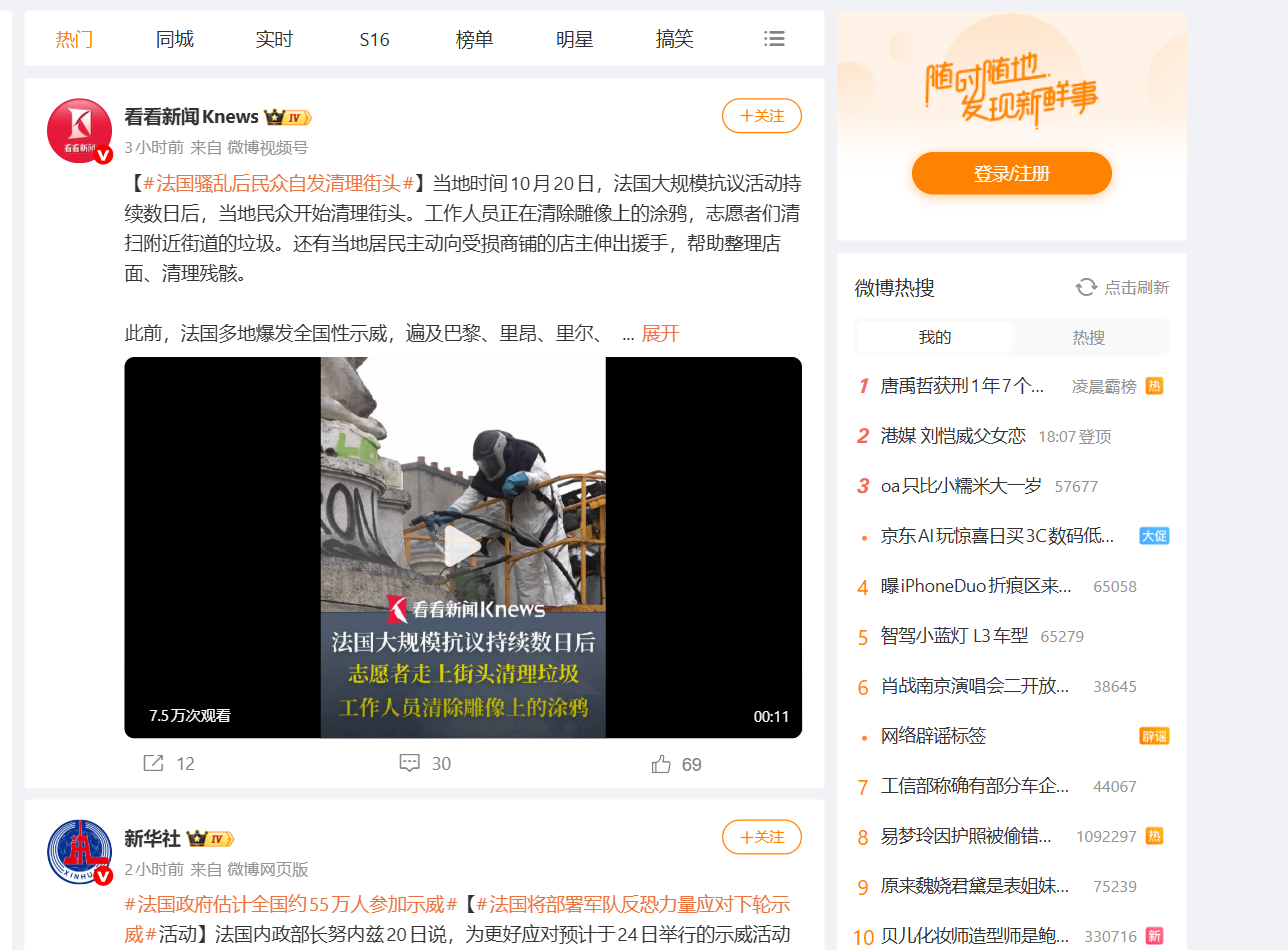
 #### Input JSON
```json
{
"searchKeywords": ["新能源汽车", "#小米汽车#"],
"postedAfter": "7 days",
"maxPostsPerSearch": 500,
"includeComments": true,
"maxComments": 50,
"hotBoards": ["realtime"],
"translateTo": "en"
}
```
#### Use the latest-first order with a date window
`searchSort: "realtime"` reads posts newest first and keeps going back in time until `postedAfter` or `maxPostsPerSearch` stops it. **Do:** `{"searchKeywords": ["咖啡"], "postedAfter": "2026-10-01", "postedBefore": "2026-10-07"}` · **Don't:** expect `comprehensive` to cover a whole week evenly; it follows Weibo's relevance ranking.
#### Search in Chinese for brands
Weibo indexes Chinese text, so `小米` finds many more posts than `Xiaomi`. Put both in `searchKeywords`; a post found by two keywords is delivered once.
#### Paste any Weibo link - it is routed for you
A profile link in the keyword box, a post link in the account box, an `s.weibo.com` search or a `t.cn` short link all go to the right job; a line that is not a Weibo link gets a free error row explaining why.
### ⬆️ Output
Each record is one dataset item. A post row (real, shortened):
```json
{
"recordType": "post",
"postId": "5356218505495865",
"postBid": "RnAv0n3IZ",
"postUrl": "https://weibo.com/2803301701/RnAv0n3IZ",
"text": "【夜读:#人生需要很多此刻就很好#】很多时候,我们活得不够洒脱 ...",
"createdAtIso": "2026-10-20T22:11:08+08:00",
"likeCount": 1775,
"commentsCount": 1293,
"repostsCount": 1295,
"region": null,
"topics": ["人生需要很多此刻就很好", "幸福就在当下的每一分每一秒里"],
"postType": "text",
"authorId": "2803301701",
"authorName": "人民日报",
"authorFollowers": 158103656,
"authorVerified": true,
"sourceType": "url"
}
```
A comment row: `{"recordType": "comment", "commentId": "5356353963165627", "postId": "5356218505495865", "text": "[心]", "createdAtIso": "2026-10-21T07:09:24+08:00", "likeCount": 0, "replyCount": 0, "floorNumber": 1424, "ipRegion": "辽宁", "isReply": false}`. A trend row: `{"recordType": "trend", "board": "realtime", "rank": 1, "word": "男子捡到38000元留了道题给失主", "hotValue": 1169412, "label": "热"}`.
#### Fields
Fill measured on real runs: posts = 1,020 rows (a 1,000-post search + the prefill), comments = 1,146 rows, accounts = 115 rows of all six kinds, trends = 69 rows.
| Field | Type | What it is | Fill |
|---|---|---|---|
| `postId`, `postBid`, `postUrl`, `postUrlMobile` | string | Ids and links of the post | 100% |
| `text`, `textLength`, `isLongText`, `isTruncated` | string / number / boolean | Plain text (full text of long posts) | 100% |
| `createdAtIso`, `createdAtTimestamp`, `createdAt` | string / number | When it was posted (Beijing time) | 100% |
| `likeCount` (= `attitudesCount`), `commentsCount`, `repostsCount` | number | Engagement | 100% |
| `readsCount` | number | Reads (posts read by link) | posts by link |
| `region` | string | Where Weibo says it was posted from (发布于) | 80.7% |
| `topics`, `mentions`, `links` | array | #topics#, @mentions, outside links | 66% / 4% / 31% |
| `images`, `picCount` | array / number | Pictures | 55.7% |
| `videoUrl`, `videoStreams`, `videoDuration`, `videoViews`, `videoTitle`, `videoCover` | string / object / number | Video posts | 25.6% |
| `postType`, `isRepost`, `repostOf`, `isPromoted`, `cardType`, `cardTitle`, `cardUrl`, `source`, `editedCount` | mixed | Kind of post, repost source, promoted flag, attached card, client, edits | 100% (cards 42%) |
| `authorId`, `authorName`, `authorFollowers`, `authorFollowing`, `authorPostsCount`, `authorVerified`, `authorVerifiedReason`, `authorDescription`, `authorGender` | mixed | Author | 100% (bio 72%, reason 59%) |
| `commentId`, `postId`, `text`, `createdAtIso`, `likeCount`, `replyCount`, `floorNumber` | mixed | Comment | 100% |
| `ipRegion` | string | Where the comment came from (来自) | 99.6% |
| `isReply`, `parentCommentId`, `replyToUserName`, `isByPostAuthor`, `likedByPostAuthor`, `picUrls` | mixed | Thread links, author flags, pictures | as present |
| `userId`, `screenName`, `followersCount`, `friendsCount`, `verified`, `relation` | mixed | Account rows (profile, author, fan, following, liker, search) | 100% |
| `statusesCount`, `description`, `gender`, `verifiedReason` | mixed | Fuller account fields (likers carry fewer) | 30-36% of all account rows |
| `birthday`, `company`, `accountCreatedAt`, `sunshineCredit`, `location`, `labels` | string / array | Profile and author rows only | on profile rows |
| `board`, `rank`, `word`, `hotValue`, `label`, `category`, `isPromoted` | mixed | Hot-search rows | word 100%, hotValue 85-98% |
| `discussions`, `reads` | number | Topic-search rows | on topic rows |
| `change`, `rankDelta`, `hotValueDelta`, `previousRank`, `peakRank`, `minutesOnBoard` | mixed | Monitor mode on boards | monitor runs |
| `sentiment`, `translatedText`, `contacts` | object / string | When those extras are on | when on |
### How can I use Weibo data?
- 📣 **Brand and social-listening teams** - track a brand name every day on the latest-first order, with likes, reposts and where each post came from
- 🔥 **Trend and news desks** - record the 热搜 boards every 10 minutes with monitor mode and get only what moved
- 🧭 **China-market researchers** - collect every post for a topic inside a date range, then the comment threads under the biggest ones
- 🤝 **KOL and agency teams** - profiles with followers, posts, verification and credit level, plus their recent posts and comment sentiment
- 🌐 **Global teams** - translate posts, comments and board topics into English as they are collected
- 🤖 **AI and data teams** - Chinese social text with dates, regions and sentiment, compact rows for LLM pipelines
### How much does it cost to scrape Weibo?
Weibo Scraper is pay-per-result with **no start fee**:
| Row type | Price per 1,000 |
|---|---:|
| Post | $0.81 |
| Account (profile, author, fan, following, liker, account search) | $0.81 |
| Comment or reply | $0.45 |
| Hot-search topic, topic-search row or suggestion | $0.90 |
| Translation (per row that carries `translatedText`) | $2.70 |
| Example | Cost |
|---|---:|
| 100 posts for one keyword | $0.081 |
| 1,000 posts in a date window | $0.81 |
| 1,000 comments of one post | $0.45 |
| The realtime hot-search board (~50 topics) | ~$0.046 |
| 100 posts translated into English | $0.351 |
Full text of long posts, sentiment, contacts in bios and the province rollup are free. Filtered posts and rows not delivered are not charged. Measured speed on the default 256 MB: 100 posts in 28 s, 1,000 posts in 7 min 47 s, 1,002 comments in 2 min 44 s.
### Integrations, API, scheduling & MCP
- **Schedules:** run Weibo Scraper hourly, daily or every 10 minutes from **Schedules**; with **Only new rows** each run returns just what is new.
- **Webhooks:** call a URL when a run finishes to push rows into your CRM, Slack or a sheet.
- **No-code:** Make, Zapier, n8n, Google Sheets, Airtable and Slack through [Apify integrations](https://docs.apify.com/integrations).
- **API:** start runs and read datasets from Node.js or Python with `apify-client` - code on the [API tab](https://apify.com/topapi/weibo-scraper/api/python), reference at [docs.apify.com/api/v2](https://docs.apify.com/api/v2).
- **MCP / AI agents:** connect Claude, Cursor or any MCP client through the [MCP tab](https://apify.com/topapi/weibo-scraper/api/mcp) and ask for Weibo posts or hot search in plain language.
### More TopApi scrapers
#### Input JSON
```json
{
"searchKeywords": ["新能源汽车", "#小米汽车#"],
"postedAfter": "7 days",
"maxPostsPerSearch": 500,
"includeComments": true,
"maxComments": 50,
"hotBoards": ["realtime"],
"translateTo": "en"
}
```
#### Use the latest-first order with a date window
`searchSort: "realtime"` reads posts newest first and keeps going back in time until `postedAfter` or `maxPostsPerSearch` stops it. **Do:** `{"searchKeywords": ["咖啡"], "postedAfter": "2026-10-01", "postedBefore": "2026-10-07"}` · **Don't:** expect `comprehensive` to cover a whole week evenly; it follows Weibo's relevance ranking.
#### Search in Chinese for brands
Weibo indexes Chinese text, so `小米` finds many more posts than `Xiaomi`. Put both in `searchKeywords`; a post found by two keywords is delivered once.
#### Paste any Weibo link - it is routed for you
A profile link in the keyword box, a post link in the account box, an `s.weibo.com` search or a `t.cn` short link all go to the right job; a line that is not a Weibo link gets a free error row explaining why.
### ⬆️ Output
Each record is one dataset item. A post row (real, shortened):
```json
{
"recordType": "post",
"postId": "5356218505495865",
"postBid": "RnAv0n3IZ",
"postUrl": "https://weibo.com/2803301701/RnAv0n3IZ",
"text": "【夜读:#人生需要很多此刻就很好#】很多时候,我们活得不够洒脱 ...",
"createdAtIso": "2026-10-20T22:11:08+08:00",
"likeCount": 1775,
"commentsCount": 1293,
"repostsCount": 1295,
"region": null,
"topics": ["人生需要很多此刻就很好", "幸福就在当下的每一分每一秒里"],
"postType": "text",
"authorId": "2803301701",
"authorName": "人民日报",
"authorFollowers": 158103656,
"authorVerified": true,
"sourceType": "url"
}
```
A comment row: `{"recordType": "comment", "commentId": "5356353963165627", "postId": "5356218505495865", "text": "[心]", "createdAtIso": "2026-10-21T07:09:24+08:00", "likeCount": 0, "replyCount": 0, "floorNumber": 1424, "ipRegion": "辽宁", "isReply": false}`. A trend row: `{"recordType": "trend", "board": "realtime", "rank": 1, "word": "男子捡到38000元留了道题给失主", "hotValue": 1169412, "label": "热"}`.
#### Fields
Fill measured on real runs: posts = 1,020 rows (a 1,000-post search + the prefill), comments = 1,146 rows, accounts = 115 rows of all six kinds, trends = 69 rows.
| Field | Type | What it is | Fill |
|---|---|---|---|
| `postId`, `postBid`, `postUrl`, `postUrlMobile` | string | Ids and links of the post | 100% |
| `text`, `textLength`, `isLongText`, `isTruncated` | string / number / boolean | Plain text (full text of long posts) | 100% |
| `createdAtIso`, `createdAtTimestamp`, `createdAt` | string / number | When it was posted (Beijing time) | 100% |
| `likeCount` (= `attitudesCount`), `commentsCount`, `repostsCount` | number | Engagement | 100% |
| `readsCount` | number | Reads (posts read by link) | posts by link |
| `region` | string | Where Weibo says it was posted from (发布于) | 80.7% |
| `topics`, `mentions`, `links` | array | #topics#, @mentions, outside links | 66% / 4% / 31% |
| `images`, `picCount` | array / number | Pictures | 55.7% |
| `videoUrl`, `videoStreams`, `videoDuration`, `videoViews`, `videoTitle`, `videoCover` | string / object / number | Video posts | 25.6% |
| `postType`, `isRepost`, `repostOf`, `isPromoted`, `cardType`, `cardTitle`, `cardUrl`, `source`, `editedCount` | mixed | Kind of post, repost source, promoted flag, attached card, client, edits | 100% (cards 42%) |
| `authorId`, `authorName`, `authorFollowers`, `authorFollowing`, `authorPostsCount`, `authorVerified`, `authorVerifiedReason`, `authorDescription`, `authorGender` | mixed | Author | 100% (bio 72%, reason 59%) |
| `commentId`, `postId`, `text`, `createdAtIso`, `likeCount`, `replyCount`, `floorNumber` | mixed | Comment | 100% |
| `ipRegion` | string | Where the comment came from (来自) | 99.6% |
| `isReply`, `parentCommentId`, `replyToUserName`, `isByPostAuthor`, `likedByPostAuthor`, `picUrls` | mixed | Thread links, author flags, pictures | as present |
| `userId`, `screenName`, `followersCount`, `friendsCount`, `verified`, `relation` | mixed | Account rows (profile, author, fan, following, liker, search) | 100% |
| `statusesCount`, `description`, `gender`, `verifiedReason` | mixed | Fuller account fields (likers carry fewer) | 30-36% of all account rows |
| `birthday`, `company`, `accountCreatedAt`, `sunshineCredit`, `location`, `labels` | string / array | Profile and author rows only | on profile rows |
| `board`, `rank`, `word`, `hotValue`, `label`, `category`, `isPromoted` | mixed | Hot-search rows | word 100%, hotValue 85-98% |
| `discussions`, `reads` | number | Topic-search rows | on topic rows |
| `change`, `rankDelta`, `hotValueDelta`, `previousRank`, `peakRank`, `minutesOnBoard` | mixed | Monitor mode on boards | monitor runs |
| `sentiment`, `translatedText`, `contacts` | object / string | When those extras are on | when on |
### How can I use Weibo data?
- 📣 **Brand and social-listening teams** - track a brand name every day on the latest-first order, with likes, reposts and where each post came from
- 🔥 **Trend and news desks** - record the 热搜 boards every 10 minutes with monitor mode and get only what moved
- 🧭 **China-market researchers** - collect every post for a topic inside a date range, then the comment threads under the biggest ones
- 🤝 **KOL and agency teams** - profiles with followers, posts, verification and credit level, plus their recent posts and comment sentiment
- 🌐 **Global teams** - translate posts, comments and board topics into English as they are collected
- 🤖 **AI and data teams** - Chinese social text with dates, regions and sentiment, compact rows for LLM pipelines
### How much does it cost to scrape Weibo?
Weibo Scraper is pay-per-result with **no start fee**:
| Row type | Price per 1,000 |
|---|---:|
| Post | $0.81 |
| Account (profile, author, fan, following, liker, account search) | $0.81 |
| Comment or reply | $0.45 |
| Hot-search topic, topic-search row or suggestion | $0.90 |
| Translation (per row that carries `translatedText`) | $2.70 |
| Example | Cost |
|---|---:|
| 100 posts for one keyword | $0.081 |
| 1,000 posts in a date window | $0.81 |
| 1,000 comments of one post | $0.45 |
| The realtime hot-search board (~50 topics) | ~$0.046 |
| 100 posts translated into English | $0.351 |
Full text of long posts, sentiment, contacts in bios and the province rollup are free. Filtered posts and rows not delivered are not charged. Measured speed on the default 256 MB: 100 posts in 28 s, 1,000 posts in 7 min 47 s, 1,002 comments in 2 min 44 s.
### Integrations, API, scheduling & MCP
- **Schedules:** run Weibo Scraper hourly, daily or every 10 minutes from **Schedules**; with **Only new rows** each run returns just what is new.
- **Webhooks:** call a URL when a run finishes to push rows into your CRM, Slack or a sheet.
- **No-code:** Make, Zapier, n8n, Google Sheets, Airtable and Slack through [Apify integrations](https://docs.apify.com/integrations).
- **API:** start runs and read datasets from Node.js or Python with `apify-client` - code on the [API tab](https://apify.com/topapi/weibo-scraper/api/python), reference at [docs.apify.com/api/v2](https://docs.apify.com/api/v2).
- **MCP / AI agents:** connect Claude, Cursor or any MCP client through the [MCP tab](https://apify.com/topapi/weibo-scraper/api/mcp) and ask for Weibo posts or hot search in plain language.
### More TopApi scrapers