

Twitter Profile Scraper - X Followers, Bio & Verified Badge
Under maintenancePricing
from $0.14 / 1,000 profiles
Twitter Profile Scraper - X Followers, Bio & Verified Badge
Under maintenanceScrape X (Twitter) profiles in bulk from handles, URLs or ids: followers, following, posts, likes and listed counts, bio, website, location, join date, verified type, pinned post and recent activity. No login or cookies. Monitor mode returns only changed profiles.
Pricing
from $0.14 / 1,000 profiles
Rating
0.0
(0)
Developer

Top Api
Maintained by CommunityActor stats
0
Bookmarked
8
Total users
5
Monthly active users
17 days ago
Last modified
Categories
Share
What does Twitter Profile Scraper do?
Twitter Profile Scraper extracts public X (Twitter) profiles from x.com and turns a list of handles, profile URLs or user ids into structured rows: one account with its followers, following, posts, likes and listed counts, bio, website, location, join date, verified badge, pinned post and recent activity. Built for influencer marketers, sales and lead-gen teams, and analysts who need clean Twitter profile data without copying it by hand.
X Profile Scraper - Twitter Profile Scraper - X.com User Scraper - Twitter Follower Count Checker
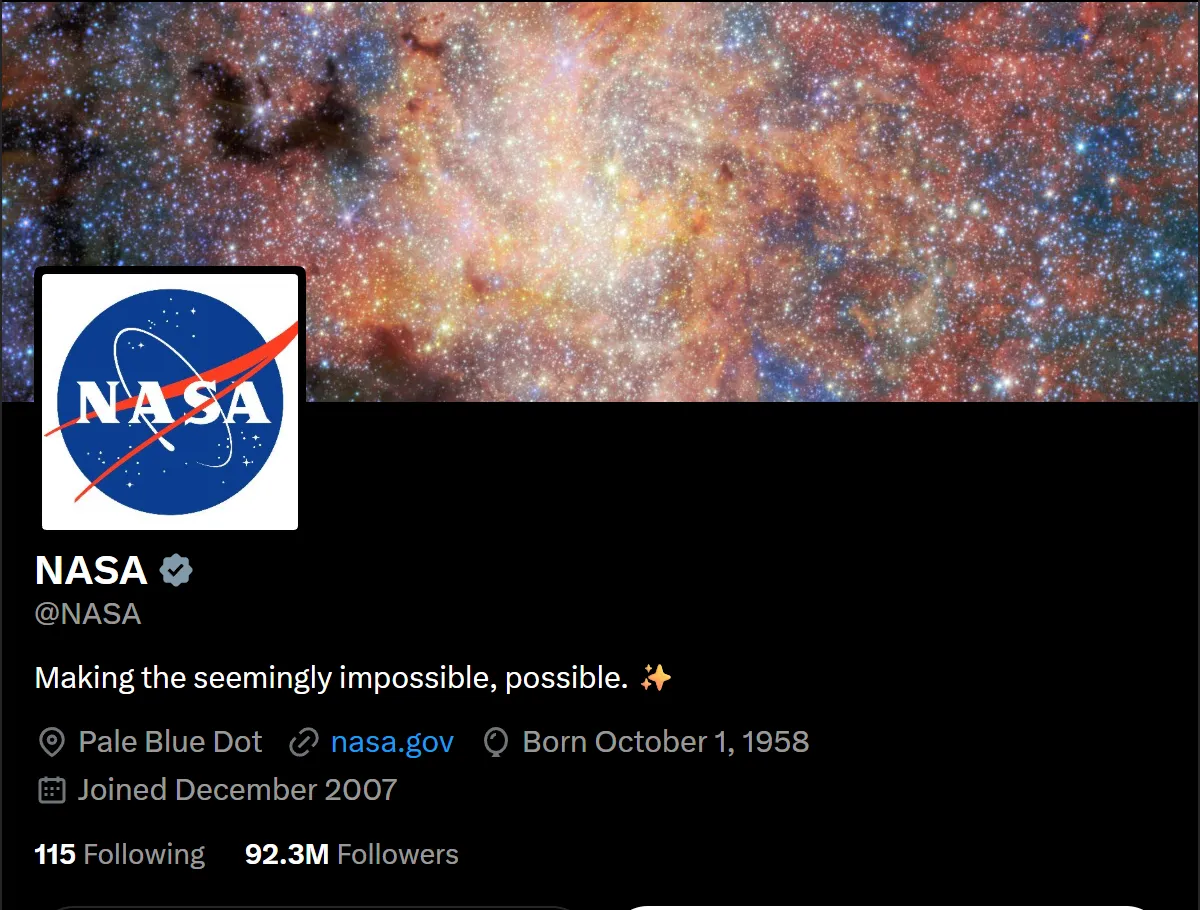
- Full Twitter profile per row: id, handle, display name, bio with links expanded, website, location, followers, following, posts, likes, listed and media counts, join date, avatar and banner.
- Verification and status: blue, Business (gold) and Government (grey) check marks, protected accounts, affiliate badges, plus a status row for handles that do not exist or are suspended.
- Activity signals from the same page, at no extra request: last post date, days since the last post, average likes, replies, reposts and views of the latest posts, and an engagement rate, all read from the same page.
- No login, cookies or X API key: paste handles,
@handles, x.com or twitter.com URLs, or numeric ids. - Monitor mode: re-check the same accounts on a schedule and get only the profiles whose followers, posts, bio or badge changed, with the deltas.
- Pay only for delivered profiles: no start fee.
- Export anywhere: JSON, CSV, Excel, XML; schedules, webhooks, Make, Zapier, n8n, Google Sheets, Slack, the Apify API and MCP.
What data can you get from an X (Twitter) profile?
| 🆔 User id (`id`) | 👤 Handle (`userName`) | 📝 Display name |
| 💬 Bio (`description`) | 🔗 Bio links and mentions | 🌐 Website |
| 📍 Location | 📅 Join date (`createdAt`) | 👥 Followers |
| ➡️ Following | 🧾 Posts count (`statusesCount`) | ❤️ Likes count (`favouritesCount`) |
| 📋 Listed count | 🖼️ Media count | ✅ Verified badge and type |
| 🔒 Protected flag | 🏢 Affiliate badge | 📌 Pinned post id |
| 🧑 Avatar (400x400) and banner | 🕒 Last post date | 📈 Engagement rate |
| 👍 Average likes, replies, reposts | 👀 Average views | 📰 Latest 5 posts (add-on) |
On a 22-profile test run every row had the id, handle, name, follower, following and post counts, join date and verification fields; 86% had a bio, 73% a website, 82% likes/listed/media counts and 91% a last-post date.
How to scrape Twitter profiles with Twitter Profile Scraper
- Create a free Apify account: $5 of monthly credit, no card needed.
- Open Twitter Profile Scraper and click Try for free.
- Paste handles, profile URLs or ids into Handles, profile URLs or user ids, one per line.
- Optionally set filters (minimum followers, verified only, bio keywords) and Max profiles to deliver.
- Click Start. Profiles stream into the dataset in about a second each.
- Open the Storage tab and Export as JSON, CSV or Excel, or let a schedule run it for you.
⬇️ Input
| Parameter | Type | Description |
|---|---|---|
| 🔍 What to scrape | ||
handles | List | Required (prefilled with nasa, apify). Handles, @handles, x.com / twitter.com profile URLs, x.com/i/user/<id> links or id:<number>. |
| ✂️ Refine results | ||
minFollowers / maxFollowers | Integer | Follower range. Default 0 = no limit. |
verifiedOnly | Boolean | Only accounts with a blue, Business or Government check mark. Default false |
withWebsiteOnly | Boolean | Only accounts that list a website. Default false |
bioKeywords | List | Only accounts whose bio or name contains one of these words. |
excludeProtected | Boolean | Drop protected (locked) accounts. Default false (they are delivered with their public counts). |
activeWithinDays | Integer | Only accounts whose latest post or reply is at most N days old. Default 0 = any. |
| ➕ Extra data | ||
includeLatestTweets | Boolean | Adds latestPosts: up to 5 latest original posts and replies. Charged as posts. |
tweetsPerProfile | Integer | 1-5 posts to attach. Default 5 |
includePinnedTweet | Boolean | Adds the full pinnedPost. Charged as posts (once per profile, together with latest posts). |
includeUnavailable | Boolean | Status rows for missing, suspended or invalid inputs. Default false |
| 🔁 Monitoring | ||
monitorMode | Boolean | Deliver only accounts that are new or changed since the last run. Pair with a schedule. |
monitorStoreName | String | Key-value store that keeps the per-account memory. Default x-profile-monitor |
| 📦 Output | ||
maxItems | Integer | Stop after this many delivered profiles. Default 0 = the whole list. |
compact | Boolean | Core fields only, sized for AI agents and MCP. |
| ⚙️ Advanced | ||
proxyConfiguration | Proxy | Default: no proxy, with automatic fallback to the Apify datacenter and residential pools if X refuses a request. |
maxConcurrency | Integer | Profiles loaded in parallel, 1-20. Default 8 |
Input JSON
Paste Twitter handles, URLs or ids in one list
Every line is resolved on its own, so a spreadsheet column works as it is. Do: nasa, @nasa, https://twitter.com/nasa, https://x.com/nasa/status/123 (the handle is read from the URL). Don't: paste search or hashtag links such as x.com/search?q=nasa; they are reported as invalid input.
Prefix short numeric Twitter ids with id:
X handles can be all digits, so a short number like 12345 is looked up as a handle. A 16-20 digit number is read as a user id automatically; for older, shorter ids write id:11348282 or paste x.com/i/user/11348282. If you list a handle and its id, the profile is delivered once.
Use filters to keep only the Twitter profiles you want
minFollowers, verifiedOnly, withWebsiteOnly, bioKeywords, excludeProtected and activeWithinDays run after the profile is read. A list of 1,000 handles filtered down to 200 delivers 200 profiles.
⬆️ Output
Every X account becomes one dataset item. Here is the table view of a real run:
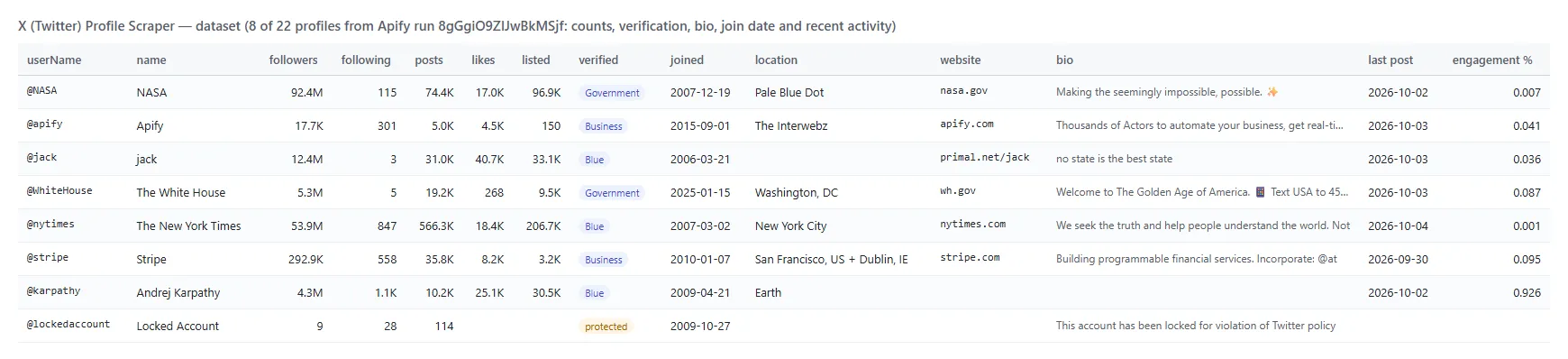
And one row as JSON (shortened):
Fields
Fill is measured on a 22-profile platform run (big brands, government accounts, small personal accounts and one protected account).
| Field | Type | What it is | Fill |
|---|---|---|---|
id, userName, name, url | string | Identity; id stays stable when a handle changes | 100% |
followers, following, statusesCount | integer | Follower, following and post counts | 100% |
favouritesCount, listedCount, mediaCount | integer | Likes given, public lists, media posts (countsSource says where they came from) | 82% |
description, descriptionUrls, descriptionMentions | string, list | Bio with t.co links expanded, plus its links and @mentions | 86% |
website, websiteDisplay | string | Profile link field | 73% |
location | string | What the owner typed | 55% |
createdAt, accountAgeDays | string, integer | Join date (ISO 8601) | 100% |
isBlueVerified, isVerified, verifiedType | boolean, string | Check mark; Business or Government when gold or grey | 100% (type 41%) |
protected, possiblySensitive | boolean | Locked account, sensitive-media flag | 100% |
profilePicture, coverPicture, profileImageShape | string | Avatar 400x400, banner, Circle or Square | 100% / 86% / 100% |
affiliation, businessAffiliatesCount | object, integer | Affiliate badge, a verified organisation's affiliate count | 9% / 41% |
pinnedTweetId, pinnedTweetIds | string, list | The pinned post | 50% |
birthdate | string | Only when the owner made it public | 5% |
lastPostAt, daysSinceLastPost | string, integer | Latest original post or reply | 91% |
recentAvgLikes, recentAvgReplies, recentAvgReposts, recentAvgViews | number | Averages over the latest posts | 91% (views 77%) |
recentEngagementRatePct | number | (likes + replies + reposts + quotes) / followers x 100 | 91% |
followersToFollowingRatio, postsPerDay | number | Derived ratios | 100% |
latestPosts, pinnedPost | list, object | With the posts add-on | 91% / 50% |
Latest and pinned Twitter posts (add-on)
With includeLatestTweets, each profile gets the latest original posts and replies (no reposts) that its public page shows: 5, or 4 when the account has a pinned post, which arrives separately as pinnedPost.
How can I use Twitter profile data?
- 🎯 Influencer marketers: shortlist creators by follower range, engagement rate and last post date, and skip dormant accounts.
- 💼 Sales and lead-gen teams: enrich a list of company or founder handles with website, location and verified status.
- 📊 Brand and competitor analysts: track follower growth and posting cadence of competitors with monitor mode and a daily schedule.
- 🔎 Researchers and journalists: check account age, verification type, affiliate badges and suspension status in bulk.
- 🤖 AI and data teams: feed compact profile rows to an LLM agent through the API or MCP.
- 🧹 CRM hygiene: find handles that were renamed (
idstays the same), suspended or deleted.
How much does it cost to scrape Twitter profiles?
Twitter Profile Scraper is pay-per-result: $0.00014 per profile ($0.14 per 1,000 profiles), no start fee. Latest and pinned posts are an optional add-on at $0.00065 per profile that receives them.
| Profiles | Profile cost | With posts add-on |
|---|---|---|
| 10 | $0.0014 | $0.0079 |
| 100 | $0.014 | $0.079 |
| 1,000 | $0.14 | $0.79 |
| 10,000 | $1.40 | $7.90 |
There is nothing else to pay: Apify platform usage is included in these prices. A 25-profile run took 15 seconds on 256 MB.
Integrations, API, scheduling & MCP
- Schedules: run Twitter Profile Scraper hourly, daily or weekly from the Schedules tab; turn on
monitorModeto get only changed profiles. - Webhooks: fire a URL when a run finishes and push new rows to your CRM, a sheet or Slack.
- No-code: Make, Zapier, n8n, Google Sheets, Airtable and Slack via Apify integrations.
- API: call it from Node.js or Python with
apify-client; code is on the API tab and in the Apify API reference. - MCP / AI agents: connect Claude, Cursor or any MCP client through the MCP tab and ask for Twitter profiles in plain language;
compactkeeps the payload small.
A daily follower tracker is one API call: {"handles": ["competitor1", "competitor2"], "monitorMode": true, "monitorStoreName": "competitors"} on a schedule. Each run returns only the accounts that changed and adds previousStats, deltas and changedFields.
More social media scrapers from TopApi
| 📸 Instagram Scraper | 🎵 TikTok Scraper | 🎬 TikTok Video Scraper |
| 📣 Facebook Search Posts Scraper | 📍 Google Maps Reviews Scraper | 🌐 SimilarWeb Scraper |
| 💼 Indeed Jobs Scraper | 🧭 All TopApi scrapers | |
Twitter profile data limits & empty runs
- Speed: about 0.15-0.5 seconds per profile at the default 8 in parallel; 25 profiles took 5-15 seconds on 256 MB.
- Likes, listed and media counts come from X's public embedded timeline, which answers about 30 lookups per IP every 15 minutes and shows no timeline for some accounts. When it does not answer, those three fields are null (never 0) and
countsSourceis null. Every other field comes from the profile page itself. On the test runs they filled for 82% of profiles in a fresh run and 48% in a run made right after another. - Latest posts: the public profile page shows the 5 most recent original posts and replies; reposts are not included, and protected accounts show none.
- Not available signed out: professional category, "can DM", the "About this account" panel (account based in, username changes, verified since, identity verification) and follower lists. X shows these only to logged-in users, so they are not in the rows.
- Monitor memory: one memory name holds about 8,000 accounts (about 850 bytes each); for bigger lists use several names, one per list.
- Empty dataset: the handles did not exist, were suspended, were invalid or were all filtered out. Turn on
includeUnavailableto get a status row for each.
FAQ
How many Twitter profiles can Twitter Profile Scraper collect in one run?
As many as you paste. Each profile is its own lookup, so a run of thousands of handles works; use maxItems as a cost cap and maxConcurrency for speed.
Can I run Twitter Profile Scraper on a schedule to track follower growth?
Yes. Save your handles as a task, open Schedules, pick the cadence and turn on monitorMode. Each run delivers only accounts whose followers, posts, bio, website, name or badge changed, with deltas. Large accounts gain followers almost every hour, so they will appear on most runs.
Does Twitter Profile Scraper work for protected or suspended accounts?
Protected accounts still publish their name, bio and counts, so they are delivered with protected: true and no posts. Suspended and deleted handles return a status row with includeUnavailable.
Can I get tweets with Twitter Profile Scraper?
Yes, the latest original posts and the pinned post, through the posts add-on. For keyword or hashtag search, or a full tweet history, use a dedicated tweet scraper.
Can I integrate Twitter Profile Scraper with other apps?
Yes: Make, Zapier, n8n, Google Sheets and Slack via Apify integrations, or webhooks when a run finishes.
Can I use Twitter Profile Scraper with the Apify API?
Yes. Start runs and fetch datasets with apify-client for Node.js or Python.
Can I use Twitter Profile Scraper through an MCP server?
Yes. Open the MCP tab, connect your MCP client and ask for X profiles in plain language. Turn on compact for smaller rows.
Do I need an X account, cookies or an X API key for Twitter Profile Scraper?
No. It reads only what X shows to signed-out visitors; you pass handles, URLs or ids and nothing else.
Why did my Twitter Profile Scraper run return no results?
The handles did not exist or were suspended, the inputs were not X handles or URLs, or your filters removed every profile. Turn on includeUnavailable and check the run summary.
Is it legal to scrape Twitter profiles?
Twitter Profile Scraper extracts only publicly available profile data and does not log in or collect private data. Results may still contain personal data, which is regulated (for example by GDPR), so make sure you have a legitimate purpose before you use it.
Your feedback
We keep improving Twitter Profile Scraper. Found a bug or missing a field? Open an issue on the Issues tab.


