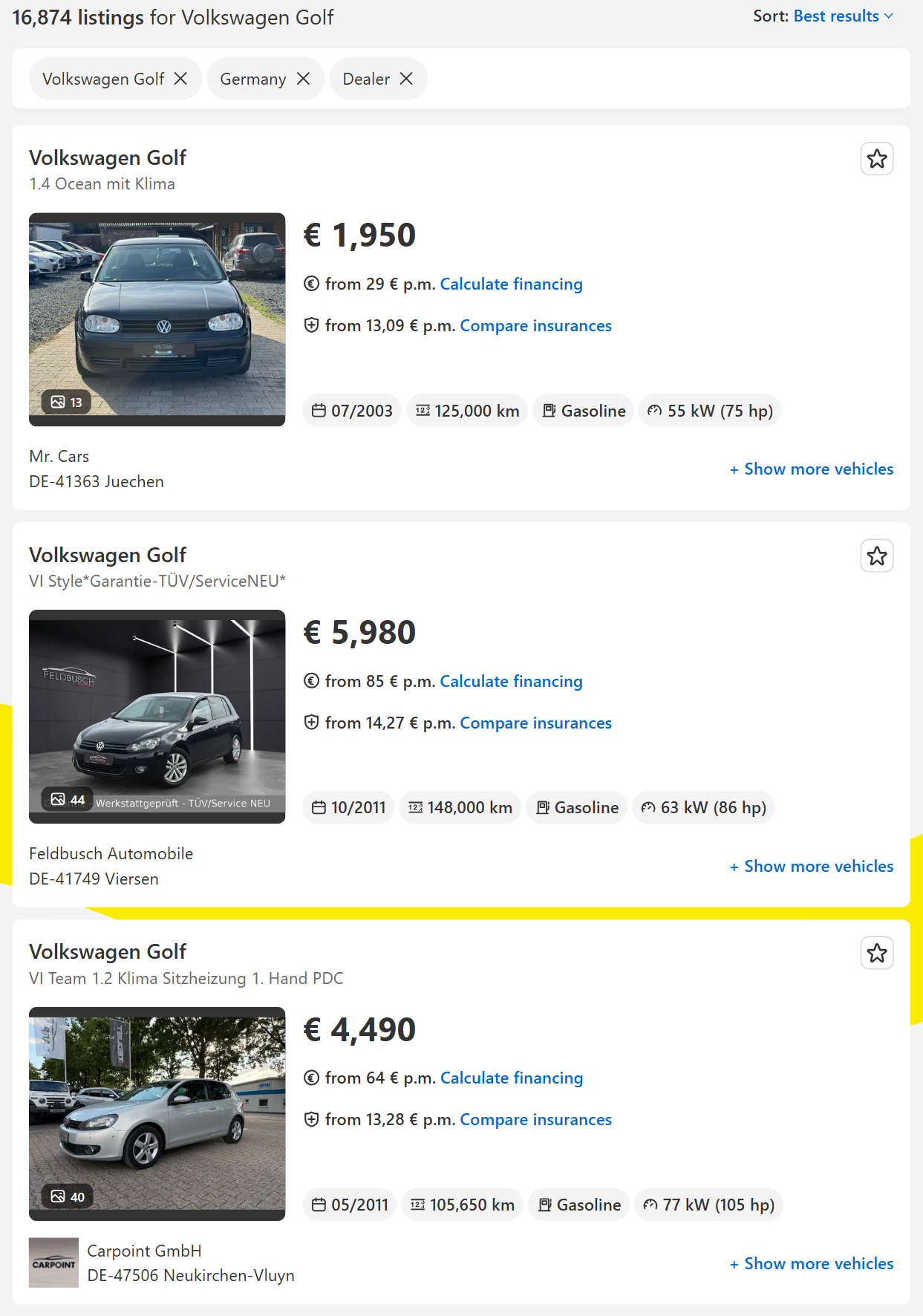
| 🚗 Make, model, version (`make`, `model`, `modelVersion`) |
💶 Price and currency (`price`, `currency`) |
🏷️ AutoScout24 price rating (`priceEvaluation`) |
| 🛣️ Mileage in km (`mileage`) |
📅 First registration (`firstRegistration`) |
⛽ Fuel and gearbox (`fuelType`, `transmission`) |
| ⚡ Power in kW and hp (`powerKw`, `powerHp`) |
🔧 Engine size (`engineDisplacementCcm`) |
🌱 WLTP consumption and CO2 (`fuelConsumption`, `co2Emissions`) |
| 📍 Country, city, ZIP, street |
🏢 Dealer or private seller (`sellerType`, `sellerName`) |
☎️ Seller phones (`phone`, `phones`) |
| ⭐ Dealer rating and reviews (`sellerRating`) |
🖼️ Photos at your size (`images`) |
🆕 New / used / demo (`condition`) |
| 🚙 Body type, colour, doors, seats (details) |
🧰 Equipment list by category (details) |
📝 Description, owners, date listed (details) |
On a 400-row test run (Volkswagen Golf, Germany) price, mileage, fuel, gearbox, power and city were filled on 100% of rows, first registration on 99.5%, the price rating on 97.2% and a dealer phone on 99.8%. Private sellers publish a phone less often: 14 of 24 on a mixed run.
### How to scrape AutoScout24 listings with AutoScout24 Listings Scraper
1. [Create a free Apify account](https://console.apify.com/sign-up). It comes with $5 of monthly credit and needs no card.
2. Open [AutoScout24 Listings Scraper](https://apify.com/topapi/autoscout24-listings-scraper) and click **Try for free**.
3. Paste AutoScout24 search URLs into **AutoScout24 URLs**, or type a make and model into **Make and model** and pick the **Markets**.
4. Set filters if you want them and choose **Max listings**.
5. Click **Start**. Rows land in the dataset page by page.
6. Open the **Storage** tab and **Export** as JSON, CSV or Excel, or let a schedule run it for you.
### ⬇️ Input
| Parameter | Type | Description |
|---|---|---|
| **🔍 What to scrape** | | |
| `searchUrls` | List | AutoScout24 search URLs (any filters set on the site) or listing URLs, from autoscout24.com or a national domain. |
| `makeModels` | List | `BMW`, `BMW 3 Series`, `Volkswagen Golf`, `Mercedes-Benz C-Class`. Empty with no URLs = all makes. |
| `countries` | Multi-select | Markets for the make/model searches: DE, AT, BE, ES, FR, IT, LU, NL. Default `DE`. |
| **🎯 Filters** (applied by AutoScout24 to the make/model searches) | | |
| `priceFrom`, `priceTo` | Integer | Asking price in EUR. |
| `yearFrom`, `yearTo` | Integer | First-registration year. |
| `mileageTo` | Integer | Highest mileage in km. |
| `fuelTypes` | Multi-select | Gasoline, Diesel, Electric, the two hybrids, LPG, CNG, Hydrogen, Ethanol, Others. |
| `transmission` | Select | Automatic, Manual, Semi-automatic. Default any. |
| `bodyTypes` | Multi-select | Compact, Convertible, Coupe, SUV, Station Wagon, Sedan, Van, Transporter, Other. |
| `powerFromKw` | Integer | Lowest power in kW. |
| `sellerType` | Select | Dealers, private sellers or both. |
| `condition` | Select | New, used, demonstration, pre-registered, employee's car, classic. |
| `zipCode`, `radiusKm` | Text, Integer | Radius search around a postcode in one market. |
| `listedWithinDays` | Integer | Only listings put online in the last N days. |
| `sortBy` | Select | Best results, newest, price, mileage, first registration. |
| **✂️ Refine results** | | |
| `priceRatings` | Multi-select | Keep only these AutoScout24 price ratings. |
| `excludeKeywords` | List | Drop listings whose title or version text contains a word, e.g. `export`. |
| `withPhoneOnly` | Boolean | Keep only listings with a seller phone. Default `false`. |
| **➕ Extra data** | | |
| `includeDetails` | Boolean | Read each delivered listing's page for the detail fields, charged as the **Listing details** add-on. Default `false`. |
| **🔁 Monitoring** | | |
| `monitorMode` | Boolean | Return only new listings and price changes since the previous run. Pair with a daily schedule. |
| `monitorStoreName` | Text | One name per watchlist. Default `autoscout24-listings-monitor`. |
| **📦 Output** | | |
| `maxResults` | Integer | Default `100`; `0` = no limit. |
| `maxResultsPerSearch` | Integer | Cap per URL, make or country search. `0` = none. |
| `compact` | Boolean | Core fields only, sized for AI agents, MCP and spreadsheets. |
| `imageResolution` | Select | 250x188, 480x360 (default) or 1280x960 photo URLs. |
| **⚙️ Advanced** | | |
| `proxyConfiguration` | Proxy | Default: direct connection, Apify Proxy then residential only if AutoScout24 refuses. |
| `maxConcurrency` | Integer | Listing pages read in parallel for the details add-on. Default `4`. |
#### Input JSON
```json
{
"makeModels": ["BMW 3 Series", "Audi A4"],
"countries": ["DE", "IT"],
"priceTo": 30000,
"yearFrom": 2019,
"sortBy": "newest",
"includeDetails": true,
"maxResults": 200
}
```
#### Use the model name AutoScout24 uses
The actor checks that AutoScout24 applied your make and model. A name it does not know is skipped with a message instead of returning every car of that make. **Do:** `BMW 3 Series`, `Mercedes-Benz C-Class`, `Volkswagen Golf`, `BMW 320` · **Don't:** `BMW 3er` on autoscout24.com (that German name works only in a pasted autoscout24.de URL).
#### Paste a URL for any other filter
Colour, doors, seats, equipment, emission class and previous owners are filters on AutoScout24 too. Set them on the site, copy the address bar and paste it into **AutoScout24 URLs**. Filters in the form apply only to the make/model searches; a pasted URL keeps its own.
#### Pick a sort order when you cap the results
With **Max listings** set, the sort decides which listings you get: `newest` for fresh stock, `priceAsc` for the cheapest cars. Monitor mode reads newest first by default.
### ⬆️ Output
Every listing becomes one dataset item. Here is a run for BMW 3 Series and Audi A4 in Germany and Italy, newest first, with the details add-on:
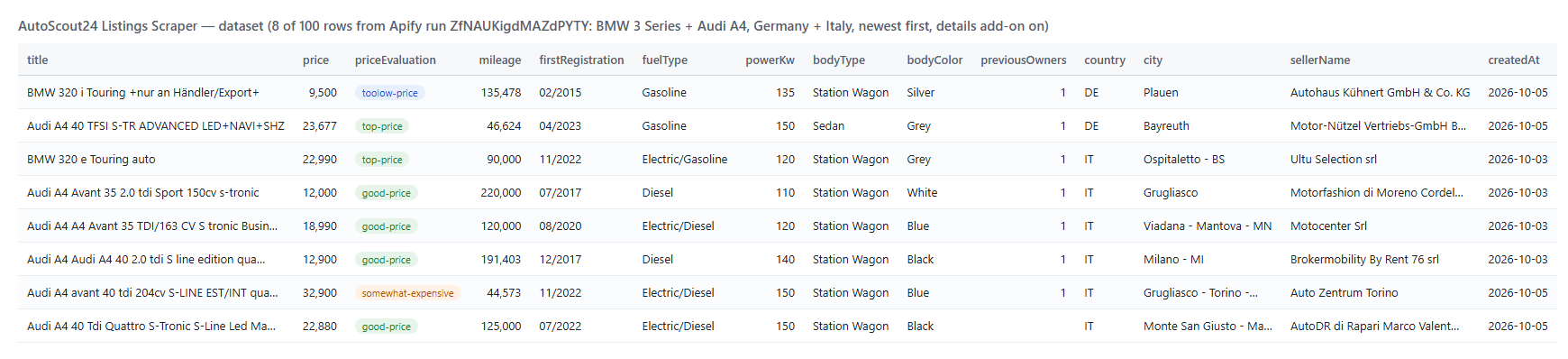 And one row of that run as JSON (shortened):
```json
{
"listingId": "466369a3-2a18-4459-9c59-428792f06fac",
"url": "https://www.autoscout24.com/offers/audi-a4-40-tfsi-s-tr-advanced-led+navi+shz-gasoline-grey-cat_ma9mo1626-466369a3-2a18-4459-9c59-428792f06fac",
"title": "Audi A4 40 TFSI S-TR ADVANCED LED+NAVI+SHZ",
"price": 23677,
"currency": "EUR",
"priceEvaluation": "top-price",
"mileage": 46624,
"firstRegistration": "04/2023",
"fuelType": "Gasoline",
"transmission": "Automatic",
"powerKw": 150,
"powerHp": 204,
"country": "DE",
"city": "Bayreuth",
"sellerType": "Dealer",
"sellerName": "Motor-Nützel Vertriebs-GmbH Bayreuth",
"phone": "+49 (0)921 - 5303916500",
"bodyType": "Sedan",
"bodyColor": "Grey",
"numberOfDoors": 4,
"previousOwners": 1,
"createdAt": "2026-10-05T17:32:02.898Z"
}
```
#### AutoScout24 listing fields
| Field | What it is | Fill on test run |
|---|---|---|
| `listingId`, `url`, `title` | AutoScout24 id, listing page, make + model + version | 100% |
| `price`, `priceFormatted`, `currency` | Asking price as a number and as shown | 100% |
| `priceEvaluation` | AutoScout24's price rating; `null` = no rating shown | 97% |
| `mileage`, `firstRegistration` | Kilometres; MM/YYYY (null for new cars) | 100%, 99.5% |
| `fuelType`, `transmission`, `power`, `powerKw`, `powerHp` | As listed | 100% |
| `fuelConsumption`, `co2Emissions` | WLTP values when the listing shows them | 49% |
| `country`, `city`, `zipCode`, `street` | Where the car is | 100% |
| `sellerType`, `sellerName`, `contactName` | Dealer or Private; dealer name and contact | 100%, 100%, 98.5% |
| `phone`, `phoneCallTo`, `phones` | First phone as shown and in international format; every phone | 99.8% (dealers) |
| `sellerRating`, `sellerReviewCount` | Dealer stars and reviews | 91.5% |
| `images`, `imageCount` | Photos at your chosen size | 100% |
| `bodyType` | From a body-type filter, or the details add-on | 100% with either |
| Details: `bodyColor`, `numberOfDoors`, `numberOfSeats`, `equipment`, `description`, `createdAt`, `latitude`, `longitude` | From the listing page | 80%, 97%, 96%, 94%, 93%, 100%, 100%, 100% |
| Details: `previousOwners`, `emissionClass`, `netPrice`, `warranty` | When the seller fills them | 59%, 74%, 29%, 42% |
| Details: `nextInspection` | Next safety inspection due (MM/YYYY), when the seller gives it | 68% (40-row dealer run, DE + NL) |
| Monitor: `changeType`, `previousPrice`, `priceChange`, `priceChangePercent`, `firstSeenAt` | NEW, PRICE_DROP or PRICE_INCREASE | every monitor row |
Fill figures: base fields from a 400-row run, details from a 100-row run with the add-on (BMW 3 Series and Audi A4, Germany and Italy).
### How can I use AutoScout24 listings data?
- 💶 **Car dealers and importers:** find cars AutoScout24 rates `top-price` or `good-price` in another market and compare cross-border prices.
- 📉 **Pricing and remarketing teams:** track asking prices by model, year and mileage, and get every price drop on your watchlist each morning.
- 🎯 **Lead-generation teams:** build lists of dealers with stock in a segment, with phone, address and rating.
- 📊 **Analysts:** measure EV share, stock age and price bands by country from the same schema in all eight markets.
- 🤖 **AI and data teams:** feed listings to valuation models and agents; `compact` keeps rows small.
- 🔔 **Buyers and brokers:** schedule monitor mode on a narrow search and act on new cars first.
### How much does it cost to scrape AutoScout24 listings?
AutoScout24 Listings Scraper is pay-per-result: **$0.95 per 1,000 listings**, no start fee. The optional **Listing details** add-on is **$1.00 per 1,000 listings** that get the detail fields. You pay for listings written to your dataset.
| Listings | Without details | With details |
|---:|---:|---:|
| 100 | $0.095 | $0.195 |
| 1,000 | $0.95 | $1.95 |
| 10,000 | $9.50 | $19.50 |
| 100,000 | $95.00 | $195.00 |
Platform usage is included in the price. Measured on 256 MB: 400 listings in 3 seconds, 100 listings with details in 20 seconds, 10,761 listings from one search in 155 seconds.
### AutoScout24 listings in your tools: integrations, API, scheduling & MCP
- **Schedules:** run it daily from the **Schedules** tab with `monitorMode: true` (and `listedWithinDays: 1` if you only want fresh stock) to receive only new listings and price changes.
- **Webhooks:** fire a URL when a run finishes and push new cars to your CRM, Slack or a sheet.
- **No-code:** Make, Zapier, n8n, Google Sheets, Airtable, Slack via [Apify integrations](https://docs.apify.com/integrations).
- **API:** call it from Node.js or Python with `apify-client`. Code is on the [API tab](https://apify.com/topapi/autoscout24-listings-scraper/api/python) and in the [Apify API reference](https://docs.apify.com/api/v2).
- **MCP / AI agents:** connect Claude, Cursor or any MCP client through the [MCP tab](https://apify.com/topapi/autoscout24-listings-scraper/api/mcp) and ask for cars in plain language. Set `compact: true` to keep rows small.
### More scrapers by TopApi
And one row of that run as JSON (shortened):
```json
{
"listingId": "466369a3-2a18-4459-9c59-428792f06fac",
"url": "https://www.autoscout24.com/offers/audi-a4-40-tfsi-s-tr-advanced-led+navi+shz-gasoline-grey-cat_ma9mo1626-466369a3-2a18-4459-9c59-428792f06fac",
"title": "Audi A4 40 TFSI S-TR ADVANCED LED+NAVI+SHZ",
"price": 23677,
"currency": "EUR",
"priceEvaluation": "top-price",
"mileage": 46624,
"firstRegistration": "04/2023",
"fuelType": "Gasoline",
"transmission": "Automatic",
"powerKw": 150,
"powerHp": 204,
"country": "DE",
"city": "Bayreuth",
"sellerType": "Dealer",
"sellerName": "Motor-Nützel Vertriebs-GmbH Bayreuth",
"phone": "+49 (0)921 - 5303916500",
"bodyType": "Sedan",
"bodyColor": "Grey",
"numberOfDoors": 4,
"previousOwners": 1,
"createdAt": "2026-10-05T17:32:02.898Z"
}
```
#### AutoScout24 listing fields
| Field | What it is | Fill on test run |
|---|---|---|
| `listingId`, `url`, `title` | AutoScout24 id, listing page, make + model + version | 100% |
| `price`, `priceFormatted`, `currency` | Asking price as a number and as shown | 100% |
| `priceEvaluation` | AutoScout24's price rating; `null` = no rating shown | 97% |
| `mileage`, `firstRegistration` | Kilometres; MM/YYYY (null for new cars) | 100%, 99.5% |
| `fuelType`, `transmission`, `power`, `powerKw`, `powerHp` | As listed | 100% |
| `fuelConsumption`, `co2Emissions` | WLTP values when the listing shows them | 49% |
| `country`, `city`, `zipCode`, `street` | Where the car is | 100% |
| `sellerType`, `sellerName`, `contactName` | Dealer or Private; dealer name and contact | 100%, 100%, 98.5% |
| `phone`, `phoneCallTo`, `phones` | First phone as shown and in international format; every phone | 99.8% (dealers) |
| `sellerRating`, `sellerReviewCount` | Dealer stars and reviews | 91.5% |
| `images`, `imageCount` | Photos at your chosen size | 100% |
| `bodyType` | From a body-type filter, or the details add-on | 100% with either |
| Details: `bodyColor`, `numberOfDoors`, `numberOfSeats`, `equipment`, `description`, `createdAt`, `latitude`, `longitude` | From the listing page | 80%, 97%, 96%, 94%, 93%, 100%, 100%, 100% |
| Details: `previousOwners`, `emissionClass`, `netPrice`, `warranty` | When the seller fills them | 59%, 74%, 29%, 42% |
| Details: `nextInspection` | Next safety inspection due (MM/YYYY), when the seller gives it | 68% (40-row dealer run, DE + NL) |
| Monitor: `changeType`, `previousPrice`, `priceChange`, `priceChangePercent`, `firstSeenAt` | NEW, PRICE_DROP or PRICE_INCREASE | every monitor row |
Fill figures: base fields from a 400-row run, details from a 100-row run with the add-on (BMW 3 Series and Audi A4, Germany and Italy).
### How can I use AutoScout24 listings data?
- 💶 **Car dealers and importers:** find cars AutoScout24 rates `top-price` or `good-price` in another market and compare cross-border prices.
- 📉 **Pricing and remarketing teams:** track asking prices by model, year and mileage, and get every price drop on your watchlist each morning.
- 🎯 **Lead-generation teams:** build lists of dealers with stock in a segment, with phone, address and rating.
- 📊 **Analysts:** measure EV share, stock age and price bands by country from the same schema in all eight markets.
- 🤖 **AI and data teams:** feed listings to valuation models and agents; `compact` keeps rows small.
- 🔔 **Buyers and brokers:** schedule monitor mode on a narrow search and act on new cars first.
### How much does it cost to scrape AutoScout24 listings?
AutoScout24 Listings Scraper is pay-per-result: **$0.95 per 1,000 listings**, no start fee. The optional **Listing details** add-on is **$1.00 per 1,000 listings** that get the detail fields. You pay for listings written to your dataset.
| Listings | Without details | With details |
|---:|---:|---:|
| 100 | $0.095 | $0.195 |
| 1,000 | $0.95 | $1.95 |
| 10,000 | $9.50 | $19.50 |
| 100,000 | $95.00 | $195.00 |
Platform usage is included in the price. Measured on 256 MB: 400 listings in 3 seconds, 100 listings with details in 20 seconds, 10,761 listings from one search in 155 seconds.
### AutoScout24 listings in your tools: integrations, API, scheduling & MCP
- **Schedules:** run it daily from the **Schedules** tab with `monitorMode: true` (and `listedWithinDays: 1` if you only want fresh stock) to receive only new listings and price changes.
- **Webhooks:** fire a URL when a run finishes and push new cars to your CRM, Slack or a sheet.
- **No-code:** Make, Zapier, n8n, Google Sheets, Airtable, Slack via [Apify integrations](https://docs.apify.com/integrations).
- **API:** call it from Node.js or Python with `apify-client`. Code is on the [API tab](https://apify.com/topapi/autoscout24-listings-scraper/api/python) and in the [Apify API reference](https://docs.apify.com/api/v2).
- **MCP / AI agents:** connect Claude, Cursor or any MCP client through the [MCP tab](https://apify.com/topapi/autoscout24-listings-scraper/api/mcp) and ask for cars in plain language. Set `compact: true` to keep rows small.
### More scrapers by TopApi