# Douyin Scraper - Videos, Creators, Comments & Hot Search (`topapi/douyin-scraper`) Actor

Scrape Douyin (抖音) videos by URL, creator or hashtag: caption, likes, comments, shares, saves, author stats, music, no-watermark MP4 link, tags. Plus creator profiles, comments, danmaku, related videos and the 5 hot-search boards. Filters, monitor mode, no login.

- **URL**: https://apify.com/topapi/douyin-scraper.md
- **Developed by:** [Top Api](https://apify.com/topapi) (community)
- **Categories:** Social media, Videos
- **Stats:** 1 total users, 1 monthly users, 100.0% runs succeeded, 0 bookmarks
- **User rating**: No ratings yet

## Pricing

from $4.00 / 1,000 videos

This Actor is paid per event. You are not charged for the Apify platform usage, but only a fixed price for specific events.

Learn more: https://docs.apify.com/actors/running/actors-in-store.md#pay-per-event

## What's an Apify Actor?

An Actor is a serverless cloud program that runs on the Apify platform. It has two run modes.
In Batch mode, an Actor accepts a well-defined JSON input, performs an action which can take anything from a few seconds to a few hours,
and optionally produces a well-defined JSON output, datasets with results, or files in key-value store.
In Standby mode, an Actor provides a web server which can be used as a website, API, or an MCP server.

Apify vocabulary and the platform model are defined once, in the agent quickstart at https://apify.com/agents.md.

## How to integrate an Actor?

If asked about integration, you help developers integrate Actors into their projects.
You adapt to their stack and deliver integrations that are safe, well-documented, and production-ready.

Do not guess an integration path. Every one of them is in the agent quickstart at https://apify.com/agents.md: the Apify MCP server, Agent Skills with the Apify CLI, the JavaScript and Python clients, the REST API, and the account-free path for an agent with no human to sign in. It also carries the rule on stating cost before the first paid run.

For examples already wired to this Actor's own input schema, see the [API](#api) section below.

Each client library has reference documentation the quickstart does not restate: [JavaScript/TypeScript](https://docs.apify.com/api/client/js/docs.md) (`npm install apify-client`) and [Python](https://docs.apify.com/api/client/python/docs.md) (`pip install apify-client`).

# README

### What does Douyin Scraper do?

**Douyin Scraper** extracts public data from [Douyin (抖音)](https://www.douyin.com), China's short-video app, and turns video links, creator pages, hashtags and the hot-search boards into structured rows: each video with its caption, likes, comments, shares, saves, publish date, creator stats, music, Douyin's own content category, the no-watermark MP4 link and its bit-rate ladder; each creator with followers, total likes and IP location; comments, danmaku (bullet comments) and trending topics as their own rows. Built for China-market researchers, brand and KOL teams, agencies and data pipelines that need Douyin numbers without the app.

Douyin Scraper - 抖音 Scraper - Douyin Video Scraper - Douyin Comments Scraper - Douyin Hot Search Scraper

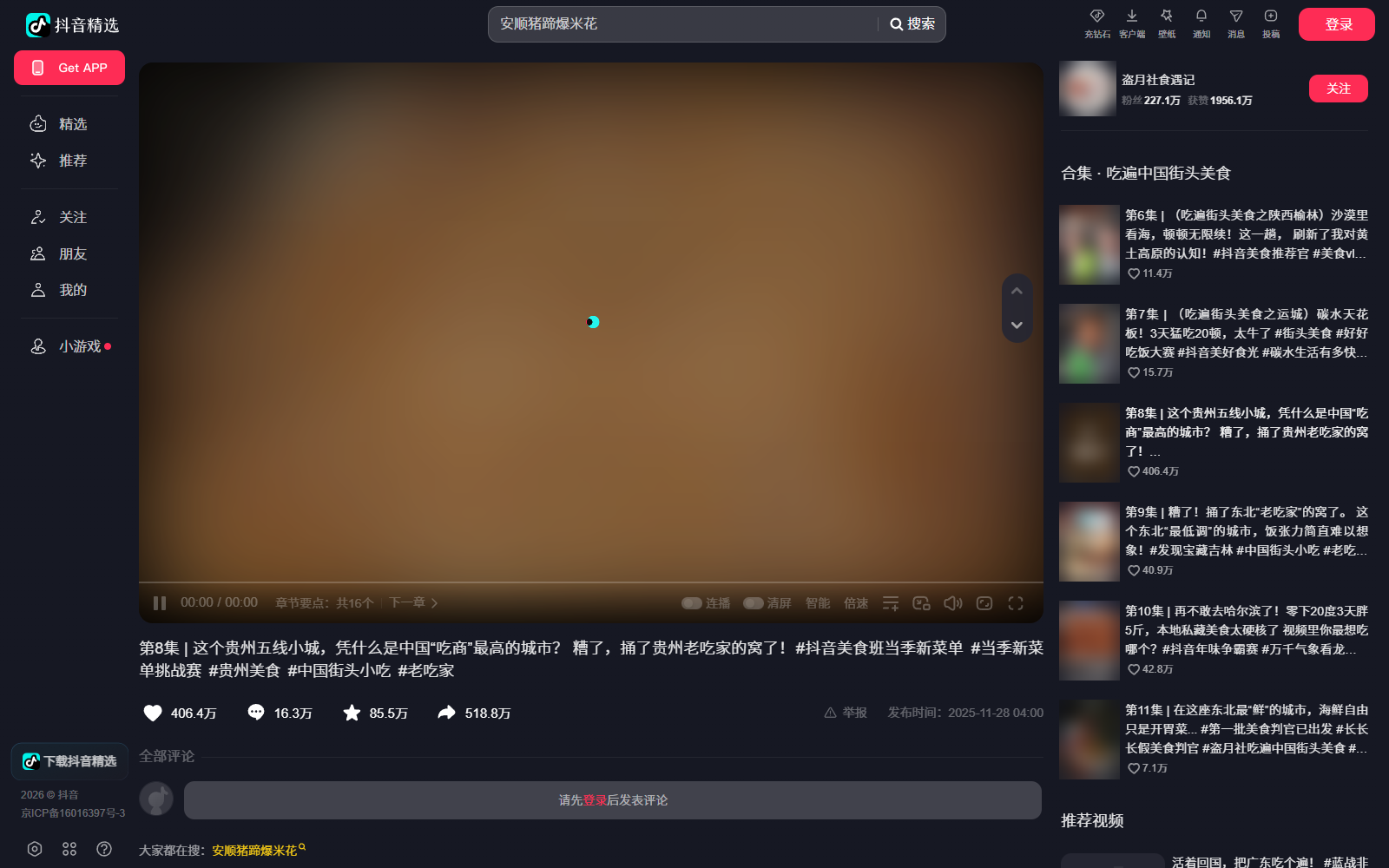
<a href="https://console.apify.com/actors/51F5q5ReQwQh6gGEx"><img src="https://api.apify.com/v2/key-value-stores/qNQ9zP0xaj2yxGeMY/records/douyin-scraper-source.png" alt="Douyin video page with likes, comments, saves and shares that Douyin Scraper turns into rows" style="width:70%"></a>

- **Five kinds of rows in one actor:** videos (by URL, creator, hashtag or the related list), creator profiles, comments, danmaku and hot-search topics. `recordType` tells them apart; each has its own price, and you only pay for the kinds you switch on.
- **Every link Douyin shares:** `douyin.com/video/…`, `/note/…`, `?modal_id=` URLs, `iesdouyin.com/share/…` links, `v.douyin.com` short links (or the whole pasted share text) and bare ids.
- **The numbers on the video page:** likes, comments, shares, saves and recommends, the publish time, duration, hashtags, Douyin's three-level content category (`videoTags`, e.g. 美食 → 美食探店 → 餐厅探店) and the creator's followers and total likes.
- **Free no-watermark MP4 link on every video** (`videoMeta.downloadUrl`, the highest H.264 resolution Douyin lists, e.g. 1080x1920) plus the full bit-rate ladder; a photo post carries its `images` instead. Optionally the MP4 file itself saved to your storage.
- **All five hot-search boards:** 热榜 Hot search, 种草榜 Seeding, 娱乐榜 Entertainment, 社会榜 Social and 挑战榜 Challenge, about 50 topics each, with rank, hot value, video count and event time.
- **No login, no cookies, no API key, no proxy needed:** paste links and run.
- **Monitor mode for schedules:** each run delivers only videos, comments and danmaku it has not delivered before (a creator's profile row comes with the first run and again only with new videos - with `maxVideosPerProfile: 0`, again whenever the creator's counts, name or bio changed); boards return only topics that are new, moved or dropped off.
- **Export anywhere:** JSON, CSV, Excel, XML; schedules, webhooks, Make, Zapier, n8n, Google Sheets; Apify API and MCP, with a `compact` mode for AI agents.

### What data can you get from Douyin?

<table>
<tr>
<td>🆔 Video id, URL and share URL (`id`, `url`, `shareUrl`)</td>
<td>📝 Caption, title, preview title (`text`, `itemTitle`, `previewTitle`)</td>
<td>📅 Publish time (`createTime`, `createDate`)</td>
</tr>
<tr>
<td>❤️ Likes (`statistics.diggCount`)</td>
<td>💬 Comments (`statistics.commentCount`)</td>
<td>🔁 Shares, saves, recommends (`shareCount`, `collectCount`, `recommendCount`)</td>
</tr>
<tr>
<td>👤 Creator: name, Douyin ID, sec_uid, bio, verification (`authorMeta`)</td>
<td>👥 Creator stats: followers, total likes, video count, IP location</td>
<td>🎵 Music: title, author, original flag, play URL (`musicMeta`)</td>
</tr>
<tr>
<td>🎬 Video: duration, size, ratio, cover, dynamic cover, play URLs (`videoMeta`)</td>
<td>⬇️ No-watermark download URL + bit-rate ladder (`downloadUrl`, `bitRates`)</td>
<td>🏷️ Content category, 3 levels (`videoTags`)</td>
</tr>
<tr>
<td>#️⃣ Hashtags with ids (`hashtags`) and @mentions (`mentions`)</td>
<td>📚 Collection and series episode (`mix`, `series`), chapters (`chapters`)</td>
<td>📍 Tagged place (`poi`), "people also search" words (`suggestWords`)</td>
</tr>
<tr>
<td>🧑‍💼 Profile rows: followers, following, total likes, videos, IP location</td>
<td>💬 Comment rows: text, likes, reply count, IP label, commenter, date</td>
<td>💭 Danmaku rows: text and the second of the video it appears at</td>
</tr>
<tr>
<td>🔥 Topic rows: board, rank, word, hot value, video count, event time</td>
<td>🔗 Related videos (`sourceType: "related"`, `relatedTo`)</td>
<td>📥 Saved MP4 and cover files (`videoFile.kvUrl`, `coverFile.kvUrl`)</td>
</tr>
</table>

Field fill on a 920-row platform run (run `RpdwJka3QlUY6pG9g`, 2026-10-08: 1 video URL, 1 creator × 20, 1 hashtag, the Hot and Entertainment boards, comments (20 per video), danmaku (30 per video) and related videos (3 per video - 91 of the 126 video rows) on): every video row had the id, URL, caption, publish date, all five counts, the creator's name and sec_uid, the cover and the music; 99% the no-watermark download URL, play URL and duration (the 1% is a photo post, which carries `images` instead), 95% the audio URL (Douyin's related list leaves it out for some videos); 100% `videoTags`, 94% hashtags, 88% `suggestWords`, 24% a collection, 10% chapters, 8% a tagged place. Creator followers and total likes are on every row from a video URL, a creator page or a hashtag (35 of 35); Douyin's related list carries the creator's name and ids but not their counts. 382 of 385 comment rows had the text (two image-only comments and one Douyin sent without text), all of them the likes, reply count and commenter, 384 the IP label; every danmaku row its text and time; every topic row the word and rank, 94% the hot value (the Hot board's pinned topic and its trending events carry none).

### How to scrape Douyin with Douyin Scraper

1. [Create a free Apify account](https://console.apify.com/sign-up) - $5 of monthly credit, no card needed.
2. Open [Douyin Scraper](https://apify.com/topapi/douyin-scraper) and click **Try for free**.
3. Paste Douyin video links, creator pages or hashtag links, or tick the hot-search boards you want.
4. Switch on the extras you need (creator profile, comments, danmaku, related videos, MP4 files) and set the limits.
5. Click **Start** and wait - the sample input finishes in about 10 seconds.
6. Download the rows as JSON, CSV or Excel, or read them through the API.

### ⬇️ Input

| Parameter | Type | Description |
|---|---|---|
| `videoUrls` | array | Video / photo-post links, share links or ids. One video row each. |
| `profileUrls` | array | Creator pages, share links or sec_uids (`MS4wLjABAAAA…`). Profile row + newest videos by publish date. |
| `hashtags` | array | Hashtag pages or ids. The hashtag's top 15 videos as full video rows. |
| `trendingBoards` | array | `hot`, `seeding`, `entertainment`, `social`, `challenge`. |
| `profileSort` | string | `latest` (default: newest publish date first; a video the creator pinned counts at its own date, although Douyin's page shows pins on top) or `popular` (most liked among the newest ~44). |
| `postedAfter` / `postedBefore` | string | `2026-09-01`, `7 days`, `3 weeks` or a day count. |
| `excludePinnedPosts`, `minLikes`, `mediaType`, `keywordFilter` | | Filters applied to every video row before it is delivered. |
| `includeProfile` | boolean | One profile row per creator. Default `true`. |
| `includeComments` + `maxCommentsPerVideo` | boolean, integer | Comment rows for every video from your lists, in Douyin's own order (popular first). Default 20 per video. |
| `includeDanmaku` + `maxDanmakuPerVideo` | boolean, integer | Bullet-comment rows. Default 200 per video. |
| `includeRelated` + `maxRelatedPerVideo` | boolean, integer | Douyin's related videos (up to 10 per video) as video rows, for each video row from your lists delivered in the run. |
| `downloadVideos`, `downloadQuality`, `downloadCovers`, `maxDownloadSizeMb`, `kvStoreName` | | Save MP4 / cover files to a key-value store (MP4 is a paid add-on, covers are free). `downloadQuality`: `standard` (720p) or `highest` (e.g. 1080p). |
| `monitorMode` + `monitorStoreName` | boolean, string | Only new rows since the previous run with the same store name. |
| `maxVideosPerProfile` | integer | Default 20, newest first. Douyin shows signed-out visitors one page of 44 of a creator's videos (the pinned ones + the newest), so a larger number returns those 44 and the status message says so. 0 = profile row only. |
| `maxTopicsPerBoard`, `maxItems`, `commentsOnly`, `compact` | | Output size and shape. |
| `proxyConfiguration`, `maxConcurrency` | | Optional; Douyin answers the actor's own IP. |

#### Input JSON

```json
{
  "videoUrls": ["https://www.douyin.com/video/7577614489533680959"],
  "profileUrls": ["https://www.douyin.com/user/MS4wLjABAAAAk1tZ-L085zZf2yW_H5dnVFZWyk8Rt8v4RAvf9KhTyPoVdMDxTs7Q_rvgTJGWXezS"],
  "maxVideosPerProfile": 20,
  "trendingBoards": ["hot"],
  "includeComments": true,
  "maxCommentsPerVideo": 50
}
```

#### Paste any Douyin link - the actor routes it

A creator link pasted into the video box is still read as a creator, and a `v.douyin.com` short link (or the whole "复制打开抖音…" share text) is resolved first. Bare numbers in the video box are video ids; in the hashtag box they are hashtag ids. A hashtag is opened by its page URL or id (`douyin.com/hashtag/1594485689837575`); a hashtag *name* cannot be resolved because that needs Douyin search.

#### Use `maxVideosPerProfile: 0` for creator stats only

With the profile row on and no videos, a run returns one row per creator - followers, following, total likes, video count, IP location - without any video rows to pay for.

#### Comments only for a list of videos

Set `commentsOnly: true` to get the comment rows of your video links without the video rows themselves. On its own it reads the comments of your video links only: creators and hashtags in the same run still deliver their video rows, with no comments unless `includeComments` is on. With `includeDanmaku: true` it delivers the bullet comments only; set `includeComments: true` as well to get both. No related videos are added in this mode.

### ⬆️ Output
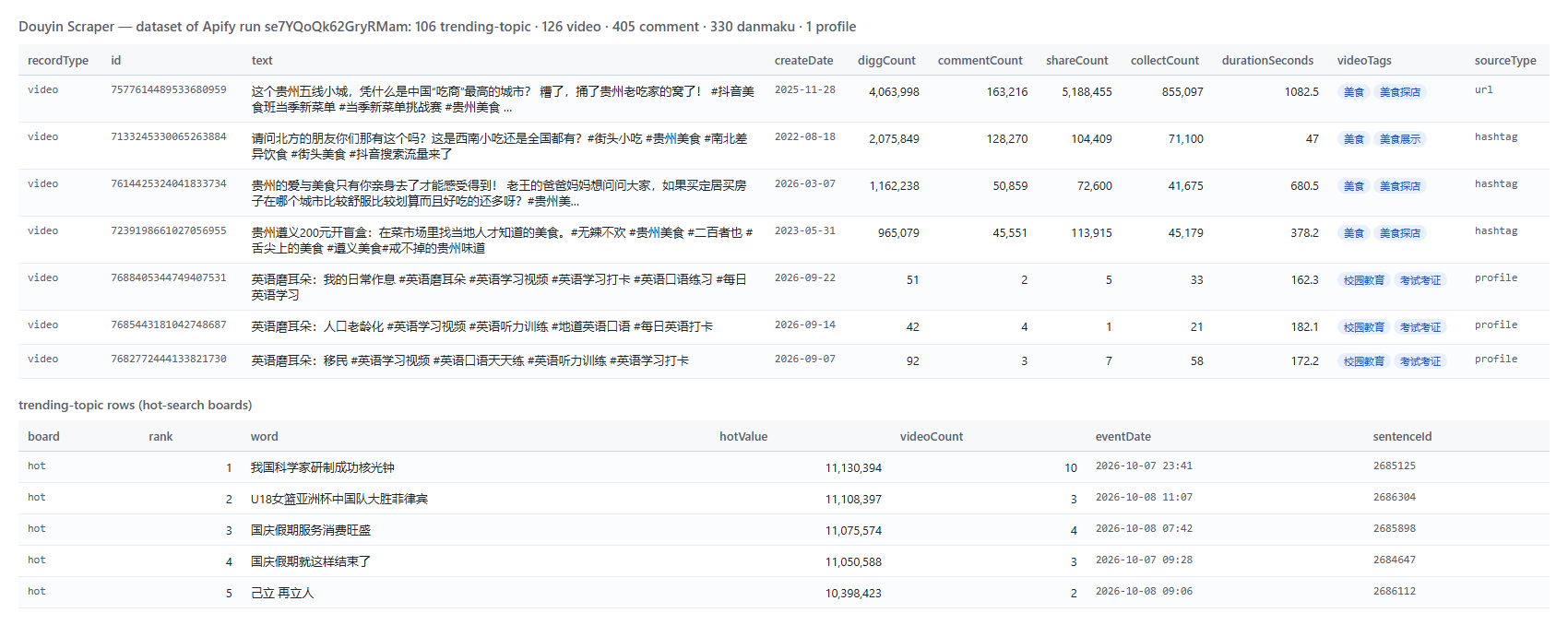
<a href="https://console.apify.com/actors/51F5q5ReQwQh6gGEx"><img src="https://api.apify.com/v2/key-value-stores/qNQ9zP0xaj2yxGeMY/records/douyin-scraper-output.png" alt="Douyin Scraper output table with likes, comments, shares, saves, content category and hot-search topics" style="width:70%"></a>

A video row (shortened; real values from run `se7YQoQk62GryRMam`):

```json
{
  "recordType": "video",
  "id": "7577614489533680959",
  "url": "https://www.douyin.com/video/7577614489533680959",
  "text": "这个贵州五线小城，凭什么是中国“吃商”最高的城市？ …",
  "createDate": "2025-11-28T09:00:00.000Z",
  "statistics": { "diggCount": 4063998, "commentCount": 163216, "shareCount": 5188455, "collectCount": 855097, "recommendCount": 254037 },
  "videoTags": [{ "level": 1, "name": "美食" }, { "level": 2, "name": "美食探店" }, { "level": 3, "name": "餐厅探店" }],
  "authorMeta": { "name": "盗月社食遇记", "username": "daoyueshe", "followersCount": 2270852, "totalLikesReceived": 19561152 },
  "videoMeta": { "duration": 1082500, "width": 3840, "height": 2160, "downloadUrl": "https://…zjcdn.com/…", "downloadQuality": "1920x1080 normal_1080_0" },
  "durationSeconds": 1082.5,
  "mix": { "id": "7486681757459154981", "name": "吃遍中国街头美食", "episode": 8, "totalEpisodes": 11 },
  "sourceType": "url"
}
```

A comment row: `{ "recordType": "comment", "cid": "…", "videoId": "7577614489533680959", "text": "…", "diggCount": 2, "replyCount": 0, "ipLabel": "贵州", "user": { "nickname": "…" }, "createDate": "2026-09-08T13:36:49.000Z" }`.
A topic row: `{ "recordType": "trending-topic", "board": "hot", "rank": 2, "word": "…", "hotValue": 11108397, "videoCount": 3, "eventDate": "2026-10-08T11:07:…" }` (the top entry of the Hot board is often Douyin's pinned topic, which has no hot value).
The dataset has four views: **Videos**, **Comments & danmaku**, **Creators** and **Hot-search topics**.

### How can I use Douyin data?

- 🛍️ **Brands entering China** - follow a category's hashtags and creators, read `videoTags`, likes and saves to see which content converts.
- 🧑‍💼 **KOL and agency teams** - shortlist creators by followers, total likes and posting cadence; `profile` rows alone are the cheap first pass.
- 📰 **Newsrooms and analysts** - schedule the five hot-search boards hourly with monitor mode and log what enters, climbs and drops off.
- 💬 **Sentiment and audience research** - comment text with the commenter's IP province (`ipLabel`) and danmaku timed to the second.
- 🤖 **AI pipelines** - `compact` rows of captions, tags and counts fit an LLM context window; MP4 files feed your own transcription or vision models.

### How much does it cost to scrape Douyin?

Douyin Scraper is pay-per-event (the Pricing tab always shows the live rates). There is no start fee.

| Event | Price | When it is charged |
|---|---:|---|
| `video` | **$0.004 per video** ($4.00 per 1,000) | Each video or photo-post row delivered after your filters |
| `profile` | **$0.0055 per creator** | Each creator profile row |
| `comment` | **$0.0016 per comment** ($1.60 per 1,000) | Each comment row |
| `danmaku` | **$0.001 per bullet comment** | Each danmaku row |
| `trending-topic` | **$0.0056 per topic** | Each hot-search topic row (monitor mode: each NEW, CHANGED or EXPIRED topic) |
| `video-download` | **$0.00094 per MP4** | Each video whose MP4 file was saved (files over your size limit are skipped and not charged) |

Worked examples:

- **The sample input** (1 video URL + 1 creator × 20 videos) = 21 × $0.004 + $0.0055 = **$0.0895**
- **An empty input** runs the sample video only (its video row, no extras) = 1 × $0.004 = **$0.004**
- **100 video URLs** = 100 × $0.004 = **$0.40**
- **1 video + 100 of its comments** = $0.004 + 100 × $0.0016 = **$0.164**
- **10 creators × 44 newest videos + profiles** = 440 × $0.004 + 10 × $0.0055 = **$1.815**
- **The Hot board once** (about 56 topics) = **$0.31**; **all five boards** (about 255 topics) = **$1.43**

Apify platform usage is included in these prices. Measured on the platform on 2026-10-09 at the default 1 GB of memory: the sample input took 8-13 seconds (two runs).

### Integrations, API, scheduling & MCP

- **Schedules:** run Douyin Scraper hourly or daily from the **Schedules** tab; with `monitorMode` each run returns only what is new.
- **Webhooks:** fire a URL when a run finishes - push rows to your CRM, Slack or a sheet.
- **No-code:** Make, Zapier, n8n, Google Sheets, Airtable, Slack via [Apify integrations](https://docs.apify.com/integrations).
- **API:** `apify-client` for [Node.js](https://apify.com/topapi/douyin-scraper/api/javascript) or [Python](https://apify.com/topapi/douyin-scraper/api/python), and the [Apify API reference](https://docs.apify.com/api/v2).
- **MCP / AI agents:** connect Claude, Cursor or any MCP client through the [MCP tab](https://apify.com/topapi/douyin-scraper/api/mcp); switch on `compact` to keep answers small.

### More TopApi scrapers

<table>
<tr>
<td>🎵 <a href="https://apify.com/topapi/tiktok-scraper">TikTok Scraper</a> - TikTok posts by profile, hashtag or URL</td>
<td>🎬 <a href="https://apify.com/topapi/tiktok-video-scraper">TikTok Video Scraper</a> - TikTok videos by URL</td>
<td>🔎 <a href="https://apify.com/topapi/tiktok-user-search-scraper">TikTok User Search Scraper</a> - TikTok accounts by keyword</td>
</tr>
<tr>
<td>▶️ <a href="https://apify.com/topapi/youtube-shorts-scraper">YouTube Shorts Scraper</a> - Shorts by channel or URL</td>
<td>📸 <a href="https://apify.com/topapi/instagram-scraper">Instagram Scraper</a> - posts and reels</td>
<td>👤 <a href="https://apify.com/topapi/instagram-profile-scraper">Instagram Profile Scraper</a> - account stats</td>
</tr>
<tr>
<td>💬 <a href="https://apify.com/topapi/facebook-comments-scraper">Facebook Comments Scraper</a> - comments and replies by post URL</td>
<td>🐦 <a href="https://apify.com/topapi/x-profile-scraper">X Profile Scraper</a> - X accounts and stats</td>
<td>🏭 <a href="https://apify.com/topapi/alibaba-1688-scraper">1688 Scraper</a> - Chinese wholesale products</td>
</tr>
</table>

All TopApi actors: [apify.com/topapi](https://apify.com/topapi).

### Limits & empty runs

- **What Douyin shows a signed-out visitor is the ceiling.** A creator's **newest ~44 videos** (Douyin's first page, which also holds the videos the creator pinned; older videos need a login), a hashtag's **top 15 videos**, and no keyword or user search (Douyin answers "请先登录，再继续搜索吧" - log in to search). The actor never logs in, so search and full creator catalogues are not available; when that page is what stops a creator's list (you asked for more than 44, or your filters left fewer videos than you asked for), the status message names it (e.g. "newest 44 videos of … (of 211); you asked for 100"); it stays silent when your own `maxVideosPerProfile`, monitor memory or `postedAfter` is what limited the list.
- **Plays:** Douyin returns 0 plays for every video to signed-out visitors, so the rows carry no play count.
- **Replies:** Douyin answers the reply list of a comment with an empty response to signed-out visitors; comment rows carry `replyCount`, the reply texts are not included.
- **Duplicates:** Douyin repeats popular comments on the next page; the actor delivers and charges each comment once, also when Apify restarts a run midway (the rows already in the dataset are read back, never delivered or charged again, and count toward your per-video limits).
- **Media URLs expire:** play and download URLs about an hour after the run, covers in 14-30 days; `id` and `url` are permanent. Use `downloadVideos` to keep the files.
- **Speed:** a browser opens one Douyin page per run (2-7 seconds) when video details or creator videos are needed; boards, comments and profiles need none.
- **Empty dataset:** your filters removed everything, the video is private or deleted (`not_found` in the run summary), or monitor mode found nothing new.
- **Links that are not Douyin** (a TikTok link, a link to another site such as toutiao.com, a Douyin search page) are skipped with a free `error` row that says why; nothing is charged for them, and an input made only of non-Douyin links delivers no paid rows. An empty input (no video, creator, hashtag or board at all) runs the sample video instead and charges it as one `video` row ($0.004); comments, danmaku, related videos or MP4 files switched on are not applied to it.

### FAQ

#### How many videos can Douyin Scraper get from one creator?

Up to 44: the one page Douyin shows a signed-out visitor (the creator's pinned videos + the newest). The actor returns them newest first by publish date; a larger `maxVideosPerProfile` returns all 44 and the status message names the ceiling; `profileSort: "popular"` returns the most liked of those.

#### Can Douyin Scraper download Douyin videos without a watermark?

Yes. Every video's row has `videoMeta.downloadUrl`, the no-watermark file at the highest H.264 resolution Douyin lists (a photo post carries its `images` instead); switch on `downloadVideos` to save the MP4 itself to a key-value store ($0.00094 per file).

#### Can Douyin Scraper get Douyin comments?

Yes, with `includeComments: true`: text, likes, reply count, the commenter's IP province and the date, in Douyin's own order (popular first), 20 per page, as many as `maxCommentsPerVideo` allows.

#### Can I track Douyin hot search with Douyin Scraper?

Yes. Tick the boards in `trendingBoards`; with `monitorMode` on a schedule, each run returns only topics that are NEW, moved rank (CHANGED) or left the board (EXPIRED).

#### Can I run Douyin Scraper on a schedule?

Yes. Save the input as a task, open **Schedules**, pick a cadence and switch on `monitorMode`; a run that finds nothing new delivers no rows (the creator's profile row is repeated only with a run that finds new videos; with `maxVideosPerProfile: 0` it is repeated whenever the creator's follower, following, like or video count, name or bio changed - for an active creator that is most runs).

#### Can I use Douyin Scraper with the Apify API?

Yes - start runs and read datasets with `apify-client` for [Node.js](https://apify.com/topapi/douyin-scraper/api/javascript) or [Python](https://apify.com/topapi/douyin-scraper/api/python).

#### Can I use Douyin Scraper through an MCP server?

Yes. Open the [MCP tab](https://apify.com/topapi/douyin-scraper/api/mcp), connect your client and ask for Douyin videos, creators or hot topics in plain language.

#### Do I need a Douyin account, cookies or a proxy?

No. Paste links and run; no account, cookie export or QR login is involved, and Douyin answers the actor without a proxy.

#### Why did my Douyin Scraper run return no rows?

The video is private or deleted, your filters removed every video (the run summary lists why), monitor mode found nothing new, or the input was not a Douyin link: each such line gets a free `error` row, and a TikTok link points you to [TikTok Scraper](https://apify.com/topapi/tiktok-scraper). Nothing is charged for those lines.

#### Is it legal to scrape Douyin?

Douyin Scraper collects publicly available data only, nothing behind a login. You are responsible for complying with Douyin's terms of service, creators' copyright and data-protection law (GDPR, CCPA, PIPL); creator profiles and comments are personal data.

#### Your feedback

Found a bug or missing a field? Open an issue on the [Issues tab](https://apify.com/topapi/douyin-scraper/issues/open) - we answer within two working days.

# Actor input Schema

## `videoUrls` (type: `array`):

Douyin video or photo-post links, e.g. "https://www.douyin.com/video/7577614489533680959", "https://v.douyin.com/iRNBho6u/", "https://www.douyin.com/?modal_id=7577614489533680959" or a bare id. One video row each, duplicates removed.

## `profileUrls` (type: `array`):

Creator pages, e.g. "https://www.douyin.com/user/MS4wLjABAAAA...", a v.douyin.com share link to a creator, or the bare sec_uid (MS4wLjABAAAA...). Returns the creator's profile row and newest videos.

## `hashtags` (type: `array`):

Hashtag pages or ids, e.g. "https://www.douyin.com/hashtag/1594485689837575" or "1594485689837575". Returns the hashtag's top 15 videos as full video rows, with the hashtag's name and view count on each row.

## `trendingBoards` (type: `array`):

Douyin's live hot-search boards; about 50 topics each with rank, hot value, video count and event time. Leave empty for none.

## `profileSort` (type: `string`):

Latest returns the newest videos by publish date: a video the creator pinned counts at its own date (Douyin's page lists pinned videos first; switch on Exclude pinned videos to drop them). Popular sorts the creator's newest ~44 videos by likes and returns the top ones.

## `postedAfter` (type: `string`):

Absolute date (2026-09-01), relative (7 days, 3 weeks, 2 months) or a day count (1 = today). Empty = no lower bound.

## `postedBefore` (type: `string`):

Same formats as above. Empty = no upper bound.

## `excludePinnedPosts` (type: `boolean`):

Skip the videos a creator pinned to the top of the page.

## `minLikes` (type: `integer`):

Only videos with at least this many likes. 0 = no minimum.

## `mediaType` (type: `string`):

Keep videos, photo slideshows or both.

## `keywordFilter` (type: `string`):

Comma-separated words; keep only videos whose caption, hashtags or author name contain one of them, e.g. "美食, 探店". Empty = keep all.

## `includeProfile` (type: `boolean`):

One profile row per creator: followers, following, total likes, video count, bio, IP location, verification.

## `includeComments` (type: `boolean`):

Comment rows for every video from your lists (text, likes, reply count, commenter, IP label, date). Douyin does not show reply threads to signed-out visitors, so replies are not included. Related videos are not expanded.

## `maxCommentsPerVideo` (type: `integer`):

Top-level comments per video, in Douyin's own order (popular first, not by date), 20 per page.

## `includeDanmaku` (type: `boolean`):

The on-screen bullet comments of every video from your lists, with their time in the video.

## `maxDanmakuPerVideo` (type: `integer`):

Bullet comments per video, in video-time order.

## `includeRelated` (type: `boolean`):

Douyin's related-video list for every video row from your lists delivered in this run (up to 10 each), as full video rows with relatedTo set. Not with Comments only, and not for a video a monitor run skips as delivered before.

## `maxRelatedPerVideo` (type: `integer`):

Related videos per video (Douyin lists about 10).

## `downloadVideos` (type: `boolean`):

Save each video's MP4 (no watermark) to a key-value store; the row's videoFile.kvUrl points to it. Paid add-on per saved file.

## `downloadQuality` (type: `string`):

Which file Save MP4 files stores. Both are without watermark; videoMeta.downloadUrl on every video row (not on photo posts) is the highest one.

## `downloadCovers` (type: `boolean`):

Save each video's cover image to the key-value store (coverFile.kvUrl). Free.

## `maxDownloadSizeMb` (type: `integer`):

Larger files are skipped (not saved, not charged). Up to 150 MB; long videos run 100-400 MB.

## `kvStoreName` (type: `string`):

Save files to this named store (kept across runs), e.g. "douyin-videos". Empty = the run's own store.

## `monitorMode` (type: `boolean`):

Skip videos, comments and danmaku delivered by earlier runs; a creator's profile row comes on the first run and again only with a run that finds new videos (with maxVideosPerProfile 0: again whenever the creator's counts, name or bio changed). Hot boards return only topics that are NEW, moved rank (CHANGED) or dropped off (EXPIRED).

## `monitorStoreName` (type: `string`):

Named key-value store that remembers what was delivered. Use a different name per schedule.

## `maxVideosPerProfile` (type: `integer`):

Newest videos per creator by publish date (a pinned video counts at its own date). Douyin shows signed-out visitors the first page of a creator's videos only (44, its pinned videos included), so a larger number returns those 44 and the status message names that ceiling. 0 = profile row only.

## `maxTopicsPerBoard` (type: `integer`):

Topics per board (each board lists about 50; the hot board adds ~5 trending events).

## `maxItems` (type: `integer`):

Stop after this many rows of any type. 0 = no limit.

## `commentsOnly` (type: `boolean`):

For the video URLs list: deliver only the comment / danmaku rows - no video row and no related videos. With neither Comments nor Danmaku on, it reads the comments of those video URLs only (creator and hashtag videos get none). With Danmaku on, switch Comments on too to keep the comments.

## `compact` (type: `boolean`):

Core fields only, trimmed for AI / MCP pipelines.

## `proxyConfiguration` (type: `object`):

Douyin answers the actor's own IP; a proxy is optional.

## `maxConcurrency` (type: `integer`):

Video URLs fetched in parallel.

## Actor input object example

```json
{
  "videoUrls": [
    "https://www.douyin.com/video/7577614489533680959"
  ],
  "profileUrls": [
    "https://www.douyin.com/user/MS4wLjABAAAAk1tZ-L085zZf2yW_H5dnVFZWyk8Rt8v4RAvf9KhTyPoVdMDxTs7Q_rvgTJGWXezS"
  ],
  "profileSort": "latest",
  "excludePinnedPosts": false,
  "minLikes": 0,
  "mediaType": "all",
  "includeProfile": true,
  "includeComments": false,
  "maxCommentsPerVideo": 20,
  "includeDanmaku": false,
  "maxDanmakuPerVideo": 200,
  "includeRelated": false,
  "maxRelatedPerVideo": 10,
  "downloadVideos": false,
  "downloadQuality": "standard",
  "downloadCovers": false,
  "maxDownloadSizeMb": 50,
  "monitorMode": false,
  "monitorStoreName": "douyin-monitor",
  "maxVideosPerProfile": 20,
  "maxTopicsPerBoard": 60,
  "maxItems": 0,
  "commentsOnly": false,
  "compact": false,
  "proxyConfiguration": {
    "useApifyProxy": false
  },
  "maxConcurrency": 4
}
```

# Actor output Schema

## `rows` (type: `string`):

The dataset: video, profile, comment, danmaku and trending-topic rows (recordType tells them apart).

## `summary` (type: `string`):

Per-input counts (read, filtered, delivered), the guest ceilings met, HTTP and browser usage.

# API

You can run this Actor programmatically using our API. Below are code examples in JavaScript, Python, and CLI, as well as the OpenAPI specification and MCP server setup.

## JavaScript example

```javascript
import { ApifyClient } from 'apify-client';

// Initialize the ApifyClient with your Apify API token
// Replace the '<YOUR_API_TOKEN>' with your token
const client = new ApifyClient({
    token: '<YOUR_API_TOKEN>',
});

// Prepare Actor input
const input = {
    "videoUrls": [
        "https://www.douyin.com/video/7577614489533680959"
    ],
    "profileUrls": [
        "https://www.douyin.com/user/MS4wLjABAAAAk1tZ-L085zZf2yW_H5dnVFZWyk8Rt8v4RAvf9KhTyPoVdMDxTs7Q_rvgTJGWXezS"
    ],
    "maxVideosPerProfile": 20
};

// Run the Actor and wait for it to finish
const run = await client.actor("topapi/douyin-scraper").call(input);

// Fetch and print Actor results from the run's dataset (if any)
console.log('Results from dataset');
console.log(`💾 Check your data here: https://console.apify.com/storage/datasets/${run.defaultDatasetId}`);
const { items } = await client.dataset(run.defaultDatasetId).listItems();
items.forEach((item) => {
    console.dir(item);
});

// 📚 Want to learn more 📖? Go to → https://docs.apify.com/api/client/js/docs

```

## Python example

```python
from apify_client import ApifyClient

# Initialize the ApifyClient with your Apify API token
# Replace '<YOUR_API_TOKEN>' with your token.
client = ApifyClient("<YOUR_API_TOKEN>")

# Prepare the Actor input
run_input = {
    "videoUrls": ["https://www.douyin.com/video/7577614489533680959"],
    "profileUrls": ["https://www.douyin.com/user/MS4wLjABAAAAk1tZ-L085zZf2yW_H5dnVFZWyk8Rt8v4RAvf9KhTyPoVdMDxTs7Q_rvgTJGWXezS"],
    "maxVideosPerProfile": 20,
}

# Run the Actor and wait for it to finish
run = client.actor("topapi/douyin-scraper").call(run_input=run_input)

# Fetch and print Actor results from the run's dataset (if there are any)
print(f"💾 Check your data here: https://console.apify.com/storage/datasets/{run.default_dataset_id}")
for item in client.dataset(run.default_dataset_id).iterate_items():
    print(item)

# 📚 Want to learn more 📖? Go to → https://docs.apify.com/api/client/python/docs/quick-start

```

## CLI example

```bash
echo '{
  "videoUrls": [
    "https://www.douyin.com/video/7577614489533680959"
  ],
  "profileUrls": [
    "https://www.douyin.com/user/MS4wLjABAAAAk1tZ-L085zZf2yW_H5dnVFZWyk8Rt8v4RAvf9KhTyPoVdMDxTs7Q_rvgTJGWXezS"
  ],
  "maxVideosPerProfile": 20
}' |
apify call topapi/douyin-scraper --silent --output-dataset

```

## MCP server setup

```json
{
    "mcpServers": {
        "apify": {
            "type": "http",
            "url": "https://mcp.apify.com/?tools=fetch-actor-details,topapi/douyin-scraper"
        }
    }
}
```

The hosted server signs you in with OAuth on first connect, so no API token belongs in this config. Clients without OAuth support can send an `Authorization: Bearer <APIFY_API_TOKEN>` header instead, using a token from API & Integrations in Apify Console (https://console.apify.com/settings/integrations).

## OpenAPI specification

Download the OpenAPI definition: https://api.apify.com/v2/actors/51F5q5ReQwQh6gGEx/builds/keg7qnbI5u6pjb3E4/openapi.json