

YouTube Shorts Scraper - Views, Channels, Hashtags & Transcript
Pricing
from $1.70 / 1,000 short scrapeds
YouTube Shorts Scraper - Views, Channels, Hashtags & Transcript
Scrape YouTube Shorts from channels, hashtags, keyword searches or URLs: exact views, likes, comment count, publish date and time, duration, hashtags, sound, tagged products, channel subscribers and transcript. Monitor mode returns only new Shorts or count changes.
Pricing
from $1.70 / 1,000 short scrapeds
Rating
0.0
(0)
Developer

Top Api
Maintained by CommunityActor stats
0
Bookmarked
3
Total users
3
Monthly active users
14 days ago
Last modified
Categories
Share
What does YouTube Shorts Scraper do?
YouTube Shorts Scraper collects YouTube Shorts from a channel's Shorts tab, a hashtag feed, a keyword search or a list of Short URLs, and returns one row per Short with exact views, likes and comment count, the publish date and time, duration, hashtags, the sound it uses and the creator's channel stats. Built for creator-economy analysts, social media and influencer marketers, and trend researchers who need Shorts performance data in a spreadsheet or API instead of copying numbers off the app.
Also searched as: YouTube Shorts API · YouTube Shorts views scraper · YouTube hashtag Shorts scraper · YouTube channel Shorts scraper.
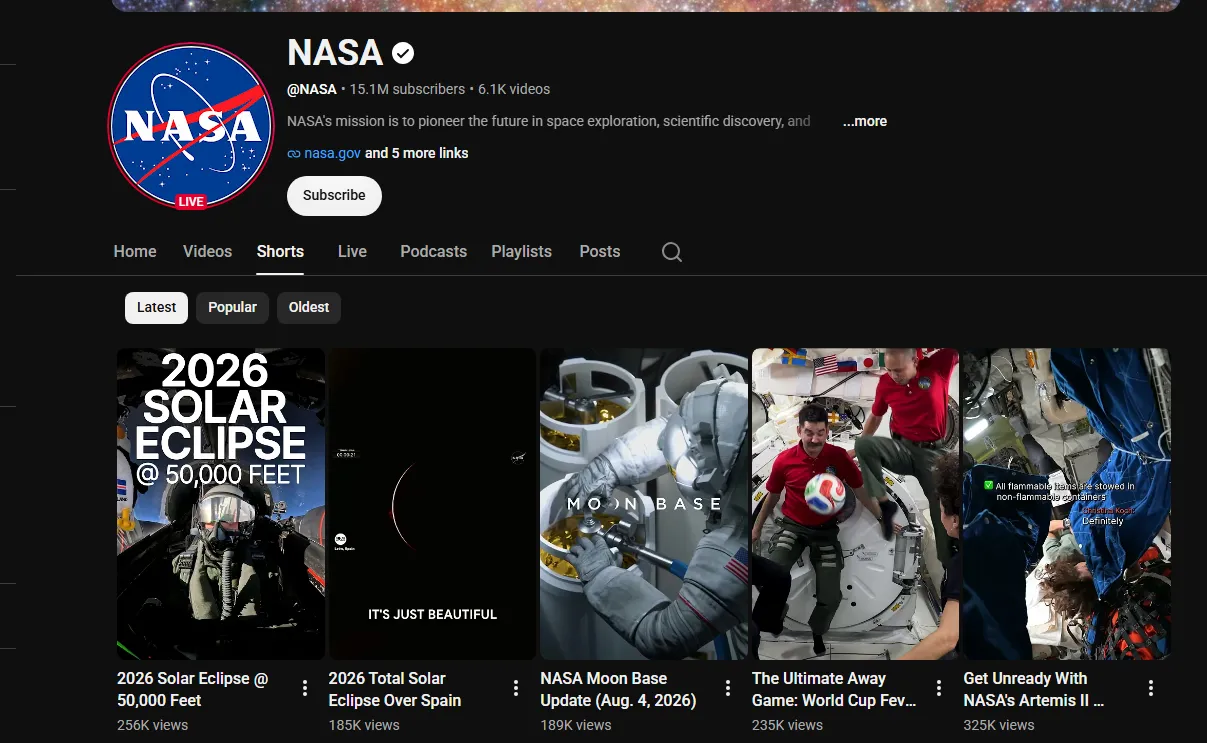
- Four ways in, one run: channels (every Short on the tab, newest, most popular or oldest first), hashtag feeds, keyword searches with YouTube's Shorts filter, and pasted Short URLs or ids - mix them freely.
- Exact numbers, not "1.2M": views, likes and comments come from YouTube's own answer for each Short. Across 228 Shorts read on Apify, 95% had an exact like count (the rest are hidden by the creator) and 91% an exact comment count (the rest have comments turned off).
- The real publish time: date and time to the second on 228 of 228 Shorts, plus duration, category and creator tags.
- Sound, products and AI labels: the sound behind every Short (title, artist, source video, link to the sound page), products tagged in the Short, and YouTube's "How this was made" labels such as Made with AI and Auto-dubbed.
- Transcript add-on: the spoken text from YouTube's own caption track, in the Short's original language, with timestamps.
- Monitor mode: schedule the same input and get only new Shorts - or new Shorts plus count changes, with deltas.
- No login, cookies or YouTube API key: no quota, no OAuth, no proxy setup.
- Pay only for delivered rows: no start fee.
- Export anywhere, works with AI agents: JSON, CSV, Excel; schedules, webhooks, Make, Zapier, n8n; the Apify API and MCP.
What data can you get from YouTube Shorts?
| 🎬 Short id and URL (`id`, `url`) | 📝 Title and full description (`text`) | #️⃣ Hashtags (`hashtags`) |
| 👁️ Exact views (`viewCount`) | ❤️ Exact likes (`likes`) | 💬 Exact comment count (`commentsCount`) |
| 📈 Engagement rate and views per day | 📅 Publish date-time (`date`) | ⏱️ Duration (`duration`, `durationSeconds`) |
| 🎵 Sound: title, artist, source video (`sound`) | 🛍️ Tagged products (`taggedProducts`) | 🤖 AI / auto-dub labels (`contentLabels`) |
| 🏷️ Category and creator tags (`keywords`) | 🖼️ Thumbnails and first frame | 🔗 Links in the description |
| 👤 Channel name, handle, id | 👥 Subscribers (`numberOfSubscribers`) | ✅ Verified badge |
| 🌍 Channel country, join date | 📊 Lifetime channel views and videos | 🔗 Channel links and About text |
| 🗣️ Transcript with timestamps (add-on) | 🆕 Monitor fields: `isNew`, `statsDelta` | 🧭 Source, input and position |
On the 25-Short live run below, every row had views, publish time, duration, category, sound and channel subscribers; 84% had a visible like count, 96% open comments and 76% a transcript.
How to scrape YouTube Shorts with YouTube Shorts Scraper
- Create a free Apify account - $5 of monthly credit, no card needed.
- Open YouTube Shorts Scraper and click Try for free.
- Add channels, hashtags, search keywords or Short URLs, and set Max Shorts per source.
- Optionally set a date window, minimum views or likes, and turn on Add transcript.
- Click Start. Rows stream into the dataset as each Short is read.
- Open Storage and Export as JSON, CSV or Excel - or put the input on a schedule.
⬇️ YouTube Shorts Scraper input
| Parameter | Type | Description |
|---|---|---|
| 🔍 What to scrape | At least one source; with none, the two sample channels run. | |
channels | List | Handles, channel URLs or ids: @MrBeast, nasa, https://www.youtube.com/@mkbhd/shorts, UCX6OQ3DkcsbYNE6H8uQQuVA. Prefill: @MrBeast, @NASA |
hashtags | List | cooking, #asmr, or a /hashtag/<tag>/shorts URL. One word each. |
searchQueries | List | Keywords searched with YouTube's Shorts filter on: kitchen hacks. |
shortUrls | List | /shorts/ links, youtu.be links, watch?v= links or bare 11-character ids. |
| 🎯 Filters | ||
sortBy | Select | YouTube's default, Newest first, Most popular, Oldest first (channels only). Default: YouTube's default |
postedAfter / postedBefore | Text | 2026-09-01, 7 days, 24 hours. Newest-first feeds stop paging once past the window. |
| ✂️ Refine results | ||
minViews, minLikes | Integer | Exact-count floors. 0 = off. |
titleKeywords | List | Keep Shorts whose title or hashtags contain one of these words. |
excludeKeywords | List | Drop Shorts whose title or description contains one of these words. |
| ➕ Extra data | ||
includeTranscript | Boolean | Spoken text from YouTube's captions, charged as the transcript add-on only on Shorts that have one. Default: false |
includeChannelDetails | Boolean | Subscribers, verified badge, banner, About text, country, join date, lifetime views, links. Free. Default: true |
| 🔁 Monitoring | ||
monitorMode | Select | Off / New Shorts only / New Shorts + count changes. Default: Off |
monitorStoreName | Text | Named store that remembers delivered Shorts. Default: youtube-shorts-monitor |
| 📦 Output | ||
maxResultsPerSource | Integer | Cap per channel, hashtag or search; 0 = no cap. Default 30, prefill 5 |
maxItems | Integer | Cap for the whole run; 0 = none. |
compact | Boolean | Core fields only, sized for AI agents and MCP. |
| ⚙️ Advanced | ||
proxyConfiguration | Proxy | Fallback only - YouTube is read from the run's own IP first. |
maxConcurrency | Integer | Shorts read at the same time, 1-20. Default 10 |
YouTube Shorts input JSON
Pick the YouTube Shorts source that answers your question
A channel gives you everything one creator posted, in order - use it for competitor and creator analytics. A hashtag gives you YouTube's own feed for that tag - use it for trend and campaign tracking. A search gives you what YouTube ranks for a phrase - use it for discovery. Do: cooking in hashtags. Don't: #cooking recipes (a hashtag is one word; put phrases in searchQueries).
Combine sort order and a date window on YouTube Shorts channels
A channel's Shorts tab is strictly newest first, so postedAfter: "7 days" stops reading as soon as it reaches older Shorts. Most popular reads the channel's top Shorts of all time. Searches accept Newest first and Most popular, but YouTube orders Shorts search results loosely; hashtag feeds have no sort at all and always use YouTube's order.
Keep one monitor store per YouTube Shorts watch list
With New Shorts only, a scheduled run of the same channels delivers only Shorts it has not delivered before, and on a newest-first channel it stops reading at the first Short it already knows - an empty poll took 1.9 seconds. Use a different monitorStoreName for each client or campaign so their memories never mix.
⬆️ YouTube Shorts Scraper output
Every Short becomes one dataset item. Here is the table view of a live run with a channel, a hashtag, a keyword search and a Short URL, transcripts on:
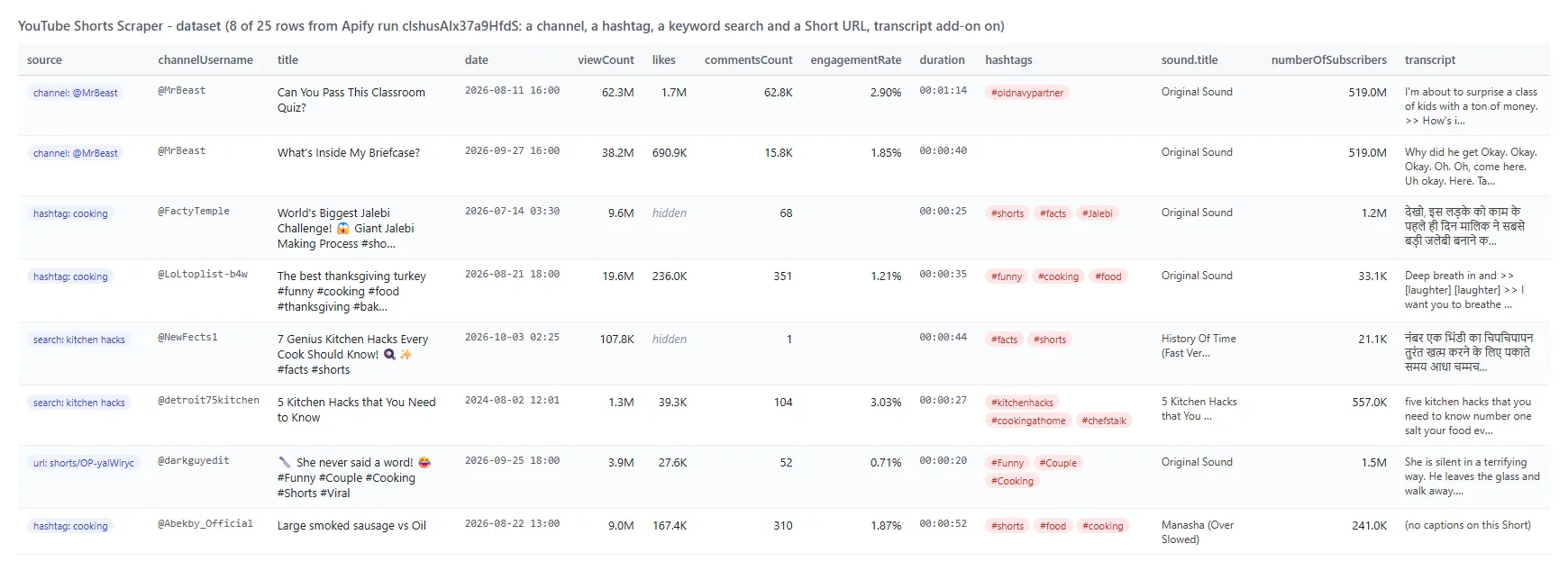
One row from that run, trimmed to the key fields:
YouTube Shorts fields
Fill = share of the 25 rows of live run clshusAIx37a9HfdS with a value (empty lists count as empty).
| Field | Type | What it is | Fill |
|---|---|---|---|
id, url, title | string | Short id, /shorts/ URL, title | 100% |
text | string | Full description ("" when none was added) | 48% |
hashtags | array | Hashtags from title and description | 60% |
descriptionLinks | array | Links in the description {text, url} | 12% |
viewCount | integer | Exact views | 100% |
likes / likesHidden | integer / boolean | Exact likes; null + likesHidden: true when the creator hides them | 84% / 100% |
commentsCount / commentsTurnedOff | integer / boolean | Exact comment count; null when comments are off | 96% / 100% |
engagementRate | number | (likes + comments) / views; null when likes are hidden | 84% |
viewsPerDay, daysSincePublished | number | Velocity since publishing | 100% |
date, datePrecision, publishedTimeText | string | Publish date-time (UTC), second, "6 days ago" | 100% |
duration, durationSeconds | string / integer | Length | 100% |
category, keywords | string / array | YouTube category; creator tags | 100% / 12% |
sound | object | Title, artist, artist channel, source video, sound page URL, original or licensed | 100% |
contentLabels | array | "How this was made": Made with AI, Auto-dubbed | 12% |
taggedProducts | array | Products tagged in the Short: title, merchant, URL | 8% |
thumbnailUrl, thumbnailFrameUrl, thumbnails | string / array | Portrait thumbnail, first frame, every size | 100% / 96% / 100% |
isAgeRestricted, isFamilySafe, isUnlisted, isShortsEligible | boolean | YouTube's flags | 100% |
channelName, channelUsername, channelId, channelUrl, channelAvatarUrl | string | Creator identity | 100% |
numberOfSubscribers, isChannelVerified | integer / boolean | Subscribers (3 significant digits, as YouTube shows them), badge | 100% |
channelTotalViews, channelTotalVideos, channelJoinedDate | integer / string | Lifetime channel stats (exact) and join date | 100% |
channelLocation, channelDescription, channelDescriptionLinks, channelBannerUrl | string / array | About panel and banner | 92% / 96% / 60% / 80% |
transcript, transcriptSegments, transcriptLanguage, transcriptIsAutoGenerated, audioLanguage, captionLanguages | add-on | Spoken text, timed segments, original language | 76% |
isNew, previousStats, statsDelta, previousScrapedAt | monitor | First delivery flag and count changes | monitor runs |
input, sourceType, fromYTUrl, order, scrapedAt | provenance | Which input produced the row, and where | 100% |
YouTube Shorts error items
When a source returns nothing, an error item says why instead of a silent skip; it is easy to filter on the error field: CHANNEL_DOES_NOT_EXIST, CHANNEL_HAS_NO_SHORTS, HASHTAG_HAS_NO_SHORTS, NO_RESULTS, VIDEO_UNAVAILABLE, VIDEO_PRIVATE, MEMBERS_ONLY, AGE_RESTRICTED, NOT_A_SHORT (a regular video URL), INVALID_INPUT, and *_BLOCKED when YouTube refused every route.
How can I use YouTube Shorts data?
- 📊 Creator and channel analysts - benchmark a channel's entire Shorts back catalogue by views, likes, comments, duration and posting time.
- 🎯 Influencer marketers - find creators through hashtag and keyword feeds, then shortlist by subscribers, verified badge, country and engagement rate.
- 🔎 Trend researchers - watch a hashtag or keyword daily and see which formats and sounds are rising, with views per day.
- 🛍️ E-commerce and brand teams - collect Shorts that tag products and see which merchants and items appear.
- 🎵 Music and sound analysts - track which licensed songs and original sounds Shorts use, with a link to each sound page.
- 🤖 AI and content teams - feed transcripts, titles and hashtags to an LLM for topic mining, scripts or classification.
- 📈 Agencies - schedule Monitor mode on client and competitor channels and get only new uploads or count changes.
How much does it cost to scrape YouTube Shorts?
YouTube Shorts Scraper is pay-per-result: $1.70 per 1,000 Shorts, no start fee (the Pricing tab always shows the live rate). The transcript add-on is $2.80 per 1,000 Shorts that receive one.
| Shorts | Cost | With transcripts on every Short |
|---|---|---|
| 10 | $0.017 | $0.045 |
| 100 | $0.17 | $0.45 |
| 1,000 | $1.70 | $4.50 |
| 10,000 | $17.00 | $45.00 |
There is nothing else to pay: Apify platform usage is included in these prices. Measured on Apify at the default 512 MB: the 10-Short prefill in 8 seconds; 50 Shorts from a channel and a hashtag in 29 seconds; 25 Shorts with transcripts in 44 seconds; an empty monitor poll in 1.9 seconds.
Integrations, API, scheduling & MCP for YouTube Shorts
- Schedules: run YouTube Shorts Scraper hourly, daily or weekly from Schedules; with Monitor mode each run delivers only new Shorts.
- Webhooks: call your URL when a run finishes - push rows to a CRM, a sheet or Slack.
- No-code: Make, Zapier, n8n, Google Sheets, Airtable and Slack through Apify integrations.
- API: start runs and read datasets with
apify-clientfor Python or JavaScript; see the Apify API reference. - MCP / AI agents: connect Claude, Cursor or any MCP client through the MCP tab and ask for YouTube Shorts in plain language;
compactkeeps answers small.
More social video scrapers from TopApi
| 🎵 TikTok Scraper - profiles, hashtags, feeds | 🎬 TikTok Video Scraper - one video by URL | 📸 Instagram Scraper |
| 🐦 X Profile Scraper | 📰 Facebook Search Posts Scraper | 🛒 Facebook Marketplace Scraper |
| 💼 Indeed Jobs Scraper | 📈 Similarweb Scraper | ⭐ Google Maps Reviews Scraper |
| 🧭 All TopApi actors | ||
YouTube Shorts limits & empty runs
- Results per source: a channel's Shorts tab pages through every Short it has (48 per page); a hashtag feed pages on; a Shorts search runs dry after a few hundred results, so split broad topics into several keywords.
- Rounded at the source: subscriber counts are what YouTube shows (3 significant digits, e.g. 15.1M). Views, likes, comments, lifetime channel views and video counts are exact.
- Hidden or off: a creator can hide likes (5% of 228 Shorts read) or turn comments off (9%); those fields are null, never 0, and
likesHidden/commentsTurnedOffsay which. - Empty dataset: your filters removed everything, monitor mode found nothing new, or the source has no Shorts - the status message and an error item say which.
- Not available signed out: dislike counts (YouTube removed them in 2021), monetization status, title translations, video locations, collaborator lists (none appeared on 77 Shorts sampled, 60 of them from #collab feeds) and members-only Shorts are not delivered. Video files are not downloaded.
FAQ
How many YouTube Shorts can YouTube Shorts Scraper collect in one run?
As many as the sources hold: a channel's whole Shorts tab, a hashtag feed page after page, and a few hundred results per search. Set maxResultsPerSource and maxItems to bound the bill; 50 Shorts took 29 seconds on Apify.
Can I run YouTube Shorts Scraper on a schedule to get new Shorts automatically?
Yes. Save your input as a task, open Schedules, pick the cadence and set Monitor mode to New Shorts only. Each run returns only Shorts it has not delivered before; on a newest-first channel it stops at the first known Short.
Can YouTube Shorts Scraper track views and likes over time?
Yes. Monitor mode New Shorts + count changes re-reads the Shorts it already delivered and returns those whose views, likes or comments moved, with previousStats and statsDelta.
Does YouTube Shorts Scraper return the transcript of a Short?
Yes, with Add transcript on: the text of YouTube's own caption track (creator captions or auto-captions) in the Short's original language, with timestamps. On the live run 19 of 25 Shorts had one.
Can I integrate YouTube Shorts Scraper with other apps?
Yes - Make, Zapier, n8n, Google Sheets, Slack and more via Apify integrations, or webhooks that fire when a run finishes.
Can I use YouTube Shorts Scraper with the Apify API?
Yes. Start runs, fetch datasets and manage schedules with apify-client for Node.js or Python; the API tab has ready-to-paste code.
Can I use YouTube Shorts Scraper through an MCP server?
Yes. Open the MCP tab, connect Claude Desktop, Cursor or another MCP client, and ask for YouTube Shorts in plain language. Turn on compact to keep rows small.
Do I need a YouTube account, cookies or a YouTube API key for YouTube Shorts Scraper?
No. YouTube Shorts Scraper reads only what YouTube shows a signed-out visitor; there is no Data API quota and nothing to set up.
Why did my YouTube Shorts Scraper run return no Shorts?
Most often the filters removed everything (the status message counts them by reason), monitor mode found nothing new, or a source has no Shorts (an error item names it). A hashtag must be one word, and a long video URL returns NOT_A_SHORT.
How is YouTube Shorts Scraper different from other YouTube Shorts scrapers?
It takes channels, hashtags, searches and URLs in one run, returns the exact publish time to the second plus exact likes and comment counts, adds sound, tagged products and AI labels, has two monitor modes, and charges no start fee.
Is it legal to scrape YouTube Shorts?
YouTube Shorts Scraper extracts only publicly available Shorts data; it does not log in or collect private data. Results may still contain personal data such as creator names, which is regulated by laws like GDPR. Make sure you have a legitimate purpose before you use it.
Your feedback
We keep improving YouTube Shorts Scraper. Found a bug or missing a field? Open an issue on the Issues tab - we answer within two working days.


![YouTube Shorts [Only $0.45💰] Scraper avatar](https://images.apifyusercontent.com/QycCQx1quhTcnOrSBDOBxyYo4N_mTVwis9MhaMS94KQ/rs:fill:76:76/cb:1/aHR0cHM6Ly9hcGlmeS1pbWFnZS11cGxvYWRzLXByb2QuczMudXMtZWFzdC0xLmFtYXpvbmF3cy5jb20vbmduOHZSRVNUa3NleVdFNnAtYWN0b3ItU1NSd2VwR0t3ekZLWWVScmstT1JvY0s0cUNoUC15dC5wbmc.webp)


