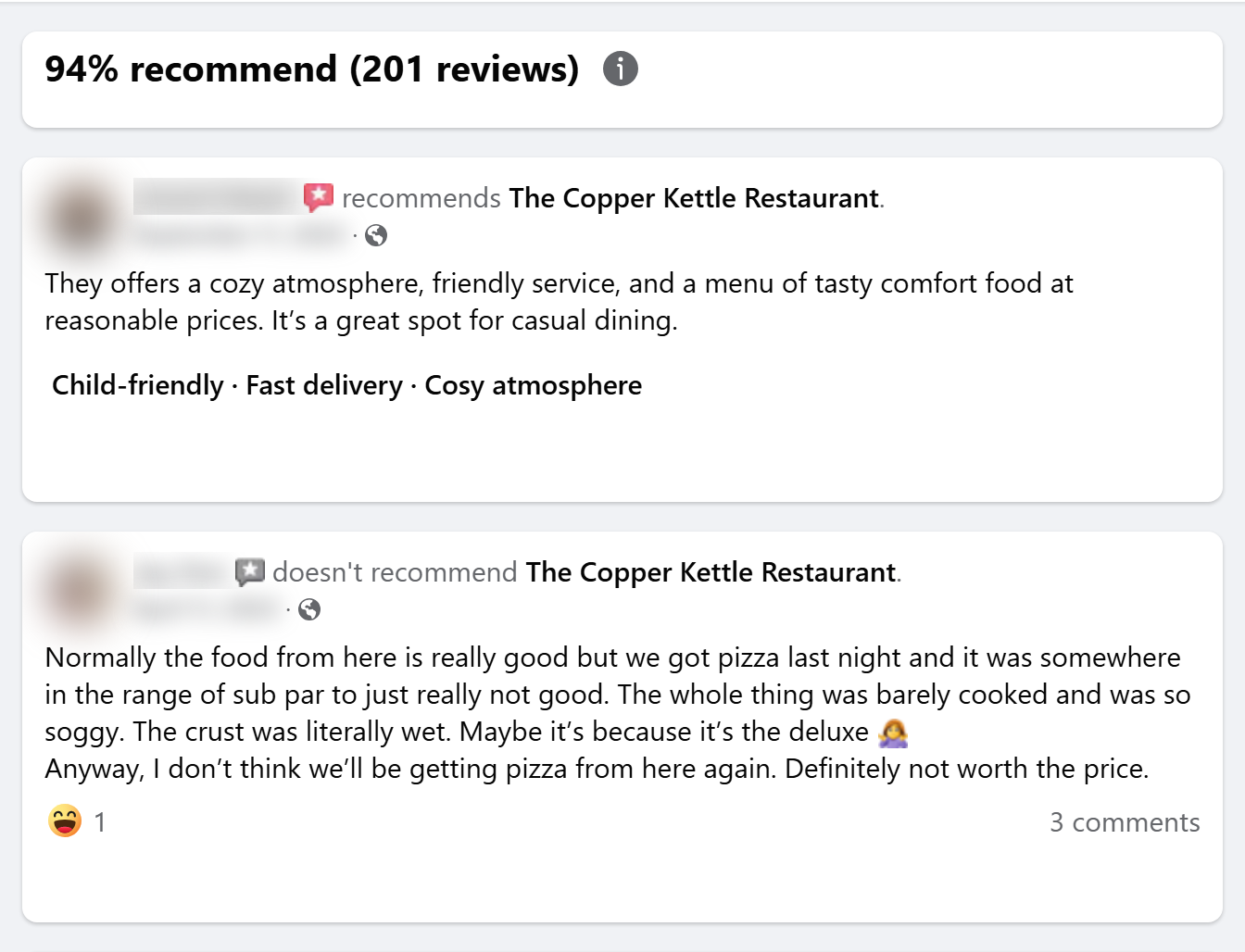
| 👍 Recommends or not (`isRecommended`) |
📝 Review text (`text`) |
📅 Date posted (`date`) |
| 🏷️ Review tags (`tags`) |
👤 Reviewer name and avatar (`user`) |
🔗 Review link (`url`) |
| ❤️ Reactions by type (`reactions`) |
💬 Comment count (`commentsCount`) |
🔁 Share count (`sharesCount`) |
| 📷 Review photos (`photos`) |
🗨️ Review comments (`comments`, add-on) |
⭐ Page "% recommend" (`pageRecommendPercent`) |
| 🔢 Page review count (`pageReviewsCount`) |
🏢 Page name, username and id |
👥 Page followers (`pageFollowers`) |
| ✅ Page verified badge |
📣 Page Ad Library id (`pageAdLibrary`) |
🔎 The search name that found the Page |
On a 1,031-review test run across three Pages, 96% of reviews had text, 45% had tags and 15% had photos; the verdict, date, reviewer, reactions and the Page's score were filled on every row (the verdict on 99.5%, see the fields table).
### How to scrape Facebook reviews with Facebook Reviews Scraper
1. [Create a free Apify account](https://console.apify.com/sign-up) — $5 of monthly credit, no card needed.
2. Open [Facebook Reviews Scraper](https://apify.com/topapi/facebook-reviews-scraper) and click **Try for free**.
3. Paste one or more Facebook Page URLs into **Facebook Page URLs** (or business names into **Search Pages by name**) and set **Max reviews per Page**.
4. Click **Start**. Reviews stream into the dataset as they are found, newest first.
5. Open the **Storage** tab and **Export** as JSON, CSV or Excel — or let a schedule run it for you.
### ⬇️ Input
| Parameter | Type | Description |
|---|---|---|
| **🔍 What to scrape** | | |
| `startUrls` | List | Facebook Pages: a Page URL (`https://www.facebook.com/katzsdeli`), its `/reviews` URL, a `profile.php?id=` URL, a username (`katzsdeli`) or a numeric Page id. |
| `searchQueries` | List | Business names looked up with Facebook's own Page search, e.g. `Katz's Delicatessen`. |
| `maxPagesPerQuery` | Integer | How many of the top search results to scrape per name. Default `1`. |
| **✂️ Refine results** | | |
| `recommendationType` | Select | `all`, `positive` (recommends) or `negative` (doesn't recommend). Default `all`. |
| `onlyReviewsNewerThan` | Date | Keep reviews posted on or after a date: `2026-01-01` or relative (`30 days`, `6 months`). |
| `onlyReviewsOlderThan` | Date | Keep reviews posted before a date. Combine both for a window. |
| `keywords` | List | Keep reviews whose text or tags contain one of these words. |
| `onlyWithText` | Boolean | Skip recommendations without written text. Default `false`. |
| `onlyWithPhotos` | Boolean | Keep only reviews with photos. Default `false`. |
| **➕ Extra data** | | |
| `includeComments` | Boolean | Add the public comments under each review — charged as **review-comments** at $0.001 per review that comes back with at least one comment. Default `false`. |
| `maxCommentsPerReview` | Integer | Most comments per review. Default `10`. |
| `maxRepliesPerComment` | Integer | Most replies nested under each comment. Default `0`. |
| **🔁 Monitoring** | | |
| `monitorMode` | Boolean | Return only reviews not delivered by previous runs. Pair with a schedule. |
| `monitorStoreName` | String | Name of the memory store. Default `facebook-reviews-monitor`. |
| **📦 Output** | | |
| `maxReviewsPerPage` | Integer | Default `100`; `0` = every public review (up to 5,000 per Page per run). `resultsLimit` is accepted too. |
| `maxReviews` | Integer | Limit for the whole run across all Pages. Default `0` (none). |
| `compact` | Boolean | Core fields only, sized for AI agents and MCP. |
| **⚙️ Advanced** | | |
| `proxyConfiguration` | Proxy | Default: no proxy, with an automatic move to Apify datacenter and residential IPs if Facebook refuses a Page. |
| `maxConcurrency` | Integer | Pages scraped at the same time. Default `3`. |
#### Input JSON
```json
{
"startUrls": [{ "url": "https://www.facebook.com/katzsdeli" }],
"searchQueries": ["Joe's Stone Crab Miami"],
"maxReviewsPerPage": 100,
"recommendationType": "all",
"onlyReviewsNewerThan": "6 months",
"includeComments": false
}
```
#### Paste the Page, not a post
Facebook Reviews Scraper reads a Page's **Reviews** tab. **Do:** `https://www.facebook.com/katzsdeli` or `katzsdeli` · **Don't:** a post or photo URL, or a group (groups have no reviews and are reported as invalid input).
#### Search with the exact business name
The search uses Facebook's own Page search, which ranks exact names well. **Do:** `Katz's Delicatessen`, `Joe's Stone Crab Miami` · **Don't:** `best deli nyc` (that finds unrelated Pages). The matched Pages are listed in the run summary, and every row carries the `searchQuery` that found it.
#### Use a date floor to stop early
Facebook serves reviews newest first, so `onlyReviewsNewerThan` stops reading as soon as reviews get older than your date. That makes "last 30 days" runs short even on Pages with thousands of reviews.
### ⬆️ Output
Every review becomes one dataset item. Here is the table view of a real run for Katz's Delicatessen and The Ritz (reviewer names blurred in the picture, delivered in full in the data):
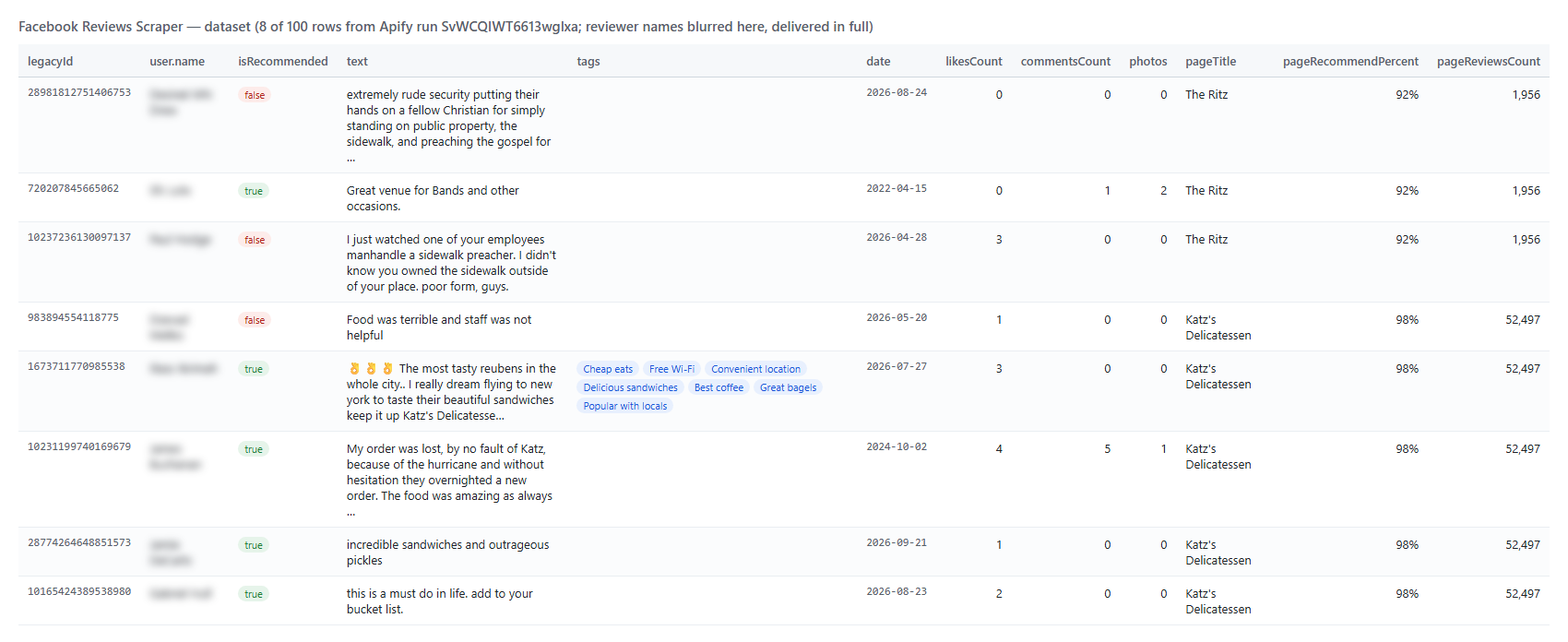 And one row as JSON (reviewer masked here):
```json
{
"facebookUrl": "https://www.facebook.com/katzsdeli",
"legacyId": "1673711770985538",
"url": "https://www.facebook.com/******/posts/pfbid0…",
"date": "2026-07-27T16:44:35.000Z",
"isRecommended": true,
"recommendationStatus": "RECOMMENDS",
"text": "👌👌👌 The most tasty reubens in the whole city.. I really dream flying to new york to taste their beautiful sandwiches keep it up Katz's Delicatessen.",
"tags": ["Cheap eats", "Free Wi-Fi", "Convenient location", "Delicious sandwiches", "Best coffee", "Great bagels", "Popular with locals"],
"user": { "id": "pfbid02x…", "name": "******", "profileUrl": null, "profilePic": "https://scontent.xx.fbcdn.net/v/…" },
"likesCount": 3,
"reactions": { "like": 2, "love": 1, "care": 0, "haha": 0, "wow": 0, "sad": 0, "angry": 0 },
"commentsCount": 0,
"photos": [],
"facebookId": "100064806517961",
"pageName": "katzsdeli",
"pageTitle": "Katz's Delicatessen",
"pageFollowers": 952715,
"pageRecommendPercent": 98,
"pageReviewsCount": 52497,
"pageRatingSummary": "98% recommend (52,497 reviews)",
"pageAdLibrary": { "id": "89033874836", "isBusinessPageActive": false },
"inputUrl": "https://www.facebook.com/katzsdeli"
}
```
#### Facebook review fields
Fill = share of rows with the field set, on a 1,031-review run (Katz's Delicatessen, Joe's Stone Crab, The Ritz).
| Field | Type | What it is | Fill |
|---|---|---|---|
| `id` / `legacyId` | string | Facebook's story id and numeric post id of the review | 100% |
| `url` | string | Link to the review | 100% |
| `date` / `timestamp` | string / number | When it was posted (ISO 8601 / Unix seconds) | 100% |
| `isRecommended` | boolean | Recommends the Page (`true`) or not (`false`) | 99.5% |
| `recommendationStatus` / `sentiment` | string | `RECOMMENDS` / `DOES_NOT_RECOMMEND`; `positive` / `negative` from the same verdict | 99.5% |
| `title` | string | The review's headline as Facebook prints it | 100% |
| `text` | string | The review text | 96% |
| `tags` | array | Tags the reviewer picked ("Fast delivery", "Cosy atmosphere") | 45% |
| `user` | object | `id`, `name`, `shortName`, `profileUrl`, `profilePic`, `isVerified` | 100% (`profileUrl` 44%) |
| `likesCount` / `reactions` | number / object | Total reactions and the count per type | 100% |
| `commentsCount` / `sharesCount` | number | Comments and shares on the review | 100% |
| `photos` | array | `id`, `url` (full size), `thumbnailUrl`, `width`, `height`, `alt` | 15% |
| `comments` | array | With `includeComments`: `id`, `text`, `date`, `authorName`, `authorUrl`, `likesCount`, `repliesCount`, `replies` | add-on |
| `facebookUrl` / `facebookId` | string | The Page's URL and numeric id | 100% |
| `pageName` / `pageTitle` | string | The Page's username and display name | 100% |
| `pageRecommendPercent` / `pageReviewsCount` / `pageRatingSummary` | number / number / string | The Page's score line, split | 100% |
| `pageFollowers` / `pageIsVerified` / `pageProfilePicture` | number / boolean / string | The Page's header | 100% |
| `pageAdLibrary` | object | The Page's Ad Library `id` and `isBusinessPageActive` | 100% |
| `feedbackId` | string | Facebook's feedback id of the review | 100% |
| `inputUrl` / `searchQuery` / `scrapedAt` | string | What you passed, the search name that found the Page, scrape time | 100% / with search / 100% |
`profileUrl` is empty when Facebook shows the reviewer without a public profile link. `isRecommended` is empty on the few reviews whose author tagged friends: Facebook then replaces the headline with "X is with Y" and shows visitors no verdict. Facebook has had no star ratings since 2018 (a review is a recommendation, yes or no), so there is no star rating field.
### How can I use Facebook reviews data?
- 📣 **Reputation-management agencies** — collect every client's Facebook reviews in one sheet and flag new negative ones each morning with monitor mode
- 🏪 **Multi-location brands** — compare the "% recommend" score and review volume of every branch Page side by side
- 🔎 **Competitor research** — read what customers praise or complain about at competing restaurants, venues or shops, by tag and keyword
- 🧑💼 **Local marketing agencies** — find businesses with negative reviews and no owner reply as outreach leads
- 🤖 **AI and research teams** — feed review text, tags and verdicts to an LLM for topic and sentiment analysis
- 📈 **Customer-experience teams** — track the verdict mix week over week on a schedule
### How much does it cost to scrape Facebook reviews?
Facebook Reviews Scraper is pay-per-result: **$2.00 per 1,000 reviews** ($0.002 per review), no start fee. The optional comments add-on is $0.001 per review that comes back with at least one comment.
| Reviews | Cost | With comments on every review |
|---:|---:|---:|
| 10 | $0.02 | $0.03 |
| 100 | $0.20 | $0.30 |
| 1,000 | $2.00 | $3.00 |
| 10,000 | $20.00 | $30.00 |
Apify platform usage is included in the price. A 931-review run from two Pages took 5.5 minutes on the default 256 MB.
### Integrations, API, scheduling & MCP
- **Schedules:** run Facebook Reviews Scraper daily or weekly from the **Schedules** tab; turn on `monitorMode` to get only new reviews.
- **Webhooks:** fire a URL when a run finishes — push new reviews to your CRM, Slack or a sheet.
- **No-code:** Make, Zapier, n8n, Google Sheets, Airtable, Slack via [Apify integrations](https://docs.apify.com/integrations).
- **API:** call it from Node.js or Python with `apify-client` — code on the [API tab](https://apify.com/topapi/facebook-reviews-scraper/api/python) and the [Apify API reference](https://docs.apify.com/api/v2).
- **MCP / AI agents:** connect Claude, Cursor or any MCP client through the [MCP tab](https://apify.com/topapi/facebook-reviews-scraper/api/mcp) and ask for a Page's Facebook reviews in plain language.
### More Facebook and review scrapers by TopApi
And one row as JSON (reviewer masked here):
```json
{
"facebookUrl": "https://www.facebook.com/katzsdeli",
"legacyId": "1673711770985538",
"url": "https://www.facebook.com/******/posts/pfbid0…",
"date": "2026-07-27T16:44:35.000Z",
"isRecommended": true,
"recommendationStatus": "RECOMMENDS",
"text": "👌👌👌 The most tasty reubens in the whole city.. I really dream flying to new york to taste their beautiful sandwiches keep it up Katz's Delicatessen.",
"tags": ["Cheap eats", "Free Wi-Fi", "Convenient location", "Delicious sandwiches", "Best coffee", "Great bagels", "Popular with locals"],
"user": { "id": "pfbid02x…", "name": "******", "profileUrl": null, "profilePic": "https://scontent.xx.fbcdn.net/v/…" },
"likesCount": 3,
"reactions": { "like": 2, "love": 1, "care": 0, "haha": 0, "wow": 0, "sad": 0, "angry": 0 },
"commentsCount": 0,
"photos": [],
"facebookId": "100064806517961",
"pageName": "katzsdeli",
"pageTitle": "Katz's Delicatessen",
"pageFollowers": 952715,
"pageRecommendPercent": 98,
"pageReviewsCount": 52497,
"pageRatingSummary": "98% recommend (52,497 reviews)",
"pageAdLibrary": { "id": "89033874836", "isBusinessPageActive": false },
"inputUrl": "https://www.facebook.com/katzsdeli"
}
```
#### Facebook review fields
Fill = share of rows with the field set, on a 1,031-review run (Katz's Delicatessen, Joe's Stone Crab, The Ritz).
| Field | Type | What it is | Fill |
|---|---|---|---|
| `id` / `legacyId` | string | Facebook's story id and numeric post id of the review | 100% |
| `url` | string | Link to the review | 100% |
| `date` / `timestamp` | string / number | When it was posted (ISO 8601 / Unix seconds) | 100% |
| `isRecommended` | boolean | Recommends the Page (`true`) or not (`false`) | 99.5% |
| `recommendationStatus` / `sentiment` | string | `RECOMMENDS` / `DOES_NOT_RECOMMEND`; `positive` / `negative` from the same verdict | 99.5% |
| `title` | string | The review's headline as Facebook prints it | 100% |
| `text` | string | The review text | 96% |
| `tags` | array | Tags the reviewer picked ("Fast delivery", "Cosy atmosphere") | 45% |
| `user` | object | `id`, `name`, `shortName`, `profileUrl`, `profilePic`, `isVerified` | 100% (`profileUrl` 44%) |
| `likesCount` / `reactions` | number / object | Total reactions and the count per type | 100% |
| `commentsCount` / `sharesCount` | number | Comments and shares on the review | 100% |
| `photos` | array | `id`, `url` (full size), `thumbnailUrl`, `width`, `height`, `alt` | 15% |
| `comments` | array | With `includeComments`: `id`, `text`, `date`, `authorName`, `authorUrl`, `likesCount`, `repliesCount`, `replies` | add-on |
| `facebookUrl` / `facebookId` | string | The Page's URL and numeric id | 100% |
| `pageName` / `pageTitle` | string | The Page's username and display name | 100% |
| `pageRecommendPercent` / `pageReviewsCount` / `pageRatingSummary` | number / number / string | The Page's score line, split | 100% |
| `pageFollowers` / `pageIsVerified` / `pageProfilePicture` | number / boolean / string | The Page's header | 100% |
| `pageAdLibrary` | object | The Page's Ad Library `id` and `isBusinessPageActive` | 100% |
| `feedbackId` | string | Facebook's feedback id of the review | 100% |
| `inputUrl` / `searchQuery` / `scrapedAt` | string | What you passed, the search name that found the Page, scrape time | 100% / with search / 100% |
`profileUrl` is empty when Facebook shows the reviewer without a public profile link. `isRecommended` is empty on the few reviews whose author tagged friends: Facebook then replaces the headline with "X is with Y" and shows visitors no verdict. Facebook has had no star ratings since 2018 (a review is a recommendation, yes or no), so there is no star rating field.
### How can I use Facebook reviews data?
- 📣 **Reputation-management agencies** — collect every client's Facebook reviews in one sheet and flag new negative ones each morning with monitor mode
- 🏪 **Multi-location brands** — compare the "% recommend" score and review volume of every branch Page side by side
- 🔎 **Competitor research** — read what customers praise or complain about at competing restaurants, venues or shops, by tag and keyword
- 🧑💼 **Local marketing agencies** — find businesses with negative reviews and no owner reply as outreach leads
- 🤖 **AI and research teams** — feed review text, tags and verdicts to an LLM for topic and sentiment analysis
- 📈 **Customer-experience teams** — track the verdict mix week over week on a schedule
### How much does it cost to scrape Facebook reviews?
Facebook Reviews Scraper is pay-per-result: **$2.00 per 1,000 reviews** ($0.002 per review), no start fee. The optional comments add-on is $0.001 per review that comes back with at least one comment.
| Reviews | Cost | With comments on every review |
|---:|---:|---:|
| 10 | $0.02 | $0.03 |
| 100 | $0.20 | $0.30 |
| 1,000 | $2.00 | $3.00 |
| 10,000 | $20.00 | $30.00 |
Apify platform usage is included in the price. A 931-review run from two Pages took 5.5 minutes on the default 256 MB.
### Integrations, API, scheduling & MCP
- **Schedules:** run Facebook Reviews Scraper daily or weekly from the **Schedules** tab; turn on `monitorMode` to get only new reviews.
- **Webhooks:** fire a URL when a run finishes — push new reviews to your CRM, Slack or a sheet.
- **No-code:** Make, Zapier, n8n, Google Sheets, Airtable, Slack via [Apify integrations](https://docs.apify.com/integrations).
- **API:** call it from Node.js or Python with `apify-client` — code on the [API tab](https://apify.com/topapi/facebook-reviews-scraper/api/python) and the [Apify API reference](https://docs.apify.com/api/v2).
- **MCP / AI agents:** connect Claude, Cursor or any MCP client through the [MCP tab](https://apify.com/topapi/facebook-reviews-scraper/api/mcp) and ask for a Page's Facebook reviews in plain language.
### More Facebook and review scrapers by TopApi