| 🧩 Technologies (`technologies`) |
🏷️ Categories (`categories`) |
🔢 Versions (`version`) |
| 🎯 Confidence 0-100 (`confidence`) |
🔍 Evidence per detection (`evidence`) |
⭐ Primary stack (`primaryStack`) |
| 📝 CMS and site builder |
🛒 Ecommerce platform |
📊 Analytics and tag managers |
| 📣 Advertising and retargeting pixels |
⚛️ JavaScript and web frameworks |
☁️ Hosting, PaaS and CDN |
| ✉️ Email and SaaS services from DNS (`dnsDetected`) |
🔒 TLS issuer and expiry (`tls`) |
🛡️ Security headers (`securityHeaders`) |
| 🖥️ Server and X-Powered-By |
🌐 Third-party domains loaded |
🔁 Added / removed since the last run |
On a 100-domain test run of B2B company websites, the 89 websites that answered had **32 technologies on average** (median 34, range 11-46) across 22 categories; 19 of them on average came from DNS records.
### How to look up a website's technology stack with Website Technology Scraper
1. [Create a free Apify account](https://console.apify.com/sign-up) - it comes with monthly free credit.
2. Open [Website Technology Scraper](https://apify.com/topapi/website-technology-scraper) and click **Try for free**.
3. Paste your domains into **Websites**, one per line (`hubspot.com`, `www.example.com` or a full URL), or link a text file under **Website URLs (or a file)**.
4. Leave **Browser render** on Auto, or set it to Never for the fastest HTTP + DNS lookup.
5. Click **Start**. Rows appear in the dataset as websites finish.
6. Open **Storage** and **Export** as JSON, CSV or Excel - or schedule the actor and turn on Monitor mode.
### ⬇️ Input
| Parameter | Type | Description |
|---|---|---|
| **🔍 What to analyze** | | |
| `domains` | List | Domains or URLs, e.g. `shopify.com`, `www.example.com`, `https://example.com/pricing`. A domain is analyzed at its homepage. An empty list (and no `startUrls`) runs the 3-site demo: shopify.com, wordpress.org, notion.so. A list that gives no website (a file link that fails, an empty file, no valid domain) ends the run as FAILED with nothing charged. |
| `startUrls` | URL list | Same as `domains` in URL form, or a link to a text/CSV file with one domain per line. |
| **🎯 Detection** | | |
| `renderJavaScript` | Select | `auto` renders JavaScript-built pages in headless Chrome, `always` renders every page (slower), `never` is HTTP + DNS only. On long lists of heavy pages a cost limit can skip some renders; those rows say `renderedWith: http`. Default: `auto` |
| `maxPagesPerDomain` | Integer | Homepage plus up to N-1 same-site pages (pricing, checkout, blog, careers). Contact pages are never picked, in English or other common languages (Kontakt, Contactez-nous, Contacto, Contatti...), and neither are imprint (Impressum, mentions légales) or directions (Anfahrt) pages. Default: `1` |
| `includeDns` | Boolean | DNS records (MX, TXT, NS, SOA, CNAME) as detection signals. Default: `true` |
| `includeTls` | Boolean | TLS certificate issuer and validity. Default: `true` |
| `renderWaitSecs` | Integer | Seconds the browser waits after load for tag managers. Default: `3` |
| **✂️ Refine results** | | |
| `categories` | List | Keep only these categories, e.g. `CMS`, `Analytics`, `Ecommerce`, `Tag managers`. |
| `onlyTechnologies` | List | "Does it use X?" mode: rows get `matches` and `matchedTechnologies`, e.g. `Shopify`, `HubSpot`. |
| `onlyMatchingSites` | Boolean | With `onlyTechnologies`: return only websites that use one of them. Default: `false` |
| `minConfidence` | Integer | Drop detections under this confidence (0-100). Default: `0` |
| **➕ Extra data** | | |
| `includeEvidence` | Boolean | The signals behind each detection. Default: `true` |
| `includeSecurityHeaders` | Boolean | HSTS, CSP, X-Frame-Options and 6 more headers. Default: `true` |
| `includeRawSignals` | Boolean | Script URLs, XHR hosts, response headers and cookie names. Store ids (such as a Shopify shop id) are removed. Default: `false` |
| **🔁 Monitoring** | | |
| `monitorMode` | Boolean | Return only websites whose stack changed since the last run: technologies added or removed, or a version changed. `categories` and `minConfidence` only choose which changes a row shows: each run is compared on the whole stack, so changing or clearing a filter between runs is never a change. Default: `false` |
| `monitorStoreName` | String | One name per list you monitor. Default: `website-technology-monitor` |
| **📦 Output** | | |
| `maxResults` | Integer | Stop after this many websites; `0` = the whole list. Default: `0` |
| `compact` | Boolean | Core fields only, sized for AI agents and MCP. Default: `false` |
| `compareMode` | Boolean | Save a `COMPARISON` record: technologies common to all websites and unique to each. |
| `includeFailedSites` | Boolean | Free rows for websites that could not be analyzed, so every valid, distinct website gets a row (invalid entries and duplicates are skipped; the log and `RUN_SUMMARY.inputsSkipped` count them). Default: `true` |
| **⚙️ Advanced** | | |
| `proxyConfiguration` | Proxy | Default: direct first, Apify proxy for hosts that refuse. |
| `maxConcurrency` | Integer | Websites analyzed in parallel (1-50), capped at 8 per GB of run memory (16 at the default 2 GB). Default: `10` |
| `requestTimeoutSecs` | Integer | Per-request time limit. Default: `20` |
| `respectRobotsTxt` | Boolean | Follow the robots.txt rules for all user agents (`User-agent: *`). A website whose address, or the page it redirects to, is disallowed gets a free `robotsDisallowed` row. Extra pages that robots.txt disallows are never fetched or billed, and the next allowed page is taken instead; an extra page that redirects to a disallowed address is dropped and not billed. A missing or unreadable robots.txt allows every page. `RUN_SUMMARY` counts the skipped extra pages (`robotsSkippedPages`). Default: `false` |
| `ignoreHttpsErrors` | Boolean | Analyze websites with invalid certificates. Default: `false` |
The actor also accepts the input names other technology lookups use (`startDomains`, `urls`, `websites`, `url`, `maxItems`, `maxUrls`, `render_js`, `max_pages_per_site`, `deep_scan`, `categories_filter`, `verify_ssl`, `enableDns`, `enableTls`, `enableSecurityScore`, `include_details`, `include_scripts`, `respect_robots_txt`, `timeout_seconds`), so an existing integration keeps working. Such a name is used while the matching field above is left at its default; `render_js: true` means Always (`false` means Auto) and `deep_scan: true` means 5 pages. The run log and `RUN_SUMMARY.inputAliases` list the names used.
#### Input JSON
```json
{
"domains": ["shopify.com", "wordpress.org", "notion.so"],
"renderJavaScript": "auto",
"maxPagesPerDomain": 1,
"includeDns": true
}
```
#### Pass domains, not deep links
The homepage carries the site-wide tags (tag manager, analytics, consent, chat). **Do:** `hubspot.com` · **Don't:** `hubspot.com/products/crm/some-landing-page` unless that page is what you want to check. Use **Pages per website** to add pricing, checkout and blog pages automatically.
#### Pick the render mode by list size
**Auto** renders only pages that need JavaScript and is the best default. **Never** is the fastest for very large lists (HTTP, DNS and TLS still run). **Always** renders every homepage in Chrome: on a 10-site test it found 51 technologies per website instead of 32, at roughly 12-16 seconds per site. A render costs more compute than a plain lookup, so on long lists of heavy pages a cost limit can skip some renders; those rows say `renderedWith: http` (two runs of the 10-site test rendered 9 and 10 of the 10 websites).
### ⬆️ Output
Each website becomes one dataset item. Here is the table view of a 100-domain run:

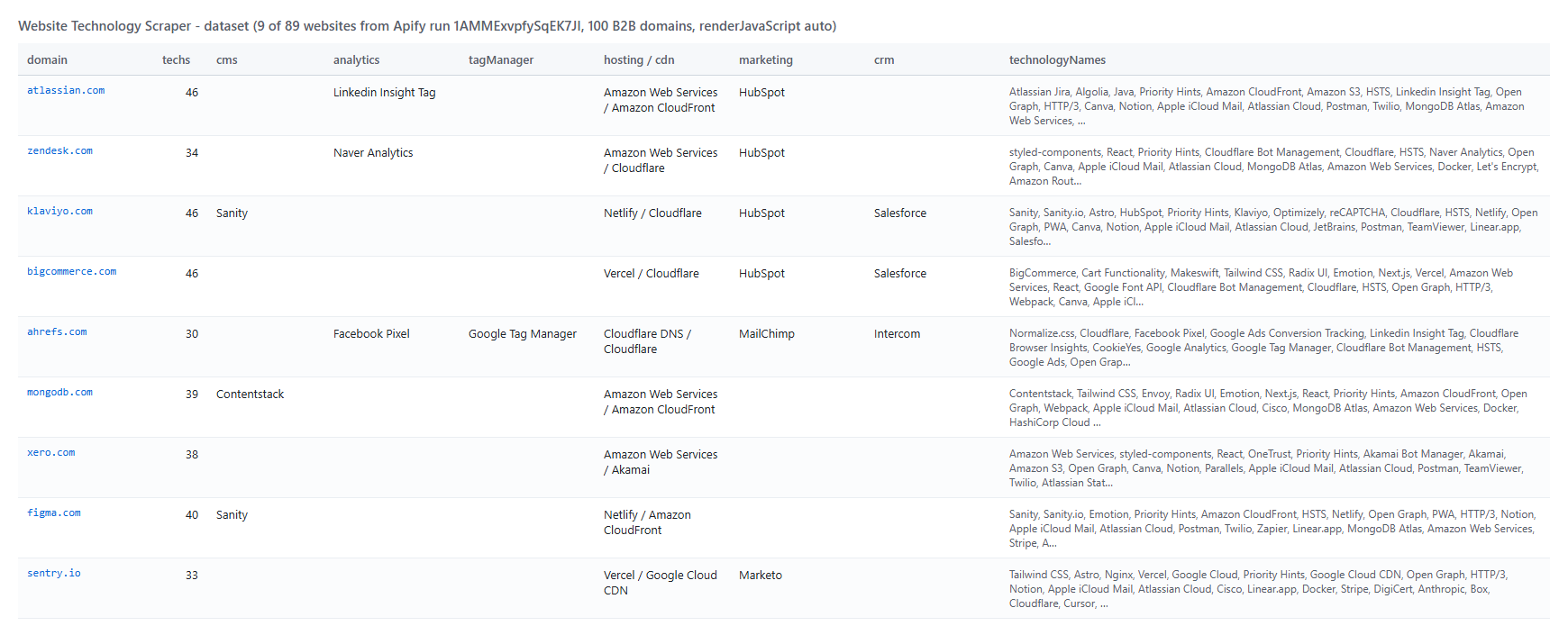 A row, shortened (real data from the test run):
```json
{
"input": "bigcommerce.com",
"domain": "bigcommerce.com",
"finalUrl": "https://www.bigcommerce.com/",
"status": "ok",
"title": "Commerce built for momentum. | BigCommerce",
"renderedWith": "http",
"techCount": 46,
"technologyNames": ["BigCommerce", "Next.js", "Vercel", "Cloudflare", "Tailwind CSS", "HubSpot", "Drift", "..."],
"primaryStack": { "ecommerce": "BigCommerce", "webFramework": "Next.js", "hosting": "Vercel", "cdn": "Cloudflare", "uiFramework": "Tailwind CSS", "marketingAutomation": "HubSpot" },
"technologies": [{
"name": "Next.js", "version": null, "confidence": 100,
"categories": [{ "id": 12, "slug": "javascript-frameworks", "name": "JavaScript frameworks" }],
"tag": "javascript-frameworks", "website": "https://nextjs.org",
"detectedVia": ["headers"],
"evidence": [{ "type": "headers", "key": "x-powered-by", "match": "x-powered-by: Next.js" }]
}],
"tls": { "issuer": "DigiCert Inc", "validTo": "2027-02-26T23:59:59.000Z" },
"analyzedAt": "2026-10-08T13:11:10.649Z"
}
```
#### Fields
| Field | Type | What it is | Fill on test run |
|---|---|---|---|
| `domain`, `finalUrl`, `statusCode` | string / int | Website, URL after redirects, HTTP status | 100% |
| `technologies` | array | name, slug, version, confidence, categories, tag, website, link, description, icon, iconUrl, cpe, saas, oss, pricing, detectedVia, evidence | 100% |
| `technologyNames`, `categories` | array | Flat lists of names | 100% |
| `techs` | array | Same list in the `name, tag, categories, link` shape other lookups use | 100% |
| `primaryStack` | object | Leading technology per group (cms, ecommerce, analytics, tagManager, hosting, cdn, crm, paymentProcessor...) | 100% (cms 60%, analytics 46%, hosting 93%) |
| `byCategory` | object | Technology names grouped by category | 100% |
| `dnsDetected` | array | Technologies found only through DNS | 100% |
| `title`, `metaDescription` | string | Page title and meta description | 100%, 97% |
| `metaGenerator` | string | The page's generator meta tag | 17% |
| `server`, `poweredBy` | string | Server and X-Powered-By headers | 85%, 26% |
| `tls` | object | issuer, issuerCn, protocol, validFrom, validTo | 100% |
| `securityHeaders`, `securityHeadersPresent` | object, int | 9 security headers (null when absent) and how many are set | 100% (3.2 set on average) |
| `thirdPartyDomains` | array | Other domains the homepage loads scripts, stylesheets, images, media, frames or XHR from (http and https addresses only) | 99% |
| `pagesAnalyzed`, `pageCount` | array, int | Pages analyzed for the website. With **Compact output**, rows with more than one page keep `pageCount` and the page URLs | 100% |
| `matches`, `matchedTechnologies` | boolean, array | With `onlyTechnologies` | when used |
| `isNew`, `added`, `removed`, `versionChanged`, `previousTechCount`, `previousAnalyzedAt` | | Monitor mode (see the FAQ) | when used |
| `version` (in `technologies`) | string | Version, when the site exposes it | 1% of detections over HTTP, 4% with the browser |
### How can I use website technology data?
- 🎯 **Sales teams** - find companies on a given platform (Shopify, HubSpot, Salesforce, Zendesk) and target accounts by the tools they already pay for
- 🧭 **Agencies** - check a prospect's CMS, analytics and ad pixels before a pitch or an audit
- 📈 **SaaS marketers** - size the install base of a competitor and track sites that add or drop it
- 💼 **Investors and analysts** - map technology adoption across a portfolio or a market
- 🔒 **Security and IT teams** - list TLS issuers, certificate expiry and security headers across many domains
- 🤖 **AI agents and data teams** - enrich account records with a structured stack through the API or MCP
### How much does it cost to look up website technologies?
Website Technology Scraper is pay-per-result: **$1.90 per 1,000 websites** ($0.0019 per website), no start fee. Extra same-site pages (when **Pages per website** is above 1) are **$1.00 per 1,000 pages** ($0.001 each). Websites that could not be analyzed (blocked, unreachable, no technology found) come back as free rows.
| Websites | Cost |
|---:|---:|
| 10 | $0.019 |
| 100 | $0.19 |
| 1,000 | $1.90 |
| 10,000 | $19.00 |
Apify platform usage is included. On the test runs, 100 B2B domains took 86-138 seconds and the 3-site demo about 5 seconds.
### Integrations, API, scheduling & MCP
- **Schedules:** run it daily or weekly from **Schedules**; with Monitor mode on, each run returns only the websites whose stack changed.
- **Webhooks:** call a URL when a run finishes to push rows to a CRM, a sheet or Slack.
- **No-code:** Make, Zapier, n8n, Google Sheets, Airtable and Slack via [Apify integrations](https://docs.apify.com/integrations).
- **API:** run it from Node.js or Python with `apify-client` - code on the [API tab](https://apify.com/topapi/website-technology-scraper/api/python) and in the [Apify API reference](https://docs.apify.com/api/v2).
- **MCP / AI agents:** connect Claude, Cursor or any MCP client through the [MCP tab](https://apify.com/topapi/website-technology-scraper/api/mcp) and ask what a website is built with.
### More data tools by TopApi
A row, shortened (real data from the test run):
```json
{
"input": "bigcommerce.com",
"domain": "bigcommerce.com",
"finalUrl": "https://www.bigcommerce.com/",
"status": "ok",
"title": "Commerce built for momentum. | BigCommerce",
"renderedWith": "http",
"techCount": 46,
"technologyNames": ["BigCommerce", "Next.js", "Vercel", "Cloudflare", "Tailwind CSS", "HubSpot", "Drift", "..."],
"primaryStack": { "ecommerce": "BigCommerce", "webFramework": "Next.js", "hosting": "Vercel", "cdn": "Cloudflare", "uiFramework": "Tailwind CSS", "marketingAutomation": "HubSpot" },
"technologies": [{
"name": "Next.js", "version": null, "confidence": 100,
"categories": [{ "id": 12, "slug": "javascript-frameworks", "name": "JavaScript frameworks" }],
"tag": "javascript-frameworks", "website": "https://nextjs.org",
"detectedVia": ["headers"],
"evidence": [{ "type": "headers", "key": "x-powered-by", "match": "x-powered-by: Next.js" }]
}],
"tls": { "issuer": "DigiCert Inc", "validTo": "2027-02-26T23:59:59.000Z" },
"analyzedAt": "2026-10-08T13:11:10.649Z"
}
```
#### Fields
| Field | Type | What it is | Fill on test run |
|---|---|---|---|
| `domain`, `finalUrl`, `statusCode` | string / int | Website, URL after redirects, HTTP status | 100% |
| `technologies` | array | name, slug, version, confidence, categories, tag, website, link, description, icon, iconUrl, cpe, saas, oss, pricing, detectedVia, evidence | 100% |
| `technologyNames`, `categories` | array | Flat lists of names | 100% |
| `techs` | array | Same list in the `name, tag, categories, link` shape other lookups use | 100% |
| `primaryStack` | object | Leading technology per group (cms, ecommerce, analytics, tagManager, hosting, cdn, crm, paymentProcessor...) | 100% (cms 60%, analytics 46%, hosting 93%) |
| `byCategory` | object | Technology names grouped by category | 100% |
| `dnsDetected` | array | Technologies found only through DNS | 100% |
| `title`, `metaDescription` | string | Page title and meta description | 100%, 97% |
| `metaGenerator` | string | The page's generator meta tag | 17% |
| `server`, `poweredBy` | string | Server and X-Powered-By headers | 85%, 26% |
| `tls` | object | issuer, issuerCn, protocol, validFrom, validTo | 100% |
| `securityHeaders`, `securityHeadersPresent` | object, int | 9 security headers (null when absent) and how many are set | 100% (3.2 set on average) |
| `thirdPartyDomains` | array | Other domains the homepage loads scripts, stylesheets, images, media, frames or XHR from (http and https addresses only) | 99% |
| `pagesAnalyzed`, `pageCount` | array, int | Pages analyzed for the website. With **Compact output**, rows with more than one page keep `pageCount` and the page URLs | 100% |
| `matches`, `matchedTechnologies` | boolean, array | With `onlyTechnologies` | when used |
| `isNew`, `added`, `removed`, `versionChanged`, `previousTechCount`, `previousAnalyzedAt` | | Monitor mode (see the FAQ) | when used |
| `version` (in `technologies`) | string | Version, when the site exposes it | 1% of detections over HTTP, 4% with the browser |
### How can I use website technology data?
- 🎯 **Sales teams** - find companies on a given platform (Shopify, HubSpot, Salesforce, Zendesk) and target accounts by the tools they already pay for
- 🧭 **Agencies** - check a prospect's CMS, analytics and ad pixels before a pitch or an audit
- 📈 **SaaS marketers** - size the install base of a competitor and track sites that add or drop it
- 💼 **Investors and analysts** - map technology adoption across a portfolio or a market
- 🔒 **Security and IT teams** - list TLS issuers, certificate expiry and security headers across many domains
- 🤖 **AI agents and data teams** - enrich account records with a structured stack through the API or MCP
### How much does it cost to look up website technologies?
Website Technology Scraper is pay-per-result: **$1.90 per 1,000 websites** ($0.0019 per website), no start fee. Extra same-site pages (when **Pages per website** is above 1) are **$1.00 per 1,000 pages** ($0.001 each). Websites that could not be analyzed (blocked, unreachable, no technology found) come back as free rows.
| Websites | Cost |
|---:|---:|
| 10 | $0.019 |
| 100 | $0.19 |
| 1,000 | $1.90 |
| 10,000 | $19.00 |
Apify platform usage is included. On the test runs, 100 B2B domains took 86-138 seconds and the 3-site demo about 5 seconds.
### Integrations, API, scheduling & MCP
- **Schedules:** run it daily or weekly from **Schedules**; with Monitor mode on, each run returns only the websites whose stack changed.
- **Webhooks:** call a URL when a run finishes to push rows to a CRM, a sheet or Slack.
- **No-code:** Make, Zapier, n8n, Google Sheets, Airtable and Slack via [Apify integrations](https://docs.apify.com/integrations).
- **API:** run it from Node.js or Python with `apify-client` - code on the [API tab](https://apify.com/topapi/website-technology-scraper/api/python) and in the [Apify API reference](https://docs.apify.com/api/v2).
- **MCP / AI agents:** connect Claude, Cursor or any MCP client through the [MCP tab](https://apify.com/topapi/website-technology-scraper/api/mcp) and ask what a website is built with.
### More data tools by TopApi