
LinkedIn Ad Library Scraper - Impressions, Targeting & Dates
Pricing
from $0.47 / 1,000 ad scrapeds
LinkedIn Ad Library Scraper - Impressions, Targeting & Dates
Scrape the LinkedIn Ad Library by keyword, advertiser, payer, country and date: ad copy, format, media, landing URL, CTA, paid-for-by, run dates, total impressions, impressions by country and targeting. Monitor new ads. No login, no cookies.
Pricing
from $0.47 / 1,000 ad scrapeds
Rating
0.0
(0)
Developer

Top Api
Maintained by CommunityActor stats
0
Bookmarked
2
Total users
1
Monthly active users
16 hours ago
Last modified
Categories
Share
What does LinkedIn Ad Library Scraper do?
LinkedIn Ad Library Scraper extracts ads from the public LinkedIn Ad Library and turns any keyword, advertiser, payer or Ad Library URL into structured rows: one ad per row with the advertiser, format, ad copy and media. Ad details (on by default) opens each ad's detail page and adds the full copy, call-to-action labels, "Paid for by", creative variants, the landing URL (the CTA link on ads shown in the EU; on other ads, a link from the ad copy with short links followed) and, for ads shown in the EU, run dates, total impressions, impressions by country and targeting. Built for B2B marketers, agencies and competitive-intelligence teams who track what competitors run on LinkedIn.
LinkedIn Ads Scraper - LinkedIn Ad Library API - LinkedIn ads spy tool
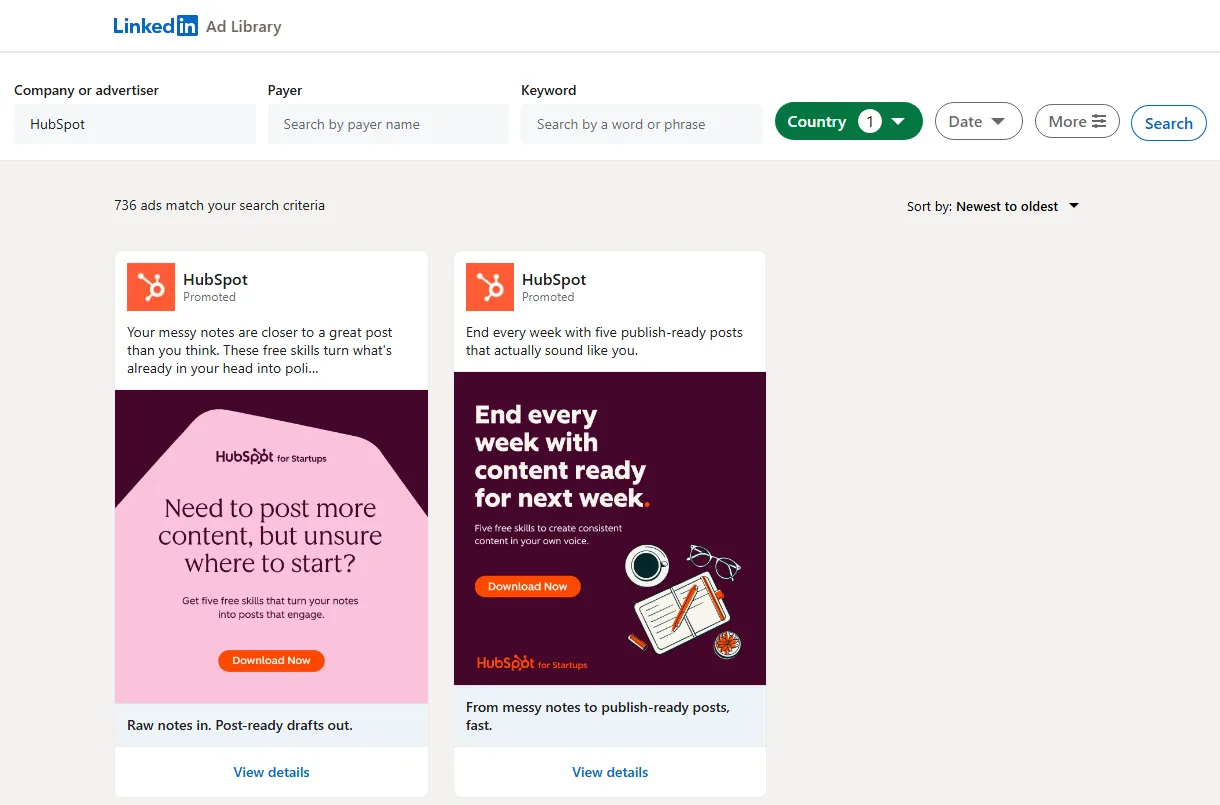
- Every ad format: single image, video, carousel, document, event, message / InMail, text, article, job and follow-company ads, each tagged with a
formatvalue; thought-leader ads (a member's post run as an ad) carryisThoughtLeaderAd: true - Impressions and targeting: total impressions range (
50k-100k) with numeric bounds, impressions by country, run dates, languages, locations and the six targeting parameters, for ads shown in the EU - Landing URLs outside the EU too: LinkedIn shows the CTA link only on ads shown in the EU; for other ads
landingUrlcomes from the links in the ad copy, with lnkd.in, bit.ly, hubs.la and other short links followed to the page they open (landingUrlSourcesays which) - All of LinkedIn's filters: country, date range, impressions range, targeting categories and sort order, plus many searches in one run
- No login, cookies or LinkedIn account: the actor reads the public Ad Library
- Monitoring: only new ads since the last run; with Ad details on, optionally the known ads whose impressions or end date changed
- Export anywhere: JSON, CSV, Excel, XML; schedules, webhooks, Make, Zapier, n8n, Google Sheets, Slack
- Works with AI agents: call it through the Apify API or the MCP server;
compactoutput keeps rows small
What data can you get from the LinkedIn Ad Library?
| 🆔 Ad id and Ad Library URL | 🏢 Advertiser, logo, company id | 💳 Paid for by (`paidBy`) |
| 🖼️ Format and creative type | 📝 Headline and full ad copy | 🔘 CTA labels (`ctas`) |
| 🔗 Landing URL with UTM tags (`landingUrl`) | 🌐 Landing domain | 🎞️ Image, video MP4, carousel cards |
| 📄 Document title and page count | 📅 Event name, time, location | ✉️ Message sender and buttons |
| 📆 Run dates and days running | 👁️ Total impressions (`impressions`) | 🌍 Impressions by country |
| 🗣️ Targeted languages and locations | 🎯 Targeting matrix (Audience, Company, Job ...) | 👤 Thought-leader poster and "Promoted by" |
On a 100-ad run for "insurance" in Germany, 100 of 100 ads had impressions, run dates and targeting, 67 had a landing URL (55 from the CTA link, 12 from links in the ad copy) and 82 an image. On the same search in the United States, 24 of the 92 ads shown only outside the EU got a landing URL from their ad copy.
How to scrape the LinkedIn Ad Library with LinkedIn Ad Library Scraper
- Create a free Apify account - $5 of monthly credit, no card needed.
- Open LinkedIn Ad Library Scraper and click Try for free.
- Type keywords (e.g.
salesforce) or advertisers (e.g.HubSpot), pick countries and a date range, and set Max ads. - Click Start. Ads stream into the dataset as they are found.
- Open the Storage tab and Export as JSON, CSV or Excel - or let a schedule run it for you.
⬇️ Input
| Parameter | Type | Description |
|---|---|---|
| 🔍 What to scrape | At least one of these. Each entry is its own search. | |
keywords | List | Words in the ad copy, e.g. salesforce, AI agents. |
advertisers | List | Company names, slugs or company URLs, e.g. HubSpot, the-home-depot, https://www.linkedin.com/company/nvidia/. |
payers | List | The "Paid for by" entity, e.g. HubSpot, Inc.. |
startUrls | List | Ad Library search URLs (all their filters are kept), ad URLs (/ad-library/detail/<id>) or company URLs. |
adIds | List | Ad Library ad ids, e.g. 1633495836. |
searches | JSON | Searches with their own filters: [{"keyword":"crm","countries":["DE"]},{"advertiser":"HubSpot","maxResults":50}]. |
| 🎯 Filters (applied by LinkedIn) | ||
countries | Select | Where the ad was shown (LinkedIn's 249 countries). Default: all. |
dateOption | Select | all-time, last-30-days, current-month, current-year, last-year, custom-date-range. Default: all time. |
startDate / endDate | Date | Custom range (YYYY-MM-DD); setting one switches to a custom range. |
impressionsMinValue / impressionsMinUnit | Integer / Select | Lower impressions bound, e.g. 100 + thousand. |
impressionsMaxValue / impressionsMaxUnit | Integer / Select | Upper bound, e.g. 10 + million. A missing bound is filled in. |
includedTargetingFacetCategories | Select | Ads whose targeting uses these: Language, Location, Audience, Demographic, Company, Education, Job, Member interests and traits. |
excludedTargetingFacetCategories | Select | Ads whose targeting excludes these. |
sortBy | Select | newest (default) or oldest. |
| ✂️ Refine results | ||
advertiserMatch | Select | contains (default, LinkedIn's matching) or exact (the company itself, no partners). |
adFormats | Select | Keep only these formats. Default: all. |
includeEmployerBranding | Boolean | Off drops job and follow-company ads. Default: true. |
excludeKeywords | List | Drop ads whose advertiser, headline or copy contains these words. |
onlyWithImpressions | Boolean | Keep only ads with impressions data. Needs Ad details. |
onlyActive | Boolean | Keep only ads still running (end date today or yesterday). Needs Ad details. |
minDaysRunning | Integer | Keep only ads that ran at least this many days. Needs Ad details. |
| ➕ Extra data | ||
scrapeAdDetails | Boolean | Open each ad's detail page (full copy, CTAs, "Paid for by", landing URL, EU transparency data) - charged as ad-details at $0.00038 per ad. Default: true. |
| 🔁 Monitoring | ||
monitorMode | Boolean | Return only ads not delivered by earlier runs with the same store. |
monitorChanges | Boolean | Also return known ads whose impressions range or end date changed. Needs Ad details. Each poll re-checks the known ads on the pages it reads (the newest 24 per search once nothing new appears). |
monitorStoreName | String | Named store that remembers delivered ads. |
| 📦 Output | ||
maxResults | Integer | Most ads per run. Default 100; 0 = no limit. |
maxResultsPerSearch | Integer | Ceiling per search. Default: none. |
countOnly | Boolean | One free row per search with LinkedIn's total ad count, no ads. Ad ids and ad URLs are skipped (not delivered, not charged). |
compact | Boolean | Core fields only, for AI agents and MCP. |
| ⚙️ Advanced | ||
proxyConfiguration | Proxy | Apify Proxy (default). |
maxConcurrency | Integer | Parallel proxy sessions, 1-8. Default 4. |
requestDelayMs | Integer | Pause between two requests on one session. Default 2200. |
Input JSON
Search EU countries when you need impressions and targeting
LinkedIn publishes run dates, impressions and targeting (and the CTA link) only for ads shown in the EU. Do: "countries": ["DE", "FR", "NL"] · Don't: a US-only search when you need impressions - on our 100-ad US-only test, 8 ads carried them.
Use advertiser names, not company ids
The Ad Library searches advertisers by name. Do: HubSpot, the-home-depot or linkedin.com/company/hubspot/ · Don't: a numeric id like 68529 (LinkedIn only resolves ids for signed-in members; the run skips it and says so). LinkedIn's name match also returns partners and agencies ("HubSpot Platinum Partner"); set advertiserMatch to exact to keep the company itself.
⬆️ Output
Every ad becomes one dataset item. Here is a run for crm in Germany, France and the Netherlands:
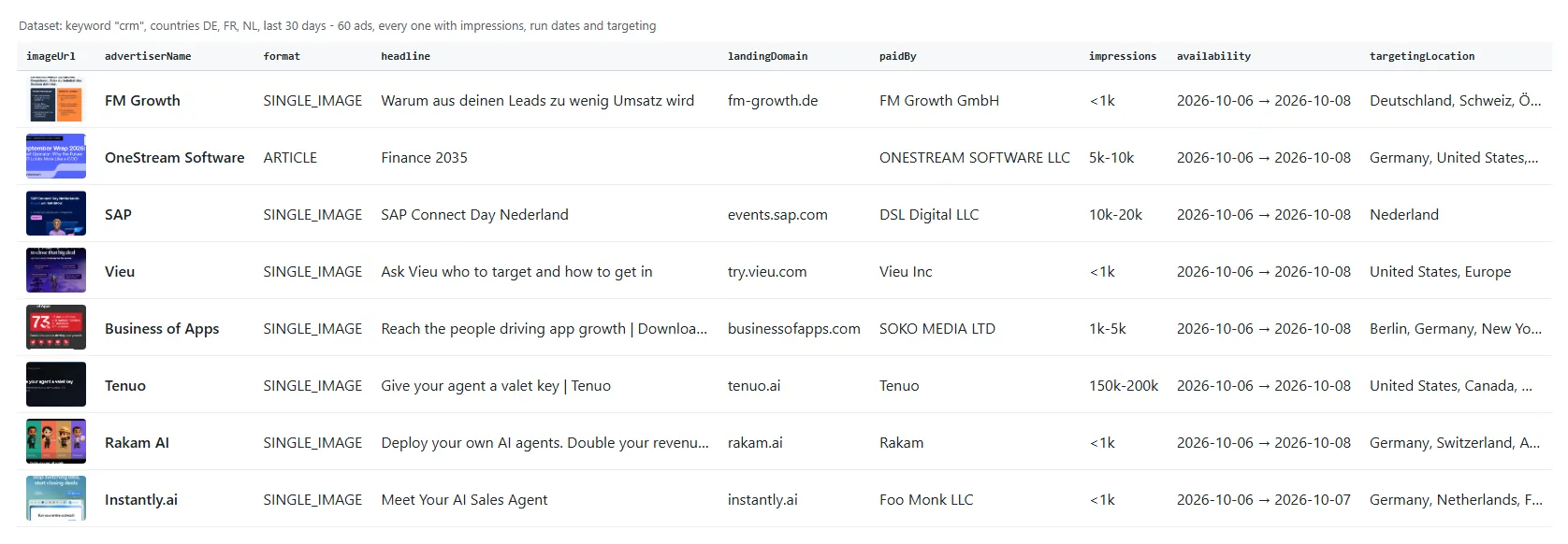
A real row from an ad shown in the EU (trimmed):
An ad shown only in the United States: no CTA link on LinkedIn's page, so the landing URL comes from the short link in its copy (trimmed):
Fields
Fill measured on two runs with Ad details on: EU = 100 ads (insurance, Germany); US = 100 ads (insurance, United States only; 8 of them were also shown in the EU).
| Field | What it is | EU | US |
|---|---|---|---|
adId, adLibraryUrl, format, creativeType | Ad identity and format | 100% | 100% |
advertiserName, advertiserLogo | Advertiser as LinkedIn shows it | 100% | 100% |
advertiserUrl | Advertiser's LinkedIn page | 99% | 99% |
paidBy | "Paid for by" entity | 100% | 100% |
body | Ad copy (full text with details) | 100% | 100% |
headline | Headline / title | 76% | 72% |
ctas | Call-to-action labels | 38% | 61% |
clickUrl | The ad's CTA link (LinkedIn prints it only on ads shown in the EU) | 55% | 8% |
landingUrl, landingUrlSource | Landing URL: the CTA link (cta), else the first link in the ad copy with short links followed (adCopy) | 67% (55 cta, 12 adCopy) | 32% (8 cta, 24 adCopy) |
landingDomain | Domain of landingUrl (empty when it is a LinkedIn page) | 62% | 31% |
externalLinksInText | Links written in the ad copy, as written | 32% | 25% |
copyLinkTargets | Where the first two copy links lead, {link, url} (ads without a CTA link) | 12% | 24% |
imageUrl / videoUrl | Main image / video MP4 | 82% / 16% | 88% / 9% |
availability, daysRunning, adStatus | Run dates (EU-shown ads only) | 100% | 8% |
impressions, impressionsMin, impressionsMax | Total impressions range | 100% | 8% |
impressionsPerCountry | Share per country (see Limits) | 1% | 0% |
targetingLanguage, targetingLocation, targetingMatrix | Targeting | 100% | 8% |
isThoughtLeaderAd (true), posterName | Thought-leader ad: a member's own post run as an ad | 15% | 19% |
promotedBy | Company that promoted the member's post (empty when the member promoted it) | 6% | 2% |
variantsCount | Number of creative variants | 100% | 100% |
variants | Every variant's creative (only on ads with more than one) | 0% | 0% |
carouselCards, documentTitle, eventName, senderName, sponsoredMessageButtons | Per-format fields | when the format has them | |
searchType, searchValue, startUrl, totalAdsInSearch, position | Which search found the ad | 100% | 100% |
detailsFetched, scrapedAt | Row status | 100% | 100% |
changeType, previousImpressions, previousEndDate | new or changed, with the earlier values (monitorMode runs only) | monitor runs | monitor runs |
How can I use LinkedIn ads data?
- 🎯 Competitive intelligence - track every ad a competitor runs, with run dates and impression ranges per market
- 📣 Performance marketers - collect winning hooks, headlines, CTAs and landing pages across a category
- 🏢 Agencies - audit a prospect's LinkedIn advertising before the pitch
- 🔎 Sales teams - find companies actively spending on LinkedIn ads (
advertiserName,paidBy,landingDomain) - 🧭 Market research - measure advertising pressure by country with
impressionsPerCountryand targeting - 🤖 AI and research teams - feed ad copy and targeting to an LLM;
compactkeeps rows small - 📈 Monitoring - run it daily with
monitorModeand get only the new ads
How much does it cost to scrape the LinkedIn Ad Library?
LinkedIn Ad Library Scraper is pay-per-result: $0.47 per 1,000 ads (event ad), plus $0.38 per 1,000 ads with Ad details (event ad-details), so $0.85 per 1,000 fully detailed ads. No start fee. countOnly rows are free.
| Ads | Without details | With details |
|---|---|---|
| 10 | $0.0047 | $0.0085 |
| 100 | $0.047 | $0.085 |
| 1,000 | $0.47 | $0.85 |
| 10,000 | $4.70 | $8.50 |
There is nothing else to pay: Apify platform usage is included in these prices. Measured on 256 MB: 100 ads with details in 86-97 s (Germany and United States runs); 1,000 ads without details in 170 s.
Integrations, API, scheduling & MCP
- Schedules: run LinkedIn Ad Library Scraper daily or weekly from the Schedules tab; with
monitorModeeach run returns only new ads. - Webhooks: fire a URL when a run finishes - push new ads to Slack, a CRM or a sheet.
- No-code: Make, Zapier, n8n, Google Sheets, Airtable, Slack via Apify integrations.
- API: call it from Node.js or Python with
apify-client- code on the API tab and the Apify API reference. - MCP / AI agents: connect Claude, Cursor or any MCP client through the MCP tab and ask for a company's LinkedIn ads in plain language.
More scrapers from TopApi
| 📢 Facebook Search Posts Scraper | 🎵 TikTok Scraper | ▶️ YouTube Shorts Scraper |
| 💼 Indeed Jobs Scraper - which advertisers are hiring | 🎬 TikTok Video Scraper | ™️ USPTO Trademark Scraper |
| ⭐ Google Maps Reviews Scraper | 💬 Facebook Comments Scraper | 🧭 All TopApi actors |
Limits & empty runs
- EU-only transparency data: LinkedIn prints run dates, impressions, targeting and the CTA link (
clickUrl) only for ads shown in the EU. In our runs 212 of 277 EU-shown ads had the CTA link and none of 883 other ads did; their button has no link on LinkedIn's page. For those other ads,landingUrlcomes from the links written in the ad copy when there are any (landingUrlSource: "adCopy"): 24 of 92 ads on our US-only run. A copy link is usually the advertiser's landing page, but it can be any page the ad links to, such as an article, a form or a job post. - Impressions by country: LinkedIn adds the country split later. Ads from the last 30 days showed "may take up to 48 hours to update" (0 of 60); ads from March-June 2026 had it (24 of 24).
- Depth: one search (
software, US) was walked 7,200 ads deep (300 pages) with no duplicates and LinkedIn still offering more; for faster runs, split very broad searches by country or date range. - Speed: LinkedIn allows about one request every 2 seconds per IP, so the actor spreads requests over
maxConcurrencyproxy sessions; more sessions = faster. - Empty dataset: no ads match the search (check the totals with
countOnly), the advertiser name is spelled differently on LinkedIn, or every ad was filtered out - the run's status message andRUN_SUMMARYsay which. Nothing is charged for an empty run. - Not available: ad spend (LinkedIn publishes impression ranges, never cost) and anything behind a LinkedIn login.
FAQ
How many ads can LinkedIn Ad Library Scraper collect in one run?
As many as the search returns up to maxResults (0 = no limit). A keyword like crm matches 228,378 ads across all countries; we walked 7,200 ads of one search with no duplicates. Use several searches or searches entries to cover more.
Can I run LinkedIn Ad Library Scraper on a schedule to get only new ads?
Yes. Turn on monitorMode, give the run a monitorStoreName, save it as a task and add a schedule. Each run returns only ads not delivered before; a poll with nothing new reads one page and charges nothing.
Why do some ads have no impressions or targeting?
LinkedIn publishes them only for ads shown in the EU. Search EU countries, or set onlyWithImpressions to keep only ads that have them.
Why do some LinkedIn ads have no landing URL?
LinkedIn shows the CTA link only on ads shown in the EU. For other ads, LinkedIn Ad Library Scraper takes the landing URL from the links written in the ad copy and follows short links (lnkd.in, bit.ly, hubs.la ...) to the page they open; landingUrlSource says cta or adCopy. An ad whose copy has no link has no landing URL.
Does LinkedIn Ad Library Scraper return ad spend?
No. LinkedIn publishes impression ranges (e.g. 50k-100k) and per-country shares, not cost.
Do I need a LinkedIn account, cookies or an API key?
No. LinkedIn Ad Library Scraper reads the public Ad Library without a login.
How do I get only one company's ads, not its partners'?
Search the company in advertisers and set advertiserMatch to exact. On a HubSpot search (Germany, France and the Netherlands, last year: 195 ads), exact kept HubSpot's own 100 ads, including 14 members' posts that HubSpot promoted and its job and follow-company ads, and dropped 95 ads from partners and agencies such as "Systony - HubSpot Elite Partner".
Can I paste a LinkedIn Ad Library URL?
Yes. Paste search URLs into startUrls - keyword, advertiser, payer, countries, dates, impressions, targeting and sort are kept - or ad detail URLs and ad ids.
Can I use LinkedIn Ad Library Scraper with the Apify API or Python?
Yes. Use apify-client for Node.js or Python; the API tab shows ready code.
Can AI agents use LinkedIn Ad Library Scraper through MCP?
Yes. Connect an MCP client through the MCP tab; set compact for small rows.
Why did my LinkedIn Ad Library run return fewer ads than Max ads?
The search had fewer matches, your filters removed some, or the run reached your spending limit. RUN_SUMMARY lists per search: LinkedIn's total, ads delivered, filtered and duplicates.
Your feedback
Found a bug or need a field? Open an issue on the Issues tab and we will look at it.
This actor is not affiliated with, endorsed by or sponsored by LinkedIn Corporation.


