

Bing Search Scraper - SERP, Ads, PAA, News, Images & Videos
Pricing
from $0.80 / 1,000 search results
Bing Search Scraper - SERP, Ads, PAA, News, Images & Videos
Scrape Bing search results for any keyword or Bing URL: organic rank, title, URL, snippet, date and sitelinks, plus ads, People Also Ask, related searches, news, images and videos. DuckDuckGo too. Any market, rank tracking, monitor mode. $0.80 per 1,000 results, no start fee.
Pricing
from $0.80 / 1,000 search results
Rating
0.0
(0)
Developer

Top Api
Maintained by CommunityActor stats
0
Bookmarked
2
Total users
1
Monthly active users
3 days ago
Last modified
Categories
Share
What does Bing Search Scraper do?
Bing Search Scraper extracts Bing search results (SERP) for any keyword or Bing URL and turns them into structured rows: one row per result with its position, title, URL, snippet and date, plus ads, People Also Ask, related searches, news, images and videos when you ask for them. Built for SEO teams, marketers and AI / RAG builders who need Bing rankings by market without copying results by hand. DuckDuckGo results come from the same actor.
Bing SERP scraper - Bing search results API - Bing rank tracker - DuckDuckGo scraper
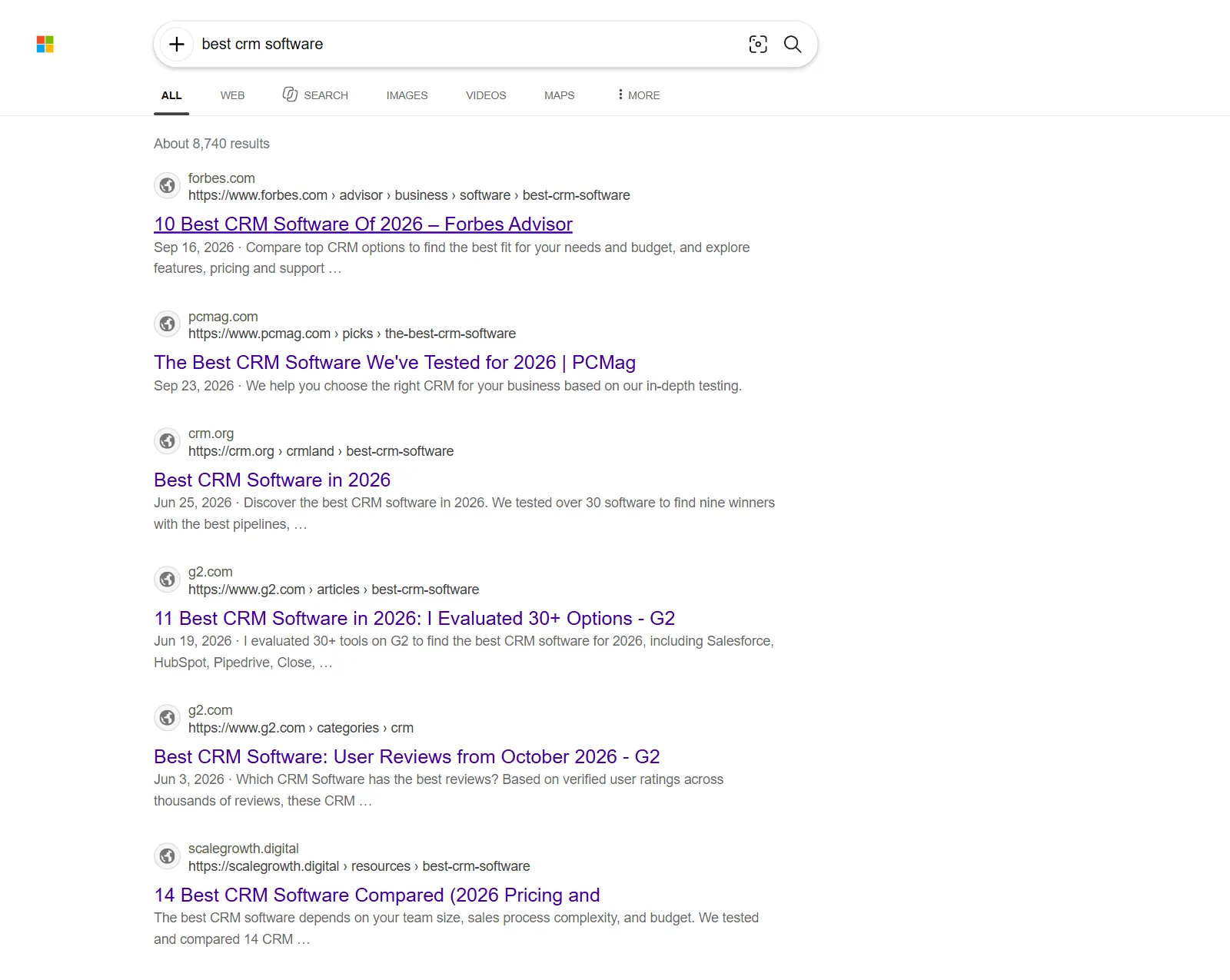
- Organic results with rank: position across pages, title, URL, displayed URL, domain, snippet, date, bold keywords, site name, icon, sitelinks and rich facts (e.g. review counts)
- Ads, People Also Ask, related searches, local pack: sponsored results with landing URL and advertiser; PAA questions with Bing's answer and source; related searches; local businesses with address and phone
- News, Images and Videos tabs: one row per article, image (full-size URL, width, height) or video (duration, channel, views)
- 38 Bing markets and 50 interface languages: results the way searchers in Germany, Japan or the UK see them
- Rank tracking and monitor mode: flag your domains, get each domain's best position, and on a schedule receive only results that are new or moved
- Two row shapes: one row per result (flat table) or one row per results page with
organicResults,paidResults,peopleAlsoAskandrelatedQueriesarrays - No login, cookies or Bing API key: you paste search terms or Bing URLs, nothing else
- Export anywhere: JSON, CSV, Excel, XML; schedules, webhooks, Make, Zapier, n8n, Google Sheets; API and MCP for AI agents
What data can you get from Bing?
🔢 Position on Bing (position) | 📝 Title | 🔗 URL and displayed URL |
| 🌐 Domain | 💬 Snippet (description) | 📅 Date Bing shows |
| 🏷️ Site name and icon | 🧭 Sitelinks (siteLinks) | ⭐ Rich facts (richSnippet) |
| 📣 Ads: advertiser, landing URL, top / bottom / side | ❓ People Also Ask: question, answer, source | 🔍 Related searches |
| 📍 Local pack: name, category, address, phone, website | 📰 News: source, publish time, image | 🖼️ Images: full-size URL, size, page |
| 🎬 Videos: duration, channel, views | 📊 Bing's result count (resultsTotal) | 🎯 Tracked-domain flag and positions |
On our 100-result test runs (10 searches, 10 results each) title, URL, displayed URL, domain, snippet and site name were filled on 100% of organic rows, the site icon on 90-100%, a date on 37-50% (Bing prints one only on some results) and Bing's result count on 84-100%.
How to scrape Bing with Bing Search Scraper
- Create a free Apify account - $5 of monthly credit, no card needed.
- Open Bing Search Scraper and click Try for free.
- Type your search terms (one per line) into Search terms or URLs, pick a Market, and set Results per search.
- Click Start. Results stream into the dataset as each search finishes.
- Open the Storage tab and Export as JSON, CSV or Excel - or put the run on a schedule.
⬇️ Input
| Parameter | Type | Description |
|---|---|---|
| 🔍 What to scrape | ||
queries | List | Required. Search terms (best crm software, plumber austin tx) or Bing / DuckDuckGo results URLs (https://www.bing.com/search?q=crm&mkt=en-GB). A Bing URL (web, news, images or videos) keeps its own market, page and filters. A DuckDuckGo URL keeps its region (kl), time (df) and SafeSearch (kp) and starts at page 1 (web results); its rows carry that region in region and its market in marketCode (kl=uk-en → en-GB). |
engine | Select | bing (default), duckduckgo, or both |
verticals | Multi-select | Bing tabs: web (default), news, images, videos |
outputMode | Select | results (one row per result, default) or pages (one row per results page) |
| 🎯 Filters (applied by Bing) | ||
marketCode | Select | Bing market, e.g. en-US (default), en-GB, de-DE, ja-JP. A two-letter country code also works ("gb"; through the API also as country: "gb"). Norway is nb-NO: Bing ignores no-NO, so the actor sends nb-NO for it |
languageCode | Select | Interface language (setlang). Default: the market's language |
safeSearch | Select | moderate (default), strict, off. Applies to Bing web, images and videos and to DuckDuckGo; Bing News results are not affected by it |
timeRange | Select | Any time (default), past 24 hours, week, month, year. Past year does not apply to news: Bing News has no such filter |
dateFrom / dateTo | Date | Custom date range for Bing web and DuckDuckGo results (news, images and videos are not date-filtered). Overrides Time range |
| ✂️ Refine results | ||
excludeDomains | List | Drop results from these sites (subdomains included) |
requireQueryMatch | Boolean | Keep only organic web and news results that mention a word of the search term (ads, images and videos are not filtered). Default: false |
| ➕ Extra data | ||
includeAds | Boolean | Add sponsored results as ad rows (not in monitor mode). Default: false |
includeSerpFeatures | Boolean | Add People Also Ask (with answers), related searches and local businesses as free rows (not in monitor mode). Default: false |
| 🔁 Monitoring | ||
trackDomains | List | Your domains and competitors. Rows get isTracked; the run summary and page rows get each domain's best position |
monitorMode | Boolean | Return only results that are new for the search or moved since the last run; ad, People Also Ask, related and local rows are not returned in this mode. Only delivered results are remembered: one that Exclude domains or Only results that mention the query removed comes as new once a run delivers it. Pair with a daily schedule |
monitorStoreName | Text | Store that remembers positions. Default: bing-search-monitor |
monitorMinPositionChange | Integer | A result counts as moved when its position changed by at least this many places. Default: 3 |
| 📦 Output | ||
maxResultsPerQuery | Integer | Results per search term. Empty = 10 (with page rows, or with Max pages set: Max pages, default 1 page); 0 = as many as Max pages allows |
maxPagesPerQuery | Integer | Upper bound on results pages per term (1-50). Set alone, it means "this many pages" |
maxItems | Integer | Stop after this many billed rows in the whole run (rows charged before a platform restart of the run count too). Empty = no cap |
maxRunSeconds | Integer | Stop starting new searches and new pages after this many seconds from the run's start; a page that arrives after that is dropped and not charged. Rows already delivered are kept. Empty = no limit |
compact | Boolean | Fewer fields, sized for AI agents and MCP. Result rows keep type, query, engine, page, position, title, url, domain, description, date, isTracked and scrapedAt (plus a news row's publishedAt and imageUrl, an image's imageUrl, a video's duration, a People Also Ask row's question and answer, a local row's category, address, phone and website, and in monitor mode monitorStatus and previousPosition). Page rows keep searchQuery, resultsTotal, trackedPositions and their arrays, each result trimmed the same way |
saveHtml / saveHtmlSnapshotUrls | Boolean | Keep the raw results-page HTML. saveHtml with one row per results page puts it in the row (html); saveHtmlSnapshotUrls (or saveHtml with one row per result) saves each page in the run's key-value store and gives rows its link (htmlSnapshotUrl) |
| ⚙️ Advanced | ||
proxyConfiguration | Proxy | Default: Apify Proxy in auto mode. Each search's first visit goes out direct from the run's own IP; so does the first try of every news, image and video page, and Bing web's first two fresh visitors for deeper pages. DuckDuckGo's later pages reuse the visitor that got page 1. Every other fresh visitor gets an Apify Proxy datacenter IP, and if direct visits keep getting off-topic answers the run switches to the proxy only. A proxy group or your own proxy URLs = proxy only |
maxConcurrency | Integer | Search terms in parallel. Default: 8, capped at memory / 32 MB (8 at the default 256 MB) |
maxSessionsPerQuery | Integer | Bing web: fresh visitor sessions (IP + cookies) a term may use when Bing answers off-topic or empty, or will not page: this many, plus 2 for every further page the search may read, at most 3× this number (Results per search 10 = up to 3 pages = up to 9 sessions). Default: 5. News, images and videos try up to 3 visitors per page; DuckDuckGo up to 3 for page 1 and 1 more for each later page |
Input JSON
Pick the row shape before anything else
One row per result is a flat table: easy to sort by position, filter by domain or load into a spreadsheet. One row per results page keeps Bing's page together - organic results, ads, People Also Ask and related searches of one page in one row - the shape the most-used Bing actors return.
Ask for results, not pages
Bing shows 2-14 organic results per page: when it renders ads, answers and videos the first page may carry only 2-6. maxResultsPerQuery: 30 asks Bing for further pages until 30 organic results are in, as long as Bing pages for the run's visitors (see How deep below); maxPagesPerQuery alone reads up to that many pages, however many results they hold.
Put the market in the input, or in the URL
marketCode: "de-DE" gives German results on German sites (in our runs: check24.de, verivox.de, finanztip.de for autoversicherung vergleich). A pasted URL such as https://www.bing.com/search?q=car+insurance+quotes&mkt=en-GB keeps its own market, so one run can cover several countries.
A URL of a later page (first=21 in the address) starts at that page. Bing shows a new visitor page 1 whatever first= says, so the actor reaches the page through Bing's own Next links; the pages before it are read but not returned or charged, and position still counts from Bing's top result. When Bing will not page that far for the actor's visitors at the time, that search returns no rows and costs nothing (RUN_SUMMARY gives the reason, e.g. bingStoppedPaging).
⬆️ Output
Every result becomes one dataset item. Here is the table view of a real run (10 searches, 10 results each):
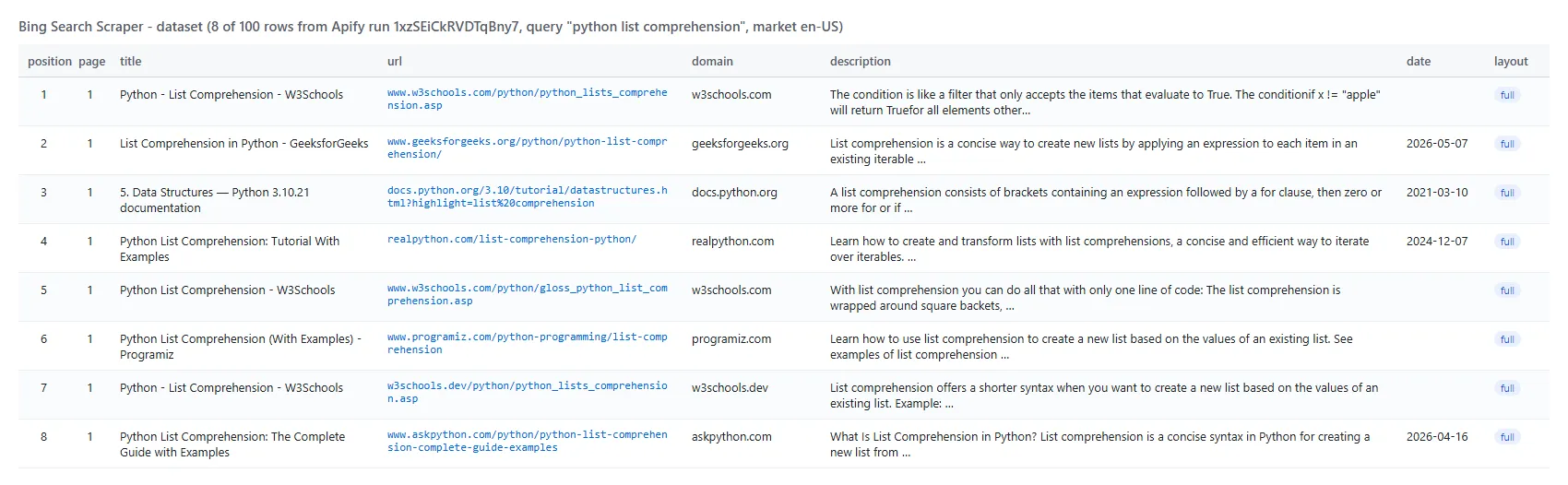
One organic row as JSON:
A People Also Ask row (includeSerpFeatures):
Fields
| Field | Type | What it is | Fill on organic rows (test runs) |
|---|---|---|---|
type | string | organic, ad, news, image, video, paa, related, local | 100% (every row) |
position | integer | Rank among the search's organic results across pages (ads: order on the page) | 100% |
page | integer | Bing results page the row came from | 100% |
title, url, domain | string | Result title, URL (Bing's click link decoded), host | 100% |
displayedUrl | string | The URL line Bing prints under the title | 100% |
description | string | Snippet | 100% |
date | string | Date Bing shows on the result (ISO) | 37-50% |
emphasizedKeywords | array | Words Bing printed in bold | 58-100% |
sourceName, iconUrl | string | Site name and icon above the result | 100%, 90-100% |
siteLinks | array | Deep links under the result | 0-3% |
richSnippet | object | Fact row, e.g. {"Reviews": "5.1K"} | 4-10% |
resultsTotal | integer | Bing's "About 9,110 results" count | 84-100% |
layout | string | Bing web rows: full (ads / answers / related rendered) or light (results only); DuckDuckGo rows: ddg | 100% (also ad rows) |
region | string | DuckDuckGo rows: the region (kl) searched, e.g. us-en | 100% of DuckDuckGo rows |
isTracked | boolean | Domain is in Track domains | 100% (also ad, news, image and video rows) |
adPosition, advertiser | string | Ads: top / bottom / side, advertiser | 100% of ad rows |
question, answer | string | People Also Ask | 100% of PAA rows |
publishedAt, imageUrl | string | News: publish time, article image | 100%, 60% |
imageUrl, thumbnailUrl, width, height | string / integer | Images | 100% of image rows |
duration, channel, viewCount, published | string / integer | Videos | 99-100% of video rows |
monitorStatus, previousPosition | string / integer | Monitor mode: new / moved and the position the result had when it was last delivered (that can be several runs ago) | monitor runs |
Other row types carry the fields that fit them: news, image and video rows have no displayedUrl and no layout; People Also Ask, related-search and local rows have no layout and no isTracked; related-search rows have no domain; local rows have no url or domain (their link is website).
Page rows (outputMode: "pages") carry searchQuery, resultsTotal, layout, organicResults, paidResults, peopleAlsoAsk, relatedQueries, localResults, newsResults, imageResults, videoResults, trackedPositions and pagination.
How can I use Bing search data?
- 🔎 SEO teams - track where your pages rank on Bing for your keywords, per market, and get only the moves on a daily schedule
- 🥊 Competitive research - see which competitors hold the top 10 and which advertisers bid on your terms (
includeAds) - 💬 Content teams - collect People Also Ask questions and related searches to plan articles that answer them
- 🤖 AI and RAG builders - feed fresh Bing results (titles, URLs, snippets, news) to an agent or a retrieval pipeline;
compactkeeps rows small - 📰 PR and brand monitoring - pull Bing News articles about a brand with source and publish time
- 🧭 Lead and link building - build URL lists of sites ranking for niche terms, filtered with
excludeDomains
How much does it cost to scrape Bing?
Bing Search Scraper is pay-per-result: $0.80 per 1,000 results ($0.0008 per result row), no start fee. With One row per results page, each page row costs $0.00095. People Also Ask, related-search and local-pack rows added by includeSerpFeatures are free.
| Results | Cost |
|---|---|
| 10 | $0.008 |
| 100 | $0.08 |
| 1,000 | $0.80 |
| 10,000 | $8.00 |
There is nothing else to pay: Apify platform usage is included in these prices. A 100-result run (10 searches) took 5-20 seconds on 256 MB in our tests.
Integrations, API, scheduling & MCP
- Schedules: run Bing Search Scraper daily or weekly from the Schedules tab; with
monitorModeeach run returns only new or moved results. - Webhooks: call a URL when a run finishes - push rankings to a sheet, a database or Slack.
- No-code: Make, Zapier, n8n, Google Sheets, Airtable and Slack via Apify integrations.
- API: start runs and read results from Node.js or Python with
apify-client- code on the API tab and in the Apify API reference. - MCP / AI agents: connect Claude, Cursor or any MCP client through the MCP tab and ask for Bing results in plain language.
More scrapers from TopApi
| 🕸️ Website Content Crawler - crawl the pages behind your results | 📈 SimilarWeb Scraper - traffic of the sites that rank | 📍 Apple Maps Scraper - local businesses with phones |
| ⭐ Google Maps Reviews Scraper | 💼 LinkedIn Ad Library Scraper | 🎵 TikTok Ads Library Scraper |
| 🛡️ Trustpilot Reviews Scraper | 🔎 Facebook Search Posts Scraper | ▶️ YouTube Shorts Scraper |
| 🐦 Twitter (X) Profile Scraper | 🧭 All TopApi actors |
Limits & empty runs
- How deep: page 1 gives about 10 organic results. Results past it come only when Bing serves one of the run's visitors its full page layout, and Bing decides that per visit. On 2026-10-08 around 12:40 UTC, 23 of 25 terms reached the 40 results asked for. From about 17:45 UTC that day and on 2026-10-09, Bing paged none of the platform's visitors: in our 4 deep test runs since, no search got past page 1 (18 searches). When that happens the status message says "N search(es) stopped early: Bing would not page for the run's visitors" and
RUN_SUMMARYgivesbingStoppedPagingfor those searches. Bing also lists a limited number of results per term even when it says "About 900,000 results". DuckDuckGo gave 25-40 results per term. - Speed: a 100-result run (10 searches × 10 results) took 5-20 seconds. Asking for more than page 1 holds adds time while the actor looks for a visitor Bing will page for (deep paging is sequential per term): 3 searches asking for 20-40 results each took 70-107 seconds and stopped at page 1.
- Page layouts: Bing decides per visit whether a page carries ads, People Also Ask, related searches and videos (
layout: "full") or results only (light). Those blocks are returned when Bing shows them; thelayoutfield tells you which page you got. - Order varies a little: two visits a minute apart can swap neighbouring results or rotate the last places of the top 10. Monitor mode reports a move only when it is at least
monitorMinPositionChangeplaces. - Restarts: when Apify migrates or restarts a run, it carries on: finished searches are skipped, rows delivered before the restart are not delivered or charged again, and Max items and your spending limit count the whole run.
- Empty dataset: Bing has no results for the term (the run summary says
noResults), SafeSearchstricthid them, or the filters removed every row. Bing also answers some platform visitors in non-US markets with a false "There are no results" page, so the actor believes it only when visitors on two different proxy IPs get it, or when every visitor the search may use does;RUN_SUMMARYgives each such search'semptyAnswersand a note on how many visitors and proxy IPs agreed.RUN_SUMMARYin the key-value store lists each search's status and why paging stopped. - Not in this version: Bing Copilot answers, Bing shopping results and the Bing Web Search API (no API key is used).
Soft blocking
Like other Bing scrapers, this actor meets Bing's soft blocking: a page about something else (results for only the first word of your term, Microsoft support pages, pages in a script your search does not use such as Chinese forum threads for a Norwegian search), a "There are no results" page for a term that has results, results for another country than the market asked for, or page 1 served again instead of page 2. The actor checks every Bing web results page against your search term (a page of 5 or more results where one word of your term appears in at most 1 in 10 of them, and the results carry less than 60% of your term's words on average, counts as answering only part of it), against the region Bing says it applied, and against Bing's page marker, and asks again as a fresh visitor when it sees one, so rows from such pages are not returned. News, image, video and DuckDuckGo results are returned as served: they get no relevance check (only an empty first news, image or video page is asked again from a fresh visitor).
One exception: when two visitors on different IP addresses get the same results that do not mention your term (at least half the same URLs), that is Bing's real answer for it and it is returned. Pages where half or more of the results are Microsoft, MSN or WhatsApp links or in a script your search does not use, pages that answer only part of your term and pages for another region are never accepted this way, and neither are two answers from the same IP (with the proxy turned off, every visitor uses the same IP). A search that never gets an on-topic answer ends as softBlocked in RUN_SUMMARY (softBlockReasons counts each kind), with nothing charged for it; when every answer was for another region, its paginationStoppedReason is marketNotApplied.
FAQ
How many results can Bing Search Scraper get per search term?
Set Results per search (maxResultsPerQuery). Page 1 gives about 10. Further pages come only when Bing serves one of the run's visitors its full layout, which Bing decides per visit: on 2026-10-08 around 12:40 UTC, 23 of 25 terms reached the 40 results asked for; on our runs from about 17:45 UTC that day and on 2026-10-09, no search got past page 1. The status message says how many searches stopped early because Bing would not page. For more rows, split a broad term into several narrower ones or run several markets.
How much does Bing Search Scraper cost?
$0.80 per 1,000 result rows, or $0.00095 per results page with page rows. There is no start fee; People Also Ask, related-search and local rows are free. See the cost table above.
Can I track my rankings on Bing with Bing Search Scraper?
Yes. Add your domains to Track domains: rows get isTracked, and the run summary (and page rows) list each domain's best position, null when it is not in the results read. With Monitor mode on a daily schedule you receive only results that are new or moved.
Can I scrape Bing for another country or language?
Yes. Pick one of 38 markets in Market (country + language) and, if you like, an interface language. You can also paste Bing URLs with their own mkt= parameter to mix countries in one run.
Does Bing Search Scraper return ads and People Also Ask?
Yes, when Bing shows them on the page: turn on Include ads and Include People Also Ask, related searches and local pack. The layout field shows whether the page carried those blocks. Monitor mode is the exception: it returns only new or moved results, without ad, People Also Ask, related or local rows (ads change on every visit, so they are no rank signal).
Can I scrape DuckDuckGo with Bing Search Scraper?
Yes. Set Search engine to DuckDuckGo, or to Both to get Bing and DuckDuckGo rows for the same terms (each row says which engine it came from).
Can I use Bing Search Scraper with the Apify API?
Yes. Start runs, fetch datasets and manage schedules through the API with apify-client for Node.js or Python.
Can I use Bing Search Scraper through an MCP server?
Yes. Open the MCP tab, connect your MCP client and ask for Bing results in plain language; turn on compact for short rows.
Do I need a Bing account, cookies or an API key?
No. You pass search terms or Bing URLs; the actor reads the results pages any visitor sees.
Why did my run return no results?
Most often Bing has no results for the term, SafeSearch strict filtered them, or Exclude domains / Only results that mention the query removed every row. In some non-US markets Bing also tells platform visitors "There are no results" for terms that have them; the actor asks visitors on two different proxy IPs before it believes that. Each search's status is in RUN_SUMMARY.
Is it legal to scrape Bing search results?
Scraping publicly available data is generally legal, but respect personal data and intellectual property rules, and Bing's terms. If you are unsure whether your use is legitimate, consult a lawyer. See Apify's post on whether web scraping is legal.
Your feedback
We keep improving Bing Search Scraper. Found a bug or missing a field? Open an issue on the Issues tab.


