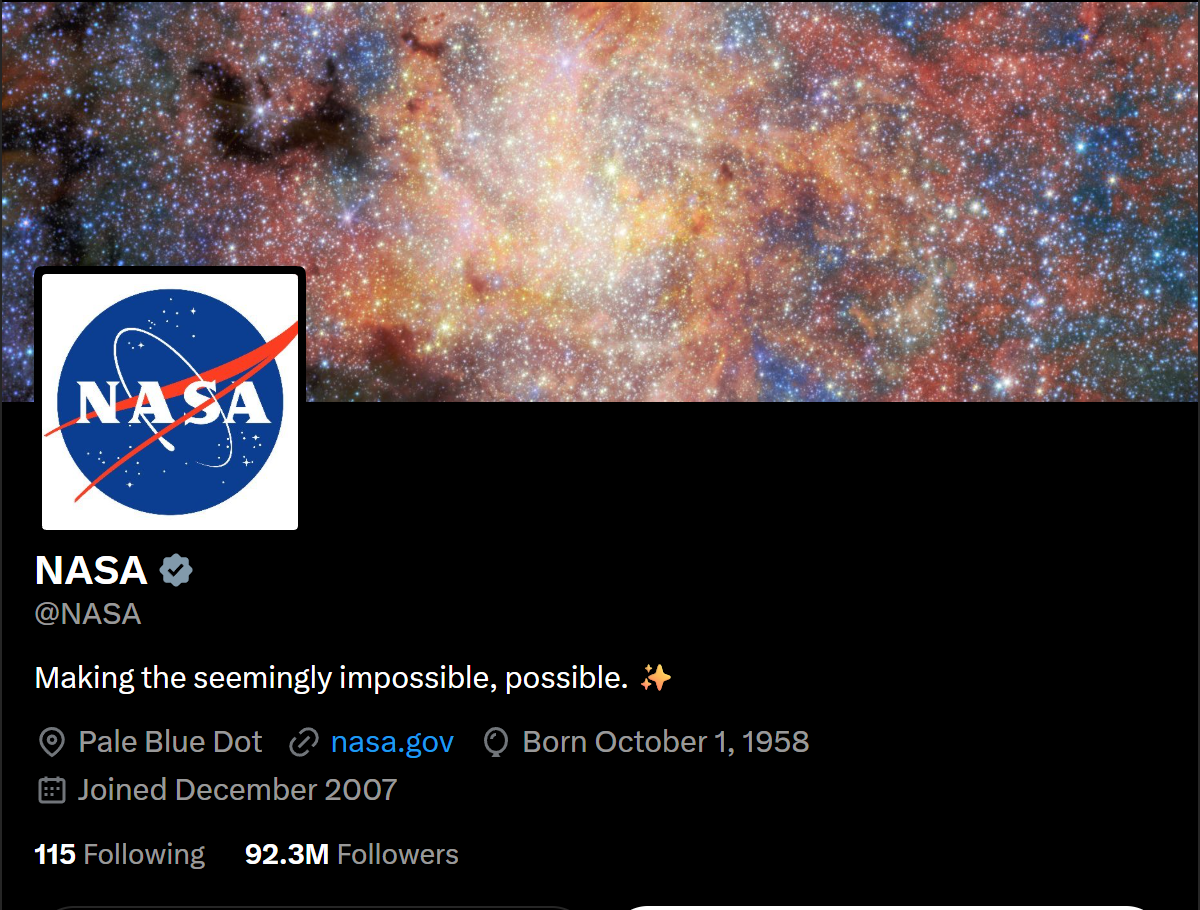
 - **Full Twitter profile per row:** id, handle, display name, bio with links expanded, website, location, followers, following, posts, likes, listed and media counts, join date, avatar and banner.
- **Verification and status:** blue, Business (gold) and Government (grey) check marks, protected accounts, affiliate badges, plus a status row for handles that do not exist or are suspended.
- **Activity signals from the same page, at no extra request:** last post date, days since the last post, average likes, replies, reposts and views of the latest posts, and an engagement rate, all read from the same page.
- **No login, cookies or X API key:** paste handles, `@handles`, x.com or twitter.com URLs, or numeric ids.
- **Monitor mode:** re-check the same accounts on a schedule and get only the profiles whose followers, posts, bio or badge changed, with the deltas.
- **Pay only for delivered profiles:** no start fee.
- **Export anywhere:** JSON, CSV, Excel, XML; schedules, webhooks, Make, Zapier, n8n, Google Sheets, Slack, the Apify API and MCP.
### What data can you get from an X (Twitter) profile?
- **Full Twitter profile per row:** id, handle, display name, bio with links expanded, website, location, followers, following, posts, likes, listed and media counts, join date, avatar and banner.
- **Verification and status:** blue, Business (gold) and Government (grey) check marks, protected accounts, affiliate badges, plus a status row for handles that do not exist or are suspended.
- **Activity signals from the same page, at no extra request:** last post date, days since the last post, average likes, replies, reposts and views of the latest posts, and an engagement rate, all read from the same page.
- **No login, cookies or X API key:** paste handles, `@handles`, x.com or twitter.com URLs, or numeric ids.
- **Monitor mode:** re-check the same accounts on a schedule and get only the profiles whose followers, posts, bio or badge changed, with the deltas.
- **Pay only for delivered profiles:** no start fee.
- **Export anywhere:** JSON, CSV, Excel, XML; schedules, webhooks, Make, Zapier, n8n, Google Sheets, Slack, the Apify API and MCP.
### What data can you get from an X (Twitter) profile?
| 🆔 User id (`id`) | 👤 Handle (`userName`) | 📝 Display name |
| 💬 Bio (`description`) | 🔗 Bio links and mentions | 🌐 Website |
| 📍 Location | 📅 Join date (`createdAt`) | 👥 Followers |
| ➡️ Following | 🧾 Posts count (`statusesCount`) | ❤️ Likes count (`favouritesCount`) |
| 📋 Listed count | 🖼️ Media count | ✅ Verified badge and type |
| 🔒 Protected flag | 🏢 Affiliate badge | 📌 Pinned post id |
| 🧑 Avatar (400x400) and banner | 🕒 Last post date | 📈 Engagement rate |
| 👍 Average likes, replies, reposts | 👀 Average views | 📰 Latest 5 posts (add-on) |
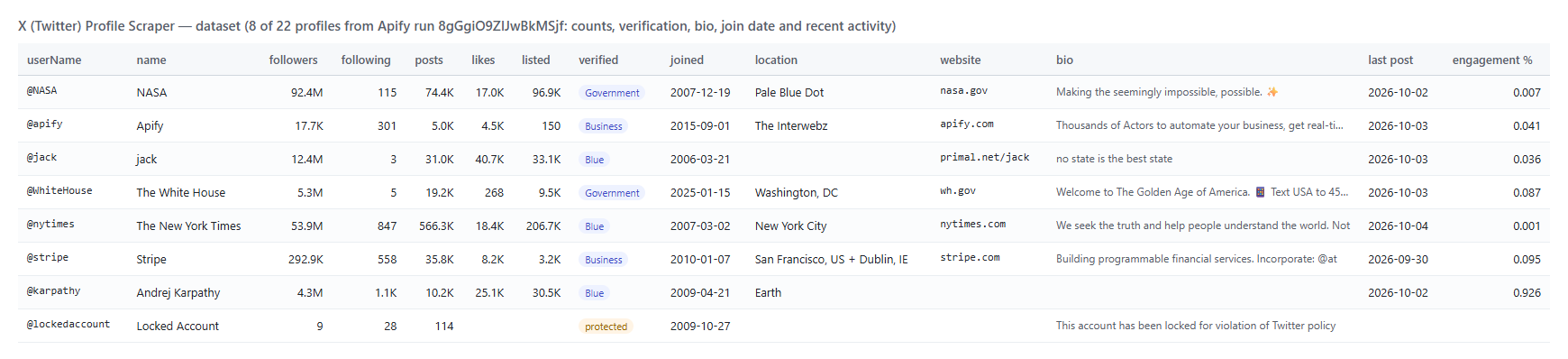 And one row as JSON (shortened):
```json
{
"status": "active",
"id": "3510729917",
"userName": "apify",
"name": "Apify",
"url": "https://x.com/apify",
"description": "Thousands of Actors to automate your business, get real-time web data, and integrate your apps and agents. ...",
"website": "https://apify.com",
"location": "The Interwebz",
"followers": 17657,
"following": 301,
"statusesCount": 4986,
"favouritesCount": 4470,
"listedCount": 150,
"mediaCount": 1266,
"createdAt": "2015-09-01T08:38:01.064Z",
"isBlueVerified": false,
"verifiedType": "Business",
"protected": false,
"profilePicture": "https://pbs.twimg.com/profile_images/2036008913192316928/yuW3cobE_400x400.png",
"pinnedTweetId": "2087572956683567110",
"lastPostAt": "2026-10-03T12:19:29.000Z",
"recentEngagementRatePct": 0.0411
}
```
#### Fields
Fill is measured on a 22-profile platform run (big brands, government accounts, small personal accounts and one protected account).
| Field | Type | What it is | Fill |
|---|---|---|---|
| `id`, `userName`, `name`, `url` | string | Identity; `id` stays stable when a handle changes | 100% |
| `followers`, `following`, `statusesCount` | integer | Follower, following and post counts | 100% |
| `favouritesCount`, `listedCount`, `mediaCount` | integer | Likes given, public lists, media posts (`countsSource` says where they came from) | 82% |
| `description`, `descriptionUrls`, `descriptionMentions` | string, list | Bio with t.co links expanded, plus its links and @mentions | 86% |
| `website`, `websiteDisplay` | string | Profile link field | 73% |
| `location` | string | What the owner typed | 55% |
| `createdAt`, `accountAgeDays` | string, integer | Join date (ISO 8601) | 100% |
| `isBlueVerified`, `isVerified`, `verifiedType` | boolean, string | Check mark; `Business` or `Government` when gold or grey | 100% (type 41%) |
| `protected`, `possiblySensitive` | boolean | Locked account, sensitive-media flag | 100% |
| `profilePicture`, `coverPicture`, `profileImageShape` | string | Avatar 400x400, banner, Circle or Square | 100% / 86% / 100% |
| `affiliation`, `businessAffiliatesCount` | object, integer | Affiliate badge, a verified organisation's affiliate count | 9% / 41% |
| `pinnedTweetId`, `pinnedTweetIds` | string, list | The pinned post | 50% |
| `birthdate` | string | Only when the owner made it public | 5% |
| `lastPostAt`, `daysSinceLastPost` | string, integer | Latest original post or reply | 91% |
| `recentAvgLikes`, `recentAvgReplies`, `recentAvgReposts`, `recentAvgViews` | number | Averages over the latest posts | 91% (views 77%) |
| `recentEngagementRatePct` | number | (likes + replies + reposts + quotes) / followers x 100 | 91% |
| `followersToFollowingRatio`, `postsPerDay` | number | Derived ratios | 100% |
| `latestPosts`, `pinnedPost` | list, object | With the posts add-on | 91% / 50% |
#### Latest and pinned Twitter posts (add-on)
With `includeLatestTweets`, each profile gets the latest original posts and replies (no reposts) that its public page shows: 5, or 4 when the account has a pinned post, which arrives separately as `pinnedPost`.
```json
{
"id": "2106358473772408931",
"url": "https://x.com/apify/status/2106358473772408931",
"text": "Did your last “agent” actually need to be an agent? 👀",
"createdAt": "2026-10-03T12:19:29.000Z",
"lang": "en",
"likes": 6, "replies": 1, "reposts": 0, "quotes": 0, "bookmarks": 0, "views": 558,
"isReply": false, "isQuote": false, "isLongPost": false,
"hashtags": [], "mentions": [], "urls": [], "media": []
}
```
### How can I use Twitter profile data?
- 🎯 **Influencer marketers:** shortlist creators by follower range, engagement rate and last post date, and skip dormant accounts.
- 💼 **Sales and lead-gen teams:** enrich a list of company or founder handles with website, location and verified status.
- 📊 **Brand and competitor analysts:** track follower growth and posting cadence of competitors with monitor mode and a daily schedule.
- 🔎 **Researchers and journalists:** check account age, verification type, affiliate badges and suspension status in bulk.
- 🤖 **AI and data teams:** feed compact profile rows to an LLM agent through the API or MCP.
- 🧹 **CRM hygiene:** find handles that were renamed (`id` stays the same), suspended or deleted.
### How much does it cost to scrape Twitter profiles?
Twitter Profile Scraper is pay-per-result: **$0.00014 per profile** ($0.14 per 1,000 profiles), no start fee. Latest and pinned posts are an optional add-on at **$0.00065 per profile** that receives them.
| Profiles | Profile cost | With posts add-on |
|---:|---:|---:|
| 10 | $0.0014 | $0.0079 |
| 100 | $0.014 | $0.079 |
| 1,000 | $0.14 | $0.79 |
| 10,000 | $1.40 | $7.90 |
There is nothing else to pay: Apify platform usage is included in these prices. A 25-profile run took 15 seconds on 256 MB.
### Integrations, API, scheduling & MCP
- **Schedules:** run Twitter Profile Scraper hourly, daily or weekly from the **Schedules** tab; turn on `monitorMode` to get only changed profiles.
- **Webhooks:** fire a URL when a run finishes and push new rows to your CRM, a sheet or Slack.
- **No-code:** Make, Zapier, n8n, Google Sheets, Airtable and Slack via [Apify integrations](https://docs.apify.com/integrations).
- **API:** call it from Node.js or Python with `apify-client`; code is on the [API tab](https://apify.com/topapi/x-profile-scraper/api/python) and in the [Apify API reference](https://docs.apify.com/api/v2).
- **MCP / AI agents:** connect Claude, Cursor or any MCP client through the [MCP tab](https://apify.com/topapi/x-profile-scraper/api/mcp) and ask for Twitter profiles in plain language; `compact` keeps the payload small.
A daily follower tracker is one API call: `{"handles": ["competitor1", "competitor2"], "monitorMode": true, "monitorStoreName": "competitors"}` on a schedule. Each run returns only the accounts that changed and adds `previousStats`, `deltas` and `changedFields`.
### More social media scrapers from TopApi
And one row as JSON (shortened):
```json
{
"status": "active",
"id": "3510729917",
"userName": "apify",
"name": "Apify",
"url": "https://x.com/apify",
"description": "Thousands of Actors to automate your business, get real-time web data, and integrate your apps and agents. ...",
"website": "https://apify.com",
"location": "The Interwebz",
"followers": 17657,
"following": 301,
"statusesCount": 4986,
"favouritesCount": 4470,
"listedCount": 150,
"mediaCount": 1266,
"createdAt": "2015-09-01T08:38:01.064Z",
"isBlueVerified": false,
"verifiedType": "Business",
"protected": false,
"profilePicture": "https://pbs.twimg.com/profile_images/2036008913192316928/yuW3cobE_400x400.png",
"pinnedTweetId": "2087572956683567110",
"lastPostAt": "2026-10-03T12:19:29.000Z",
"recentEngagementRatePct": 0.0411
}
```
#### Fields
Fill is measured on a 22-profile platform run (big brands, government accounts, small personal accounts and one protected account).
| Field | Type | What it is | Fill |
|---|---|---|---|
| `id`, `userName`, `name`, `url` | string | Identity; `id` stays stable when a handle changes | 100% |
| `followers`, `following`, `statusesCount` | integer | Follower, following and post counts | 100% |
| `favouritesCount`, `listedCount`, `mediaCount` | integer | Likes given, public lists, media posts (`countsSource` says where they came from) | 82% |
| `description`, `descriptionUrls`, `descriptionMentions` | string, list | Bio with t.co links expanded, plus its links and @mentions | 86% |
| `website`, `websiteDisplay` | string | Profile link field | 73% |
| `location` | string | What the owner typed | 55% |
| `createdAt`, `accountAgeDays` | string, integer | Join date (ISO 8601) | 100% |
| `isBlueVerified`, `isVerified`, `verifiedType` | boolean, string | Check mark; `Business` or `Government` when gold or grey | 100% (type 41%) |
| `protected`, `possiblySensitive` | boolean | Locked account, sensitive-media flag | 100% |
| `profilePicture`, `coverPicture`, `profileImageShape` | string | Avatar 400x400, banner, Circle or Square | 100% / 86% / 100% |
| `affiliation`, `businessAffiliatesCount` | object, integer | Affiliate badge, a verified organisation's affiliate count | 9% / 41% |
| `pinnedTweetId`, `pinnedTweetIds` | string, list | The pinned post | 50% |
| `birthdate` | string | Only when the owner made it public | 5% |
| `lastPostAt`, `daysSinceLastPost` | string, integer | Latest original post or reply | 91% |
| `recentAvgLikes`, `recentAvgReplies`, `recentAvgReposts`, `recentAvgViews` | number | Averages over the latest posts | 91% (views 77%) |
| `recentEngagementRatePct` | number | (likes + replies + reposts + quotes) / followers x 100 | 91% |
| `followersToFollowingRatio`, `postsPerDay` | number | Derived ratios | 100% |
| `latestPosts`, `pinnedPost` | list, object | With the posts add-on | 91% / 50% |
#### Latest and pinned Twitter posts (add-on)
With `includeLatestTweets`, each profile gets the latest original posts and replies (no reposts) that its public page shows: 5, or 4 when the account has a pinned post, which arrives separately as `pinnedPost`.
```json
{
"id": "2106358473772408931",
"url": "https://x.com/apify/status/2106358473772408931",
"text": "Did your last “agent” actually need to be an agent? 👀",
"createdAt": "2026-10-03T12:19:29.000Z",
"lang": "en",
"likes": 6, "replies": 1, "reposts": 0, "quotes": 0, "bookmarks": 0, "views": 558,
"isReply": false, "isQuote": false, "isLongPost": false,
"hashtags": [], "mentions": [], "urls": [], "media": []
}
```
### How can I use Twitter profile data?
- 🎯 **Influencer marketers:** shortlist creators by follower range, engagement rate and last post date, and skip dormant accounts.
- 💼 **Sales and lead-gen teams:** enrich a list of company or founder handles with website, location and verified status.
- 📊 **Brand and competitor analysts:** track follower growth and posting cadence of competitors with monitor mode and a daily schedule.
- 🔎 **Researchers and journalists:** check account age, verification type, affiliate badges and suspension status in bulk.
- 🤖 **AI and data teams:** feed compact profile rows to an LLM agent through the API or MCP.
- 🧹 **CRM hygiene:** find handles that were renamed (`id` stays the same), suspended or deleted.
### How much does it cost to scrape Twitter profiles?
Twitter Profile Scraper is pay-per-result: **$0.00014 per profile** ($0.14 per 1,000 profiles), no start fee. Latest and pinned posts are an optional add-on at **$0.00065 per profile** that receives them.
| Profiles | Profile cost | With posts add-on |
|---:|---:|---:|
| 10 | $0.0014 | $0.0079 |
| 100 | $0.014 | $0.079 |
| 1,000 | $0.14 | $0.79 |
| 10,000 | $1.40 | $7.90 |
There is nothing else to pay: Apify platform usage is included in these prices. A 25-profile run took 15 seconds on 256 MB.
### Integrations, API, scheduling & MCP
- **Schedules:** run Twitter Profile Scraper hourly, daily or weekly from the **Schedules** tab; turn on `monitorMode` to get only changed profiles.
- **Webhooks:** fire a URL when a run finishes and push new rows to your CRM, a sheet or Slack.
- **No-code:** Make, Zapier, n8n, Google Sheets, Airtable and Slack via [Apify integrations](https://docs.apify.com/integrations).
- **API:** call it from Node.js or Python with `apify-client`; code is on the [API tab](https://apify.com/topapi/x-profile-scraper/api/python) and in the [Apify API reference](https://docs.apify.com/api/v2).
- **MCP / AI agents:** connect Claude, Cursor or any MCP client through the [MCP tab](https://apify.com/topapi/x-profile-scraper/api/mcp) and ask for Twitter profiles in plain language; `compact` keeps the payload small.
A daily follower tracker is one API call: `{"handles": ["competitor1", "competitor2"], "monitorMode": true, "monitorStoreName": "competitors"}` on a schedule. Each run returns only the accounts that changed and adds `previousStats`, `deltas` and `changedFields`.
### More social media scrapers from TopApi
| 📸 Instagram Scraper | 🎵 TikTok Scraper | 🎬 TikTok Video Scraper |
| 📣 Facebook Search Posts Scraper | 📍 Google Maps Reviews Scraper | 🌐 SimilarWeb Scraper |
| 💼 Indeed Jobs Scraper | 🧭 All TopApi scrapers | |