# Facebook Comments Scraper - Replies, Reactions & Dates (`topapi/facebook-comments-scraper`) Actor

Scrape public Facebook comments from any post, reel, video, photo or group post URL: text, commenter, date, reactions by type, reply count, replies threaded to their parent, and the post itself. Newest-first, date window, keyword filters and monitor mode for new comments only. No login or cookies.

- **URL**: https://apify.com/topapi/facebook-comments-scraper.md
- **Developed by:** [Top Api](https://apify.com/topapi) (community)
- **Categories:** Social media, Lead generation
- **Stats:** 3 total users, 0 monthly users, 100.0% runs succeeded, 0 bookmarks
- **User rating**: No ratings yet

## Pricing

$0.95 / 1,000 comment scrapeds

This Actor is paid per event. You are not charged for the Apify platform usage, but only a fixed price for specific events.

Learn more: https://docs.apify.com/actors/running/actors-in-store.md#pay-per-event

## What's an Apify Actor?

An Actor is a serverless cloud program that runs on the Apify platform. It has two run modes.
In Batch mode, an Actor accepts a well-defined JSON input, performs an action which can take anything from a few seconds to a few hours,
and optionally produces a well-defined JSON output, datasets with results, or files in key-value store.
In Standby mode, an Actor provides a web server which can be used as a website, API, or an MCP server.

Apify vocabulary and the platform model are defined once, in the agent quickstart at https://apify.com/agents.md.

## How to integrate an Actor?

If asked about integration, you help developers integrate Actors into their projects.
You adapt to their stack and deliver integrations that are safe, well-documented, and production-ready.

Do not guess an integration path. Every one of them is in the agent quickstart at https://apify.com/agents.md: the Apify MCP server, Agent Skills with the Apify CLI, the JavaScript and Python clients, the REST API, and the account-free path for an agent with no human to sign in. It also carries the rule on stating cost before the first paid run.

For examples already wired to this Actor's own input schema, see the [API](#api) section below.

Each client library has reference documentation the quickstart does not restate: [JavaScript/TypeScript](https://docs.apify.com/api/client/js/docs.md) (`npm install apify-client`) and [Python](https://docs.apify.com/api/client/python/docs.md) (`pip install apify-client`).

# README

### What does Facebook Comments Scraper do?

**Facebook Comments Scraper** extracts public Facebook comments from any post, reel, video, photo or group post you give it by URL. Every comment becomes one structured row: the text, the commenter, the date, reactions by type, the reply count, the replies threaded to their parent, and the post the comment belongs to. Built for social media managers, brand and reputation teams, researchers and AI pipelines that need Facebook comments data without a login, cookies or an API key.

Facebook Comment Scraper - Facebook Comments Extractor - Facebook Reel Comments Scraper - FB Comments Export

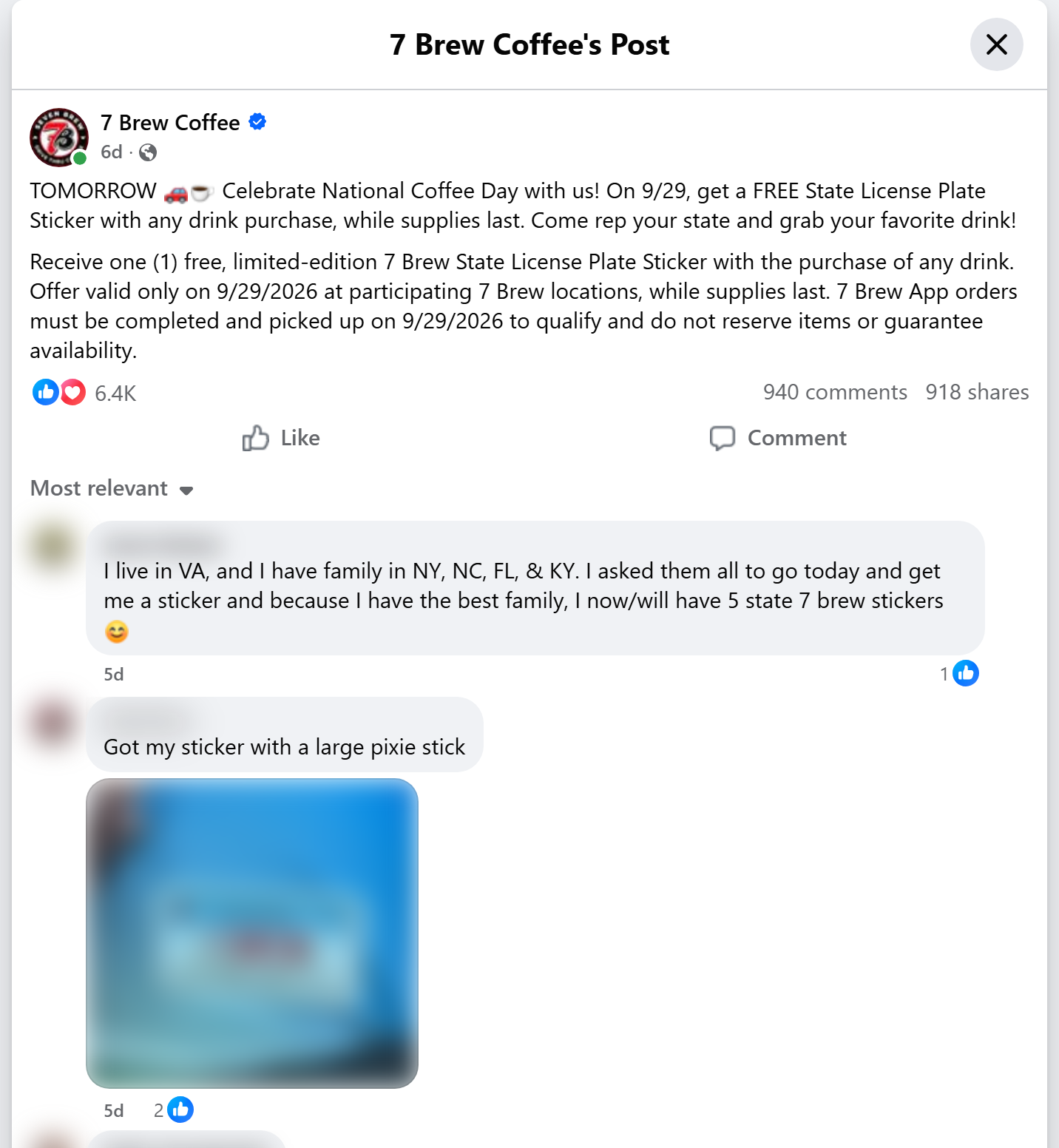
<a href="https://console.apify.com/actors/jvRtaDjDXm8NRgpBc"><img src="https://api.apify.com/v2/key-value-stores/qNQ9zP0xaj2yxGeMY/records/facebook-comments-scraper-source.png" alt="Facebook post with its comments that Facebook Comments Scraper turns into rows" style="width:70%"></a>

- **Every public comment of a post:** posts, reels, videos, photos, group posts, `permalink.php`, `watch?v=`, share links and `m.facebook.com` links all work. On a test post Facebook counted 940 comments and replies; the actor read all 582 top-level comments, which carry 325 of those replies.
- **Replies, threaded:** turn on replies and each reply is its own row with `replyToCommentId`, `replyToAuthorName` and `rootCommentId`, two levels deep, as Facebook shows them.
- **Reactions by type:** like, love, care, haha, wow, sad and angry for every comment, plus the total and the reply count.
- **The post on every row:** post text, post author, post date and post type ride along, so rows from many posts stay readable in one sheet.
- **Brand replies flagged:** `isPostAuthor` is `true` when the post's own author (a brand answering its customers) wrote the comment.
- **Monitor mode:** remembers what it delivered per post and returns only new comments. A quiet post costs one request.
- **No login, cookies or Facebook API key:** the actor reads only what Facebook shows a signed-out visitor.
- **Export anywhere:** JSON, CSV, Excel, XML, RSS; schedules, webhooks, Make, Zapier, n8n, Google Sheets, Slack, the Apify API and MCP.

### What data can you get from Facebook comments?

<table>
<tr>
<td>💬 Comment text (`text`)</td>
<td>📅 Date and Unix time (`date`, `timestamp`)</td>
<td>🔗 Comment URL (`commentUrl`)</td>
</tr>
<tr>
<td>🆔 Comment ids (`commentId`, `id`, `feedbackId`)</td>
<td>👤 Commenter name and id (`profileName`, `profileId`)</td>
<td>🌐 Commenter profile URL (`profileUrl`)</td>
</tr>
<tr>
<td>🖼️ Commenter avatar (`profilePicture`)</td>
<td>✔️ Verified badge and fan badges (`authorIsVerified`, `authorBadges`)</td>
<td>🏢 Brand reply flag (`isPostAuthor`)</td>
</tr>
<tr>
<td>❤️ Reactions total (`likesCount`)</td>
<td>😆 Reactions by type (`reactionCounts`)</td>
<td>↩️ Reply count (`commentsCount`)</td>
</tr>
<tr>
<td>🧵 Thread links (`threadingDepth`, `replyToCommentId`, `rootCommentId`)</td>
<td>📎 Stickers, GIFs, photos and links (`attachments`)</td>
<td>🗣️ Language (`language`)</td>
</tr>
<tr>
<td>📝 Post text (`postTitle`)</td>
<td>📣 Post author and date (`postAuthorName`, `postPublishedAt`)</td>
<td>📰 Post URL, id and type (`facebookUrl`, `facebookId`, `postType`)</td>
</tr>
</table>

On a 748-row test run (three posts, replies on) the commenter, date, comment URL, reactions and reply count were filled on 100% of rows, the text on 98% (the rest are sticker- or GIF-only comments) and the commenter's profile URL on 43%. Facebook shows that URL to signed-out visitors only for some people.

### How to scrape Facebook comments with Facebook Comments Scraper

1. [Create a free Apify account](https://console.apify.com/sign-up). It comes with $5 of monthly credit and needs no card.
2. Open [Facebook Comments Scraper](https://apify.com/topapi/facebook-comments-scraper) and click **Try for free**.
3. Paste one or more post, reel or video URLs into **Facebook post URLs** and set **Max comments per post**.
4. Pick the comment order, and turn on **Include replies** if you want the threads.
5. Click **Start**. Comments stream into the dataset as each page of 10 arrives.
6. Open the **Storage** tab and **Export** as JSON, CSV or Excel, or let a schedule run it for you.

### ⬇️ Input

| Parameter | Type | Description |
|---|---|---|
| **🔍 What to scrape** | | |
| `startUrls` | List | **Required.** Public post, reel, video, photo or group-post URLs. Share links (`/share/p/...`), `permalink.php`, `watch?v=` and `m.facebook.com` links work; a bare post id or `pfbid` works as `https://www.facebook.com/<id>`. You can also link a remote text file of URLs. |
| **🎯 Filters** (applied by Facebook) | | |
| `sortBy` | Select | `newest` (every comment, date-ordered), `most_relevant` (Facebook's default view, may hide some) or `all`. Default: `newest` |
| **✂️ Refine results** | | |
| `onlyCommentsNewerThan` | Date | Keep comments posted on or after a date: `2026-09-01` or relative, `7 days`, `12 hours`. With `newest`, paging stops once comments get older. |
| `onlyCommentsOlderThan` | Date | Keep comments posted before a date. Combine both for a window. |
| `keywordFilter` | Text | Keep comments containing at least one of these words, comma-separated, e.g. `refund, broken, price`. |
| `minReactions` | Integer | Keep comments with at least this many reactions. Default: `0` |
| `withTextOnly` | Boolean | Skip sticker-only and GIF-only comments. Default: `false` |
| **➕ Extra data** | | |
| `includeReplies` | Boolean | Save the replies under each saved comment as their own rows. Default: `false` |
| `maxRepliesPerComment` | Integer | Cap the replies saved under one comment. `0` = all. Default: `0` |
| **🔁 Monitoring** | | |
| `monitorMode` | Boolean | Return only comments that earlier runs did not deliver. Pair it with a schedule. Default: `false` |
| `monitorStoreName` | Text | Name of the memory store, one per schedule. Default: `facebook-comments-monitor` |
| **📦 Output** | | |
| `maxCommentsPerPost` | Integer | Rows per post, replies included. `0` = every comment (up to 20,000 per post). Default: `100` |
| `maxItems` | Integer | Stop the whole run after this many rows. `0` = no cap. Default: `0` |
| `compact` | Boolean | Core fields only, for AI agents, MCP and spreadsheets. Default: `false` |
| **⚙️ Advanced** | | |
| `proxyConfiguration` | Proxy | Apify Proxy by default. Every post gets its own IP; a post Facebook refuses is retried on a fresh one. |
| `maxConcurrency` | Integer | Posts read at the same time, 1-5. Default: `2` |

#### Input JSON

```json
{
  "startUrls": [
    { "url": "https://www.facebook.com/7brewcoffee/posts/pfbid024Het6Hb531EDqJsLdv9GbredhhftgHkLPtBEQJxVkfwWZvQL65Aoj9LTKMJZCfNkl" },
    { "url": "https://www.facebook.com/reel/1567627928372584/" }
  ],
  "sortBy": "newest",
  "includeReplies": true,
  "maxCommentsPerPost": 500
}
```

Field names from other Facebook comments scrapers are accepted too through the API (`postUrls` and `post_id` as plain strings, `resultsLimit`, `includeNestedComments`, `viewOption`), so a saved API call can switch over without edits. `startUrls` itself takes `{ "url": ... }` objects, as on the Apify form.

#### Paste the post URL, not the Page URL

The actor reads the Facebook comments of one post per URL. **Do:** `https://www.facebook.com/7brewcoffee/posts/pfbid0...` or `https://www.facebook.com/reel/1567627928372584`. **Don't:** `https://www.facebook.com/7brewcoffee` (a Page, not a post: the run skips it as not a post URL, says so in the log and charges nothing). To get comments from a Page's latest posts, collect the post URLs first, for example with Facebook Search Posts Scraper.

#### Use "Newest first" for date windows and monitoring

Facebook serves `newest` in strict date order, so `onlyCommentsNewerThan: "3 days"` reads only the pages it needs. On a test run it stopped after 3 pages on a 940-comment post. `most_relevant` is the view a visitor sees first; Facebook leaves some comments out of it (559 of 582 top-level comments on the same post).

#### Count replies in your per-post cap

Replies are rows like Facebook comments and count toward `maxCommentsPerPost`. To keep every thread of a busy post, raise the cap or set `maxRepliesPerComment` to keep a few replies per comment.

### ⬆️ Output

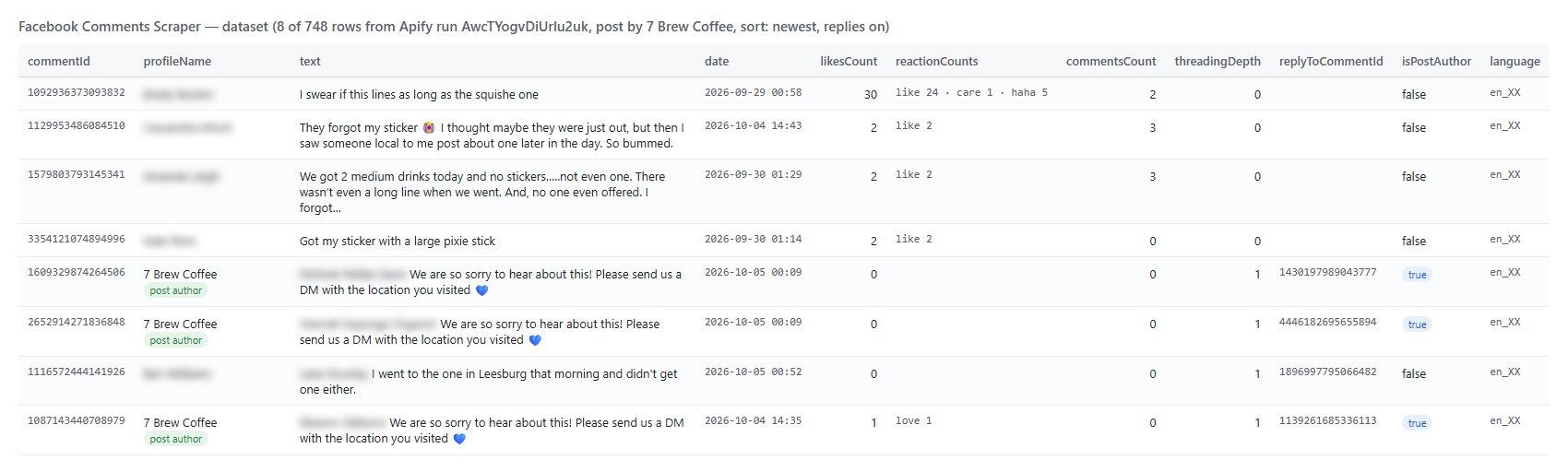
Every Facebook comment or reply becomes one dataset item. Here is the table view of a run on a brand's post with replies on (commenters' names blurred here):

<a href="https://console.apify.com/actors/jvRtaDjDXm8NRgpBc"><img src="https://api.apify.com/v2/key-value-stores/qNQ9zP0xaj2yxGeMY/records/facebook-comments-scraper-output.png" alt="Facebook Comments Scraper output table with comments, reactions and replies" style="width:70%"></a>

And a reply as JSON (shortened):

```json
{
  "facebookUrl": "https://www.facebook.com/7brewcoffee/posts/pfbid03896bGxWttPnd3tP73tNRD98Wb2xiNviJTHPqtaZB5VcXxmTZ64NQzzb9XBT3YG9il",
  "facebookId": "1614057347434600",
  "postTitle": "TOMORROW 🚗☕️ Celebrate National Coffee Day with us! ...",
  "postAuthorName": "7 Brew Coffee",
  "postPublishedAt": "2026-09-28T18:02:00.000Z",
  "commentId": "1609329874264506",
  "commentUrl": "https://www.facebook.com/7brewcoffee/posts/pfbid0...?comment_id=1430197989043777&reply_comment_id=1609329874264506",
  "text": "... We are so sorry to hear about this! Please send us a DM with the location you visited 💙",
  "date": "2026-10-05T00:09:04.000Z",
  "profileName": "7 Brew Coffee",
  "profileUrl": "https://www.facebook.com/7brewcoffee",
  "authorIsVerified": true,
  "authorBadges": ["author"],
  "isPostAuthor": true,
  "likesCount": 0,
  "reactionCounts": { "like": 0, "love": 0, "care": 0, "haha": 0, "wow": 0, "sad": 0, "angry": 0 },
  "commentsCount": 0,
  "threadingDepth": 1,
  "isReply": true,
  "replyToCommentId": "1430197989043777",
  "rootCommentId": "1430197989043777",
  "language": "en_XX"
}
```

#### Facebook comment fields

| Field | Type | What it is | Filled (748-row run) |
|---|---|---|---|
| `commentId`, `id`, `feedbackId`, `commentUrl` | string | Comment ids and direct link | 100% |
| `text` | string | Comment text; `null` for sticker- or GIF-only comments | 98% |
| `date`, `timestamp` | string, integer | Comment time, ISO 8601 and Unix seconds | 100% |
| `profileName`, `profileId`, `profilePicture` | string | Commenter name, id and avatar | 100% |
| `profileUrl` | string | Commenter profile or Page URL, when Facebook shows it | 43% |
| `authorIsVerified`, `authorBadges`, `isPostAuthor` | boolean, list | Verified badge, fan / author badges, brand reply flag | 100% |
| `likesCount`, `reactionCounts` | integer, object | Reactions total and by type | 100% |
| `commentsCount` | integer | Replies under the comment | 100% |
| `threadingDepth`, `isReply`, `replyToCommentId`, `replyToAuthorName`, `rootCommentId` | mixed | Thread position | 100% (reply fields on replies) |
| `attachments`, `attachmentUrls` | list | Stickers, GIFs, photos, links in the comment | 5% (rows that have one) |
| `language` | string | Facebook's detected language, e.g. `en_XX` | 89% |
| `facebookUrl`, `facebookId`, `postTitle`, `postAuthorName`, `postAuthorId`, `postPublishedAt`, `postType` | mixed | The post the comment belongs to | 100% |
| `pageAdLibrary` | object | Post author's Page in the Ad Library | Page posts |
| `authorGender`, `authorType`, `inputUrl`, `sortOrder`, `scrapedAt` | string | Facebook's grammatical gender and type of the commenter, run context | 100% |

### How can I use Facebook comments data?

- 📣 **Social media and community managers:** export every comment on your posts and reels, sort by reactions, and find the questions you have not answered yet (`isPostAuthor` shows which threads you already replied to).
- 🛡️ **Brand and reputation teams:** monitor competitors' and your own posts on a schedule and catch complaints the day they appear, with `keywordFilter` on words like "refund" or "broken".
- 🔬 **Researchers and analysts:** collect Facebook comment threads with dates and reaction breakdowns for sentiment, topic and audience studies.
- 🎬 **Creators and agencies:** compare the conversation under reels and videos across accounts and campaigns.
- 🤖 **AI and data teams:** feed clean comment text into LLMs, classifiers and dashboards; `compact` keeps rows small.
- 🎁 **Giveaway and contest organisers:** export the full list of entries under a contest post, with the comment time for a fair cut-off.

### How much does it cost to scrape Facebook comments?

Facebook Comments Scraper is pay-per-result: **$0.95 per 1,000 Facebook comments**, replies included, no start fee. You only pay for the comments written to your dataset.

| Comments | Cost |
|---:|---:|
| 100 | $0.095 |
| 1,000 | $0.95 |
| 10,000 | $9.50 |
| 100,000 | $95.00 |

Apify platform usage (compute, proxy) is included in this price. Measured on the platform: 20 comments in 6 seconds, 748 comments with replies from three posts in 87 seconds, all on 256 MB with a memory peak under 60 MB.

### Facebook comments in your tools: integrations, API, scheduling & MCP

- **Schedules:** run it hourly or daily from the **Schedules** tab with `monitorMode: true` and `sortBy: newest` to receive only new comments on the posts you watch.
- **Webhooks:** fire a URL when a run finishes, and push new comments to your CRM, help desk, Slack or a sheet.
- **No-code:** Make, Zapier, n8n, Google Sheets, Airtable, Slack via [Apify integrations](https://docs.apify.com/integrations).
- **API:** call it from Node.js or Python with `apify-client`. Code is on the [API tab](https://apify.com/topapi/facebook-comments-scraper/api/python) and in the [Apify API reference](https://docs.apify.com/api/v2).
- **MCP / AI agents:** connect Claude, Cursor or any MCP client through the [MCP tab](https://apify.com/topapi/facebook-comments-scraper/api/mcp) and ask for the comments on a post in plain language. Set `compact: true` to keep rows small.

### More social media scrapers by TopApi

<table>
<tr>
<td>🔎 <a href="https://apify.com/topapi/facebook-search-posts-scraper">Facebook Search Posts Scraper</a> - find public posts by keyword, then pass their URLs here</td>
<td>🛒 <a href="https://apify.com/topapi/facebook-marketplace-scraper">Facebook Marketplace Scraper</a> - listings, prices and price drops by keyword and city</td>
<td>📸 <a href="https://apify.com/topapi/instagram-scraper">Instagram Scraper</a> - posts, reels, hashtags and profiles</td>
</tr>
<tr>
<td>🎵 <a href="https://apify.com/topapi/tiktok-scraper">TikTok Scraper</a> - videos by profile, hashtag or keyword, with transcripts</td>
<td>🎬 <a href="https://apify.com/topapi/tiktok-video-scraper">TikTok Video Scraper</a> - stats, transcript and download by video URL</td>
<td>▶️ <a href="https://apify.com/topapi/youtube-shorts-scraper">YouTube Shorts Scraper</a> - views, channels, hashtags and transcripts</td>
</tr>
<tr>
<td>🐦 <a href="https://apify.com/topapi/x-profile-scraper">Twitter Profile Scraper</a> - X followers, bio and verified badge</td>
<td>📍 <a href="https://apify.com/topapi/google-maps-reviews-scraper">Google Maps Reviews Scraper</a> - reviews, ratings and owner replies</td>
<td>🧭 <a href="https://apify.com/topapi">All TopApi actors</a> - including Indeed jobs and Similarweb traffic</td>
</tr>
</table>

### Limits & empty runs

- **10 Facebook comments per request:** Facebook pages its comment list 10 at a time. A post with 1,000 comments takes about 100 requests; the actor reads 2 posts in parallel by default.
- **What Facebook shows a visitor:** on the test post Facebook counted 940 comments and replies; `newest` and `all` returned 582 top-level comments carrying 325 replies (907, or 96%). The rest are deleted, hidden or held back by Facebook. `most_relevant` returned 559 top-level comments.
- **Replies** are collected under the comments the run saves, two levels deep as Facebook shows them (80 of 83 replies on the busiest thread we tested).
- **Monitor mode** returns comments newer than the last run's. Replies added later under older comments are picked up only when those comments are on the pages the run reads.
- **Reactions by type** are the types Facebook lists on the comment; when they do not add up to the total, the unlisted types are `null`, not zero.
- **Empty dataset:** the URL is not a public post (a Page, a private group, a removed post), the post has no comments, your filters removed every comment, or monitor mode found nothing new. The status message and the `RUN_SUMMARY` record say which; nothing is charged.
- **Not available signed-out:** private groups, friends-only posts and comment reactor lists. Avatar and media URLs are signed CDN links that expire after a few hours.

### FAQ

#### How many comments can Facebook Comments Scraper collect from one post?

Up to 20,000 per post (set `maxCommentsPerPost` to `0`), at 10 comments per request. A 500-comment run on a busy post took 78 seconds on the platform, including a forced restart that did not duplicate a single row.

#### Can I run Facebook Comments Scraper on a schedule to get new comments automatically?

Yes. Save your input as a task with `monitorMode: true` and `sortBy: newest`, open **Schedules** and pick the cadence. Each run returns only comments that earlier runs did not deliver; a post with nothing new costs one page load and one request, and the run ends with an empty dataset (6 seconds for two quiet posts on a test poll).

#### Does Facebook Comments Scraper get replies to comments?

Yes. Turn on `includeReplies`. Each reply is its own row, linked to its parent with `replyToCommentId` and to the thread's first comment with `rootCommentId`. Use `maxRepliesPerComment` to keep a few per comment.

#### Can I scrape comments from Facebook reels and videos with Facebook Comments Scraper?

Yes. Reel URLs (`/reel/<id>`), video URLs (`/<page>/videos/<id>`), `watch?v=` links and share links all resolve to the same post and return its comments.

#### Can I filter Facebook comments by date or keyword?

Yes. `onlyCommentsNewerThan` and `onlyCommentsOlderThan` take a date or a relative time like `7 days`; `keywordFilter`, `minReactions` and `withTextOnly` narrow the rest. Filtered comments are not written to the dataset.

#### Can I integrate Facebook Comments Scraper with other apps?

Yes. Make, Zapier, n8n, Google Sheets, Slack and more via [Apify integrations](https://docs.apify.com/integrations), or use [webhooks](https://docs.apify.com/integrations/webhooks) to trigger an action when a run finishes.

#### Can I use Facebook Comments Scraper with the Apify API?

Yes. The API starts runs, fetches datasets and manages schedules. Use `apify-client` for [Node.js](https://apify.com/topapi/facebook-comments-scraper/api/javascript) or [Python](https://apify.com/topapi/facebook-comments-scraper/api/python); the API tab has ready-to-paste code.

#### Can I use Facebook Comments Scraper through an MCP server?

Yes. Open the [MCP tab](https://apify.com/topapi/facebook-comments-scraper/api/mcp), connect your MCP client (Claude Desktop, Cursor, LibreChat) and ask for the comments on a post. `compact: true` keeps the rows small.

#### Do I need a Facebook account, cookies or an API key for Facebook Comments Scraper?

No. Facebook Comments Scraper reads only what Facebook shows a signed-out visitor. You pass post URLs and nothing else.

#### Why did my Facebook Comments Scraper run return no comments?

The most common causes, in order: the URL is a Page, profile or group home rather than a post (skipped as invalid input); the post is in a private group or was removed; your date window or keyword filter removed every comment; monitor mode found nothing new. The status message names the cause for each URL.

#### Is it legal to scrape Facebook comments?

Facebook Comments Scraper extracts only publicly available comments; it does not log in or collect private data. Comments may still contain personal data, which is regulated (for example by GDPR). Make sure you have a legitimate purpose before you store or reuse it.

#### Your feedback

We keep improving Facebook Comments Scraper. Found a bug or missing a field? Open an issue on the [Issues tab](https://apify.com/topapi/facebook-comments-scraper/issues/open).

# Actor input Schema

## `startUrls` (type: `array`):

Public post, reel, video, photo or group-post URLs, e.g. https://www.facebook.com/reel/1567627928372584 or a /share/p/ link. A bare post id works as https://www.facebook.com/<id>.

## `sortBy` (type: `string`):

"Newest first" returns every public comment in date order - use it with a date window or monitor mode. "Most relevant" is the default view a visitor sees; Facebook hides some comments in it.

## `onlyCommentsNewerThan` (type: `string`):

Keep comments posted on or after this date: absolute (2026-09-01) or relative (7 days, 12 hours, 2 months). Leave empty for no lower bound.

## `onlyCommentsOlderThan` (type: `string`):

Keep comments posted before this date, e.g. 2026-10-01 or 1 day. Combine with 'Comments newer than' for a window.

## `keywordFilter` (type: `string`):

Keep only comments whose text contains at least one of these words, comma-separated, case-insensitive, e.g. "price, refund, broken". Leave empty to keep all.

## `minReactions` (type: `integer`):

Keep only comments with at least this many reactions (likes, loves, hahas... combined), e.g. 5. 0 keeps all.

## `withTextOnly` (type: `boolean`):

Skip comments that are only a sticker, GIF or photo with no words (about 2-18% of comments on the posts we measured).

## `includeReplies` (type: `boolean`):

Also save the replies under each saved comment (two levels deep, as Facebook shows them). Each reply is one row and counts toward 'Max comments per post'.

## `maxRepliesPerComment` (type: `integer`):

Cap the replies saved under one comment, e.g. 10. 0 = every reply Facebook shows.

## `monitorMode` (type: `boolean`):

Remember every comment delivered, per post, and return only new ones next run. With 'Newest first' a run stops at the first page of already-seen comments, so a quiet post costs one request.

## `monitorStoreName` (type: `string`):

Name of the key-value store that holds what was already delivered, e.g. "brand-posts". Use one name per schedule; a new name starts from scratch.

## `maxCommentsPerPost` (type: `integer`):

Comments (and replies, when included) saved per post, e.g. 500. 0 = every comment Facebook serves (up to 20,000 per post). Facebook serves 10 per request.

## `maxItems` (type: `integer`):

Stop the whole run after this many rows across all posts, e.g. 1000. 0 = no total cap.

## `compact` (type: `boolean`):

Core fields only (comment id and URL, text, date, author, reactions, replies, post URL) - smaller rows for AI agents, MCP clients and spreadsheets.

## `proxyConfiguration` (type: `object`):

Apify Proxy (default) gives every post a fresh IP; when Facebook refuses three of them the run retries the post on a residential IP. Direct egress also works.

## `maxConcurrency` (type: `integer`):

How many posts are read at the same time, e.g. 3. Comments of one post are always read in order.

## Actor input object example

```json
{
  "startUrls": [
    {
      "url": "https://www.facebook.com/7brewcoffee/posts/pfbid024Het6Hb531EDqJsLdv9GbredhhftgHkLPtBEQJxVkfwWZvQL65Aoj9LTKMJZCfNkl"
    }
  ],
  "sortBy": "newest",
  "minReactions": 0,
  "withTextOnly": false,
  "includeReplies": false,
  "maxRepliesPerComment": 0,
  "monitorMode": false,
  "monitorStoreName": "facebook-comments-monitor",
  "maxCommentsPerPost": 20,
  "maxItems": 0,
  "compact": false,
  "proxyConfiguration": {
    "useApifyProxy": true
  },
  "maxConcurrency": 2
}
```

# Actor output Schema

## `comments` (type: `string`):

The dataset of Facebook comments and replies (one item per comment).

## `summary` (type: `string`):

Per-post counts (read, filtered, already delivered, delivered), status of every input, requests made, sessions used and bytes transferred.

# API

You can run this Actor programmatically using our API. Below are code examples in JavaScript, Python, and CLI, as well as the OpenAPI specification and MCP server setup.

## JavaScript example

```javascript
import { ApifyClient } from 'apify-client';

// Initialize the ApifyClient with your Apify API token
// Replace the '<YOUR_API_TOKEN>' with your token
const client = new ApifyClient({
    token: '<YOUR_API_TOKEN>',
});

// Prepare Actor input
const input = {
    "startUrls": [
        {
            "url": "https://www.facebook.com/7brewcoffee/posts/pfbid024Het6Hb531EDqJsLdv9GbredhhftgHkLPtBEQJxVkfwWZvQL65Aoj9LTKMJZCfNkl"
        }
    ],
    "maxCommentsPerPost": 20
};

// Run the Actor and wait for it to finish
const run = await client.actor("topapi/facebook-comments-scraper").call(input);

// Fetch and print Actor results from the run's dataset (if any)
console.log('Results from dataset');
console.log(`💾 Check your data here: https://console.apify.com/storage/datasets/${run.defaultDatasetId}`);
const { items } = await client.dataset(run.defaultDatasetId).listItems();
items.forEach((item) => {
    console.dir(item);
});

// 📚 Want to learn more 📖? Go to → https://docs.apify.com/api/client/js/docs

```

## Python example

```python
from apify_client import ApifyClient

# Initialize the ApifyClient with your Apify API token
# Replace '<YOUR_API_TOKEN>' with your token.
client = ApifyClient("<YOUR_API_TOKEN>")

# Prepare the Actor input
run_input = {
    "startUrls": [{ "url": "https://www.facebook.com/7brewcoffee/posts/pfbid024Het6Hb531EDqJsLdv9GbredhhftgHkLPtBEQJxVkfwWZvQL65Aoj9LTKMJZCfNkl" }],
    "maxCommentsPerPost": 20,
}

# Run the Actor and wait for it to finish
run = client.actor("topapi/facebook-comments-scraper").call(run_input=run_input)

# Fetch and print Actor results from the run's dataset (if there are any)
print(f"💾 Check your data here: https://console.apify.com/storage/datasets/{run.default_dataset_id}")
for item in client.dataset(run.default_dataset_id).iterate_items():
    print(item)

# 📚 Want to learn more 📖? Go to → https://docs.apify.com/api/client/python/docs/quick-start

```

## CLI example

```bash
echo '{
  "startUrls": [
    {
      "url": "https://www.facebook.com/7brewcoffee/posts/pfbid024Het6Hb531EDqJsLdv9GbredhhftgHkLPtBEQJxVkfwWZvQL65Aoj9LTKMJZCfNkl"
    }
  ],
  "maxCommentsPerPost": 20
}' |
apify call topapi/facebook-comments-scraper --silent --output-dataset

```

## MCP server setup

```json
{
    "mcpServers": {
        "apify": {
            "type": "http",
            "url": "https://mcp.apify.com/?tools=fetch-actor-details,topapi/facebook-comments-scraper"
        }
    }
}
```

The hosted server signs you in with OAuth on first connect, so no API token belongs in this config. Clients without OAuth support can send an `Authorization: Bearer <APIFY_API_TOKEN>` header instead, using a token from API & Integrations in Apify Console (https://console.apify.com/settings/integrations).

## OpenAPI specification

Download the OpenAPI definition: https://api.apify.com/v2/actors/jvRtaDjDXm8NRgpBc/builds/dLnNtcNuA2N4xK1fb/openapi.json