| 🆔 Listing id and URL (`listingUrl`) |
📝 Title |
💲 Price and currency |
| 🏷️ Original price and discount % |
📍 City, state, `locationText` |
📅 Date listed (`listedAt`) |
| 🖼️ Primary photo (`photoUrl`) |
🗂️ Category (`categoryName`) |
✅ Sold / pending flags |
| 🚚 Delivery options |
📄 Full description ➕ |
📸 Every photo ➕ |
| ⭐ Condition and attributes ➕ |
🌐 Latitude, longitude, distance ➕ |
🚗 Vehicle: year, make, model, mileage ➕ |
| 🏠 Property: beds, baths, street ➕ |
📉 Price drop: `previousPrice`, `priceDelta` |
🔎 Search keyword and location |
➕ = with **Include listing details** on. On a 25-listing live run ("desk" near Austin, details on) every row had a title, price, currency, city, photo, category, listing date, condition, coordinates and distance; 92% had a description, 40% an original price, and listings had 1 to 8 photos (3.4 on average).
### How to scrape Facebook Marketplace with Facebook Marketplace Scraper
1. [Create a free Apify account](https://console.apify.com/sign-up): $5 of monthly credit, no card needed.
2. Open [Facebook Marketplace Scraper](https://apify.com/topapi/facebook-marketplace-scraper) and click **Try for free**.
3. Type what you want into **Search keywords** (e.g. `bike`) and a place into **Location** (e.g. `Austin, TX`).
4. Set **Max listings per search**, and turn on **Include listing details** if you need descriptions, all photos or vehicle data.
5. Click **Start**. Rows stream into the dataset as they are found.
6. Open the **Storage** tab and **Export** as JSON, CSV or Excel, or let a schedule run it for you.
### ⬇️ Input
| Parameter | Type | Description |
|---|---|---|
| **🔍 What to scrape** | | |
| `searchQueries` | List | Keywords, one per line, e.g. `bike`, `iphone 15`, `honda civic`. Prefill: `bike`. |
| `location` | String | City, `City, State`, postal code or `lat,lng`; several places separated by `;`. Default: New York, NY. |
| `radiusKm` | Integer | Search radius (1-500 km). Facebook's own filter; exact with listing details. |
| `categories` | Select (multi) | 18 Marketplace categories (Vehicles, Property Rentals, Home Sales, Electronics, Free Stuff and more). Without keywords each is browsed. |
| `listingUrls` | List | Listing URLs or ids, or Marketplace search/category URLs copied from your browser. |
| **🎯 Filters** (applied by Facebook) | | |
| `minPrice`, `maxPrice` | Integer | Price window in the local currency. `maxPrice: 0` = free items. |
| `condition` | Select (multi) | New, Used - like new, Used - good, Used - fair. Default: any. |
| `sortBy` | Select | Best match (default), newest first, price low/high, distance. |
| `daysSinceListed` | Select | Any time (default), last 24 hours, 7 days, 30 days. |
| **✂️ Refine results** | | |
| `mustContainQuery` | Boolean | Keep only listings whose title contains every word of the keyword. Default: `false`. |
| `excludeKeywords` | String | Drop listings whose title (or description, with details) contains any of these words. |
| **➕ Extra data** | | |
| `includeListingDetails` | Boolean | Description, all photos, condition, coordinates, vehicle and property data, charged as **Listing details** per row that gets it. Default: `false`. |
| **🔁 Monitoring** | | |
| `monitorMode` | Boolean | Return only listings not delivered by previous runs, plus price drops. Pair with a schedule. |
| `monitorStoreName` | String | Name of the store that remembers delivered listings. Default: `facebook-marketplace-monitor`. |
| **📦 Output** | | |
| `maxResultsPerQuery` | Integer | Cap per keyword x category x location. Default `100`, prefill `24`, `0` = up to 5,000. |
| `maxItems` | Integer | Cap for the whole run. `0` = no total cap. |
| `compact` | Boolean | Core fields only, sized for AI agents and MCP. |
| **⚙️ Advanced** | | |
| `proxyConfiguration` | Proxy | Default: Apify RESIDENTIAL (US). Other choices fall back to it automatically. |
#### Input JSON
```json
{
"searchQueries": ["desk", "office chair"],
"location": "Austin, TX",
"maxPrice": 150,
"sortBy": "newest",
"daysSinceListed": "7",
"includeListingDetails": true,
"maxResultsPerQuery": 50
}
```
#### Write the location as "City, State" or a postal code
Facebook's own location search resolves the place. **Do:** `Austin, TX`, `Manchester, UK`, `90210`, `30.27,-97.74`. **Don't:** `Austin` alone when you mean Texas (several towns share the name; the log prints the place used).
#### Paste a Marketplace search URL to keep your browser filters
Copy the address bar of a Marketplace search into `listingUrls`. The actor reads its city, keyword, category and filters (`minPrice`, `maxPrice`, `sortBy`, `daysSinceListed`, `itemCondition`); the form's filters do not override it.
#### Sort by newest for alerts, by distance for "near me"
`newest` is the order for monitoring; Facebook widens the area slightly for it. `distance` keeps results closest to you. Facebook treats the radius as a hint (about 65 km), so turn on listing details when it must be exact: farther rows are removed.
#### Turn on "Only listings that contain the keyword" for strict results
Marketplace search is fuzzy: `bike` also returns bike racks. With `mustContainQuery` every keyword word must appear in the title.
### ⬆️ Output
Every listing becomes one dataset item. Here is the table view of the 25-listing live run for `desk` near Austin, TX with listing details on:
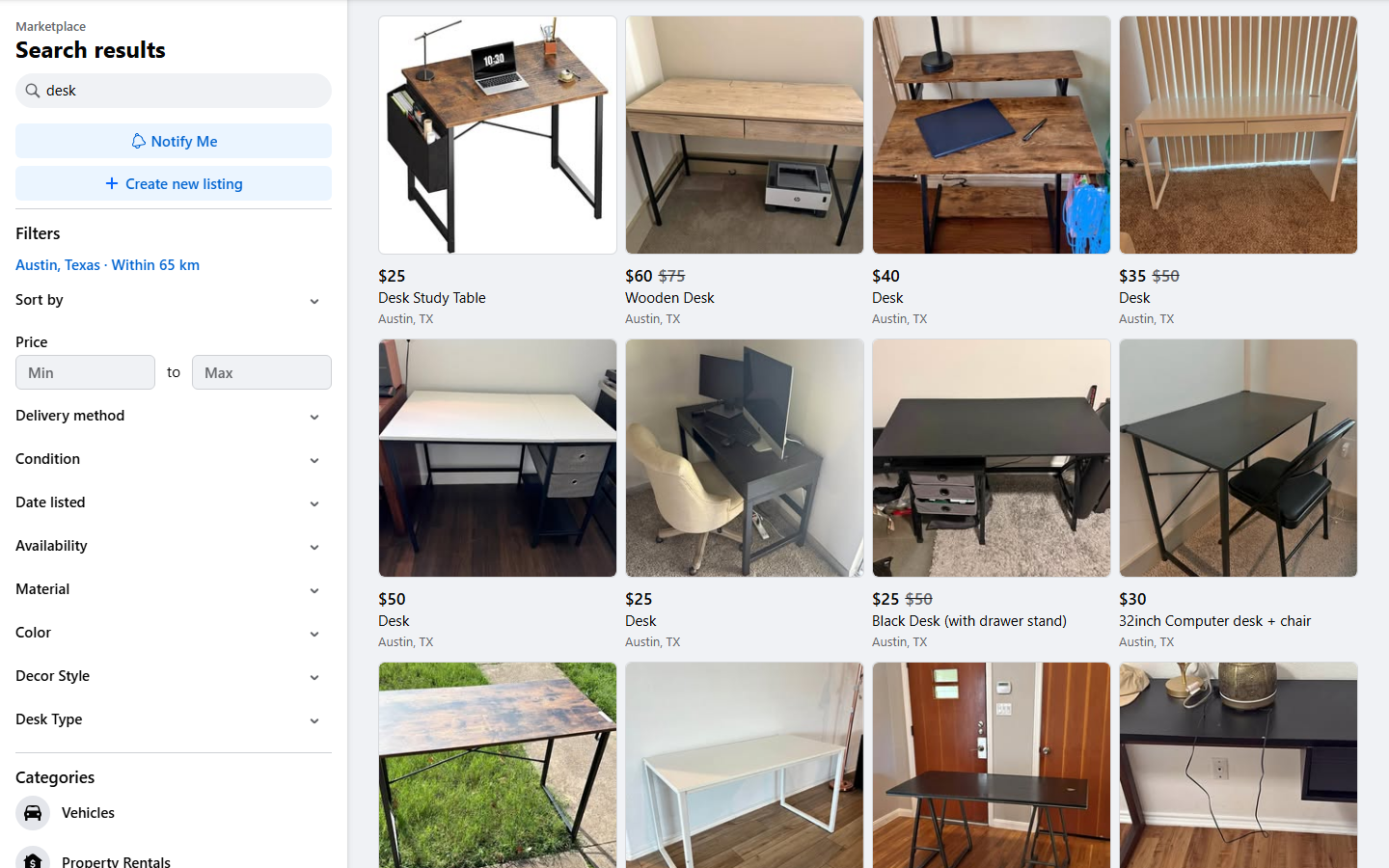
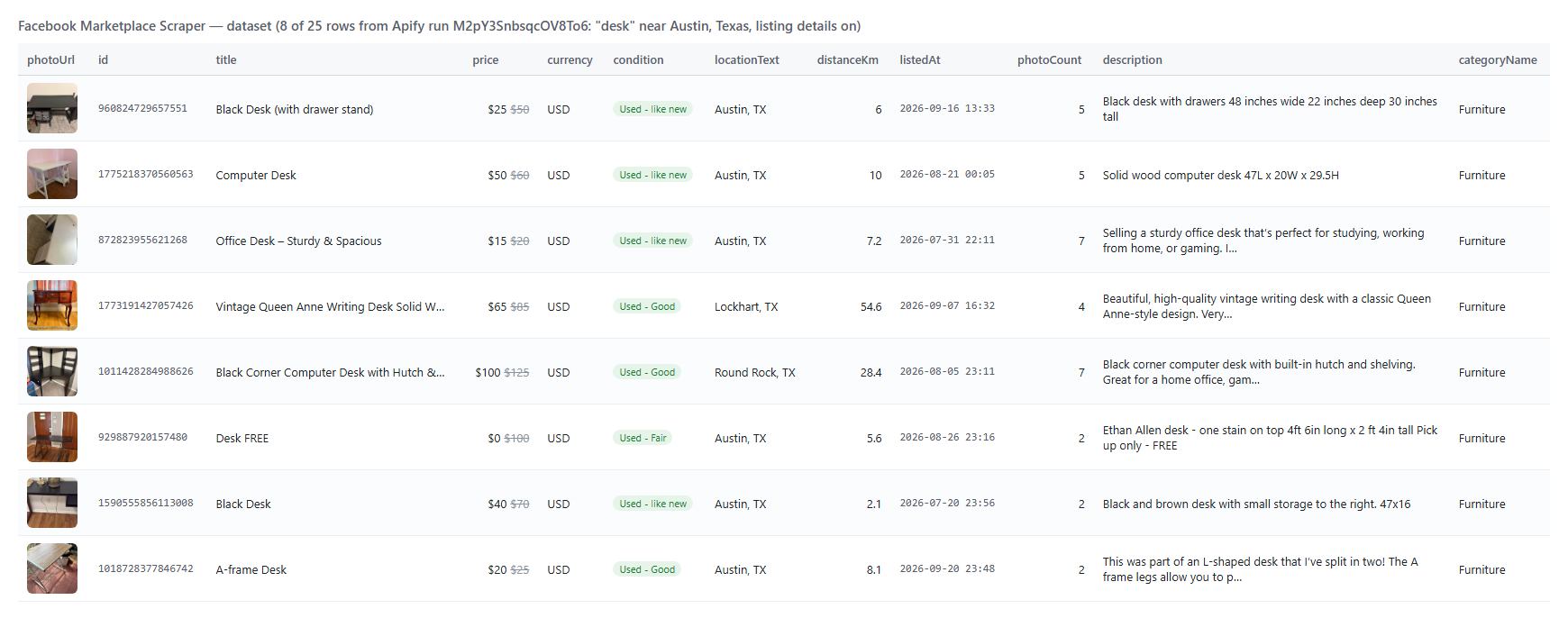 And one row as JSON (trimmed):
```json
{
"id": "960824729657551",
"listingUrl": "https://www.facebook.com/marketplace/item/960824729657551/",
"title": "Black Desk (with drawer stand)",
"price": 25,
"priceFormatted": "$25",
"currency": "USD",
"originalPrice": 50,
"discountPct": 50,
"city": "Austin",
"state": "TX",
"latitude": 30.270080566406,
"longitude": -97.684936523438,
"distanceKm": 6,
"categoryName": "Furniture",
"condition": "Used - like new",
"listedAt": "2026-09-16T13:33:48.000Z",
"photoCount": 5,
"description": "Black desk with drawers\n\n48 inches wide\n22 inches deep\n30 inches tall",
"isSold": false,
"deliveryTypes": ["IN_PERSON", "DOOR_PICKUP"],
"searchQuery": "desk",
"searchLocation": "Austin, Texas",
"detailsFetched": true
}
```
Rows also keep Facebook's own field names (`marketplace_listing_title`, `listing_price`, `primary_listing_photo`, `location`, `redacted_description`, `listing_photos`, `vehicle_*`), as other Marketplace scrapers do, so existing pipelines keep working.
#### Fields
| Field | Type | What it is | Fill on test run |
|---|---|---|---|
| `id`, `listingUrl`, `title` | string | Listing id, link, title | 100% |
| `price`, `priceFormatted`, `currency` | number, string | Price as a number, as shown, ISO currency | 100% |
| `originalPrice`, `discountPct` | number | Struck-through price and markdown % | 40% (only marked-down items) |
| `city`, `state`, `locationText` | string | Where the item is | 100% |
| `photoUrl` | string (URL) | Primary photo | 100% |
| `categoryName`, `categoryId` | string | Marketplace category | 100% |
| `listedAt`, `listedHoursAgo` | ISO date, number | When it was posted | 100% |
| `isSold`, `isPending`, `deliveryTypes` | boolean, array | Status and delivery options | 100% |
| `description` ➕ | string | Full description | 92% |
| `photoUrls`, `photoCount` ➕ | array, integer | Every photo | 100% |
| `condition`, `attributes` ➕ | string, array | Condition and listing attributes | 100% |
| `latitude`, `longitude`, `distanceKm` ➕ | number | Coordinates and distance from the search point | 100% |
| `vehicle` ➕ | object | year, make, model, mileage, transmission, exterior colour, seller type 100%; trim 92%; fuel 88%; MPG 68%; owners 56%; title status 40% | vehicles (25-car run) |
| `property` ➕ | object | Property type, beds, baths, street, walk/transit scores | rentals and home sales |
| `changeType`, `previousPrice`, `priceDelta` | string, number | Monitor mode: `NEW` or `PRICE_DROP` | monitor runs |
### How can I use Facebook Marketplace data?
- 💸 **Resellers and flippers:** an alert when an item is listed under your price, or a seller cuts the price.
- 🚗 **Car dealers and buyers:** private-party cars with year, make, model, mileage and asking price for trade-in pricing.
- 🏠 **Property managers and renters:** rentals and homes for sale with beds, baths, street and price.
- 📊 **Market researchers and brands:** second-hand prices, supply and discounting across cities.
- 🤖 **AI and data teams:** `compact` rows for an LLM or MCP agent ("a used road bike under $300 near Denver").
### How much does it cost to scrape Facebook Marketplace?
Facebook Marketplace Scraper is pay-per-result: **$0.40 per 1,000 listings**, no start fee. Listing details are **$0.80 per 1,000 listings** that receive them.
| Listings | Cost | With listing details |
|---:|---:|---:|
| 10 | $0.004 | $0.012 |
| 100 | $0.04 | $0.12 |
| 1,000 | $0.40 | $1.20 |
| 10,000 | $4.00 | $12.00 |
Measured on the platform: 24 listings in 5-13 seconds, 100 listings in 15 seconds, 25 listings with details in 22 seconds, all on 256 MB with a peak of 42-52 MB.
### Facebook Marketplace in your tools: integrations, API, scheduling & MCP
- **Schedules:** run it hourly or daily from the **Schedules** tab with `monitorMode` and `sortBy: newest` to receive only new listings and price drops.
- **Webhooks:** fire a URL when a run finishes and push the new listings to Slack, a CRM or a sheet.
- **No-code:** Make, Zapier, n8n, Google Sheets, Airtable, Slack via [Apify integrations](https://docs.apify.com/integrations).
- **API:** call it from Node.js or Python with `apify-client`; code is on the [API tab](https://apify.com/topapi/facebook-marketplace-scraper/api/python) and in the [Apify API reference](https://docs.apify.com/api/v2).
- **MCP / AI agents:** connect Claude, Cursor or any MCP client through the [MCP tab](https://apify.com/topapi/facebook-marketplace-scraper/api/mcp) and ask for Marketplace listings in plain language; set `compact: true` to keep rows small.
### More scrapers by TopApi
And one row as JSON (trimmed):
```json
{
"id": "960824729657551",
"listingUrl": "https://www.facebook.com/marketplace/item/960824729657551/",
"title": "Black Desk (with drawer stand)",
"price": 25,
"priceFormatted": "$25",
"currency": "USD",
"originalPrice": 50,
"discountPct": 50,
"city": "Austin",
"state": "TX",
"latitude": 30.270080566406,
"longitude": -97.684936523438,
"distanceKm": 6,
"categoryName": "Furniture",
"condition": "Used - like new",
"listedAt": "2026-09-16T13:33:48.000Z",
"photoCount": 5,
"description": "Black desk with drawers\n\n48 inches wide\n22 inches deep\n30 inches tall",
"isSold": false,
"deliveryTypes": ["IN_PERSON", "DOOR_PICKUP"],
"searchQuery": "desk",
"searchLocation": "Austin, Texas",
"detailsFetched": true
}
```
Rows also keep Facebook's own field names (`marketplace_listing_title`, `listing_price`, `primary_listing_photo`, `location`, `redacted_description`, `listing_photos`, `vehicle_*`), as other Marketplace scrapers do, so existing pipelines keep working.
#### Fields
| Field | Type | What it is | Fill on test run |
|---|---|---|---|
| `id`, `listingUrl`, `title` | string | Listing id, link, title | 100% |
| `price`, `priceFormatted`, `currency` | number, string | Price as a number, as shown, ISO currency | 100% |
| `originalPrice`, `discountPct` | number | Struck-through price and markdown % | 40% (only marked-down items) |
| `city`, `state`, `locationText` | string | Where the item is | 100% |
| `photoUrl` | string (URL) | Primary photo | 100% |
| `categoryName`, `categoryId` | string | Marketplace category | 100% |
| `listedAt`, `listedHoursAgo` | ISO date, number | When it was posted | 100% |
| `isSold`, `isPending`, `deliveryTypes` | boolean, array | Status and delivery options | 100% |
| `description` ➕ | string | Full description | 92% |
| `photoUrls`, `photoCount` ➕ | array, integer | Every photo | 100% |
| `condition`, `attributes` ➕ | string, array | Condition and listing attributes | 100% |
| `latitude`, `longitude`, `distanceKm` ➕ | number | Coordinates and distance from the search point | 100% |
| `vehicle` ➕ | object | year, make, model, mileage, transmission, exterior colour, seller type 100%; trim 92%; fuel 88%; MPG 68%; owners 56%; title status 40% | vehicles (25-car run) |
| `property` ➕ | object | Property type, beds, baths, street, walk/transit scores | rentals and home sales |
| `changeType`, `previousPrice`, `priceDelta` | string, number | Monitor mode: `NEW` or `PRICE_DROP` | monitor runs |
### How can I use Facebook Marketplace data?
- 💸 **Resellers and flippers:** an alert when an item is listed under your price, or a seller cuts the price.
- 🚗 **Car dealers and buyers:** private-party cars with year, make, model, mileage and asking price for trade-in pricing.
- 🏠 **Property managers and renters:** rentals and homes for sale with beds, baths, street and price.
- 📊 **Market researchers and brands:** second-hand prices, supply and discounting across cities.
- 🤖 **AI and data teams:** `compact` rows for an LLM or MCP agent ("a used road bike under $300 near Denver").
### How much does it cost to scrape Facebook Marketplace?
Facebook Marketplace Scraper is pay-per-result: **$0.40 per 1,000 listings**, no start fee. Listing details are **$0.80 per 1,000 listings** that receive them.
| Listings | Cost | With listing details |
|---:|---:|---:|
| 10 | $0.004 | $0.012 |
| 100 | $0.04 | $0.12 |
| 1,000 | $0.40 | $1.20 |
| 10,000 | $4.00 | $12.00 |
Measured on the platform: 24 listings in 5-13 seconds, 100 listings in 15 seconds, 25 listings with details in 22 seconds, all on 256 MB with a peak of 42-52 MB.
### Facebook Marketplace in your tools: integrations, API, scheduling & MCP
- **Schedules:** run it hourly or daily from the **Schedules** tab with `monitorMode` and `sortBy: newest` to receive only new listings and price drops.
- **Webhooks:** fire a URL when a run finishes and push the new listings to Slack, a CRM or a sheet.
- **No-code:** Make, Zapier, n8n, Google Sheets, Airtable, Slack via [Apify integrations](https://docs.apify.com/integrations).
- **API:** call it from Node.js or Python with `apify-client`; code is on the [API tab](https://apify.com/topapi/facebook-marketplace-scraper/api/python) and in the [Apify API reference](https://docs.apify.com/api/v2).
- **MCP / AI agents:** connect Claude, Cursor or any MCP client through the [MCP tab](https://apify.com/topapi/facebook-marketplace-scraper/api/mcp) and ask for Marketplace listings in plain language; set `compact: true` to keep rows small.
### More scrapers by TopApi