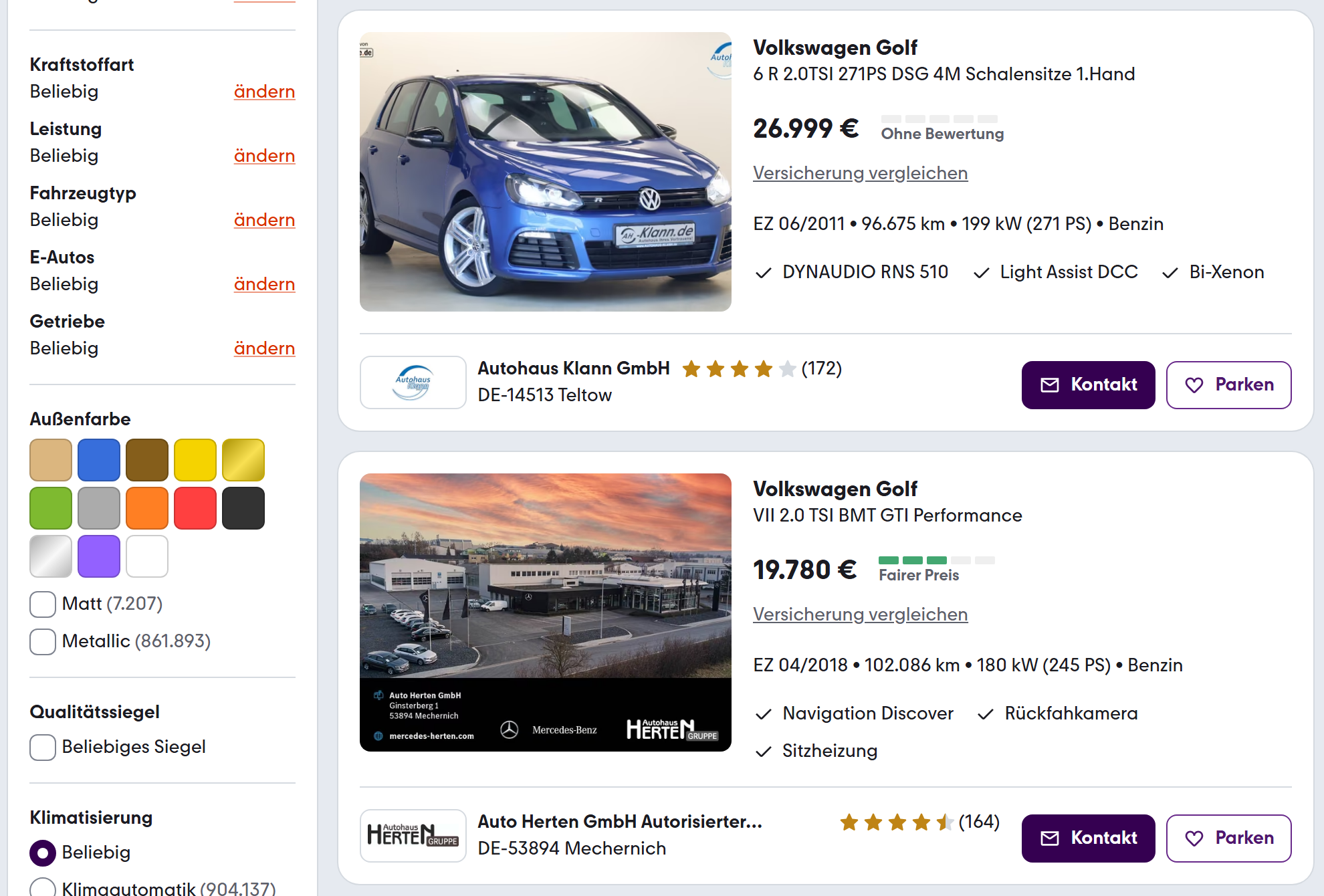
| 🔗 Listing URL and ID (`listingId`) |
🚗 Make, model, title and variant |
💶 Price, net price, VAT rate |
| 🏷️ Price rating (`priceRating`) and band thresholds |
🛣️ Mileage (`mileageKm`) |
📅 First registration (`firstRegistration`) |
| ⛽ Fuel type and gearbox |
⚡ Power in kW and hp |
🚙 Body type, doors, seats, colour |
| 👥 Previous owners, HU date |
🌱 Emission class, CO₂ and consumption |
🔢 KBA codes (`kbaHsn`, `kbaTsn`) |
| 🏢 Seller type and dealer name |
☎️ Phone numbers and WhatsApp |
⭐ Seller rating and review count |
| 📍 ZIP, city, country, seller GPS |
🖼️ Photo URLs and photo count |
🕒 Listed, modified and renewed dates |
| 💳 Financing offer (monthly rate, bank) |
📝 Description and equipment (details) |
🔁 Change type and previous price (monitor) |
On a 6,103-listing run (every VW Golf GTI on mobile.de) price, price rating, mileage, location and listing date were filled on 100% of rows, power on 99%, first registration on 93%, and every dealer row carried the dealer's name.
### How to scrape mobile.de listings with Mobile.de Listings Scraper
1. [Create a free Apify account](https://console.apify.com/sign-up) - $5 of monthly credit, no card needed.
2. Open [Mobile.de Listings Scraper](https://apify.com/topapi/mobile-de-listings-scraper) and click **Try for free**.
3. Type a **Make** and **Model** (the form comes prefilled with Volkswagen Golf), add filters, or paste mobile.de search URLs into **mobile.de URLs**.
4. Set **Max listings** and click **Start**. Listings stream into the dataset as they are read.
5. Open the **Storage** tab and **Export** as JSON, CSV or Excel, or save the input as a task and schedule it.
### ⬇️ Input
| Parameter | Type | Description |
|---|---|---|
| **🔍 What to scrape** | | |
| `startUrls` | List | mobile.de search URLs, listing URLs or dealer pages (`home.mobile.de/...`). When URLs are given, the make, model, keyword and Filters fields are not used. |
| `query` | Text | Free-text search, as in mobile.de's search box, e.g. `golf gti`. |
| `make` | Text | One make or several separated by commas: `Volkswagen`, `BMW, Audi`. Prefill: `Volkswagen`. |
| `model` | Text | Model or series of that make: `Golf`, `3er` or `3 Series`, `C-Klasse`, `X5`. Prefill: `Golf`. |
| `category` | Select | Cars, motorbikes, motorhomes, vans and trucks up to 7.5 t, trucks, buses, trailers, construction, agricultural and forklift. Default: Cars. |
| **🎯 Filters** (applied by mobile.de) | | |
| `priceMin`, `priceMax` | Integer | Gross price range in euros. |
| `yearMin`, `yearMax` | Integer | First-registration years. |
| `mileageMax` | Integer | Highest mileage in km. |
| `fuelTypes`, `transmission`, `bodyTypes` | Multi-select | Fuel, gearbox and car body types; empty = any. |
| `sellerType` | Select | Dealers only or private sellers only; empty = both. |
| `damageStatus` | Select | Hide damaged vehicles (mobile.de's default), show all, or only damaged. |
| `zipCode`, `radiusKm` | Text, Integer | German or Austrian postal code, a town, or `lat,lon`, and a radius in km (default 50). |
| `sort` | Select | Relevance, newest listings, price, mileage or first registration. Default: relevance. |
| `searchParams` | Text | Any other mobile.de URL parameters, e.g. `pw=110:&ecol=BLACK`. |
| **✂️ Refine results** | | |
| `priceRatings` | Multi-select | Keep only listings with these price ratings, e.g. Very good + Good. |
| `includeKeywords`, `excludeKeywords` | Text | Comma-separated words matched in the title and subtitle. |
| `postedWithinDays` | Integer | Only listings first published in the last N days. |
| **➕ Extra data** | | |
| `includeDetails` | Boolean | Adds the advert's details; charged as the `listing-details` add-on per listing that gets them. Default: `false`. |
| **🔁 Monitoring** | | |
| `monitorMode` | Boolean | Return only new and changed listings since the previous run of the same search. |
| `monitorStoreName` | Text | Named key-value store that remembers listings between runs. |
| `reportRemoved` | Boolean | Also return a `REMOVED` row for listings that left the search. |
| **📦 Output** | | |
| `maxResults` | Integer | Listings per run. Default `100`, prefill `50`, `0` = no limit. |
| `maxResultsPerSearch` | Integer | Cap per search URL. `0` = none. |
| `compact` | Boolean | Core fields only, sized for AI agents and MCP. |
| **⚙️ Advanced** | | |
| `proxyConfiguration` | Proxy | Default: direct connection first, Apify Proxy only for a refused request. |
| `maxConcurrency` | Integer | Pages read at the same time, 1-10. Default `4`. |
#### Input JSON
```json
{
"make": "BMW",
"model": "3er",
"priceMax": 25000,
"yearMin": 2018,
"fuelTypes": ["DIESEL"],
"sellerType": "DEALER",
"zipCode": "80331",
"radiusKm": 100,
"maxResults": 500
}
```
#### Paste a search URL when you need mobile.de's full filter set
Set every filter you want on mobile.de (equipment, colour, emissions sticker, VAT, number of owners and more), copy the address bar, and paste it into **mobile.de URLs**. The actor reads exactly that search. **Do:** `https://suchen.mobile.de/fahrzeuge/search.html?vc=Car&ms=3500;;;&p=:25000` · **Don't:** paste the homepage `https://www.mobile.de/` (it is not a search).
#### Write make and model the way mobile.de lists them
Makes are matched against mobile.de's own list, so `VW`, `Volkswagen` and `volkswagen` all work. Models are matched to a model or a series: `Golf` covers every Golf, `3er` or `3 Series` covers the whole BMW 3 Series, `320` is one model. A name mobile.de has no model for is searched as model text, e.g. `GTI`.
#### Go past 2,000 listings per search
mobile.de returns at most 2,000 results for one search, however many match. Set **Max listings** above 2,000 (or `0`) and the actor reads the search in price order: it takes a 2,000-listing window, restarts the search at the last price it saw, and repeats until the end. The run summary compares the unique listings read with mobile.de's own total.
### ⬆️ Output
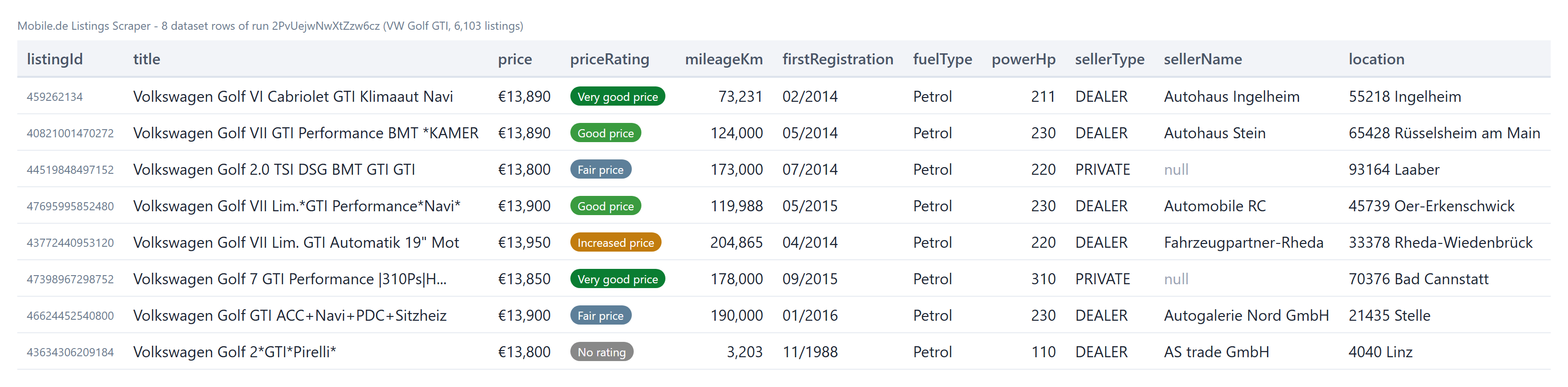
Every listing becomes one dataset item. Here is the table view of a run:
 One row from that run, shortened:
```json
{
"listingId": "458954990",
"url": "https://suchen.mobile.de/auto-inserat/volkswagen-golf-vii-gti-lim-xenon-mtl-klimatronik-pdc-holzgerlingen/458954990.html",
"title": "Volkswagen Golf VII GTI Lim XENON*MTL*KLIMATRONIK*PDC*",
"make": "Volkswagen",
"model": "Golf",
"price": 12980,
"netPrice": 10907.56,
"priceRating": "GOOD_PRICE",
"priceRatingThresholds": [9300, 12100, 13000, 14500, 15600, 17300],
"mileageKm": 145000,
"firstRegistration": "01/2016",
"fuelType": "Petrol",
"transmission": "Manual gearbox",
"powerHp": 220,
"previousOwners": 1,
"huStatus": "03/2027",
"sellerType": "DEALER",
"sellerName": "AUTOPARK YALCIN",
"sellerPhone": "+49 (0)7031 762236",
"sellerRating": 3.4,
"sellerLatitude": 48.6301161,
"location": "71088 Holzgerlingen",
"createdAt": "2026-06-23T12:11:16.000Z"
}
```
#### Fields
Fill rates come from a 6,103-listing run (all VW Golf GTI listings) and, for the details fields, from a 100-listing dealer run with `includeDetails` on (BMW 3 Series near Munich).
| Field | Type | What it is | Fill |
|---|---|---|---|
| `listingId`, `url`, `title` | string | mobile.de listing ID, listing page, title | 100% |
| `make`, `model`, `makeId`, `modelId` | string / number | Make and model, with mobile.de's IDs | 100% |
| `price`, `priceCurrency`, `priceType` | number / string | Gross price, currency, fixed or negotiable | 100% |
| `netPrice`, `vatRate`, `vatDeductible` | number / boolean | Net price and VAT, when the seller shows VAT | 41% |
| `priceRating`, `priceRatingLabel` | string | mobile.de's rating: `VERY_GOOD_PRICE` to `HIGH_PRICE`, or `NO_RATING` | 100% |
| `priceRatingThresholds`, `priceRatingOffset` | array / number | Price band limits mobile.de rates against, and the vehicle's position | 77% |
| `mileageKm` | number | Mileage in km | 100% |
| `firstRegistration`, `firstRegistrationDate` | string | `MM/YYYY` and `YYYY-MM` | 93% |
| `fuelType`, `transmission` | string | Fuel and gearbox | 99% |
| `powerKw`, `powerHp` | number | Engine power | 99% |
| `bodyType`, `color`, `doors`, `seats` | string / number | Body and interior basics | 78-100% |
| `previousOwners`, `huStatus`, `emissionClass` | number / string | Owners, next HU, Euro class | 67-78% |
| `kbaHsn`, `kbaTsn` | string | German KBA type codes | 52% |
| `sellerType`, `sellerId` | string | `DEALER`, `PRIVATE` or `COMMERCIAL_PRIVATE`, seller ID | 100% |
| `sellerName` | string | Dealer name (private sellers show none) | 65% |
| `sellerPhone`, `sellerPhones`, `sellerWhatsapp` | string / array | Phone numbers shown on the listing | 71% |
| `sellerRating`, `sellerReviewCount` | number | Dealer rating and number of reviews | 55% |
| `sellerLatitude`, `sellerLongitude` | number | Seller position | 99% |
| `location`, `zipCode`, `city`, `country` | string | Where the vehicle is | 100% |
| `imageUrls`, `numImagesAvailable` | array / number | Photo URLs (1024 px) and photo count | 99% |
| `financing` | object | Financing example: bank, monthly rate, term, down payment | 100% |
| `partnerName`, `partnerUrl` | string | Partner-site listings shown on mobile.de (e.g. Kleinanzeigen) | 26% |
| `createdAt`, `modifiedAt`, `renewedAt` | string (ISO) | When the listing was published, edited and renewed | 100% |
| `description`, `features` | string / array | Advert text and equipment list (details) | 100% |
| `isRoadworthy`, `trimLevel`, `accidentFree` | boolean / string | Condition and trim from the advert (details); `accidentFree` only when the seller states it | 100% / 90% / 40% |
| `sellerStreet`, `sellerZipCity`, `sellerOpeningHours` | string / array | Dealer address and opening hours (details) | 92-100% of dealers |
| `aiSummary`, `aiHighlights` | string / array | mobile.de's AI summary of the advert (details) | 84% |
| `changeType`, `previousPrice`, `priceChange`, `changedFields` | string / number / array | Monitor mode: `NEW`, `PRICE_DROP`, `PRICE_INCREASE`, `CHANGED`, `REMOVED` | monitor runs |
### How can I use mobile.de listing data?
- 🚗 **Car dealers and importers** - find stock to buy: good and very good price ratings within a radius, with the selling dealer's phone.
- 📉 **Used-car pricing and valuation** - build price curves by model, year and mileage from thousands of listings, with mobile.de's own rating bands.
- 🔔 **Buyers and traders** - schedule a search and get only new listings and price drops each morning.
- 🏢 **Lead generation for automotive services** - dealers with their stock levels, ratings, phone numbers and locations.
- 💳 **Leasing, finance and insurance teams** - track asking prices, financing offers and market supply by segment.
- 🤖 **AI and research teams** - feed compact rows to an agent or a model through the API or MCP.
### How much does it cost to scrape mobile.de listings?
Mobile.de Listings Scraper is pay-per-result: **$0.56 per 1,000 listings**, no start fee. You only pay for the listings written to your dataset. Full listing details are an add-on of **$0.10 per 1,000 listings** that get them.
| Listings | Without details | With details |
|---:|---:|---:|
| 100 | $0.056 | $0.066 |
| 1,000 | $0.56 | $0.66 |
| 10,000 | $5.60 | $6.60 |
| 100,000 | $56.00 | $66.00 |
Apify platform usage is included in this price. Measured on the platform at 256 MB: 50 listings in 6 seconds, 6,103 listings in 132 seconds.
### Integrations, API, scheduling & MCP
- **Schedules:** save your input as a task, open **Schedules** and run it daily or hourly. With **Only new and changed listings** on, each run returns just what changed:
```json
{
"startUrls": [{ "url": "https://suchen.mobile.de/fahrzeuge/search.html?vc=Car&ms=20100;;40;&p=:60000" }],
"monitorMode": true,
"sort": "newest",
"maxResults": 0
}
```
- **Webhooks:** call a URL when a run finishes and push the new rows to your CRM, Slack or a sheet.
- **No-code:** Make, Zapier, n8n, Google Sheets, Airtable and Slack through [Apify integrations](https://docs.apify.com/integrations).
- **API:** start runs and read datasets from Node.js or Python with `apify-client`; code is on the [API tab](https://apify.com/topapi/mobile-de-listings-scraper/api/python).
- **MCP / AI agents:** connect Claude, Cursor or any MCP client through the [MCP tab](https://apify.com/topapi/mobile-de-listings-scraper/api/mcp) and ask for mobile.de listings in plain language. Set `compact: true` to keep rows small.
### More scrapers by TopApi
One row from that run, shortened:
```json
{
"listingId": "458954990",
"url": "https://suchen.mobile.de/auto-inserat/volkswagen-golf-vii-gti-lim-xenon-mtl-klimatronik-pdc-holzgerlingen/458954990.html",
"title": "Volkswagen Golf VII GTI Lim XENON*MTL*KLIMATRONIK*PDC*",
"make": "Volkswagen",
"model": "Golf",
"price": 12980,
"netPrice": 10907.56,
"priceRating": "GOOD_PRICE",
"priceRatingThresholds": [9300, 12100, 13000, 14500, 15600, 17300],
"mileageKm": 145000,
"firstRegistration": "01/2016",
"fuelType": "Petrol",
"transmission": "Manual gearbox",
"powerHp": 220,
"previousOwners": 1,
"huStatus": "03/2027",
"sellerType": "DEALER",
"sellerName": "AUTOPARK YALCIN",
"sellerPhone": "+49 (0)7031 762236",
"sellerRating": 3.4,
"sellerLatitude": 48.6301161,
"location": "71088 Holzgerlingen",
"createdAt": "2026-06-23T12:11:16.000Z"
}
```
#### Fields
Fill rates come from a 6,103-listing run (all VW Golf GTI listings) and, for the details fields, from a 100-listing dealer run with `includeDetails` on (BMW 3 Series near Munich).
| Field | Type | What it is | Fill |
|---|---|---|---|
| `listingId`, `url`, `title` | string | mobile.de listing ID, listing page, title | 100% |
| `make`, `model`, `makeId`, `modelId` | string / number | Make and model, with mobile.de's IDs | 100% |
| `price`, `priceCurrency`, `priceType` | number / string | Gross price, currency, fixed or negotiable | 100% |
| `netPrice`, `vatRate`, `vatDeductible` | number / boolean | Net price and VAT, when the seller shows VAT | 41% |
| `priceRating`, `priceRatingLabel` | string | mobile.de's rating: `VERY_GOOD_PRICE` to `HIGH_PRICE`, or `NO_RATING` | 100% |
| `priceRatingThresholds`, `priceRatingOffset` | array / number | Price band limits mobile.de rates against, and the vehicle's position | 77% |
| `mileageKm` | number | Mileage in km | 100% |
| `firstRegistration`, `firstRegistrationDate` | string | `MM/YYYY` and `YYYY-MM` | 93% |
| `fuelType`, `transmission` | string | Fuel and gearbox | 99% |
| `powerKw`, `powerHp` | number | Engine power | 99% |
| `bodyType`, `color`, `doors`, `seats` | string / number | Body and interior basics | 78-100% |
| `previousOwners`, `huStatus`, `emissionClass` | number / string | Owners, next HU, Euro class | 67-78% |
| `kbaHsn`, `kbaTsn` | string | German KBA type codes | 52% |
| `sellerType`, `sellerId` | string | `DEALER`, `PRIVATE` or `COMMERCIAL_PRIVATE`, seller ID | 100% |
| `sellerName` | string | Dealer name (private sellers show none) | 65% |
| `sellerPhone`, `sellerPhones`, `sellerWhatsapp` | string / array | Phone numbers shown on the listing | 71% |
| `sellerRating`, `sellerReviewCount` | number | Dealer rating and number of reviews | 55% |
| `sellerLatitude`, `sellerLongitude` | number | Seller position | 99% |
| `location`, `zipCode`, `city`, `country` | string | Where the vehicle is | 100% |
| `imageUrls`, `numImagesAvailable` | array / number | Photo URLs (1024 px) and photo count | 99% |
| `financing` | object | Financing example: bank, monthly rate, term, down payment | 100% |
| `partnerName`, `partnerUrl` | string | Partner-site listings shown on mobile.de (e.g. Kleinanzeigen) | 26% |
| `createdAt`, `modifiedAt`, `renewedAt` | string (ISO) | When the listing was published, edited and renewed | 100% |
| `description`, `features` | string / array | Advert text and equipment list (details) | 100% |
| `isRoadworthy`, `trimLevel`, `accidentFree` | boolean / string | Condition and trim from the advert (details); `accidentFree` only when the seller states it | 100% / 90% / 40% |
| `sellerStreet`, `sellerZipCity`, `sellerOpeningHours` | string / array | Dealer address and opening hours (details) | 92-100% of dealers |
| `aiSummary`, `aiHighlights` | string / array | mobile.de's AI summary of the advert (details) | 84% |
| `changeType`, `previousPrice`, `priceChange`, `changedFields` | string / number / array | Monitor mode: `NEW`, `PRICE_DROP`, `PRICE_INCREASE`, `CHANGED`, `REMOVED` | monitor runs |
### How can I use mobile.de listing data?
- 🚗 **Car dealers and importers** - find stock to buy: good and very good price ratings within a radius, with the selling dealer's phone.
- 📉 **Used-car pricing and valuation** - build price curves by model, year and mileage from thousands of listings, with mobile.de's own rating bands.
- 🔔 **Buyers and traders** - schedule a search and get only new listings and price drops each morning.
- 🏢 **Lead generation for automotive services** - dealers with their stock levels, ratings, phone numbers and locations.
- 💳 **Leasing, finance and insurance teams** - track asking prices, financing offers and market supply by segment.
- 🤖 **AI and research teams** - feed compact rows to an agent or a model through the API or MCP.
### How much does it cost to scrape mobile.de listings?
Mobile.de Listings Scraper is pay-per-result: **$0.56 per 1,000 listings**, no start fee. You only pay for the listings written to your dataset. Full listing details are an add-on of **$0.10 per 1,000 listings** that get them.
| Listings | Without details | With details |
|---:|---:|---:|
| 100 | $0.056 | $0.066 |
| 1,000 | $0.56 | $0.66 |
| 10,000 | $5.60 | $6.60 |
| 100,000 | $56.00 | $66.00 |
Apify platform usage is included in this price. Measured on the platform at 256 MB: 50 listings in 6 seconds, 6,103 listings in 132 seconds.
### Integrations, API, scheduling & MCP
- **Schedules:** save your input as a task, open **Schedules** and run it daily or hourly. With **Only new and changed listings** on, each run returns just what changed:
```json
{
"startUrls": [{ "url": "https://suchen.mobile.de/fahrzeuge/search.html?vc=Car&ms=20100;;40;&p=:60000" }],
"monitorMode": true,
"sort": "newest",
"maxResults": 0
}
```
- **Webhooks:** call a URL when a run finishes and push the new rows to your CRM, Slack or a sheet.
- **No-code:** Make, Zapier, n8n, Google Sheets, Airtable and Slack through [Apify integrations](https://docs.apify.com/integrations).
- **API:** start runs and read datasets from Node.js or Python with `apify-client`; code is on the [API tab](https://apify.com/topapi/mobile-de-listings-scraper/api/python).
- **MCP / AI agents:** connect Claude, Cursor or any MCP client through the [MCP tab](https://apify.com/topapi/mobile-de-listings-scraper/api/mcp) and ask for mobile.de listings in plain language. Set `compact: true` to keep rows small.
### More scrapers by TopApi