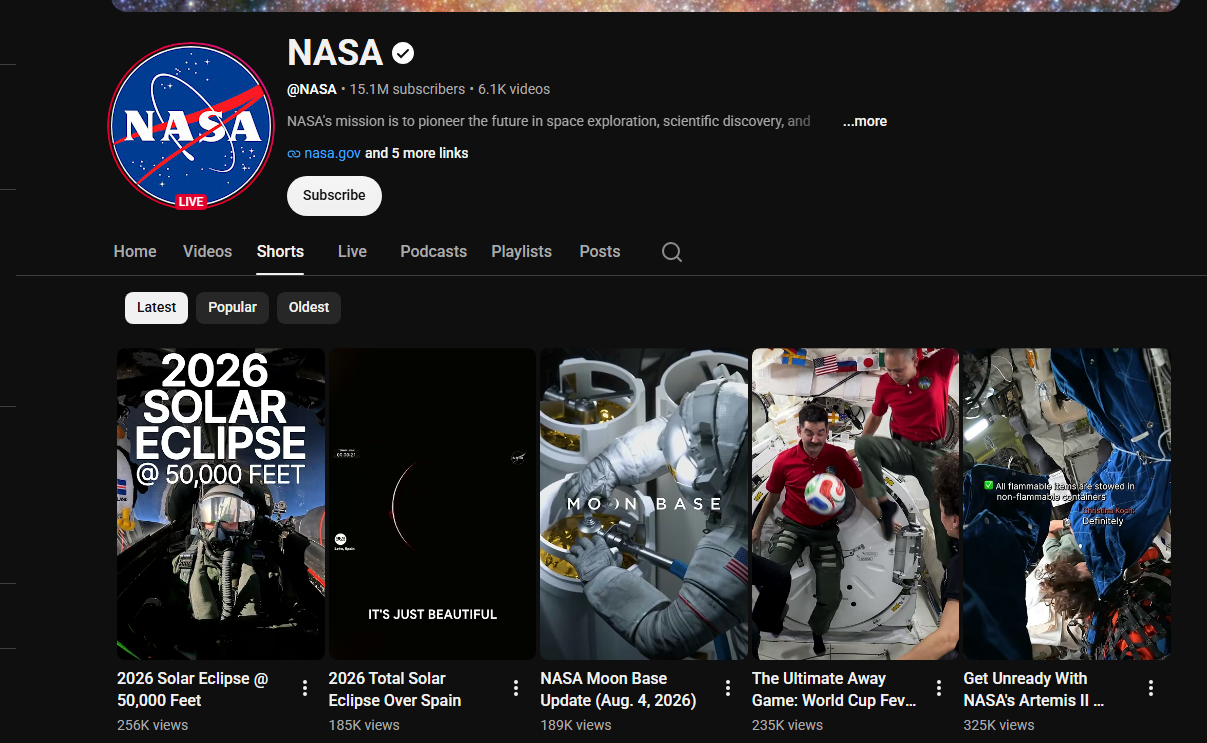
 - **Four ways in, one run:** channels (every Short on the tab, newest, most popular or oldest first), hashtag feeds, keyword searches with YouTube's Shorts filter, and pasted Short URLs or ids - mix them freely.
- **Exact numbers, not "1.2M":** views, likes and comments come from YouTube's own answer for each Short. Across 228 Shorts read on Apify, 95% had an exact like count (the rest are hidden by the creator) and 91% an exact comment count (the rest have comments turned off).
- **The real publish time:** date and time to the second on 228 of 228 Shorts, plus duration, category and creator tags.
- **Sound, products and AI labels:** the sound behind every Short (title, artist, source video, link to the sound page), products tagged in the Short, and YouTube's "How this was made" labels such as Made with AI and Auto-dubbed.
- **Transcript add-on:** the spoken text from YouTube's own caption track, in the Short's original language, with timestamps.
- **Monitor mode:** schedule the same input and get only new Shorts - or new Shorts plus count changes, with deltas.
- **No login, cookies or YouTube API key:** no quota, no OAuth, no proxy setup.
- **Pay only for delivered rows:** no start fee.
- **Export anywhere, works with AI agents:** JSON, CSV, Excel; schedules, webhooks, Make, Zapier, n8n; the Apify API and MCP.
### What data can you get from YouTube Shorts?
- **Four ways in, one run:** channels (every Short on the tab, newest, most popular or oldest first), hashtag feeds, keyword searches with YouTube's Shorts filter, and pasted Short URLs or ids - mix them freely.
- **Exact numbers, not "1.2M":** views, likes and comments come from YouTube's own answer for each Short. Across 228 Shorts read on Apify, 95% had an exact like count (the rest are hidden by the creator) and 91% an exact comment count (the rest have comments turned off).
- **The real publish time:** date and time to the second on 228 of 228 Shorts, plus duration, category and creator tags.
- **Sound, products and AI labels:** the sound behind every Short (title, artist, source video, link to the sound page), products tagged in the Short, and YouTube's "How this was made" labels such as Made with AI and Auto-dubbed.
- **Transcript add-on:** the spoken text from YouTube's own caption track, in the Short's original language, with timestamps.
- **Monitor mode:** schedule the same input and get only new Shorts - or new Shorts plus count changes, with deltas.
- **No login, cookies or YouTube API key:** no quota, no OAuth, no proxy setup.
- **Pay only for delivered rows:** no start fee.
- **Export anywhere, works with AI agents:** JSON, CSV, Excel; schedules, webhooks, Make, Zapier, n8n; the Apify API and MCP.
### What data can you get from YouTube Shorts?
| 🎬 Short id and URL (`id`, `url`) | 📝 Title and full description (`text`) | #️⃣ Hashtags (`hashtags`) |
| 👁️ Exact views (`viewCount`) | ❤️ Exact likes (`likes`) | 💬 Exact comment count (`commentsCount`) |
| 📈 Engagement rate and views per day | 📅 Publish date-time (`date`) | ⏱️ Duration (`duration`, `durationSeconds`) |
| 🎵 Sound: title, artist, source video (`sound`) | 🛍️ Tagged products (`taggedProducts`) | 🤖 AI / auto-dub labels (`contentLabels`) |
| 🏷️ Category and creator tags (`keywords`) | 🖼️ Thumbnails and first frame | 🔗 Links in the description |
| 👤 Channel name, handle, id | 👥 Subscribers (`numberOfSubscribers`) | ✅ Verified badge |
| 🌍 Channel country, join date | 📊 Lifetime channel views and videos | 🔗 Channel links and About text |
| 🗣️ Transcript with timestamps (add-on) | 🆕 Monitor fields: `isNew`, `statsDelta` | 🧭 Source, input and position |
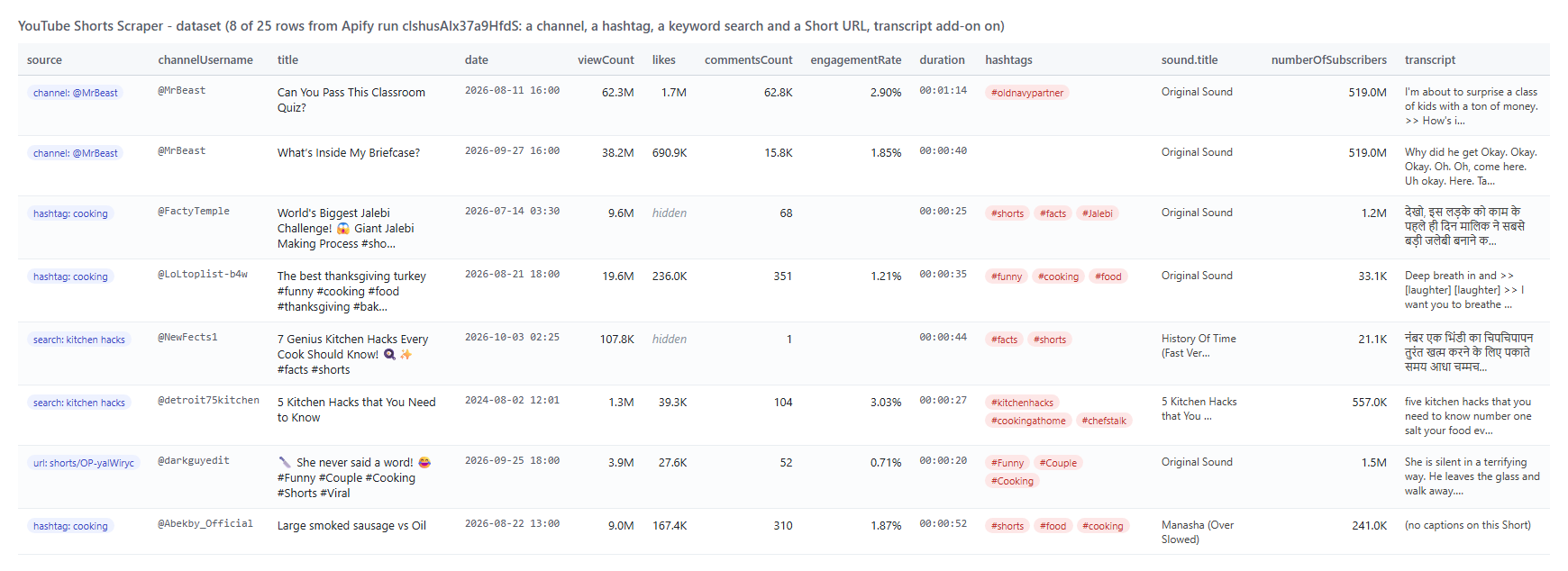 One row from that run, trimmed to the key fields:
```json
{
"id": "LiH-P4rSkLI",
"url": "https://www.youtube.com/shorts/LiH-P4rSkLI",
"title": "Can You Pass This Classroom Quiz?",
"viewCount": 62282923,
"likes": 1743395,
"commentsCount": 62763,
"engagementRate": 0.028999,
"date": "2026-08-11T16:00:06.000Z",
"datePrecision": "second",
"duration": "00:01:14",
"hashtags": ["#oldnavypartner"],
"sound": { "title": "Original Sound", "artist": "@MrBeast", "isOriginalSound": true },
"channelUsername": "MrBeast",
"numberOfSubscribers": 519000000,
"isChannelVerified": true,
"channelLocation": "United States",
"transcriptLanguage": "en",
"input": "@MrBeast",
"sourceType": "channel"
}
```
#### YouTube Shorts fields
Fill = share of the 25 rows of live run `clshusAIx37a9HfdS` with a value (empty lists count as empty).
| Field | Type | What it is | Fill |
|---|---|---|---|
| `id`, `url`, `title` | string | Short id, `/shorts/` URL, title | 100% |
| `text` | string | Full description (`""` when none was added) | 48% |
| `hashtags` | array | Hashtags from title and description | 60% |
| `descriptionLinks` | array | Links in the description `{text, url}` | 12% |
| `viewCount` | integer | Exact views | 100% |
| `likes` / `likesHidden` | integer / boolean | Exact likes; null + `likesHidden: true` when the creator hides them | 84% / 100% |
| `commentsCount` / `commentsTurnedOff` | integer / boolean | Exact comment count; null when comments are off | 96% / 100% |
| `engagementRate` | number | (likes + comments) / views; null when likes are hidden | 84% |
| `viewsPerDay`, `daysSincePublished` | number | Velocity since publishing | 100% |
| `date`, `datePrecision`, `publishedTimeText` | string | Publish date-time (UTC), `second`, "6 days ago" | 100% |
| `duration`, `durationSeconds` | string / integer | Length | 100% |
| `category`, `keywords` | string / array | YouTube category; creator tags | 100% / 12% |
| `sound` | object | Title, artist, artist channel, source video, sound page URL, original or licensed | 100% |
| `contentLabels` | array | "How this was made": Made with AI, Auto-dubbed | 12% |
| `taggedProducts` | array | Products tagged in the Short: title, merchant, URL | 8% |
| `thumbnailUrl`, `thumbnailFrameUrl`, `thumbnails` | string / array | Portrait thumbnail, first frame, every size | 100% / 96% / 100% |
| `isAgeRestricted`, `isFamilySafe`, `isUnlisted`, `isShortsEligible` | boolean | YouTube's flags | 100% |
| `channelName`, `channelUsername`, `channelId`, `channelUrl`, `channelAvatarUrl` | string | Creator identity | 100% |
| `numberOfSubscribers`, `isChannelVerified` | integer / boolean | Subscribers (3 significant digits, as YouTube shows them), badge | 100% |
| `channelTotalViews`, `channelTotalVideos`, `channelJoinedDate` | integer / string | Lifetime channel stats (exact) and join date | 100% |
| `channelLocation`, `channelDescription`, `channelDescriptionLinks`, `channelBannerUrl` | string / array | About panel and banner | 92% / 96% / 60% / 80% |
| `transcript`, `transcriptSegments`, `transcriptLanguage`, `transcriptIsAutoGenerated`, `audioLanguage`, `captionLanguages` | add-on | Spoken text, timed segments, original language | 76% |
| `isNew`, `previousStats`, `statsDelta`, `previousScrapedAt` | monitor | First delivery flag and count changes | monitor runs |
| `input`, `sourceType`, `fromYTUrl`, `order`, `scrapedAt` | provenance | Which input produced the row, and where | 100% |
#### YouTube Shorts error items
When a source returns nothing, an error item says why instead of a silent skip; it is easy to filter on the `error` field: `CHANNEL_DOES_NOT_EXIST`, `CHANNEL_HAS_NO_SHORTS`, `HASHTAG_HAS_NO_SHORTS`, `NO_RESULTS`, `VIDEO_UNAVAILABLE`, `VIDEO_PRIVATE`, `MEMBERS_ONLY`, `AGE_RESTRICTED`, `NOT_A_SHORT` (a regular video URL), `INVALID_INPUT`, and `*_BLOCKED` when YouTube refused every route.
### How can I use YouTube Shorts data?
- 📊 **Creator and channel analysts** - benchmark a channel's entire Shorts back catalogue by views, likes, comments, duration and posting time.
- 🎯 **Influencer marketers** - find creators through hashtag and keyword feeds, then shortlist by subscribers, verified badge, country and engagement rate.
- 🔎 **Trend researchers** - watch a hashtag or keyword daily and see which formats and sounds are rising, with views per day.
- 🛍️ **E-commerce and brand teams** - collect Shorts that tag products and see which merchants and items appear.
- 🎵 **Music and sound analysts** - track which licensed songs and original sounds Shorts use, with a link to each sound page.
- 🤖 **AI and content teams** - feed transcripts, titles and hashtags to an LLM for topic mining, scripts or classification.
- 📈 **Agencies** - schedule Monitor mode on client and competitor channels and get only new uploads or count changes.
### How much does it cost to scrape YouTube Shorts?
YouTube Shorts Scraper is pay-per-result: **$1.70 per 1,000 Shorts**, no start fee (the Pricing tab always shows the live rate). The transcript add-on is **$2.80 per 1,000 Shorts that receive one**.
| Shorts | Cost | With transcripts on every Short |
|---:|---:|---:|
| 10 | $0.017 | $0.045 |
| 100 | $0.17 | $0.45 |
| 1,000 | $1.70 | $4.50 |
| 10,000 | $17.00 | $45.00 |
There is nothing else to pay: Apify platform usage is included in these prices. Measured on Apify at the default 512 MB: the 10-Short prefill in 8 seconds; 50 Shorts from a channel and a hashtag in 29 seconds; 25 Shorts with transcripts in 44 seconds; an empty monitor poll in 1.9 seconds.
### Integrations, API, scheduling & MCP for YouTube Shorts
- **Schedules:** run YouTube Shorts Scraper hourly, daily or weekly from **Schedules**; with Monitor mode each run delivers only new Shorts.
- **Webhooks:** call your URL when a run finishes - push rows to a CRM, a sheet or Slack.
- **No-code:** Make, Zapier, n8n, Google Sheets, Airtable and Slack through [Apify integrations](https://docs.apify.com/integrations).
- **API:** start runs and read datasets with `apify-client` for [Python](https://apify.com/topapi/youtube-shorts-scraper/api/python) or [JavaScript](https://apify.com/topapi/youtube-shorts-scraper/api/javascript); see the [Apify API reference](https://docs.apify.com/api/v2).
- **MCP / AI agents:** connect Claude, Cursor or any MCP client through the [MCP tab](https://apify.com/topapi/youtube-shorts-scraper/api/mcp) and ask for YouTube Shorts in plain language; `compact` keeps answers small.
### More social video scrapers from TopApi
One row from that run, trimmed to the key fields:
```json
{
"id": "LiH-P4rSkLI",
"url": "https://www.youtube.com/shorts/LiH-P4rSkLI",
"title": "Can You Pass This Classroom Quiz?",
"viewCount": 62282923,
"likes": 1743395,
"commentsCount": 62763,
"engagementRate": 0.028999,
"date": "2026-08-11T16:00:06.000Z",
"datePrecision": "second",
"duration": "00:01:14",
"hashtags": ["#oldnavypartner"],
"sound": { "title": "Original Sound", "artist": "@MrBeast", "isOriginalSound": true },
"channelUsername": "MrBeast",
"numberOfSubscribers": 519000000,
"isChannelVerified": true,
"channelLocation": "United States",
"transcriptLanguage": "en",
"input": "@MrBeast",
"sourceType": "channel"
}
```
#### YouTube Shorts fields
Fill = share of the 25 rows of live run `clshusAIx37a9HfdS` with a value (empty lists count as empty).
| Field | Type | What it is | Fill |
|---|---|---|---|
| `id`, `url`, `title` | string | Short id, `/shorts/` URL, title | 100% |
| `text` | string | Full description (`""` when none was added) | 48% |
| `hashtags` | array | Hashtags from title and description | 60% |
| `descriptionLinks` | array | Links in the description `{text, url}` | 12% |
| `viewCount` | integer | Exact views | 100% |
| `likes` / `likesHidden` | integer / boolean | Exact likes; null + `likesHidden: true` when the creator hides them | 84% / 100% |
| `commentsCount` / `commentsTurnedOff` | integer / boolean | Exact comment count; null when comments are off | 96% / 100% |
| `engagementRate` | number | (likes + comments) / views; null when likes are hidden | 84% |
| `viewsPerDay`, `daysSincePublished` | number | Velocity since publishing | 100% |
| `date`, `datePrecision`, `publishedTimeText` | string | Publish date-time (UTC), `second`, "6 days ago" | 100% |
| `duration`, `durationSeconds` | string / integer | Length | 100% |
| `category`, `keywords` | string / array | YouTube category; creator tags | 100% / 12% |
| `sound` | object | Title, artist, artist channel, source video, sound page URL, original or licensed | 100% |
| `contentLabels` | array | "How this was made": Made with AI, Auto-dubbed | 12% |
| `taggedProducts` | array | Products tagged in the Short: title, merchant, URL | 8% |
| `thumbnailUrl`, `thumbnailFrameUrl`, `thumbnails` | string / array | Portrait thumbnail, first frame, every size | 100% / 96% / 100% |
| `isAgeRestricted`, `isFamilySafe`, `isUnlisted`, `isShortsEligible` | boolean | YouTube's flags | 100% |
| `channelName`, `channelUsername`, `channelId`, `channelUrl`, `channelAvatarUrl` | string | Creator identity | 100% |
| `numberOfSubscribers`, `isChannelVerified` | integer / boolean | Subscribers (3 significant digits, as YouTube shows them), badge | 100% |
| `channelTotalViews`, `channelTotalVideos`, `channelJoinedDate` | integer / string | Lifetime channel stats (exact) and join date | 100% |
| `channelLocation`, `channelDescription`, `channelDescriptionLinks`, `channelBannerUrl` | string / array | About panel and banner | 92% / 96% / 60% / 80% |
| `transcript`, `transcriptSegments`, `transcriptLanguage`, `transcriptIsAutoGenerated`, `audioLanguage`, `captionLanguages` | add-on | Spoken text, timed segments, original language | 76% |
| `isNew`, `previousStats`, `statsDelta`, `previousScrapedAt` | monitor | First delivery flag and count changes | monitor runs |
| `input`, `sourceType`, `fromYTUrl`, `order`, `scrapedAt` | provenance | Which input produced the row, and where | 100% |
#### YouTube Shorts error items
When a source returns nothing, an error item says why instead of a silent skip; it is easy to filter on the `error` field: `CHANNEL_DOES_NOT_EXIST`, `CHANNEL_HAS_NO_SHORTS`, `HASHTAG_HAS_NO_SHORTS`, `NO_RESULTS`, `VIDEO_UNAVAILABLE`, `VIDEO_PRIVATE`, `MEMBERS_ONLY`, `AGE_RESTRICTED`, `NOT_A_SHORT` (a regular video URL), `INVALID_INPUT`, and `*_BLOCKED` when YouTube refused every route.
### How can I use YouTube Shorts data?
- 📊 **Creator and channel analysts** - benchmark a channel's entire Shorts back catalogue by views, likes, comments, duration and posting time.
- 🎯 **Influencer marketers** - find creators through hashtag and keyword feeds, then shortlist by subscribers, verified badge, country and engagement rate.
- 🔎 **Trend researchers** - watch a hashtag or keyword daily and see which formats and sounds are rising, with views per day.
- 🛍️ **E-commerce and brand teams** - collect Shorts that tag products and see which merchants and items appear.
- 🎵 **Music and sound analysts** - track which licensed songs and original sounds Shorts use, with a link to each sound page.
- 🤖 **AI and content teams** - feed transcripts, titles and hashtags to an LLM for topic mining, scripts or classification.
- 📈 **Agencies** - schedule Monitor mode on client and competitor channels and get only new uploads or count changes.
### How much does it cost to scrape YouTube Shorts?
YouTube Shorts Scraper is pay-per-result: **$1.70 per 1,000 Shorts**, no start fee (the Pricing tab always shows the live rate). The transcript add-on is **$2.80 per 1,000 Shorts that receive one**.
| Shorts | Cost | With transcripts on every Short |
|---:|---:|---:|
| 10 | $0.017 | $0.045 |
| 100 | $0.17 | $0.45 |
| 1,000 | $1.70 | $4.50 |
| 10,000 | $17.00 | $45.00 |
There is nothing else to pay: Apify platform usage is included in these prices. Measured on Apify at the default 512 MB: the 10-Short prefill in 8 seconds; 50 Shorts from a channel and a hashtag in 29 seconds; 25 Shorts with transcripts in 44 seconds; an empty monitor poll in 1.9 seconds.
### Integrations, API, scheduling & MCP for YouTube Shorts
- **Schedules:** run YouTube Shorts Scraper hourly, daily or weekly from **Schedules**; with Monitor mode each run delivers only new Shorts.
- **Webhooks:** call your URL when a run finishes - push rows to a CRM, a sheet or Slack.
- **No-code:** Make, Zapier, n8n, Google Sheets, Airtable and Slack through [Apify integrations](https://docs.apify.com/integrations).
- **API:** start runs and read datasets with `apify-client` for [Python](https://apify.com/topapi/youtube-shorts-scraper/api/python) or [JavaScript](https://apify.com/topapi/youtube-shorts-scraper/api/javascript); see the [Apify API reference](https://docs.apify.com/api/v2).
- **MCP / AI agents:** connect Claude, Cursor or any MCP client through the [MCP tab](https://apify.com/topapi/youtube-shorts-scraper/api/mcp) and ask for YouTube Shorts in plain language; `compact` keeps answers small.
### More social video scrapers from TopApi
| 🎵 TikTok Scraper - profiles, hashtags, feeds | 🎬 TikTok Video Scraper - one video by URL | 📸 Instagram Scraper |
| 🐦 X Profile Scraper | 📰 Facebook Search Posts Scraper | 🛒 Facebook Marketplace Scraper |
| 💼 Indeed Jobs Scraper | 📈 Similarweb Scraper | ⭐ Google Maps Reviews Scraper |
| 🧭 All TopApi actors | ||