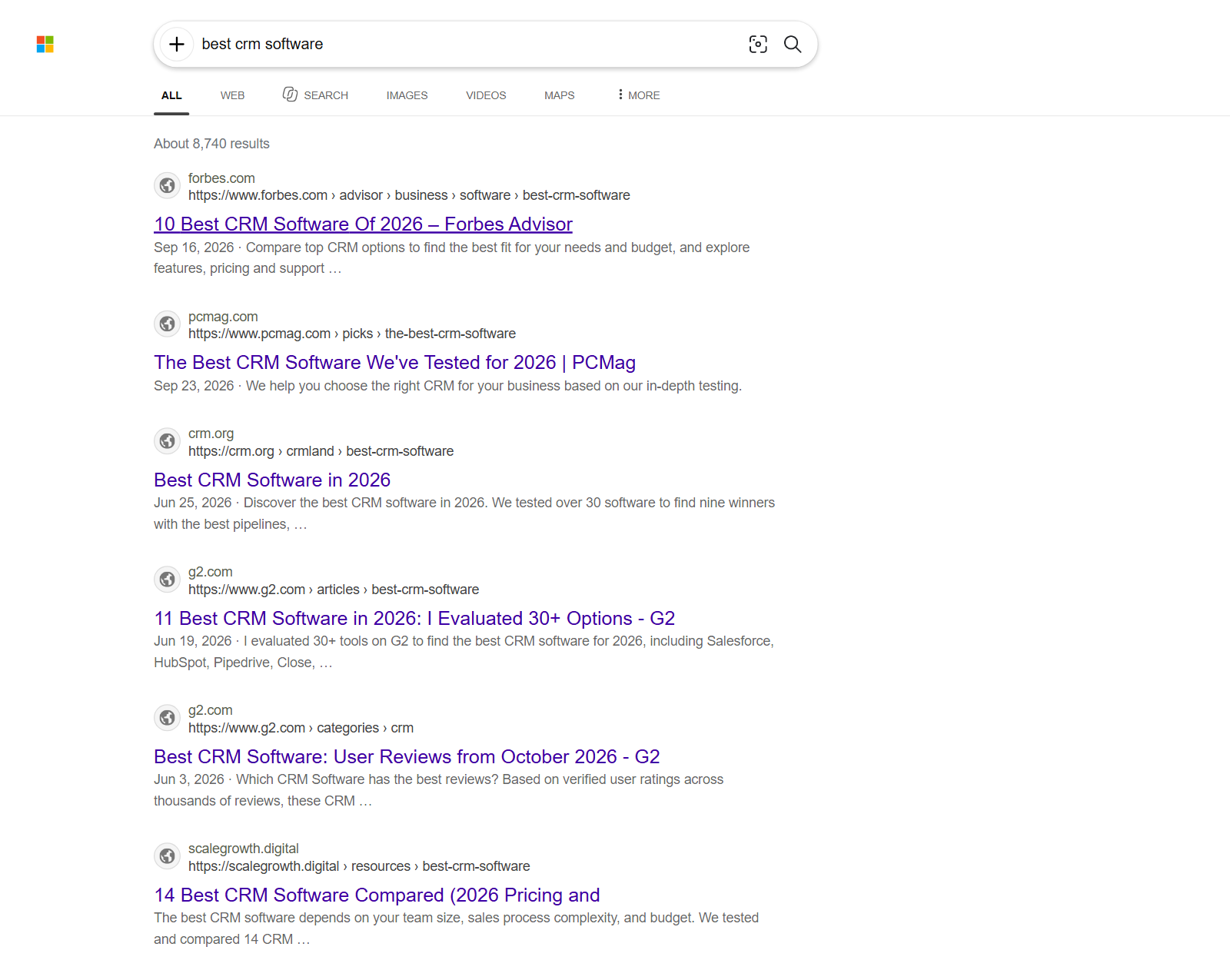
🔢 Position on Bing (position) |
📝 Title |
🔗 URL and displayed URL |
| 🌐 Domain |
💬 Snippet (description) |
📅 Date Bing shows |
| 🏷️ Site name and icon |
🧭 Sitelinks (siteLinks) |
⭐ Rich facts (richSnippet) |
| 📣 Ads: advertiser, landing URL, top / bottom / side |
❓ People Also Ask: question, answer, source |
🔍 Related searches |
| 📍 Local pack: name, category, address, phone, website |
📰 News: source, publish time, image |
🖼️ Images: full-size URL, size, page |
| 🎬 Videos: duration, channel, views |
📊 Bing's result count (resultsTotal) |
🎯 Tracked-domain flag and positions |
On our 100-result test runs (10 searches, 10 results each) title, URL, displayed URL, domain, snippet and site name were filled on 100% of organic rows, the site icon on 90-100%, a date on 37-50% (Bing prints one only on some results) and Bing's result count on 84-100%.
### How to scrape Bing with Bing Search Scraper
1. [Create a free Apify account](https://console.apify.com/sign-up) - $5 of monthly credit, no card needed.
2. Open [Bing Search Scraper](https://apify.com/topapi/bing-search-scraper) and click **Try for free**.
3. Type your search terms (one per line) into **Search terms or URLs**, pick a **Market**, and set **Results per search**.
4. Click **Start**. Results stream into the dataset as each search finishes.
5. Open the **Storage** tab and **Export** as JSON, CSV or Excel - or put the run on a schedule.
### ⬇️ Input
| Parameter | Type | Description |
|---|---|---|
| **🔍 What to scrape** | | |
| `queries` | List | **Required.** Search terms (`best crm software`, `plumber austin tx`) or Bing / DuckDuckGo results URLs (`https://www.bing.com/search?q=crm&mkt=en-GB`). A Bing URL (web, news, images or videos) keeps its own market, page and filters. A DuckDuckGo URL keeps its region (`kl`), time (`df`) and SafeSearch (`kp`) and starts at page 1 (web results); its rows carry that region in `region` and its market in `marketCode` (`kl=uk-en` → `en-GB`). |
| `engine` | Select | `bing` (default), `duckduckgo`, or `both` |
| `verticals` | Multi-select | Bing tabs: `web` (default), `news`, `images`, `videos` |
| `outputMode` | Select | `results` (one row per result, default) or `pages` (one row per results page) |
| **🎯 Filters** (applied by Bing) | | |
| `marketCode` | Select | Bing market, e.g. `en-US` (default), `en-GB`, `de-DE`, `ja-JP`. A two-letter country code also works (`"gb"`; through the API also as `country: "gb"`). Norway is `nb-NO`: Bing ignores `no-NO`, so the actor sends `nb-NO` for it |
| `languageCode` | Select | Interface language (`setlang`). Default: the market's language |
| `safeSearch` | Select | `moderate` (default), `strict`, `off`. Applies to Bing web, images and videos and to DuckDuckGo; Bing News results are not affected by it |
| `timeRange` | Select | Any time (default), past 24 hours, week, month, year. Past year does not apply to news: Bing News has no such filter |
| `dateFrom` / `dateTo` | Date | Custom date range for Bing web and DuckDuckGo results (news, images and videos are not date-filtered). Overrides Time range |
| **✂️ Refine results** | | |
| `excludeDomains` | List | Drop results from these sites (subdomains included) |
| `requireQueryMatch` | Boolean | Keep only organic web and news results that mention a word of the search term (ads, images and videos are not filtered). Default: `false` |
| **➕ Extra data** | | |
| `includeAds` | Boolean | Add sponsored results as `ad` rows (not in monitor mode). Default: `false` |
| `includeSerpFeatures` | Boolean | Add People Also Ask (with answers), related searches and local businesses as free rows (not in monitor mode). Default: `false` |
| **🔁 Monitoring** | | |
| `trackDomains` | List | Your domains and competitors. Rows get `isTracked`; the run summary and page rows get each domain's best position |
| `monitorMode` | Boolean | Return only results that are new for the search or moved since the last run; ad, People Also Ask, related and local rows are not returned in this mode. Only delivered results are remembered: one that Exclude domains or Only results that mention the query removed comes as new once a run delivers it. Pair with a daily schedule |
| `monitorStoreName` | Text | Store that remembers positions. Default: `bing-search-monitor` |
| `monitorMinPositionChange` | Integer | A result counts as moved when its position changed by at least this many places. Default: `3` |
| **📦 Output** | | |
| `maxResultsPerQuery` | Integer | Results per search term. Empty = 10 (with page rows, or with Max pages set: Max pages, default 1 page); `0` = as many as Max pages allows |
| `maxPagesPerQuery` | Integer | Upper bound on results pages per term (1-50). Set alone, it means "this many pages" |
| `maxItems` | Integer | Stop after this many billed rows in the whole run (rows charged before a platform restart of the run count too). Empty = no cap |
| `maxRunSeconds` | Integer | Stop starting new searches and new pages after this many seconds from the run's start; a page that arrives after that is dropped and not charged. Rows already delivered are kept. Empty = no limit |
| `compact` | Boolean | Fewer fields, sized for AI agents and MCP. Result rows keep `type`, `query`, `engine`, `page`, `position`, `title`, `url`, `domain`, `description`, `date`, `isTracked` and `scrapedAt` (plus a news row's `publishedAt` and `imageUrl`, an image's `imageUrl`, a video's `duration`, a People Also Ask row's `question` and `answer`, a local row's `category`, `address`, `phone` and `website`, and in monitor mode `monitorStatus` and `previousPosition`). Page rows keep `searchQuery`, `resultsTotal`, `trackedPositions` and their arrays, each result trimmed the same way |
| `saveHtml` / `saveHtmlSnapshotUrls` | Boolean | Keep the raw results-page HTML. `saveHtml` with one row per results page puts it in the row (`html`); `saveHtmlSnapshotUrls` (or `saveHtml` with one row per result) saves each page in the run's key-value store and gives rows its link (`htmlSnapshotUrl`) |
| **⚙️ Advanced** | | |
| `proxyConfiguration` | Proxy | Default: Apify Proxy in auto mode. Each search's first visit goes out direct from the run's own IP; so does the first try of every news, image and video page, and Bing web's first two fresh visitors for deeper pages. DuckDuckGo's later pages reuse the visitor that got page 1. Every other fresh visitor gets an Apify Proxy datacenter IP, and if direct visits keep getting off-topic answers the run switches to the proxy only. A proxy group or your own proxy URLs = proxy only |
| `maxConcurrency` | Integer | Search terms in parallel. Default: `8`, capped at memory / 32 MB (8 at the default 256 MB) |
| `maxSessionsPerQuery` | Integer | Bing web: fresh visitor sessions (IP + cookies) a term may use when Bing answers off-topic or empty, or will not page: this many, plus 2 for every further page the search may read, at most 3× this number (Results per search 10 = up to 3 pages = up to 9 sessions). Default: `5`. News, images and videos try up to 3 visitors per page; DuckDuckGo up to 3 for page 1 and 1 more for each later page |
#### Input JSON
```json
{
"queries": ["best crm software", "plumber austin tx"],
"marketCode": "en-US",
"maxResultsPerQuery": 30,
"includeAds": true,
"trackDomains": ["hubspot.com", "salesforce.com"]
}
```
#### Pick the row shape before anything else
**One row per result** is a flat table: easy to sort by `position`, filter by `domain` or load into a spreadsheet. **One row per results page** keeps Bing's page together - organic results, ads, People Also Ask and related searches of one page in one row - the shape the most-used Bing actors return.
#### Ask for results, not pages
Bing shows 2-14 organic results per page: when it renders ads, answers and videos the first page may carry only 2-6. `maxResultsPerQuery: 30` asks Bing for further pages until 30 organic results are in, as long as Bing pages for the run's visitors (see **How deep** below); `maxPagesPerQuery` alone reads up to that many pages, however many results they hold.
#### Put the market in the input, or in the URL
`marketCode: "de-DE"` gives German results on German sites (in our runs: check24.de, verivox.de, finanztip.de for `autoversicherung vergleich`). A pasted URL such as `https://www.bing.com/search?q=car+insurance+quotes&mkt=en-GB` keeps its own market, so one run can cover several countries.
A URL of a later page (`first=21` in the address) starts at that page. Bing shows a new visitor page 1 whatever `first=` says, so the actor reaches the page through Bing's own Next links; the pages before it are read but not returned or charged, and `position` still counts from Bing's top result. When Bing will not page that far for the actor's visitors at the time, that search returns no rows and costs nothing (`RUN_SUMMARY` gives the reason, e.g. `bingStoppedPaging`).
### ⬆️ Output
Every result becomes one dataset item. Here is the table view of a real run (10 searches, 10 results each):
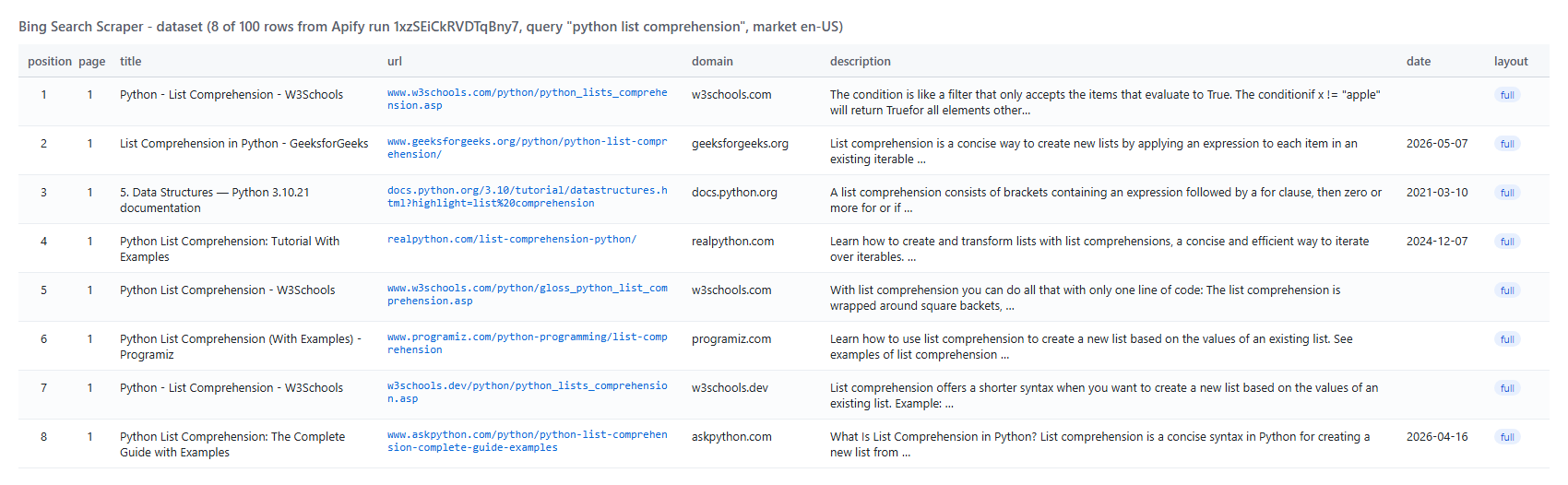 One organic row as JSON:
```json
{
"type": "organic",
"query": "best crm software",
"engine": "bing",
"marketCode": "en-US",
"page": 1,
"position": 1,
"title": "10 Best CRM Software Of 2026 – Forbes Advisor",
"url": "https://www.forbes.com/advisor/business/software/best-crm-software/",
"displayedUrl": "https://www.forbes.com › advisor › business › software › best-crm-software",
"domain": "forbes.com",
"description": "Forbes Advisor reviewed dozen of CRM software options on the market to help you find the best possible solution for your business.",
"sourceName": "Forbes",
"isTracked": false,
"layout": "full",
"resultsTotal": 8730
}
```
A People Also Ask row (`includeSerpFeatures`):
```json
{
"type": "paa",
"query": "how does a crm work",
"question": "What is CRM & how does it work?",
"answer": "CRM stands for customer relationship management. It’s an AI-powered technology that helps companies stay connected to customers, …",
"title": "What Is CRM (Customer Relationship Management)? | Salesforce",
"url": "https://www.salesforce.com/crm/what-is-crm/"
}
```
#### Fields
| Field | Type | What it is | Fill on organic rows (test runs) |
|---|---|---|---|
| `type` | string | `organic`, `ad`, `news`, `image`, `video`, `paa`, `related`, `local` | 100% (every row) |
| `position` | integer | Rank among the search's organic results across pages (ads: order on the page) | 100% |
| `page` | integer | Bing results page the row came from | 100% |
| `title`, `url`, `domain` | string | Result title, URL (Bing's click link decoded), host | 100% |
| `displayedUrl` | string | The URL line Bing prints under the title | 100% |
| `description` | string | Snippet | 100% |
| `date` | string | Date Bing shows on the result (ISO) | 37-50% |
| `emphasizedKeywords` | array | Words Bing printed in bold | 58-100% |
| `sourceName`, `iconUrl` | string | Site name and icon above the result | 100%, 90-100% |
| `siteLinks` | array | Deep links under the result | 0-3% |
| `richSnippet` | object | Fact row, e.g. `{"Reviews": "5.1K"}` | 4-10% |
| `resultsTotal` | integer | Bing's "About 9,110 results" count | 84-100% |
| `layout` | string | Bing web rows: `full` (ads / answers / related rendered) or `light` (results only); DuckDuckGo rows: `ddg` | 100% (also ad rows) |
| `region` | string | DuckDuckGo rows: the region (`kl`) searched, e.g. `us-en` | 100% of DuckDuckGo rows |
| `isTracked` | boolean | Domain is in Track domains | 100% (also ad, news, image and video rows) |
| `adPosition`, `advertiser` | string | Ads: top / bottom / side, advertiser | 100% of ad rows |
| `question`, `answer` | string | People Also Ask | 100% of PAA rows |
| `publishedAt`, `imageUrl` | string | News: publish time, article image | 100%, 60% |
| `imageUrl`, `thumbnailUrl`, `width`, `height` | string / integer | Images | 100% of image rows |
| `duration`, `channel`, `viewCount`, `published` | string / integer | Videos | 99-100% of video rows |
| `monitorStatus`, `previousPosition` | string / integer | Monitor mode: `new` / `moved` and the position the result had when it was last delivered (that can be several runs ago) | monitor runs |
Other row types carry the fields that fit them: news, image and video rows have no `displayedUrl` and no `layout`; People Also Ask, related-search and local rows have no `layout` and no `isTracked`; related-search rows have no `domain`; local rows have no `url` or `domain` (their link is `website`).
Page rows (`outputMode: "pages"`) carry `searchQuery`, `resultsTotal`, `layout`, `organicResults`, `paidResults`, `peopleAlsoAsk`, `relatedQueries`, `localResults`, `newsResults`, `imageResults`, `videoResults`, `trackedPositions` and `pagination`.
### How can I use Bing search data?
- 🔎 **SEO teams** - track where your pages rank on Bing for your keywords, per market, and get only the moves on a daily schedule
- 🥊 **Competitive research** - see which competitors hold the top 10 and which advertisers bid on your terms (`includeAds`)
- 💬 **Content teams** - collect People Also Ask questions and related searches to plan articles that answer them
- 🤖 **AI and RAG builders** - feed fresh Bing results (titles, URLs, snippets, news) to an agent or a retrieval pipeline; `compact` keeps rows small
- 📰 **PR and brand monitoring** - pull Bing News articles about a brand with source and publish time
- 🧭 **Lead and link building** - build URL lists of sites ranking for niche terms, filtered with `excludeDomains`
### How much does it cost to scrape Bing?
Bing Search Scraper is pay-per-result: **$0.80 per 1,000 results** ($0.0008 per result row), no start fee. With **One row per results page**, each page row costs **$0.00095**. People Also Ask, related-search and local-pack rows added by `includeSerpFeatures` are free.
| Results | Cost |
|---:|---:|
| 10 | $0.008 |
| 100 | $0.08 |
| 1,000 | $0.80 |
| 10,000 | $8.00 |
There is nothing else to pay: Apify platform usage is included in these prices. A 100-result run (10 searches) took 5-20 seconds on 256 MB in our tests.
### Integrations, API, scheduling & MCP
- **Schedules:** run Bing Search Scraper daily or weekly from the **Schedules** tab; with `monitorMode` each run returns only new or moved results.
- **Webhooks:** call a URL when a run finishes - push rankings to a sheet, a database or Slack.
- **No-code:** Make, Zapier, n8n, Google Sheets, Airtable and Slack via [Apify integrations](https://docs.apify.com/integrations).
- **API:** start runs and read results from Node.js or Python with `apify-client` - code on the [API tab](https://apify.com/topapi/bing-search-scraper/api/python) and in the [Apify API reference](https://docs.apify.com/api/v2).
- **MCP / AI agents:** connect Claude, Cursor or any MCP client through the [MCP tab](https://apify.com/topapi/bing-search-scraper/api/mcp) and ask for Bing results in plain language.
### More scrapers from TopApi
One organic row as JSON:
```json
{
"type": "organic",
"query": "best crm software",
"engine": "bing",
"marketCode": "en-US",
"page": 1,
"position": 1,
"title": "10 Best CRM Software Of 2026 – Forbes Advisor",
"url": "https://www.forbes.com/advisor/business/software/best-crm-software/",
"displayedUrl": "https://www.forbes.com › advisor › business › software › best-crm-software",
"domain": "forbes.com",
"description": "Forbes Advisor reviewed dozen of CRM software options on the market to help you find the best possible solution for your business.",
"sourceName": "Forbes",
"isTracked": false,
"layout": "full",
"resultsTotal": 8730
}
```
A People Also Ask row (`includeSerpFeatures`):
```json
{
"type": "paa",
"query": "how does a crm work",
"question": "What is CRM & how does it work?",
"answer": "CRM stands for customer relationship management. It’s an AI-powered technology that helps companies stay connected to customers, …",
"title": "What Is CRM (Customer Relationship Management)? | Salesforce",
"url": "https://www.salesforce.com/crm/what-is-crm/"
}
```
#### Fields
| Field | Type | What it is | Fill on organic rows (test runs) |
|---|---|---|---|
| `type` | string | `organic`, `ad`, `news`, `image`, `video`, `paa`, `related`, `local` | 100% (every row) |
| `position` | integer | Rank among the search's organic results across pages (ads: order on the page) | 100% |
| `page` | integer | Bing results page the row came from | 100% |
| `title`, `url`, `domain` | string | Result title, URL (Bing's click link decoded), host | 100% |
| `displayedUrl` | string | The URL line Bing prints under the title | 100% |
| `description` | string | Snippet | 100% |
| `date` | string | Date Bing shows on the result (ISO) | 37-50% |
| `emphasizedKeywords` | array | Words Bing printed in bold | 58-100% |
| `sourceName`, `iconUrl` | string | Site name and icon above the result | 100%, 90-100% |
| `siteLinks` | array | Deep links under the result | 0-3% |
| `richSnippet` | object | Fact row, e.g. `{"Reviews": "5.1K"}` | 4-10% |
| `resultsTotal` | integer | Bing's "About 9,110 results" count | 84-100% |
| `layout` | string | Bing web rows: `full` (ads / answers / related rendered) or `light` (results only); DuckDuckGo rows: `ddg` | 100% (also ad rows) |
| `region` | string | DuckDuckGo rows: the region (`kl`) searched, e.g. `us-en` | 100% of DuckDuckGo rows |
| `isTracked` | boolean | Domain is in Track domains | 100% (also ad, news, image and video rows) |
| `adPosition`, `advertiser` | string | Ads: top / bottom / side, advertiser | 100% of ad rows |
| `question`, `answer` | string | People Also Ask | 100% of PAA rows |
| `publishedAt`, `imageUrl` | string | News: publish time, article image | 100%, 60% |
| `imageUrl`, `thumbnailUrl`, `width`, `height` | string / integer | Images | 100% of image rows |
| `duration`, `channel`, `viewCount`, `published` | string / integer | Videos | 99-100% of video rows |
| `monitorStatus`, `previousPosition` | string / integer | Monitor mode: `new` / `moved` and the position the result had when it was last delivered (that can be several runs ago) | monitor runs |
Other row types carry the fields that fit them: news, image and video rows have no `displayedUrl` and no `layout`; People Also Ask, related-search and local rows have no `layout` and no `isTracked`; related-search rows have no `domain`; local rows have no `url` or `domain` (their link is `website`).
Page rows (`outputMode: "pages"`) carry `searchQuery`, `resultsTotal`, `layout`, `organicResults`, `paidResults`, `peopleAlsoAsk`, `relatedQueries`, `localResults`, `newsResults`, `imageResults`, `videoResults`, `trackedPositions` and `pagination`.
### How can I use Bing search data?
- 🔎 **SEO teams** - track where your pages rank on Bing for your keywords, per market, and get only the moves on a daily schedule
- 🥊 **Competitive research** - see which competitors hold the top 10 and which advertisers bid on your terms (`includeAds`)
- 💬 **Content teams** - collect People Also Ask questions and related searches to plan articles that answer them
- 🤖 **AI and RAG builders** - feed fresh Bing results (titles, URLs, snippets, news) to an agent or a retrieval pipeline; `compact` keeps rows small
- 📰 **PR and brand monitoring** - pull Bing News articles about a brand with source and publish time
- 🧭 **Lead and link building** - build URL lists of sites ranking for niche terms, filtered with `excludeDomains`
### How much does it cost to scrape Bing?
Bing Search Scraper is pay-per-result: **$0.80 per 1,000 results** ($0.0008 per result row), no start fee. With **One row per results page**, each page row costs **$0.00095**. People Also Ask, related-search and local-pack rows added by `includeSerpFeatures` are free.
| Results | Cost |
|---:|---:|
| 10 | $0.008 |
| 100 | $0.08 |
| 1,000 | $0.80 |
| 10,000 | $8.00 |
There is nothing else to pay: Apify platform usage is included in these prices. A 100-result run (10 searches) took 5-20 seconds on 256 MB in our tests.
### Integrations, API, scheduling & MCP
- **Schedules:** run Bing Search Scraper daily or weekly from the **Schedules** tab; with `monitorMode` each run returns only new or moved results.
- **Webhooks:** call a URL when a run finishes - push rankings to a sheet, a database or Slack.
- **No-code:** Make, Zapier, n8n, Google Sheets, Airtable and Slack via [Apify integrations](https://docs.apify.com/integrations).
- **API:** start runs and read results from Node.js or Python with `apify-client` - code on the [API tab](https://apify.com/topapi/bing-search-scraper/api/python) and in the [Apify API reference](https://docs.apify.com/api/v2).
- **MCP / AI agents:** connect Claude, Cursor or any MCP client through the [MCP tab](https://apify.com/topapi/bing-search-scraper/api/mcp) and ask for Bing results in plain language.
### More scrapers from TopApi