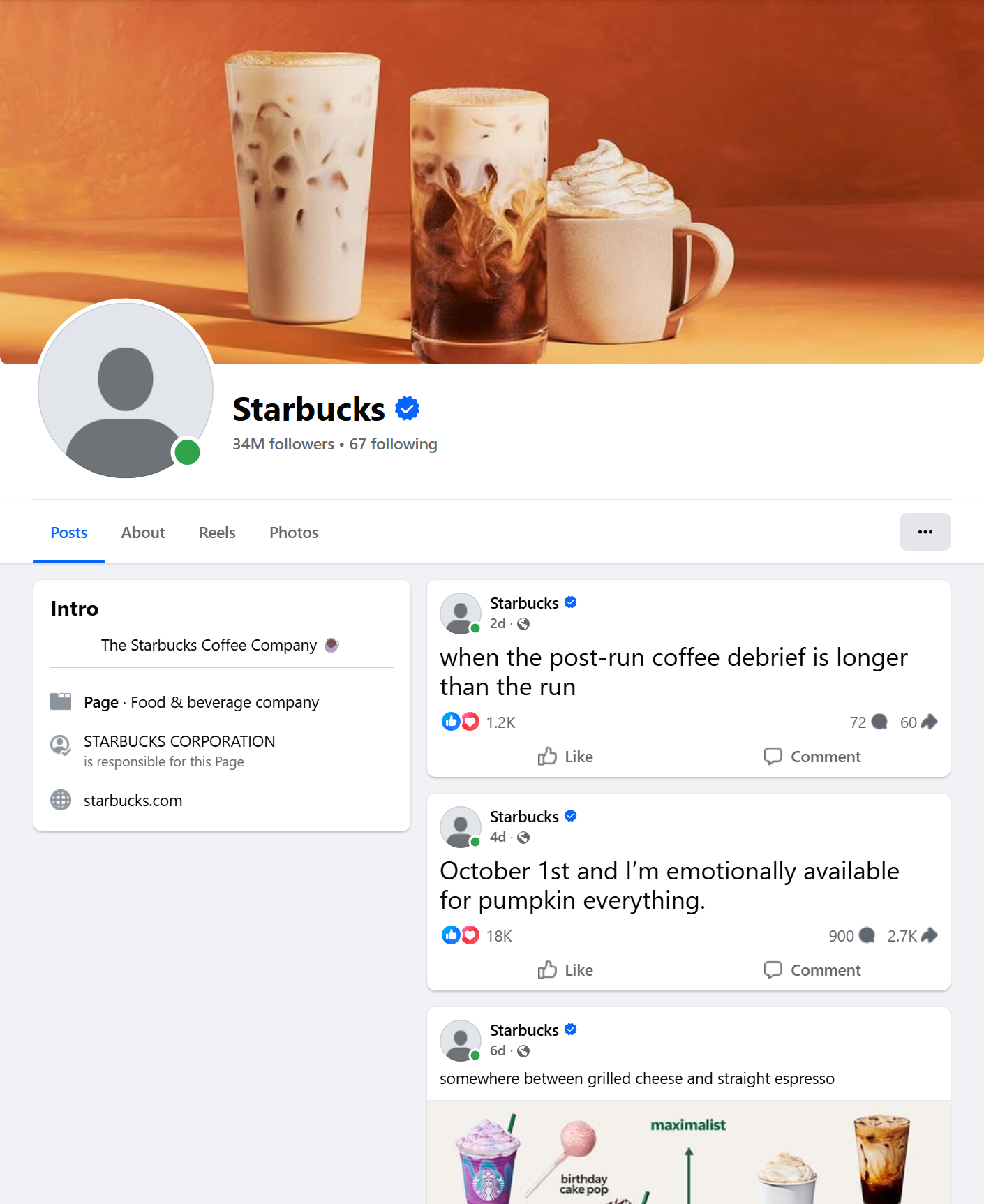
 - **Any public Page, many per run:** paste Page URLs, usernames or numeric ids; each Page is read newest post first, with Facebook's own date window.
- **Every engagement number:** reactions with the like / love / care / haha / wow / sad / angry breakdown, comments, shares, video views and plays - filled on 100% of a 150-post test run.
- **Page context on every row:** Page id, name, URL, followers, "talking about this" and the Page's Ad Library id, so posts from different Pages compare directly (`engagement_rate`).
- **Links, mentions and rich text:** outbound links unwrapped from Facebook's redirect, mentioned Pages, hashtags, and `message_rich` with the links kept as HTML.
- **Filters:** date window, post type, minimum reactions, minimum comments and a keyword filter.
- **Monitor mode:** remembers each Page's newest post and returns only newer ones - pair it with a schedule for a feed of new posts.
- **Export anywhere:** JSON, CSV, Excel, XML, RSS; schedules, webhooks, Make, Zapier, n8n, Google Sheets, Slack, the Apify API and MCP.
### What data can you get from a Facebook Page?
- **Any public Page, many per run:** paste Page URLs, usernames or numeric ids; each Page is read newest post first, with Facebook's own date window.
- **Every engagement number:** reactions with the like / love / care / haha / wow / sad / angry breakdown, comments, shares, video views and plays - filled on 100% of a 150-post test run.
- **Page context on every row:** Page id, name, URL, followers, "talking about this" and the Page's Ad Library id, so posts from different Pages compare directly (`engagement_rate`).
- **Links, mentions and rich text:** outbound links unwrapped from Facebook's redirect, mentioned Pages, hashtags, and `message_rich` with the links kept as HTML.
- **Filters:** date window, post type, minimum reactions, minimum comments and a keyword filter.
- **Monitor mode:** remembers each Page's newest post and returns only newer ones - pair it with a schedule for a feed of new posts.
- **Export anywhere:** JSON, CSV, Excel, XML, RSS; schedules, webhooks, Make, Zapier, n8n, Google Sheets, Slack, the Apify API and MCP.
### What data can you get from a Facebook Page?
| 🔗 Post URL and id (`url`, `post_id`) | 📝 Full text (`message`) and `message_rich` | 📅 Publish date (`timestamp`, `published_at`) |
| 📄 Page id, name, URL (`source_id`, `source_name`, `source_url`) | 👥 Page followers, talking about, were here | 📣 Page Ad Library id (`page_ad_library_id`) |
| 👍 Reactions total and by type (`reactions`) | 💬 Comments and shares (`comments_count`, `reshare_count`) | 📈 Engagement and engagement rate |
| ▶️ Video views, plays, duration, thumbnail, captions | 🖼️ Photos and albums (`image`, `images`, `image_alt`) | 🌐 Outbound link and preview (`external_url`, `external_link`) |
| 🔁 Shared post URL and author (`attached_post`) | 🏷️ Hashtags, mentioned Pages, collaborators | 💬 A top comment on every row; ~10 with the details add-on |
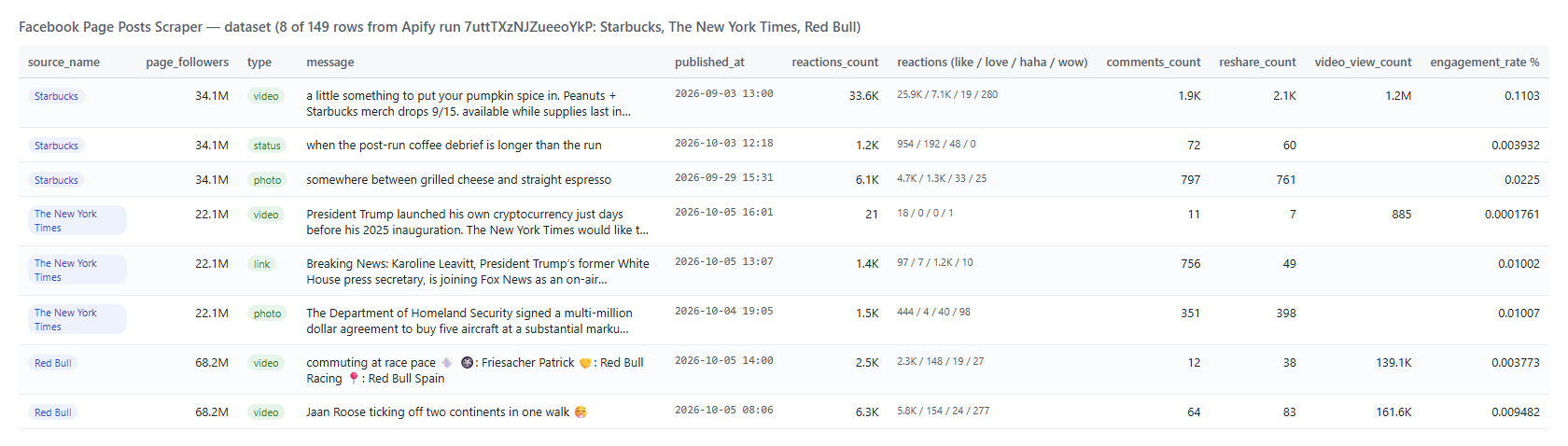 And one real row from that run (trimmed):
```json
{
"post_id": "1582731997219696",
"type": "status",
"url": "https://www.facebook.com/Starbucks/posts/pfbid0DJSiUv3UQpCbAxHvVgqDF5pXfr882F6XX3vJdyrHgFmdBkgfRMvp5EPCmofarNDAl",
"message": "October 1st and I’m emotionally available for pumpkin everything.",
"published_at": "2026-10-01T11:57:25.000Z",
"source_type": "page",
"source_id": "100064487329582",
"source_name": "Starbucks",
"source_url": "https://www.facebook.com/Starbucks",
"page_followers": 34082879,
"page_ad_library_id": "22092443056",
"reactions_count": 18785,
"comments_count": 900,
"reshare_count": 2784,
"reactions": { "like": 12890, "love": 5377, "haha": 323, "care": 172, "wow": 12, "sad": 6, "angry": 5 },
"engagement_count": 22469,
"engagement_rate": 0.06592
}
```
#### Facebook Page post fields
| Field | Type | What it is | Fill on the 150-post run |
|---|---|---|---|
| `post_id`, `url`, `story_id`, `comments_id` | string | Post id, permalink, story id, feedback id | 100% |
| `type` | string | `video`, `link`, `photo`, `album`, `event`, `share`, `marketplace` or `status` | 100% |
| `message`, `message_rich` | string | Full text; the same text as HTML with its links (`message_rich` only when the text has links) | 99% / 31% |
| `timestamp`, `published_at` | integer, ISO 8601 | Publish time | 100% |
| `source_type`, `source_id`, `source_name`, `source_url`, `input_url` | string | The Page the post came from and your input line | 100% |
| `page_followers`, `page_talking_about`, `page_were_here` | integer | The Page's counters (were here = places only) | 100% / 100% / 33% |
| `page_ad_library_id`, `page_ad_library_active` | string, boolean | The Page id Meta's Ad Library uses and Facebook's business-active flag | 99% |
| `author` | object | `id`, `name`, `url`, `profile_picture_url`, `type`, `is_verified` | 100% |
| `reactions_count`, `comments_count`, `reshare_count`, `engagement_count` | integer | Totals; engagement = reactions + comments + shares | 100% |
| `reactions` | object | `like`, `love`, `care`, `haha`, `wow`, `sad`, `angry`; an unlisted type is `0` when the listed ones add up to the total, else `null` | 100% |
| `engagement_rate` | number | Engagement as a % of the Page's followers | 100% |
| `video_view_count`, `video_play_count`, `video`, `video_id`, `video_thumbnail`, `video_duration_ms`, `video_captions_url` | mixed | Video posts | 48% (every video post) |
| `image`, `images`, `album_count`, `image_alt` | object, array | First image, every image of an album, accessibility caption | 82% / 15% |
| `external_url`, `external_link`, `links` | string, object, array | Outbound link (unwrapped), its preview card, every link in the text | 33% / 20% / 13% |
| `attached_post_url`, `attached_post` | string, object | The original post when this one is a share | 2% |
| `event`, `location`, `collaborators` | object, array | Event posts, tagged place, co-authors | as published |
| `hashtags`, `mentions` | array | Hashtags and the Pages or profiles mentioned in the text | 1% / 17% |
| `top_comment` | object | The top comment Facebook prints with the post: text, date, author, reactions | 82% |
| `top_comments`, `video_files`, `details_status` | array, object | Up to ~10 comments and the video SD/HD files - details add-on | details on 11 of 12 posts of a platform test: comments on 7 of 7 regular posts, files on 5 of 6 videos |
### How can I use Facebook Page posts data?
- 📊 **Competitor benchmarking** - run your competitors' Pages weekly and compare `engagement_rate`, `reactions` by type and posting frequency.
- 📰 **Media and news monitoring** - follow publishers' Pages with `monitorMode` and get every new post, its link and its engagement.
- 🎯 **Social media reporting** - pull a client's Page for last month with `startDate` / `endDate` and chart reactions, comments, shares and views.
- 📣 **Ad and creative research** - `page_ad_library_id` takes you to the Page's ads in Meta's Ad Library; `postType: video` with `minReactions` finds the creatives that work.
- 🔎 **Content discovery** - sort a Page's history by `reshare_count` or `video_play_count` to see which formats travel.
- 🤖 **AI and research teams** - feed `compact` rows to an LLM for summaries, topic tagging or sentiment; `top_comment` adds the audience's voice.
### How much does it cost to scrape Facebook Page posts?
Facebook Page Posts Scraper is pay-per-result: **$1.20 per 1,000 posts**, no start fee. You only pay for the posts you get. The optional post details are **$1.00 per 1,000 posts** that receive them.
| Posts | Cost | With post details |
|---:|---:|---:|
| 10 | $0.012 | $0.022 |
| 100 | $0.12 | $0.22 |
| 1,000 | $1.20 | $2.20 |
| 10,000 | $12.00 | $22.00 |
Apify platform usage (compute and residential proxy) is included in these prices. Measured on the platform: 10 posts in 6-10 seconds, 60 posts from two Pages in 21 seconds (256 MB, the default), 150 posts from three Pages in 30 seconds, 300 posts from one Page in 159 seconds (512 MB), with a peak of 42-81 MB of memory.
### Facebook Page posts in your tools: integrations, API, scheduling & MCP
- **Schedules:** run it hourly, daily or weekly from the **Schedules** tab; with `monitorMode` each run returns only the posts published since the previous one.
- **Webhooks:** fire a URL when a run finishes - push new posts to your CRM, Slack or a sheet.
- **No-code:** Make, Zapier, n8n, Google Sheets, Airtable, Slack via [Apify integrations](https://docs.apify.com/integrations).
- **API:** call it from Node.js or Python with `apify-client` - code on the [API tab](https://apify.com/topapi/facebook-page-posts-scraper/api/python) and the [Apify API reference](https://docs.apify.com/api/v2).
- **MCP / AI agents:** connect Claude, Cursor or any MCP client through the [MCP tab](https://apify.com/topapi/facebook-page-posts-scraper/api/mcp) and ask for a Page's latest posts in plain language; set `compact: true` to keep rows small.
### More social media scrapers by TopApi
And one real row from that run (trimmed):
```json
{
"post_id": "1582731997219696",
"type": "status",
"url": "https://www.facebook.com/Starbucks/posts/pfbid0DJSiUv3UQpCbAxHvVgqDF5pXfr882F6XX3vJdyrHgFmdBkgfRMvp5EPCmofarNDAl",
"message": "October 1st and I’m emotionally available for pumpkin everything.",
"published_at": "2026-10-01T11:57:25.000Z",
"source_type": "page",
"source_id": "100064487329582",
"source_name": "Starbucks",
"source_url": "https://www.facebook.com/Starbucks",
"page_followers": 34082879,
"page_ad_library_id": "22092443056",
"reactions_count": 18785,
"comments_count": 900,
"reshare_count": 2784,
"reactions": { "like": 12890, "love": 5377, "haha": 323, "care": 172, "wow": 12, "sad": 6, "angry": 5 },
"engagement_count": 22469,
"engagement_rate": 0.06592
}
```
#### Facebook Page post fields
| Field | Type | What it is | Fill on the 150-post run |
|---|---|---|---|
| `post_id`, `url`, `story_id`, `comments_id` | string | Post id, permalink, story id, feedback id | 100% |
| `type` | string | `video`, `link`, `photo`, `album`, `event`, `share`, `marketplace` or `status` | 100% |
| `message`, `message_rich` | string | Full text; the same text as HTML with its links (`message_rich` only when the text has links) | 99% / 31% |
| `timestamp`, `published_at` | integer, ISO 8601 | Publish time | 100% |
| `source_type`, `source_id`, `source_name`, `source_url`, `input_url` | string | The Page the post came from and your input line | 100% |
| `page_followers`, `page_talking_about`, `page_were_here` | integer | The Page's counters (were here = places only) | 100% / 100% / 33% |
| `page_ad_library_id`, `page_ad_library_active` | string, boolean | The Page id Meta's Ad Library uses and Facebook's business-active flag | 99% |
| `author` | object | `id`, `name`, `url`, `profile_picture_url`, `type`, `is_verified` | 100% |
| `reactions_count`, `comments_count`, `reshare_count`, `engagement_count` | integer | Totals; engagement = reactions + comments + shares | 100% |
| `reactions` | object | `like`, `love`, `care`, `haha`, `wow`, `sad`, `angry`; an unlisted type is `0` when the listed ones add up to the total, else `null` | 100% |
| `engagement_rate` | number | Engagement as a % of the Page's followers | 100% |
| `video_view_count`, `video_play_count`, `video`, `video_id`, `video_thumbnail`, `video_duration_ms`, `video_captions_url` | mixed | Video posts | 48% (every video post) |
| `image`, `images`, `album_count`, `image_alt` | object, array | First image, every image of an album, accessibility caption | 82% / 15% |
| `external_url`, `external_link`, `links` | string, object, array | Outbound link (unwrapped), its preview card, every link in the text | 33% / 20% / 13% |
| `attached_post_url`, `attached_post` | string, object | The original post when this one is a share | 2% |
| `event`, `location`, `collaborators` | object, array | Event posts, tagged place, co-authors | as published |
| `hashtags`, `mentions` | array | Hashtags and the Pages or profiles mentioned in the text | 1% / 17% |
| `top_comment` | object | The top comment Facebook prints with the post: text, date, author, reactions | 82% |
| `top_comments`, `video_files`, `details_status` | array, object | Up to ~10 comments and the video SD/HD files - details add-on | details on 11 of 12 posts of a platform test: comments on 7 of 7 regular posts, files on 5 of 6 videos |
### How can I use Facebook Page posts data?
- 📊 **Competitor benchmarking** - run your competitors' Pages weekly and compare `engagement_rate`, `reactions` by type and posting frequency.
- 📰 **Media and news monitoring** - follow publishers' Pages with `monitorMode` and get every new post, its link and its engagement.
- 🎯 **Social media reporting** - pull a client's Page for last month with `startDate` / `endDate` and chart reactions, comments, shares and views.
- 📣 **Ad and creative research** - `page_ad_library_id` takes you to the Page's ads in Meta's Ad Library; `postType: video` with `minReactions` finds the creatives that work.
- 🔎 **Content discovery** - sort a Page's history by `reshare_count` or `video_play_count` to see which formats travel.
- 🤖 **AI and research teams** - feed `compact` rows to an LLM for summaries, topic tagging or sentiment; `top_comment` adds the audience's voice.
### How much does it cost to scrape Facebook Page posts?
Facebook Page Posts Scraper is pay-per-result: **$1.20 per 1,000 posts**, no start fee. You only pay for the posts you get. The optional post details are **$1.00 per 1,000 posts** that receive them.
| Posts | Cost | With post details |
|---:|---:|---:|
| 10 | $0.012 | $0.022 |
| 100 | $0.12 | $0.22 |
| 1,000 | $1.20 | $2.20 |
| 10,000 | $12.00 | $22.00 |
Apify platform usage (compute and residential proxy) is included in these prices. Measured on the platform: 10 posts in 6-10 seconds, 60 posts from two Pages in 21 seconds (256 MB, the default), 150 posts from three Pages in 30 seconds, 300 posts from one Page in 159 seconds (512 MB), with a peak of 42-81 MB of memory.
### Facebook Page posts in your tools: integrations, API, scheduling & MCP
- **Schedules:** run it hourly, daily or weekly from the **Schedules** tab; with `monitorMode` each run returns only the posts published since the previous one.
- **Webhooks:** fire a URL when a run finishes - push new posts to your CRM, Slack or a sheet.
- **No-code:** Make, Zapier, n8n, Google Sheets, Airtable, Slack via [Apify integrations](https://docs.apify.com/integrations).
- **API:** call it from Node.js or Python with `apify-client` - code on the [API tab](https://apify.com/topapi/facebook-page-posts-scraper/api/python) and the [Apify API reference](https://docs.apify.com/api/v2).
- **MCP / AI agents:** connect Claude, Cursor or any MCP client through the [MCP tab](https://apify.com/topapi/facebook-page-posts-scraper/api/mcp) and ask for a Page's latest posts in plain language; set `compact: true` to keep rows small.
### More social media scrapers by TopApi
| 🔎 Facebook Search Posts Scraper - public posts found by keyword, any Page or group | 🛒 Facebook Marketplace Scraper - listings, prices and sellers by city and keyword | 📸 Instagram Scraper - posts, reels, hashtags and profiles |
| 🎵 TikTok Scraper - videos, hashtags, profiles and search | 🎬 TikTok Video Scraper - single videos with stats and downloads | 🐦 X Profile Scraper - X (Twitter) profiles and counters |
| ▶️ YouTube Shorts Scraper - Shorts by channel, hashtag or search | 📍 Google Maps Reviews Scraper - reviews, ratings and owner replies | 💼 Indeed Jobs Scraper - job listings with descriptions |
| 🌐 Similarweb Scraper - website traffic and competitors | 🔎 All TopApi actors - monitor-ready scrapers for schedules, APIs and AI agents |