| 📍 Latitude and longitude (`latitude`, `longitude`) |
🏠 Formatted address (`formattedAddress`) |
🆔 Google Place ID (`placeId`) |
| 🔢 Street number (`streetNumber`) |
🛣️ Street (`route`, `streetAddress`) |
🏘️ Neighborhood (`neighborhood`) |
| 🏙️ City (`city`) |
📮 Postal code (`postalCode`) |
🗺️ State and state code (`state`, `stateCode`) |
| 🌍 Country and ISO code (`country`, `countryCode`) |
➕ Plus code (`plusCode`, `plusCodeCompound`) |
🕒 Time zone and current UTC offset (`timezone`, `utcOffset`) |
| 🏷️ Google place type and categories (`placeType`, `categories`) |
🎯 Result level (`resultLevel`: address, street, postal code, area, place) |
✅ Match score and partial-match flag (`matchScore`, `partialMatch`) |
| 📏 Distance from your coordinate (`distanceMeters`, reverse) |
🔗 Google Maps link, feature ID and CID |
☎️ Phone, website, rating, review count (Business details add-on) |
### How to geocode addresses with Google Geocoding Scraper
1. [Create a free Apify account](https://console.apify.com/sign-up) - $5 of monthly credit, no card needed.
2. Open [Google Geocoding Scraper](https://apify.com/topapi/google-geocoding-scraper) and click **Try for free**.
3. Paste addresses into **Addresses (forward geocoding)**, one per line, and/or coordinates into **Coordinates (reverse geocoding)** as `lat,lng`.
4. Optional: set **Region bias** to the country most of your addresses are in.
5. Click **Start**. About 9 inputs are geocoded per second at the default concurrency.
6. Open the **Storage** tab and **Export** as CSV, Excel or JSON.
### ⬇️ Google Geocoding Scraper input
| Parameter | Type | Description |
|---|---|---|
| `addresses` | Array of strings | Addresses, place names or postal codes to turn into coordinates. A `lat,lng` line here is reverse geocoded. Prefill: 2 addresses. |
| `latlngs` | Array of strings | Coordinates to turn into addresses, as `lat,lng` (decimal degrees, WGS84). Prefill: 1 coordinate. |
| `records` | Array of objects | For APIs: `{"id": "...", "address": "..."}` or `{"id": "...", "lat": 0, "lng": 0}`; your `id` comes back as `inputId`. |
| `language` | Select | Language of addresses, names and country names. Default `en`. |
| `region` | Select | Country to favour for ambiguous inputs (a bias, not a filter). Default `us`. |
| `bounds` | String | Favour results inside a box: `swLat,swLng\|neLat,neLng`. |
| `countryCodes` | Multi-select | Keep only results in these countries; Google's next candidate inside them is used if the first is outside. |
| `resultTypes` | Multi-select | Keep only `address`, `street`, `postal_code`, `area` and/or `place` results. |
| `minMatchScore` | Integer 0-100 | Drop results scoring lower. Default `0`. |
| `includePlaceDetails` | Boolean | Add phone, website, rating and review count when the result is a business or landmark (add-on event). Default `false`. |
| `monitorMode` | Boolean | Skip inputs geocoded in earlier runs. Default `false`. |
| `monitorStoreName` | String | Named store that remembers them. Default `google-geocoding-monitor`. |
| `recheckAfterDays` | Integer | In monitor mode, geocode an input again after this many days. `0` = never. |
| `maxResults` | Integer | Stop after this many delivered rows; `0` = every input. Form prefill `100`. |
| `maxAlternatives` | Integer 0-10 | Also list other candidates in an `alternatives` array. Default `0`. |
| `includeUnavailable` | Boolean | Also write status rows for no-match, invalid, filtered or failed inputs. Default `false`. |
| `compact` | Boolean | Core fields only, for AI agents and spreadsheets. Default `false`. |
| `proxyConfiguration` | Proxy | Default: direct requests, switching to Apify Proxy automatically if Google refuses them. |
| `maxConcurrency` | Integer 1-50 | Lookups in parallel. Default `10`. |
#### Input JSON
```json
{
"addresses": [
"1600 Amphitheatre Parkway, Mountain View, CA",
"Eiffel Tower, Paris, France",
"SW1A 1AA"
],
"latlngs": ["40.6782,-73.9442"],
"records": [{ "id": "cust-1", "address": "350 5th Ave, New York, NY 10118" }],
"region": "us",
"maxAlternatives": 1
}
```
#### Put one complete address per line to geocode
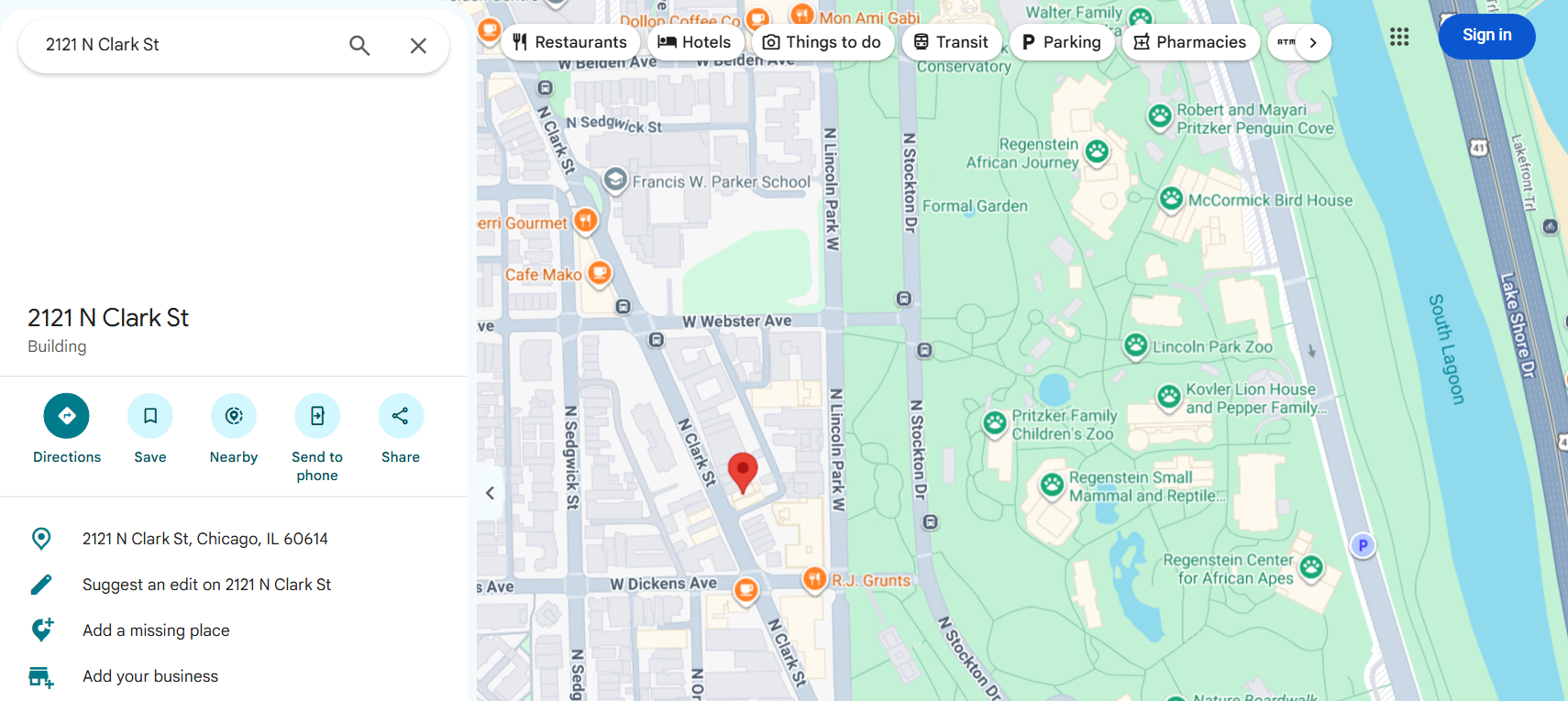
Google answers best when the line carries the street, the city and the region or postal code: `2121 N Clark St, Chicago, IL 60614` rather than `2121 Clark`. Place names (`Sydney Opera House`), postal codes (`11968`, `SW1A 1AA`) and cities (`Toledo`) work too; `resultLevel` tells you which kind of place came back.
#### Use Region bias or Viewport bias for ambiguous names
`Toledo` resolves to Toledo, Ohio with region `us` and to Toledo, Spain with region `es`. For a smaller area, set `bounds`: `39.70,-89.80|40.10,-89.40` turns `Springfield` into Springfield, Illinois. Both are biases. To exclude other countries, use `countryCodes`.
#### Send coordinates as lat,lng
Latitude first, then longitude, in decimal degrees: `40.6782,-73.9442`. `(40.6782, -73.9442)` and `40.6782 -73.9442` are read too. A line that is not a coordinate is reported as `INVALID_REQUEST` (visible with `includeUnavailable`).
### ⬆️ Geocoding output
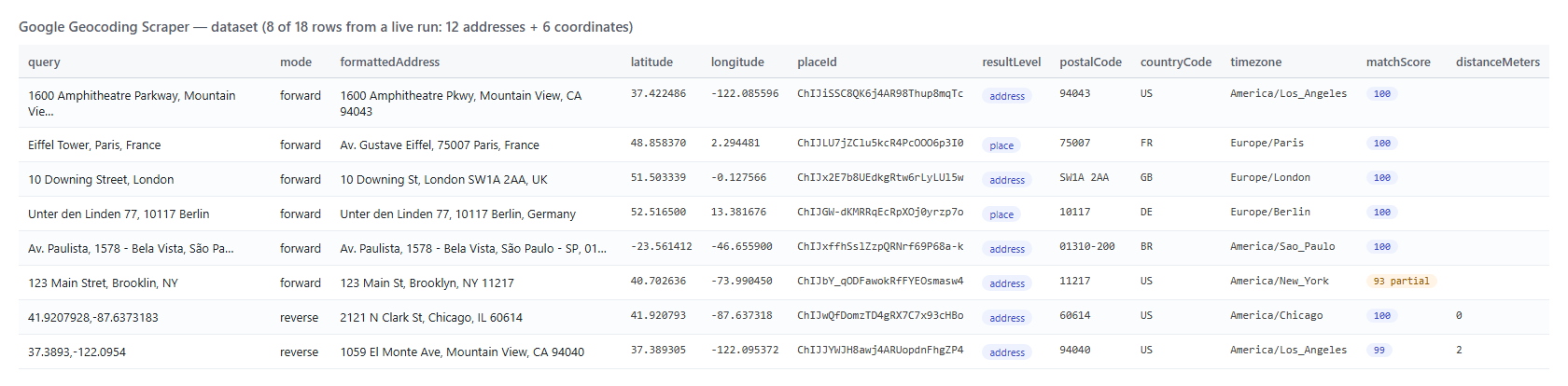 A forward row (real output, trimmed):
```json
{
"inputId": "address-1",
"query": "1600 Amphitheatre Parkway, Mountain View, CA",
"mode": "forward",
"status": "OK",
"formattedAddress": "1600 Amphitheatre Pkwy, Mountain View, CA 94043",
"latitude": 37.4224864,
"longitude": -122.0855962,
"resultLevel": "address",
"placeType": "compound_building",
"streetNumber": "1600",
"route": "Amphitheatre Pkwy",
"city": "Mountain View",
"postalCode": "94043",
"state": "California",
"stateCode": "CA",
"country": "United States",
"countryCode": "US",
"placeId": "ChIJiSSC8QK6j4AR98Thup8mqTc",
"plusCode": "849VCWC7+XQ",
"timezone": "America/Los_Angeles",
"utcOffset": "-07:00",
"matchScore": 100,
"partialMatch": false
}
```
A reverse row adds `inputLatitude`, `inputLongitude`, `inputPlusCode` and `distanceMeters` (how far the returned address is from your coordinate):
```json
{
"inputId": "latlng-1",
"query": "41.9207928,-87.6373183",
"mode": "reverse",
"formattedAddress": "2121 N Clark St, Chicago, IL 60614",
"streetNumber": "2121",
"route": "N Clark St",
"neighborhood": "Lincoln Park",
"resultLevel": "address",
"distanceMeters": 0,
"inputPlusCode": "86HJW9C7+838",
"matchScore": 100
}
```
#### Geocoding fields
Fill measured on a 90-input run on the Apify platform (70 forward inputs in 18 countries incl. 40 made-up house numbers, 20 coordinates in 13 countries; 89 rows).
| Field | Meaning | Filled |
|---|---|---:|
| `formattedAddress`, `latitude`, `longitude`, `placeId` | Google's address line, coordinates and Place ID | 100% |
| `plusCode`, `timezone`, `utcOffset` | Plus code of the result, IANA time zone, current offset | 100% |
| `resultLevel`, `matchScore`, `partialMatch` | Kind of result and how much of the input it accounts for | 100% |
| `placeType` | Google's type (`premise`, `locality`, `postal_code`, `museum`…) | 94% |
| `city` / `country`, `countryCode` | City / country | 97% / 99% |
| `postalCode` | Postal code | 88% |
| `state` / `stateCode` | State or region / short code (US, CA, AU, BR, MX) | 79% / 72% |
| `streetAddress` / `streetNumber` / `route` | Street line / house number / street | 72% / 60% / 67% |
| `neighborhood` | Neighborhood | 69% |
| `categories` | Google Maps labels (businesses, landmarks) | 31% |
| `plusCodeCompound` | Google's local plus code, when Google prints one | 13% |
| `distanceMeters`, `inputPlusCode` | Reverse rows only | 100% of reverse |
| `phone`, `website`, `rating`, `reviewsCount` | Business details add-on, businesses only | 12% / 20% / 13% / 8% |
Street fields are empty when the result is a city, region, postal code or a landmark without a street number, which is what Google returns for those inputs.
### Use cases for geocoded addresses
- 🚚 **Logistics and delivery planning:** turn order addresses into coordinates for routing and territory maps.
- 🏠 **Real estate and insurance:** geocode property lists, then add distance, flood-zone or school-district data by coordinate.
- 🧹 **CRM and data cleaning:** normalise free-text addresses into street, city, postal code and country columns; review rows with `partialMatch: true`.
- 📱 **Location analytics:** reverse geocode GPS pings into street, neighborhood, city and time zone.
- 🗺️ **Store locators and lead lists:** get the Place ID and plus code of every branch for Google Maps links and other Google tools.
- 🤖 **AI agents:** call it through MCP with `compact: true` to resolve "where is…" questions.
### How much does it cost to geocode addresses with Google Geocoding Scraper?
Google Geocoding Scraper is pay-per-event (the Pricing tab always shows the live rates):
| Event | Price | When it is charged |
|---|---:|---|
| `address-geocoded` | **$0.000095 per row** ($0.095 per 1,000) | Each geocoded input written to the dataset |
| `place-details` | **$0.0005 per row** | Only with Business details on, on rows that carry a phone, website or rating |
There is no start fee. Inputs Google cannot place, invalid coordinates, filtered results and repeated inputs do not produce a geocoded row.
| Inputs geocoded | Price |
|---:|---:|
| 10 | $0.00095 |
| 1,000 | $0.095 |
| 10,000 | $0.95 |
| 100,000 | $9.50 |
Speed measured on the platform: 90 inputs (70 addresses, 20 coordinates) in 10.6 seconds end to end at the default concurrency of 10; a single address in about 3 seconds.
### Integrations, API, scheduling & MCP
- **Schedules:** run Google Geocoding Scraper daily over a growing address list with `monitorMode` on, so only new addresses are geocoded.
- **Webhooks:** call a URL when a run finishes and load the rows into your database or CRM.
- **No-code:** Make, Zapier, n8n, Google Sheets, Airtable and Slack via [Apify integrations](https://docs.apify.com/integrations).
- **API:** start runs and read datasets with `apify-client` for [Python](https://apify.com/topapi/google-geocoding-scraper/api/python) or [JavaScript](https://apify.com/topapi/google-geocoding-scraper/api/javascript); the `records` input echoes your own IDs back as `inputId`.
- **MCP / AI agents:** connect Claude, Cursor or any MCP client through the [MCP tab](https://apify.com/topapi/google-geocoding-scraper/api/mcp).
### More TopApi scrapers
A forward row (real output, trimmed):
```json
{
"inputId": "address-1",
"query": "1600 Amphitheatre Parkway, Mountain View, CA",
"mode": "forward",
"status": "OK",
"formattedAddress": "1600 Amphitheatre Pkwy, Mountain View, CA 94043",
"latitude": 37.4224864,
"longitude": -122.0855962,
"resultLevel": "address",
"placeType": "compound_building",
"streetNumber": "1600",
"route": "Amphitheatre Pkwy",
"city": "Mountain View",
"postalCode": "94043",
"state": "California",
"stateCode": "CA",
"country": "United States",
"countryCode": "US",
"placeId": "ChIJiSSC8QK6j4AR98Thup8mqTc",
"plusCode": "849VCWC7+XQ",
"timezone": "America/Los_Angeles",
"utcOffset": "-07:00",
"matchScore": 100,
"partialMatch": false
}
```
A reverse row adds `inputLatitude`, `inputLongitude`, `inputPlusCode` and `distanceMeters` (how far the returned address is from your coordinate):
```json
{
"inputId": "latlng-1",
"query": "41.9207928,-87.6373183",
"mode": "reverse",
"formattedAddress": "2121 N Clark St, Chicago, IL 60614",
"streetNumber": "2121",
"route": "N Clark St",
"neighborhood": "Lincoln Park",
"resultLevel": "address",
"distanceMeters": 0,
"inputPlusCode": "86HJW9C7+838",
"matchScore": 100
}
```
#### Geocoding fields
Fill measured on a 90-input run on the Apify platform (70 forward inputs in 18 countries incl. 40 made-up house numbers, 20 coordinates in 13 countries; 89 rows).
| Field | Meaning | Filled |
|---|---|---:|
| `formattedAddress`, `latitude`, `longitude`, `placeId` | Google's address line, coordinates and Place ID | 100% |
| `plusCode`, `timezone`, `utcOffset` | Plus code of the result, IANA time zone, current offset | 100% |
| `resultLevel`, `matchScore`, `partialMatch` | Kind of result and how much of the input it accounts for | 100% |
| `placeType` | Google's type (`premise`, `locality`, `postal_code`, `museum`…) | 94% |
| `city` / `country`, `countryCode` | City / country | 97% / 99% |
| `postalCode` | Postal code | 88% |
| `state` / `stateCode` | State or region / short code (US, CA, AU, BR, MX) | 79% / 72% |
| `streetAddress` / `streetNumber` / `route` | Street line / house number / street | 72% / 60% / 67% |
| `neighborhood` | Neighborhood | 69% |
| `categories` | Google Maps labels (businesses, landmarks) | 31% |
| `plusCodeCompound` | Google's local plus code, when Google prints one | 13% |
| `distanceMeters`, `inputPlusCode` | Reverse rows only | 100% of reverse |
| `phone`, `website`, `rating`, `reviewsCount` | Business details add-on, businesses only | 12% / 20% / 13% / 8% |
Street fields are empty when the result is a city, region, postal code or a landmark without a street number, which is what Google returns for those inputs.
### Use cases for geocoded addresses
- 🚚 **Logistics and delivery planning:** turn order addresses into coordinates for routing and territory maps.
- 🏠 **Real estate and insurance:** geocode property lists, then add distance, flood-zone or school-district data by coordinate.
- 🧹 **CRM and data cleaning:** normalise free-text addresses into street, city, postal code and country columns; review rows with `partialMatch: true`.
- 📱 **Location analytics:** reverse geocode GPS pings into street, neighborhood, city and time zone.
- 🗺️ **Store locators and lead lists:** get the Place ID and plus code of every branch for Google Maps links and other Google tools.
- 🤖 **AI agents:** call it through MCP with `compact: true` to resolve "where is…" questions.
### How much does it cost to geocode addresses with Google Geocoding Scraper?
Google Geocoding Scraper is pay-per-event (the Pricing tab always shows the live rates):
| Event | Price | When it is charged |
|---|---:|---|
| `address-geocoded` | **$0.000095 per row** ($0.095 per 1,000) | Each geocoded input written to the dataset |
| `place-details` | **$0.0005 per row** | Only with Business details on, on rows that carry a phone, website or rating |
There is no start fee. Inputs Google cannot place, invalid coordinates, filtered results and repeated inputs do not produce a geocoded row.
| Inputs geocoded | Price |
|---:|---:|
| 10 | $0.00095 |
| 1,000 | $0.095 |
| 10,000 | $0.95 |
| 100,000 | $9.50 |
Speed measured on the platform: 90 inputs (70 addresses, 20 coordinates) in 10.6 seconds end to end at the default concurrency of 10; a single address in about 3 seconds.
### Integrations, API, scheduling & MCP
- **Schedules:** run Google Geocoding Scraper daily over a growing address list with `monitorMode` on, so only new addresses are geocoded.
- **Webhooks:** call a URL when a run finishes and load the rows into your database or CRM.
- **No-code:** Make, Zapier, n8n, Google Sheets, Airtable and Slack via [Apify integrations](https://docs.apify.com/integrations).
- **API:** start runs and read datasets with `apify-client` for [Python](https://apify.com/topapi/google-geocoding-scraper/api/python) or [JavaScript](https://apify.com/topapi/google-geocoding-scraper/api/javascript); the `records` input echoes your own IDs back as `inputId`.
- **MCP / AI agents:** connect Claude, Cursor or any MCP client through the [MCP tab](https://apify.com/topapi/google-geocoding-scraper/api/mcp).
### More TopApi scrapers