| 🆔 User id, username, profile URL |
👤 Full name and bio |
👥 Followers (`followersCount`) |
| ➡️ Following (`followsCount`) |
🖼️ Posts count (`postsCount`) |
🎬 IGTV and highlight counts |
| 🔗 Link in bio + every bio link with its label (`externalUrls`) |
📧 Emails in the bio (`emails`) |
📞 Phones in the bio or WhatsApp link (`phones`) |
| 🏢 Business / creator / personal (`accountType`) |
🏷️ Category and category code |
📍 Business address, contact method |
| ✅ Verified, 🔒 private flags |
🧑🤝🧑 Related accounts (`relatedProfiles`) |
📷 Profile picture, standard and HD |
| 📅 Date of the newest post (`lastPostAt`) |
📈 Add-on: latest posts + engagement rate |
🔁 Tracking: follower and post deltas, what changed |
On the first live run (20 input lines: brands, restaurants, creators, a private account, a handle that does not exist and a numeric id) all 18 delivered profiles had followers, following and posts counts, 94% a bio, 83% a website, 83% a category, 56% related accounts, 22% an email in the bio and 6% a phone; the not-found handle came back as a free status row and the numeric id was recognised as a duplicate of a username already in the list.
### How to scrape Instagram profiles with Instagram Profile Scraper
1. [Create a free Apify account](https://console.apify.com/sign-up) - $5 of monthly credit, no card needed.
2. Open [Instagram Profile Scraper](https://apify.com/topapi/instagram-profile-scraper) and click **Try for free**.
3. Paste your handles into **Profiles** (one per line) or upload a file under **Profile URLs from a file**, and set **Max profiles**.
4. Optionally set filters, turn on **Latest posts + engagement rate**, or turn on **Track changes between runs** for a watchlist.
5. Click **Start**. Rows stream into the dataset; the 20-line test list finished in 33 seconds.
6. Open the **Storage** tab and **Export** as JSON, CSV or Excel, or let a schedule run it for you.
### ⬇️ Instagram Profile Scraper input
| Parameter | Type | Description |
|---|---|---|
| **🔍 What to scrape** | | |
| `usernames` | List | **Required** (or `startUrls`). Usernames, @handles, profile URLs or user ids, e.g. `nasa`, `@natgeo`, `https://www.instagram.com/nike/`, `528817151`. With nothing given, the actor runs the sample profile `nasa`. |
| `startUrls` | File / URL list | Profile URLs from an uploaded file or a remote list, merged with `usernames`. |
| **✂️ Refine results** | | |
| `minFollowers` / `maxFollowers` | Integer | Follower range, e.g. 10,000-100,000 for micro-influencers. Default: no limit. |
| `accountType` | Select | Any, professional (business or creator), business, creator or personal. Default: any. |
| `verifiedOnly` | Boolean | Only accounts with the verified badge. Default: `false` |
| `excludePrivate` | Boolean | Leave out private accounts. Default: `false` |
| `requireContact` | Select | Must have a website, an email, a phone, an email or phone, or any of the three. Default: no requirement. |
| `bioKeywords` | Text | Keep accounts whose bio, name, category or bio links contain one of these words, e.g. `bakery, cafe`. |
| `activeWithinDays` | Integer | Keep accounts whose newest post is at most N days old. Default: `0` (off). |
| **➕ Extra data** | | |
| `includeLatestPosts` | Boolean | Adds up to 12 latest posts plus engagement metrics, charged as **latest-posts** per profile that gets posts. Default: `false` |
| **🔁 Monitoring** | | |
| `monitorMode` | Boolean | Adds `changeType`, `followersDelta`, `followsDelta`, `postsDelta`, `followersGrowthPct` and `changedFields` against the last run. Pair with a daily schedule. |
| `monitorStoreName` | Text | Named key-value store holding the snapshots. Default: `instagram-profiles-monitor` |
| `monitorOnlyChanges` | Boolean | With tracking on, deliver only new or changed profiles. Default: `false` |
| **📦 Output** | | |
| `maxResults` | Integer | Cap on delivered profiles; `0` = the whole list. Default: `0` (the form suggests 100). |
| `includeUnavailable` | Boolean | Add a free status row for each input that returned no profile (not found, unreadable, invalid). |
| `compact` | Boolean | Core fields only, sized for AI agents and MCP clients. |
| **⚙️ Advanced** | | |
| `proxyConfiguration` | Proxy | Default: Apify proxy (datacenter first, residential only as a fallback). |
| `maxConcurrency` | Integer | Profiles read at once, 1-10. Default: `4` |
#### Input JSON
```json
{
"usernames": ["nasa", "@natgeo", "https://www.instagram.com/nike/", "528817151"],
"minFollowers": 10000,
"accountType": "professional",
"includeLatestPosts": true,
"maxResults": 100
}
```
#### Paste usernames, profile URLs or user ids in the same list
Every form of a handle is read once. **Do:** `nasa`, `@nasa`, `https://www.instagram.com/nasa/`, `instagram.com/nasa/reels/`. **Don't:** a post or reel link such as `https://www.instagram.com/p/DNQuxufAih9/` - it is not a profile, so it is skipped and named in the log (and as a status row with `includeUnavailable`).
#### Use the filters to keep only the profiles you can work with
Filters run on each profile after it is read and before it is written: a list of 1,000 handles with `minFollowers: 10000` and `requireContact: "email"` returns only the accounts that pass. The run summary (`RUN_SUMMARY` in the key-value store) counts how many each filter removed.
#### Turn on tracking for a daily watchlist
With `monitorMode` on, the first run stores a snapshot of every profile and marks it `NEW`; each later run of the same list adds the change since then (`followersDelta`, `postsDelta`, `changedFields` such as `biography`, `links`, `verified`). Give each watchlist its own `monitorStoreName`. Add `monitorOnlyChanges` when you only want the accounts that moved: new posts, an edited bio or links, a new category, or followers up or down by 1% or more since the profile was last delivered.
### ⬆️ Instagram Profile Scraper output
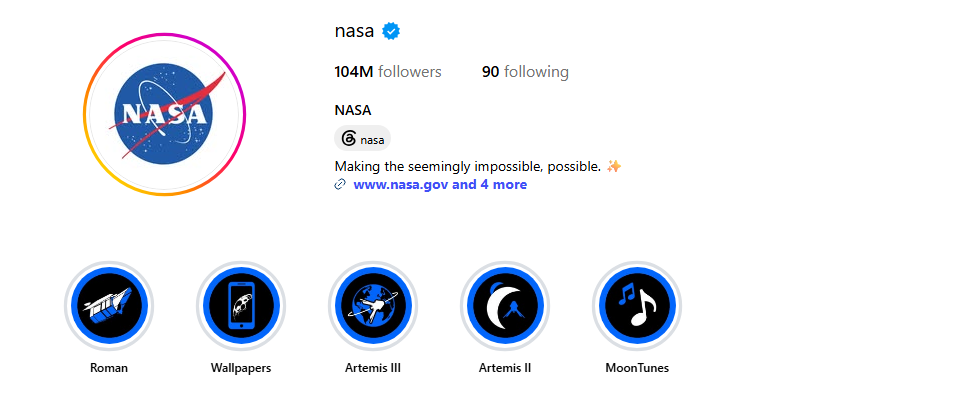
Every profile becomes one dataset item. Here is the table view of the first live run (latest-posts add-on on):
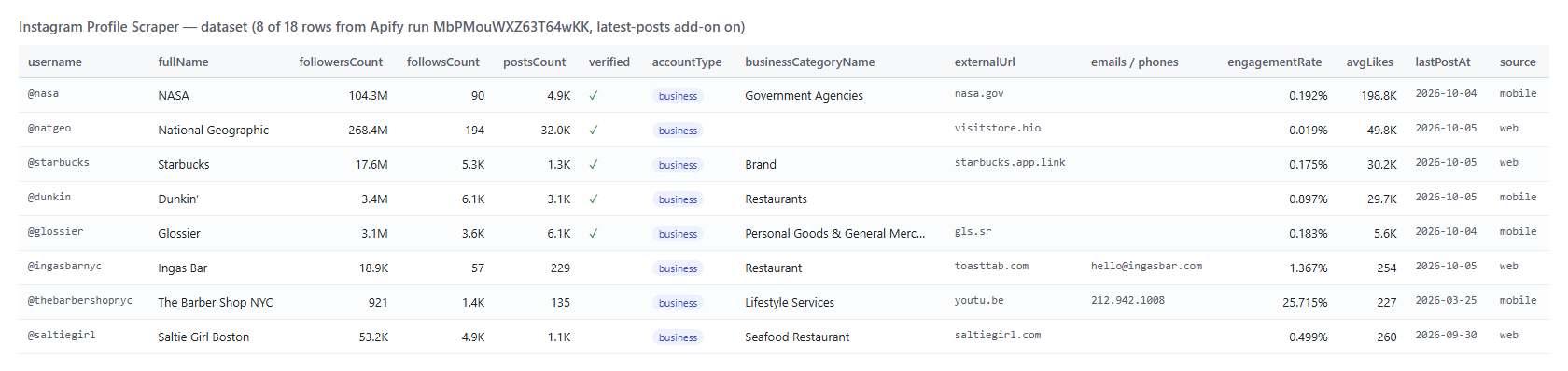 And one row as JSON (shortened; `relatedProfiles`, `externalUrls` and `latestPosts` are arrays of objects):
```json
{
"id": "528817151",
"username": "nasa",
"fullName": "NASA",
"biography": "Making the seemingly impossible, possible. ✨",
"externalUrl": "https://www.nasa.gov/",
"followersCount": 104294180,
"followsCount": 90,
"postsCount": 4945,
"igtvVideoCount": 171,
"highlightReelCount": 6,
"verified": true,
"private": false,
"accountType": "business",
"businessCategoryName": "Government Agencies",
"categoryEnum": "GOVERNMENT_ORGANIZATION",
"businessContactMethod": "CALL",
"relatedProfiles": [{ "username": "sciencechannel", "full_name": "Science Channel", "is_verified": true }],
"lastPostAt": "2026-10-04T16:09:22.000Z",
"engagementRate": 0.192,
"avgLikes": 198829,
"avgComments": 1006,
"postsPerWeek": 11.26,
"status": "ok"
}
```
#### Instagram profile fields
Fill measured on the 18 profiles of the first live run.
| Field | Type | What it is | Fill |
|---|---|---|---|
| `id`, `username`, `url`, `fullName` | string | Who the account is | 100%, name 94% |
| `followersCount`, `followsCount`, `postsCount` | number | Exact counts | 100% |
| `biography` | string | Bio text | 94% |
| `externalUrl`, `externalUrls` | string, array | Link in bio and every bio link with its label | 83% |
| `businessCategoryName` | string | Category shown under the name | 83% |
| `accountType`, `isBusinessAccount`, `isProfessionalAccount` | string, boolean | business / creator / personal | 100% |
| `verified`, `private` | boolean | Badges | 100% |
| `highlightReelCount` | number | Story highlights | 94% |
| `igtvVideoCount`, `categoryEnum`, `businessContactMethod` | number, string | From Instagram's app answer (see Limits) | 67%, 44%, 44% |
| `relatedProfiles` | array | Accounts Instagram suggests next to this one | 56% |
| `emails`, `phones` | array | Written in the bio or bio links | 22%, 6% |
| `businessAddress` | object | Street, city, zip, coordinates when published | 11% |
| `profilePicUrl`, `profilePicUrlHD`, `fbid` | string | Avatar and Meta account id | 100% |
| `lastPostAt` | ISO date | Newest visible post | 94% |
| `latestPosts`, `engagementRate`, `avgLikes`, `avgComments`, `postsPerWeek` | add-on | Latest posts and engagement | 94% |
| `changeType`, `followersDelta`, `postsDelta`, `changedFields` | tracking | Change since the last run | every row in tracking mode |
| `status`, `source`, `inputUrl`, `scrapedAt` | string | ok / private; which Instagram surface served it; the input line | 100% |
### How can I use Instagram profile data?
- 🎯 **Influencer marketers** - size a creator list by followers, engagement rate and posting frequency before outreach.
- 📇 **Lead-generation teams** - turn a list of business handles into rows with website, category, address and any email or phone they publish.
- 🏷️ **Agencies** - check a client's competitors weekly: follower growth, new posts, bio and link changes.
- 🧑🤝🧑 **Researchers** - expand a seed list through `relatedProfiles` and classify accounts by type and category.
- 🤖 **AI and data teams** - feed `compact` rows to an LLM or a warehouse; counts are numbers, never "1.2M".
- 📈 **Brand monitoring** - schedule tracking mode daily and alert on accounts whose `changedFields` is not empty.
### How much does it cost to scrape Instagram profiles?
Instagram Profile Scraper is pay-per-result: **$0.95 per 1,000 profiles**, no start fee. One result is one profile written to the dataset. The optional latest posts + engagement block is **$1.00 per 1,000 profiles** that get it.
| Profiles | Profiles only | With latest posts + engagement |
|---:|---:|---:|
| 10 | $0.0095 | $0.0195 |
| 100 | $0.095 | $0.195 |
| 1,000 | $0.95 | $1.95 |
| 10,000 | $9.50 | $19.50 |
Status rows for unavailable profiles (`includeUnavailable`) are free. Apify platform usage is included in these prices. The actor runs on 256 MB with no browser: 18 profiles took 33 seconds and peaked at 59 MB; 100 profiles took 157 seconds.
### Integrations, API, scheduling & MCP
- **Schedules:** run the same list hourly, daily or weekly from the **Schedules** tab; with `monitorMode` each run carries the change since the previous one.
- **Webhooks:** call a URL when a run finishes and push the rows to your CRM, Slack or a sheet.
- **No-code:** Make, Zapier, n8n, Google Sheets, Airtable and Slack through [Apify integrations](https://docs.apify.com/integrations).
- **API:** start runs and read datasets from Node.js or Python with `apify-client`; code is on the [API tab](https://apify.com/topapi/instagram-profile-scraper/api/python).
- **MCP / AI agents:** connect Claude, Cursor or any MCP client through the [MCP tab](https://apify.com/topapi/instagram-profile-scraper/api/mcp) and ask for profiles in plain language; `compact` keeps rows small.
### More TopApi scrapers
And one row as JSON (shortened; `relatedProfiles`, `externalUrls` and `latestPosts` are arrays of objects):
```json
{
"id": "528817151",
"username": "nasa",
"fullName": "NASA",
"biography": "Making the seemingly impossible, possible. ✨",
"externalUrl": "https://www.nasa.gov/",
"followersCount": 104294180,
"followsCount": 90,
"postsCount": 4945,
"igtvVideoCount": 171,
"highlightReelCount": 6,
"verified": true,
"private": false,
"accountType": "business",
"businessCategoryName": "Government Agencies",
"categoryEnum": "GOVERNMENT_ORGANIZATION",
"businessContactMethod": "CALL",
"relatedProfiles": [{ "username": "sciencechannel", "full_name": "Science Channel", "is_verified": true }],
"lastPostAt": "2026-10-04T16:09:22.000Z",
"engagementRate": 0.192,
"avgLikes": 198829,
"avgComments": 1006,
"postsPerWeek": 11.26,
"status": "ok"
}
```
#### Instagram profile fields
Fill measured on the 18 profiles of the first live run.
| Field | Type | What it is | Fill |
|---|---|---|---|
| `id`, `username`, `url`, `fullName` | string | Who the account is | 100%, name 94% |
| `followersCount`, `followsCount`, `postsCount` | number | Exact counts | 100% |
| `biography` | string | Bio text | 94% |
| `externalUrl`, `externalUrls` | string, array | Link in bio and every bio link with its label | 83% |
| `businessCategoryName` | string | Category shown under the name | 83% |
| `accountType`, `isBusinessAccount`, `isProfessionalAccount` | string, boolean | business / creator / personal | 100% |
| `verified`, `private` | boolean | Badges | 100% |
| `highlightReelCount` | number | Story highlights | 94% |
| `igtvVideoCount`, `categoryEnum`, `businessContactMethod` | number, string | From Instagram's app answer (see Limits) | 67%, 44%, 44% |
| `relatedProfiles` | array | Accounts Instagram suggests next to this one | 56% |
| `emails`, `phones` | array | Written in the bio or bio links | 22%, 6% |
| `businessAddress` | object | Street, city, zip, coordinates when published | 11% |
| `profilePicUrl`, `profilePicUrlHD`, `fbid` | string | Avatar and Meta account id | 100% |
| `lastPostAt` | ISO date | Newest visible post | 94% |
| `latestPosts`, `engagementRate`, `avgLikes`, `avgComments`, `postsPerWeek` | add-on | Latest posts and engagement | 94% |
| `changeType`, `followersDelta`, `postsDelta`, `changedFields` | tracking | Change since the last run | every row in tracking mode |
| `status`, `source`, `inputUrl`, `scrapedAt` | string | ok / private; which Instagram surface served it; the input line | 100% |
### How can I use Instagram profile data?
- 🎯 **Influencer marketers** - size a creator list by followers, engagement rate and posting frequency before outreach.
- 📇 **Lead-generation teams** - turn a list of business handles into rows with website, category, address and any email or phone they publish.
- 🏷️ **Agencies** - check a client's competitors weekly: follower growth, new posts, bio and link changes.
- 🧑🤝🧑 **Researchers** - expand a seed list through `relatedProfiles` and classify accounts by type and category.
- 🤖 **AI and data teams** - feed `compact` rows to an LLM or a warehouse; counts are numbers, never "1.2M".
- 📈 **Brand monitoring** - schedule tracking mode daily and alert on accounts whose `changedFields` is not empty.
### How much does it cost to scrape Instagram profiles?
Instagram Profile Scraper is pay-per-result: **$0.95 per 1,000 profiles**, no start fee. One result is one profile written to the dataset. The optional latest posts + engagement block is **$1.00 per 1,000 profiles** that get it.
| Profiles | Profiles only | With latest posts + engagement |
|---:|---:|---:|
| 10 | $0.0095 | $0.0195 |
| 100 | $0.095 | $0.195 |
| 1,000 | $0.95 | $1.95 |
| 10,000 | $9.50 | $19.50 |
Status rows for unavailable profiles (`includeUnavailable`) are free. Apify platform usage is included in these prices. The actor runs on 256 MB with no browser: 18 profiles took 33 seconds and peaked at 59 MB; 100 profiles took 157 seconds.
### Integrations, API, scheduling & MCP
- **Schedules:** run the same list hourly, daily or weekly from the **Schedules** tab; with `monitorMode` each run carries the change since the previous one.
- **Webhooks:** call a URL when a run finishes and push the rows to your CRM, Slack or a sheet.
- **No-code:** Make, Zapier, n8n, Google Sheets, Airtable and Slack through [Apify integrations](https://docs.apify.com/integrations).
- **API:** start runs and read datasets from Node.js or Python with `apify-client`; code is on the [API tab](https://apify.com/topapi/instagram-profile-scraper/api/python).
- **MCP / AI agents:** connect Claude, Cursor or any MCP client through the [MCP tab](https://apify.com/topapi/instagram-profile-scraper/api/mcp) and ask for profiles in plain language; `compact` keeps rows small.
### More TopApi scrapers