| 👤 Handle (`name`) and display name (`nickName`) |
🔗 Profile URL and TikTok ids (`id`, `secUid`) |
📝 Bio (`signature`) |
| 🌐 Bio link (`bioLink`) |
📧 E-mails written in the bio (`bioEmails`) |
🖼️ Profile picture (`avatar`) |
| 👥 Followers (`fans`), exact with profile details |
➡️ Following (`following`) |
❤️ Total likes (`heart`) |
| 🎬 Videos posted (`video`) |
📈 Average likes per video (`avgLikesPerVideo`) |
✅ Verified badge and its label |
| 🛍️ TikTok Shop seller (`ttSeller`) and commerce category |
🔒 Private account and 🏢 organization flags |
🗣️ Account language and 📅 creation date |
| 🔴 Live right now (`isLive`, `roomId`) |
🔎 The keyword and its rank (`searchQuery`, `searchRank`) |
🌍 Which TikTok index answered (`searchMarket`, `searchRegion`) |
Across 1,171 accounts from 33 test runs on the platform (13 keywords, from `fitness coach` and `realtor miami` to `coffee roasters` and `nike`): handle, name, followers, following, likes and video count were filled on 100% of rows, 80% had a bio, 27% a bio link and 7% an e-mail address in the bio; 3.8% carried the verified badge, 2.6% were TikTok Shop sellers and 4.2% were private.
### How to scrape TikTok accounts with TikTok User Search Scraper
1. [Create a free Apify account](https://console.apify.com/sign-up) - $5 of monthly credit, no card needed.
2. Open [TikTok User Search Scraper](https://apify.com/topapi/tiktok-user-search-scraper) and click **Try for free**.
3. Type one keyword per line into **Search queries** (a niche, a job, a brand, a city: `fitness coach`, `vegan bakery`, `realtor miami`) and set **Max accounts per query**.
4. Optionally set a follower band, **Verified accounts only** or **With an e-mail in the bio only**.
5. Click **Start**. Accounts stream into the dataset while TikTok pages its results.
6. Open the **Storage** tab and **Export** as JSON, CSV or Excel - or let a schedule run it for you.
### ⬇️ Input
| Parameter | Type | Description |
|---|---|---|
| **🔍 What to scrape** | | |
| `searchQueries` | List | **Required** (the form prefills `fitness coach`). Keywords to search accounts for, or TikTok search URLs: `"fitness coach"`, `"vegan bakery"`, `"https://www.tiktok.com/search/user?q=realtor%20miami"`. |
| **🎯 Filters** (applied by TikTok) | | |
| `searchMarket` | Select | Which TikTok index answers: `any` (TikTok EU / global first - most reliable, deepest lists), `us` (TikTok US), `eu` (TikTok EU, as a UK visitor), `global` (TikTok global, as a Canadian visitor). Default: `any` |
| **✂️ Refine results** | | |
| `minFollowers` / `maxFollowers` | Integer | Follower band, e.g. `10000` to `200000`. Default: no limit |
| `verifiedOnly` | Boolean | Only accounts with TikTok's verified badge. Default: `false` |
| `withEmailOnly` | Boolean | Only accounts with an e-mail address in the bio. Default: `false` |
| `withBioLinkOnly` | Boolean | Only accounts that show a bio link (turns on profile details). Default: `false` |
| `excludePrivate` | Boolean | Skip private accounts (turns on profile details). Default: `false` |
| `strictMatch` | Boolean | Only accounts whose handle, name or bio contains every word of the query. Default: `false` |
| `bioKeywords` | Text | Only accounts whose handle, name or bio contains one of these words, comma separated. |
| **➕ Extra data** | | |
| `includeProfileDetails` | Boolean | Exact followers, following, video count, bio link, private / seller / organization flags, language, creation date - charged as **profile-details** per account that gets them. Default: `true` |
| **🔁 Monitoring** | | |
| `monitorMode` | Boolean | Return only accounts not delivered by a previous monitor run for the same query. Default: `false` |
| `monitorStoreName` | Text | Named key-value store holding that memory. Default: `tiktok-user-search-monitor` |
| **📦 Output** | | |
| `maxResultsPerQuery` | Integer | Accounts per query after your filters. Default `50`; `0` = every account TikTok lists (about 240 on TikTok EU / global, 60-70 on TikTok US). |
| `maxItems` | Integer | Cap for the whole run. Default: no cap |
| `dedupeAcrossQueries` | Boolean | An account found by two queries is delivered once. Default: `true` |
| `compact` | Boolean | Core fields only, sized for AI agents and MCP. Default: `false` |
| **⚙️ Advanced** | | |
| `proxyConfiguration` | Proxy | Leave as is. A proxy group or country set here is used for every market. |
#### Input JSON
```json
{
"searchQueries": ["fitness coach", "personal trainer"],
"maxResultsPerQuery": 100,
"minFollowers": 10000,
"maxFollowers": 500000,
"withEmailOnly": true,
"includeProfileDetails": true
}
```
#### Put one niche per TikTok search query
TikTok's account search matches handles, names and bios loosely, so `fitness coach` and `personal trainer` return different accounts. Run several short queries rather than one long one. **Do:** `["fitness coach", "personal trainer", "pilates instructor"]` · **Don't:** `["fitness coach personal trainer pilates"]` (TikTok then lists accounts that match a few of the words).
#### Pick the TikTok search market before you compare runs
TikTok US, TikTok EU and TikTok's global cluster keep **separate account indexes**: the same keyword lists different accounts in each (measured: "dog trainer" listed 67 accounts on TikTok US and 207+ on TikTok EU, 9 of them in common). Every row says which one answered in `searchMarket`. Keep the same market for runs you want to compare; monitor mode keeps the first run's market for each query by itself.
#### Use the follower band to shortlist TikTok creators
Filters run on every account TikTok lists, so `minFollowers: 10000` with `maxResultsPerQuery: 50` reads further down the list until 50 accounts in your band are found (or the list ends). Followers in TikTok's search answer are rounded ("53.9K"); with profile details on, the band is checked on the exact count.
### ⬆️ Output
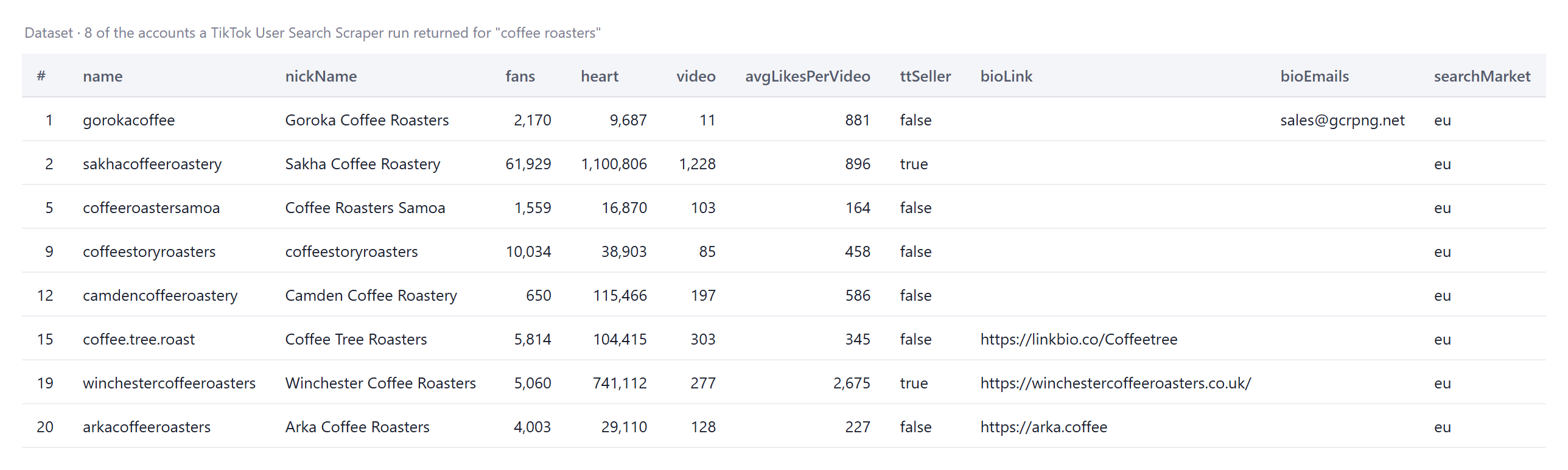
Every account becomes one dataset item. Here are 8 of the accounts a run returned for `coffee roasters`:
### Limits & empty TikTok searches
- **How many accounts per keyword:** TikTok lists about 230-240 accounts per keyword on TikTok EU and the global cluster ("fitness coach" 231-234, "vegan bakery" 234, "realtor miami" 240) and about 60-70 on TikTok US ("fitness coach" 59, "dog trainer" 67-68, "vegan bakery" 69-70), then the list ends. Use more, narrower keywords to go wider.
- **TikTok US is the moodiest index:** it sometimes refuses one keyword to signed-out visitors for a few minutes (empty pages on several fresh connections in a row while other keywords are served). The actor switches to fresh sessions, retries the keyword once more at the end of the run, and charges nothing for a keyword TikTok did not answer. The default market `any` starts on TikTok EU / global, which answered every search measured.
- **Followers without profile details** are TikTok's rounded display numbers ("2.3M" arrives as 2,300,000, up to about 5% off); `countsSource` says which you have.
- **Speed:** the first accounts arrive 3-40 seconds after the page opens (TikTok often answers the very first search of a session empty, and the page's own "Try again" fixes it); each further page of 10 accounts takes a few seconds; profile details add about a second per account, 8 at a time.
- **Empty dataset:** your filters removed every account, the keyword has no matching accounts, or TikTok did not answer the search (the status message says which). Nothing is charged for any of them.
- **Not available:** an account's region / country (TikTok's public pages do not show it), phone numbers and e-mails that are not written in the bio, follower lists and videos (see TikTok Scraper).
### FAQ
#### How many TikTok accounts can TikTok User Search Scraper find per keyword?
As many as TikTok lists: about 230-240 per keyword on TikTok EU / global and 60-70 on TikTok US. Set `maxResultsPerQuery: 0` to take them all, and add more keywords to go further; `dedupeAcrossQueries` keeps an account that two keywords find from being delivered twice.
#### Does TikTok User Search Scraper return exact follower counts?
Yes, with **Profile details** on (the default): the follower count comes from the account's profile page (2,274,668), not from the search list ("2.3M"). Turn the add-on off for a cheaper run with TikTok's rounded counts.
#### Can TikTok User Search Scraper find creators' e-mail addresses?
It returns every e-mail address the creator wrote in their bio (`bioEmails`, 7% of accounts in our tests, including `name (at) gmail (dot) com` forms) and the bio link (27%). E-mail addresses that are not written in the bio are not included.
#### Can I run TikTok User Search Scraper on a schedule to get new accounts automatically?
Yes. Save your keywords as a task, open **Schedules**, pick the cadence and switch on `monitorMode`: each run delivers only accounts not delivered before for that keyword, and keeps the same TikTok market for it.
#### Can I integrate TikTok User Search Scraper with other apps?
Yes - Make, Zapier, n8n, Google Sheets, Slack and more via [Apify integrations](https://docs.apify.com/integrations), or use [webhooks](https://docs.apify.com/integrations/webhooks) to trigger an action when a run finishes.
#### Can I use TikTok User Search Scraper with the Apify API?
Yes. Start runs, fetch datasets and manage schedules with `apify-client` for [Node.js](https://apify.com/topapi/tiktok-user-search-scraper/api/javascript) or [Python](https://apify.com/topapi/tiktok-user-search-scraper/api/python); the API tab has ready-to-paste code.
#### Can I use TikTok User Search Scraper through an MCP server?
Yes. Open the [MCP tab](https://apify.com/topapi/tiktok-user-search-scraper/api/mcp), connect your MCP client (Claude Desktop, Cursor, LibreChat...) and ask for TikTok creators in plain language; `compact` keeps the rows short.
#### Do I need a TikTok account, cookies or an API key?
No. TikTok User Search Scraper opens TikTok's public search like a signed-out visitor; you only pass keywords.
#### Why did my TikTok User Search Scraper run return no accounts?
In order of frequency: your filters removed every account (the status message counts them), TikTok did not answer the keyword on this run (it happens on TikTok US; run it again later or use market `any`), or the keyword matches no account. None of these is charged.
#### Why do two runs of the same keyword return different accounts?
TikTok answers from three separate indexes (TikTok US, TikTok EU, global) and tailors results to the visitor's country; `searchMarket` and `searchRegion` on every row say which one answered. Pick a fixed market in **Search market** to compare runs.
#### Is it legal to scrape TikTok data?
TikTok User Search Scraper extracts only publicly available TikTok account data; it does not log in or collect private data. Results may still contain personal data (names, bios, e-mail addresses creators publish), which is regulated by laws such as GDPR. Make sure you have a legitimate purpose before you use it.
#### Your feedback
We keep improving TikTok User Search Scraper. Found a bug or missing a field? Open an issue on the [Issues tab](https://apify.com/topapi/tiktok-user-search-scraper/issues/open).
# Actor input Schema
## `searchQueries` (type: `array`):
Keywords to search TikTok accounts for, e.g. "fitness coach", "vegan bakery", "realtor miami", or a TikTok search URL. Several queries run in one go; every row carries its searchQuery.
## `searchMarket` (type: `string`):
TikTok US, EU and global keep separate account indexes, so a query lists different accounts in each. A named market searches from a residential US / UK / Canada session. Rows carry searchMarket.
## `minFollowers` (type: `integer`):
Skip accounts with fewer followers, e.g. 10000 for micro-influencers and up. 0 = no minimum.
## `maxFollowers` (type: `integer`):
Skip accounts with more followers, e.g. 200000 to leave out big creators. 0 = no maximum.
## `verifiedOnly` (type: `boolean`):
Keep only accounts with TikTok's verified badge.
## `withEmailOnly` (type: `boolean`):
Keep only accounts whose bio contains an e-mail address (returned in bioEmails), e.g. "collabs: name@gmail.com".
## `withBioLinkOnly` (type: `boolean`):
Keep only accounts that show a website or link-in-bio on their profile (bioLink). Reads the profile page, so it turns on Profile details.
## `excludePrivate` (type: `boolean`):
Skip private accounts. Reads the profile page, so it turns on Profile details.
## `strictMatch` (type: `boolean`):
TikTok's account search is fuzzy. Keep only accounts whose handle, name or bio contains every word of the query, e.g. both "vegan" and "bakery".
## `bioKeywords` (type: `string`):
Keep only accounts whose handle, name or bio contains at least one of these words, comma separated, e.g. "coach, trainer, nutrition". Empty = no keyword filter.
## `includeProfileDetails` (type: `boolean`):
Adds exact followers, following, video count, bio link, private / seller / organization flags, language and account creation date from each profile page. Paid add-on per account (see Pricing).
## `monitorMode` (type: `boolean`):
Return only accounts not delivered by a previous monitor run for the same query. The memory lives in a named key-value store on your account.
## `monitorStoreName` (type: `string`):
Named key-value store that keeps the accounts already delivered per query. Use a different name per project, e.g. "fitness-creators-weekly".
## `maxResultsPerQuery` (type: `integer`):
How many accounts to deliver per query, after your filters. TikTok lists up to ~240 accounts per query. 0 = every account TikTok lists.
## `maxItems` (type: `integer`):
Stop the whole run after this many accounts across all queries. 0 = no total cap.
## `dedupeAcrossQueries` (type: `boolean`):
An account found by two of your queries is delivered (and charged) once, under the first query that found it.
## `compact` (type: `boolean`):
Core fields only (handle, name, profile URL, bio, bio link, emails, verified, followers, likes, videos, query, rank) - trimmed for AI agents, MCP and spreadsheets.
## `proxyConfiguration` (type: `object`):
Leave as is: each market's search opens in a residential session in its country (US / UK / Canada); 'Any' uses this proxy. A proxy group or country set here is used for every market.
## Actor input object example
```json
{
"searchQueries": [
"fitness coach"
],
"searchMarket": "any",
"minFollowers": 0,
"maxFollowers": 0,
"verifiedOnly": false,
"withEmailOnly": false,
"withBioLinkOnly": false,
"excludePrivate": false,
"strictMatch": false,
"bioKeywords": "",
"includeProfileDetails": true,
"monitorMode": false,
"monitorStoreName": "tiktok-user-search-monitor",
"maxResultsPerQuery": 20,
"maxItems": 0,
"dedupeAcrossQueries": true,
"compact": false,
"proxyConfiguration": {
"useApifyProxy": true
}
}
```
# Actor output Schema
## `accounts` (type: `string`):
The dataset of TikTok accounts found by your queries (one item per account).
## `summary` (type: `string`):
Per-query counts (found, filtered, already delivered, delivered), browser sessions and bytes transferred.
# API
You can run this Actor programmatically using our API. Below are code examples in JavaScript, Python, and CLI, as well as the OpenAPI specification and MCP server setup.
## JavaScript example
```javascript
import { ApifyClient } from 'apify-client';
// Initialize the ApifyClient with your Apify API token
// Replace the '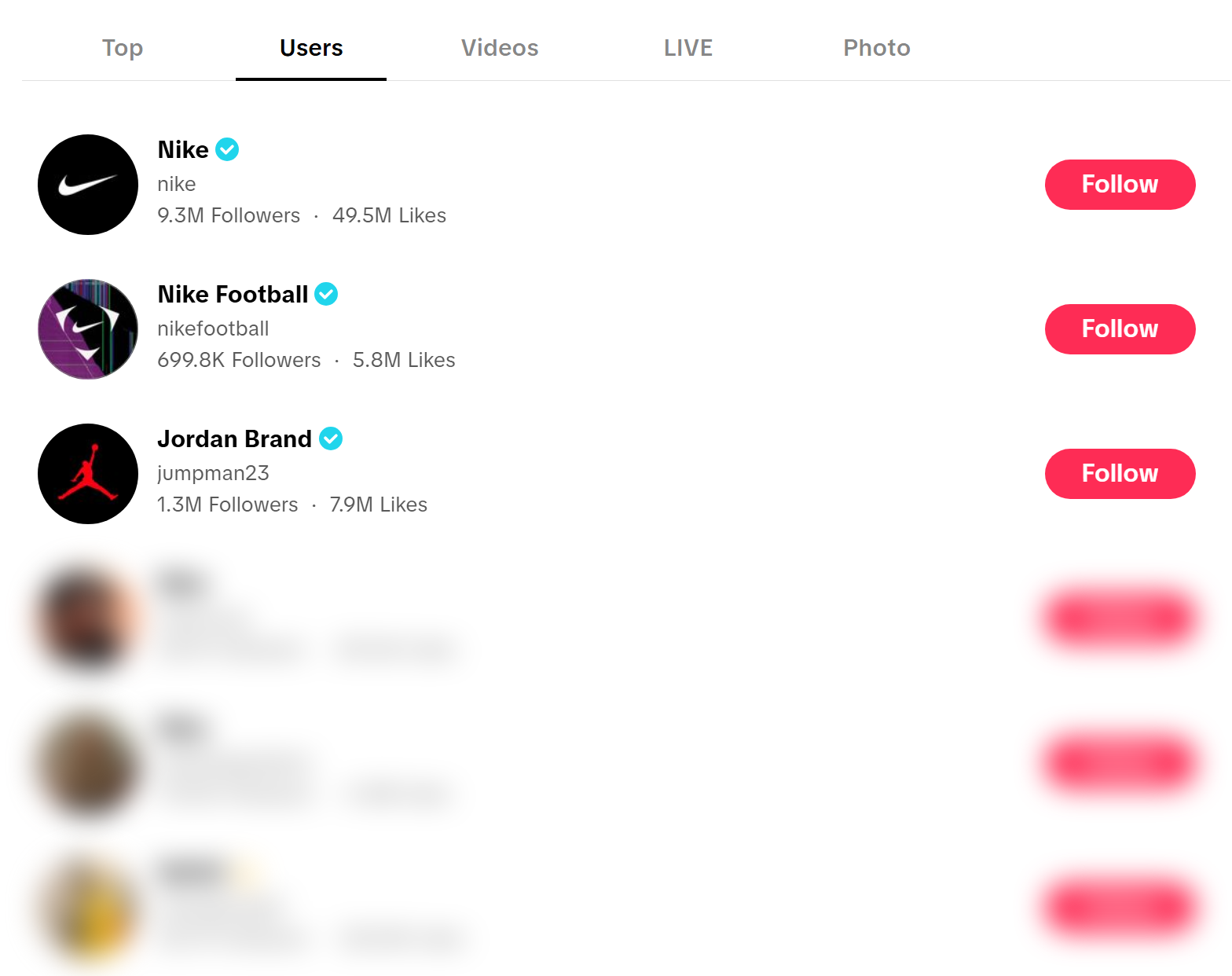
 And one row as JSON (a real row of that run, avatar and `secUid` left out):
```json
{
"id": "7464183541431436296",
"name": "gorokacoffee",
"nickName": "Goroka Coffee Roasters",
"profileUrl": "https://www.tiktok.com/@gorokacoffee",
"signature": "🇵🇬Family owned and operated coffee roasting business in the Eastern Highlands of PNG
📧 sales@gcrpng.net
☎️ +675 7150 5050 (WhatsApp)
☕️",
"bioLink": null,
"bioEmails": ["sales@gcrpng.net"],
"verified": false,
"privateAccount": false,
"ttSeller": false,
"fans": 2170,
"following": 34,
"heart": 9687,
"video": 11,
"avgLikesPerVideo": 881,
"countsSource": "profile",
"language": "en",
"createTimeISO": "2025-01-26T11:28:40.000Z",
"searchQuery": "coffee roasters",
"searchRank": 1,
"searchMarket": "eu",
"searchRegion": "GB"
}
```
#### TikTok account fields
| Field | Type | What it is | Fill (1,171 accounts, 33 runs) |
|---|---|---|---|
| `id`, `secUid` | string | TikTok's numeric and secure account ids (stable across handle changes) | 100% |
| `name`, `nickName`, `profileUrl` | string | Handle, display name, profile link | 100% |
| `signature` | string | Bio text | 80% (the rest have no bio) |
| `bioLink` | string | Website or link-in-bio on the profile (profile details) | 27% |
| `bioEmails` | array | E-mail addresses written in the bio, including `name (at) gmail (dot) com` forms | 7% |
| `avatar` | string | Profile picture URL (signed, expires after a few hours) | 100% |
| `verified`, `verificationLabel` | boolean, string | TikTok's badge (true on 3.8%) and its text | 100% / 3.8% |
| `fans`, `following`, `heart`, `video`, `digg`, `friends` | number | Followers, following, likes received, videos, likes given, mutual follows | 100% with profile details |
| `avgLikesPerVideo` | number | `heart / video` | 87% (null for accounts with no videos) |
| `countsSource` | string | `profile` = exact counts from the profile page; `search` = TikTok's rounded search counts | 100% |
| `privateAccount`, `ttSeller`, `isOrganization`, `commerceUserInfo` | boolean, object | Private (true on 4.2%), TikTok Shop seller (2.6%), organization account, commerce category (3.4%) | 100% with profile details |
| `language`, `createTime`, `createTimeISO` | string, number | Account language and creation date | 99.8% / 100% with profile details |
| `isLive`, `roomId` | boolean, string | The account is live right now, and its LIVE room id | 100% / when live (2 of 1,171) |
| `searchQuery`, `searchRank`, `searchMarket`, `searchRegion` | string, number | The keyword, the position TikTok listed the account at, the TikTok index and the visitor country it answered for | 100% |
| `scrapedAt` | string | When the row was scraped | 100% |
### How can I use TikTok account data?
- 🎯 **Influencer marketing teams** - shortlist micro-creators per niche with `minFollowers: 10000, maxFollowers: 200000`, then read `avgLikesPerVideo` to spot accounts whose audience still engages.
- 📧 **Agencies and outreach** - `withEmailOnly: true` returns creators who publish a business e-mail in their bio; `bioLink` gives the link-in-bio page for the rest.
- 🛍️ **E-commerce and TikTok Shop sellers** - search your product category and read `ttSeller` and `commerceUserInfo.category` to map competing shops and affiliate creators.
- 🏢 **Brands and PR** - list every account that uses your brand name (`nike`, `gymshark`) to find fan pages, resellers and impersonators; `verified` separates the official ones.
- 🤖 **AI and research teams** - feed `signature`, `nickName` and the counts to an LLM to classify creators by topic; `compact` keeps a thousand accounts inside a context window.
- 📈 **Growth tracking** - run the same queries weekly with `monitorMode` and get only the accounts that newly rank for your keywords.
### How much does it cost to scrape TikTok accounts?
TikTok User Search Scraper is pay-per-event (the Pricing tab always shows the live rates):
| Event | Price | When it is charged |
|---|---:|---|
| `account-scraped` | **$0.004 per account** ($4.00 per 1,000) | Each account written to the dataset after your filters |
| `profile-details` | **$0.0008 per account** ($0.80 per 1,000) | Add-on, on by default: each delivered account whose profile page was read |
There is no start fee. Accounts removed by your filters, accounts already delivered for an earlier query, and searches TikTok did not answer are not charged.
| Accounts | With profile details | Without |
|---:|---:|---:|
| 20 | $0.096 | $0.08 |
| 100 | $0.48 | $0.40 |
| 1,000 | $4.80 | $4.00 |
Apify platform usage (compute, proxy) is included in these prices. Measured on the platform on 2026-10-05: 20 accounts with profile details in 20-130 seconds (most of the spread is finding a TikTok session that answers); 100 accounts across two keywords in 111 seconds on the default 2 GB of memory; three keywords at TikTok's full depth (704 accounts) in about 6 minutes.
### Integrations, API, scheduling & MCP
- **Schedules:** run TikTok User Search Scraper daily or weekly from the **Schedules** tab; combine with `monitorMode` to get only accounts that are new for each keyword.
- **Webhooks:** fire a URL when a run finishes - push new creators to your CRM, Slack or a sheet.
- **No-code:** Make, Zapier, n8n, Google Sheets, Airtable, Slack via [Apify integrations](https://docs.apify.com/integrations).
- **API:** call it from Node.js or Python with `apify-client` - code on the [API tab](https://apify.com/topapi/tiktok-user-search-scraper/api/python) and the [Apify API reference](https://docs.apify.com/api/v2).
- **MCP / AI agents:** connect Claude, Cursor or any MCP client through the [MCP tab](https://apify.com/topapi/tiktok-user-search-scraper/api/mcp) and ask for TikTok creators in plain language; switch on `compact` to keep the answer small.
### More TopApi scrapers
And one row as JSON (a real row of that run, avatar and `secUid` left out):
```json
{
"id": "7464183541431436296",
"name": "gorokacoffee",
"nickName": "Goroka Coffee Roasters",
"profileUrl": "https://www.tiktok.com/@gorokacoffee",
"signature": "🇵🇬Family owned and operated coffee roasting business in the Eastern Highlands of PNG
📧 sales@gcrpng.net
☎️ +675 7150 5050 (WhatsApp)
☕️",
"bioLink": null,
"bioEmails": ["sales@gcrpng.net"],
"verified": false,
"privateAccount": false,
"ttSeller": false,
"fans": 2170,
"following": 34,
"heart": 9687,
"video": 11,
"avgLikesPerVideo": 881,
"countsSource": "profile",
"language": "en",
"createTimeISO": "2025-01-26T11:28:40.000Z",
"searchQuery": "coffee roasters",
"searchRank": 1,
"searchMarket": "eu",
"searchRegion": "GB"
}
```
#### TikTok account fields
| Field | Type | What it is | Fill (1,171 accounts, 33 runs) |
|---|---|---|---|
| `id`, `secUid` | string | TikTok's numeric and secure account ids (stable across handle changes) | 100% |
| `name`, `nickName`, `profileUrl` | string | Handle, display name, profile link | 100% |
| `signature` | string | Bio text | 80% (the rest have no bio) |
| `bioLink` | string | Website or link-in-bio on the profile (profile details) | 27% |
| `bioEmails` | array | E-mail addresses written in the bio, including `name (at) gmail (dot) com` forms | 7% |
| `avatar` | string | Profile picture URL (signed, expires after a few hours) | 100% |
| `verified`, `verificationLabel` | boolean, string | TikTok's badge (true on 3.8%) and its text | 100% / 3.8% |
| `fans`, `following`, `heart`, `video`, `digg`, `friends` | number | Followers, following, likes received, videos, likes given, mutual follows | 100% with profile details |
| `avgLikesPerVideo` | number | `heart / video` | 87% (null for accounts with no videos) |
| `countsSource` | string | `profile` = exact counts from the profile page; `search` = TikTok's rounded search counts | 100% |
| `privateAccount`, `ttSeller`, `isOrganization`, `commerceUserInfo` | boolean, object | Private (true on 4.2%), TikTok Shop seller (2.6%), organization account, commerce category (3.4%) | 100% with profile details |
| `language`, `createTime`, `createTimeISO` | string, number | Account language and creation date | 99.8% / 100% with profile details |
| `isLive`, `roomId` | boolean, string | The account is live right now, and its LIVE room id | 100% / when live (2 of 1,171) |
| `searchQuery`, `searchRank`, `searchMarket`, `searchRegion` | string, number | The keyword, the position TikTok listed the account at, the TikTok index and the visitor country it answered for | 100% |
| `scrapedAt` | string | When the row was scraped | 100% |
### How can I use TikTok account data?
- 🎯 **Influencer marketing teams** - shortlist micro-creators per niche with `minFollowers: 10000, maxFollowers: 200000`, then read `avgLikesPerVideo` to spot accounts whose audience still engages.
- 📧 **Agencies and outreach** - `withEmailOnly: true` returns creators who publish a business e-mail in their bio; `bioLink` gives the link-in-bio page for the rest.
- 🛍️ **E-commerce and TikTok Shop sellers** - search your product category and read `ttSeller` and `commerceUserInfo.category` to map competing shops and affiliate creators.
- 🏢 **Brands and PR** - list every account that uses your brand name (`nike`, `gymshark`) to find fan pages, resellers and impersonators; `verified` separates the official ones.
- 🤖 **AI and research teams** - feed `signature`, `nickName` and the counts to an LLM to classify creators by topic; `compact` keeps a thousand accounts inside a context window.
- 📈 **Growth tracking** - run the same queries weekly with `monitorMode` and get only the accounts that newly rank for your keywords.
### How much does it cost to scrape TikTok accounts?
TikTok User Search Scraper is pay-per-event (the Pricing tab always shows the live rates):
| Event | Price | When it is charged |
|---|---:|---|
| `account-scraped` | **$0.004 per account** ($4.00 per 1,000) | Each account written to the dataset after your filters |
| `profile-details` | **$0.0008 per account** ($0.80 per 1,000) | Add-on, on by default: each delivered account whose profile page was read |
There is no start fee. Accounts removed by your filters, accounts already delivered for an earlier query, and searches TikTok did not answer are not charged.
| Accounts | With profile details | Without |
|---:|---:|---:|
| 20 | $0.096 | $0.08 |
| 100 | $0.48 | $0.40 |
| 1,000 | $4.80 | $4.00 |
Apify platform usage (compute, proxy) is included in these prices. Measured on the platform on 2026-10-05: 20 accounts with profile details in 20-130 seconds (most of the spread is finding a TikTok session that answers); 100 accounts across two keywords in 111 seconds on the default 2 GB of memory; three keywords at TikTok's full depth (704 accounts) in about 6 minutes.
### Integrations, API, scheduling & MCP
- **Schedules:** run TikTok User Search Scraper daily or weekly from the **Schedules** tab; combine with `monitorMode` to get only accounts that are new for each keyword.
- **Webhooks:** fire a URL when a run finishes - push new creators to your CRM, Slack or a sheet.
- **No-code:** Make, Zapier, n8n, Google Sheets, Airtable, Slack via [Apify integrations](https://docs.apify.com/integrations).
- **API:** call it from Node.js or Python with `apify-client` - code on the [API tab](https://apify.com/topapi/tiktok-user-search-scraper/api/python) and the [Apify API reference](https://docs.apify.com/api/v2).
- **MCP / AI agents:** connect Claude, Cursor or any MCP client through the [MCP tab](https://apify.com/topapi/tiktok-user-search-scraper/api/mcp) and ask for TikTok creators in plain language; switch on `compact` to keep the answer small.
### More TopApi scrapers