# Instagram Email Scraper - Phone, WhatsApp & Website Contacts (`topapi/instagram-contact-scraper`) Actor

Find emails, phone numbers and WhatsApp for Instagram accounts: reads the bio, bio links, link-in-bio pages (Linktree, Later, Sprout, Stan, lnk.bio) and the account's own website contact pages. Every contact with its source. Related-account discovery, monitor mode. No login.

- **URL**: https://apify.com/topapi/instagram-contact-scraper.md
- **Developed by:** [Top Api](https://apify.com/topapi) (community)
- **Categories:** Social media, Lead generation
- **Stats:** 2 total users, 1 monthly users, 100.0% runs succeeded, 0 bookmarks
- **User rating**: No ratings yet

## Pricing

$6.10 / 1,000 contact records

This Actor is paid per event. You are not charged for the Apify platform usage, but only a fixed price for specific events.

Learn more: https://docs.apify.com/actors/running/actors-in-store.md#pay-per-event

## What's an Apify Actor?

An Actor is a serverless cloud program that runs on the Apify platform. It has two run modes.
In Batch mode, an Actor accepts a well-defined JSON input, performs an action which can take anything from a few seconds to a few hours,
and optionally produces a well-defined JSON output, datasets with results, or files in key-value store.
In Standby mode, an Actor provides a web server which can be used as a website, API, or an MCP server.

Apify vocabulary and the platform model are defined once, in the agent quickstart at https://apify.com/agents.md.

## How to integrate an Actor?

If asked about integration, you help developers integrate Actors into their projects.
You adapt to their stack and deliver integrations that are safe, well-documented, and production-ready.

Do not guess an integration path. Every one of them is in the agent quickstart at https://apify.com/agents.md: the Apify MCP server, Agent Skills with the Apify CLI, the JavaScript and Python clients, the REST API, and the account-free path for an agent with no human to sign in. It also carries the rule on stating cost before the first paid run.

For examples already wired to this Actor's own input schema, see the [API](#api) section below.

Each client library has reference documentation the quickstart does not restate: [JavaScript/TypeScript](https://docs.apify.com/api/client/js/docs.md) (`npm install apify-client`) and [Python](https://docs.apify.com/api/client/python/docs.md) (`pip install apify-client`).

# README

### What does Instagram Email Scraper do?

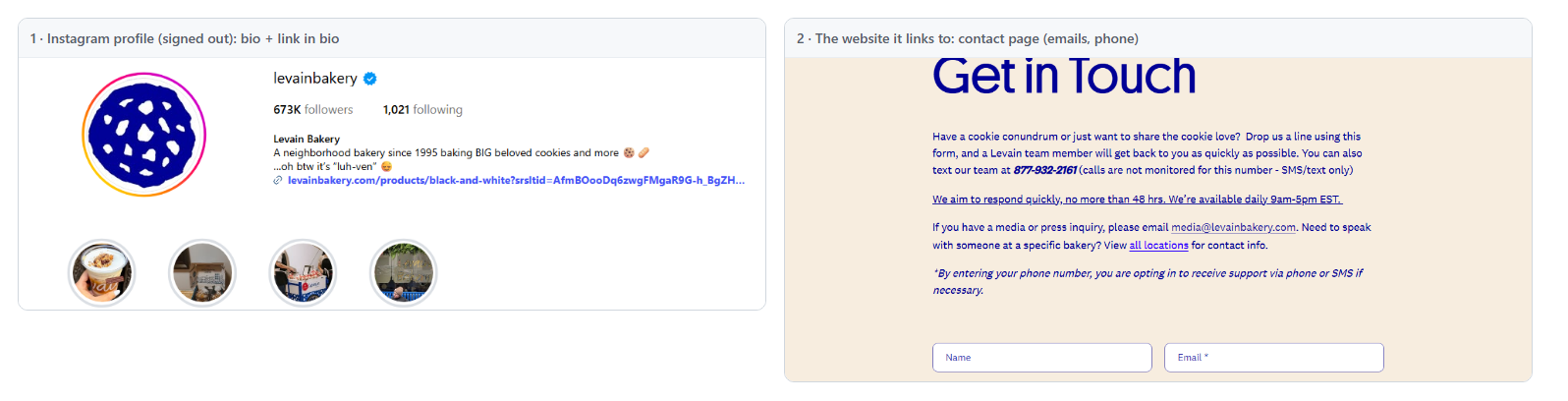
**Instagram Email Scraper** turns a list of Instagram accounts into contact records: every email, phone number and WhatsApp number each account publishes, found in its bio, its bio links, its link-in-bio page (Linktree, Later, Sprout, Stan Store, lnk.bio and more) and the contact pages of its own website. One row per account, every contact with the page it came from. Built for agencies, sales teams, PR and influencer marketers who need to reach Instagram businesses and creators without copying contact details by hand.

Instagram Contact Scraper - Instagram Email Finder - Instagram Phone Number Scraper - Linktree Email Scraper

<a href="https://console.apify.com/actors/dngyaEUL2JEZeZNk3"><img src="https://api.apify.com/v2/key-value-stores/qNQ9zP0xaj2yxGeMY/records/instagram-contact-scraper-source.png" alt="An Instagram profile and the website contact page that Instagram Email Scraper reads into one contact record" style="width:70%"></a>

- **Emails, phones and WhatsApp in one row:** `emails`, `phones`, `whatsapp`, plus a best single `email` and `phone` for your CRM.
- **It reads the website, not just the bio:** the account's own homepage and its contact, imprint and about pages (mailto and tel links, schema.org data, footers). On a 75-account test 97% of the contacts found came from the accounts' websites.
- **Link-in-bio pages unwrapped:** Linktree, Later Link in Bio, Sprout Social, Stan Store, Emplifi, lnk.bio, direct.me, bio.site, solo.to and other services; their links are followed to the account's own site.
- **Every contact with its source:** `contactDetails` says where each email or phone was found (bio, bio link, link-in-bio page, website page URL), whether an email is a role or personal address, whether its domain matches the website, and whether the domain has a mail server (MX).
- **Related-account discovery:** optionally add the accounts Instagram suggests next to yours and get their contacts too.
- **No Instagram login, cookies or API key.**
- **Export anywhere:** JSON, CSV, Excel; schedules, webhooks, Make, Zapier, n8n, Google Sheets, the Apify API and MCP.

### What data can you get from Instagram contacts?

<table>
<tr>
<td>📧 Emails (`emails`) and best email (`email`)</td>
<td>📞 Phone numbers (`phones`, `phone` in E.164)</td>
<td>💬 WhatsApp numbers (`whatsapp`)</td>
</tr>
<tr>
<td>🌐 The account's website (`website`, `websiteDomain`)</td>
<td>🌳 Link-in-bio service and page (`linkInBioService`)</td>
<td>🔗 Social profiles by network (`socials`)</td>
</tr>
<tr>
<td>🧾 Source of every contact (`contactDetails`)</td>
<td>✅ Role / personal email and MX check</td>
<td>📍 Postal address from the website (`websiteAddress`)</td>
</tr>
<tr>
<td>👤 Username, name, bio, profile URL</td>
<td>👥 Followers and following</td>
<td>🏷️ Account type and category</td>
</tr>
<tr>
<td>🔗 Every bio link with its label (`bioLinks`)</td>
<td>📄 Pages read (`pagesScanned`)</td>
<td>🧭 Related-to account (`relatedTo`)</td>
</tr>
</table>

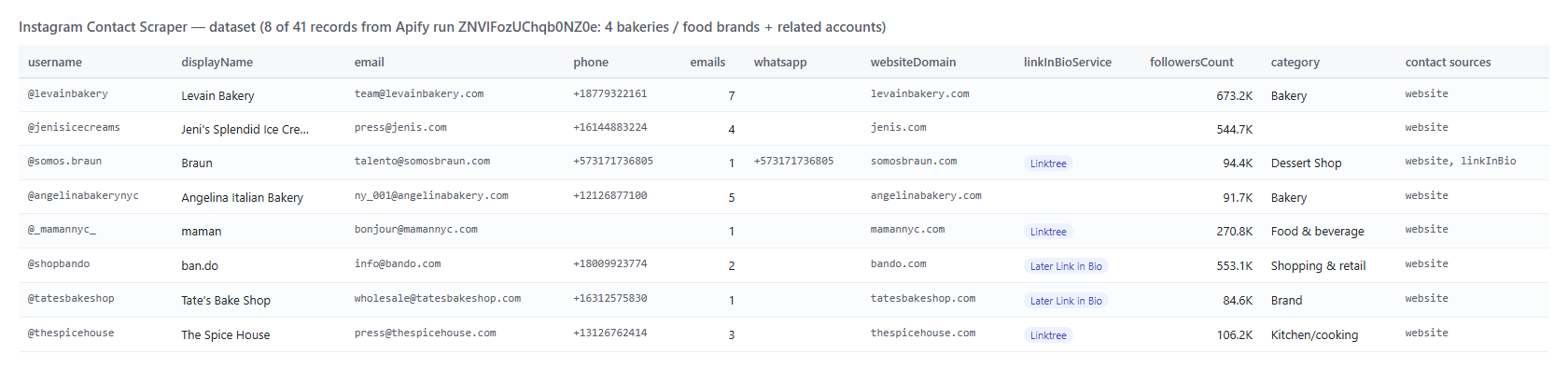
On a 75-account test run (4 food brands and the accounts Instagram suggests next to them), 41 accounts had at least one contact. Of those 41 records, 73% carried an email, 63% a phone number, 5% a WhatsApp number, 98% a website and 95% at least one other social profile.

### How to scrape Instagram emails with Instagram Email Scraper

1. [Create a free Apify account](https://console.apify.com/sign-up) - it comes with monthly free credit.
2. Open [Instagram Email Scraper](https://apify.com/topapi/instagram-contact-scraper) and click **Try for free**.
3. Paste usernames or profile URLs into **Instagram accounts**, one per line.
4. Pick **Deliver accounts with** (any contact, email only, phone only, email and phone, or every account) and click **Start**.
5. Open the **Storage** tab and **Export** as CSV, Excel or JSON - or let a schedule run it for you.

### ⬇️ Instagram Email Scraper input

| Parameter | Type | Description |
|---|---|---|
| **🔍 What to scrape** | | |
| `usernames` | List | **Required.** Usernames, @handles, profile URLs or numeric ids, e.g. `lukeslobster`, `@nutsdotcom`, `https://www.instagram.com/jenisicecreams/` |
| `startUrls` | File / URL list | Optional list of accounts from a text or CSV file, merged with the list above |
| `expandRelatedAccounts` | Boolean | Also find contacts for the accounts Instagram suggests next to each account. Default `false` |
| **✂️ Refine results** | | |
| `requireContact` | Select | `any` (an email, phone or WhatsApp - default), `email`, `phone`, `emailAndPhone`, `none` (every account) |
| `accountType` | Select | Any, professional, business, creator or personal |
| `minFollowers` / `maxFollowers` | Integer | Follower range. `0` = no limit |
| `excludePrivate` | Boolean | Leave out private accounts. Default `false` |
| **➕ Extra data** | | |
| `scanDepth` | Select | `website` (bio + link-in-bio + website, default), `linkInBio`, `profile` (bio only, fastest) |
| `maxPagesPerWebsite` | Integer | Pages read per website, homepage included. Default `4` |
| `includeThirdPartyContacts` | Boolean | Also read sites the account links to that are not its own; their contacts go to `thirdPartyEmails` / `thirdPartyPhones`. Default `false` |
| **🔁 Monitoring** | | |
| `monitorMode` | Boolean | Remember every account read and skip it on the next run. Default `false` |
| `monitorStoreName` | String | Name of the memory, one per list. Default `instagram-contacts-monitor` |
| `recheckAfterDays` | Integer | Re-read known accounts after N days and deliver them again only if their contacts changed. Default `0` (never) |
| **📦 Output** | | |
| `maxResults` | Integer | Cap on delivered records. `0` = no cap |
| `maxProfilesToCheck` | Integer | Cap on accounts read, including those with no contact. `0` = no cap |
| `compact` | Boolean | Core fields only, sized for AI agents and CRMs |
| `includeUnavailable` | Boolean | Add a status row for every account that could not be read |
| **⚙️ Advanced** | | |
| `proxyConfiguration` | Proxy | Apify datacenter proxy by default |
| `maxConcurrency` | Integer | Accounts processed at once. Default `5` |

#### Input JSON

```json
{
  "usernames": ["lukeslobster", "nutsdotcom", "jenisicecreams"],
  "requireContact": "any",
  "scanDepth": "website",
  "maxResults": 50
}
```

#### Paste usernames, profile URLs or ids in the same list

Mix bare usernames, @handles, profile URLs and numeric user ids; duplicates are read once. **Do:** `https://www.instagram.com/lukeslobster/` · **Don't:** `https://www.instagram.com/p/C1abc/` (a post link is skipped with a warning).

#### Pick what a record must contain before you start

`requireContact` decides which accounts become rows. Leave it on **any** for a lead list, choose **email** for an email campaign, or **none** when you want a row for every account (for example to see which ones publish nothing).

#### Use related-account discovery to build a list from a few seeds

Turn on **Also find related accounts** and paste 3-5 accounts of the kind you want: the run adds the accounts Instagram suggests next to them (measured: 22 for one bakery, 38 for one seafood restaurant, none for some creators) and reads their contacts too. Set **Max accounts to check** to bound the run.

### ⬆️ Instagram Email Scraper output

Every account with a contact becomes one dataset item. Here are 8 real records from the 75-account test run (the JSON below is a real record of a later run):
<a href="https://console.apify.com/actors/dngyaEUL2JEZeZNk3"><img src="https://api.apify.com/v2/key-value-stores/qNQ9zP0xaj2yxGeMY/records/instagram-contact-scraper-output.png" alt="Instagram Email Scraper output table with emails, phones, WhatsApp and websites" style="width:70%"></a>

```json
{
  "username": "lukeslobster",
  "displayName": "Luke’s Lobster",
  "email": "catering@lukeslobster.com",
  "phone": "+12072925946",
  "emails": ["catering@lukeslobster.com", "retail@lukeslobster.com"],
  "phones": ["2072925946"],
  "whatsapp": [],
  "website": "https://shop.lukeslobster.com/collections/shop-lukes",
  "websiteDomain": "lukeslobster.com",
  "linkInBioService": "Later Link in Bio",
  "socials": { "facebook": ["https://www.facebook.com/LukesLobster"], "youtube": ["https://www.youtube.com/lukeslobster"] },
  "contactDetails": [
    { "type": "email", "value": "catering@lukeslobster.com", "sources": ["website"], "sourceUrls": ["https://lukeslobster.com/pages/contact-us"], "emailType": "role", "matchesWebsite": true, "mxValid": true }
  ],
  "followersCount": 129000,
  "accountType": "business",
  "status": "ok"
}
```

#### Instagram contact fields

| Field | What it is | Fill on the 41-record test run |
|---|---|---|
| `email`, `emails` | Best email and all emails the account publishes | 73% |
| `phone`, `phones` | Best phone (E.164 when it has a country code or is North American) and all phones | 63% |
| `whatsapp` | WhatsApp numbers from wa.me links and "WhatsApp: +..." in the bio | 5% |
| `website`, `websiteDomain` | The account's own website that was read | 98% |
| `linkInBioService`, `linkInBioUrl`, `childLinks` | The link-in-bio page and the links on it | 32% |
| `socials` | Other profiles of the account: Facebook, TikTok, YouTube, X, LinkedIn, Pinterest ... | 95% |
| `contactDetails` | Every contact with `sources`, `sourceUrls`, `emailType`, `matchesWebsite`, `mxValid` | 100% |
| `websiteAddress` | Street, city, region, postcode from the website's schema.org data or address block | 6 of 12 restaurants (local test) |
| `username`, `displayName`, `biography`, `profileUrl`, `followersCount`, `accountType` | The Instagram profile | 100% |
| `category` | The category Instagram shows under the name | 46% |
| `pagesScanned` | Every page read for the record | 98% |

### How can I use Instagram contact data?

- 🎯 **Agencies and sales teams** - turn a list of local businesses on Instagram into an outreach list with emails and phone numbers.
- 🤝 **Influencer marketers and PR** - find booking and press addresses for a creator shortlist.
- 📇 **CRM enrichment** - add emails, phones and websites to Instagram handles you already have.
- 🔎 **Lead discovery** - start from 3 accounts you like and collect the contacts of the accounts Instagram suggests next to them.
- 🤖 **AI and automation** - feed `compact` rows to an agent or a workflow that drafts the first message.

### How much does it cost to scrape Instagram emails?

Instagram Email Scraper is pay-per-result: **$6.10 per 1,000 contact records**, no start fee. A record is one account written to the dataset. With the default **any contact** setting, accounts with no email, phone or WhatsApp are left out of the dataset and are not charged (choose **every account** to get them too).

| Records | Cost |
|---:|---:|
| 10 | $0.061 |
| 100 | $0.61 |
| 1,000 | $6.10 |
| 10,000 | $61.00 |

Apify platform usage is included in the price. The actor runs on 1,024 MB with no browser: 75 accounts took 3 minutes 27 seconds at the default settings; the 3-account example input takes about 9 seconds.

### Integrations, API, scheduling & MCP

- **Schedules:** run a growing list daily or weekly from the **Schedules** tab; with `monitorMode` each run returns only accounts it has not delivered before.
- **Webhooks:** call a URL when a run finishes and push the records to your CRM, Slack or a sheet.
- **No-code:** Make, Zapier, n8n, Google Sheets, HubSpot and Airtable through [Apify integrations](https://docs.apify.com/integrations).
- **API:** start runs and read datasets from Node.js or Python with `apify-client`; code is on the [API tab](https://apify.com/topapi/instagram-contact-scraper/api/python).
- **MCP / AI agents:** connect Claude, Cursor or any MCP client through the [MCP tab](https://apify.com/topapi/instagram-contact-scraper/api/mcp); `compact` keeps rows small.

### More TopApi scrapers

<table>
<tr>
<td>👤 <a href="https://apify.com/topapi/instagram-profile-scraper">Instagram Profile Scraper</a> - followers, bio and engagement for a list of accounts</td>
<td>📸 <a href="https://apify.com/topapi/instagram-scraper">Instagram Scraper</a> - posts, reels and hashtags</td>
<td>🎵 <a href="https://apify.com/topapi/tiktok-scraper">TikTok Scraper</a> - videos, hashtags and profiles</td>
</tr>
<tr>
<td>𝕏 <a href="https://apify.com/topapi/x-profile-scraper">Twitter Profile Scraper</a> - X followers, bio and verified badge</td>
<td>🔎 <a href="https://apify.com/topapi/facebook-search-posts-scraper">Facebook Search Posts Scraper</a> - public posts by keyword</td>
<td>💬 <a href="https://apify.com/topapi/facebook-comments-scraper">Facebook Comments Scraper</a> - comments and replies</td>
</tr>
<tr>
<td>⭐ <a href="https://apify.com/topapi/google-maps-reviews-scraper">Google Maps Reviews Scraper</a> - ratings and owner replies</td>
<td>📍 <a href="https://apify.com/topapi/google-geocoding-scraper">Google Geocoding Scraper</a> - addresses to coordinates</td>
<td>💼 <a href="https://apify.com/topapi/indeed-jobs-scraper">Indeed Jobs Scraper</a> - jobs with salary and company</td>
</tr>
<tr>
<td>📊 <a href="https://apify.com/topapi/similarweb-scraper">SimilarWeb Scraper</a> - website traffic and rank</td>
<td>🧭 <a href="https://apify.com/topapi">All TopApi actors</a></td>
<td></td>
</tr>
</table>

### Instagram contact limits & empty runs

- **Instagram's contact button:** the email and phone behind Instagram's Contact button are shown to signed-in users only, so they are not part of the output; contacts come from the bio, the bio links, the link-in-bio page and the website.
- **Not every account publishes a contact:** on the 75-account test run 34 accounts had no email, phone or WhatsApp in the bio, the link-in-bio page or the website pages read.
- **Link-in-bio pages that render only in a browser** (Beacons, visitstore.bio, komi.io, hoo.be) give no links to read; those accounts get whatever the bio and the page HTML carry.
- **Sites that refuse automated visits:** the actor retries through the Apify proxy; a site that still refuses is listed in the run summary.
- **Speed:** about 3 seconds per account at the default settings; raise **Parallel accounts** and the run memory for large lists.
- **Empty dataset:** every account had no contact, was filtered out, did not exist, or (with `monitorMode`) was already delivered - the status message and `RUN_SUMMARY` say which.

### FAQ

#### How much does Instagram Email Scraper cost?

$6.10 per 1,000 contact records, no start fee. With the default settings accounts with no contact are not delivered and not charged.

#### How many Instagram accounts can Instagram Email Scraper check in one run?

As many as you paste; there is no Instagram-side cap. The 75-account test run took 3 minutes 27 seconds. Use `maxResults` and `maxProfilesToCheck` to bound a run.

#### Where do the Instagram emails come from?

From the account's bio, its bio links (mailto, tel and WhatsApp links), its link-in-bio page and its own website's homepage and contact pages. `contactDetails` lists the source page of every email and phone.

#### Does Instagram Email Scraper return the email from Instagram's Contact button?

No. Instagram shows that button only to signed-in users, and this actor does not log in.

#### Can I find contacts for accounts similar to mine with Instagram Email Scraper?

Yes. Turn on **Also find related accounts**: the accounts Instagram suggests next to each of yours are added to the run.

#### Can I run Instagram Email Scraper on a schedule?

Yes. Save your input as a task, schedule it, and turn on `monitorMode` so each run returns only accounts it has not delivered before; `recheckAfterDays` re-reads known accounts and returns the ones whose contacts changed.

#### Do I need an Instagram account, cookies or an API key?

No. You pass usernames or profile URLs and nothing else.

#### Can I use Instagram Email Scraper with the Apify API?

Yes. Use `apify-client` for [Node.js](https://apify.com/topapi/instagram-contact-scraper/api/javascript) or [Python](https://apify.com/topapi/instagram-contact-scraper/api/python); the API tab has ready-to-paste code.

#### Can I use Instagram Email Scraper through an MCP server?

Yes. Open the [MCP tab](https://apify.com/topapi/instagram-contact-scraper/api/mcp), connect Claude Desktop, Cursor or another MCP client, and ask for contacts in plain language.

#### Why did my Instagram Email Scraper run return no results?

In testing the causes were accounts that publish no contact anywhere, handles that do not exist (turn on `includeUnavailable` to see them), filters that removed every account, and monitor runs where every account was already delivered.

#### Is it legal to scrape Instagram contact details?

Instagram Email Scraper collects only information that is publicly visible without logging in: an account's public profile and the pages it links to. Contact details of people are personal data in most jurisdictions (for example under the GDPR), so make sure you have a lawful basis before you use them and honour opt-outs.

#### Your feedback

Found a bug or a contact the actor missed? Open an issue on the [Issues tab](https://apify.com/topapi/instagram-contact-scraper/issues/open) and we will look at it.

# Actor input Schema

## `usernames` (type: `array`):

Accounts to find contacts for, e.g. "lukeslobster", "@nutsdotcom", "https://www.instagram.com/jenisicecreams/". Duplicates are read once; post and reel URLs are skipped.

## `startUrls` (type: `array`):

Optional: upload a text/CSV file or link a remote list of usernames or profile URLs (one per line), e.g. an influencer shortlist export. Merged with the list above.

## `expandRelatedAccounts` (type: `boolean`):

Adds the accounts Instagram suggests next to each account in your list (up to ~30-50 each) and finds their contacts too, e.g. 3 bakeries in, ~100 similar bakeries out. Use Max accounts to check to bound it.

## `requireContact` (type: `string`):

Which accounts become records. Accounts that publish none of the chosen contacts are left out of the dataset and listed in the run summary.

## `accountType` (type: `string`):

Keep only one kind of account, as Instagram classifies it (accountType in the output).

## `minFollowers` (type: `integer`):

Keep only accounts with at least this many followers, e.g. 1000. 0 = no minimum.

## `maxFollowers` (type: `integer`):

Keep only accounts with at most this many followers, e.g. 50000 for micro-influencers and small businesses. 0 = no maximum.

## `excludePrivate` (type: `boolean`):

Leave out private accounts. A private account's bio and bio links are still public, so by default its contacts are read too.

## `scanDepth` (type: `string`):

The website step reads the account's own site: its homepage and contact / imprint / about pages (mailto, tel, schema.org, footer).

## `maxPagesPerWebsite` (type: `integer`):

Most pages read on one website, homepage included, e.g. 4 = homepage + up to 3 contact / imprint / about pages. Reading stops early once an email and a phone are found.

## `includeThirdPartyContacts` (type: `boolean`):

Also read websites the account links to that are NOT its own (e.g. brands on a creator's Linktree). Their contacts go to thirdPartyEmails / thirdPartyPhones, never into emails / phones.

## `monitorMode` (type: `boolean`):

Remembers every account read (in the named key-value store below). Accounts seen before are skipped without a request, so a scheduled run over a growing list or related-account discovery returns only new leads.

## `monitorStoreName` (type: `string`):

Name of the key-value store that remembers the accounts. Give each list (a client, a campaign) its own name. Letters, digits and hyphens.

## `recheckAfterDays` (type: `integer`):

With monitoring on, re-read an account last checked more than N days ago and deliver it again only if its contacts changed (changeType UPDATED), e.g. 30. 0 = never re-check.

## `maxResults` (type: `integer`):

Cap on delivered contact records (after your filters). 0 = every account in the list. There is no Instagram-side limit on how many accounts one run can look up.

## `maxProfilesToCheck` (type: `integer`):

Cap on accounts read, including those that end up with no contact, e.g. 500 with related accounts on. 0 = no cap.

## `compact` (type: `boolean`):

Core fields only (username, name, best email, best phone, emails, phones, WhatsApp, website, followers, category, profile URL): small rows sized for AI agents, MCP clients and CRMs.

## `includeUnavailable` (type: `boolean`):

Also write a free status row (status unavailable, with the reason: not_found / blocked) for every input that returned no account, so the output lines up with your list.

## `proxyConfiguration` (type: `object`):

Used for Instagram (Apify datacenter proxies serve it) and for any website that refuses a direct request; a site that also refuses the datacenter proxy gets one residential attempt. Websites are read directly first.

## `maxConcurrency` (type: `integer`):

How many accounts are processed at once. 5 is a safe default; raise the run memory before going above 8.

## Actor input object example

```json
{
  "usernames": [
    "lukeslobster",
    "nutsdotcom",
    "jenisicecreams"
  ],
  "startUrls": [],
  "expandRelatedAccounts": false,
  "requireContact": "any",
  "accountType": "any",
  "minFollowers": 0,
  "maxFollowers": 0,
  "excludePrivate": false,
  "scanDepth": "website",
  "maxPagesPerWebsite": 4,
  "includeThirdPartyContacts": false,
  "monitorMode": false,
  "monitorStoreName": "instagram-contacts-monitor",
  "recheckAfterDays": 0,
  "maxResults": 50,
  "maxProfilesToCheck": 0,
  "compact": false,
  "includeUnavailable": false,
  "proxyConfiguration": {
    "useApifyProxy": true
  },
  "maxConcurrency": 5
}
```

# Actor output Schema

## `contacts` (type: `string`):

The dataset of contact records (one item per Instagram account).

## `summary` (type: `string`):

Per-account outcome (delivered, no contact found, filtered, known, not found, unreadable), contacts by source, pages read and bytes transferred.

# API

You can run this Actor programmatically using our API. Below are code examples in JavaScript, Python, and CLI, as well as the OpenAPI specification and MCP server setup.

## JavaScript example

```javascript
import { ApifyClient } from 'apify-client';

// Initialize the ApifyClient with your Apify API token
// Replace the '<YOUR_API_TOKEN>' with your token
const client = new ApifyClient({
    token: '<YOUR_API_TOKEN>',
});

// Prepare Actor input
const input = {
    "usernames": [
        "lukeslobster",
        "nutsdotcom",
        "jenisicecreams"
    ],
    "maxResults": 50
};

// Run the Actor and wait for it to finish
const run = await client.actor("topapi/instagram-contact-scraper").call(input);

// Fetch and print Actor results from the run's dataset (if any)
console.log('Results from dataset');
console.log(`💾 Check your data here: https://console.apify.com/storage/datasets/${run.defaultDatasetId}`);
const { items } = await client.dataset(run.defaultDatasetId).listItems();
items.forEach((item) => {
    console.dir(item);
});

// 📚 Want to learn more 📖? Go to → https://docs.apify.com/api/client/js/docs

```

## Python example

```python
from apify_client import ApifyClient

# Initialize the ApifyClient with your Apify API token
# Replace '<YOUR_API_TOKEN>' with your token.
client = ApifyClient("<YOUR_API_TOKEN>")

# Prepare the Actor input
run_input = {
    "usernames": [
        "lukeslobster",
        "nutsdotcom",
        "jenisicecreams",
    ],
    "maxResults": 50,
}

# Run the Actor and wait for it to finish
run = client.actor("topapi/instagram-contact-scraper").call(run_input=run_input)

# Fetch and print Actor results from the run's dataset (if there are any)
print(f"💾 Check your data here: https://console.apify.com/storage/datasets/{run.default_dataset_id}")
for item in client.dataset(run.default_dataset_id).iterate_items():
    print(item)

# 📚 Want to learn more 📖? Go to → https://docs.apify.com/api/client/python/docs/quick-start

```

## CLI example

```bash
echo '{
  "usernames": [
    "lukeslobster",
    "nutsdotcom",
    "jenisicecreams"
  ],
  "maxResults": 50
}' |
apify call topapi/instagram-contact-scraper --silent --output-dataset

```

## MCP server setup

```json
{
    "mcpServers": {
        "apify": {
            "type": "http",
            "url": "https://mcp.apify.com/?tools=fetch-actor-details,topapi/instagram-contact-scraper"
        }
    }
}
```

The hosted server signs you in with OAuth on first connect, so no API token belongs in this config. Clients without OAuth support can send an `Authorization: Bearer <APIFY_API_TOKEN>` header instead, using a token from API & Integrations in Apify Console (https://console.apify.com/settings/integrations).

## OpenAPI specification

Download the OpenAPI definition: https://api.apify.com/v2/actors/dngyaEUL2JEZeZNk3/builds/UbEvwrlIbDIwEmjSE/openapi.json
