

Yelp Ultimate Scraper ($0.75/1000 results)
Pricing
from $0.75 / 1,000 results
Yelp Ultimate Scraper ($0.75/1000 results)
🍎 Extract business listings, in-depth details, reviews, menus, and popular dishes. Support for location-based search, category filtering, and automated pagination.
Pricing
from $0.75 / 1,000 results
Rating
5.0
(6)
Developer

API ninja
Maintained by CommunityActor stats
29
Bookmarked
849
Total users
168
Monthly active users
4 days ago
Last modified
Categories
Share
Yelp Ultimate Scraper: The All-in-One Yelp Data Extraction Tool
Extract comprehensive business listings, customer reviews, detailed menus, and popular dishes from Yelp with the Yelp Ultimate Scraper, a powerful Yelp scraper and Yelp API alternative for structured data extraction. Whether you need to conduct market research, monitor local competitors, or aggregate culinary data, this high-performance scraper handles technical challenges like pagination and data extraction for you.
What is Yelp Ultimate Scraper and how to use it to scrape Yelp data?
The Yelp Ultimate Scraper is a powerful automation tool designed to crawl and extract data from Yelp profiles at scale. It delivers clean data in formats like JSON, CSV, and Excel.
You can use it to:
- Search Businesses: Find listings by keyword or specific Yelp categories in any location.
- Extract Deep Details: Get exhaustive metadata including contact info, attributes, and operation hours.
- Scrape Yelp Reviews: Collect thousands of customer reviews with star-rating filters and custom sorting.
- Analyze Menus: Extract full structured menus and "Popular Dishes" curated by the community.
Why use Yelp Ultimate Scraper to scrape Yelp business data and reviews?
In today's local-first economy, Yelp data is a goldmine for business intelligence. However, manual collection is impossible at scale. Our scraper acts as a robust Yelp API alternative, offering:
- Lead Generation: Build lists of local businesses with phone numbers and addresses.
- Sentiment Analysis: Analyze customer feedback to understand market trends.
- Competitive Auditing: Compare your ratings and menu offerings against local rivals.
- Menu Aggregation: Perfect for food delivery startups or restaurant discovery apps.
Use cases for scraping Yelp
- Lead generation for local businesses (phone, address, website).
- Competitor and market research (ratings, reviews, categories).
- Sentiment analysis on Yelp reviews.
- Menu aggregation for delivery apps or restaurant discovery tools.
- Local SEO and reputation monitoring.
How do I use Yelp Ultimate Scraper to scrape website data?
- Open Yelp Ultimate Scraper in the Apify Console.
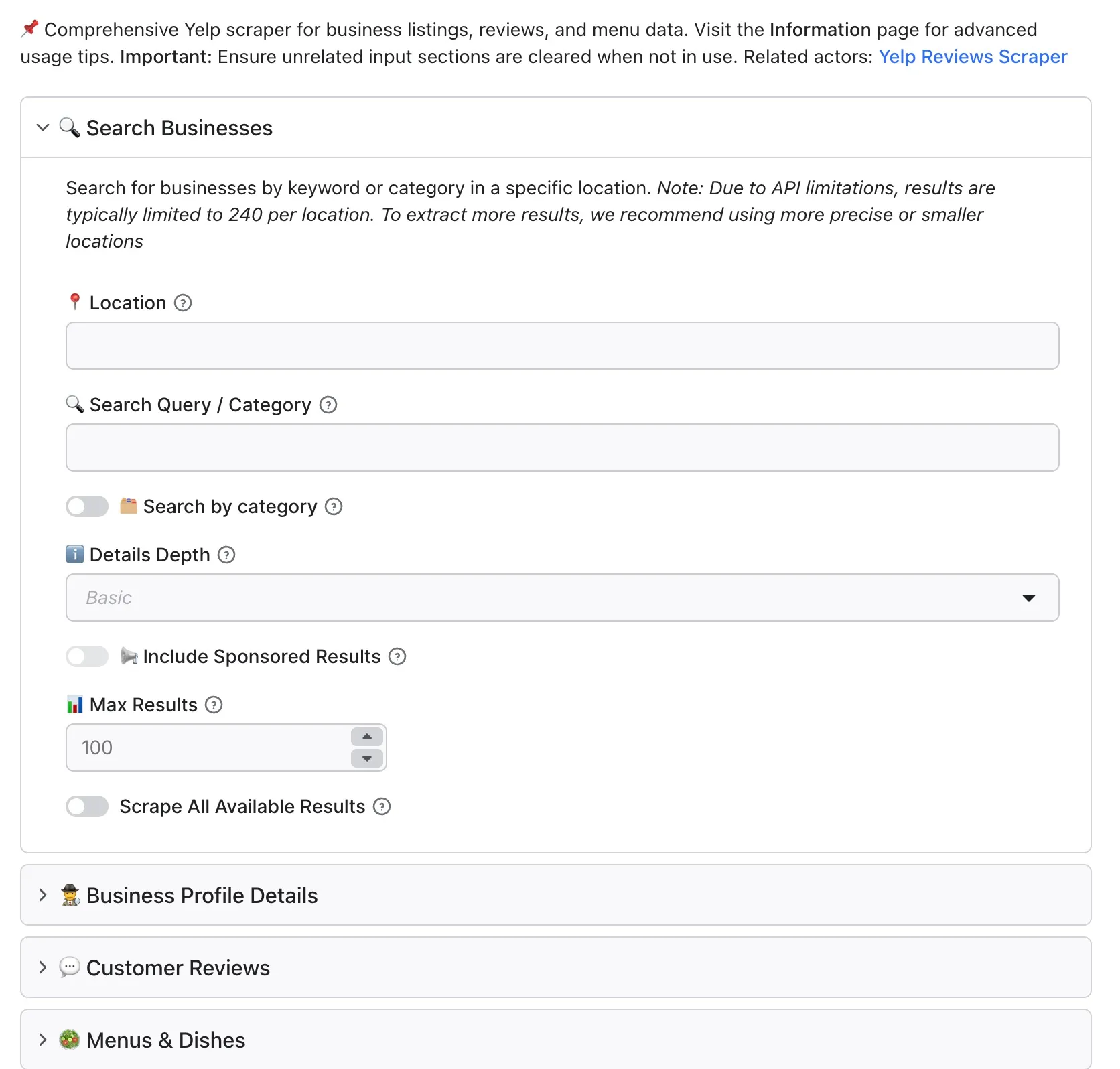
- Set your Search: Enter a keyword (e.g., "Pizza") and a location (e.g., "Brooklyn, NY").
- Choose Detail Depth: Select Basic for quick listings or Advanced for full profile metadata.
- Target Specific Profiles: (Optional) Paste a list of Yelp URLs or IDs to target specific businesses.
- Configure Reviews/Menus: Set your limits and filters for reviews or dish extraction.
- Run & Download: Hit the Start button and wait for the run to finish.
- Export your Yelp data as JSON, CSV, or Excel in seconds.
Input
Yelp Ultimate Scraper has multiple input options, including search keywords + locations, detail depth, direct Yelp business URLs, and review/menu configuration. Click on the Input tab in Apify Console for a full description of all fields.
The Business Profile Details (businessUrl), Customer Reviews (reviewsUrl), and Menus & Dishes (businessUrlMenu) inputs each accept at most 5 URLs or IDs per run, including mixed lists of URLs and IDs. The limit applies to the supplied list before deduplication. Larger lists are rejected before any API requests are made. Split larger lists into runs of up to 5 items.
Duplicate references are processed once within each list. Equivalent Yelp profile URLs with tracking parameters, fragments, trailing slashes, or different http/https and www forms are treated as the same business. Numbered business slugs remain distinct. A business can still appear in separate lists to request different data, such as details and reviews.
Output
You can download the dataset extracted by Yelp Ultimate Scraper in various formats such as JSON, HTML, CSV, or Excel, or access it programmatically via the Apify API. Depending on the section you are scraping, the Actor will deliver specific data structures.
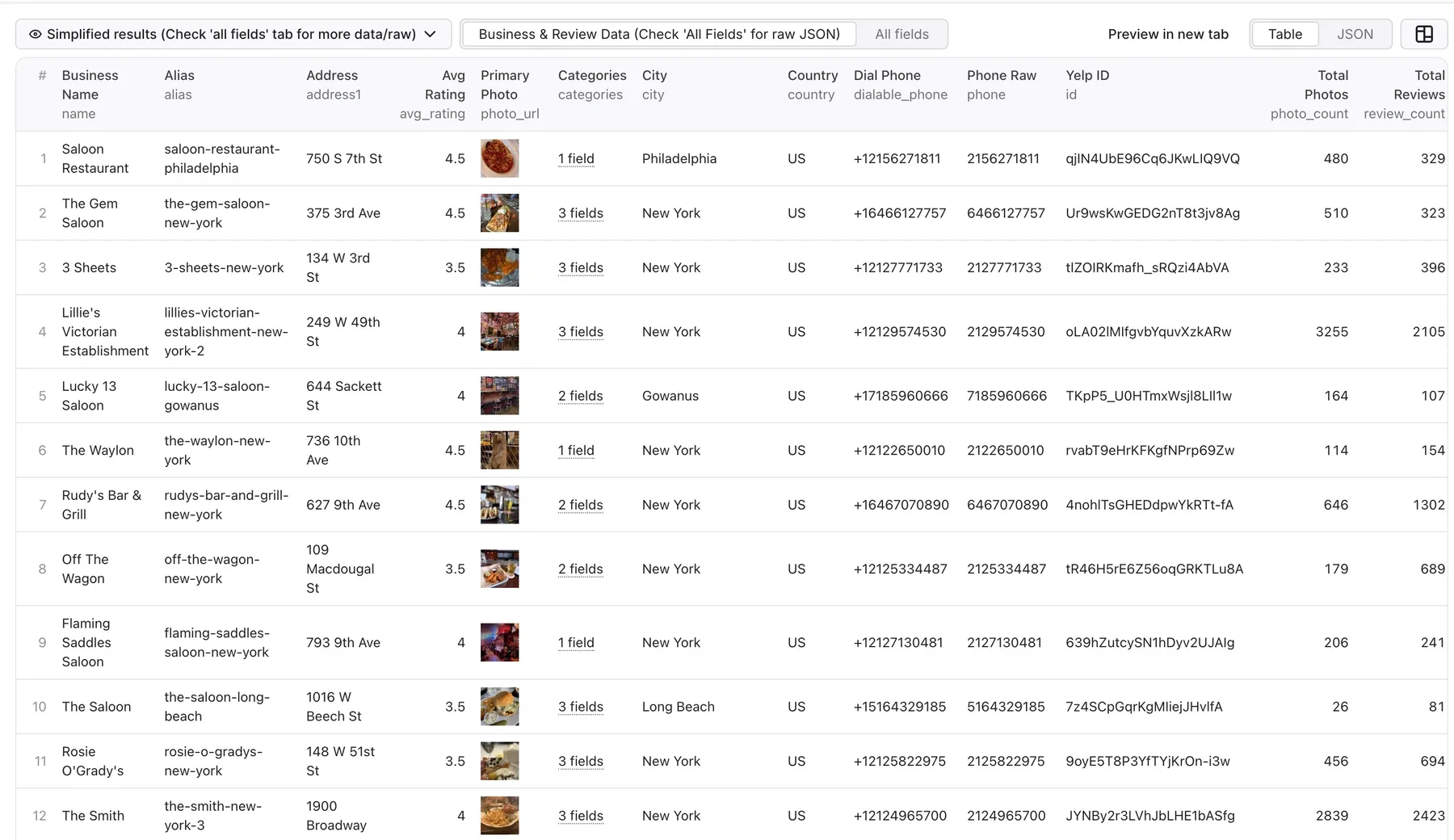
1. Search Results (Basic Depth)
Perfect for quick lead generation and listing discovery.
2. Business Details (Advanced Depth)
Exhaustive metadata including attributes, hours, and full image galleries.
3. Customer Reviews
Detailed review objects with author metadata and business replies.
4. Menu & Popular Dishes
Structured culinary data extracted directly from business profiles.
Menu Item:
Popular Dish:
Pricing
How much will it cost to scrape Yelp?
This Actor uses pay-per-event pricing.
| Charge | Free plan | Bronze-Diamond plans |
|---|---|---|
| Actor start | $0.01 | $0.01 |
| Dataset item (including confirmed not-found records) | $0.005 per result | $0.00075 per result |
The Actor start event is charged according to memory, at one event per GB with at least one event per run. The final cost depends mainly on how many business, review, menu, or dish records are saved. Apify requires a maximum-charge limit of at least $0.10 per run; this is a spending cap, not a minimum fee. Start with a focused location and a small result limit, then check the Actor's Pricing tab before a large run.
Missing businesses and failed requests
A confirmed missing business produces a billable dataset item at the same per-item price as a successful result. This covers the API lookup even when the supplied business does not exist. Successful records keep their existing format; missing-business records look like:
For an input business ID, the record uses businessId instead of url. These fields are visible in the dataset table. A missing business is confirmed by a 404 from a single-business details lookup, initial review lookup, or URL-to-ID lookup; an explicit BUSINESS_NOT_FOUND response; or the provider's exact response {"Error":"Error making request: 'businesses'"} from an individual details lookup, initial review lookup, or URL-to-ID lookup. Each confirmed missing-business lookup produces one billable record; requesting both reviews and menus for the same missing business produces two records. A generic batch failure cannot identify which IDs are missing, so it does not create individual not-found records. Empty responses, empty review lists, missing menus, malformed JSON, and other provider errors do not establish that a business is missing and do not produce billable error records.
All API requests share a limit of 10 request starts per second, spaced at least 100 milliseconds apart, with at most 10 requests in flight per run. The same limit applies to search, business details, reviews, URL-to-ID lookups, menus, popular dishes, pagination, and retries.
Temporary network failures, timeouts, HTTP 408/429, and HTTP 500/502/503/504 are retried at most twice, with 1-second and 2-second backoff. Each request has a 30-second timeout, starting when the request is sent. On HTTP 429, the Actor pauses all new API requests for the Retry-After delay, or the current retry backoff if no valid delay is provided. If the provider requires a wait longer than 60 seconds, the affected request is not retried, but other queued requests still respect the full pause. Permanent errors and confirmed missing businesses are not retried. HTTP 401/403 cancels queued requests and fails the run after already-started requests settle.
Tips for extracting maximum results
To avoid spending resources during a provider outage, the Actor stops new API work after five consecutive failed requests, counting each request once after its applicable retries finish. Successful responses (including legitimate empty results), confirmed missing-business responses, and permanent non-provider errors reset the streak. Provider failures include network/timeouts, exhausted rate-limit or server errors, malformed JSON, and explicit API error responses without usable data. If the cutoff is reached, queued requests and further retries are cancelled, already-started requests are allowed to settle, and the run fails with a clear message. Results already saved remain available; provider failures do not create billable error records.
Overcoming the 240-result limit
Due to internal limitations on the source side, Yelp search results are typically capped at 240 listings per location.
Pro Tip: To extract more than 240 results for a large city (like "New York"), use more precise locations such as specific neighborhoods (e.g., "SoHo, NY", "Williamsburg, NY") or individual ZIP codes. This allows the scraper to "zoom in" and uncover the full list of businesses.
Other Yelp Scraping Tools
If you only need customer reviews from known Yelp business URLs or IDs, use Yelp Reviews Scraper. It provides focused review extraction with sorting, rating filters, and pagination.
Is it legal to scrape Yelp?
Our scrapers are ethical and do not extract any private user data, such as email addresses, gender, or location. They only extract what the user has chosen to share publicly. We therefore believe that our scrapers, when used for ethical purposes by Apify users, are safe. However, you should be aware that your results could contain personal data. Personal data is protected by the GDPR in the European Union and by other regulations around the world. You should not scrape personal data unless you have a legitimate reason to do so.
If you're unsure whether your reason for scraping Yelp data is legitimate, consult your legal counsel. You can also read Apify’s blog post on the legality of web scraping.
Support & Feedback
We are constantly improving the Yelp Ultimate Scraper. If you encounter bugs, have feature requests, or need a custom solution for your specific business case, please reach out via the Issues tab in the Apify Console. Check out similar scrapers on the Apify Store.


