Oct 30, 2026
Apify Store API: new search backend and breaking changes
New
API
Actor
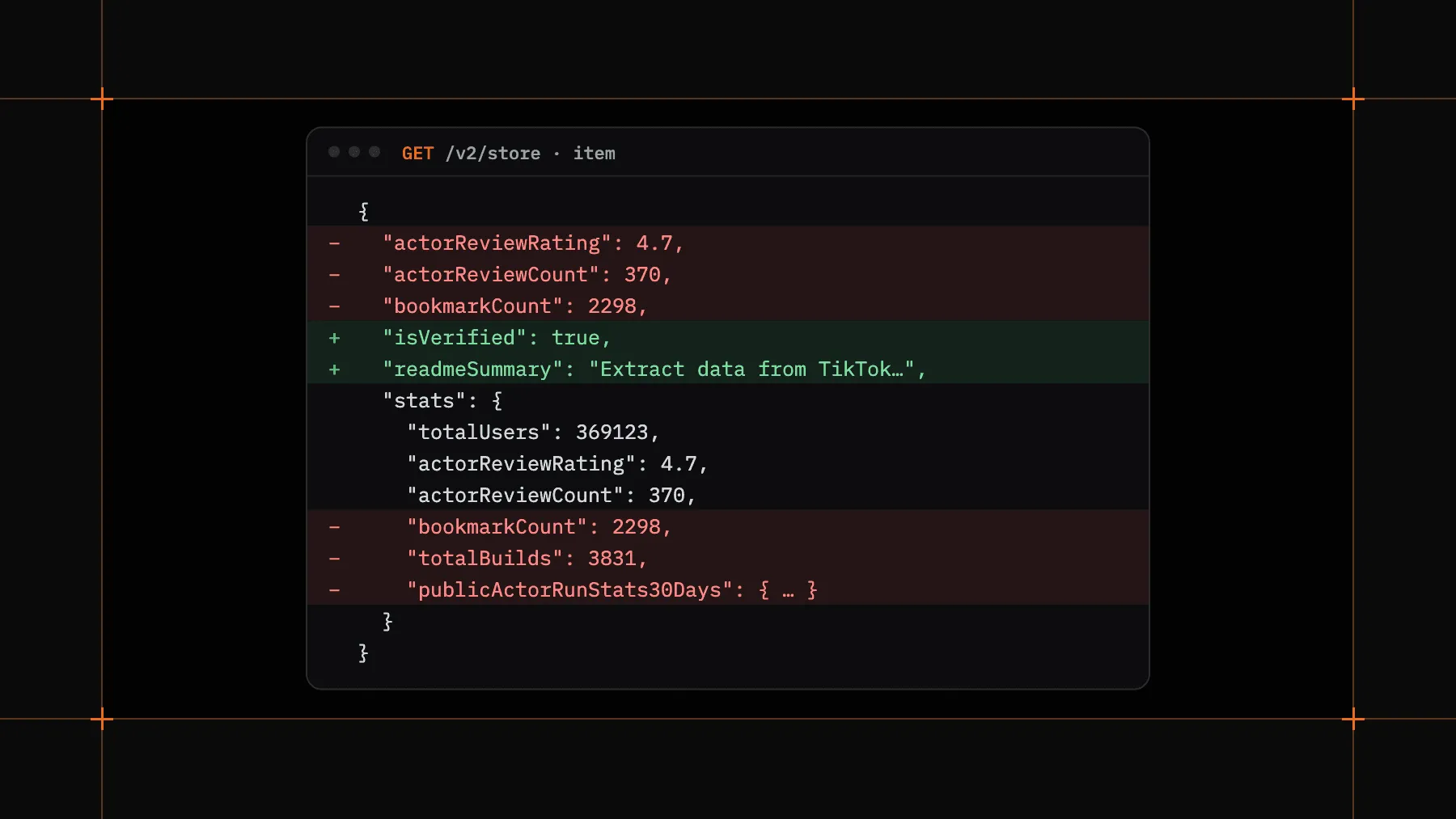
On November 15, GET /v2/store in the Apify API moves to a new search backend. This includes calls through apify-client and the Apify MCP server.
Search ranks Actors by how well they match the query and returns one page of the closest matches. Responses also drop fields that added noise to agent context. Both changes can break existing integrations.
The path, the search parameter, and the { data: { items, total, count, offset, limit, desc } } response envelope stay the same.
When you pass a search query
Listing without search keeps paging and accurate totals. With search:
One page only, with a maximum of 100 items. limit is capped at 100 (it was 1,000), offset is ignored without an error, and there's no second page. Filter your results with category, username, or pricingModel instead of paging.
total and count change meaning. Both now equal the number of items returned, not the number of matches. A loop that fetches until offset >= total stops after one request.
New ranking. The order and the set of results differ from before. For authenticated calls, ranking is personalized to your account. Results are cached for 5 minutes.
All calls
sortBy is ignored. The API still accepts it without an error, but it has no effect. Search results come back by relevance, and listings without search come back in Apify Store order. Sort on your side if you need a specific order.
category values changed. category now takes comma-separated category IDs, case-insensitive, and an Actor must match all of them. Old keys such as SOCIAL_MEDIA still work, and an unknown value returns a 400 error. Categories are assigned automatically from a larger list, so the same category can return different Actors than before.
Item fields changed
- Removed from the top level:
bookmarkCount,actorReviewCount, andactorReviewRating - Removed from
stats:bookmarkCount,publicActorRunStats30Days,totalBuilds,totalMetamorphs, andlastRunStartedAt - Ratings stay in
stats.actorReviewRatingandstats.actorReviewCount - Added:
isVerifiedandreadmeSummary categoriesreturns the new category IDscurrentPricingInfocontains onlypricingModel, plus event prices for pay-per-event Actors- Missing
title,description, andreadmeSummaryvalues are now empty strings ('') pictureUrl,userPictureUrl,userFullName,notice,badge,isWhiteListedForAgenticPayments,stats.totalRuns,stats.totalUsers7Days,stats.totalUsers30Days, andstats.totalUsers90Daysmay be absent
Agent format. With responseFormat=agent, stats.bookmarkCount is removed. stats now contains totalUsers, actorReviewRating, and actorReviewCount.
Filter fixes. allowsAgenticUsers now filters results (it was ignored before). pricingModel and allowsAgenticUsers can lag behind recent pricing changes until the owner next edits the Actor. includeInputSchema=true still caps limit at 10.
- Replace paging through
searchresults with filters:category,username, orpricingModel. You get up to 100 items on one page. - Expect
totalto equal the items returned when you usesearch, not all matches. - Sort results on your side instead of with
sortBy. - Check your
categoryvalues against the new category IDs. - Read ratings from
stats, and remove any use ofbookmarkCountand the other removed fields.
See the GET /v2/store API reference for every parameter and field, or contact support with questions.