May 4, 2026
Full-permission Actors now require approval
New
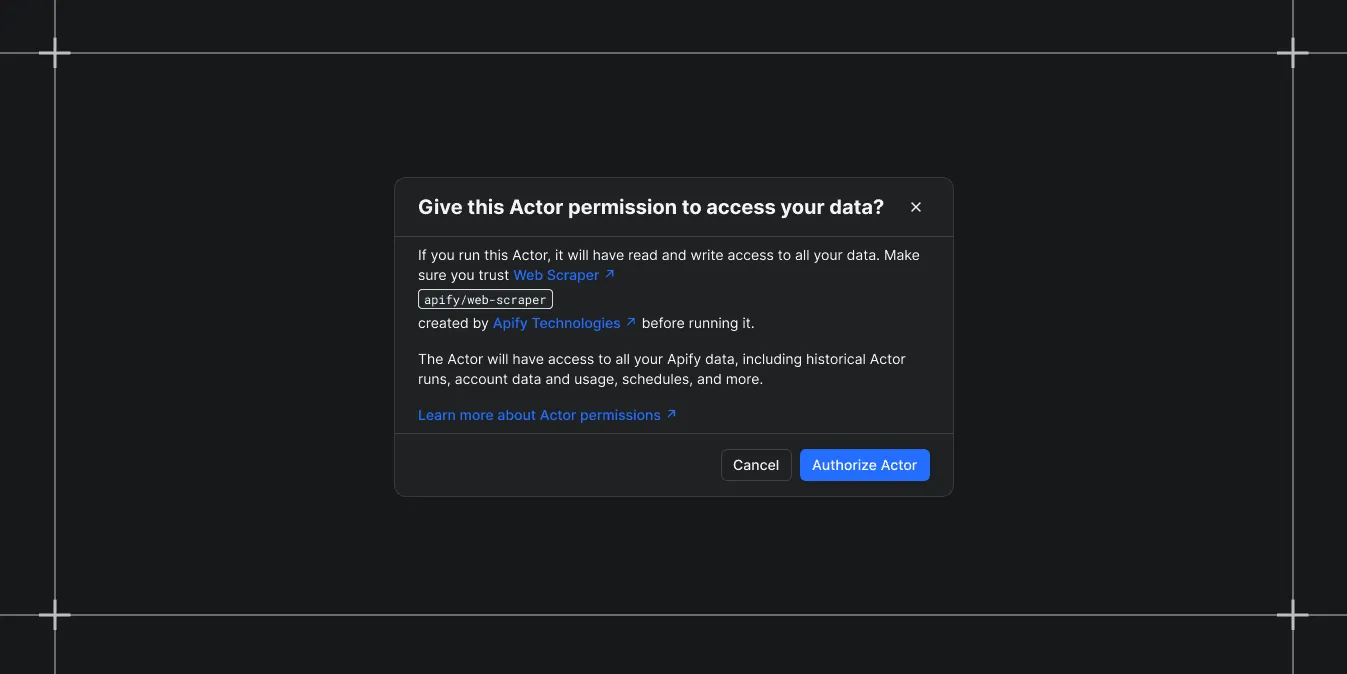
After launching Actor permissions , we continue to adopt least-privileged access and stricter defaults, improving security for both users and AI agents. The first time you run a full-permission Actor, you'll see a one-time confirmation modal explaining what it can access. Once approved, subsequent runs go through without further approval.
This applies everywhere a full-permission Actor can be invoked: Apify Console, the Apify API, the Apify CLI, schedules, and webhooks. Limited-permission Actors are unaffected.
When you're running Actors from Apify Store, in some cases you might be prompted to approve an Actor before its first run.
No approval is required when running:
- Limited-permission Actors: no extra step needed.
- Your own Actors, regardless of their permission level.
- A full-permission Actor you've already used: your prior runs count as an implicit approval.
- A full-permission Actor calling or metamorphing into another: by approving the first Actor, you're trusting it with all its actions, including calling or metamorphing into other Actors.
Permission approval is required when:
- You run a full-permission Actor you haven't used yet: you'll see a one-time confirmation modal in Apify Console.
- A full-permission Actor's developer changes its permission level: your prior approval is revoked, and you'll be asked to approve again on the next run.
- You call a full-permission Actor via the Apify API, CLI, or MCP for the first time: the request fails with an error code
403and anapprovalUrlpointing to approve the run in Apify Console.
Full-permission Actors receive unrestricted access to your Apify account. With AI agents now routinely running Actors on your behalf, an explicit human approval step is the simplest way to make sure your account isn't exposed to anything you wouldn't have run yourself.
If you build Actors, this is also a strong nudge to migrate to limited permissions wherever possible. Actors with limited permissions are easier to trust, friendlier to AI agents, and don't trigger an approval step for users.
When you start a full-permission Actor in Apify Console that you haven't run before, a confirmation modal asks you to review what the Actor can access and approve it. You can also approve an Actor up front via the three-dot menu on the Actor detail screen.
If you call an unapproved full-permission Actor through the API (or any non-Console path), the request fails with a 403 and an approvalUrl pointing to the Actor's page in Apify Console:
Approval can only be granted in Apify Console - not through the API. This is intentional: it prevents AI agents and automation from approving full-permission Actors on your behalf.
If you'd rather not be prompted, you can opt out under Settings → Login & Privacy → Actor permission approval → Skip approval. We recommend leaving the default on; when you skip the approval, any full-permission Actor can run under your account without explicit consent. Only disable this if you understand the risk, especially if AI agents run Actors from your account.
You can learn more about Actor permissions in the docs.