


Best Video Downloader
Pricing
Pay per event
Best Video Downloader
💎 $0.25/video any length 🚀 Download videos from 1000+ sites in 4K — TikTok, YouTube, Instagram, Twitter — no watermark, with title, thumbnail, and top comments.
Pricing
Pay per event
Rating
5.0
(1)
Developer

CheapGET
Actor stats
8
Bookmarked
149
Total users
7
Monthly active users
8 hours ago
Last modified
Categories
Share
Best Video Downloader - Download Videos from YouTube, TikTok & More



Download videos from 1000+ platforms in up to 4K — cheap and fast, with no login required and no subscription.
🏆 Key Features
🌍 Works with 1000+ Sites
-
🎯 1000+ Supported Sites: Save videos from YouTube, TikTok, Instagram, Twitter/X, Facebook, Vimeo, Dailymotion, and many more.
-
🔄 Clean Results: All video details come in a consistent format — same fields every time, no matter the platform.
-
📦 Download or Just Check: Choose to download the video file or just get the video info without downloading.
-
⚡ One Video at a Time: Each run handles one video URL for simple, reliable results every time.
📊 Full Video Details
-
📊 Video Info: Get the title, description, duration, publish date, platform, and video ID.
-
👤 Author Info: See the uploader's name, profile link, and platform ID when available.
-
📈 Engagement Stats: Check views, likes, dislikes, shares, and total comment counts.
-
📝 Comments Included: Set
max_commentsabove0to get the top comments along with the video info. -
🖼️ Thumbnail: Get the full-size thumbnail image link for every video.
🎯 Flexible Options
-
🎬 Quality Selection: Choose
high(4K),medium(720p),low(480p), ormetadata(info only — no download). -
💬 Comment Control: Keep
max_commentsat0to skip comments, or set a number to grab the top ones. -
💰 Check First, Download Later: Start with
metadatamode to preview the video info before paying for a full download. -
🛡️ Reliable Downloads: Automatic retries across multiple connections to handle tricky platforms.
💰 Pricing
| Resource | Cost | Description |
| --------------- | -------- | --------------------------------------------------------------------------------------------------- |
| Actor Usage | $0.00001 | Charged for Actor runtime, proxy and storage. Cost depends on resource consumption during execution |
| Metadata | $0.05 | Charged for getting video info. One-time fee per video processed without download |
| Download | $0.25 | Charged for video file download and storage. One-time fee per video downloaded |
Example Cost Calculation:
-
Getting info from 10 videos
-
Cost: (10 × $0.05) = $0.50 + runtime fees
Example with Download:
-
Downloading 5 videos in high quality
-
Cost: (5 × $0.25) = $1.25 + runtime fees
🎯 Use Cases
Download Videos to Watch Offline
Save your favorite videos from YouTube, TikTok, Instagram, and other platforms to watch anytime — even without an internet connection.
Save Videos for Content Creation
Download source videos to use in your own edits, compilations, reactions, or social media reposts.
Check Video Stats
Look up views, likes, comments, and other engagement numbers for any public video without downloading it.
Keep a Personal Video Library
Build your own collection of videos, tutorials, music videos, or educational content with full details saved alongside each file.
Save Videos as Evidence
Download and save public videos with full details and timestamps for record-keeping, fact-checking, or documentation.
🌟 Why Choose This Actor
Built for video lovers, content creators, and curious users, this Actor lets you download and save online videos with all the details you need — fast and affordable.
| Feature | Best Video Downloader | Online Converters | Browser Extensions | Premium Services |
| :---------------- | :-------------------- | :---------------- | :----------------- | :--------------- |
| Pricing Model | ✅ Pay per use | ⚠️ Ads/Limits | ⚠️ Subscription | ❌ Monthly plans |
| Platforms | ✅ 1000+ sites | ⚠️ 5-10 sites | ⚠️ 3-5 sites | ⚠️ 20-50 sites |
| Quality | ✅ Up to 4K | ⚠️ 720p max | ⚠️ 1080p max | ✅ 4K support |
| Video Info | ✅ Full details | ❌ Not available | ❌ Not available | ⚠️ Basic only |
| Comments | ⚠️ Supported sites | ❌ Not supported | ❌ Not supported | ❌ Not supported |
| API Access | ✅ Full API | ❌ Not available | ❌ Not available | ⚠️ Limited API |
| Automation | ✅ Instant | ❌ Manual only | ❌ Manual only | ⚠️ Complex setup |
🚀 Quick Start
-
Enter your video URL — Paste any public video link from YouTube, TikTok, Instagram, Twitter/X, or 1000+ other platforms.
-
Click Start — Choose your quality (4K, 720p, 480p, or info only) and hit the Start button.
-
Download your results — Get the video file and full details in seconds. Export to JSON, CSV, or Excel.
💻 Input Parameters
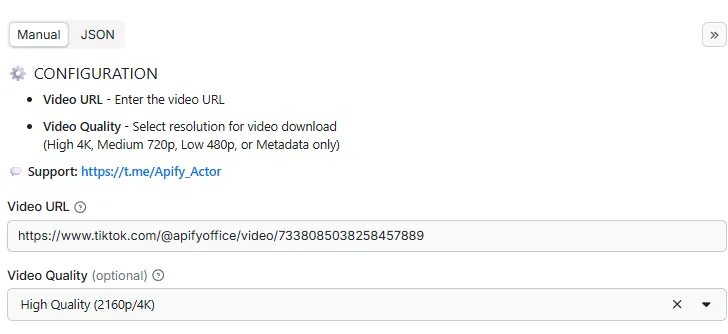
| Parameter | Type | Required | Description |
|---|---|---|---|
video_url | string | ✅ Yes | Enter the video URL |
video_quality | string | ❌ No | Choose the video quality for download: High (4K), Medium (720p), Low (480p), or Metadata only |
max_comments | integer | ❌ No | Maximum number of comments to get. Set to 0 to skip comments |
📝 Example Input
📤 Output Structure
| Field | Type | Description |
|---|---|---|
processor | string | URL of the Apify actor that processed this data |
processed_at | string | ISO 8601 formatted timestamp (UTC) when the data was processed |
id | string | Unique video identifier from the source platform |
thumbnail | string | Direct link to the source platform thumbnail image |
platform | string | Source platform where the video was hosted |
title | string | Video title |
description | string | Full video description or caption |
duration | number | Video length in seconds |
published_at | string | ISO 8601 timestamp of when the video was published |
author | string | Username or display name of the video creator |
author_id | string | Unique identifier of the video creator on the platform |
author_url | string | Direct link to the creator's profile page |
categories | array | List of categories assigned to the video |
tags | array | Hashtags and keywords associated with the video |
view_count | number | Total number of video views |
like_count | number | Total number of likes or favorites |
shares_count | number | Number of times the video has been shared or reposted |
dislike_count | number | Total number of dislikes (if available) |
comment_count | number | Total number of comments on the video |
width | number | Video resolution width in pixels |
height | number | Video resolution height in pixels |
fps | number | Video frame rate (frames per second) |
audio_title | string | Title of the audio track or background music |
audio_artist | string | Artist name of the audio track or background music |
comments | array | List of video comments with author, text, likes, and timestamp, limited by max_comments when set |
video | string | Direct download link to the stored video file when video download is enabled |
📤 Example Output
🔌 Integrations
Connect this actor to your favorite tools and services with the Apify API.
🐍 Python SDK
🟨 JavaScript / Node.js SDK
🌐 REST API (curl)
Ⓜ️ Make.com Integration
Get Started with Make.com (1000 Free Credits) 🎁
🎱 N8N.io Integration
Open Source Workflow Automation ⚡
📚 API Documentation
-
Python Guide - Step-by-step Python examples
-
JavaScript Guide - Node.js integration guide
🏗️ Metadata (JSON-LD)
🚀 Performance Tips
Get the best results for the least cost with these simple tips:
💰 Save Money
-
Check First: Start with
metadatamode ($0.05/video) to make sure the video works before downloading ($0.25/video) -
Skip Comments by Default: Keep
max_commentsat0unless you actually need the comments -
One at a Time: This Actor handles one video per run — start multiple runs if you need more
⚡ Speed Tips
-
Info Only is Fastest: Use
metadatamode when you just want the video details without the file -
Lower Quality = Faster: Choosing
lowormediumquality downloads much faster thanhigh -
Fewer Comments = Faster: Set a small
max_commentsvalue when you only need a sample
🛡️ Best Results
-
Public Videos Only: Only publicly available videos can be downloaded — private or age-restricted content won't work
-
Fresh Info: Views, likes, and comment counts are captured at the time of your request
-
Budget Control: Set
ACTOR_MAX_TOTAL_CHARGE_USDenvironment variable to cap your spending -
Automatic Retries: Failed downloads are automatically retried with different connections
❓ FAQ
How many videos can I download at once?
This Actor handles one video URL per run. For more videos, just start multiple runs at the same time — it's easy to scale up.
Why are some stats or comments missing?
Not every platform shows all the same info. Some videos have view and like counts but no dislikes or shares. If max_comments is set to 0, comments are skipped entirely.
How long does it take?
It depends on the platform and quality you choose. Getting just the video info (metadata mode) is usually the fastest. Full downloads in high quality take longer, especially for long videos.
Why is the quality different from what I picked?
The quality setting is a preference. If the platform doesn't have a 4K version, you'll get the best quality available for that video.
How do I save results to Excel?
After the run finishes, go to the Output tab in the Apify Console. Click Export and choose Excel format. CSV and JSON are also available.
How do I get comments for a video?
Set max_comments to any number above 0. For YouTube, the limit is applied during the download. For other platforms, all available comments are collected and trimmed to your limit.
What formats can I save results in?
Video details come in JSON format by default. You can also save them as CSV or Excel using Apify's built-in export tools.
Is this free to use?
There's no subscription. Runtime is billed at $0.00001, checking video info costs $0.05 per video, and downloading a video costs $0.25. No hidden fees.
🏷️ SEO Keywords
🔍 Primary Keywords: best video downloader, download videos online, save videos from youtube, tiktok video downloader, instagram video saver, twitter video downloader, 4k video downloader, free video downloader
📝 Long-Tail Keywords: how to download youtube videos for free, download tiktok videos without watermark, save instagram reels to phone, best way to download twitter videos, download videos from any website, get video with comments and details, download hd videos online, save youtube shorts offline
🏢 Industry Keywords: video download tool, online video saver, social media video downloader, multi-platform video downloader, video saver with comments, video download with thumbnail, video info checker, video details lookup
📍 Location Keywords: download youtube videos worldwide, international video downloader, global video saver, multi-language video downloader
💡 Use Case Keywords: save videos for offline viewing, download videos for content creation, check video stats online, build personal video library, save tutorial videos, download music videos, save lecture recordings, video evidence collection
⚖️ Legal & Compliance
This actor collects publicly available data only. It does not bypass authentication, access private content, or violate platform terms of service. You are responsible for:
-
Data Rights: Ensuring you have permission to collect and use the collected data
-
Privacy Compliance: Adhering to GDPR, CCPA, and other applicable privacy laws when processing data
-
Platform Terms: Respecting the platform's terms of service and usage policies
-
Ethical Use: Using collected data responsibly and in compliance with applicable laws
🔗 Related Actors
💼 Jobs
-
Best Job Search - Search jobs across LinkedIn, Indeed, Glassdoor, and regional platforms — all in one place.
-
Glassdoor Job Search - Find Glassdoor jobs with salary ranges, company ratings, and reviews.
-
Indeed Job Search - Search Indeed for jobs with salary info, company details, and application links.
-
LinkedIn Job Search - Find LinkedIn jobs with company info, seniority levels, and applicant counts.
🎬 Videos
-
Best Video Downloader - Download videos from 1000+ platforms with quality control and thumbnails.
-
TikTok Video Downloader - Download TikTok videos without watermarks with full video details.
-
YouTube Video Downloader - Download YouTube videos in multiple qualities with comments and thumbnails.
-
Video Subtitles Downloader - Get subtitles from any video as downloadable text.
-
TikTok Live Recorder - Record TikTok live streams with creator and engagement info.
-
TikTok Video Lookup - Get full TikTok video details with hidden SEO data and music info
-
YouTube Niche Scraper - Find YouTube videos by keyword and get channel details, contact info, and stats.
-
Video To Text - Convert video and audio content into searchable text with timestamps.
-
Instagram To Text - Convert Instagram video content into text for captioning and repurposing.
📱 Social Media
-
Instagram Explore - Get trending Instagram Explore posts with topic labels, media links, and engagement counts.
-
Instagram Post - Get recent Instagram posts from any public profile with captions and media.
-
Instagram Profile - Check any Instagram profile for bio, followers, business info, and more.
-
Social Media Marketing - Generate ready-to-post marketing content with multiple tones and formats.
-
Reddit User Profile - Look up Reddit user profiles with karma, trophies, and activity info.
-
Reddit Community Profile - Get subreddit info including rules, descriptions, and pinned posts.
-
Reddit Community Post - Browse posts from any subreddit with comments and engagement stats.
-
Reddit Post Search - Search Reddit posts by keyword with comments and engagement info.
-
Reddit Community User - Find active users in any subreddit with profile details.
-
Telegram Group Member - Get member profiles from public Telegram groups.
-
Telegram Channel Message - Read Telegram channel messages with media, views, and reactions.
-
Telegram Profile - Look up Telegram profiles for users, groups, bots, and channels.
-
Google Business Profile - Find Google Business listings with reviews, ratings, photos, and contact info.
-
X Community Profile - Get X community info including membership, creator, and activity details.
-
X User Profile - Look up X user profiles with followers, verification, and pinned content.
-
Find Anyone On LinkedIn - Search for people on LinkedIn by name, company, or job title.
-
Find Any Company On LinkedIn - Look up any company on LinkedIn with employee count, industry, and details.
🏠 Real Estate
-
Zillow Real Estate - Search Zillow listings with pricing, photos, valuations, and property details.
-
US Real Estate - Find U.S. property listings with pricing, specs, agent details, and market data.
🤝 Support & Community
📧 Support: Contact Us 💬 Community: Telegram Group
Last Updated: April 22, 2026


