


Telegram Profile
Pricing
Pay per event
Telegram Profile
Look up any Telegram user, bot, channel, or group — premium status, verification, member counts, and privacy settings. Search many at once.
Pricing
Pay per event
Rating
3.8
(4)
Developer

CheapGET
Actor stats
15
Bookmarked
473
Total users
22
Monthly active users
3 hours ago
Last modified
Categories
Share
Telegram Profile - Find Any Telegram User, Bot, Channel or Group



Find any Telegram profile — users, bots, channels, and groups — fast and cheap, with 50+ details per result.
Search public Telegram profiles and get identity details, verification badges, member counts, privacy settings, and channel or group info. Just paste usernames, @handles, or t.me links — up to 1,000 per run — and get results in seconds. No login required and no Telegram account needed.
🏆 Key Features
👤 User & Bot Lookup
-
🎯 Identity Details: Get first/last names, phone numbers (if public), language codes, and permanent unique Telegram IDs.
-
👑 Premium & Verification: Instantly spot Telegram Premium subscribers and officially verified accounts.
-
🛡️ Safety Flags: See if accounts are flagged as "Scam," "Fake," "Restricted," or "Deleted" to stay safe.
-
🤖 Bot Info: Get bot-specific details including active user counts, commands, menu buttons, and permissions.
📈 Group & Channel Info
-
👥 Membership Numbers: Get total members, online count, admin count, and banned users in real time.
-
📅 Community Details: See creation dates and whether the entity is a regular group, supergroup, or broadcast channel.
-
⚙️ Group Settings: Check "Join to Send" requirements, "Join Request" settings, "Slowmode" configs, and "No Forwards" restrictions.
-
📍 Location Info: Get geographic location data, linked discussion chats, and forum topic structures when available.
🕵️ Privacy & Activity Check
-
⏰ Last Seen Status: See user activity status — "online," "recently," "last week," "last month," or an exact timestamp.
-
📞 Contact Settings: Check if users allow phone calls, video calls, or voice messages.
-
🔒 Access Info: See "Blocked" status and "Contact Requires Premium" settings.
-
📌 Chat Permissions: Check pinned message capabilities, common chat counts, and scheduled message indicators.
⚡ Fast Batch Lookup
-
🚀 Up to 1,000 Profiles: Look up up to 1,000 targets in a single run.
-
🔄 Flexible Input: Paste usernames,
@usernames, ort.me/links — mix and match in one request. -
🛡️ Status Tracking: Each result includes a
statusfield so you know which lookups succeeded and which were not found. -
📊 Consistent Output: Every profile comes back in the same clean format, ready to save or share.
💰 Pricing
| Resource | Cost | Description |
| --------------- | -------- | -------------------------------------------------------------------------------------- |
| Actor Start | $0.00005 | One-time charge when the Actor starts running |
| Actor Usage | $0.00001 | Charged for runtime — minimal cost per run |
| Profile | $0.00269 | Charged per profile found — includes users, bots, channels, and groups with 50+ fields |
Example Cost:
-
Looking up 1,000 Telegram profiles
-
Cost: $0.00005 (Actor Start) + (1,000 × $0.00269) = $2.69 + runtime fees
🎯 Use Cases
👥 Community Safety & Trust Checks
Check usernames, verification badges, scam flags, and group settings before joining communities, approving moderators, or trusting new contacts.
📣 Channel & Group Comparison
Compare member counts, online activity, group settings, and linked chats across multiple Telegram communities in one go.
🔍 Account Verification
Verify Telegram accounts by checking their verification status, Premium badge, creation date, activity status, and safety flags — all from public info.
🌟 Why Choose This Actor
Built for anyone who wants quick, affordable Telegram profile lookups — community managers, researchers, social media enthusiasts, and curious users alike.
| Feature | Telegram Profile | TGStat | Telemetr.io | Manual Lookup |
| :-------------------- | :----------------------- | :--------------- | :--------------- | :--------------- |
| Profile Types | ✅ User/Bot/Ch/Gr | ⚠️ Channels only | ⚠️ Channels only | ✅ One at a time |
| Premium Detection | ✅ Full detection | ❌ Not available | ❌ Not available | ⚠️ Manual check |
| Privacy Check | ✅ Call/Msg settings | ❌ Not available | ❌ Not available | ⚠️ Manual check |
| Data Depth | ✅ 50+ fields | ⚠️ Limited | ⚠️ Basic stats | ⚠️ What you see |
| Batch Lookup | ✅ 1,000 / run | ⚠️ One at a time | ⚠️ One at a time | ❌ One at a time |
| Setup Time | ✅ Instant | ⚠️ Registration | ⚠️ Registration | ✅ None |
| Pricing | ✅ Pay per use | ⚠️ Subscription | ⚠️ Subscription | ✅ Free (slow) |
🚀 Quick Start
-
Enter Telegram Targets — Paste usernames,
@handles, ort.melinks into thetelegram_urlfield (up to 1,000). -
Click Start — Hit the ▷ Start button and wait a few seconds.
-
Download Results — Save your profile results as JSON, CSV, or Excel.
💻 Input Parameters
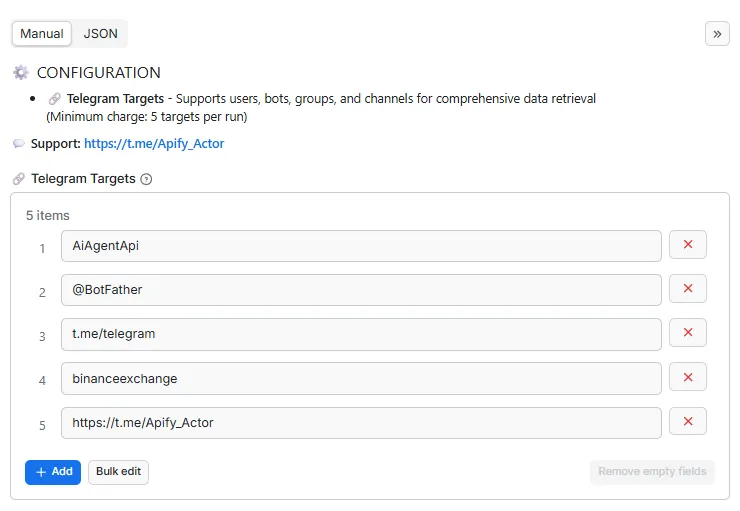
| Parameter | Type | Required | Description |
|---|---|---|---|
telegram_url | array | ✅ Yes | Enter up to 1000 Telegram targets to inspect. Supports usernames, @usernames, and common t.me profile links. |
📝 Example Input
📤 Output Structure
| Field | Type | Description |
|---|---|---|
processor | string | URL of the Apify actor that processed this data |
processed_at | string | ISO 8601 formatted timestamp (UTC) when the data was processed |
status | string | Status of the processing operation (e.g., 'success' or 'not found') |
source_url | string | Original Telegram URL that was processed |
photo_url | string | URL of the downloaded profile photo stored in key-value store |
type | string | Type of Telegram entity (user, bot, channel, supergroup, group) |
id | integer | Telegram entity unique identifier |
usernames | array | List of usernames associated with the entity |
title | string | Title of group or channel |
first_name | string | User's first name (users/bots only) |
last_name | string | User's last name (users/bots only) |
phone | string | User's phone number if publicly visible or accessible (users only) |
lang_code | string | User's language code (users only) |
bot_active_users | integer | Estimated number of active users for the bot when available (bots only) |
bot_has_main_app | boolean | Whether the bot has a main app entry point |
bot_attach_menu | boolean | Whether the bot supports the attachment menu |
attach_menu_enabled | boolean | Whether the attachment menu is enabled for the bot |
bot_nochats | boolean | Whether the bot cannot be added to group chats (bots only) |
bot_inline_placeholder | string | Placeholder text shown when using the bot in inline mode (bots only) |
bot_chat_history | boolean | Whether the bot has access to chat history (bots only) |
bot_can_edit | boolean | Whether the bot can be edited by its developer (bots only) |
bot_business | boolean | Whether the bot is a Business Bot (bots only) |
description | string | User's bio description or group/channel about information |
bot_description | string | Extended bot description text when available (bots only) |
bot_commands | array | List of bot commands and descriptions when available (bots only) |
menu_button_url | string | URL opened by the bot menu button when available (bots only) |
is_premium | boolean | Whether user has Telegram Premium (users only) |
is_verified | boolean | Whether user/channel is verified |
is_scam | boolean | Whether entity is marked as scam |
is_fake | boolean | Whether entity is marked as fake |
is_deleted | boolean | Whether user account is deleted (users only) |
is_support | boolean | Whether user is a support account (users only) |
is_restricted | boolean | Whether entity is restricted |
profile_photo | boolean | Whether entity has a profile photo |
last_seen | string | User's last seen status: 'online', ISO timestamp with timezone, 'recently', 'last_week', 'last_month', 'offline', or 'unknown' (users only) |
is_blocked | boolean | Whether user is blocked (users only) |
premium_contact | boolean | Whether contacting user requires premium (users only) |
phone_calls | boolean | Whether phone calls are available with user (users only) |
video_calls | boolean | Whether video calls are available with user (users only) |
voice_messages | boolean | Whether voice messages can be sent to this user (opposite of voice_messages_forbidden) (users only) |
can_pin | boolean | Whether you can pin messages with user (users only) |
common_chats_count | integer | Number of common chats/groups shared with this user (users only) |
has_scheduled | boolean | Whether there are scheduled messages |
can_manage_emoji | boolean | Whether bot can manage emoji status (bots only) |
private_calls | boolean | Whether phone calls setting is private (users only) |
private_reads | boolean | Whether read dates setting is private (users only) |
personal_channel_id | integer | Telegram ID of the user's associated personal channel (users only) |
birthday | object | User's birthday with day, month, and optional year (users only) |
business_hours | object | Business account working hours with open status and timezone (users only) |
business_location | object | Physical address and coordinates of the business account (users only) |
business_greeting | boolean | Whether the business account has a greeting message configured (users only) |
business_away | boolean | Whether the business account has an away message configured (users only) |
business_intro | object | Business account introduction with title and description (users only) |
join_to_send | boolean | Whether joining is required to send messages (channels/groups only) |
join_request | boolean | Whether join request is required (channels/groups only) |
is_forum | boolean | Whether the group/channel is a forum (channels/groups only) |
no_forwards | boolean | Whether forwarding is restricted (channels/groups only) |
has_location | boolean | Whether group/channel has geographic location (channels/groups only) |
gigagroup | boolean | Whether channel is a gigagroup (channels/groups only) |
slowmode | boolean | Whether slowmode is enabled (channels/groups only) |
created_date | string | ISO timestamp when the group/channel was created (channels/groups only) |
chat_bots | array | Bots detected in the channel/group with basic identity and description fields |
admins_count | integer | Total number of administrators in the group/channel (channels/groups only) |
kicked_count | integer | Total number of kicked members in the group/channel (channels/groups only) |
banned_count | integer | Total number of banned members in the group/channel (channels/groups only) |
member_count | integer | Total number of participants/members in the group/channel (channels/groups only) |
online_count | integer | Current number of online members in the group/channel (channels/groups only) |
paid_messages_available | boolean | Whether paid messages are available in the channel/group |
paid_media_allowed | boolean | Whether paid media can be posted in the channel/group |
stargifts_available | boolean | Whether Telegram stargifts are available for the channel/group |
stargifts_count | integer | Number of stargifts associated with the channel/group when available |
can_view_stars_revenue | boolean | Whether stars revenue is viewable for the channel/group |
slowmode_seconds | integer | Slowmode delay in seconds when enabled for the group/channel |
hidden_prehistory | boolean | Whether message history is hidden for newly joined members |
view_members | boolean | Whether members list is viewable (channels/groups only) |
participants_hidden | boolean | Whether the group/channel hides its participant list from members |
call_active | boolean | Whether a voice/video call is currently active (channels/groups only) |
view_stats | boolean | Whether statistics are viewable (channels/groups only) |
default_banned_rights | object | Default member restrictions applied in the group/channel |
linked_chat_id | integer | Telegram ID of the linked discussion group or associated channel (channels/groups only) |
linked_monoforum_id | integer | Telegram ID of the linked monoforum channel (channels only) |
location | object | Geographic location information if available (channels/groups only) |
🔌 Integrations
Connect this actor to your favorite tools and workflows.
🐍 Python SDK
🟨 JavaScript / Node.js SDK
🌐 REST API (curl)
Ⓜ️ Make.com Integration
Get Started with Make.com (1000 Free Credits) 🎁
🎱 N8N.io Integration
Open Source Workflow Automation ⚡
📚 API Documentation
-
Python API - Complete Python client documentation with examples
-
JavaScript API - Node.js and browser integration guide
🏗️ JSON-LD Metadata
🚀 Performance Tips
Get the most out of your Telegram profile lookups with these tips:
💰 Save Money
-
Focus Your Lookups: Only look up the profiles you actually need — skip duplicates and invalid usernames.
-
Batch Runs: Always include 100+ profiles per run to get the best value from runtime costs.
-
Skip Re-Lookups: For monitoring, only re-check profiles that have changed rather than re-running everything.
⚡ Go Faster
-
Clean Your Input: Use consistent username formats to avoid lookup errors.
-
Split Large Lists: For more than 1,000 targets, split into multiple runs of 1,000 each.
-
Remove Duplicates: De-duplicate your input list before running to avoid wasted lookups.
🛡️ Get Better Results
-
Real-Time Info: Profile data reflects the live state on Telegram at the moment of lookup.
-
Privacy Settings: If a profile returns limited data, the user probably has strict privacy settings.
-
Use Telegram IDs: The
idfield never changes — use it as your primary key since usernames can change.
📊 Best Practices
-
Test First: Run a test with 5 varied targets (User, Bot, Channel, Group) to make sure everything works for your use case.
-
Check Status: Look at the
statusfield in each result —not foundmeans the target could not be resolved. -
Stay Compliant: Respect privacy and make sure your usage follows GDPR, CCPA, and local regulations.
❓ FAQ
How do I look up a Telegram profile?
Just paste usernames, @handles, or t.me links into the telegram_url field and click Start. You can look up users, bots, channels, and groups — all in one run.
Is this free to use?
There is no subscription. Each run starts at $0.00005, Actor Usage is $0.00001, and each profile costs $0.00269. Looking up 100 profiles costs about $0.27.
How many profiles can I look up at once?
Up to 1,000 per run. For larger lists, split them into multiple runs of 1,000 each.
Can I get someone's phone number?
Only if the user has their phone number set to "Public" in Telegram privacy settings. Most users keep this hidden by default.
What is the difference between a Channel and a Supergroup?
Channels are for one-way broadcasts, while supergroups support two-way chats with advanced features. The actor automatically identifies the type for you.
Can I spot fake or scam accounts?
Yes! Telegram's official "Scam" and "Fake" flags are included in every result, along with "Restricted" status for additional safety checks.
How does "Last Seen" work?
Depending on user privacy settings, you'll see "online," a specific timestamp, or a range like "recently," "last_week," or "last_month."
Is the data live?
Yes — profile data reflects the current state on Telegram at the exact moment of your lookup. For ongoing monitoring, schedule periodic runs.
How long does a lookup take?
Most runs complete in under a minute for small batches. Larger runs (500–1,000 profiles) typically finish in a few minutes.
🏷️ SEO Keywords
Primary Keywords: telegram profile lookup, telegram user search, telegram channel info, telegram group lookup, telegram bot check
Long-Tail Keywords: look up telegram user profile online, check telegram channel member count, find telegram bot commands and details, search telegram group settings and info, telegram profile verification check free
Industry Keywords: telegram community check, telegram safety verification, telegram account lookup, telegram premium detection, telegram profile photo finder
🌍 Location Keywords: telegram users united states, telegram profiles uk, telegram user search worldwide, telegram users india, telegram profiles any country, telegram users global
Use Case Keywords: check telegram scam account, find telegram channel creation date, look up telegram user last seen, verify telegram premium status, search telegram group admin count
⚖️ Legal & Compliance
This actor accesses publicly available data only. It does not bypass authentication, access private content, or violate platform security measures. You are responsible for:
-
Data Rights: Ensuring you have the legal right to collect and process the targeted data.
-
Privacy Compliance: Adhering to GDPR, CCPA, and other applicable privacy laws when processing user data.
-
Platform Terms: Respecting Telegram's terms of service and usage policies.
-
Ethical Use: Using profile data responsibly and following community guidelines.
Need help or have compliance questions? Contact us.
🔗 Related Actors
💼 Jobs
-
Best Job Search - Find jobs on LinkedIn, Indeed, and Glassdoor — fast and cheap, with salary info.
-
Glassdoor Job Search - Search Glassdoor jobs with salary ranges, company ratings, and reviews.
-
Indeed Job Search - Find Indeed job listings with salary, location, and company details.
-
LinkedIn Job Search - Search LinkedIn jobs with applicant counts, company info, and salary data.
🎬 Videos
-
Best Video Downloader - Download videos from 1000+ sites — fast, cheap, and easy.
-
TikTok Video Downloader - Save TikTok videos without watermarks with full metadata.
-
YouTube Video Downloader - Download YouTube videos in multiple qualities with comments and metadata.
-
Video Subtitles Downloader - Get subtitles from any video URL as downloadable text files.
-
TikTok Live Recorder - Record TikTok live streams with creator and engagement details.
-
TikTok Video Lookup - Get full TikTok video details with hidden SEO data and music info
-
YouTube Niche Scraper - Find YouTube videos by keyword and get channel details, contact info, and stats
-
Video To Text - Turn any video into searchable text with timestamps and language support.
-
Instagram To Text - Turn Instagram videos into text for captions, notes, and research.
📱 Social Media
-
Instagram Explore - Get trending Instagram Explore posts with topic labels, media links, and engagement counts.
-
Instagram Post - Get recent Instagram posts from any public profile with captions and media.
-
Instagram Profile - Check any Instagram profile for bio, followers, business info, and more.
-
Social Media Marketing - Generate ready-to-post marketing content from any source material.
-
Find Any Company On LinkedIn - Look up any company on LinkedIn with employee counts, locations, and details.
-
Find Anyone On LinkedIn - Look up anyone on LinkedIn with job title, company, education, and contact info.
-
X Community Profile - Look up X community details including members, rules, and activity.
-
X User Profile - Look up any X user profile with followers, verification, and pinned posts.
-
Reddit User Profile - Look up Reddit user profiles with karma, trophies, and activity history.
-
Reddit Community Profile - Get subreddit details including rules, descriptions, and community info.
-
Reddit Community Post - Browse subreddit posts with comments, votes, and author details.
-
Reddit Post Search - Search Reddit posts by keyword with comments and engagement info.
-
Reddit Community User - Find active users in any subreddit with karma and profile details.
💬 Telegram
-
Telegram Group Member - Get member lists from public Telegram groups with profile details.
-
Telegram Channel Message - Get messages from Telegram channels with views, reactions, and media.
-
Telegram Profile - Look up any Telegram user, bot, channel, or group profile.
📍 Local & Real Estate
-
Google Business Profile - Find Google Business listings with reviews, ratings, photos, and contact info.
-
Zillow Real Estate - Search Zillow property listings with prices, photos, and home details.
-
US Real Estate - Find US property listings with prices, specs, and agent contact info.
🤝 Support & Community
📧 Support: Contact Us 💬 Community: Telegram Group 📖 Documentation: View Docs
Last Updated: April 22, 2026


