

Hireology Jobs Monitor & Scraper
Pricing
from $3.60 / 1,000 current job saveds
Hireology Jobs Monitor & Scraper
Get current jobs from known public Hireology career pages, with descriptions and pay when listed. Compare full snapshots to find new, changed and removed jobs.
Pricing
from $3.60 / 1,000 current job saveds
Rating
0.0
(0)
Developer

Cliqto Media
Maintained by CommunityActor stats
0
Bookmarked
2
Total users
1
Monthly active users
15 days ago
Last modified
Categories
Share
Get current job listings from known public Hireology career pages. This Hireology jobs scraper returns descriptions, locations, pay when shown, and links to apply. Save full snapshots to track new, changed and removed jobs.
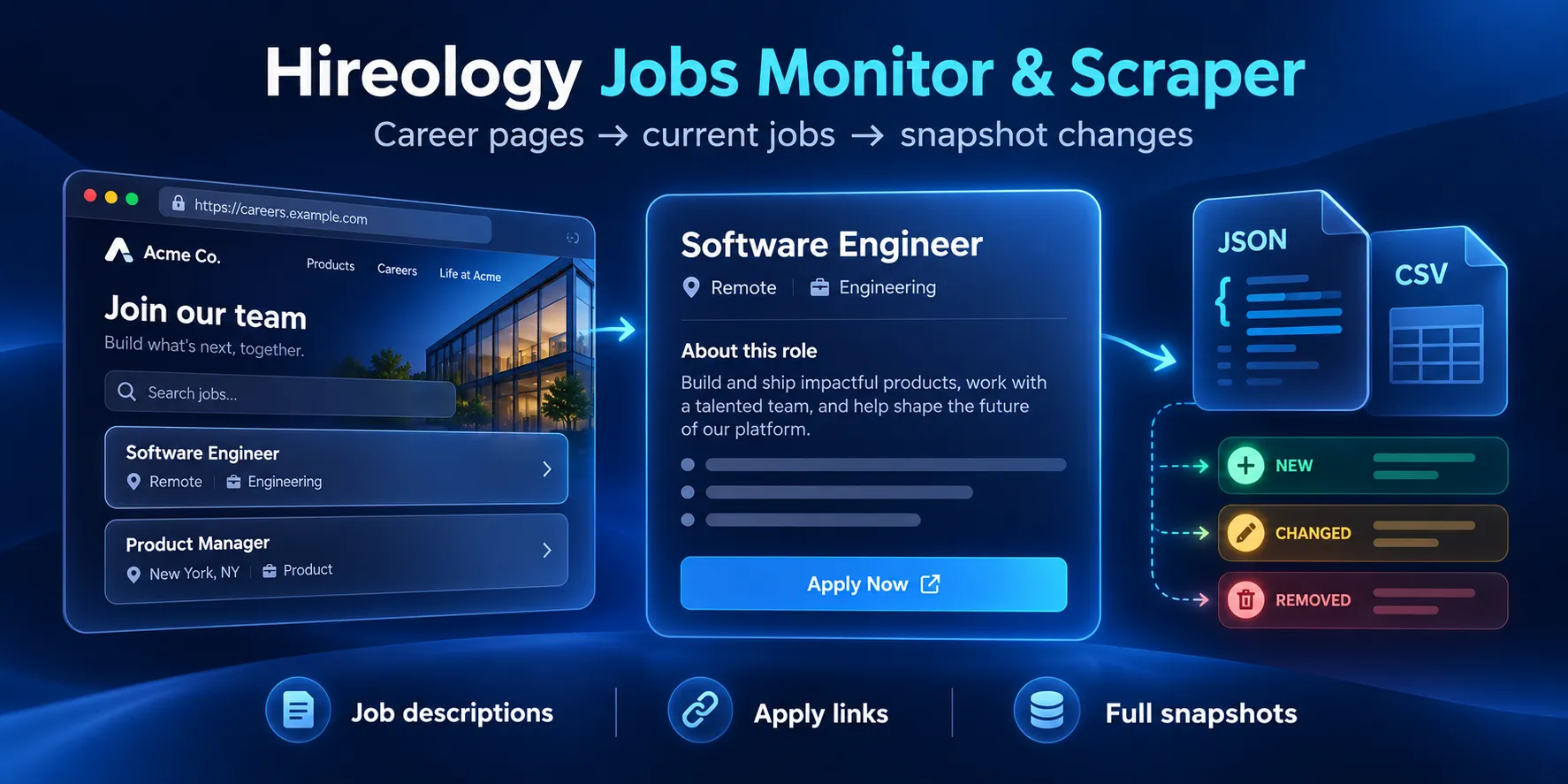
Table of contents
- What it does
- Job data
- Quick start
- Input
- Input examples
- Output example
- Output fields
- Pricing
- Use cases
- Monitoring
- API and integrations
- Limits and partial scans
- Troubleshooting
- FAQ
- Support
What it does
Give it company board URLs such as https://careers.hireology.com/hyattneward. It reads the public job list and returns one current job per Dataset row. A group board can include jobs from child employers. Job links keep the child employer's page.
To compare two runs, copy the first run's SNAPSHOT into previousSnapshot for the next run. The Actor compares every fetched job before the title filter and output limit. It reports removals only for a company with a complete old scan and a complete new scan.
You need known board URLs. The Actor does not find companies by name or search the whole job market. It uses no employer login, candidate records or API key from Hireology.
Job data
Each row includes a job ID, employer, title, locations, employment type, published time and job links. Descriptions come as HTML and plain text. Pay fields are present only when the public page provides them. Currency is null because this source does not give a reliable currency field.
Quick start
- Open Input.
- In
startUrls, enterhttps://careers.hireology.com/hyattneward. - Keep descriptions on and use 256 MB of memory.
- Set a maximum run charge, then click Start.
- Open Dataset for current jobs and
OUTPUTfor scan status.
Our live check returned 10 jobs, including Hotel Director of Sales in Newark, CA. Counts can change as employers edit their boards. Check status and the source total before using the results.
Input
| Key | Type | Required | Runtime default | Allowed values | Effect and advice |
|---|---|---|---|---|---|
startUrls | array of strings | Yes | None; UI prefill is the Hyatt example | 1–10 HTTPS company URLs on careers.hireology.com, with only the company slug in the path | Use exact known boards. No custom domain, query, credentials or job URL. Duplicate boards are read once. |
includeDescription | boolean | No | true | true or false | Include HTML and text in Dataset. Turn off for smaller exports. Descriptions are still read for snapshot comparisons. |
titleKeyword | string | No | "" | Up to 100 characters | Keep titles that contain this text, ignoring case. Empty means all titles. Filter runs still read the full source list. |
maxResults | integer | No | 200 | 1–200 | Limit saved Dataset rows across the run. It does not limit the scan or compact snapshot. Use 1 for a small output test. |
maxJobsPerCompany | integer | No | 200 | 1–200 | Limit jobs scanned per company. The whole snapshot also has a 200-job cap. A board above either cap becomes partial. |
maxRequests | integer | No | 100 | 1–100 | Limit all HTTP attempts, including retries. Keep the default for ordinary scans. Unfinished boards become partial. |
previousSnapshot | object | No | Absent | A SNAPSHOT object from this Actor: version 1, at most 10 companies, 200 jobs and 2 MB | Paste the full object, not Dataset rows. Complete matching companies are compared. Leave absent on the first run. |
Empty input is invalid. Unknown keys and wrong types are rejected. titleKeyword and maxResults reduce rows, but still scan the boards. includeDescription=false changes the export, not the comparison. Scanning caps affect completeness and can stop comparison.
Input examples
Read two known boards
Our check returned 24 jobs and complete snapshots for both boards.
Filter current jobs
The Actor scans the board, saves matching current jobs, and keeps all fetched job IDs in SNAPSHOT. A filter with no matches returns zero Dataset rows and still pays the start fee.
Check changes
Run the first example. In its key-value store, open SNAPSHOT and copy the whole JSON object. Add that object as previousSnapshot to the same input and run again. In CHANGES, each company has new, changed, removed and an unchanged count. An unchanged run still saves current matching jobs and charges for those rows.
Output example
This is a trimmed real row from the Hyatt example. The full row also has descriptions, pay details and scan fields.
Output fields
Dataset: current jobs
| Field | Type / null | Example | Meaning |
|---|---|---|---|
ats | string, never null | hireology | Source platform |
org | string, never null | hyattneward | Input board slug |
company | string, never null | Hyatt Place Newark / Silicon Valley | Employer from the job, which may be a child company |
jobId | string, never null | 2506809 | Public widget ID, also used in the job URL |
globalId | string, never null | hireology:hyattneward:2506809 | ID within this input board; use for deduplication across runs |
title | string, never null | Hotel Director of Sales | Public job title |
department | string or null | General | Public job family; not an inferred team |
employmentType | string or null | FullTime | FullTime, PartTime, Contract, Temporary, Internship or the source label |
isRemote | boolean or null | false | Source remote flag; null if missing |
location | string or null | Newark, CA | First public city/state |
locations | array of strings, never null | ["Newark, CA"] | All public city/state labels; empty if absent |
descriptionHtml | string or null | <p>Director of Sales</p> | Public HTML; null when output descriptions are off. Treat as untrusted HTML. |
descriptionText | string or null | Director of Sales | Plain text; scripts, styles and images omitted |
publishedAt | ISO string or null | 2025-03-24T20:41:19.901Z | Source created time; not a claim that the job is newly opened |
jobUrl | string, never null | See example | Canonical job description page, including a child employer slug |
applyUrl | string, never null | See example | Application page link; no form is submitted |
compensation | object or null | {"min":70000,"max":100000,"period":"year","currency":null} | Source pay range or amount. min/max are numbers or null; period is string or null; currency is null. Null if no positive pay value. |
salaryText | string or null | 70000–100000 / year | Short pay label, without an assumed currency |
contentHash | string, never null | 64 hex characters | SHA-256 of stable public fields, including full descriptions. HTML edits can change it. |
companyTotalJobs | integer, never null | 10 | Source's reported total, even on a partial board |
jobsFound | integer, never null | 10 | Reported total for compatibility; use company summary jobsFound for the actual fetched count |
inputIndex | integer, never null | 0 | Zero-based index after duplicate boards are removed |
scrapedAt | ISO string, never null | 2026-10-04T17:37:00.000Z | Time fetched |
sourceStatus | string, never null | complete | complete or partial for this job's board |
A group board and a child board can show the same job. globalId includes the input board, so jobs across different boards are not merged automatically. Some other scrapers use a different jobId; map by the numeric ID in jobUrl before switching consumers.
Key-value store: scan reports
| Record | Fields and types | Meaning |
|---|---|---|
OUTPUT | schemaVersion: integer; sourceCommit: string/null; status: string; companies: array; savedJobs: integer; snapshotComplete: boolean; comparisonStatus: string; optional reason: string | Overall scan and output status |
RUN_SUMMARY | All OUTPUT fields plus ISO startedAt/finishedAt, integer requests/retries/chargedJobs, boolean cancellation/billingStopped, integer responseBytes/maxResponseBytes, object limits | Attempts, billing counts and stop limits. Some fields are absent when input fails before a scan. |
SNAPSHOT | schemaVersion: 1; generatedAt: ISO string; companies: array of {org:string, complete:boolean, jobs:array} | All fetched IDs/hashes before output filters. A partial snapshot must not be treated as a full board. |
CHANGES | schemaVersion: 1; companies: array of comparison objects | Only matched full board snapshots are compared |
In OUTPUT and RUN_SUMMARY, each company has org (string), status (string), jobsFound (actual fetched integer), reportedTotal (integer/null), pages (integer) and reason (string/null). Null reason means no reported source issue. limits lists maxResults, maxJobsPerCompany, maxRequests, maxSnapshotJobs=200 and maxRuntimeSeconds=180.
Each snapshot job has five strings: globalId, jobId, title, jobUrl, contentHash. The compact snapshot does not keep full descriptions. Each CHANGES company has org, status (baseline, compared, skipped), nullable reason, arrays new/changed/removed of these compact jobs, and integer unchanged. Removed jobs appear here, not as paid Dataset rows. Companies removed from the input are not scanned or compared.
comparisonStatus is baseline without a previous snapshot, compared when every requested company can be compared, and skipped when at least one comparison is unavailable. Read each company's status for mixed cases.
Pricing
The price is $0.06 per start + $0.0036 per saved current job. One start event applies up to 1 GB of allocated memory; larger memory has more start events. Use 256 MB; supported memory is 256–512 MB. Platform usage during the run is included in these event prices. Reading or keeping storage after a run may have separate Apify account costs; see Apify pricing.
| Saved jobs in one run | Start | Job events | Total event price |
|---|---|---|---|
| 0 | $0.06 | $0 | $0.06 |
| 1 | $0.06 | $0.0036 | $0.0636 |
| 10 | $0.06 | $0.036 | $0.096 |
| 100 | $0.06 | $0.36 | $0.42 |
| 182 | $0.06 | $0.6552 | $0.7152 |
These are event calculations, not a promise of a fixed job count. An empty board, missing board, title filter with no matches, or failed scan can still have the start fee. On partial or cancelled runs, saved rows can be billed. Snapshots and change records have no extra event. An unchanged monitor run still saves and bills current jobs.
The default maximum charge is $0.80 per run. You can lower it. If the limit cannot pay for another row, output stops and the run can be partial. RUN_SUMMARY.billingStopped reports an output stop. A completed source snapshot stays complete, so it can still be compared; overall output status is partial. A small output limit does not remove the full scan cost. There is a 200-job scan cap; a 1,000-job run is not supported.
Use cases
| Task | Input | Useful result |
|---|---|---|
| Update a small job board | Known company URLs | Job ID, title, description and application link |
| Watch hiring activity | Same URLs and previous full SNAPSHOT | New, changed and removed entries |
| Review public hotel or dealership roles | URLs and optional title filter | Employer, city, employment type and listed pay |
Monitoring
Keep the same board URLs between checks. Save each complete SNAPSHOT outside the unnamed run storage before its retention period ends. Pass it into the next run. Check CHANGES and company completeness before removing any job from your system. A removal means it is absent from the next full scan; it does not prove why the employer removed it.
Apify supports schedules, but a schedule with a fixed input will keep using the same baseline. Your own workflow must update previousSnapshot after each successful full scan. This Actor does not create schedules or send alerts on its own.
API and integrations
Use the Apify run API with the same JSON input and a bounded charge, timeout and memory. After the run, get its default Dataset and key-value store IDs. Export Dataset as JSON or CSV. Use globalId to update your records and CHANGES to find differences.
MCP and no-code tools that can call Apify Actors can pass this input and read the same outputs. No separate custom MCP server or built-in email/webhook integration is supplied. See Apify MCP tools for setup.
Limits and partial scans
The first release was checked on 10 live boards and 182 jobs in one complete run. Hard limits are 10 input boards, 200 fetched jobs across the snapshot, 200 saved rows, 100 HTTP attempts and 180 seconds of application work. Responses have an 8 MB total limit, and each description has a 64 KB limit. Longer titles above 200 characters are rejected as source field errors. Requests run in sequence, with up to two retries for temporary failures. No proxy is used.
complete means all requested boards were read with the reported source counts. partial means a limit, cancellation or mixed source failure affected the run. not_found means all requested boards returned 404. error means all source reads failed or the input was invalid. A source error is never reported as a successful empty board. Fully empty boards require a valid response with count zero.
Only full matching company snapshots can report removals. Counts can change while a board is being read; count drift or duplicate page IDs makes it partial. The public widget is not a guaranteed employer API and may change. Custom domains, individual job URLs, private accounts, candidates and global company search are outside this Actor's scope.
Troubleshooting
No rows: open OUTPUT. A complete scan with no title matches is valid. A not_found board URL may be wrong or no longer active. An error is a technical problem.
Partial result: read each company reason. JOB_LIMIT means a scan cap; use fewer boards or a smaller known board. REQUEST_LIMIT means the attempt cap. TOTAL_BODY_LIMIT means the source response budget. Retry a temporary source error later; do not infer removals from this run.
No comparison: check both complete flags, the board slug and snapshot format. A board with no baseline has baseline; an incomplete comparison has skipped. Invalid snapshot IDs, hashes, duplicate IDs or job URLs are rejected.
Only some Dataset rows: maxResults, the title filter or the charge limit can reduce output while the snapshot contains more jobs.
FAQ
Do I need a Hireology key? No. You need an Apify account to run the Actor, and public Hireology board URLs.
Does it read candidate applications? No. It reads public job data and returns application links. It does not submit or read candidate forms.
Can I watch a large company? A board above 200 jobs is partial. The supported first-release size is up to 10 small known boards within the shared scan cap.
Are results always fresh and complete? They are read at run time. Limits, changing pages and source errors can make scans partial. Check the reports.
Is it an official Hireology product? No. It is an independent tool for public career pages.
Support
Open the Actor's Issues tab in Apify and include the run ID, board slug, expected job ID and safe error code. Do not send passwords, tokens, cookies or candidate data.

![Workable Jobs Scraper [$0.90/1K💰] | ATS Boards | Remote Jobs avatar](https://images.apifyusercontent.com/shEaEIMaQjqVdpwUIlbycsyLLgzn8YFqEXq6z_aodzw/rs:fill:76:76/cb:1/aHR0cHM6Ly9hcGlmeS1pbWFnZS11cGxvYWRzLXByb2QuczMudXMtZWFzdC0xLmFtYXpvbmF3cy5jb20vZHRSN3FuVGJRck5pU0NtajctYWN0b3Itc0w5S1FpRW9BMUpveFZVZWUtakswT2JZRlVtVC1pbWFnZXNfJTI4MjQlMjkucG5n.webp)


