
Polymarket & Kalshi Prediction Market Data, No Login
Pricing
from $3.00 / 1,000 market rows
Polymarket & Kalshi Prediction Market Data, No Login
Polymarket and Kalshi prediction markets in one table: question, outcome prices as implied probabilities, volume, liquidity, open interest, close time, status and URL, with optional price history. Search, filter or look up by ID or URL. No login or API key.
Pricing
from $3.00 / 1,000 market rows
Rating
0.0
(0)
Developer

Cliqto Media
Maintained by CommunityActor stats
0
Bookmarked
2
Total users
1
Monthly active users
6 days ago
Last modified
Share
Get prediction market data from Polymarket and Kalshi in one table: the question, Yes/No prices as implied probabilities, volume, open interest, close time, status and a link to the market, with optional price history. No login and no API key.
Use it for research, news, dashboards or data science. The smallest run takes a few seconds: pick Polymarket, type election, keep 20 results, click Start.
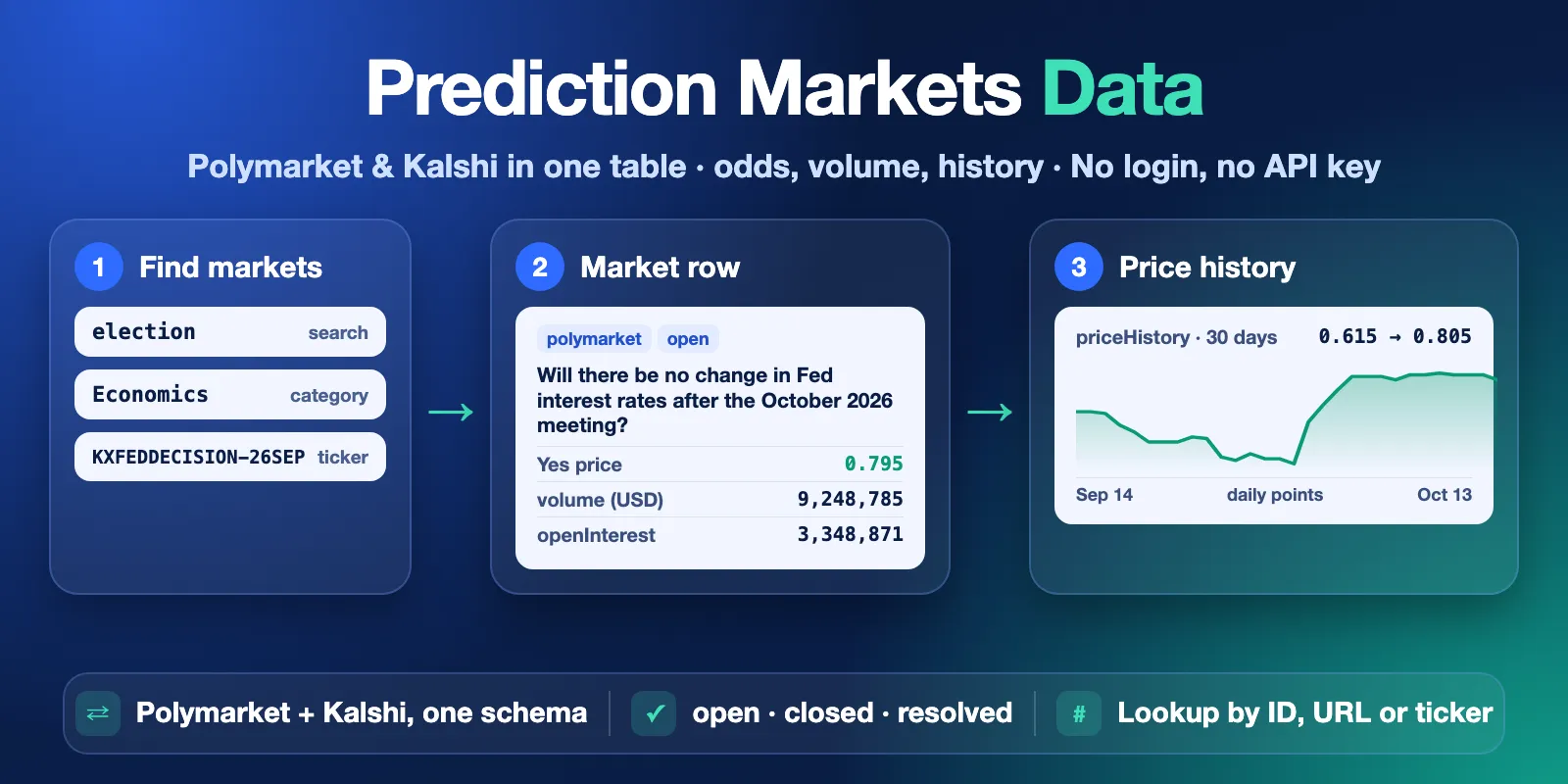
Table of contents
- What it does
- What data you get
- Quick start
- Input
- Input examples
- Output
- Pricing
- Use cases
- Scheduling and monitoring
- API, export and integrations
- Use with AI agents (MCP)
- Limits and partial results
- Troubleshooting
- FAQ
- Support
What it does
The Actor reads the public market data of two prediction markets:
- Polymarket — public Gamma, CLOB and Data APIs (docs).
- Kalshi — public market data API (docs).
It has two modes:
- Find markets. Search by keywords, filter by category and by status (
openorclosed). You get the most traded markets first. - Look up markets. Paste market IDs, slugs, URLs or tickers. You get each market, and a clear "not found" row for each ID that does not exist.
Both platforms come back in one schema, so you can sort and compare them in one table.
Good fit
- Track the odds of elections, Fed decisions, crypto prices, sports and other events.
- Compare the same question on Polymarket and Kalshi.
- Get daily or hourly Yes-price history for charts and backtests.
- Check if a market is open, closed or resolved, and which outcome won.
Not a fit / limits
- No trading, no orders, no account data. This is a read-only data tool.
- No order book depth and no trade-by-trade history. You get best bid, best ask, last price and a price history.
- Not real time. You get the values at the moment of the run.
- Not betting or investment advice.
What data you get
One row per market:
- Question and event:
question,outcomeLabel,eventTitle,category,tags,rules. - Prices:
outcomes(Yes and No withpriceandprobability),lastTradePrice,bestBid,bestAsk. - Activity:
volume,volume24h,liquidity,openInterest,volumeUnit. - Time and status:
openTime,closeTime,status(open,closed,resolved),resolvedOutcome. - Links and IDs:
url,marketId,marketSlug,conditionId,eventId,seriesTicker. - Optional history:
priceHistory(timestamp + Yes price) andpriceHistoryStatus. - Provenance:
source,sourceApiUrl,fetchedAt.
Quick start
- Open the Input tab.
- Keep the prefilled values: Platforms =
polymarket, Search =election, Max markets per platform =20. - Click Start.
- Open the Output tab, view Markets. Sort by
volumeor readoutcomes.
Expected result: about 20 election markets with prices and volume, in a few seconds.
To get Kalshi too, add kalshi to Platforms. To look up exact markets, paste IDs or URLs into Market IDs or URLs.
Input
All fields are optional. With an empty input the Actor lists 50 open markets on each platform, the most traded first.
| Field | Type | Default / prefill | Allowed values | What it does | Recommendation |
|---|---|---|---|---|---|
platforms | array | default ["polymarket","kalshi"], prefill ["polymarket"] | polymarket, kalshi | Which markets to search. | Use both to compare platforms. Ignored in lookup mode. |
search | string | none, prefill election | up to 200 characters | Keywords. Every word must appear in the question, event title, outcome, category or tags. | Use 1–3 short words: fed rate, bitcoin, super bowl. |
category | string | none | any category or tag, case-insensitive | Keeps only markets of this category. Polymarket: event tags (Politics, Crypto, Sports, Economy, …). Kalshi: series category (Politics, Elections, Economics, Financials, Crypto, Climate and Weather, Sports, …). | Check the category and tags of a first run, then filter. |
status | string | open | open, closed | open: markets that still trade. closed: markets that stopped trading, including resolved ones with the winning outcome. | Use closed for results and backtests. |
marketIds | array | none | up to 200 entries | Lookup mode. Polymarket market ID (2589812), condition ID (0x…), market or event slug, polymarket.com/event/… URL. Kalshi market, event or series ticker (KXFEDDECISION-26OCT-H0, KXFEDDECISION-26OCT, KXFEDDECISION) or kalshi.com/markets/… URL. Prefix polymarket: or kalshi: if an ID is ambiguous. | Use when you already know the markets. |
includePriceHistory | boolean | false | true, false | Adds the Yes-price history to each market row. One extra request per market, so the run is slower. | Turn on for charts. |
priceHistoryDays | integer | 30 | 1–365 | Days of history, ending now (or at close time for closed markets). 7 days or less = hourly points, more = daily points. | 30 for trends, 7 for hourly detail. |
maxItems | integer | 50, prefill 20 | 1–1000 | Maximum market rows per platform. Each row is one paid result. | Start small, then raise. |
How the settings work together
| When | Effect |
|---|---|
marketIds is not empty | Lookup mode. search, category, status and platforms are ignored. Each ID names its own platform. maxItems still caps rows per platform: an event or series ID can return many markets. |
search + category + status | All filters apply together. No match → NO_RESULTS, only the start fee is charged. |
search is empty | You get the most traded open markets (or the most recently closed, with status: closed). |
Both platforms, large maxItems + history | Each platform gets an equal share of the run time. See Limits. |
| The same market appears twice | It is saved and charged once. |
Input examples
Find election markets on Polymarket (prefill)
Expected output: 20 election market rows. Cost: start fee + 20 market rows.
Kalshi economics markets with 30-day history
Expected output: up to 50 open Kalshi economics markets, each with about 30 daily Yes prices in priceHistory.
Look up exact markets on both platforms
Expected output: all markets of both Fed decision events (one per outcome), with 90 days of history, and one not_found row for kalshi:KXNOPE-99ZZZ.
Resolved markets for a backtest
Expected output: closed and resolved Fed markets with resolvedOutcome.
Output
The default Dataset has three views. Views choose columns, they do not filter rows: every view lists all rows of the run.
- Markets — market columns. Lookup-status rows (if any) show here with empty market cells.
- Price history — market ID, question and the
priceHistorylist. - Not found / invalid IDs — identifier, platform and status columns. Look at rows with
recordType: "lookup-status"; market rows show here too. To get only one kind, filter the Dataset byrecordType.
Output example (Polymarket market, lookup with history, trimmed)
The same run returned this Kalshi row (trimmed):
A not-found lookup row:
Output fields
| Field | Type | Can be null? | Example | Meaning |
|---|---|---|---|---|
recordType | string | no | market | market or lookup-status. |
platform | string | no (market rows) | kalshi | polymarket or kalshi. |
marketId | string | no (market rows) | KXFEDDECISION-26OCT-H0 | Polymarket market ID or Kalshi market ticker. |
marketSlug | string | yes | will-there-be-… | Polymarket slug. Null for Kalshi. |
conditionId | string | yes | 0xdf9b… | Polymarket condition ID. Null for Kalshi. |
eventId | string | yes | KXFEDDECISION-26OCT | Event ID (Polymarket) or event ticker (Kalshi). |
eventTitle | string | yes | Fed decision in Oct 2026? | Title of the event that groups the markets. |
seriesTicker | string | yes | KXFEDDECISION | Kalshi series ticker. Null for Polymarket. |
question | string | no | Will the Federal Reserve …? | The market question. |
outcomeLabel | string | yes | No change | Short name of this market inside its event. |
category | string | yes | Economics | Polymarket: main event category. Kalshi: event category. |
tags | array | no (may be empty) | ["Fed","Economy"] | Polymarket event tags. Empty for Kalshi. |
outcomes | array | no | [{"name":"Yes","price":0.81,"probability":0.81}, …] | Outcome names with price (0–1). probability = price, the crowd-implied chance. price is null when there is no price. |
lastTradePrice | number | yes | 0.81 | Last traded Yes price. |
bestBid | number | yes | 0.79 | Best Yes bid. Null when there is no bid. |
bestAsk | number | yes | 0.8 | Best Yes ask. Null when there is no ask. |
volume | number | yes | 9190598.64 | Total traded volume, in volumeUnit. |
volume24h | number | yes | 461867.16 | Volume in the last 24 hours. |
liquidity | number | yes | 424329.6 | Polymarket order book liquidity in USD. Null for Kalshi. |
openInterest | number | yes | 1571499.2 | Open interest. Polymarket: USD. Kalshi: contracts. Null when the source does not return it. |
volumeUnit | string | no | USD | USD (Polymarket) or contracts (Kalshi, $1 payout each). |
openTime | string | yes | 2026-06-18T00:02:51.727Z | When trading started (ISO 8601, UTC). |
closeTime | string | yes | 2026-10-29T03:59:00.000Z | Planned end of trading. A Polymarket market can resolve early; then this date can still be in the future. |
status | string | no | open | open, closed or resolved. |
sourceStatus | string | yes | active | The raw status from the platform. |
resolvedOutcome | string | yes | Yes | Winning outcome for resolved markets. Null otherwise. |
rules | string | yes | If the Federal Reserve … | Resolution rules, up to 2,000 characters. |
url | string | yes (rare) | https://kalshi.com/markets/… | Link to the market. Kalshi links go to the event page (Kalshi has no page per market). |
priceHistoryStatus | string | no | complete | complete, empty (no trades in the period), unavailable (no history source for this market), error, or not_requested when history is off. |
priceHistory | array | yes | [{"timestamp":"…","price":0.66}] | Yes price over time. Null when history is off. Days without trades can be missing. |
status / statusReason / errorCode / queryIds | — | — | not_found | Lookup-status rows only: not_found or invalid, a plain reason, and the IDs you sent. |
source | string | no | Kalshi public market data API | Where the row comes from. |
sourceApiUrl | string | no | https://api.elections.kalshi.com/… | The public API URL used. |
fetchedAt | string | no | 2026-10-13T18:20:03.824Z | When the row was read. |
How the Yes price is set. Polymarket: the outcome price that Polymarket itself shows (in most markets the middle of best bid and best ask). Kalshi: the last trade price; the middle of bid and ask when there was no trade. A price is never invented: no data → null, not 0.
Run summary
Each run also saves RUN_SUMMARY in the default Key-value store: status, reason, message, counts per platform, charged rows, warnings and source links. The run status message shows the same short result, for example COMPLETE: 20 market row(s).
status | Meaning |
|---|---|
COMPLETE | Rows saved, no problem. Not-found IDs, if any, are listed in the message. |
NO_RESULTS | The search ran, but no market matches. Not an error. |
NOT_FOUND | Lookup mode: none of the IDs exist. |
INVALID_INPUT | No ID could be read. Fix the input. |
PARTIAL | Some data is missing. reason is SOURCE_ERROR (a platform failed) or PRICE_HISTORY_ERROR (history failed for some markets). |
CAPPED | The run stopped early: CHARGE_LIMIT (your max charge), DEADLINE (internal time limit) or REQUEST_CAP. Saved rows are kept. |
ERROR | A platform failed before any row was saved, or a technical error. |
CANCELLED | You stopped the run. Saved rows are kept. |
Pricing
Pay per event. You pay only for saved markets, plus a small start fee.
| Event | Price | When |
|---|---|---|
| Actor start | $0.007 | Once per run (one event per GB of memory, minimum one; the Actor runs at 256 MB, so one event). |
| Market row | $0.0035 (Free plan), $0.0033 (Bronze), $0.0031 (Silver), $0.003 (Gold and higher) | Each saved market row. Price history for that market is included. |
| Market ID not found | $0.0003 | Each lookup ID the platform does not know. |
Invalid IDs (not a Polymarket or Kalshi ID) have no row charge. The Actor start fee is charged on every run, also when all IDs are invalid (INVALID_INPUT). The platform usage (compute) is included in these prices.
Cost examples (Free plan prices)
| Scenario | Rows | Cost |
|---|---|---|
| Prefill: 20 election markets | 20 | $0.077 |
| 10 markets | 10 | $0.042 |
| 100 markets with 30-day history | 100 | $0.357 |
| 1,000 markets on one platform | 1,000 | $3.507 |
| 1,000 + 1,000 markets on both platforms | 2,000 | $7.007 |
| Search with no match | 0 | $0.007 |
| Lookup of 10 IDs that do not exist | 0 (10 not found) | $0.010 |
To keep a hard budget, set Max total charge in the run options. The Actor stops before the next paid row and keeps what it saved (CAPPED, CHARGE_LIMIT).
A failed or partial run charges only the start fee and the rows that were really saved.
Use cases
| Job | Input | Key fields | Next step |
|---|---|---|---|
| Election and policy research | search: "election", both platforms | question, outcomes, volume, closeTime | Export to a sheet, compare platforms |
| Macro tracking (Fed, CPI, recession) | category: "Economics" or search: "fed" | outcomes, openInterest, priceHistory | Chart odds over time |
| Newsroom: "what do markets say?" | marketIds of the markets you cite | outcomes, url, fetchedAt | Quote the price with time and link |
| Backtest or data science | status: "closed", includePriceHistory: true | resolvedOutcome, priceHistory | Load the JSON or CSV into Python |
| Crypto event odds | search: "bitcoin" | outcomes, volume24h | Join with your price data |
Scheduling and monitoring
Add a Schedule in Apify Console (for example, every hour) with a marketIds list or a search. Each run saves a fresh snapshot with fetchedAt, so you can build a time series of odds. The Actor does not compare runs; every run returns the current values.
API, export and integrations
- Export: JSON, CSV, Excel, XML or HTML from the Output tab or the Dataset API.
- API: start runs and read the Dataset with the Apify API or the JavaScript and Python clients.
- No-code: connect the Dataset to Make, Zapier, n8n or Google Sheets through Apify integrations.
Use with AI agents (MCP)
- MCP server with only this Actor:
https://mcp.apify.com?tools=cliqtomedia/prediction-markets-data - Smallest useful input:
{"platforms": ["polymarket"], "search": "election", "maxItems": 20} - Key output fields:
question(what the market asks),outcomes[].probability(crowd-implied chance, 0–1),volume(traded amount involumeUnit),status(open,closed,resolved),url(market page). - Typical run: 3–10 seconds and under $0.10 for 20 markets. With history, about 400 markets per platform fit in one run.
- Market prices are crowd-implied probabilities from public market data, not forecasts or advice.
Limits and partial results
- Max rows:
maxItemsis per platform, up to 1,000. Without history, 1,000 markets per platform (2,000 per run) were tested. With history, about 400 markets per platform fit in one run. - Memory: 256 MB (default and maximum). More memory does not make the run faster; the time goes to waiting for the platforms.
- Time limit: source work stops after about 4 minutes. Each platform gets an equal share of the time. If a platform reaches its share, the run ends
CAPPEDwithreason: DEADLINE; rows saved so far are kept, and you pay only for them. Split big jobs into smaller runs. - Search: every search word must be in the market text: question, event title, outcome label, category, tags, slug, market/event ID or Kalshi series ticker. Words match as parts of words, so a short word like
usalso matchesbonus; use longer words. The platforms' own search is fuzzy, so the Actor removes loose matches. Very general words can match fewer markets than you expect. - Kalshi category: the
categoryfilter uses the Kalshi series category, but the row shows the event category. So aPoliticsfilter can return rows withcategory: "Elections". - Kalshi URL: links go to the event page. Kalshi has no page for a single market.
- Open interest: can be
nullif the Polymarket Data API does not return it for a market. A warning inRUN_SUMMARYnames how many markets are affected. - Price history: best effort. If history fails for some markets, the run is
PARTIALwithreason: PRICE_HISTORY_ERROR, and those rows havepriceHistoryStatus: "error". Days without trades are missing from the list. - Platform failure: if one platform fails after some rows were saved, the run is
FAILEDin Apify,RUN_SUMMARY.statusisPARTIALwithreason: SOURCE_ERROR, and the saved rows stay in the Dataset. - Terms: data comes from public, read-only APIs. Check the Polymarket terms and Kalshi terms before commercial reuse.
Troubleshooting
The run returned no markets
Symptom: RUN_SUMMARY.status is NO_RESULTS.
Likely reason: no market has all your search words, or the category name does not match.
Action: use fewer words, remove category, or try status: "closed".
A Kalshi ID was not found
Symptom: a row with status: "not_found".
Likely reason: a typo, or a Polymarket-like ID was read as Kalshi.
Action: copy the ticker from the Kalshi URL, or add the prefix kalshi: or polymarket:.
The run stopped with CAPPED
Symptom: RUN_SUMMARY.status is CAPPED.
Likely reason: your max charge (CHARGE_LIMIT) or the internal time limit (DEADLINE).
Action: raise the max charge, lower maxItems, turn off history, or run one platform at a time.
The run FAILED with PARTIAL
Symptom: Apify shows FAILED, RUN_SUMMARY.status is PARTIAL, reason: SOURCE_ERROR.
Likely reason: Polymarket or Kalshi was down or limited requests.
Action: run again in a few minutes. You paid only for saved rows and the start fee.
FAQ
Do I need a Polymarket or Kalshi account or API key?
No. The Actor uses only public market data. No login, no API key.
Is the data real time?
No. You get the values at the moment of the run (fetchedAt). Prices on both platforms can change every second.
Why is a price null and not 0?
null means the platform has no price (no trade and no quote). The Actor never turns missing data into 0.
Why do Polymarket and Kalshi show different numbers for the same event?
They are different markets with different traders. Volume units also differ: Polymarket uses USD, Kalshi uses contracts.
Is this betting or investment advice?
No. This is a data export tool. Prices are crowd-implied probabilities copied from public data, not forecasts or buy and sell signals.
Support
For bugs, questions or feature requests, use the Issues tab of this Actor. Include the run ID, your input and the error text. Never send API tokens, passwords or account data.


