
Software End-of-Life Checker
Pricing
from $1.60 / 1,000 checked versions
Software End-of-Life Checker
Check software versions against endoflife.date: support phase, EOL, end of active and extended support dates, LTS and latest patch, with near-EOL flags. Paste product + version or a CSV.
Pricing
from $1.60 / 1,000 checked versions
Rating
0.0
(0)
Developer

Cliqto Media
Maintained by CommunityActor stats
0
Bookmarked
2
Total users
1
Monthly active users
13 days ago
Last modified
Categories
Share
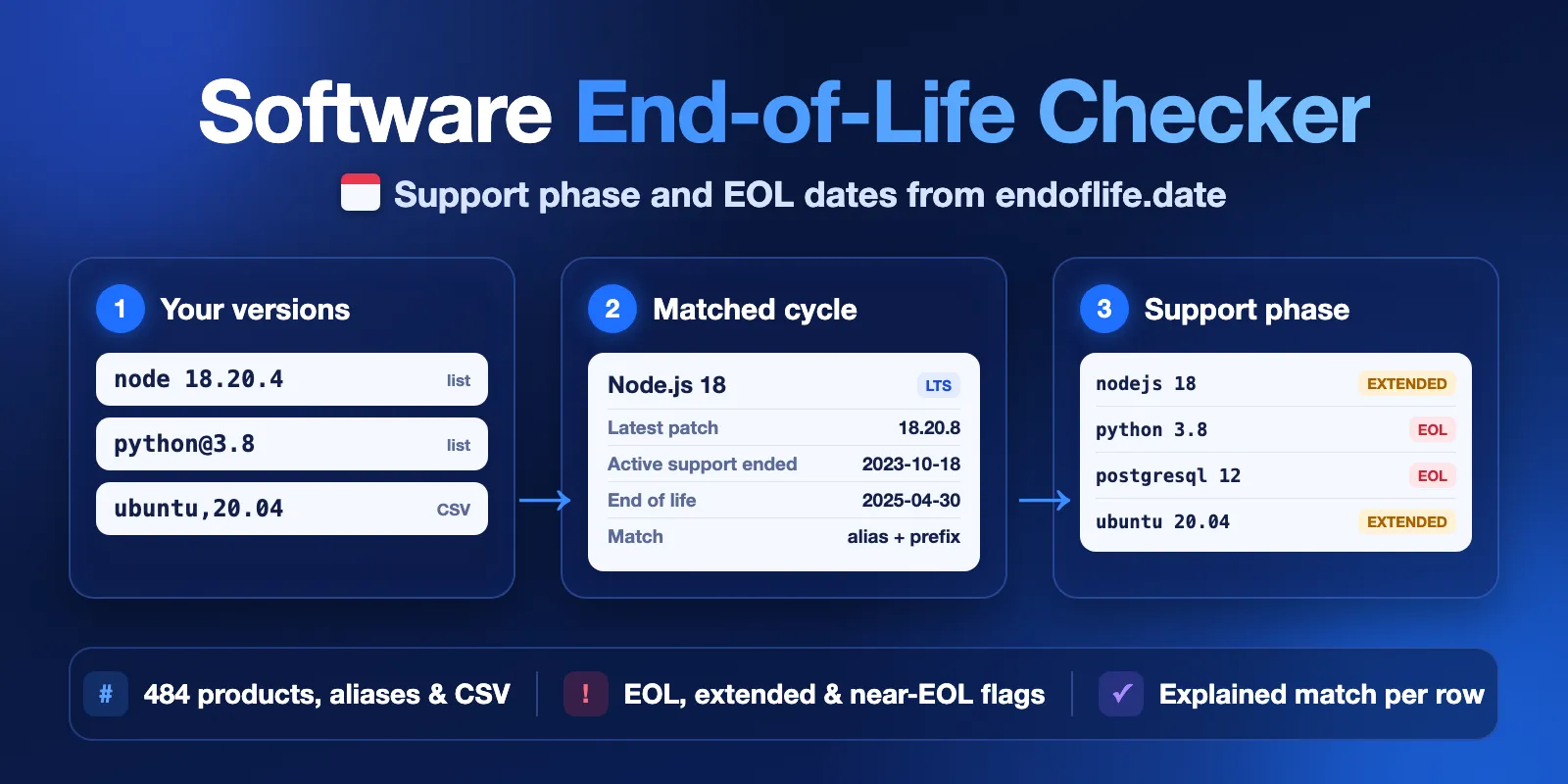
Software End-of-Life Checker checks your software versions against endoflife.date. Add product + version rows such as nodejs 18.20.4, python 3.8 or ubuntu 20.04, or a CSV. You get one row per version with the matched release cycle, the support phase on a date (active, security-only, extended, EOL), the end of active support, end of life (EOL) and end of extended support dates, LTS status, the latest patch and a near-EOL flag.
It is made for upgrade planning, IT asset and SBOM reviews and compliance checklists. No login and no API key are needed. The form example (5 versions) finishes in a few seconds and costs $0.0125.
Contents
- What it does
- Quick start
- Use cases
- Input
- Output
- Pricing
- Limits
- API and integrations
- Troubleshooting
- FAQ
- Data source and licence
- Support
What it does
The Actor reads the public endoflife.date API live at run time. endoflife.date tracks release cycles and support dates for 484 products: languages, frameworks, databases, operating systems, devices and services.
For each row the Actor:
- Finds the product. It accepts endoflife.date names (
nodejs), their aliases and common spellings (node,postgres,golang,Node.js). An unknown name gives anunknown_productrow with suggestions. It is never guessed. - Finds the release cycle. A cycle (
18), a minor version (3.8) or a full patch (18.20.4,v18.20.4) all work. Codenames (focal) and release names (SQL Server2019) work too. If a version fits several cycles (for examplepython 3), you get anambiguous_versionrow with the candidates. - Computes the support phase on the as-of date (today by default) and the days left to each date.
- Explains the match in
matchExplanation, for exampleproduct "node" → nodejs (alias); version "18.20.4" → cycle 18 (prefix match).
Each product is read once per run, even when many rows use it.
Good fit
- Find which of your runtimes, databases and operating systems are already EOL or end soon.
- Plan upgrades for next quarter with
asOfDate. - Add lifecycle dates to an SBOM, CMDB or asset list (CSV in, rows out).
- Run a regular check of a fixed list and keep only rows that need action (
onlyAttention).
Not a fit
- Vulnerability (CVE) scanning or a security audit. The Actor reports published lifecycle dates only.
- Products that endoflife.date does not track. They get an honest
unknown_productrow. - Vendor contracts. Paid extended support (for example Ubuntu Pro or a commercial Node.js offer) is shown as
extended, but the Actor cannot know whether you have it.
Quick start
- Open the Input tab. The form already has five versions:
nodejs 18,python 3.8,postgresql 12,ubuntu 20.04andangular 15. - Click Start.
- Open the Overview view in the Output tab. Check
supportPhase,eolFromanddaysToEol. - Replace the list with your own versions (up to 500 rows), or paste a CSV into CSV text.
Expected result: five complete rows in a few seconds. On 2026-10-12 they were: nodejs 18 extended, python 3.8 eol, postgresql 12 eol, ubuntu 20.04 extended, angular 15 extended.
Use cases
| Buyer job | Input | Key fields |
|---|---|---|
| Find EOL software in an inventory | items or csvText | supportPhase, isEol, eolFrom, needsAttention |
| Plan upgrades before a date | items + asOfDate | supportPhase, daysToEol, nearEol |
| Keep patch levels current | items with full versions | latestPatch, isLatestPatch, latestPatchDate |
| Short action list for a team | items + onlyAttention | rows with needsAttention: true only |
Input
| Field | Type | Default | What it does |
|---|---|---|---|
items | list of strings | form example: 5 versions | One row per line: product and version separated by a space or @, e.g. nodejs 18.20.4, python@3.8. Through the API you can also pass objects {"product": "nodejs", "version": "18"}. |
csvText | text | empty | A CSV with product and version columns. Header is optional; recognized headers: product/software/name and version/release/cycle. Comma, semicolon or tab. Max 200 KB. |
csvUrl | URL | empty | A public https:// link to a CSV with the same columns (max 1 MB). Private and local network addresses are refused. |
nearEolDays | integer 1–3650 | 180 | A still-supported cycle gets nearEol: true when its EOL date is within this many days. |
asOfDate | date YYYY-MM-DD | today | Compute phases for this date instead of today. |
timeZone | IANA time zone | UTC | Defines "today" when asOfDate is empty, e.g. Europe/Berlin. |
onlyAttention | boolean | false | Output only rows that need action. Hidden rows are free. |
items, csvText and csvUrl are combined, in this order. Duplicate rows (same product and version) are checked once. A row without a version (for example nodejs) gets an invalid_input row. If every row is invalid, the run fails with INVALID_INPUT, writes no rows and costs only the start.
Input examples
Plan upgrades for the end of 2026 and keep only rows that need action:
Expected result (run on 2026-10-12): 4 rows. python 3.12 and ubuntu 22.04 are security-only (ubuntu with nearEol: true), django 4.2 is eol, and node 18.20.4 is unknown, because the end date of its commercial extended support is not published. postgres 16 is still active, so it is hidden.
Check an inventory CSV:
Output
One Dataset row per unique input row, in input order. The Overview view shows the main fields; the Lifecycle dates view shows all dates.
Row status
status | matchStatus | Meaning |
|---|---|---|
complete | matched | Product and cycle found; phase and dates filled. |
not_found | unknown_product | endoflife.date does not track this product. See suggestions. |
not_found | unknown_version | The product exists, but no cycle matches the version. suggestions lists recent cycles. |
not_found | ambiguous_version | The version fits several cycles. Give a more precise version. |
error | invalid_input | The row has no product or no version. |
error | source_error | The endoflife.date request failed. The row was not checked. Run it again later. |
Main fields
| Field | Meaning |
|---|---|
input | Your original row: raw, product, version, source (items, csvText or csvUrl) and index. |
matchExplanation | How the product and the cycle were matched, in plain words. |
product, productLabel, productCategory | The endoflife.date product. |
cycle, cycleLabel, codename | The matched release cycle. |
supportPhase | upcoming, active, security-only, extended, eol or unknown on asOfDate. |
isEol | Standard support has ended. It is true also during paid extended support. |
hasExtendedSupport | The product has an extended support phase for this cycle. |
releaseDate, isLts, ltsFrom | Release date and LTS status on asOfDate. |
eoasFrom, eolFrom, eoesFrom | End of active support, end of life (end of security support), end of extended support. |
daysToEoas, daysToEol, daysToEoes | Days from asOfDate to each date. Negative means the date has passed. |
nearEol | A supported cycle reaches EOL within nearEolDays. |
eolDateKnown | false when the source has no EOL date. |
needsAttention | true for eol, extended, security-only, unknown, near-EOL, not-found and error rows. |
latestPatch, latestPatchDate, latestPatchUrl, isLatestPatch | Latest patch of the cycle and whether your version is it. isLatestPatch is null when you gave only a cycle. |
sourceUrl, apiUrl, sourceLastModified, fetchedAt | Links to the endoflife.date page and API, the source update time (null when read from the full catalog) and our read time. |
error, suggestions | Reason and suggestions for not_found and error rows. |
How dates and phases are read
- A
nulldate means unknown, not "supported forever". For a futureasOfDate, a cycle with unknown dates getssupportPhase: "unknown". extendedis not standard support. It means the standard EOL has passed and only paid or vendor extended support is left. When the source has no end date for extended support,eoesFromisnull.- A phase starts on its date: on the EOL date itself the cycle is
eolanddaysToEolis0. - "Today" is the calendar date in
timeZone, so a run just after midnight can differ by one day between time zones.
Output example
This example is trimmed. It comes from the form example run on 2026-10-12.
Run summary
The RUN_SUMMARY record in the Key-value store has status, a plain message, counts per phase and status, charged rows and the data licence. status is one of:
COMPLETE: all rows were processed;PARTIAL: endoflife.date failed for some rows;CAPPED: the run stopped at your maximum cost or at the internal time limit;ERROR: the product list could not be read;INVALID_INPUT: the input is wrong (the run fails and the message says why);CANCELLED: you stopped the run.
Pricing
Pay per event. Platform usage is included.
| Event | Price | When |
|---|---|---|
| Actor start | $0.003 | Once per run (per GB of memory; the default 256 MB counts once) |
| Checked version | $0.0019 (Free plan), $0.0018 (Bronze), $0.0017 (Silver), $0.0016 (Gold and higher) | Each complete row saved to the Dataset |
| Unmatched row | $0.0002 | Each not_found or invalid_input row saved to the Dataset |
source_error rows and rows hidden by onlyAttention are free. A run where every row is hidden costs only the start.
| Run (Free plan prices) | Example cost |
|---|---|
| Form example, 5 versions | $0.0125 |
| 10 versions | $0.022 |
| 100 versions | $0.193 |
| 500 versions | $0.953 |
| 100 unknown products | $0.023 |
Set a maximum cost per run in the run options to cap your spend. The Actor stops before a paid row that does not fit and reports CAPPED.
Limits
- Up to 500 unique rows per run. A larger input is refused.
- Up to 10 distinct products: one request per product, at most 4 at a time and at least 150 ms apart. More than 10: one request for the full endoflife.date catalog (about 3 MB) instead.
- Internal time budget is 240 seconds. Rows not reached in time get
errorrows and the run isCAPPED. - If endoflife.date fails for 2 products in a row, the Actor stops sending requests. Rows already tried get
source_errorrows; the rest are not written.RUN_SUMMARYcounts them, so run again later. - The data is only as complete as endoflife.date. Some products have no EOL or extended support dates.
API and integrations
Start a run with the same JSON input through the Apify API (POST /v2/acts/cliqtomedia~software-end-of-life-checker/runs), then read the Dataset. Export to CSV, Excel or JSON from the Dataset, or connect the run to other tools with the usual Apify integrations.
To check the same list regularly, save it as a task and add an Apify schedule. Use onlyAttention: true so the Dataset has only the rows to act on. The Actor keeps no state between runs.
Use with AI agents (MCP)
AI agents can call this Actor through the Apify MCP server: add https://mcp.apify.com?tools=cliqtomedia/software-end-of-life-checker to your MCP client (Claude, Cursor, VS Code and others). The MCP server needs your Apify account (OAuth sign-in or an Apify API token); endoflife.date itself needs no key. The smallest useful input:
Key output fields for an agent: supportPhase, isEol, eolFrom, daysToEol, nearEol, latestPatch and matchExplanation. A call with 5–100 versions usually finishes in under 30 seconds and costs $0.0125–$0.193. Rows with status: "not_found" carry suggestions that the agent can use to fix the input.
Troubleshooting
| Symptom | Check | Action |
|---|---|---|
unknown_product for a real product | suggestions | Use the suggested endoflife.date name. If there is none, endoflife.date does not track the product. |
unknown_version | suggestions (recent cycles) | Check the version. Some products use other cycle names, for example windows-server 2019. |
ambiguous_version | suggestions | Give the minor version, e.g. python 3.12 instead of python 3. |
supportPhase: "unknown" | eolFrom, eoesFrom | The source has no date for this phase on your asOfDate. |
source_error rows or PARTIAL | RUN_SUMMARY.message | endoflife.date did not answer. Run again later. |
Run failed with INVALID_INPUT | the run status message | Typical causes: no version in any row, a wrong date format, more than 500 rows, a private csvUrl. |
FAQ
Is this a vulnerability scanner?
No. It reports lifecycle dates from endoflife.date. An EOL version usually gets no more security fixes, but the Actor does not check CVEs.
Why is Node.js 18 "extended" and not "eol"?
endoflife.date lists commercial extended support for some cycles after the standard EOL. The row has isEol: true and supportPhase: "extended". If you do not buy that support, treat the cycle as EOL.
How fresh is the data?
Each run reads endoflife.date live. Each row has sourceLastModified (when the source last changed the product; null when the run used the full catalog, which has no per-product time) and fetchedAt (our read time).
Can I check a future date?
Yes. Set asOfDate. Dates in the past work too. The isLts value and the phase are computed for that date.
Data source and licence
Data: endoflife.date API v1. The endoflife.date data is published under the MIT License, copyright endoflife.date contributors. This Actor is independent and not affiliated with or endorsed by endoflife.date or any software vendor.
Support
Use the Issues tab of this Actor. Add the run ID, the input rows and the matchExplanation you saw. Do not send API tokens or private data.


