

XML Sitemap URLs Extractor
Pricing
from $0.27 / 1,000 sitemap url saveds
XML Sitemap URLs Extractor
Extract URLs and metadata from public XML sitemaps, sitemap indexes, and gzip files without crawling page URLs.
Pricing
from $0.27 / 1,000 sitemap url saveds
Rating
0.0
(0)
Developer

Cliqto Media
Maintained by CommunityActor stats
0
Bookmarked
2
Total users
1
Monthly active users
16 days ago
Last modified
Categories
Share
Read public XML sitemaps, sitemap indexes, and gzip sitemap files and save one deduplicated row per page URL. Each row includes url, lastmod, changefreq, priority, and the source sitemapUrl.
Use direct public sitemap URLs. The Actor reads sitemap files only. It does not discover sitemaps from a bare domain and it does not open the page URLs found inside a sitemap.
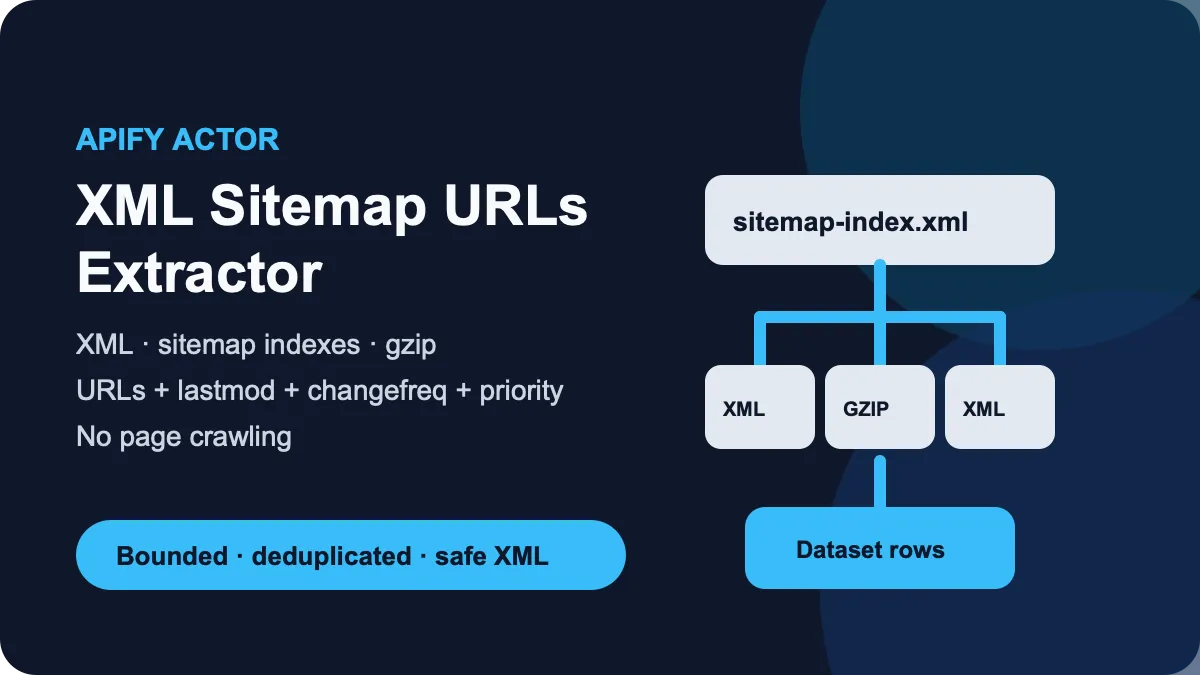
Table of contents
- What it does
- Data returned
- Quick start
- Input
- Input examples
- Output example
- Output fields
- Pricing and limits
- Use cases
- Scheduling and monitoring
- API and integrations
- Limits and partial results
- Troubleshooting
- FAQ
- Support
What it does
The Actor:
- reads public HTTP(S) XML sitemaps;
- follows nested
sitemapindexfiles up to the depth you set; - reads gzip sitemap files with bounded decompression;
- saves one row for each unique page URL;
- keeps
lastmod,changefreq,priority, and the first sitemap that contained the URL; - blocks private-network targets, unsafe redirects, XML DTD/entity input, oversized responses, and decompression bombs.
It follows the XML Sitemap protocol described at sitemaps.org.
Good fit
- Build a clean URL inventory before a crawler or audit.
- Export sitemap metadata for SEO or migration work.
- Read a large sitemap index without visiting the listed pages.
- Turn
.xml.gzsitemap files into a normal Dataset.
Not a fit
- Bare website domains. Add the direct sitemap URL instead.
- Login-protected or private-network sitemaps.
- Page status checks. The Actor does not request discovered page URLs.
- Image, video, news, or hreflang sitemap extensions.
Data returned
Each Dataset item is one unique page URL. Optional sitemap metadata is null when the source does not provide a usable value.
The default key-value store also contains:
OUTPUT— terminal status, Dataset link, result count, and the summary record name.RUN_SUMMARY— status, counters, limits, HTTP totals, and bounded issues.
Normal statuses are complete, partial, not_found, and error.
Quick start
- Open the Input tab.
- Add one direct public sitemap URL to Sitemap URLs (
startUrls). - Keep the default limits for the first run.
- Click Start.
- Open the Dataset and check the
urlandsitemapUrlfields.
Example first input:
This input returns the URLs listed by that sitemap. It does not open those URLs.
Input
| Field | Type | Required | Default / prefill | Allowed values | What it changes | Recommendation |
|---|---|---|---|---|---|---|
startUrls | array of URL objects | yes | UI prefill: https://www.sitemaps.org/sitemap.xml | 1–20 public HTTP(S) sitemap URLs | Starting sitemap files or indexes | Use direct sitemap URLs, not a bare domain |
maxDepth | integer | no | 5 | 0–10 | Maximum nested sitemap-index depth; start URLs are depth 0 | Keep 5 unless you know the index is deeper |
maxSitemaps | integer | no | 20 | 1–50 | Maximum unique sitemap files fetched | Lower it to stop a very large index early |
maxResults | integer | no | 4000 | 1–4000 | Maximum unique Dataset rows | Keep 4000 for the proven public capacity |
requestTimeoutSecs | integer | no | 20 | 5–60 | Timeout for one sitemap HTTP request | Increase only for a known slow server |
maxRetries | integer | no | 2 | 0–4 | Retries temporary 429, 5xx, and transport errors | Keep 2 for normal runs |
maxCompressedBytes | integer | no | 5242880 | 65536–5242880 | Compressed response cap for gzip input | Keep 5242880 or use a lower cap |
maxDecompressedBytes | integer | no | 8388608 | 65536–8388608 | XML size cap after decompression | Keep the default |
Duplicate start sitemap URLs are fetched once. Duplicate page URLs are saved once; the first sitemap that contains the page wins for sitemapUrl.
The main limits interact. The Actor stops when it reaches the result, file, time, request, byte, or spending limit and reports partial when useful work was cut short.
Input examples
Read one sitemap
Expected result: up to 100 unique Dataset rows with sitemap metadata.
Read a nested sitemap index
Expected result: child sitemaps are followed until the input limits are reached.
Read a gzip sitemap
Expected result: the gzip payload is decoded within the configured byte caps and the page URLs are saved to the Dataset.
Output example
This is one real Dataset item from the quick-start input. null means the source did not provide a usable value for that optional field.
Output fields
| Field | Type | Can be null? | Example | Meaning |
|---|---|---|---|---|
url | string | no | https://www.sitemaps.org/ | Page URL from the sitemap |
lastmod | string | yes | 2016-11-21T00:00:00.000Z | Last modification value, normalized to ISO 8601 when parseable |
changefreq | string | yes | weekly or null | Publisher-declared change frequency |
priority | number | yes | 0.8 or null | Publisher-declared priority from 0 to 1 |
sitemapUrl | string | no | https://www.sitemaps.org/sitemap.xml | First sitemap file that contained this deduplicated page URL |
You can read or export Dataset items with the Apify Dataset tools.
OUTPUT record
| Field | Type / null | Example | Meaning |
|---|---|---|---|
schemaVersion | integer | 1 | Record format version |
status | string | complete | complete, partial, not_found, or error |
resultCount | integer | 84 | Saved Dataset row count |
datasetId | string or null | your-dataset-id | Default Dataset ID; null only when unavailable |
resultsUrl | string or null | https://api.apify.com/v2/datasets/your-dataset-id/items | Dataset API link; null only when unavailable |
summaryRecord | string | RUN_SUMMARY | Key of the detailed summary |
RUN_SUMMARY record
| Field | Type / null | Example | Meaning |
|---|---|---|---|
schemaVersion | integer | 1 | Record format version |
status | string | partial | Terminal extraction status |
startedAt, finishedAt | string | 2026-10-05T00:00:00.000Z | ISO timestamps of extraction start and finish |
resultCount | integer | 84 | Saved row count |
duplicatesSkipped | integer | 1 | Duplicate page URLs skipped |
sitemapsFetched | integer | 3 | Successfully parsed sitemap files |
sitemapsFailed | integer | 0 | Failed or unavailable sitemap files |
sitemapsQueued | integer | 3 | Unique sitemap files added to the queue |
invalidEntries | integer | 0 | Entries without a usable page URL |
invalidMetadata | integer | 1 | Unusable optional metadata values |
limitReached | string or null | maxResults | Stop limit; null when no limit was reached |
http | object | {"requests":3,"retries":0,"redirects":0,"wireBytes":1024,"decodedBytes":2048} | Request counts and received/decoded body sizes, including failed attempts |
limits | object | {"startUrlCount":1,"maxDepth":5,"maxSitemaps":20,"maxResults":4000,"requestTimeoutSecs":20,"maxRetries":2,"maxCompressedBytes":5242880,"maxDecompressedBytes":8388608,"runTimeSecs":60,"maxRunBytes":8388608,"maxHttpRequests":64} | Applied input and fixed limits |
issues | array | [{"code":"MAX_RESULTS_REACHED","sitemap":null,"message":"Stopped at 4000 unique page URLs"}] | Up to 20 short issue records; sitemap can be null |
The record examples explain the format. Live timestamps, IDs, and counters depend on your run. limitReached can be maxDepth, maxSitemaps, maxResults, chargeLimit, runTime, httpRequests, runBytes, or aborted.
Pricing and limits
The Actor uses pay-per-event pricing:
- Actor start: $0.0200 once per run.
- Saved result: $0.00027 for each item written to the default Dataset.
- Platform usage: included in these event prices.
Only saved Dataset items count as result events. A partial run charges only the rows already saved, plus the one start event. A zero-result run still has the start charge because the Actor may need network and parsing work to find that there are no results.
| Example | Saved rows | Event price |
|---|---|---|
| Small check | 10 | $0.02270 |
| Normal batch | 100 | $0.04700 |
| Large batch | 1000 | $0.29000 |
| Proven maximum | 4000 | $1.10000 |
The public maxResults limit is 4000. This limit was tested with a nested public sitemap index before release. Platform defaults are 128 MB, a 120-second safety timeout, and a $1.11 maximum event charge. Raising the platform timeout does not raise the fixed 60-second scan limit.
Use cases
| Job | Input | Main output | Typical next step |
|---|---|---|---|
| Build an SEO URL inventory | direct sitemap or index | url, lastmod, sitemapUrl | Export to CSV/JSON for analysis |
| Prepare a crawl seed list | direct sitemap or index | deduplicated url values | Send URLs to a separate crawler |
| Review publisher sitemap hints | sitemap URL | lastmod, changefreq, priority | Compare in a spreadsheet |
| Read a compressed sitemap | .xml.gz URL | normal Dataset rows | Export or call the Dataset API |
Scheduling and monitoring
You can run this Actor on an Apify schedule. Each scheduled run creates a new Dataset.
The Actor does not keep history and does not label URLs as new, changed, or removed. If you need change monitoring, compare the Datasets from separate runs in your own workflow.
API and integrations
Use the Run Actor API with the same JSON input shown above. The run object contains the default Dataset ID, and the Dataset contains the extracted URL rows.
The standard Apify Dataset can be consumed by API clients and other Apify integrations. Use url as the main downstream field and sitemapUrl when you need source provenance.
Limits and partial results
- Up to 20 start sitemap URLs per run.
- Up to 4000 unique page results.
- Up to 50 sitemap files when
maxSitemapsis raised. - Sitemap-index depth is bounded from 0 to 10.
- Fixed scan limits: 60 seconds of source work, 64 HTTP attempts (including retries and redirects), and 8 MiB of downloaded response bodies across the whole run.
- Each gzip file is capped at 5 MiB compressed and 8 MiB of XML. XML nesting is capped at 64 levels and each file at 50,000 entries.
- A smaller user spending limit can stop results early; summaries count only saved rows.
- Only public HTTP(S) targets on standard web ports are allowed.
- Redirect destinations are checked again before they are requested.
- DTD and XML entity declarations are rejected.
partial means a limit or a failing sitemap prevented a full run. It can contain zero rows, such as when an index depth limit stops all children. Check RUN_SUMMARY for limitReached and bounded issue details.
not_found means all start sitemap URLs returned HTTP 404/410 and no rows were saved.
error means no useful rows were produced because of a technical or safety error. Technical zero-result errors fail the platform run so they are not confused with a valid empty result.
Troubleshooting
The Dataset is empty and the run says not_found
The direct sitemap URL returned 404 or 410. Check the exact sitemap path and try again.
The run is partial
Open RUN_SUMMARY. If limitReached is maxResults, maxSitemaps, or maxDepth, raise only the relevant input within its allowed range. Fixed scan limits cannot be raised; split large inputs into smaller runs. For chargeLimit, allow enough event budget for the rows you need.
The run fails with a DTD or entity error
The response contains an XML DTD/entity declaration or is not a supported sitemap document. Use a normal XML sitemap generated without external or custom entities.
A private or local URL is rejected
This is expected. The Actor accepts public HTTP(S) sitemap targets only and blocks private, loopback, link-local, and metadata-network destinations.
A large gzip sitemap fails
Check maxCompressedBytes and maxDecompressedBytes. Raise a cap only when you trust the source and the file size is known.
FAQ
Does it crawl every page in the sitemap?
No. It reads sitemap files and saves the listed URLs. It does not request the discovered pages.
Does it find a sitemap from a website homepage?
No. Add the direct sitemap URL, such as https://example.com/sitemap.xml.
Does it support sitemap indexes?
Yes. It follows nested indexes up to maxDepth and maxSitemaps.
Does it support .xml.gz?
Yes. Gzip is detected from the response bytes and decoded with compressed and decompressed byte caps.
Why are some metadata fields null?
They are optional in a sitemap. The Actor keeps null when the publisher does not provide a usable value.
Is a zero-result run free?
No. Every run has the one-time $0.0200 start event. Result events are charged only for rows saved to the Dataset.
Support
For a bug or question, use the Issues tab on this Actor page. Include the run ID, the non-sensitive input mode, and the error text. Do not post API tokens, cookies, private source data, or billing details.


