
Tiktok Shop Product Scraper
Pricing
from $2.40 / 1,000 product results
Tiktok Shop Product Scraper
Extract TikTok Shop products, prices, discounts, sold counts, ratings, variants, seller info, shipping, and review signals from product URLs, keywords, categories, and seller pages.
Pricing
from $2.40 / 1,000 product results
Rating
5.0
(1)
Developer

Delowar Munna
Maintained by CommunityActor stats
2
Bookmarked
226
Total users
39
Monthly active users
9.6 hours
Issues response
9 days ago
Last modified
Categories
Share
Extract TikTok Shop products with live prices, discounts, sold counts, ratings, real customer reviews, variants, stock, shipping and seller data — from keywords, product URLs, categories, or a seller's whole catalogue.
Then go one step further than any other TikTok Shop scraper: filter by price, rating and sales volume, and let the built-in analysis engine sort every product into shortlist / review / skip with a plain-English reason.
Quick start
- Type a keyword — e.g.
portable blender. - Set Max Results Per Query (start with 20).
- Click Start.
You get back one row per product, with price, discount, sold count, rating, review count and seller. That's it — no proxy setup, no cookies, no configuration.
Want the deep data? Turn on Include Variants, Stock, Shipping & Seller Profile, or Include Reviews. These fetch extra data per product and are billed as separate events — see Pricing.
Best for
- Dropshippers hunting winning products by keyword, price band and proven sales.
- TikTok Shop sellers tracking competitor prices, discounts and stock.
- E-commerce analysts pulling category or seller catalogues into Sheets/BI.
- Brand teams monitoring who is selling their products and at what price.
Not best for
- Markets outside the six supported ones. The US, Malaysia, Thailand, Vietnam, the Philippines and Singapore work; GB, AU, JP, ID, DE, BR and the rest return nothing — see Supported markets.
- TikTok video/engagement data (views, likes, creator stats). This actor returns shop data. Use a TikTok video scraper for that.
- Buyer contact details. Not exposed by TikTok and not collected here.
Discovery modes
| Mode | Input | What you get |
|---|---|---|
| Keyword search | portable blender | Products matching the keyword — the fastest and cheapest way to discover |
| Product URL or ID | https://shop.tiktok.com/view/product/<id> or 1732417183133045688 | One product, always fully enriched (variants, stock, shipping) |
| Seller / Store URL or ID | https://shop.tiktok.com/us/store/<slug>/<id> or 7495975800231332547 | Every product in that seller's catalogue |
| Category | Kitchenware | Products from a TikTok Shop category (240 categories resolved by name) |
Modes are auto-detected and can be combined in a single run.
Input
| Parameter | Type | Default | Description |
|---|---|---|---|
keywords | string[] | [] | Keywords to search TikTok Shop |
productUrls | string[] | [] | Product URLs or bare product IDs |
sellerUrls | string[] | [] | Seller/store URLs or bare seller IDs |
categories | string[] | [] | Category names, e.g. Kitchenware, Beauty & Personal Care |
countries | string[] | ["US"] | Market. Currently US only |
maxResultsPerQuery | integer | 50 | Max products per keyword / category / seller |
maxResultsTotal | integer | 0 | Hard cap for the whole run (0 = no cap) |
minPrice / maxPrice | number | — | Keep only products in this price band |
minRating | number | — | Keep only products rated at or above this (0–5) |
minSoldCount | integer | — | Keep only products with at least this many units sold |
includeProductDetails | boolean | false | Variants, stock, shipping and seller profile — one call, one charge. Billed separately |
includeReviews | boolean | false | Real customer reviews. Billed separately |
maxReviews | integer | 20 | Reviews per product when reviews are on. Billed per review record |
deduplicateProducts | boolean | true | Remove duplicates across modes |
includeSummary | boolean | true | Save a run summary to the key-value store, key SUMMARY (free) |
Filters run before any paid enrichment, so you never pay to enrich a product your filter was going to discard.
1. Keyword discovery — the cheap path
No enrichment: one API call returns ~30 products, so this is the cheapest way to see a market.
2. Find the winners, then enrich only those
Filters run before the paid detail call, so you pay to enrich the 12 products that survived — not the 100 you started with.
3. Audit a seller's entire catalogue, with reviews
This is the run that produced every output sample below. demandBucket ranks the catalogue against itself, so you find the winners inside a small store instead of getting 50 rows that all say skip.
4. Deep-dive specific products
Paste product URLs, bare product IDs, or a mix of both. Product URL mode is always fully enriched — variants, stock, shipping and the seller profile — because that is the request.
5. Browse a category
6. Mixed run, with a hard cost ceiling
Modes are auto-detected and combined. maxResultsTotal caps the whole run, whatever it discovers.
Output
One flat row per product. Five dataset views: Products, Pricing, Sellers, Reviews, Analysis.
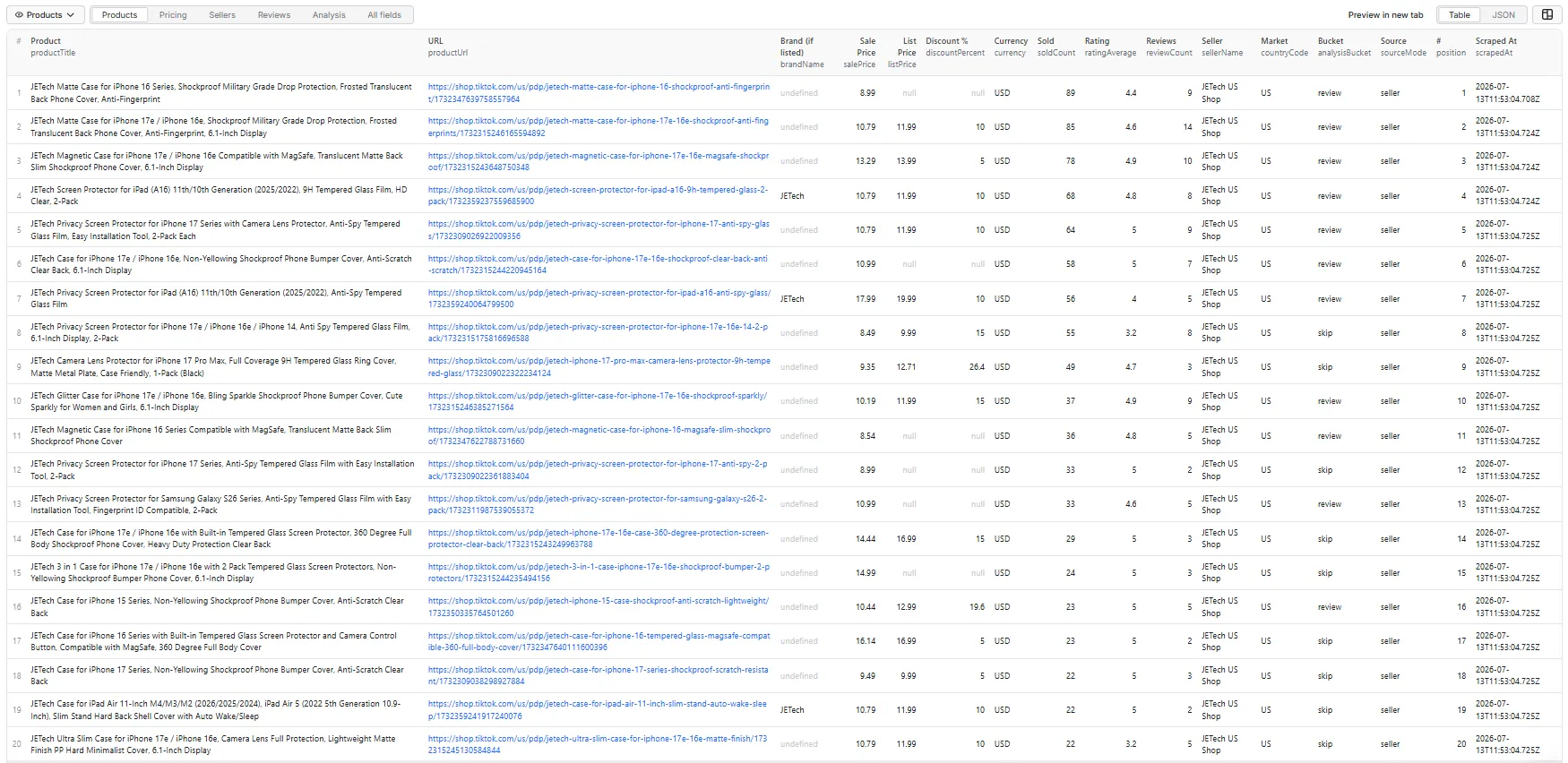
Every sample below is copied verbatim from one real run — sample input #3 above, a 50-product seller catalogue with details and reviews on. Nothing here is invented.
A full product record
Discovery alone (keyword / category / seller with no enrichment) returns everything down to hasReviewSignal. The variants, stock, shipping and seller-profile blocks need includeProductDetails; the review block needs includeReviews.
Read that analysisReason — it is the whole product in one line. 68 units sold is nothing in absolute terms, but it is top-quarter demand inside this seller's own catalogue. The 4.8 rating looks excellent and is explicitly not trusted, because only 8 people left one. So the verdict is review, not shortlist — and you can see exactly why.
ratingAverageisnull, not0, when a product has no reviews. No rating is not a bad rating.
Reviews (when includeReviews is on)
Two fields no other TikTok Shop scraper gives you:
isIncentivized — whether the reviewer was paid or gifted. This is the difference between a 4.8 that means something and a 4.8 that was bought. incentivizedReviewPercent summarises it per product — and on the product above, 1 in 5 of its reviews were incentivized.
ratingDistribution — the full star breakdown. An average hides the shape: "4.1 from 828 reviews" could be 545 five-stars and 128 one-stars — a polarised product, not a mediocre one. Only the breakdown tells you which.
Reviews are best-effort
TikTok throttles its review endpoints at random — the same request can be refused several times and then succeed, and it sometimes refuses one endpoint outright for minutes at a time. We retry up to 7 times per page, then fall back to a second review endpoint before giving up. (On the 50-product run above, 47 of 50 products returned reviews.)
The star breakdown is only served by the primary endpoint, so on a run that fell back you may get review records with no
ratingDistribution. The log says when this happens.If both endpoints refuse three products in a row, that is an upstream outage rather than a throttle, and we stop calling them for the rest of the run — the remaining rows report
reviewsUnavailableReasonexactly as they would have, without you waiting through a few hundred doomed retries. Re-run later to pick reviews back up.When reviews can't be fetched, the record says so explicitly and you are not charged:
"throttled"(couldn't fetch — re-run to retry) is always distinguishable from"none"(this product genuinely has no reviews):A third value,
"unreadable_response", means the endpoint answered but with a body we could not read — an upstream change on TikTok's side, not a product without reviews. It is reported rather than hidden, and it is not charged.We will not blame TikTok for an empty result we can already explain, and we will not report a product with 682 reviews as having none.
ratingAverageandreviewCountare always available and need no extra option — only the review text, star breakdown, and incentivized flags depend on this endpoint.
Run summary
Written to the key-value store under the key SUMMARY — not into the dataset, so it never pollutes your product rows or CSV export. Free.
Output field reference
Identity — productId, productUrl, productTitle, productDescription, brandName (sparse — see below), productCategory, categoryPath, imageUrls, countryCode
brandNameis sparse and the key is omitted when absent. Most TikTok Shop listings come from unbranded third-party sellers and carry no brand at all — roughly 1 in 10 in keyword search (a branded seller's own catalogue will naturally be higher). When a product has no registered brand the field is left out of the record entirely rather than written asnull, so"brandName" in recordis a reliable test. It is also not available in Product URL mode: TikTok's product-detail endpoint does not return a brand field, so that mode never emits the key. Do not treat a missingbrandNameas a scrape failure — it means the listing is unbranded.
Pricing — currency, listPrice, salePrice, discountAmount, discountPercent, priceRangeMin, priceRangeMax, isDiscounted (see below)
Discounts are visible in keyword, seller and category mode — not in Product URL mode. The list price (and therefore the discount) is only carried on TikTok's product cards, which is what search, seller and category browsing return. TikTok's product-detail endpoint — the only source for a product fetched by URL or ID — does not include a list price at all.
So in Product URL mode,
listPrice,discountAmountanddiscountPercentarenull, andisDiscountedisnulltoo — meaning "we can't see whether it's discounted", not "it isn't". In every other modeisDiscountedis a realtrue/false.If discount data matters to you, discover products by keyword, seller or category.
Demand — soldCount, ratingAverage, ratingCount, reviewCount, hasReviewSignal, popularityLabel
Variants & stock (needs includeProductDetails) — variantCount, variantSummary, variantOptions, hasVariants, availableQuantity, inStock
Shipping (needs includeProductDetails) — shippingFee, shippingType, estimatedDelivery, shippingInfo, shipsFrom (often null — most US merchants don't publish a warehouse region)
Seller — sellerName, sellerId, sellerUrl, storeName — always present. sellerRating, sellerFollowerCount, sellerProductCount need includeProductDetails, and are what feed sellerTrustBucket.
Reviews (needs includeReviews, best-effort) — reviews[], ratingDistribution, reviewSummaryText, incentivizedReviewPercent, reviewsAccessible, reviewsFetched, reviewsTotal, reviewsUnavailableReason
Analysis — analysisBucket, analysisReason, isResearchCandidate, demandBucket, isDiscounted, pricePositionBucket, ratingQualityBucket, sellerTrustBucket
Lineage & run — sourceMode, sourceInputType, sourceKeywords, sourceCategories, sourceSellerUrls, sourceCountries, position, scrapedAt, isPartial, errorType, errorMessage
Analysis buckets
Every product is classified, with a reason you can read:
- shortlist — proven demand (500+ sold) and a rating backed by at least 20 reviews, plus a reason to act (a real discount, or a seller with a track record).
- review — worth a look: a credible rating with real sales, or strong sales on their own.
- skip — not enough signal.
A rating only counts as evidence if enough people left one. A 5.0 from 2 reviews is noise, and it is never shortlisted — you'll see "Rating 5 but only 2 review(s) — unproven" in analysisReason. This is the difference between a shortlist you can act on and a list of lottery tickets.
Demand is judged two ways
Sales are measured absolutely (500+ / 1,000+ sold — "sells a lot by TikTok Shop standards") and relatively (demandBucket: where the product sits in your result set — top / mid / bottom quartile). The stronger of the two signals wins.
The relative measure exists for seller and category audits. A small store's entire catalogue can top out around 90 sold; against the absolute bar every row scores skip, and a column that says the same thing fifty times tells you nothing. The question a seller audit actually asks is "which of these are the winners" — so analysisReason will say "Top-quarter demand in this run (89 sold)" rather than "Low sold count (89)".
Keyword and category runs over the open market are unaffected: absolute thresholds still apply, and the relative lane only ever adds a way for a product to qualify. Ranking is skipped when the result set is too small (under 8 products) or flat (every product has the same sold count) — there's no meaningful "top quarter" of either.
Pricing
Pay-per-event. You pay for data you receive — nothing else.
The three events
| Event | Charged | Triggered by |
|---|---|---|
product-result | once per product row | Every run. This is the base charge. |
product-detail-result | once per product | Only if Include Variants, Stock, Shipping & Seller Profile is on — or in Product URL mode, which always enriches. |
review-result | once per review record | Only if Include Reviews is on. 20 reviews on one product = 20 events. |
Per-1,000 rates are on the Actor's Pricing tab.
What you are never charged for
- Failed extractions. If a product can't be fetched, you get a record explaining why — free.
- Reviews that couldn't be fetched. TikTok throttles its review endpoint; when reviews don't come back,
reviewsAccessibleisfalseand noreview-resultevents are billed. - Duplicates. Removed before they are charged.
- The run summary.
- Retries. However many attempts a request takes, you pay once for the result.
- Anything skipped by the Free plan limits below.
Free plan limitations
The two enrichment options require a paid Apify plan. On the Free plan they are skipped and you are not charged for them.
| Free plan | Any paid plan | |
|---|---|---|
| Products returned by discovery | ✅ Full, no row cap | ✅ Full |
| Price, rating, sold count, images, seller name | ✅ Included | ✅ Included |
| Filters, deduplication, analysis buckets, run summary | ✅ Included | ✅ Included |
| Product URL mode — fully detailed products | ✅ Included | ✅ Included |
| Include Variants, Stock, Shipping & Seller Profile | ❌ Skipped, not charged | ✅ Included |
| Include Reviews | ❌ Skipped, not charged | ✅ Included |
Why: both enrichments cost one upstream API call per product, while discovery amortises a single call across a whole page of them. Restricting those two keeps the Actor sustainable without capping how many products you get.
Product URL mode is deliberately exempt — there the detail call is the request, so a Free-plan run still returns complete product records for the URLs you name.
Runs are never failed because of this. You'll see it in the log and in the run's status message.
Filters run before enrichment
minPrice / maxPrice / minRating / minSoldCount are applied to the cheap discovery data before any per-product enrichment call is made. A product your filter rejects never incurs a product-detail-result or review-result charge — so filtering hard is also the cheapest way to run.
Estimating a run
Enrichment fetches extra data per product, which is why both enrichment options default to off.
Worked examples (event counts — multiply by the rates on the Pricing tab):
| Run | product-result | product-detail-result | review-result |
|---|---|---|---|
| 100 products, keyword search, no enrichment | 100 | 0 | 0 |
| 100 products + product details | 100 | 100 | 0 |
100 products + reviews (maxReviews: 20) | 100 | 0 | up to 2,000 |
| 100 found, filtered down to 12, + product details | 12 | 12 | 0 |
Reviews are the big multiplier. At
maxReviews: 20, a 100-product run generates up to 2,000 review events — 20× the product count. That's 20× the data, but check it's what you want before enabling it on a large run. UsemaxResultsTotalto cap any run.
Tip: TikTok serves reviews in pages of 20.
maxReviews: 20fetches a full page with nothing wasted;21costs an entire extra page for one more review. Multiples of 20 are the efficient choices.
Supported markets
United States, Malaysia, Thailand, Vietnam, the Philippines and Singapore.
| Market | Currency | Verified |
|---|---|---|
| United States | USD | keyword search, category browse, seller catalogue, product detail, reviews |
| Malaysia | MYR | same five |
| Thailand | THB | same five |
| Vietnam | VND | same five |
| Philippines | PHP | same five |
| Singapore | SGD | same five |
Each was checked end to end on 2026-08-23, not just for a 200 response: the products that came back carry titles, prices, images, sold counts and seller details at the same coverage as the US.
The five Southeast Asian markets were previously listed here as unavailable, because in July 2026 they genuinely returned nothing. They now work. GB, AU, JP, ID, DE, BR, MX, FR, IT, ES and IE were re-tested on the same day and still return nothing, so they stay out of the dropdown rather than being offered as options that silently produce no rows.
Prices are in each market's own currency, and
minPrice/maxPriceare plain numbers with no currency attached. AmaxPriceof 50 means 50 USD and 50 THB and 50 VND if you select those markets together. Run one market at a time when you are filtering on price.
FAQ
Do I need a proxy? No. There is nothing to configure — no proxy, no cookies, no session.
Do I get real review text?
Yes — turn on includeReviews. You get the review text, star rating, verified-purchase flag, the variant purchased, and whether the review was incentivized (paid/gifted).
Why is ratingAverage null on some products?
Because the product has no reviews yet. We report that as null, not 0, so it can't be mistaken for a bad rating.
Do failed runs cost me anything? No. Failed extractions aren't charged, the run summary isn't charged, duplicates aren't charged, and retries aren't charged. If reviews can't be fetched for a product, you aren't charged for them either.
Why did enabling reviews increase my cost so much?
Reviews are billed per review, not per product. At the default maxReviews: 20, a 100-product run can generate 2,000 review events — 20× the product count. That's 20× the data, but set maxReviews lower (or use filters) if you only need a sample.
How do I keep a run cheap?
Leave the enrichment options off, and filter hard. Filters are applied before any paid per-product call, so a product excluded by minRating or minSoldCount costs you nothing beyond its discovery row.
How do I scrape a specific seller?
Paste their store URL, or just the seller ID. Every product row includes a sellerId — copy it straight back into the seller field to pull that seller's whole catalogue.
Why does maxResultsPerQuery return fewer products than I asked for?
Either the source has fewer products, duplicates were removed (deduplicateProducts), or your filters excluded them. The log tells you which.
Can I scrape markets other than the US? Not today. See Supported markets.
Where is the run summary?
In the key-value store, under the key SUMMARY — not in the dataset. It holds averages, top sellers and the bucket breakdown, and keeping it out of the dataset means your product rows and CSV exports stay clean.
Which category names can I use?
Any of the 240 TikTok Shop categories — e.g. Kitchenware, Beauty & Personal Care, Phones & Electronics, Womenswear & Underwear. Names are matched loosely; if a name isn't found, the log lists the valid top-level categories.
Can I re-run a product from a previous dataset?
Yes. Copy the productUrl or productId from any row straight into the product field.
Limitations
- US market only (see above).
- Keyword search is the only mode that discovers products by text. TikTok does not expose a public search for other regions.
- TikTok Shop links are geo-gated. A
productUrlin the output opens the product for a US visitor; from other regions TikTok may redirect the link to its main feed. The data in the dataset is unaffected. - Product URL mode cannot see discounts. TikTok's product-detail endpoint carries no list price, so
isDiscountedisnull(notfalse) anddiscountPercentisnullfor products fetched by URL or ID. Discover by keyword, seller or category if you need discount data. soldCountis lifetime units sold, not a recent rate. TikTok does not publish 30-day sales, revenue, or a category rank on any public surface, so a product that sold 100K last month and one that sold 100K over three years look the same in this field.demandBucketranks products against each other within your run, which is the closest honest substitute.- Some sellers return no products — dormant or delisted stores. The run log says so explicitly rather than failing silently.
- Product descriptions are image-only for some merchants;
productDescriptionwill benullin that case. brandNameis only present for the minority of listings that have a registered brand (~1 in 10 in our sampling), and is never present in Product URL mode — TikTok's detail endpoint carries no brand field. The key is omitted rather than nulled.- Analysis fields are derived heuristics, not TikTok-provided data.
- Pricing and stock reflect what was publicly displayed at scrape time.
API integration
JavaScript
Python
CLI
MCP — use this Actor as a tool in Claude, Cursor, or any MCP client
Add Apify's MCP server to your client's config, scoped to just this Actor so your agent sees one clean tool instead of the whole Apify store:
Your client will prompt you to sign in to Apify on first use. If you'd rather use a token directly:
Then just ask for what you want:
"Find portable blenders on TikTok Shop rated 4.3+ with over 1,000 sold, and tell me which ones are worth stocking."
The agent fills in the inputs, runs the Actor, and reads the dataset back. The analysisBucket and
analysisReason fields are built for exactly this — the agent gets a shortlist with a stated reason
per product, not 30 raw rows it has to rank itself.
Data & compliance
All data comes from public TikTok Shop surfaces. No login, no personal buyer data. Reviewer names are returned exactly as TikTok displays them (already masked, e.g. G**a G**.).


![TikTok Shop Scraper [NO COOKIES] ✅ avatar](https://images.apifyusercontent.com/19hg3d40D0AYRrOpNZsFNdyRHHdIZBNmXd51M9i64RI/rs:fill:76:76/cb:1/aHR0cHM6Ly9hcGlmeS1pbWFnZS11cGxvYWRzLXByb2QuczMudXMtZWFzdC0xLmFtYXpvbmF3cy5jb20vc0NDU2R3bm1LTUoxUTJzVG4tYWN0b3ItQzk3U1VpTWxiWjc1eDZ1MjItTTRLdXpqR2FERi10aWt0b2stbG9nby1wbmctZmlsZS0xMTY2MTYzNzYyNng0cTF3c2djc3kucG5n.webp)


