
Youtube Channel Finder
Pricing
from $1.00 / 1,000 channel results
Youtube Channel Finder
Fast YouTube channel discovery tool that extracts comprehensive channel information from YouTube searches and videos. Discover 5-20+ channels per search with 15 complete fields including profile, metrics, and metadata. No residential proxy required.
Pricing
from $1.00 / 1,000 channel results
Rating
5.0
(1)
Developer

Delowar Munna
Maintained by CommunityActor stats
6
Bookmarked
215
Total users
10
Monthly active users
a month ago
Last modified
Categories
Share
YouTube Channel Finder ⚡
Fast, low-cost YouTube channel discovery. Find channels from keywords, video URLs, or channel URLs and export 29 complete channel fields — profile, metrics, source attribution, and free derived analytics. Powered by the official YouTube Data API v3 with a browserless discovery engine (no headless browser on the fast path).
🚀 Key Features
- ⚡ Browserless & fast: keyword search, video URLs, and channel URLs are all resolved over plain HTTP — dozens of channels in seconds, no Chromium on the happy path.
- 🎯 Enhanced discovery: keyword search surfaces channels from both channel results and the creators behind video results (5–20+ per search).
- 🎬 Video → channel: drop in video URLs and get the channels behind them.
- 📊 29 channel fields: complete profile with subscriber/video/view counts, description, country, join date, keywords, verification, and type.
- 🧮 Free derived analytics: size tier, avg views/video, views/subscriber, and niche-fit score — computed from data already fetched, so they cost nothing extra.
- 🧭 Source attribution: every row records why it's in your results — which keyword or input found it, how, and its rank.
- 🔄 Smart deduplication: automatic by
ChannelIdwithin a run. - 🎛️ Niche presets: one-click keyword sets for 10 common niches.
- 🌍 Localization: country and language targeting for discovery.
- 📦 Bulk processing: paste many URLs, upload a text file, or link a remote list.
- 📅 Date & size filtering: filter by join date and subscriber range, and sort to get a true top-N.
- 💪 Resilient: official API first, automatic fallbacks, browser only as a last resort.
Best for: influencer marketing, partnership discovery, competitive analysis, market research, and creator scouting. Need emails & social links? Pair this with our YouTube Channel Contacts & Social Links Scraper.
🎯 At a Glance
| Feature | Value |
|---|---|
| Speed | Fast path: dozens of channels in seconds (browserless). Browser fallback: ~7–9s/channel |
| Discovery | 5–20+ channels per search (vs 1–2 traditional) |
| Inputs | Keywords, niche presets, channel URLs, video URLs, bulk files |
| Fields | 29 comprehensive channel fields |
| Method | Official YouTube Data API v3 + browserless HTTP discovery; browser fallback |
| Deduplication | Automatic by ChannelId |
| Proxy | Not required |
💡 Why This Scraper?
Most YouTube channel scrapers drive a headless browser for every channel — slow and expensive. YouTube Channel Finder is browserless-first:
| Metric | YouTube Channel Finder | Traditional Scrapers |
|---|---|---|
| Discovery per search | 5–20+ channels | 1–2 channels |
| Fast-path speed | Dozens of channels in seconds | ~30–40s per channel |
| Data source | Official YouTube Data API v3 + HTTP | Browser scraping only |
| Video URL → channel | ✅ Browserless | ✅ Browser (slow) |
| Field coverage | 29 fields (incl. free derived analytics) | Varies |
| Deduplication | ✅ Automatic by ChannelId | ❌ Manual |
| Proxy required | ❌ No | Often yes |
How it works: keyword searches and video URLs are resolved to channel IDs over plain HTTP, then enriched in batches through the official YouTube Data API v3. If the API's daily free quota is exhausted, enrichment automatically falls back to a hosted API so runs keep working — the headless browser is only used as a final fallback for edge cases.
📋 Input Parameters
| Field | Key | Type | Default | Description |
|---|---|---|---|---|
| Search Keywords | searchQueries | Array | [] | Fuzzy keyword discovery — returns channels related to the terms (not one exact channel). Surfaces channels from both channel and video results. |
| Channels & videos (exact match) | channelOrVideoInputs | Array | [] | Exact-match lookup. Channel handle (@name), channel ID (UC…), or channel URL; or a video ID / watch?v= URL / youtu.be / Shorts URL (returns the video's channel). One entry per line. |
| Niche preset | nichePreset | string | "" | Ready-made keyword set for a common niche (AI & automation, SaaS, tech reviews, gaming, fitness, cooking, personal finance, education, beauty, travel). Adds 4 keywords to Search Keywords; yours take priority. |
| Max channels per query | maxResultsPerQuery | integer | 10 | Max channels per search keyword (1–50). |
| Max total channels (whole run) | maxTotalResults | integer | 0 | Run-level cap across all keywords + inputs combined; spend control. 0 = no limit. |
| Min subscribers | minSubscribers | integer | 0 | Keep only channels with ≥ this many subscribers. 0 = no minimum. |
| Max subscribers | maxSubscribers | integer | 0 | Keep only channels with ≤ this many subscribers. 0 = no maximum. |
| Sort results by | sort | string | "relevance" | relevance (discovery order), subscribers (highest first), or date (newest joined first). |
| Country | regionCode | string | "US" | ISO country code — US, GB, CA, AU, IN, DE, FR, JP, BR, MX. |
| Language | language | string | "en" | Language code — en, es, de, fr, pt, ja, hi, zh. |
| From Date | dateFrom | string (YYYY-MM-DD) | "" | Filter by channel join date (Joined After). Optional. |
| To Date | dateTo | string (YYYY-MM-DD) | "" | Filter by channel join date (Joined Before). Optional. |
| Find channels similar to (paid extra) | similarToChannels | Array | [] | Opt-in. Seed channels (handle / ID / URL); returns channels YouTube associates with them via the related-video graph, ranked by recurrence. Up to maxResultsPerQuery per seed. Billed per similar channel (replaces the standard per-channel fee for those rows). |
| Add activity metrics (paid extra) | includeActivityScore | boolean | false | Opt-in. Adds upload cadence / consistency / activity fields (21–25 below). Billed per channel scored, on top of the result fee. Only channels actually returned are scored. |
💰 Enrichment (paid extras) — the last two fields above sit in their own Enrichment section in the Apify UI. Both are OFF by default: leave them alone and you pay only the standard per-channel result fee.
Notes:
- 🎯 No required fields — runs out of the box with sensible defaults.
- 🔎 Two ways to find channels — Search Keywords for fuzzy discovery; Channels & videos for exact lookups by handle, ID, or URL.
- 🎬 Videos welcome — paste a
watch?v=…URL or a bare video ID and the actor returns the channel behind it. - ✍️ Bare inputs accepted —
@handle,UC…channel ID, or an 11-character video ID work without a full URL. (Write handles with the leading@; a bare 11-character token is treated as a video ID.) - 🏆 True top-N — combine
sortwithmaxTotalResultsto get the best N, not the first N found.sort=subscribers+maxTotalResults=10returns the 10 most-subscribed channels discovered, because sorting happens after filtering but before the cap. - 🧮 Free derived metrics — size tier, avg views/video, views/subscriber and niche fit (fields 26–29) are computed from data already fetched, so they cost nothing extra and are always included.
- 📄 Run summary — every run writes a machine-readable
RUN_SUMMARYrecord to the key-value store: counts by discovery method, filter/skip totals, API quota used, and billing. Kept out of the dataset so it never pollutes your results. - ⚙️ Proxy, concurrency, and HTTP mode are tuned internally (no configuration needed).
📤 Output Schema
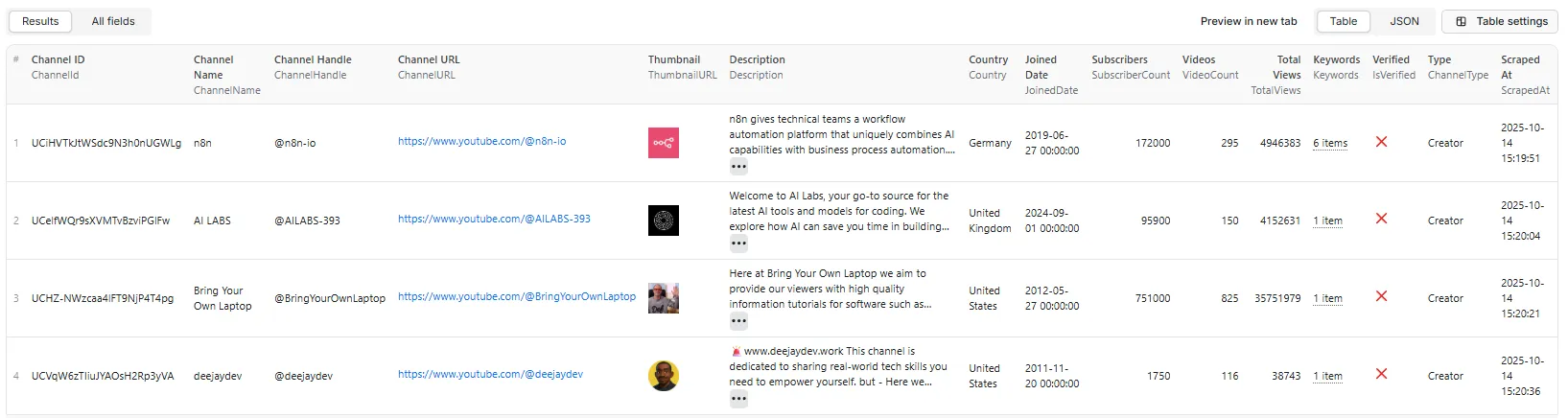
Comprehensive channel data — 29 fields (flat, spreadsheet-ready)
16 channel fields + 4 source-attribution + 5 activity (opt-in) + 4 derived metrics (free, always on).
| # | Field | Type | Description |
|---|---|---|---|
| 1 | ChannelId | String | Unique YouTube channel ID (e.g., UCiHVTkJtWSdc9N3h0nUGWLg) |
| 2 | ChannelName | String | Display name |
| 3 | ChannelHandle | String | The @handle (e.g., @n8n-io) |
| 4 | ChannelURL | String | Canonical channel link |
| 5 | ThumbnailURL | String | Profile image / avatar URL |
| 6 | BannerURL | String | Channel banner / cover image URL (empty if the channel has none) |
| 7 | Description | String | Channel description / "About" text |
| 8 | Country | String | null | Listed country, if available |
| 9 | JoinedDate | String | null | Channel creation date (YYYY-MM-DD) |
| 10 | SubscriberCount | Integer | null | Total subscribers |
| 11 | VideoCount | Integer | null | Total videos uploaded |
| 12 | TotalViews | Integer | null | Lifetime view count |
| 13 | Keywords | Array | Channel keywords / tags (if public) |
| 14 | IsVerified | Boolean | null | Verification badge. null means unknown, not unverified — the official Data API doesn’t expose the badge, so the fast path can’t determine it. true/false only when actually determined (fallback API or browser path). |
| 15 | ChannelType | String | null | e.g. "Creator", "Gaming", "Education" (if determinable) |
| 16 | ScrapedAt | String (ISO 8601) | Extraction timestamp |
| 17 | SourceQuery | String | The keyword that produced this channel (keyword search only; empty otherwise) |
| 18 | SourceUrl | String | The input token/URL that produced it — handle, channel ID/URL, or video (exact-match inputs; empty otherwise) |
| 19 | DiscoveryMethod | String | How it was found: keyword_search, video, channel, handle, or similar |
| 20 | SearchRank | Integer | null | 1-based rank within its keyword query (keyword search only; null otherwise) |
Activity metrics — fields 21–25 (opt-in, paid extra: includeActivityScore)
Empty/null unless you switch activity scoring on. Only channels actually returned are scored, so filtered-out rows never cost you anything.
| # | Field | Type | Description |
|---|---|---|---|
| 21 | LastUploadDate | String (YYYY-MM-DD) | Date of the channel's most recent upload |
| 22 | DaysSinceLastUpload | Integer | null | Days elapsed since that upload — 0 means it posted today |
| 23 | UploadsPerMonth | Number | null | Average uploads per month across the recent sample |
| 24 | UploadConsistency | Integer | null | 0–100 regularity score — high means a steady, predictable cadence |
| 25 | ActivityStatus | String | active, slowing, dormant, or inactive |
Derived metrics — fields 26–29 (free, always on)
Computed from data already fetched — no extra API call, no extra charge.
| # | Field | Type | Description |
|---|---|---|---|
| 26 | SizeTier | String | nano (<1K), micro (<100K), mid (<1M), macro (<10M), mega (10M+) |
| 27 | AvgViewsPerVideo | Integer | null | Lifetime views ÷ video count — a quick reach-per-upload read |
| 28 | ViewsPerSubscriber | Number | null | Lifetime views ÷ subscribers — indicates reach beyond the subscriber base |
| 29 | NicheFit | Integer | null | 0–100: share of your search terms found in the channel's own text. null only when the run has no keywords at all. Use ≥67 as a reliable relevance filter — lower scores can come from a single common word matching. |
ℹ️ Note on
IsVerified: the official YouTube Data API does not expose the verification badge, so on the fast path this field isnull(unknown) rather thanfalse— reportingfalsewould wrongly assert that well-known verified channels are unverified. A realtrue/falseappears only when the value is genuinely determined (fallback API or browser path).
🧭 Source attribution: fields 17–20 tell you why each channel is in your results — which keyword or input produced it, how, and (for keyword search) its rank. A channel found via multiple inputs is attributed to the first one that discovered it.
📊 Output Examples
Results tab — table view
Results tab — JSON view
One complete record, exactly as returned (fitness keyword search, activity scoring enabled):
(Description and Keywords abbreviated for readability — the actual record returns them in full.)
Output benefits:
- 🎯 Flat & clean — numeric counts, ISO dates, typed fields; imports straight into Google Sheets / Excel / BI.
- 📐 Uniform rows — every record carries all 29 keys whether or not a value was found, so CSV and Excel exports never come out ragged.
- ⚡ Fast path — official API enrichment in batches, no per-channel browser load.
- 💼 Business-ready — everything needed for partnerships, competitive analysis, and market research.
- 🚀 Enhanced discovery — 5–20+ channels per search.
🎬 Quick Start
Example 1: Keyword search
Example 2: Videos (returns the channels behind the videos)
Example 3: Exact channel lookup (handle, ID, or URL)
Example 4: Niche preset — a whole niche in one click
Example 5: True top-N — the 25 biggest channels in a niche
Sorting happens after filtering but before the cap, so this returns the 25 most-subscribed channels discovered — not the first 25 found.
Example 6: With the paid extras switched on
Both extras are off by default. This run adds activity metrics to every returned channel and expands the list with channels similar to two seeds.
💪 Performance & Reliability
Architecture (browserless-first)
- Discovery — keyword searches resolve to channel IDs over HTTP; video URLs resolve to their channel by fetching the watch page (no browser).
- Enrichment — channel IDs are enriched in batches through the official YouTube Data API v3 (14 of the 16 core fields; the rest are generated locally at no cost).
- Automatic fallback — if the API's daily free quota is exhausted, a hosted API enriches channels instead, so runs don't stall.
- Browser last resort — the headless browser is used only for edge cases the HTTP paths can't handle.
- Deduplication — automatic by
ChannelId.
Throughput
The browserless fast path processes many channels in seconds (discovery + batched enrichment). When the browser fallback is used, expect ~7–9s per channel.
📚 Use Cases
- Influencer marketing — find creators by niche with subscriber/verification data.
- Partnership discovery — build target lists with complete channel profiles.
- Competitive analysis — compare competitor channels by subscribers, output, and views.
- Market research — analyze 100–200+ channels by country, type, and niche.
- Creator scouting — surface emerging channels with growth indicators.
- Channel databases — assemble structured, spreadsheet-ready channel records.
💲 Pricing
Pay only for results. No monthly rental, no per-run fee, and no charge at all on a run that returns nothing. You're billed per unique channel returned — that's it. Two optional extras bill only if you switch them on.
| Event | Charged when |
|---|---|
| Channel result | Once per unique channel written to the dataset |
| Similar channel (opt-in) | Once per channel found via similarToChannels — replaces the standard channel fee for those rows, never charged on top of it |
| Activity score (opt-in) | Once per channel successfully scored when includeActivityScore is on |
| Run size | Events billed |
|---|---|
| 0 channels (nothing found) | nothing — the run is free |
| 10 channels | 10 channel results |
| 1,000 channels | 1,000 channel results |
- Default runs cost the standard rate. Leave both extras off — as they ship — and you pay only the per-channel fee.
- Not charged: empty runs, duplicate channels (deduped within a run), rows filtered out by your date/subscriber/cap settings, failed activity scores, and failed / not-found lookups.
- Free of charge: the four derived metrics (fields 26–29) are computed from data already fetched — no extra event, no extra cost.
- Live rates: see the Pricing tab on this actor's page for the current per-event prices. (This README deliberately doesn't quote figures — the Pricing tab is always current.)
💡 Use
maxTotalResultsto cap the number of channels — and therefore the cost — on large multi-keyword or bulk runs. Filtering and sorting are applied before the cap and before any paid scoring, so you never pay for rows you don't receive.
❓ FAQ
Q: How many channels can I discover per search? A: 5–20+ per search — the actor extracts both explicit channel results and the creators behind video results.
Q: Does it scrape every video from a channel? A: No. This actor finds and profiles channels. It does not download a channel's full video list.
Q: How is this different from a "YouTube Channel Video" / video scraper? A: Many similarly-named actors scrape videos. This one returns channels — one clean profile row per channel (subscribers, views, country, join date, keywords, verification, type), not a list of videos. Use it to find and shortlist creators; if you then need each channel's videos or their emails/social links, pair it with the matching video or Contacts & Social Links scraper.
Q: Can I cap the total number of results (and the cost)?
A: Yes — set maxTotalResults to cap the number of channels returned across all keywords and inputs combined (0 = no limit). The cap is applied before enrichment, so it also controls spend on large multi-keyword or bulk runs. maxResultsPerQuery still caps each individual keyword.
Q: Why is a given channel in my results — which input found it?
A: Every record includes source attribution — SourceQuery (the keyword), SourceUrl (the input token/URL), DiscoveryMethod (keyword_search/video/channel/handle), and SearchRank (rank within its keyword). A channel found via multiple inputs is attributed to the first one that discovered it.
Q: How does it stay fast and cheap? A: It's browserless-first — keyword searches and video URLs resolve over plain HTTP, then channels are enriched in batches via the official YouTube Data API v3. A headless browser is only a last-resort fallback, which keeps runs fast and low-cost.
Q: Can I pass video URLs?
A: Yes — paste watch?v=… links (or a mix of channel and video URLs) and the actor returns the channels behind them.
Q: Can I filter by channel join date?
A: Yes — use dateFrom / dateTo (YYYY-MM-DD). Leave empty to include all channels.
Q: Can I target a country / language?
A: Yes — set regionCode and language. Each channel's own country is also extracted when available.
Q: I need creator emails and social links. A: Use our companion actor, YouTube Channel Contacts & Social Links Scraper, which adds email and categorized social links.
🛠️ Technologies
- Discovery: browserless HTTP resolution of keyword searches and video URLs (YouTube
ytInitialData). - Enrichment: official YouTube Data API v3 (
channels.list, batched) with an automatic hosted-API fallback. - Fallback engine: Puppeteer (headless Chrome) + Crawlee — used only when HTTP paths can't complete.
- Runtime: Node.js 18+.
- Deduplication:
ChannelIdtracking across all sources.
📋 Best Practices
- Start small — test with
maxResultsPerQuery: 10to see 5–20+ channels per search. - Use broad keywords — they discover more channels via dual extraction.
- Mix inputs — combine keywords, channel URLs, and video URLs in one run.
- Filter by date — use
dateFrom/dateToto target newer or older channels. - Export — JSON / CSV / Excel to Sheets, S3, or your CRM.
📜 Changelog
v2.5 — Discovery & analytics update (July 2026)
- 🧮 Free derived metrics — size tier, avg views/video, views/subscriber, and a niche-fit score on every row at no extra cost.
- 🧭 Source attribution — every channel records which keyword or input found it, how, and its rank.
- 🎛️ Niche presets — ready-made keyword sets for 10 common niches.
- 🔗 Similar-channel discovery (opt-in) — expand a seed channel into its related-channel neighbourhood.
- 📈 Activity metrics (opt-in) — upload cadence, consistency, and an active/slowing/dormant/inactive status.
- 🎚️ Subscriber filters + true top-N sorting — sort is applied before the run cap, so you get the best N, not the first N.
- 📄 Run summary — a machine-readable
RUN_SUMMARYrecord in the key-value store, kept out of your dataset.
v2.5 — Browserless update (July 2026)
- ⚡ Browserless-first architecture — keyword search, video URLs, and channel URLs resolved over HTTP; headless browser only as a last-resort fallback.
- 🎬 Video URLs resolved browserlessly (previously required a browser).
- 🔁 Automatic enrichment fallback when the YouTube Data API daily quota is exhausted — runs keep working.
- 🏎️ Major speed & cost improvement on the fast path.
- 🧹 Reliability fixes (About-page navigation, join-date accuracy).
v2.5 — YouTube Data API v3 (Feb 2026)
- Replaced the previous hybrid method with the official YouTube Data API v3 (13/15 fields from the API).
- Removed the legacy third-party extraction API.
Earlier (2025)
- Enhanced discovery (channels from channel + video results, YouTube channel filter), 15-field schema, hybrid HTTP/Puppeteer mode.
🤝 Compliance
- Collects only public YouTube channel data.
- Uses the official YouTube Data API v3 within its terms.
- Intended for legitimate channel discovery, influencer research, and business intelligence.
- Users are responsible for compliance with applicable laws in their jurisdiction.
💬 Support
- Issues / feature requests: via GitHub or Apify support.
- Documentation: see the
/docsfolder for the PRD and guides.
Built with ❤️ for fast, low-cost channel discovery.


![Youtube Channel Scraper V2 [FAST] | Subs, Stats & Contact avatar](https://images.apifyusercontent.com/wldgvFWts7KCpdUkDIWsk3wjgevwfKFAWCopMxw1LOI/rs:fill:76:76/cb:1/aHR0cHM6Ly9hcGlmeS1pbWFnZS11cGxvYWRzLXByb2QuczMudXMtZWFzdC0xLmFtYXpvbmF3cy5jb20vUnN5WGlFT2RQWWZwV09LUWstYWN0b3ItakRLUkQySUpjRk9MZVFGVzAtU2p4d1lnaDZvMi1GcmFtZV84LnBuZw.webp)


