

Youtube Video Finder
Pricing
from $3.00 / 1,000 results
Youtube Video Finder
Fast YouTube video discovery tool optimized for speed and minimal data extraction. Extract 10 essential discovery fields to quickly identify relevant videos for deeper analysis. No residential proxy required.
Pricing
from $3.00 / 1,000 results
Rating
0.0
(0)
Developer

Delowar Munna
Maintained by CommunityActor stats
0
Bookmarked
216
Total users
6
Monthly active users
3 days ago
Last modified
Categories
Share
YouTube Video Finder ⚡
Fast, API-based YouTube video discovery. Find videos by keyword, #hashtag, channel, playlist, or URL/ID and extract 30+ fields each — including tags, category, hashtags, engagement metrics, channel analytics, detected language, and optional transcripts. Powered by TikHub keyword & hashtag search + the official YouTube Data API — no browser, no proxy, high reliability.
🚀 Key Features
- ⚡ API-only & fast: No browser, no proxy — pure API calls
- 🔎 Keyword & hashtag search via TikHub: Avoids YouTube's expensive 100-unit
search.listquota - 💰 Near-free YouTube quota: Batched
videos.list(~1 unit per 50 videos → ~500k videos/day) - 📊 30+ Fields per video: Thumbnails, description, engagement metrics, channel info, tags, category, hashtags, links
- 🎚️ Filters & sorting: content type, duration, upload date, title filter; sort by relevance / date / views
- 📈 Rich analytics built in: engagement scoring, channel analytics, and language detection on every video — plus optional trending mode
- 📝 Optional transcripts: Turn on Include Transcript to add full captions/transcript text per video (off by default; charged only when a transcript is delivered)
- 🎯 Flexible discovery: A single field accepts keywords, #hashtags, channels, playlists, and seed videos (a seed video expands to its whole channel)
- 🎬 Direct video mode: List exact video URLs or bare 11-char IDs — one record each
- 📦 Bulk Processing: Text file upload or remote file links
Best for: Video discovery, candidate selection, building watch lists, market research, and SEO analysis
🎯 At a Glance
| Feature | Value |
|---|---|
| Speed | API-only — no browser; metadata batched 50/call |
| Fields | 30+ fields per video (incl. tags, category, channel analytics) |
| Discovery | Keyword · #hashtag · channel · playlist · seed video |
| Transcripts | Optional enrichment (~60–80% availability) |
| Proxy | ❌ Not needed |
| YouTube quota | ~1 unit / 50 videos (~500k videos/day) |
💡 Why This Scraper?
Traditional YouTube scrapers drive a headless browser and hit bot detection. YouTube Video Finder is API-only — TikHub for keyword & hashtag search, the official YouTube Data API for metadata and channel/playlist expansion:
| Metric | YouTube Video Finder | Browser-based Scrapers |
|---|---|---|
| Method | Pure API (no browser) | Headless Chrome |
| Proxy requirement | ❌ Never needed | ✅ Usually required |
| Keyword/hashtag search cost | TikHub (no YouTube quota) | Browser scraping / quota |
| YouTube quota | ~1 unit / 50 videos (batched) | n/a or high |
How it works:
- Keyword and #hashtag sources → TikHub search (
get_general_search_v2), avoiding YouTube's 100-unitsearch.list - Channel / playlist / seed-video sources → YouTube Data API expansion (uploads playlist, playlist items)
- All discovered + direct video IDs → batched
videos.listfor full metadata (~1 unit per 50 videos)
📋 Input Parameters
| Field | Key | Type | Default | Description |
|---|---|---|---|---|
| Channels, Playlists & Discovery | searchQueries | Array | [] | Discovery sources (auto-detected): keyword, hashtag (#tag or a youtube.com/hashtag/<tag> URL), channel (URL / @handle / bare UC… ID), playlist (URL or bare PL…/UU… ID), or a seed video (expands to its channel) |
| Content type | contentType | string | "all" | all / videos / shorts / live. Filters discovered results (Shorts detected by duration ≤ 60s) |
| Sort by | sortBy | string | "relevance" | relevance (discovery order) / date (newest) / views (most viewed) |
| Duration | videoDuration | string | "all" | all / short (<4 min) / medium (4–20 min) / long (>20 min) |
| Upload date | uploadDate | string | "all" | Relative published-date filter: hour/today/week/month/year. Applies to all sources |
| Title filter | titleFilter | string | "" | Comma-separated keywords; keep results whose title contains any (OR, case-insensitive) |
| Include trending | trending | boolean | false | Also add the region's trending ("most popular") videos as a source (≤50, sourceType: "trending") |
| Max videos per source | maxResultsPerQuery | integer | 10 | Max videos taken from each discovery source (before filtering) |
| Max videos total | maxResults | integer | 0 | Global cap across all sources, applied after filtering + sorting. 0 = no cap |
| Country | regionCode | string | "US" | ISO country code; selects trending region + the category list for categoryName |
| Language | language | string | "en" | Language code. Limited effect in API mode |
| From Date | dateFrom | string | "" | Published-after (YYYY-MM-DD). Applies to all sources |
| To Date | dateTo | string | "" | Published-before (YYYY-MM-DD). Applies to all sources |
| YouTube URL | startUrls | Array<Object|string> | [] | Direct videos only — video URLs or bare 11-char IDs. One record each, exempt from the filters above. Supports file upload |
| Include Transcript | includeTranscript | boolean | false | Fill the transcript field with captions/transcript text (otherwise null). Adds ~1–2s per video; ~60–80% of videos have captions. Billed per delivered transcript |
| Transcript Language | transcriptLanguage | string | "" | Preferred transcript language (e.g. en). Empty = auto-detect (first available). Only used when Include Transcript is on |
Important Notes:
- 🌱 Seed videos: A video URL/ID in Search Keywords returns that video's whole channel; to fetch a single video, put it in Direct URLs.
- #️⃣ Hashtags: Enter
#tag(e.g.#openai) or ayoutube.com/hashtag/<tag>URL to pull YouTube's search results for that tag. Results are taggedsourceType: "hashtag". (This is YouTube's search-for-the-tag, not the exact curated hashtag feed — no API exposes that.) - 📅 Date & filters apply to all discovery sources (keyword/channel/playlist/seed). Direct URLs are exempt — a video you list explicitly is always returned.
- 🔃 sortBy sorts the discovered set before
maxResultsis applied, so "top N by views/date" works. - 📁 Bulk upload: Upload text file (one URL/ID per line) or link to a remote file.
📤 Output Schema
Output Fields (metadata + scoring + optional enrichment + source-attribution)
Core metadata is extracted via the official YouTube Data API (videos.list). engagementRate/viewsPerDay, language detection, and channel analytics are all computed automatically on every run; transcript is filled only when Include Transcript is enabled. The three source* fields record where each result came from.
| # | Field | Type | Description |
|---|---|---|---|
| 1 | type | String | One of: video, shorts, live |
| 2 | videoId | String | YouTube video ID (e.g., dQw4w9WgXcQ) |
| 3 | videoUrl | String | Full YouTube video URL |
| 4 | thumbnailUrl | String | null | High-quality thumbnail URL (maxres/high) |
| 5 | title | String | Video title |
| 6 | duration | String | null | Human-readable duration (H:MM:SS, or M:SS for videos under an hour) |
| 7 | durationSeconds | Integer | null | Duration in seconds |
| 8 | viewCount | Integer | null | Total view count |
| 9 | likeCount | Integer | null | Total like count |
| 10 | commentCount | Integer | null | Total comment count |
| 11 | description | String | null | Full video description |
| 12 | publishDate | String | null | Publish date (YYYY-MM-DD) |
| 13 | channelId | String | null | Channel ID (UC...) |
| 14 | channelTitle | String | null | Channel name |
| 15 | channelUrl | String | null | Full channel URL |
| 16 | tags | Array | Video tags (empty array if none) |
| 17 | categoryId | String | null | YouTube category ID |
| 18 | categoryName | String | null | Human-readable category (e.g. "Science & Technology") |
| 19 | hashtags | Array | #hashtags extracted from title + description |
| 20 | descriptionLinks | Array | URLs extracted from the description |
| 21 | transcript | String | null | Captions/transcript text. null unless Include Transcript is on and captions exist (~60–80% of videos) |
| 22 | engagementRate | Number | null | (likes + comments) / views (always computed) |
| 23 | viewsPerDay | Number | null | Views ÷ days-since-publish — discovery velocity (always computed) |
| 24 | detectedLanguage | String | null | 2-letter language code (API hint, else detected from title+description) |
| 25 | channelSubscriberCount | Integer | null | Channel subscriber count |
| 26 | channelViewCount | Integer | null | Channel total views |
| 27 | channelVideoCount | Integer | null | Channel video count |
| 28 | channelCountry | String | null | Channel country (null if the channel didn't set one) |
| 29 | channelJoinedDate | String | null | Channel creation date |
| 30 | channelDescription | String | null | Channel description |
| 31 | sourceType | String | Where it came from: keyword, hashtag, channel, playlist, seed, direct, trending |
| 32 | sourceQuery | String | The exact input that produced this result |
| 33 | searchRank | Integer | 1-based position of this result within its source |
Note: Field names are camelCase (since v2.8).
videoId/videoUrl/thumbnailUrlreplaced the oldVideoId/PageURL/thumbnails.
📊 Output Examples
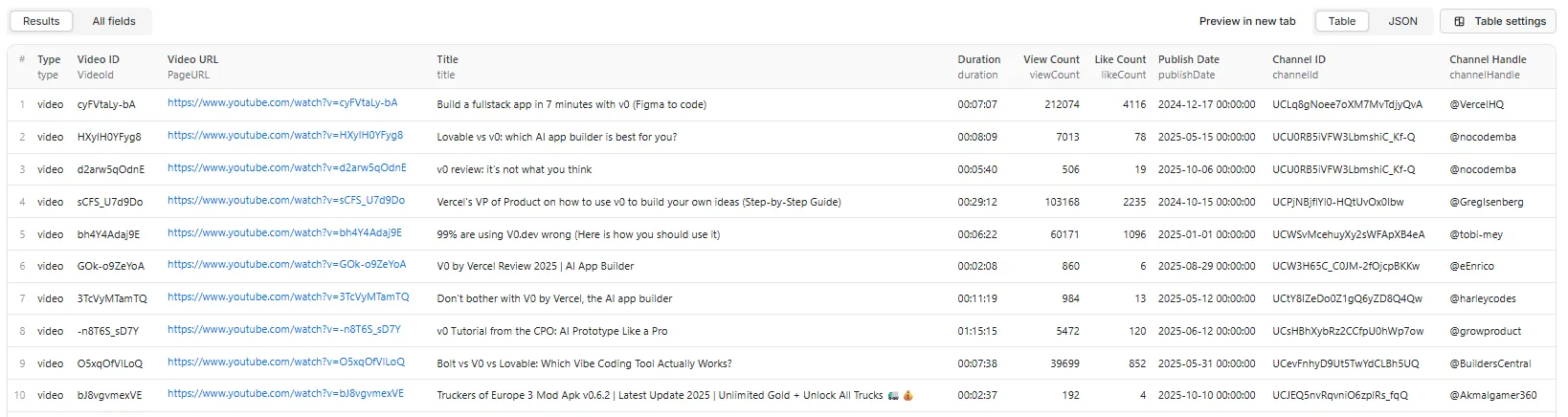
Single Video Output
Every record is a flat object with the full field set below (metadata + engagement scoring + channel analytics + language + source attribution — all computed on every run):
Multiple Videos (Batch Discovery)
With Transcript (includeTranscript: true)
When Include Transcript is enabled, the transcript field is filled for videos that have captions:
(other fields omitted for brevity — the full field set is unchanged; only transcript becomes populated)
Performance Benefits:
- ⚡ Complete data: 30+ fields via the official YouTube Data API
- ⚡ Fast: pure API, no browser; metadata fetched in batches of 50
- ⚡ Efficient: ~1 YouTube quota unit per 50 videos
- ⚡ Rich metadata: Includes thumbnails, descriptions, and full engagement metrics
- ⚡ Perfect for comprehensive analysis and decision-making
🎬 Quick Start
Example 1: Search with Filters & Sorting
Example 2: Direct Video URLs
Example 3: Bulk URL Upload (Remote File)
Example 4: Trending Videos + Title Filter
Example 5: Discovery + Transcripts
Enabling
includeTranscriptadds ~1–2s per video and a separatetranscriptcharge per delivered transcript — great for SEO keyword extraction, summarization, and NLP/AI datasets.
💪 Performance & Reliability
Architecture (API-only)
- Discovery — each Search Keywords entry is classified and expanded to video IDs:
- keyword → TikHub search (
get_general_search_v2) - hashtag (
#tagoryoutube.com/hashtag/<tag>) → TikHub search for that tag - channel (
@handle,/channel/UC…,/c/…,/user/…) → resolve → channel uploads - playlist (
…?list=…) → playlist items - seed video → resolve its channel → that channel's videos
- keyword → TikHub search (
- Direct URLs — video URLs / bare IDs are taken as-is (one record each).
- Metadata — all IDs are deduped and fetched from
videos.listin batches of 50 (~1 quota unit per 50 videos). - Transcript (optional) — when Include Transcript is on, captions are fetched per result via TikHub
get_video_captions_v2and parsed to plain text; billed per delivered transcript.
Quota efficiency
videos.listcosts a flat 1 unit per call (up to 50 IDs) → ~1 unit per 50 videos.- On the default 10,000-unit/day YouTube quota that's roughly 500,000 videos/day.
- Keyword & hashtag search uses TikHub (paid per page) instead of YouTube's 100-unit
search.list.
Caps & limits
maxResultsPerQuery— per-source cap (each keyword/channel/playlist/seed).maxResults— optional global cap across the whole run.- Keyword & hashtag search is bounded to ≤ 10 TikHub pages per term.
📚 Use Cases
- SEO Research: Analyze keywords, tags, titles, descriptions
- Content Strategy: Study successful formats, posting patterns
- Competitive Intelligence: Benchmark creators, track performance
- Market Research: Identify trends by topic, region, language
- Brand Monitoring: Find mentions and gauge engagement
- Influencer Discovery: Filter by views/engagement in your niche
- Trend Analysis: Spot emerging topics and viral patterns
💵 Pricing
Pay per event — two billable events (see the Apify Store page for current prices):
| Event | Charged | When |
|---|---|---|
video-result | Per video record written to the dataset | Every result |
transcript | Per transcript actually delivered | Only when Include Transcript is on and captions exist |
- Transcripts are off by default — you're never charged the
transcriptevent unless you enable it, and only for videos where a transcript is actually returned (~60–80% of videos have captions). - Keyword/hashtag discovery runs through TikHub; metadata via YouTube's
videos.list(batched). - Use Max videos per source and Max videos total to control run size and cost. Runs also respect your per-run spending limit — the actor stops cleanly once the cap is reached.
🚫 What This Actor Does NOT Do
- No comment scraping — comment bodies are out of scope.
- Transcripts are opt-in — off by default (the
transcriptfield isnull); enable Include Transcript to populate it (charged per delivered transcript, ~60–80% availability).
⚠️ Limitations
- Filters & sort are applied client-side to the discovered set. Keyword search fetches YouTube's relevance-ordered top results (via TikHub), then
sortBy/ date / duration / title filters run over that set — so e.g.sortBy=viewsgives the most-viewed among the discovered results, not a global "most viewed" search. Aggressive filters (e.g. keyword +uploadDate=today) may return fewer than Max videos per source. - Shorts are detected by duration (≤ 60s); the Data API has no explicit Shorts flag, so classification is approximate.
regionCode/languagehave limited effect in API mode.- A bare all-letter 11-character token (e.g.
programming) is treated as a keyword, not a video ID. To force seed-video behavior for such an ID, pass the full video URL.
❓ FAQ
Q: How does discovery work?
A: It's API-only (no browser). Keyword searches go through TikHub search; channels/playlists/seed videos expand via the YouTube Data API. Every discovered video's metadata is then fetched in batches from the official YouTube Data API (videos.list).
Q: What's the difference between the two input sections? A: Channels, Playlists & Discovery discovers many videos from a keyword, #hashtag, channel, playlist, or seed video (a video there returns its whole channel). Direct URLs returns exactly the videos you list (video URLs or bare IDs), one record each.
Q: Can I get transcripts?
A: Yes — turn on Include Transcript (includeTranscript: true), optionally set Transcript Language. The transcript field is then filled with captions text for videos that have them (~60–80%); it stays null otherwise. Transcripts are billed as a separate transcript event, only for videos where one is actually delivered. Off by default.
Q: Can I search by hashtag?
A: Yes — put #tag (e.g. #openai) or a youtube.com/hashtag/<tag> URL in the Channels, Playlists & Discovery field. It returns YouTube's search results for that tag (labelled sourceType: "hashtag"). Note this is search-for-the-tag rather than the exact curated hashtag feed — no public API exposes that feed directly.
Q: Do I need a residential proxy? A: No. The actor is API-only — no browser and no proxy.
Q: What about Shorts and live videos?
A: Use contentType (all/videos/shorts/live) to filter discovered results (Shorts are approximated by duration ≤ 60s; live via the type field). A video you explicitly list in Direct URLs is always returned, even if it's a Short.
Q: Can I filter and sort?
A: Yes — sortBy (relevance/date/views), contentType, videoDuration, titleFilter, and date filters (dateFrom/dateTo + relative uploadDate) all apply to discovery sources. Direct URLs are exempt. Filters run client-side over the discovered results.
Q: How do I bulk upload URLs?
A: Upload a text file (one URL or bare video ID per line) or provide a requestsFromUrl pointing to a remote text file in the Direct URLs section.
Q: How much YouTube quota does it use?
A: videos.list costs a flat 1 unit per call (up to 50 IDs), so ~1 unit per 50 videos — roughly 500,000 videos/day on the default 10,000-unit quota. Keyword search uses TikHub instead of YouTube's 100-unit search.list.
🛠️ Technologies & Architecture
Built entirely on official/first-party APIs — no browser:
- Keyword & hashtag search: TikHub
get_general_search_v2(avoids YouTube's 100-unitsearch.list) - Metadata: YouTube Data API v3
videos.list(batched, 50 IDs/call) - Channel/Playlist Expansion: YouTube Data API
channels.list+playlistItems.list - Channel-ID Resolution: YouTube
forHandle/forUsername, with TikHubget_channel_idfallback for/c/… - Channel analytics / trending: YouTube
channels.listandvideos.list?chart=mostPopular - Transcripts (optional): TikHub
get_video_captions_v2— captions parsed to plain text - Language detection:
franc-min(pure-JS trigram detector) with API language hints - Runtime: Node.js 18+ with native
fetch(only runtime deps:apify,franc-min)
Why This Architecture?
- ✅ No browser, no proxy — lower cost and faster cold starts
- ✅ Quota-efficient: ~1 YouTube unit per 50 videos; keywords billed via TikHub, not YouTube
- ✅ Reliable: official APIs return complete, well-structured data
- ✅ Simple: linear pipeline, easy to reason about and maintain
- ✅ Scalable: Handles high-volume scraping efficiently
📋 Best Practices
- Start small: Test with
maxResultsPerQuery: 10to verify your configuration - Filter early: Use
dateFrom/dateToto narrow results - Bulk wisely: Group URLs by topic/channel for better performance
- Export: JSON/CSV/Excel to your datastore, Google Sheets, or S3
📜 Changelog
v2.11 (hashtag discovery + optional transcripts)
- #️⃣ Hashtag search:
#tagtokens andyoutube.com/hashtag/<tag>URLs are now a first-class discovery source in Channels, Playlists & Discovery — routed through search and labelledsourceType: "hashtag". (Hashtag page URLs were previously skipped.) - 📝 Optional transcripts: new Include Transcript toggle (
includeTranscript, default off) + Transcript Language — fills the newtranscriptoutput field via TikHub captions for videos that have them (~60–80%). - 💳 Pricing model → pay-per-event: billing moved from pay-per-result to pay-per-event with two events —
video-result(per result) andtranscript(per delivered transcript). Runs respect your per-run spending limit.
v2.10 (analytics, trending, language, engagement)
- 📈 Channel analytics (always-on): subs, total views, video count, country, join date, description
- 🌐 Language detection (always-on): hybrid API hint →
franc-min - 💯 Engagement scoring (always-on):
engagementRate+viewsPerDayvelocity - 🔥 Trending mode (
trending): add a region's most-popular videos as a source - 🆔 Bare
UC…/PL…/UU…IDs accepted in Search Keywords
v2.9 (Discovery v2: filters + richer output)
- 🔃 Sorting:
sortBy(relevance / date / views) — sorts the discovered set before the total cap - 🎚️ Filters:
contentType(replacesincludeShorts),videoDuration, relativeuploadDate,titleFilter - 📅 Date filtering now works for keyword search too (applied client-side across all sources)
- 🆔 Bare channel IDs (
UC…) and playlist IDs (PL…/UU…) now accepted in Search Keywords (previously URL-only) - 🏷️ Richer output:
tags,categoryId,categoryName,hashtags,descriptionLinks,durationSeconds - ⚠️ Breaking input:
includeShortsremoved — usecontentTypeinstead
v2.8 (polish + provenance)
- 🔤 camelCase output:
VideoId→videoId,PageURL→videoUrl,thumbnails→thumbnailUrl(breaking — update downstream integrations) - 🧭 Source attribution: new
sourceType/sourceQuery/searchRankfields on every record - 📄 README: added Pricing, "What this actor does NOT do", and Limitations sections
v2.7 (API-only re-architecture)
- 🧹 Removed Puppeteer/browser entirely — the actor is now pure API (faster, lighter, no proxy)
- 🔎 Keyword search via TikHub (
get_general_search_v2) — avoids YouTube's 100-unitsearch.list - 💰 Batched
videos.listmetadata — ~1 quota unit per 50 videos (~500k videos/day) - 🎯 Unified discovery input:
searchQueriesnow accepts keyword / channel / playlist / seed video (a seed video expands to its channel) - 🎬 Direct URLs now accept bare 11-char video IDs; return one record per video
- 📅 Date filters now apply to channel/playlist/seed sources (not keyword search)
- ➕ New optional
maxResultsglobal cap
v2.5.1 (API Integration Release)
- 🔑 YouTube Data API Integration: Automatic fallback when CAPTCHA detected
- ✅ 100% Success Rate: No more bot detection failures
- 📊 14 Complete Fields: Added thumbnails, commentCount, description, channelUrl
- ❌ Proxy Removed: No longer needed - API handles all bot detection
- 🚀 Hybrid Speed: Puppeteer (~2-3s) or API (~100ms) depending on detection
- ✅ publishDate Fixed: Now populates 100% via API or microformat extraction
- 📋 Simplified Input: Removed all proxy configuration fields
- 🎯 Enhanced Output: Complete video metadata for comprehensive analysis
v2.5 (Discovery Release)
- ⚡ 2x faster extraction (~2-3s per video vs 5-6s)
- 📊 Optimized to 10 minimal discovery fields
- 🚀 79% code reduction (34KB vs 165KB)
- 💰 Zero artificial delays (error-based backoff only)
- 📅 Date range filtering for search keywords
- 📁 Bulk URL upload via text file or remote link
v2.0
- Caption tracks in output
- Richer channel fields
- Improved localization
🤝 Compliance
- Intended for legitimate research & business intelligence
- Collects only public YouTube data
- Respect YouTube's Terms of Service
- Users responsible for compliance with applicable laws
💬 Support
- Issues: Report via GitHub or Apify support
- Feature requests: Open an issue with your use case
- Documentation: See
/docsfolder for detailed guides
Built with ❤️ for performance and reliability


