
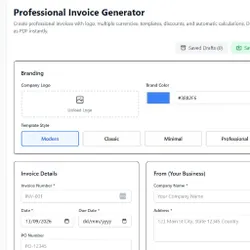
Invoice Generator
Pricing
Pay per usage
Invoice Generator
Create professional invoices online for free. Add your details, list items, and download a ready-to-send PDF invoice in minutes.
Pricing
Pay per usage
Rating
0.0
(0)
Developer

Download Mate
Maintained by CommunityActor stats
0
Bookmarked
2
Total users
1
Monthly active users
a day ago
Last modified
Categories
Share
Invoice Generator: The Complete Solution to Creating Professional Invoices Online
Getting paid on time starts with sending a clear, professional invoice — and you don't need expensive accounting software to do it. If you want to create one in minutes, try the Free Invoice Generator by Zone of Tools — just fill in your business and client details, add your line items, and download a polished, ready-to-send invoice instantly, completely free.
In this guide, we'll cover what an invoice actually is, the essential elements every invoice needs, why professional invoicing matters for freelancers and small businesses, and practical tips for getting paid faster.
Try Now: Free Invoice Generator by Zone of Tools
What Is an Invoice?
An invoice is a formal document issued by a seller or service provider to a buyer, requesting payment for goods or services rendered. It serves as a legal record of a transaction, outlining what was provided, how much is owed, and the terms of payment.
Unlike a receipt, which confirms that a payment has already been made, an invoice is issued before payment is received and functions as a request for payment. Invoices are used across nearly every industry — freelancers, agencies, contractors, retailers, and large corporations all rely on them to formalize transactions and maintain accurate financial records.
Why Professional Invoicing Matters
For freelancers and small business owners especially, the invoice is often the final impression a client has of a transaction. A well-structured, professional invoice does more than just request payment — it reinforces credibility and can directly impact how quickly you get paid.
Here's why it matters:
- Faster payments — Clear, professional invoices reduce confusion and back-and-forth questions, which speeds up the payment process
- Legal protection — A properly documented invoice serves as evidence of an agreed transaction if disputes arise
- Accurate bookkeeping — Invoices provide a clear paper trail for tax filing, accounting, and financial reporting
- Brand credibility — A polished, branded invoice reflects professionalism and builds trust with clients
- Easier tax preparation — Organized invoices make it significantly easier to calculate income, track expenses, and prepare for tax season
Poorly formatted or incomplete invoices, on the other hand, are one of the most common causes of delayed payments — clients often hold off paying simply because they're unsure of the amount due, the payment method, or the deadline.
Essential Elements Every Invoice Should Include
Whether you're creating an invoice manually or using an online generator, certain elements are considered standard and should never be left out.
1. Invoice Header
This should clearly state "Invoice" at the top, along with your business name and logo (if applicable), so there's no confusion about the document's purpose.
2. Invoice Number
A unique invoice number helps both you and your client track and reference the transaction later — essential for bookkeeping and resolving any future disputes.
3. Issue Date and Due Date
The issue date shows when the invoice was created, while the due date specifies the payment deadline. This is one of the most important elements for ensuring timely payment.
4. Business and Client Details
Include your business name, address, email, and phone number, along with the client's corresponding details. This ensures the invoice is properly attributed and easily referenced.
5. Description of Goods or Services
A clear, itemized list of what was provided — including quantities, rates, and descriptions — helps the client understand exactly what they're being charged for.
6. Subtotal, Taxes, and Total Amount Due
Break down the subtotal, any applicable taxes (VAT, sales tax, etc.), discounts, and the final total amount due. Transparency here reduces client confusion and payment delays.
7. Payment Terms and Methods
Specify how the client can pay (bank transfer, PayPal, mobile banking, etc.) and any relevant terms, such as late payment penalties or early payment discounts.
8. Notes or Thank You Message
A brief closing note thanking the client for their business adds a professional, personal touch and can help strengthen long-term client relationships.
How an Online Invoice Generator Works
An online invoice generator simplifies the entire invoicing process by providing a structured template where you simply fill in the relevant details. Here's the typical process:
- Enter your business information — name, logo, address, and contact details
- Add client details — name, business, address, and contact information
- List your products or services — including descriptions, quantities, and rates
- Apply taxes or discounts — the tool automatically calculates the subtotal and total
- Set payment terms — due date, accepted payment methods, and any additional notes
- Generate and download — export the invoice as a PDF, ready to email or print
This automation removes the need for manual calculations and formatting, significantly reducing the time it takes to create a clean, professional invoice.
Benefits of Using a Free Online Invoice Generator
Many freelancers and small businesses hesitate to invest in expensive accounting software when they're just starting out — and often, they don't need to. A free online invoice generator offers several key advantages:
- No software installation — works directly in your browser
- No cost for basic invoicing needs — ideal for freelancers, small businesses, and startups
- Instant, professional formatting — no design skills required
- Automatic calculations — reduces the risk of manual math errors in totals and taxes
- PDF export — invoices can be downloaded and sent immediately via email
- Reusable templates — save time on recurring invoices for repeat clients
The Invoice Generator on Zone of Tools is designed to give freelancers, agencies, and small business owners exactly this kind of simplicity — a fast, free, and professional way to create invoices without needing accounting software or design experience.
Step-by-Step: Creating Your First Invoice
If you're new to invoicing, here's a simple walkthrough to get started:
- Gather your business details — legal or trading name, address, contact info, and logo if you have one
- Collect your client's information — accurate name and billing address to avoid processing delays
- List out the work completed — be specific with descriptions, quantities, and rates
- Calculate applicable taxes — check your local tax requirements to ensure compliance
- Set a clear due date — common terms include "Net 15," "Net 30," or "Due on Receipt"
- Choose your payment methods — list all methods you accept to avoid follow-up questions
- Review before sending — double-check all details, especially amounts and client information
- Send and follow up — email the invoice promptly and follow up if payment isn't received by the due date
Common Invoicing Mistakes to Avoid
Even experienced freelancers and business owners sometimes make invoicing mistakes that delay payment. Here are the most common ones to watch out for:
-
Missing or unclear due dates — Without a clear deadline, clients may deprioritize payment indefinitely.
-
Incorrect client information — Errors in the client's name or billing address can cause processing delays, especially for larger companies with formal accounts payable processes.
-
Vague item descriptions — "Services rendered" tells the client nothing. Be specific about what was delivered.
-
Forgetting to include an invoice number — This makes tracking and referencing past invoices unnecessarily difficult.
-
Inconsistent numbering or formatting — Using a disorganized invoice numbering system can create confusion during bookkeeping or tax season.
-
Not specifying accepted payment methods — If clients don't know how to pay, they may delay simply out of uncertainty.
-
Sending invoices too late — Delayed invoicing leads to delayed payment. Send invoices promptly after completing work.
Tips for Getting Paid Faster
Beyond having a well-structured invoice, there are several strategies that can help speed up payment collection:
- Set clear payment terms upfront — Agree on payment terms before starting work, not after
- Offer multiple payment methods — The easier it is to pay, the faster clients tend to pay
- Send invoices immediately — Don't wait days or weeks after completing work to send the invoice
- Follow up politely but promptly — A brief reminder a few days after the due date can significantly improve payment timelines
- Consider early payment incentives — Small discounts for early payment can encourage faster settlement
- Use consistent invoice numbering — This makes it easier for both you and the client to reference and track payments
Invoicing for Freelancers vs. Small Businesses
While the core elements of an invoice remain the same, freelancers and small businesses often have slightly different invoicing needs.
Freelancers
Freelancers typically need simple, fast invoicing for individual projects or hourly work. Since freelance work often involves multiple clients simultaneously, having a clean, repeatable invoice template saves significant time and reduces administrative overhead.
Small Businesses
Small businesses may need to account for multiple products, recurring billing cycles, tax compliance across regions, and more complex payment terms. As a business grows, invoice generators that support saved templates and recurring invoices become increasingly valuable for efficiency.
Digital Invoices vs. Traditional Paper Invoices
The shift toward digital invoicing has been driven by clear practical advantages:
| Factor | Digital Invoice | Paper Invoice |
|---|---|---|
| Speed of delivery | Instant (email/PDF) | Delayed (mail) |
| Cost | Free or low-cost | Printing and postage costs |
| Environmental impact | Minimal | Higher (paper waste) |
| Record keeping | Easily searchable and stored | Physical storage required |
| Editing and reuse | Easy to duplicate/edit for future invoices | Requires manual recreation |
Given these advantages, digital invoicing has become the standard for freelancers and businesses of virtually all sizes.
Frequently Asked Questions About Invoice Generators
Are online invoice generators free to use? Many online invoice generators, including basic PDF creation and templates, are available for free. Some platforms charge for advanced features like recurring billing, client management, or accounting integrations.
Do I need an accountant to create an invoice? No. Basic invoicing doesn't require an accountant — an online invoice generator can handle formatting and calculations. However, for tax compliance in more complex situations, consulting an accountant is recommended.
Can I customize the invoice with my business logo and branding? Most invoice generators allow you to add a logo and customize basic branding elements, helping your invoices look professional and consistent with your business identity.
What file format should I send my invoice in? PDF is the standard format for sending invoices, as it preserves formatting across all devices and is universally accepted by businesses and accounting systems.
How do I handle taxes on my invoice? Tax requirements vary by location and business type. Most invoice generators allow you to manually add applicable tax rates, but it's important to verify your local tax obligations to ensure compliance.
What should I do if a client doesn't pay by the due date? Send a polite follow-up reminder shortly after the due date passes. If payment remains outstanding, escalate with formal reminders and, if necessary, review the payment terms agreed upon before taking further action.
Final Thoughts
A professional invoice is more than just a payment request — it's a reflection of how seriously you run your business, and it directly influences how quickly and reliably you get paid. With the right online invoice generator, creating clean, accurate, and professional invoices takes just minutes, without needing accounting software or design skills.
The key to effective invoicing is clarity: clear line items, clear payment terms, and a clear due date. Combine that with prompt sending and polite follow-ups, and you'll significantly reduce payment delays.
Ready to create your first invoice? Try the free Invoice Generator from Zone of Tools and generate a professional, ready-to-send invoice in minutes.
This article is for informational purposes only and does not constitute legal, tax, or accounting advice. Consult a qualified professional for guidance specific to your business and location.


