

Brave AI Mode API | Privacy-Search Intelligence
Pricing
from $0.01 / 1,000 results
Brave AI Mode API | Privacy-Search Intelligence
Track Brave Search's AI Mode answers for any query: get the AI-generated answer, its cited sources, and the supporting web results as structured JSON. Built for privacy-search intelligence, infosec research, and journalism. Pay per query, MCP-ready.
Pricing
from $0.01 / 1,000 results
Rating
5.0
(1)
Developer

John
Maintained by CommunityActor stats
1
Bookmarked
8
Total users
8
Monthly active users
2 days ago
Last modified
Categories
Share
Brave AI Mode API | Privacy-Search Intelligence & Brave Search AI Answers
Track Brave Search AI Mode answers for any query and get the AI-generated answer, its cited sources, and the supporting web results as structured JSON. Brave is the privacy-first search engine, and its AI Mode answers reflect a different index and a different audience than mainstream search. Use this API to monitor what Brave's AI tells users about your brand, product, or topic, and which sources it cites.
Built for privacy-tech, infosec, and journalism: send one query or many, and get one clean row per query with the answer as markdown, the structured text blocks, the cited references, and the underlying web results.
What you get
One row per query:
ai_mode_present: whether Brave returned an AI Mode answermarkdown: the full answer as markdowntext_blocks: the structured content blocks (headings, paragraphs, lists)references: the cited sources, each with index, title, and linkweb_results: the supporting web results behind the answer, with title, link, snippet, source, and daterelated_questions: follow-up questions Brave associates with the answer
Use cases
- Monitor what Brave's AI Mode says about your brand or product
- Compare Brave's cited sources against other engines for AEO research
- Track the privacy-search narrative on security, crypto, and policy topics
- Give an AI agent a privacy-first answer plus its sources in one call
- Audit answer drift over time by re-running key queries on a schedule
🔌 Integrations: Monitor Brave Search AI Answers on a Schedule
A single run answers one query. The real value comes from running the Brave AI Mode API repeatedly and watching how the answers, their cited sources, and the supporting web results shift over time. Wire it into the tools you already use with Apify integrations.
Tasks and schedules (the core recipe)
Save one task per thing you monitor: a "brand-watch" task with your brand queries, a "policy-watch" task with topic queries. Then attach one schedule from the Actor's Actions, then Schedule menu. One schedule can trigger many tasks at once.
Common cron strings:
0 7 * * *runs daily at 7 AM0 */6 * * *runs every six hours0 9 * * 1runs every Monday morning
The Track Brand Mentions in Brave AI Search Answers task is a ready-made starting point for a scheduled brand monitor.
n8n
Available as an n8n community node, n8n-nodes-brave-ai-mode-api. A four-step workflow: Schedule Trigger, then the Brave AI Mode API node, then a Filter on ai_mode_present, then a Slack or email node so you only get pinged when an answer changes. The n8n integration section below has install steps.
Make and Zapier
Connect the same output to thousands of apps with Make and Zapier: run the Actor, then map the markdown and references fields into a spreadsheet row, a ticket, or a chat message.
Store history in Supabase
Send every run into a database so the answers accumulate into a history you can query. No-code path: an n8n Actor node, then a Supabase node. In Python, run the Actor and bulk-insert the flat rows with apify-client and supabase:
MCP and AI agents
Add the Actor to any MCP client through the Apify MCP server and let an agent pull Brave's privacy-first answers on demand. From Claude Code (free trial) or Cursor you can ask it to "check what Brave Search AI says about our product across these queries." The MCP section below covers the Brave Search MCP setup and the timing notes.
Webhooks
For anything custom, add an Apify webhook on the ACTOR.RUN.SUCCEEDED event to push each finished run into your own endpoint.
Input
| Field | Type | Description |
|---|---|---|
query | string | A single query, e.g. what is quantum computing. Provide this, queries, or both. |
queries | array of strings | A batch of queries to resolve in one run. Merged with query and de-duplicated. |
country | string | Optional two-letter country code, e.g. us, gb, de. Default us. |
language | string | Optional two-letter language code, e.g. en, es, de. Default en. |
Example input
Sample output
Pricing
Pay per query: a flat $0.015 per query resolved, whether or not an AI Mode answer is shown (the lookup runs either way). No setup fee, no per-run fee. Batch many queries in one run.
How to get started
- Open Brave AI Mode API on the Apify Store.
- Enter a
query(or aquerieslist of brand or topic terms). - Run the Actor and read the AI Mode answer, its sources, and web results from the dataset.
- Export as JSON, CSV, or Excel, or pull it from the API. Schedule it to track changes.
Prefer code? See johnvc's GitHub for setup guides and code examples.
Run from the API
🔌 Use this API from Claude (MCP)
This Actor is compatible with the Model Context Protocol (MCP), so AI agents can call it as a tool. Add it through the hosted Apify MCP server using this Actor-specific URL:
https://mcp.apify.com/?tools=actors,docs,johnvc/brave-ai-mode-api
If you run agents from Claude Code (free trial) or Claude Cowork (free trial), add the Apify MCP server and ask it to "check what Brave AI Mode says about our product across these queries."
Setup walkthrough:
Apify MCP integration docs: https://docs.apify.com/platform/integrations/mcp
MCP call timing (waitSecs)
Brave's AI Mode answers are generated on demand, so a run here commonly takes 45 to 110 seconds. That is longer than the hosted MCP call-actor wait window, where waitSecs defaults to 30 and maxes out at 45. If you call this Actor over MCP with the defaults, the tool call can return while the run is still RUNNING, with no items yet or only a partial set. The run is healthy: it simply finishes after the wait window has closed, and the full data lands in the dataset a short time later.
Two ways to handle it:
- Set
waitSecs: 45(the maximum) to give the run as long as MCP allows. This covers the faster queries, but a slow answer can still run past 45 seconds. - Fire-and-forget, then poll (the reliable pattern for this Actor): call with
waitSecs: 0to start the run and get arunIdanddatasetIdback right away, then read the results from the dataset (for example with theget-dataset-itemstool) once the run reachesSUCCEEDED. Because Brave answers frequently exceed 45 seconds, this is the recommended approach.
An immediate RUNNING status, or an empty or partial first response, is expected behavior over MCP, not an error.
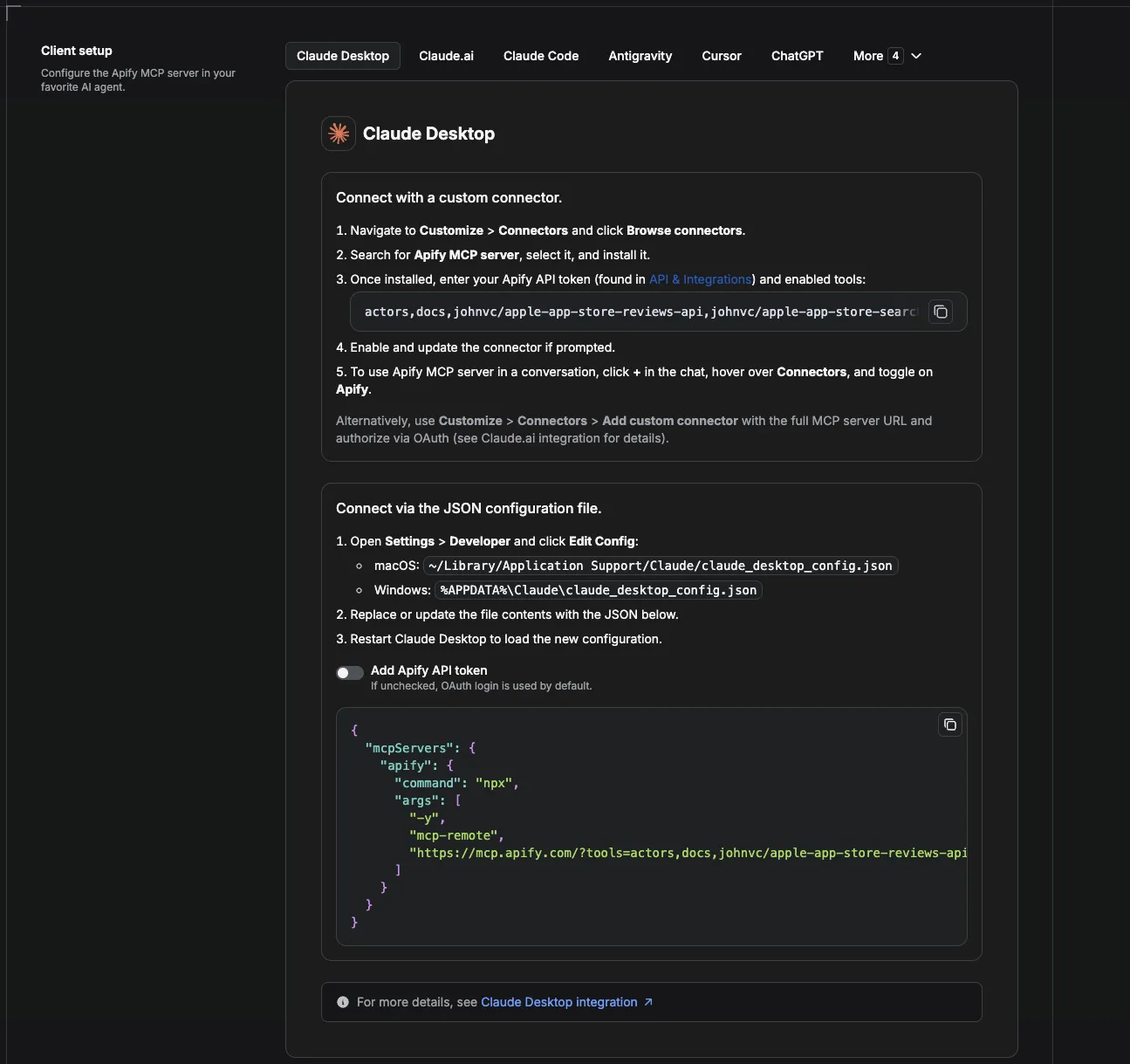
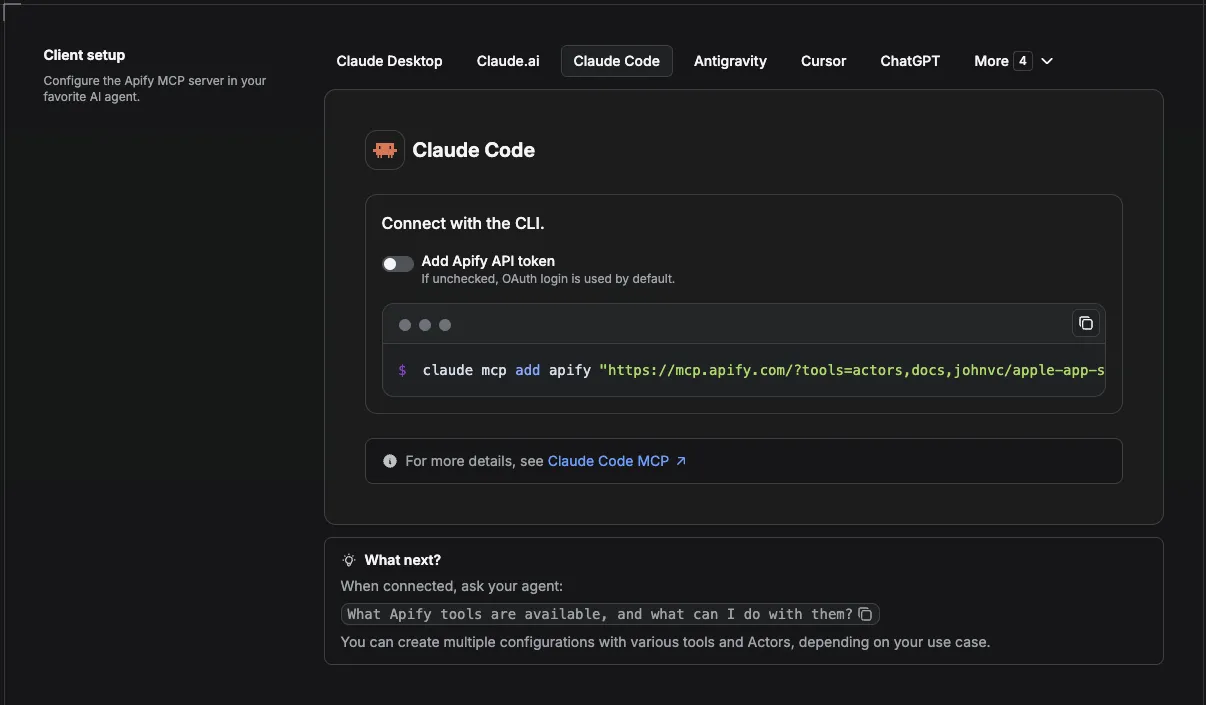
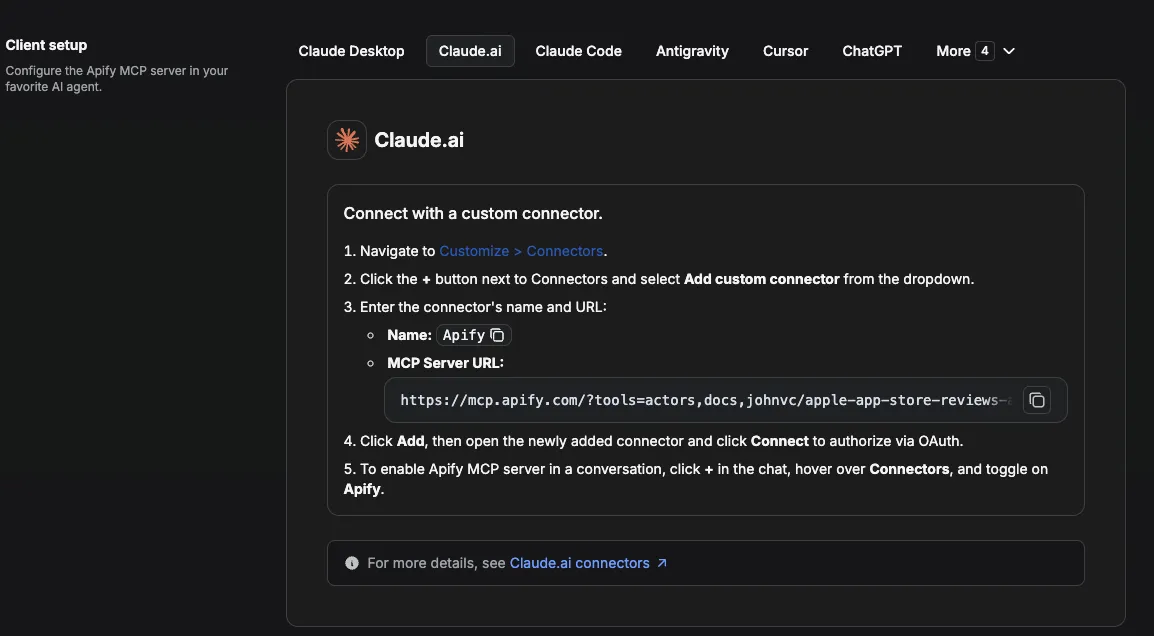
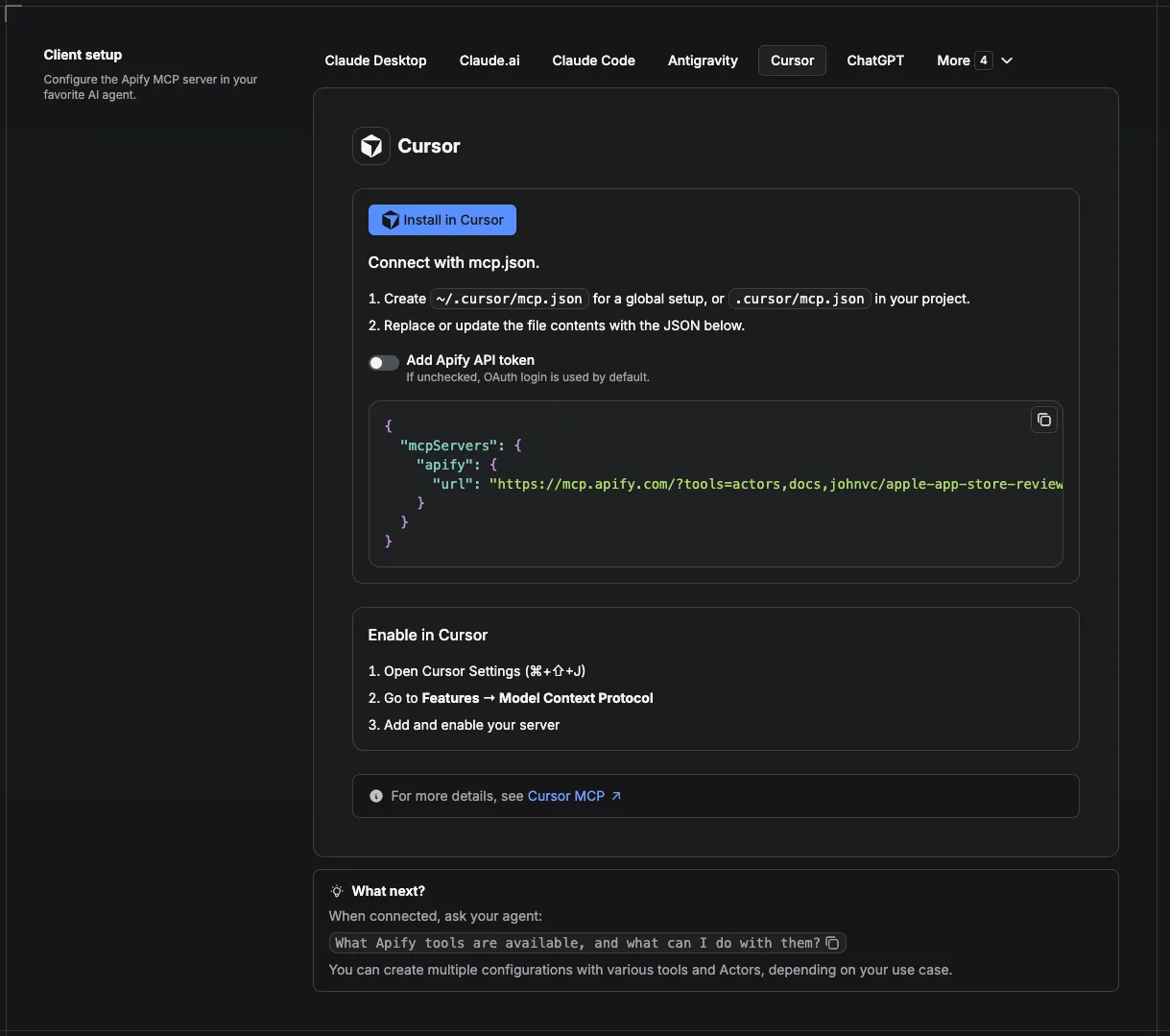
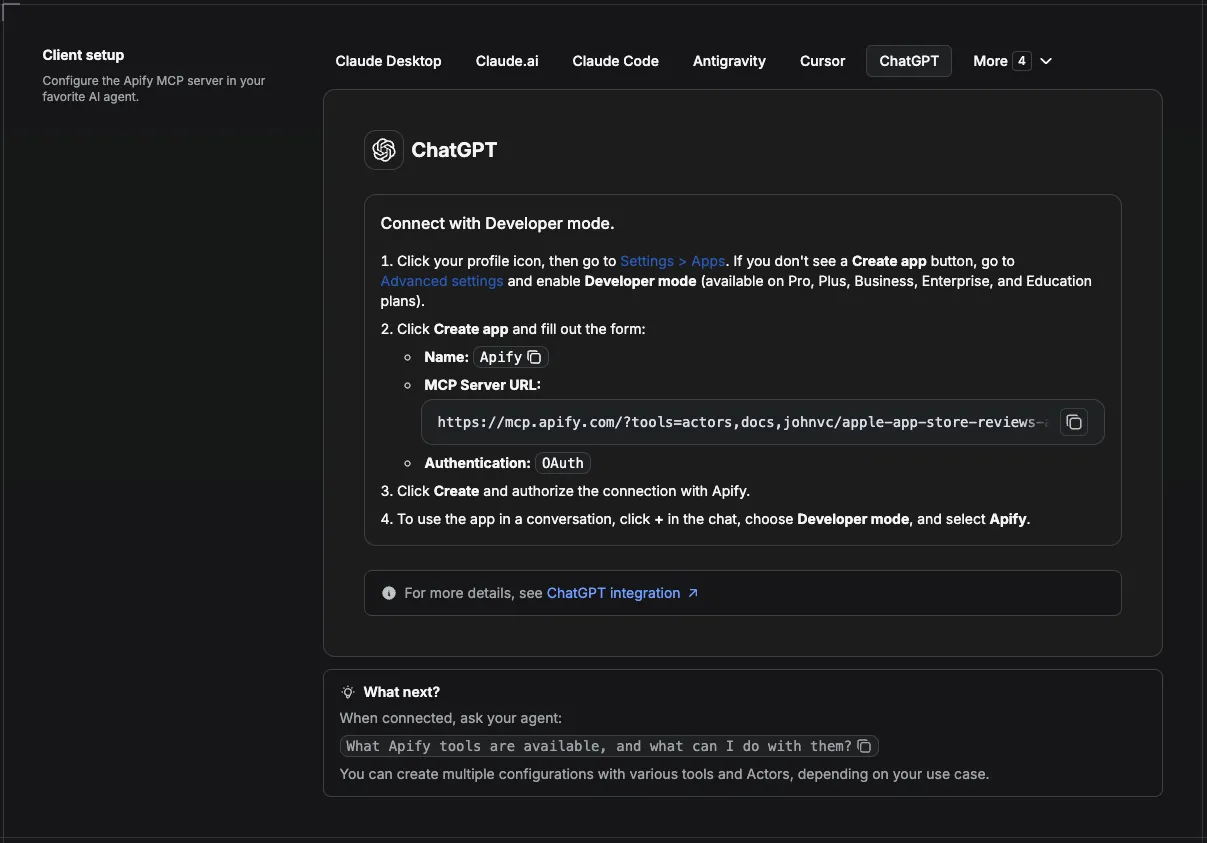
MCP setup, step by step
Visual setup guides for each client (source and more assets: ApifyPublicData on GitHub):
Claude Cowork Desktop (free trial)
Claude Code (free trial)
Claude (website)
Cursor
ChatGPT
🔗 Related Tools
Track answer engines across the whole search landscape, not just Brave. These related Actors from the same portfolio cover the other AI answer surfaces and privacy engines:
- Google AI Overview API: capture Google's AI Overview answers and their cited sources for the same queries you track on Brave.
- Bing Copilot AI Answers API: monitor Microsoft's Copilot answers for AEO coverage on Bing.
- Naver AI Overview API: track AI answers on Korea's largest search engine for Korean-market AEO.
- DuckDuckGo Scraper: pull organic results from another privacy-first engine to compare against Brave.
Other Brave AI Actors exist on the Store, but public run statistics tell the story: one widely listed Brave Search MCP alternative shows a recent run success rate near 40 percent, while this API reports a 100 percent recent success rate and returns clean, consistent JSON on every query.
FAQ
What is Brave AI Mode?
It is the AI-generated answer Brave Search produces for many queries, with cited sources and supporting web results. This API returns that answer and its sources as structured data.
Do I get charged if no answer is shown?
Yes, a flat per-query fee, because the lookup runs either way. The row will have ai_mode_present: false and a short note.
Why Brave specifically?
Brave is privacy-first and uses an independent index, so its AI answers and cited sources can differ from mainstream engines. That makes it valuable for AEO research and privacy-aware audiences.
Can I monitor many terms at once?
Yes. Pass a queries list; each is resolved independently and returned as its own row.
Can I schedule the Brave AI Mode API to run automatically?
Yes. Any run can be automated on a schedule. Create a saved task with your queries, then attach a schedule from the Actor's Actions, then Schedule menu. Use cron strings like 0 7 * * * for daily at 7 AM, 0 */6 * * * for every six hours, or 0 9 * * 1 for Monday mornings, and remember that one schedule can trigger many tasks at once. The Integrations section above has the full monitoring recipe.
Should I use an API or a web scraper for Brave AI answers?
Both describe the same job here. An official search API is rate limited, quota bound, and often missing the AI answer entirely, while a web scraper reads what a real browser sees. This Actor gives you the clean, structured result of a scraper through a simple API endpoint you call yourself, with no separate Brave key and no quota to manage.
Can I integrate this Brave Search scraper with other apps?
Yes. The Actor connects to almost any cloud service through Apify integrations: Make, Zapier, Slack, Google Sheets, and more. For custom actions, add an Apify webhook on ACTOR.RUN.SUCCEEDED. The Integrations section above has copy-paste recipes.
Can I use the Brave AI Mode API with the Apify API?
Yes. The Apify API gives you programmatic access to run the Actor, schedule it, and fetch datasets, and the apify-client package is available for both Node.js and Python. See the Actor's own API tab for ready-made snippets.
Can I use Brave Search through an MCP server?
Yes. The Actor can be added as a tool to any MCP client, including Claude, Cursor, and ChatGPT, through the hosted Apify MCP server. Use the Actor-specific URL https://mcp.apify.com/?tools=actors,docs,johnvc/brave-ai-mode-api. From Claude Code (free trial) you can run Brave Search MCP queries directly inside your agent. If a client reports "could not connect to MCP server brave search", re-check the server URL and that the Actor tool is enabled. See the Apify MCP docs and the MCP section above for timing notes.
Is the Brave Search API free, and do I need an API key?
There is no free public Brave AI Mode endpoint, and you do not need your own Brave Search API key to use this Actor. You pay a small flat fee per query resolved on Apify, and the lookup is handled for you. That is what people are after when they search how to get a Brave Search API key: this Actor removes that step.
What makes Brave Search's AI answers unique?
Brave runs an independent index and is privacy-first, so its AI Mode answers and the sources they cite can differ from mainstream engines. You can read more about the engine at Brave Search. That independent view is what makes Brave valuable for answer-engine optimization and privacy-aware research.
How can I track other AI search and AEO tools?
Answer-engine optimization spans more than one engine. Pair this Actor with the Google AI Overview API, the Bing Copilot AI Answers API, and the Naver AI Overview API to cover Google, Microsoft, and Korean AI answers with the same monitoring workflow. See Related Tools above for the full list.
n8n integration
Available as an n8n community node, n8n-nodes-brave-ai-mode-api. In n8n: Settings, Community Nodes, install n8n-nodes-brave-ai-mode-api, then use it in any workflow (it also works as an AI Agent tool).
Featured Tasks
Ready-to-run examples that show this API solving a specific problem. Each opens its own setup so you can run it on your account in one click.
- Track Brand Mentions in Brave AI Search Answers - Monitor whether your brand appears in Brave's AI Mode answers: get the ai_mode_present flag, answer markdown, and cited references as JSON.
- Brave Search API Alternative: AI Answers as JSON - A Brave Search API alternative, no Brave key: get the AI Mode answer markdown, an ai_mode_present flag, and cited references as JSON.
- Brave Search AI for Claude via MCP, No API Key - Use Brave's AI Mode answers as a tool in Claude via MCP, no Brave API key.
- Track sources cited in Brave AI answers - See which sites Brave AI cites for your keywords.
- Export Brave AI answers to CSV - Export Brave AI answers to CSV for any keywords.
- Check Brave AI answers for many keywords - Check Brave AI answers across a list of keywords in one run.
Last Updated: 2026.07.14


