

Google Ads Transparency API | Ad Library for Marketing Agents
Pricing
from $0.01 / 1,000 results
Google Ads Transparency API | Ad Library for Marketing Agents
List any advertiser's ads from the Google Ads Transparency Center as structured JSON: ad format, first and last shown dates, total days running, and a preview link. Competitor ad library for growth teams, agencies, and AI marketing agents. Pay per ad, MCP-ready.
Pricing
from $0.01 / 1,000 results
Rating
5.0
(1)
Developer

John
Maintained by CommunityActor stats
1
Bookmarked
7
Total users
7
Monthly active users
19 hours ago
Last modified
Categories
Share
Google Ads Transparency API | Competitor Ad Library for Marketing Agents
The Google Ads Transparency API lists any advertiser's ads from the Google Ads Transparency Center as clean structured JSON. Give the API an advertiser ID and get back the ads they are running, each with its format, the dates it was first and last shown, the total days it has run, and a preview link. It is a competitor ad library for growth teams, agencies, and AI marketing agents, the kind of competitive intelligence tools like SpyFu and SEMrush charge a subscription for, available pay-as-you-go.
What you get
One row per ad:
advertiserandadvertiser_idad_creative_idandformat(text, image, or video)first_shownandlast_shown(timestamps) andtotal_days_shownlinkto a preview of the creative, and adetails_linkto the ad on the Transparency Center
Use cases
- Build a competitor ad library and watch what creatives a rival runs
- Track how long an ad has been running (long run time signals a winner)
- Audit a brand's video vs image vs text ad mix over time
- Feed an AI marketing agent a competitor's live ads for creative analysis
- Monitor several advertisers at once and diff their libraries on a schedule
Input
| Field | Type | Description |
|---|---|---|
advertiserId | string | A single advertiser ID, the AR... code in a Google Ads Transparency Center URL (e.g. AR01614014350098432001). Provide this, advertiserIds, or both. |
advertiserIds | array of strings | A batch of advertiser IDs to fetch in one run. Merged with advertiserId and de-duplicated. |
region | string | Optional region filter. Leave blank to include ads shown anywhere. |
maxResultsPerAdvertiser | integer | Ads per advertiser. Default 50, maximum 500. |
To get an advertiser ID, open the advertiser on the Google Ads Transparency Center; the AR... code is in the URL.
Example input
Sample output
Pricing
Pay-per-result: a small actor_start fee plus a per-ad charge. The per-ad price scales down with your Apify plan.
| Plan | Per ad | Start fee |
|---|---|---|
| Free | $0.003 | $0.001 |
| Bronze | $0.0025 | $0.001 |
| Silver | $0.002 | $0.001 |
| Gold | $0.0017 | $0.001 |
You only pay for the ads you receive. No monthly minimum.
How to get started
- Open Google Ads Transparency API on the Apify Store.
- Enter an
advertiserId(or aadvertiserIdslist). - Set
maxResultsPerAdvertiser, then run the Actor. - Export the dataset as JSON, CSV, or Excel, or pull it from the API.
Prefer code? See johnvc's GitHub for setup guides and code examples.
Run from the API
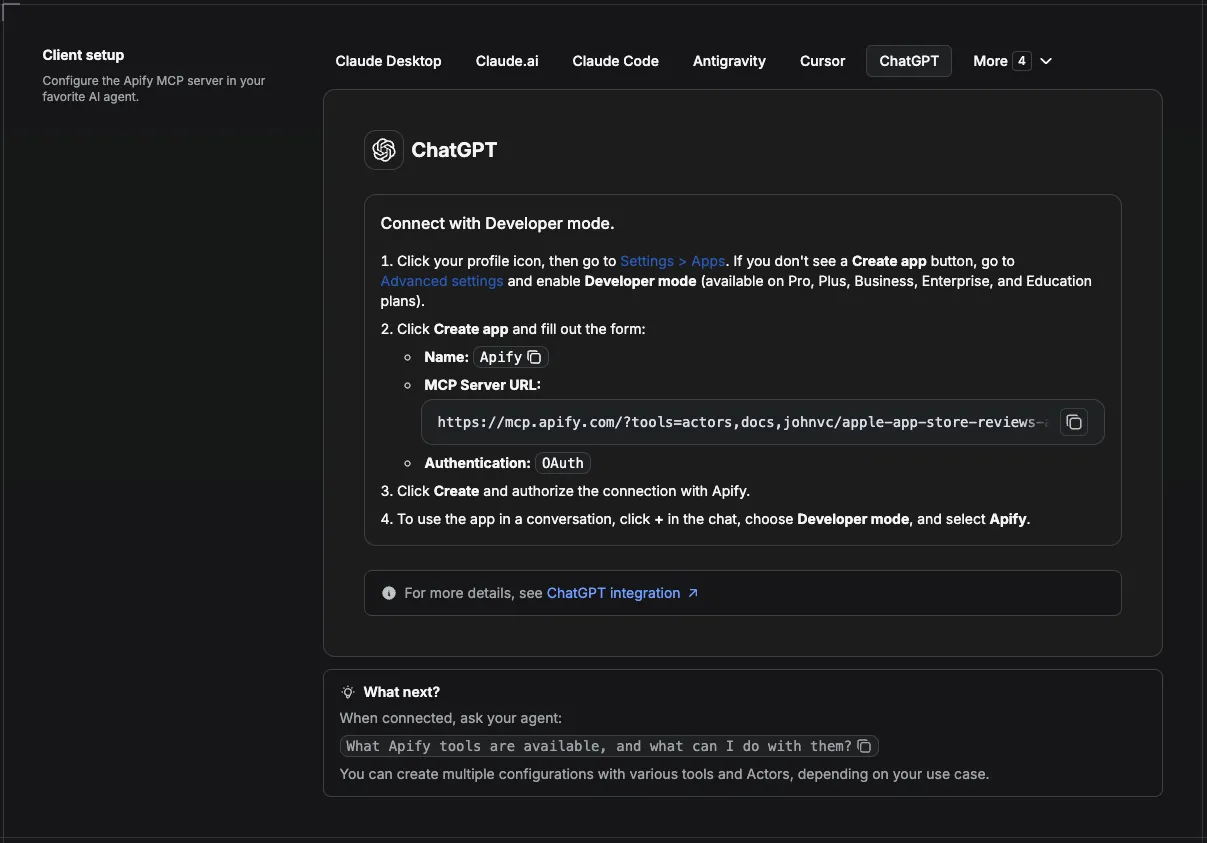
🔌 Use this API from Claude (MCP)
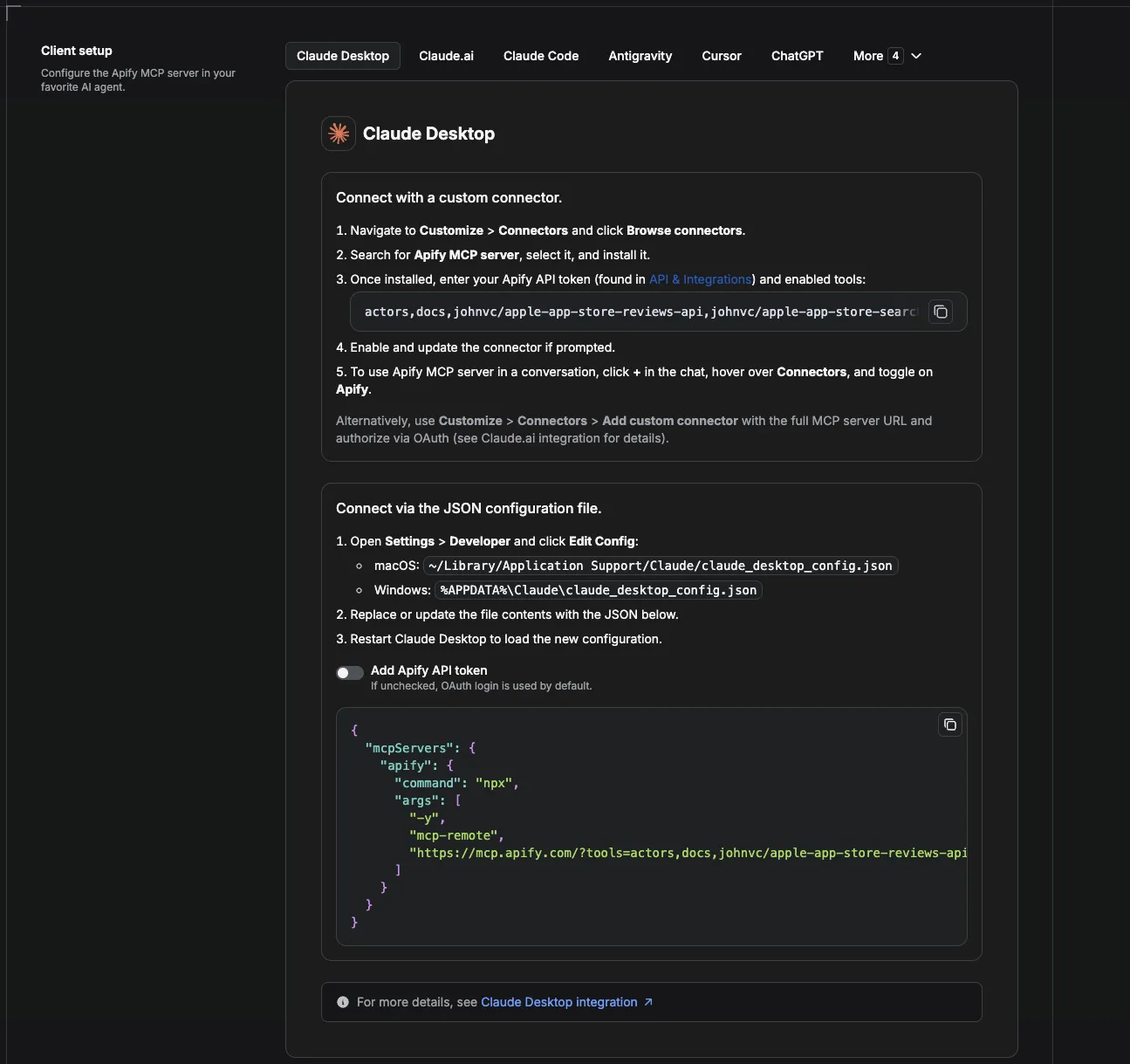
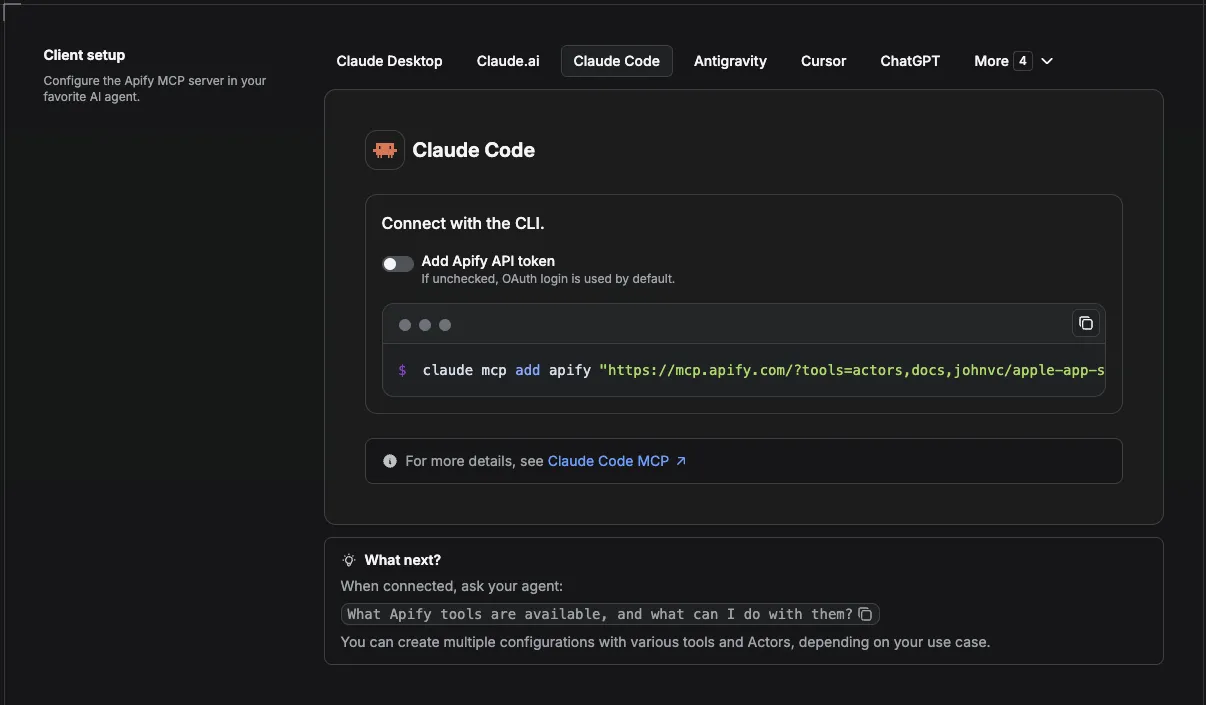
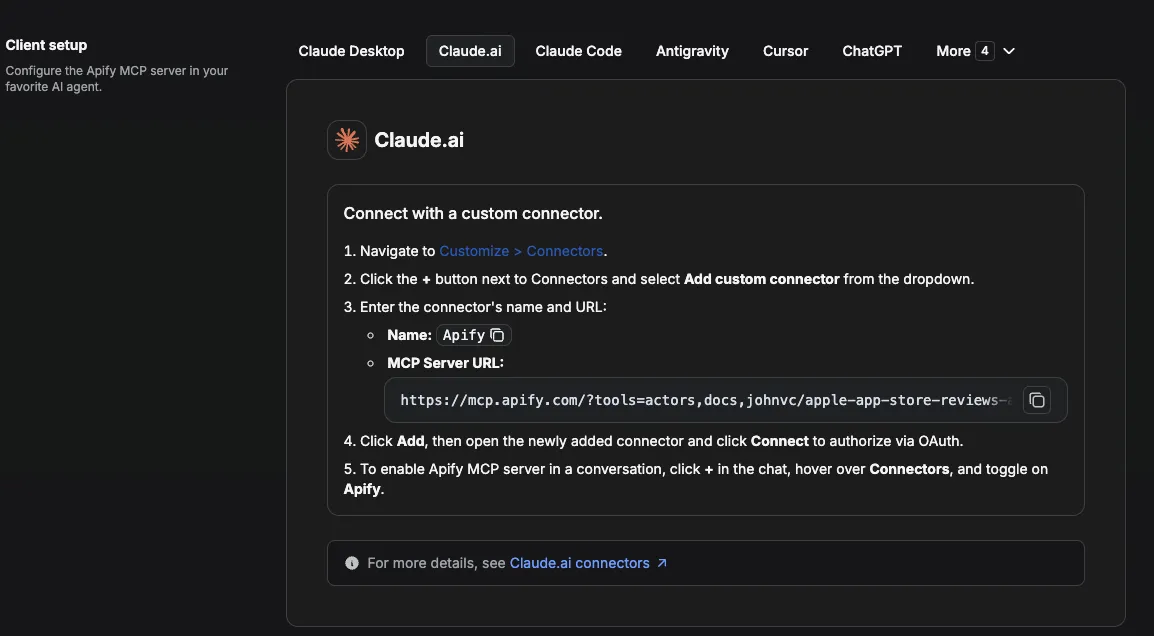
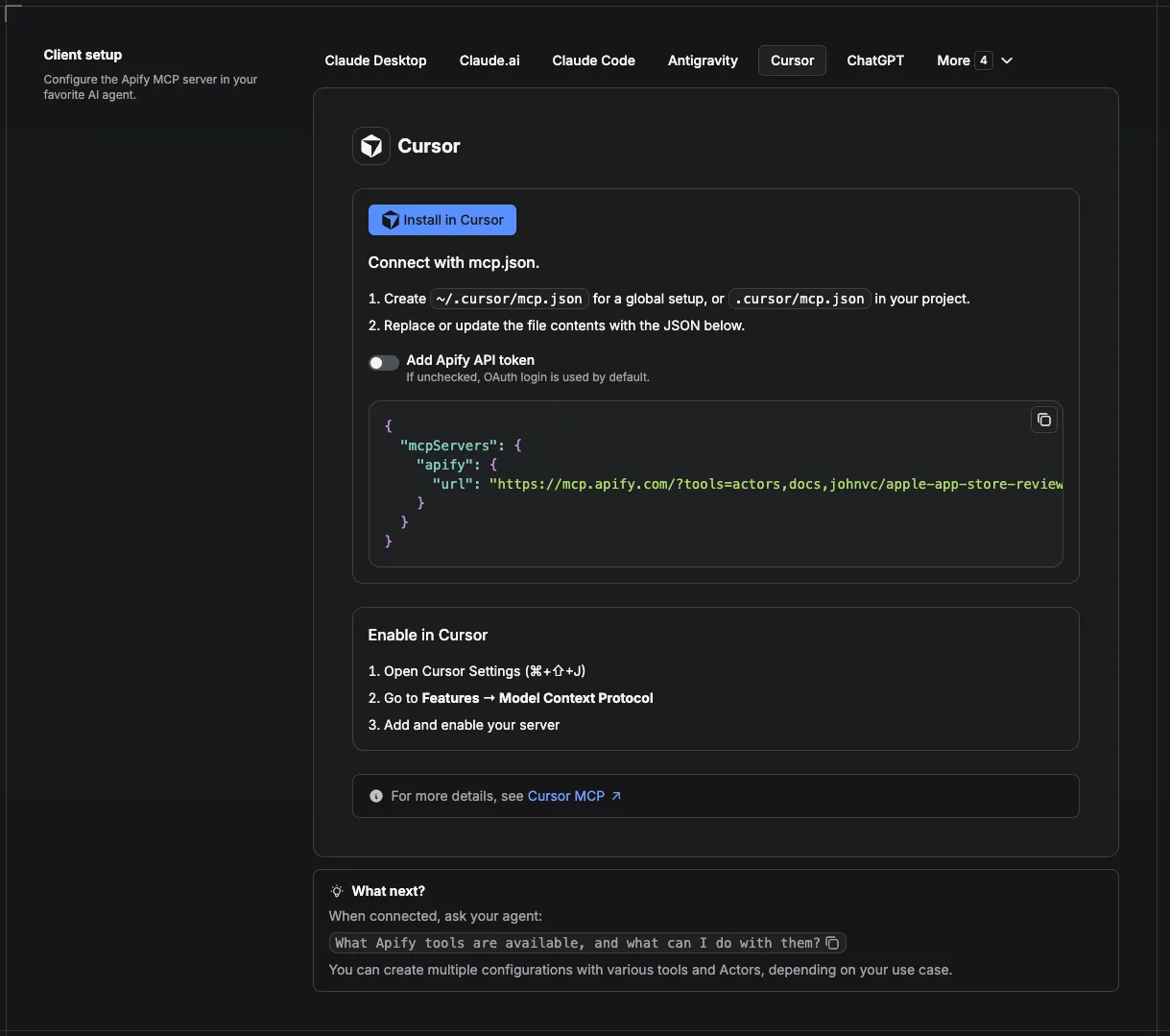
This Actor is compatible with the Model Context Protocol (MCP), so AI agents can call it as a tool. Add it through the hosted Apify MCP server using this Actor-specific URL:
https://mcp.apify.com/?tools=actors,docs,johnvc/google-ads-transparency-api
If you run agents from Claude Code (free trial) or Claude Cowork (free trial), add the Apify MCP server and ask it to "pull this competitor's ad library and summarize their creative strategy."
Setup walkthrough:
Apify MCP integration docs: https://docs.apify.com/platform/integrations/mcp
MCP setup, step by step
Visual setup guides for each client (source and more assets: ApifyPublicData on GitHub):
Claude Cowork Desktop (free trial)
Claude Code (free trial)
Claude (website)
Cursor
ChatGPT
🔌 Integrations: Automate the Google Ads Transparency API
A single run answers one question: what is this advertiser running right now? The real value shows up when you run the Google Ads Transparency API on a schedule, so a competitor ad library builds up over time and you can diff it week to week. Here is the full menu of Apify platform integrations.
Tasks and schedules (the core recipe)
Save one task per advertiser you want to watch. Input a single advertiserId, or pass an advertiserIds batch to track a whole set of rivals in one task. Then attach a schedule from the Actor's Actions, then Schedule menu. One schedule can trigger many tasks at once. Useful cron strings:
0 7 * * *runs every day at 7 AM0 */6 * * *runs every six hours0 9 * * 1runs every Monday morning
Each run appends a fresh snapshot, so first_shown, last_shown, and total_days_shown show you which creatives a competitor keeps alive and which they quietly kill.
n8n
This Actor ships as an n8n community node. See the n8n integration section below for install steps, then build a workflow: Schedule Trigger, then the Actor node, then a Filter on total_days_shown, then a Slack or email node that pings you when a competitor launches a long-running new ad. For the platform basics, see the Apify n8n integration docs.
Make and Zapier
The same pattern works no-code in Make and Zapier: trigger the Actor on a schedule and pipe each ad row into a sheet, a CRM, or a chat channel.
Store ad history in Supabase
Send the accumulated data somewhere it persists. No-code, chain the n8n Actor node into a Supabase node. In Python, run the Actor with apify-client and bulk-insert the flat ad rows:
Full Python and MCP walkthroughs live in the example repo on GitHub.
MCP and AI agents
Add the Actor as a tool in any MCP client through the hosted Apify MCP server, then let an agent pull and summarize a competitor's live ads. See the Use this API from Claude (MCP) section above for the Actor-specific URL and per-client setup. An agent running in Claude Code (free trial) can answer questions like "which of this advertiser's video ads have run the longest?"
Webhooks
For anything custom, add an Apify webhook on ACTOR.RUN.SUCCEEDED to POST each finished run to your own endpoint.
🔗 Related Tools
Competitor ad research rarely stops at one Google surface. These related tools from the same portfolio cover the neighboring marketing intelligence jobs:
- Google Local Services API pulls Local Services Ads and lead-gen listings, the other paid surface where local rivals show up.
- Google Shopping API returns competitor products, prices, and deals so you can pair ad creative with the offers behind it.
- Google AI Overview API tracks how brands surface inside Google's AI answers, the organic side of the same visibility question.
- Google News API monitors brand and competitor coverage so a creative push and its press cycle line up.
For contrast, an older alternative such as ads-transparency-scraper by solidcode carries a public user rating below 2.5 out of 5 at the time of writing; this API is actively maintained and returns clean, consistently structured JSON on every run.
FAQ
What is an advertiser ID?
It is the AR... code that identifies an advertiser on the Google Ads Transparency Center. Open the advertiser there and copy the code from the URL.
How many ads come back?
Up to maxResultsPerAdvertiser (default 50). The Actor paginates an advertiser's library for you.
Can I track several competitors at once?
Yes. Pass an advertiserIds list; each is fetched independently.
Does it include the ad preview?
Yes. Each ad has a link to a preview of the creative and a details_link to the ad on the Transparency Center.
Can I schedule this Google Ads Transparency scraper?
Yes, and this is where the tool earns its keep. Save a task with your advertiser IDs, then attach a schedule from the Actor's Actions, then Schedule menu. Use 0 7 * * * for daily at 7 AM, 0 */6 * * * for every six hours, or 0 9 * * 1 for Monday mornings, and note that one schedule can trigger many tasks at once. The Integrations section above has the full monitoring recipe, and Apify schedules covers the platform details.
Should I use an API or a web scraper?
An official ad-platform API is rate limited, quota bound, and often missing the fields you actually want. This Actor gives you the same competitor ad data as either a no-code web scraper or a clean API endpoint you call yourself, with no quotas to manage. If the difference is new to you, here is a plain-language primer on web scraping.
Can I integrate this ad data with other apps?
Yes. The Actor connects to almost any cloud service through Apify integrations: Make, Zapier, Slack, Google Sheets, and more. For custom actions, add an Apify webhook on ACTOR.RUN.SUCCEEDED. The Integrations section above has copy-paste recipes.
Can I use the Google Ads Transparency API programmatically?
Yes. The Apify API gives programmatic access to run the Actor, schedule it, and fetch datasets, and the apify-client package exists for both Node.js and Python. See the Actor's own API tab.
Can I use this Actor through an MCP server?
Yes. Add it as a tool to any MCP client (Claude, Cursor, and others) through the hosted Apify MCP server with the Actor-specific URL https://mcp.apify.com/?tools=actors,docs,johnvc/google-ads-transparency-api. Agents running in Claude Code (free trial) or Claude Cowork (free trial) can call it directly. See the Apify MCP docs.
How can I track other competitor marketing channels?
Pair this API with related tools in the same portfolio: Google Local Services API for Local Services Ads, Google Shopping API for competitor product pricing, and Google AI Overview API for brand visibility in AI answers. The Related Tools section above has the full list.
Is it legal to collect ad transparency data?
The Google Ads Transparency Center is a public transparency tool, and this Actor reads only what is publicly published there. For background on the wider topic, see the legality of web scraping.
n8n integration
Available as an n8n community node, n8n-nodes-google-ads-transparency-api. In n8n: Settings, Community Nodes, install n8n-nodes-google-ads-transparency-api, then use it in any workflow (it also works as an AI Agent tool).
Featured Tasks
Ready-to-run examples that show this API solving a specific problem. Each opens its own setup so you can run it on your account in one click.
- Spy on a Competitor's Google Ads - See every Google ad a competitor is running: ad format, first and last shown dates, total days running, and a link to each ad on the Transparency Center.
- Monitor a Political Advertiser's Google Ads - Pull a political advertiser's Google ads from the Transparency Center: ad format, first and last shown dates, total days running, and a link to each ad.
- Export an advertiser's Google ads to CSV - Export every ad an advertiser runs in the Google Ads Transparency Center to CSV.
- Track how long a competitor's ads have run - Track how long each of a competitor's Google ads has run.
- Audit an advertiser's Google ad creatives - Audit every ad creative an advertiser runs on Google.
Last Updated: 2026.07.14


