

Google Autocomplete API | Search & Place Suggestions for Agents
Pricing
from $0.01 / 1,000 results
Google Autocomplete API | Search & Place Suggestions for Agents
Get Google autocomplete suggestions for any query as structured JSON: the suggestions Google shows as you type. Resolve partial searches and surface place suggestions to feed into a Maps or Places lookup. Fast query and keyword expansion for SEO and AI agents. Pay per suggestion, MCP-ready.
Pricing
from $0.01 / 1,000 results
Rating
5.0
(1)
Developer

John
Maintained by CommunityActor stats
1
Bookmarked
5
Total users
3
Monthly active users
19 hours ago
Last modified
Categories
Share
Get the autocomplete suggestions Google shows as you type, for any query, as clean structured JSON. Pass one or many partial queries and get back the ranked suggestion list for each. For location and place queries, these act as fast place suggestions you can pipe straight into a Maps or Places lookup. It is the lightweight front-end for query expansion, keyword research, and resolving partial searches before a heavier call.
What you get
One row per suggestion:
query: the input query the suggestion belongs toposition: the rank of the suggestion (1 is the top suggestion)value: the suggested query text
Use cases
- Resolve a partial place query into suggestions, then feed a chosen one into a Google Maps Places API
- Expand a seed keyword into the real phrases people search (SEO and PPC)
- Power a type-ahead box with Google's own suggestions
- Give an AI agent the likely full queries behind a vague user request
- Mine "near me", "open now", and long-tail variants for a location term
🔌 Integrations: Put the Google Autocomplete API on a Schedule
A single run answers one question. The real value comes from running the Google Autocomplete API repeatedly, so a keyword set stays fresh and a place-suggestion feed keeps refilling. Wire it into your stack with Apify platform integrations.
Tasks and schedules
Save your input as a task: one task per keyword set or per market, for example a "us-en seed keywords" task and a "de-de seed keywords" task. Then attach a schedule from the Actor's Actions, then Schedule menu. One schedule can trigger many tasks at once. Useful cron strings:
0 7 * * *runs every day at 7 AM0 */6 * * *runs every six hours0 9 * * 1runs every Monday morning
The Get Keyword Research Data as JSON From Google task is a ready-made starting point to schedule.
n8n
This Actor ships as an n8n community node, so you can drop it into any workflow (see the n8n integration section below). A common flow is Schedule Trigger, then the Autocomplete node, then a Filter, then a Slack or email node when new suggestions appear.
Make and Zapier
Apply the same recurring pattern with Make and Zapier: a scheduled trigger runs the Actor, then routes the suggestions into a sheet, CRM, or chat channel.
Store suggestion history in Supabase
Send each run's rows to a database so keyword and suggestion history accumulates over time. No-code path: an n8n Actor node followed by a Supabase node. In Python, run the Actor and bulk-insert the flat query, position, and value rows:
MCP and AI agents
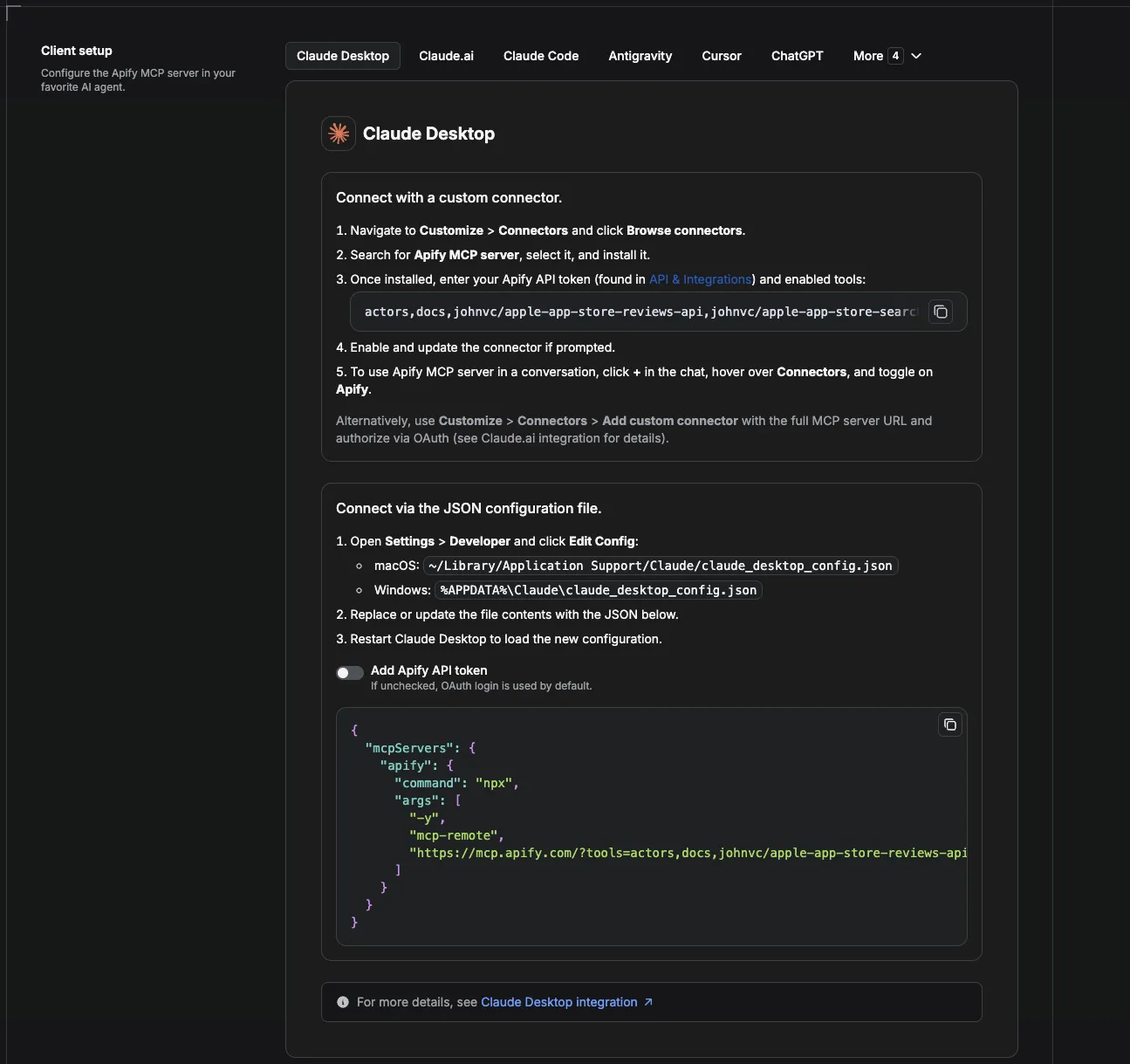
Add the Actor as a tool in any MCP client through the hosted Apify MCP server and let an agent expand a vague request into the real queries behind it. See the Use this API from Claude (MCP) section below for the Actor-specific URL and per-client setup.
Webhooks
For anything custom, attach an Apify webhook on the ACTOR.RUN.SUCCEEDED event to push fresh suggestions into your own endpoint the moment a run finishes.
Input
| Field | Type | Description |
|---|---|---|
queries | array of strings | One or more partial queries, e.g. coffee near. Each is completed independently. Required. |
gl | string | Optional two-letter country code, e.g. us, gb, de. Default us. |
hl | string | Optional two-letter language code, e.g. en, es, de. Default en. |
Example input
Sample output
Each query typically returns about ten suggestions, ranked from most to least likely.
Pricing
Pay-per-result: a flat $0.002 per suggestion returned. No setup fee, no per-run fee, no monthly minimum. You only pay for the suggestions you receive.
How to get started
- Open Google Autocomplete API on the Apify Store.
- Enter one or more partial
queries. - Optionally set
gl/hl, then run the Actor. - Export the dataset as JSON, CSV, or Excel, or pull it from the API.
Prefer code? See johnvc's GitHub for setup guides and code examples. For a ready-to-run Python and MCP walkthrough built for this Actor, see the Google Autocomplete API example repo.
Run from the API
🔌 Use this API from Claude (MCP)
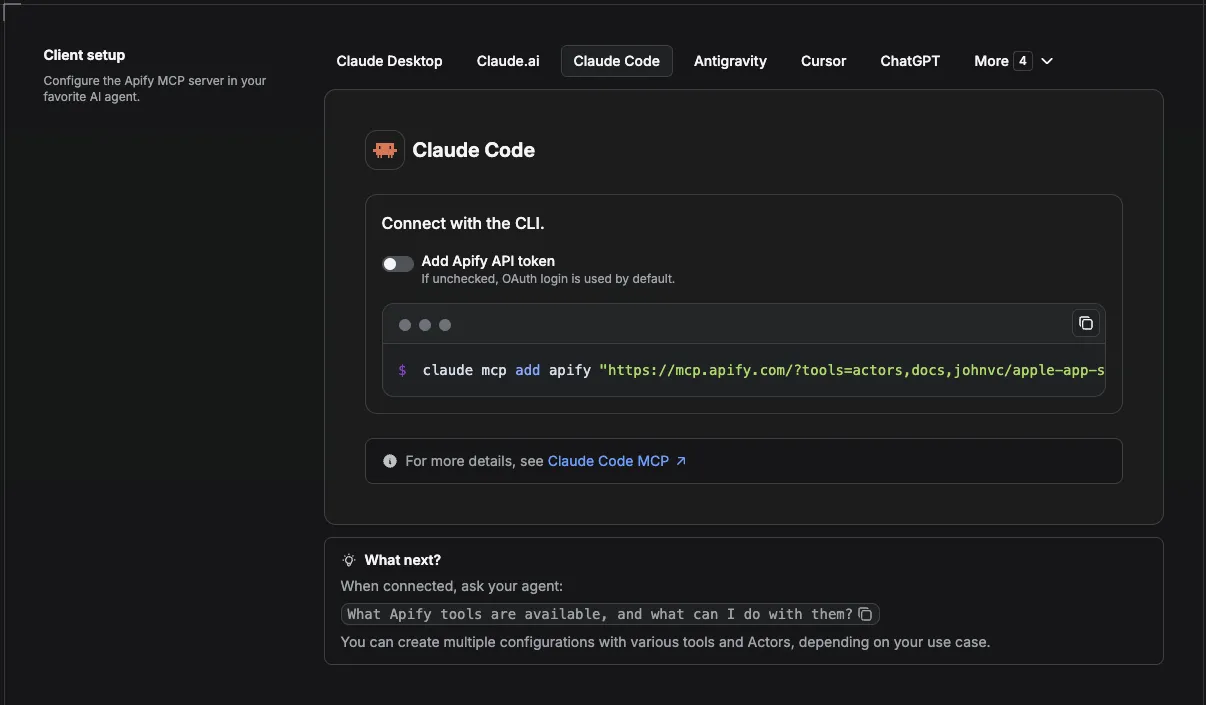
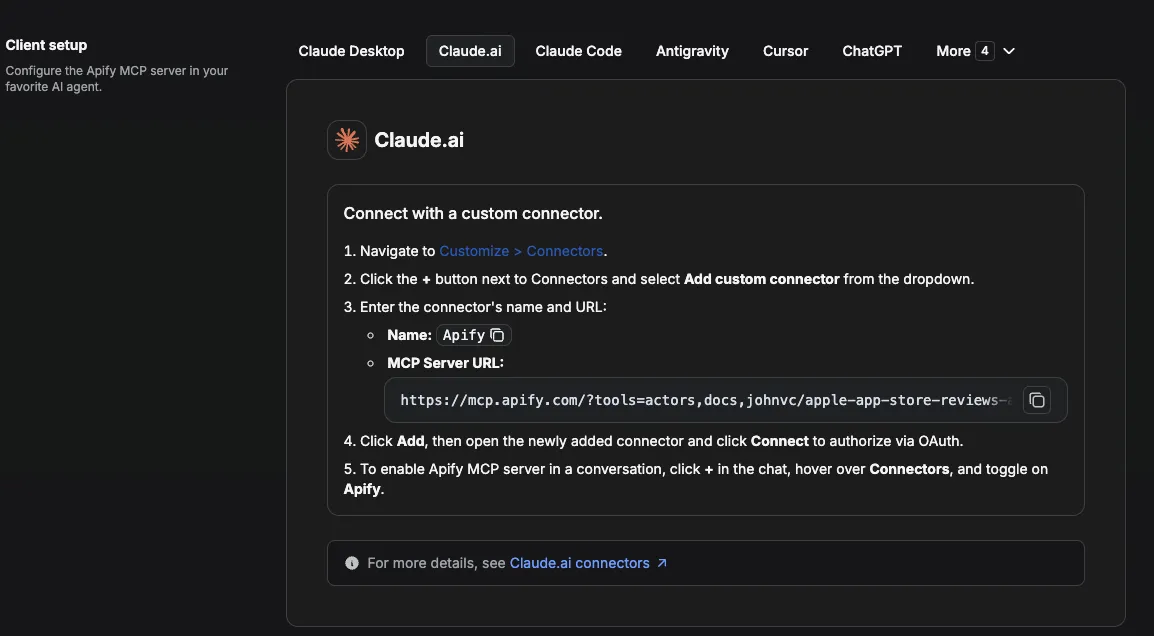
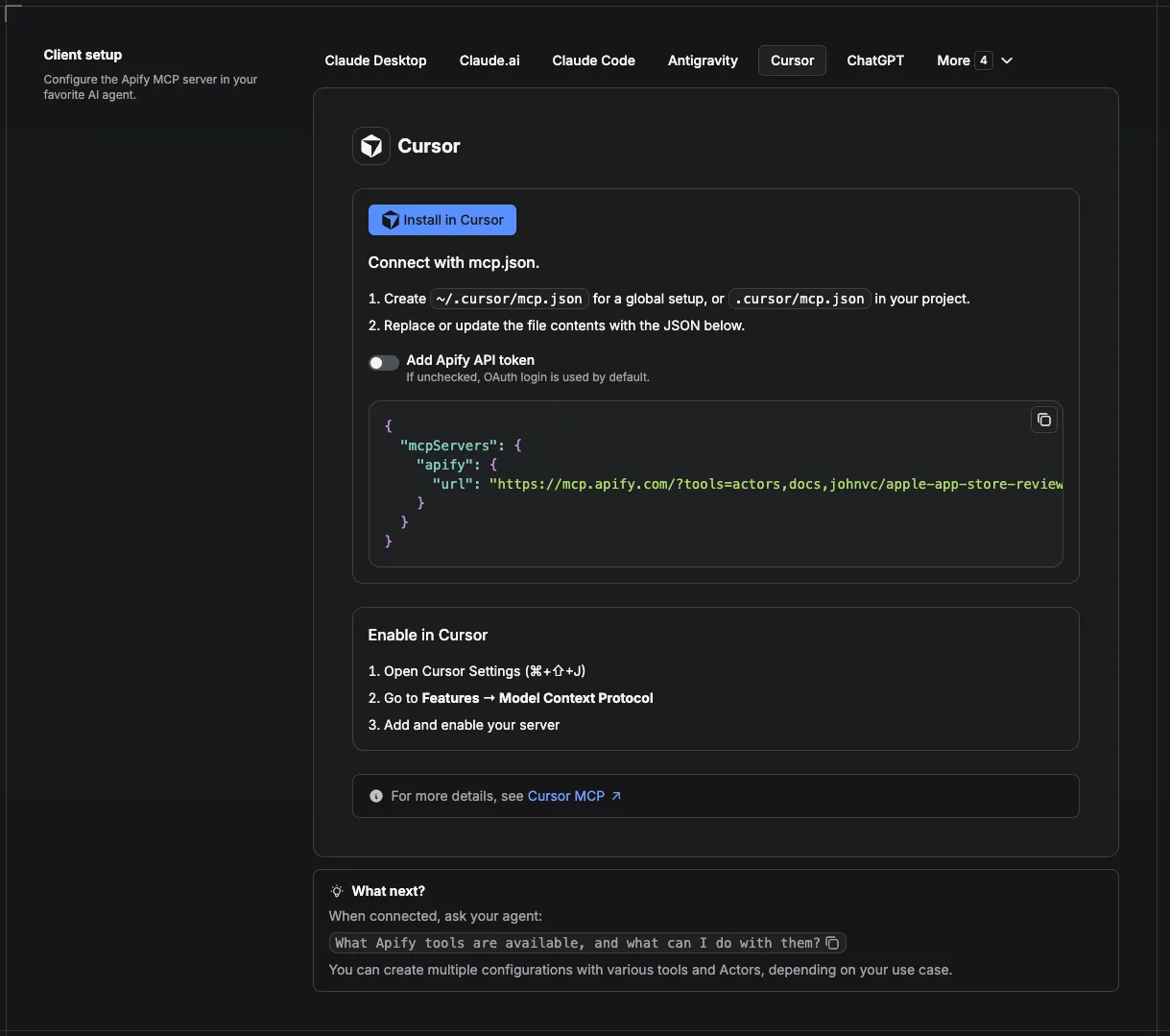
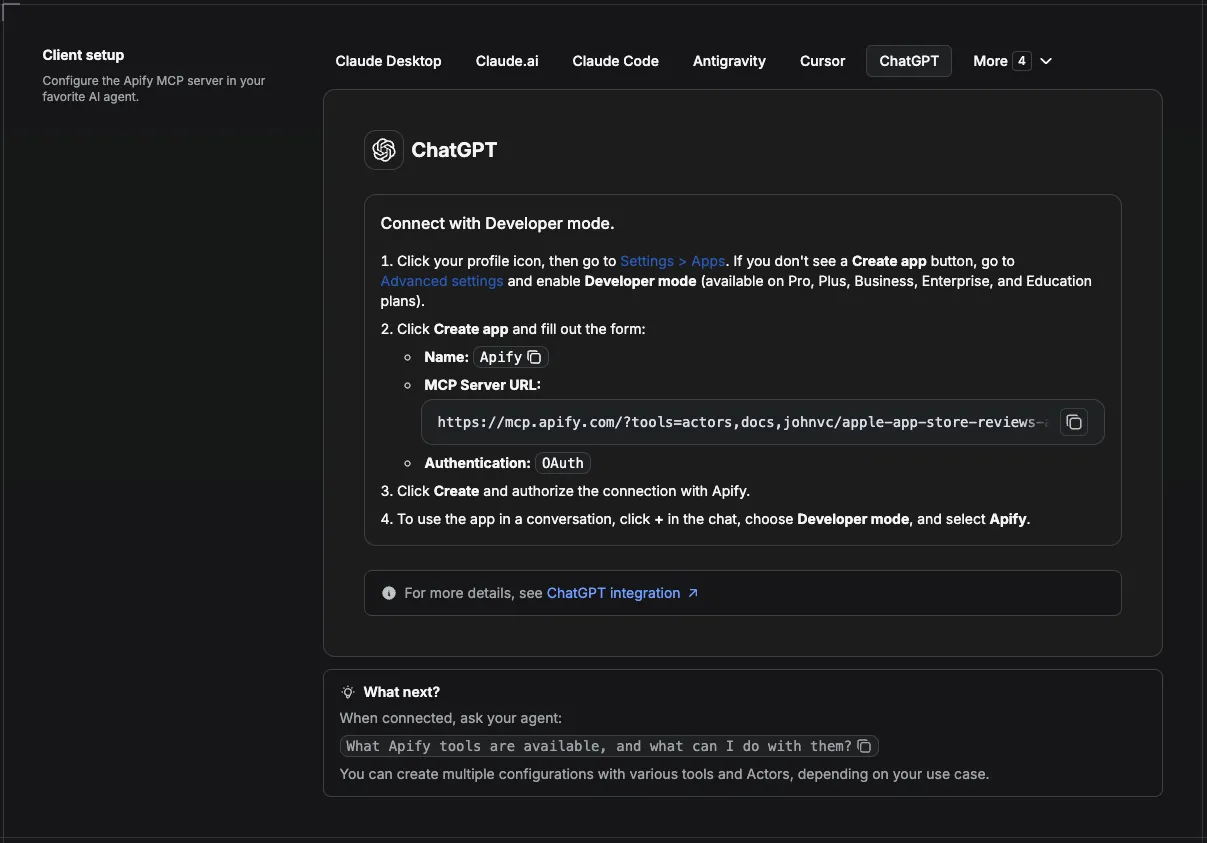
This Actor is compatible with the Model Context Protocol (MCP), so AI agents can call it as a tool. Add it through the hosted Apify MCP server using this Actor-specific URL:
https://mcp.apify.com/?tools=actors,docs,johnvc/google-autocomplete-api
If you run agents from Claude Code (free trial) or Claude Cowork (free trial), add the Apify MCP server and ask it to "autocomplete 'coffee near' and pick the best place query."
Setup walkthrough:
Apify MCP integration docs: https://docs.apify.com/platform/integrations/mcp
MCP setup, step by step
Visual setup guides for each client (source and more assets: ApifyPublicData on GitHub):
Claude Cowork Desktop (free trial)
Claude Code (free trial)
Claude (website)
Cursor
ChatGPT
🔗 Related Tools
Building a Google search or SEO pipeline? These tools from the same portfolio pair well with autocomplete data:
- Google Maps Places API: turn a chosen place suggestion into full records with address, rating, and coordinates.
- Google Local API: pull the Local Pack and business-search SERP for the "near me" queries autocomplete surfaces.
- Google AI Overview API: see the AI Overview Google generates for the expanded keywords you find.
- Google Shopping API: get product, price, and deal data for the commercial queries in your keyword set.
For contrast, an older alternative such as maged120/google-autocomplete-ppe carries no user ratings, has a small user base, and has not been updated in months. This API is actively maintained, returns clean structured JSON, and charges per suggestion so you only pay for the results you keep.
FAQ
Does it return place IDs?
No. It returns the suggested query text. For full place records (place ID, address, rating, coordinates), pipe a chosen suggestion into the Google Maps Places API.
How many suggestions per query?
Usually about ten, the same set Google shows in its type-ahead box.
Can I autocomplete many queries at once?
Yes. Pass multiple queries; each is completed independently and tagged with its source query.
Can I localize suggestions?
Yes. Set gl (country) and hl (language) to localize the suggestions.
Can I schedule the Google Autocomplete API?
Yes. Any run can be automated on a schedule. Save your queries as a task, then open the Actor's Actions, then Schedule menu and attach a schedule. Common cron strings are 0 7 * * * for daily at 7 AM, 0 */6 * * * for every six hours, and 0 9 * * 1 for Monday mornings, and one schedule can drive many tasks at once. See the Integrations section above for the full monitoring and storage recipe.
Should I use an API or a web scraper for Google autocomplete?
Both describe the same job here. An official API is rate limited, quota bound, and often hides the raw suggestion list, while a no-code web scraper or a clean endpoint you call yourself returns the suggestions directly with no quota to manage. This Actor works as both: run it from the dashboard like a scraper, or call it as an API from your own code.
Can I integrate this scraper with other apps?
Yes. The Actor connects to almost any cloud service through Apify integrations, including Make, Zapier, and Slack, and you can trigger custom actions with webhooks on ACTOR.RUN.SUCCEEDED. See the Integrations section for copy-paste recipes.
Can I use the Google Autocomplete API with the Apify API?
Yes. The Apify API gives programmatic access to run the Actor, schedule it, and fetch datasets, and the apify-client package is available for both Node.js and Python. See the Run from the API example above, or the Actor's own API tab.
Can I use this through an MCP server?
Yes. Add the Actor as a tool to any MCP client (Claude, Cursor, and others) through the hosted Apify MCP server with the Actor-specific URL https://mcp.apify.com/?tools=actors,docs,johnvc/google-autocomplete-api. The Use this API from Claude (MCP) section above has the per-client setup. See also the Apify MCP docs.
How much does the Google Autocomplete API cost?
You pay per suggestion returned, with no setup fee, no per-run fee, and no monthly minimum. See the Pricing section for the current per-suggestion rate. There is no free daily quota to track, so you are billed only for the suggestions you receive.
How do I get a ZIP code or place data from an autocomplete suggestion?
The autocomplete response returns the suggested query text, not structured place fields. To turn a place suggestion into an address, ZIP code, rating, or coordinates, pass the chosen suggestion into the Google Maps Places API, which returns full place records.
How do I remove unwanted characters from the results?
The value field is plain suggestion text, so any cleanup such as trimming, lowercasing, or stripping punctuation is a one-line transform in your own code or in a spreadsheet after export. The Actor does not alter Google's suggestion text, so you always get exactly what the type-ahead box shows.
How can I expand keyword research with other Google search tools?
Feed the queries you discover into related tools: the Google AI Overview API for the AI Overview on a keyword, the Google Local API for local SERPs, and the Google Maps Places API for place records. See the Related Tools section for the full list.
Where do these suggestions come from?
The suggestions are the same predictions Google shows in its search box as you type. For background on how type-ahead prediction works, see autocomplete.
n8n integration
Available as an n8n community node, n8n-nodes-google-autocomplete-api. In n8n: Settings, Community Nodes, install n8n-nodes-google-autocomplete-api, then use it in any workflow (it also works as an AI Agent tool).
Featured Tasks
Ready-to-run examples that show this API solving a specific problem. Each opens its own setup so you can run it on your account in one click.
- Get Long-Tail Keyword Ideas From Google Autocomplete
- Get Question Keywords From Google Autocomplete
- Get Keyword Research Data as JSON From Google
- Find Negative Keywords for Google Ads
- Get Google Search Suggestions for Any Keyword
- 获取谷歌搜索下拉词(中文关键词) - 输入任意中文关键词, 返回谷歌搜索框的下拉联想词及排序, JSON 输出。
- 挖掘中文长尾关键词(谷歌联想词) - 用谷歌联想词批量扩展中文长尾关键词: 每个种子词返回约十条真实搜索词, 含排序。
Last Updated: 2026.07.14


