
Google Maps Photos API - Bulk Place Photos
Pricing
from $9.60 / 1,000 place searches
Google Maps Photos API - Bulk Place Photos
Get every photo Google Maps holds for a place as structured JSON: full-size image URLs, thumbnails, gallery position, and a stable photo ID. Filter to menu, food and drink, vibe, by owner, videos, or street view. Chain it from a places search or paste a map URL. Pay per photo, MCP-ready.
Pricing
from $9.60 / 1,000 place searches
Rating
0.0
(0)
Developer

John
Maintained by CommunityActor stats
2
Bookmarked
5
Total users
2
Monthly active users
a day ago
Last modified
Categories
Share
Google Maps Photos API | Bulk Place Photos by Category
The Google Maps Photos API pulls every photo Google Maps holds for a business or landmark, as structured JSON. Type a place name and get back full-size image URLs, thumbnails, gallery positions, and a stable photo ID for each one. Filter to a single gallery section when you only want menus, food shots, interiors, owner uploads, videos, or street view.
Search by name or by category and city. Mozart's Coffee Roasters, Austin TX returns that one place. coffee shops in Austin, TX returns several, with photos for each.
Built for listing sites, travel and hospitality apps, real estate tools, dataset builders, and AI agents that need real imagery rather than a single hero thumbnail.
Example code: Python quick-start + MCP setup on GitHub - call the API from Python, or install it as a tool in Claude, Cursor, and ChatGPT.
What you get
Per photo:
image, the full-size photo URLthumbnail, a smaller preview of the same photoposition, where it sits in the place's galleryphoto_id, a stable identifier you can de-duplicate on across runsdata_id, the place the photo belongs toplace_title, the place's name, when it was found by searchcategory_id, when a category filter was applied
Per place, one summary row carries photos_returned, pages_fetched, and place_categories, the full list of gallery sections that place offers with the ID for each. Feed one of those IDs back in to pull just that section.
What you do NOT get
Photo captions, EXIF data, contributor names, and upload dates are not part of this Actor's output. Places with small galleries return everything they have, which can be fewer than 20 photos.
Four ways to name a place
Mix them freely in a single run.
- Just search. Put a name, or a category and a city, in
searchTerm. One lookup per search term, billed per term no matter how many places it matches.maxPlacesPerSearchcontrols how many of the matches you fetch photos for, default 3. - Paste a Google Maps URL. Put map links in
placeUrls. The identifier is read out of the link locally, so no lookup and no search charge. - Chain from a places search. Run the Google Maps Places API and pass its
dataIdfield straight through. Best for bulk: it resolves places more cheaply than a search here, so a large list is cheaper to hydrate this way. - Paste the identifier directly into
dataId, or a list intodataIds. It is a hex pair that looks like0x8644b5554461664d:0xbc4ff333ec9ad1ad.
Options 2, 3, and 4 skip the search charge entirely.
How results are displayed
The Output tab opens on the Photos view, which renders previews inline: preview, place, gallery position, full-size URL, category, and both IDs. Each place also contributes one unbilled summary row, which shows blank photo columns in that view; switch to All fields to see the per-place rollup and the gallery categories.
Street View, 360, and video galleries
Photos are not the only thing a place's gallery holds. Two of the eight category filters return media most tools ignore:
- Street View & 360, the immersive panoramas attached to the place
- Videos, short clips uploaded by the owner or by customers
Set photoCategory to street_view or videos and the run returns only that section. Both are universal categories, present on every place type, so they work on a museum or a car park as readily as on a restaurant.
Bulk photo download with the Google Maps Photos API
Saving one photo off a map is a right-click. The reason to use an API is volume: every photo for a place, or every photo for every place in a city.
One run can take a search term, resolve it to as many places as you want, and pull the full gallery for each. A neighbourhood sweep of thirty restaurants at twenty photos apiece is six hundred image URLs from a single input, each one carrying a stable photo_id so a re-run updates rather than duplicates.
Use cases
- Listing and directory sites. Populate business profiles with real interior and exterior imagery instead of one stock thumbnail.
- Travel and hospitality. Pull menu and food galleries for restaurant pages, or vibe shots for a neighborhood guide.
- Real estate and retail siting. Look at how a location actually presents before a visit.
- Competitive research. Compare how rival venues present themselves, and how much of a gallery is owner-uploaded versus customer-uploaded.
- Dataset and model building. Assemble image sets keyed to real places, de-duplicated by photo ID.
- AI agents. Give an agent the ability to look at a place, not just read about it.
Input
| Field | Type | Description |
|---|---|---|
searchTerm | string | Find a place by name, or by category and city. Billed per search. |
searchTerms | array | Several searches in one run. Each is billed as one search. |
maxPlacesPerSearch | integer | How many of each search's matches to fetch photos for. Default 3, max 20. |
placeUrls | array | Google Maps place URLs. Parsed locally, no search charge. |
dataId | string | A place you already have an identifier for. No search charge. |
dataIds | array | Several identifiers at once. Merged with dataId and de-duplicated. |
maxPhotosPerPlace | integer | How many photos per place. Default 20. |
photoCategory | select | All Photos, Latest, Videos, By Owner, Street View, Menu, Food & Drink, or Vibe. |
hl | string | Two-letter interface language. Default en. |
categoryId | string | A venue-specific gallery section, such as an individual dish. Overrides photoCategory. |
Photos arrive in blocks of 20, so setting maxPhotosPerPlace to a multiple of 20 is the most cost-efficient.
Example input
Search a neighborhood and pull food photos for the top five matches:
Or skip the search when you already have identifiers:
Example output
A photo row:
The per-place summary row, which is how you discover venue-specific categories:
Pricing
Pay-per-result: a small start fee, a per-photo charge, and a per-search charge only when you search by name. All scale down with your Apify plan.
| Plan | Per photo | Per search | Start fee |
|---|---|---|---|
| Free | $0.0017 | $0.0135 | $0.001 |
| Bronze | $0.0015 | $0.012 | $0.001 |
| Silver | $0.00135 | $0.0108 | $0.001 |
| Gold | $0.0012 | $0.0096 | $0.001 |
A search is billed once per term, not once per place it matches, so coffee shops in Austin, TX costs the same whether you keep one match or twenty. Supply a Google Maps URL or a place identifier instead and no search charge applies at all.
You only pay for the photos you receive. No monthly minimum. Summary rows and error rows are never charged.
How to get started
- Open Google Maps Photos API on the Apify Store.
- Type a place into
searchTerm, or paste a Google Maps URL intoplaceUrlsif you have one. - Set
maxPhotosPerPlace, pick aphotoCategoryif you want one section, then run it. - Export the dataset as JSON, CSV, or Excel, or pull it from the API.
Prefer code? See johnvc's GitHub for setup guides and code examples.
Run from the API
🔌 Use this API from Claude (MCP)
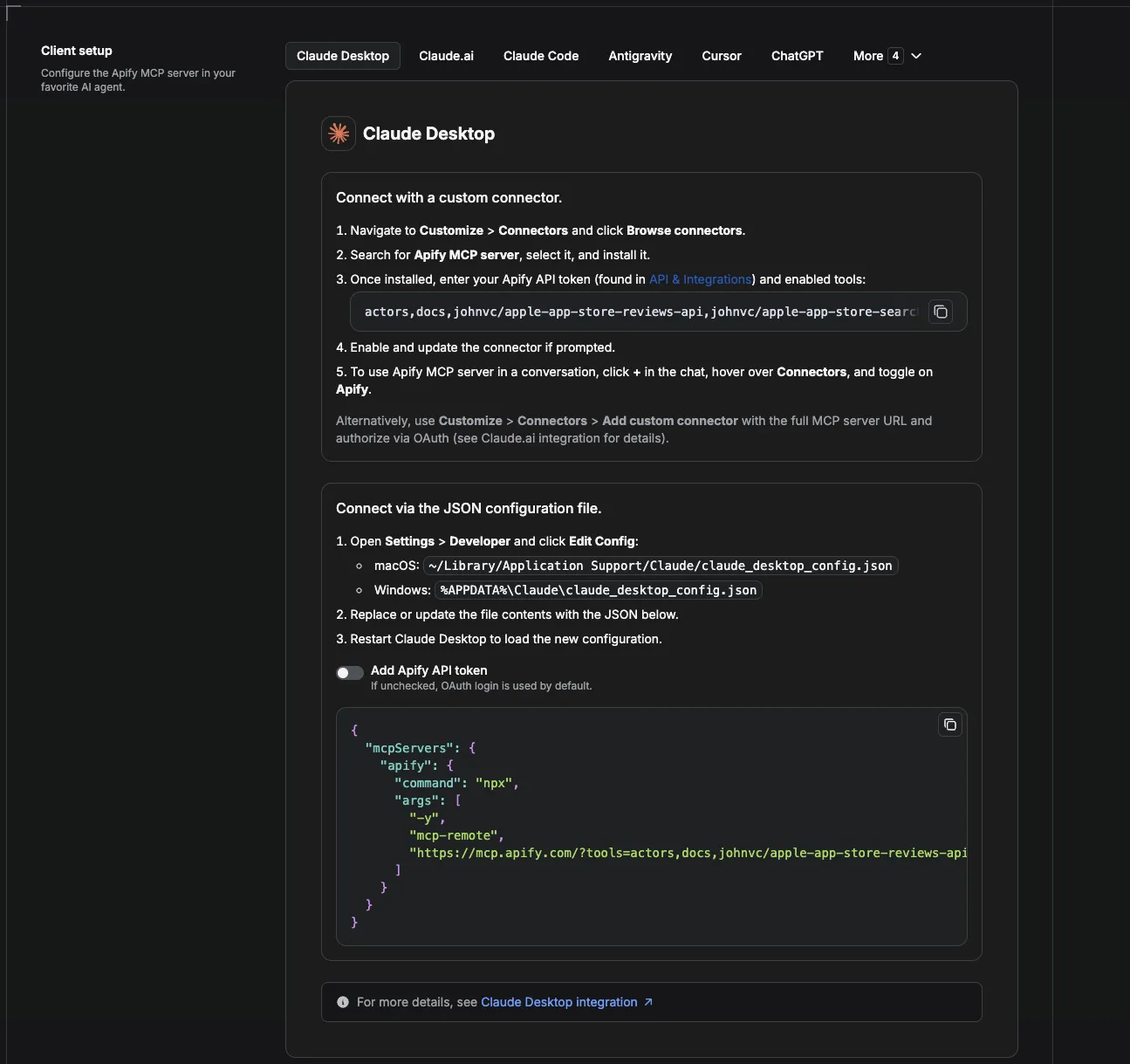
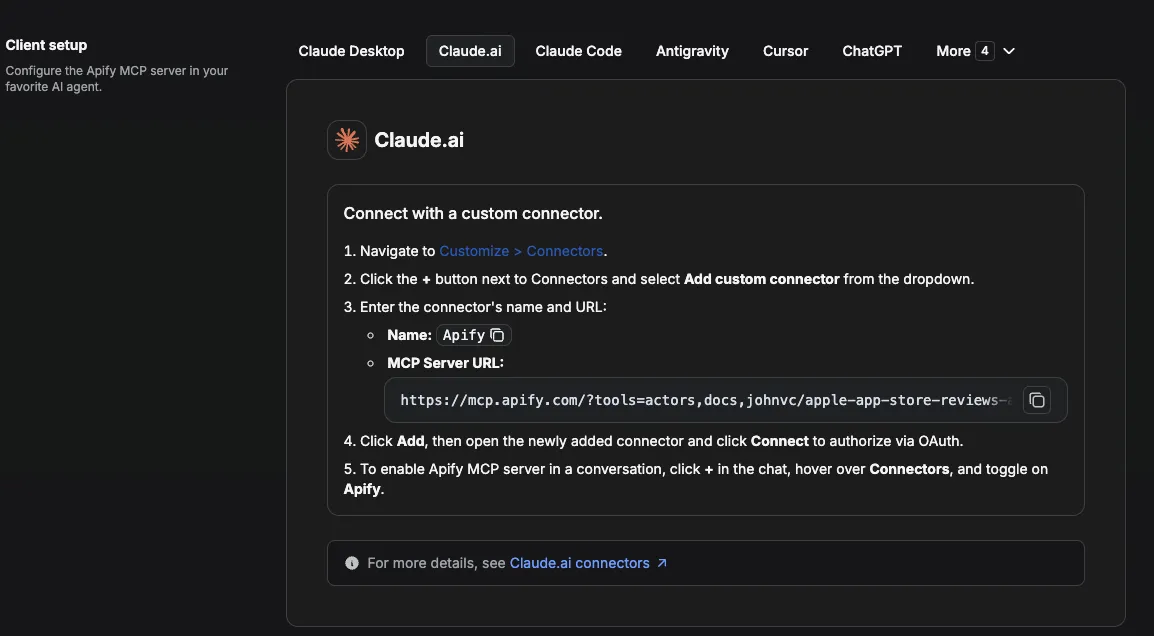
This Actor is compatible with the Model Context Protocol (MCP), so AI agents can call it as a tool. Add it through the hosted Apify MCP server using this Actor-specific URL:
https://mcp.apify.com/?tools=actors,docs,johnvc/google-maps-photos-api
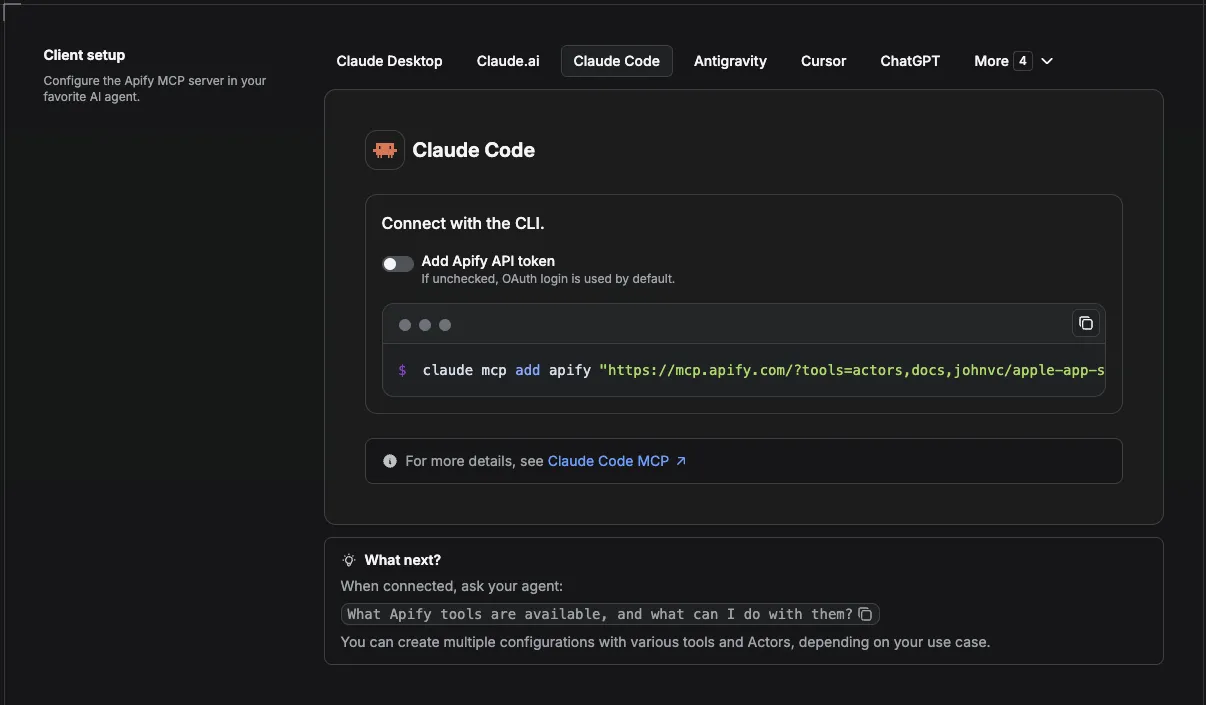
If you run agents from Claude Code (free trial) or Claude Cowork (free trial), add the Apify MCP server and ask it to "pull the menu photos for Mozart's Coffee Roasters in Austin and tell me what is on offer." It can search by name, so no identifier is needed.
Setup walkthrough:
Apify MCP integration docs: https://docs.apify.com/platform/integrations/mcp
MCP setup, step by step
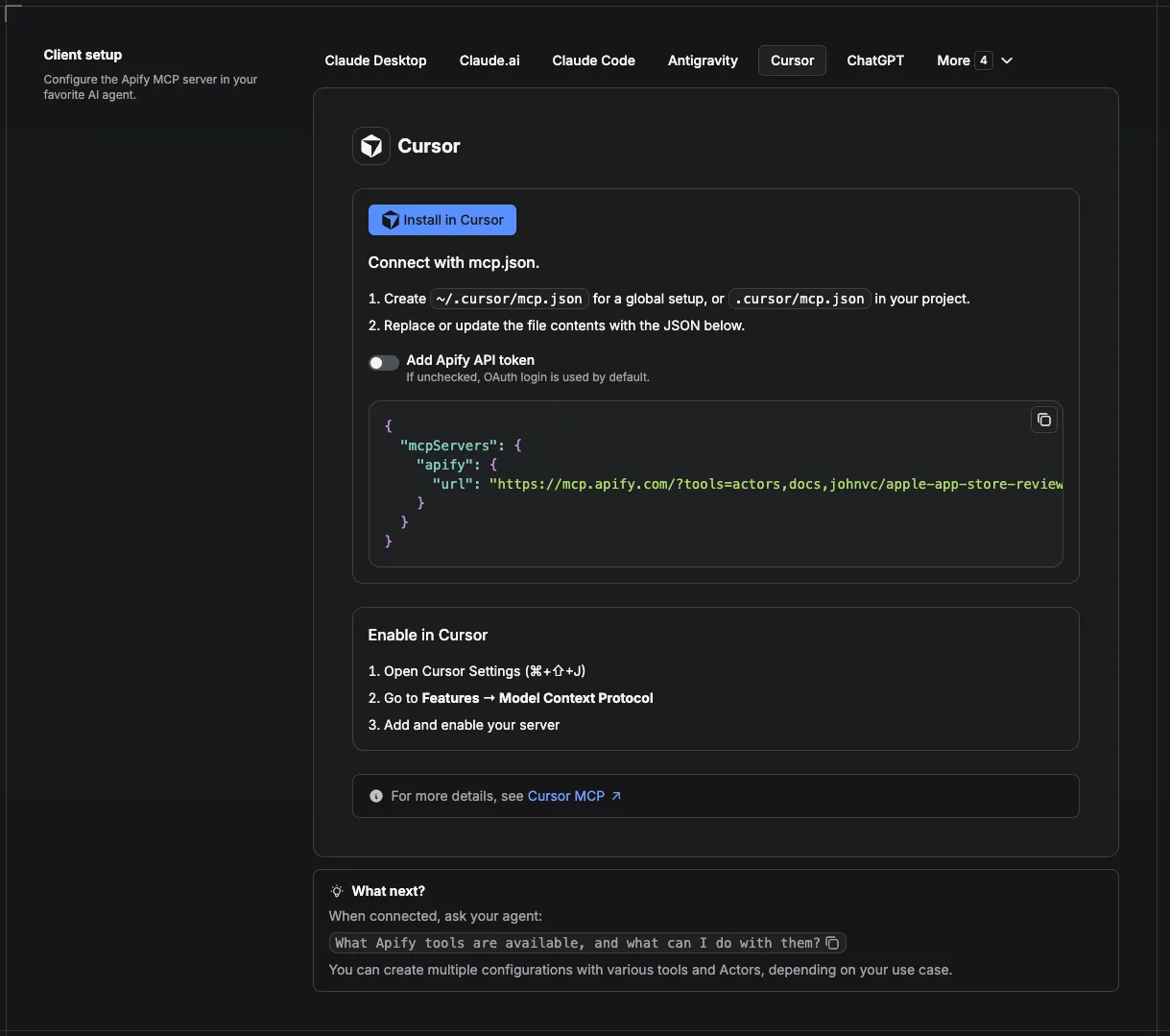
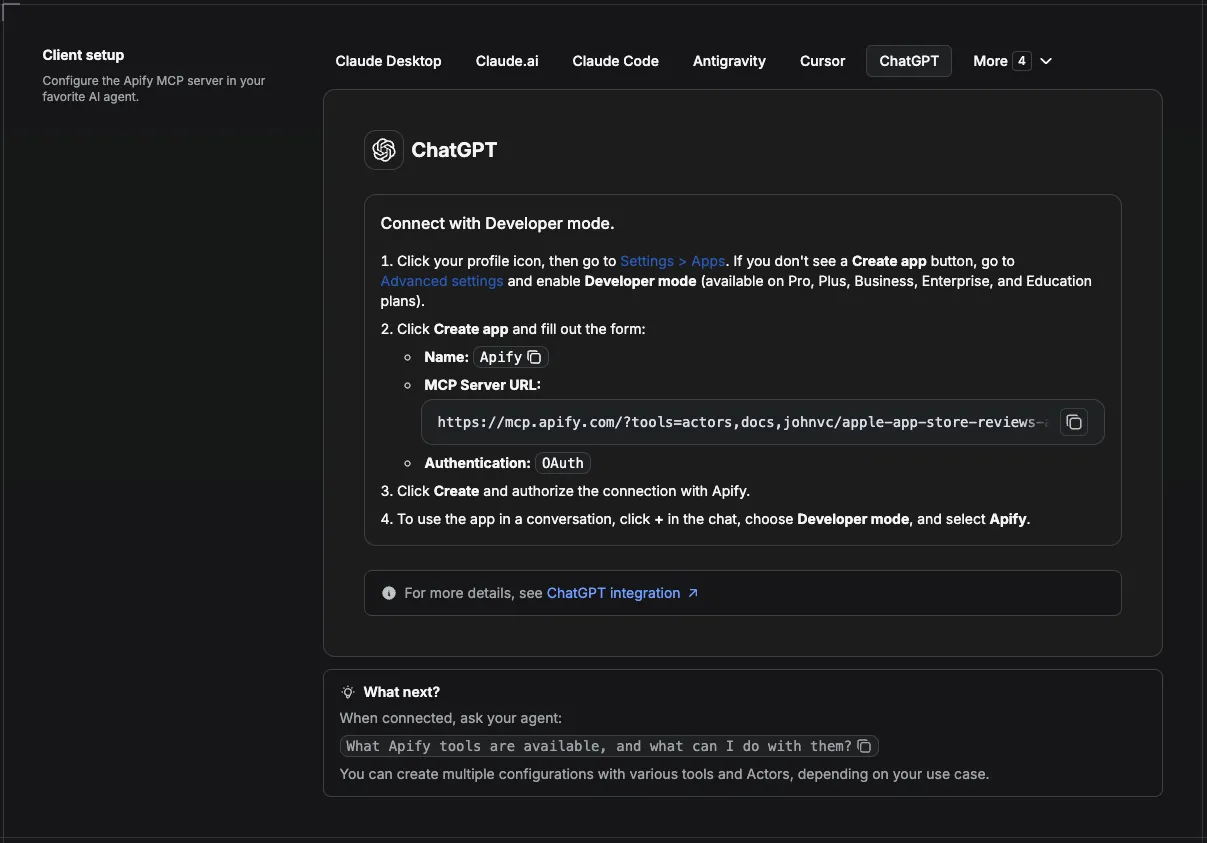
Visual setup guides for each client (source and more assets: ApifyPublicData on GitHub):
Claude Cowork Desktop (free trial)
Claude Code (free trial)
Claude (website)
Cursor
ChatGPT
💸 Pay per run with crypto (x402)
The Google Maps Photos API supports agentic payments via the x402 protocol. AI agents and MCP clients can pay for runs in USDC (on Base) with no Apify account or API token needed: point your agent at the Apify MCP server and it can discover, pay for, and run this Actor autonomously. Read the Apify x402 announcement for details.
🔌 Integrations: Automate Google Maps photo collection
Search then hydrate (the core recipe)
Run the Google Maps Places API to find businesses in an area, then feed the dataId field of each result into this Actor. Both read the same public Google Maps place listings you would see in a browser. That two-step pattern gives you a full listing plus real imagery, and you only pay for photos on the places you actually want.
Tasks and schedules
Save a run configuration as a Task, then attach a schedule to refresh a gallery weekly or monthly. Useful for listing sites that need imagery to stay current.
n8n
Use the Apify node to trigger this Actor, then pass the image URLs to an upload or storage node.
Make and Zapier
Trigger on a new dataset item and push each photo URL into a CMS, an asset manager, or a Google Sheet.
Store galleries in Supabase
Insert one row per photo keyed on photo_id, which is stable across runs, so a re-run updates rather than duplicates.
MCP and AI agents
Add the Actor-specific MCP URL above and let an agent fetch imagery on demand as part of a larger research task.
Webhooks
Fire a webhook on run completion to kick off downstream image processing.
Agent Skills
Ready-made skills for Claude Code (free trial) and other agents that drive this Actor. Install with npx skills add johnisanerd/<name>.
- claude-skill-google-maps-photo-download: bulk photo download for a place or a whole neighbourhood
- claude-skill-google-street-view-api: Street View and 360 panoramas addressed by place name
🔗 Related Tools
- Google Maps Places API, find the places whose photos you want
- Google Maps Directions API, routes and travel times between places
- Google Maps Contributor Reviews API, reviews left by a single contributor
- Google Hotels Search Scraper, hotel search, photos, and reviews
- Apple Maps API, the same place data from a second source
Comparing alternatives: scrape.badger's Google Maps Photos Scraper bills per page of twenty rather than per photo, which is cheaper if you always want whole galleries. Its published run success rate sits around 91% against this Actor's, and it takes only place identifiers, so there is no search-by-name path.
FAQ
Do I need a place ID?
No. Type the place into searchTerm and the Actor finds it. Identifiers are there for when you already have them, and using one skips the search charge.
How is a search billed?
Once per search term, regardless of how many places it matches. coffee shops in Austin, TX costs one search whether you keep one match or twenty. Use maxPlacesPerSearch to control how many you fetch photos for, since every place you keep costs photos.
How do I avoid the search charge?
Give the Actor a Google Maps URL in placeUrls, or a place identifier in dataId or dataIds. Both are used as-is with no lookup. For large batches the cheapest route is to resolve places with the Google Maps Places API and pass its dataId field through.
How many photos does a place have?
Popular businesses often have hundreds. Photos come back 20 at a time and the Actor pages through them until it reaches your maxPhotosPerPlace limit. Small or new places may have only a handful.
Can I get just the menu photos?
Yes. Set photoCategory to Menu, or to Food & Drink or Vibe. Those sections exist on food and drink venues. Every place also offers Latest, Videos, By Owner, and Street View.
How do I filter by something more specific, like one dish?
Run the place once and look at place_categories on the summary row. It lists every gallery section that place offers with an ID for each, including venue-specific ones. Put the ID you want into categoryId.
What is the Street View category?
It returns the immersive panoramas attached to a place rather than flat photos. Street View imagery is captured both by Google and by contributors, and the category is present on every place type.
Does the output include EXIF data?
No. EXIF metadata such as camera model, GPS coordinates, and capture time is not part of this Actor's output. You get the image URL, a thumbnail, the gallery position, and a stable photo ID.
Do the image URLs expire?
The URLs point at Google's image hosts and are stable in normal use, but they are not guaranteed permanent. If you need long-term retention, download the images and store them yourself.
Can I process many places in one run?
Yes. Put them in dataIds or placeUrls. They are merged, de-duplicated, and processed in order, and each gets its own summary row.
What happens if one place fails?
That place gets an error row explaining why, and the run continues with the rest. You are not charged for photos that were not returned.
Can I schedule this Google Maps photos scraper?
Yes. Save your configuration as a Task and attach a schedule to refresh galleries on a cadence.
Should I use an API or a web scraper?
An API returns clean structured JSON with no browser to babysit, no proxies to rotate, and no markup to re-parse when the page changes. That is what this Actor gives you.
Can I use this Actor through an MCP server?
Yes. Use the Actor-specific MCP URL in the section above, and an AI agent can call it as a tool.
Is it legal to collect place photos?
The Actor reads publicly visible information. How you store and republish images is your responsibility, and image rights belong to whoever uploaded them. Check the terms that apply to your use case.
🌐 About Alpha OSINT
This Actor is part of Alpha OSINT, toolset of financial and operations data sources and APIs. See the Google Maps Photos API source page for related tools and use cases. For support or requests for this actor, please start a ticket directly on our support page.
Last Updated: 2026.09.21


