Google Scholar Lite - Cheap Bulk Academic Papers API
Pricing
from $0.90 / 1,000 papers
Google Scholar Lite - Cheap Bulk Academic Papers API
Search Google Scholar for academic papers in bulk and export clean JSON: title, authors, journal, year, citation count, and PDF links. Fast bibliometric search for literature reviews, citation discovery, and research datasets. Pay per paper from $1.50 per 1,000, with no setup or per-run fee.
Pricing
from $0.90 / 1,000 papers
Rating
5.0
(4)
Developer

John
Maintained by CommunityActor stats
5
Bookmarked
19
Total users
10
Monthly active users
9 hours ago
Last modified
Categories
Share
Search Google Scholar for academic papers in bulk and get clean, structured JSON: title, authors, journal, publication year, citation count, result snippet, and links to the paper and its PDF or HTML full text. Search many queries at once, filter by year range, and export thousands of papers. Pay per paper from $1.50 per 1,000, with no setup or per-run fee.
This is the Lite option: a fast, low-cost Google Scholar API for bulk bibliometric search, literature reviews, citation discovery, and research datasets. It talks to a structured scholarly search API instead of driving a slow, breakable headless browser, so it is quick and reliable. If you need full PDF text extraction, author profiles (h-index, full publication lists), or citation-network walking, this is not the tool - see the comparison below.
What you get
One clean row per paper:
- Title and result snippet
publicationInfoline (authors, journal or venue, year)- Publication
year citedBycitation countlinkto the paper, pluspdfUrl/htmlUrlfull-text links when available- A stable result
idand thesearchTermit was found for
What you do NOT get
- Full PDF text extraction
- Author profile expansion (h-index, all-publications lists)
- Citation-network walking (who-cites-whom graphs)
- Semantic enrichment or de-duplication against external databases
Need those? Our more robust Google Scholar API is the full-featured companion: it adds author profiles (h-index, full publication lists), citation lookups, and co-author network expansion. This Lite Actor is the fast, cheap complement for everyone who just needs the paper data in bulk.
Use cases
- Build a literature-review shortlist across dozens of queries in one run
- Track citation counts for a topic or research group over a year range
- Assemble bibliometric datasets for analysis or AI training pipelines
- Discover the most-cited recent papers in a field, then follow the PDF links
- Monitor a research area by re-running the same queries on a schedule
When to use this actor
This Lite Actor is the bulk, low-cost option. When you need deeper research features, our more robust Google Scholar API is the companion to reach for.
| This Actor (Lite) | Google Scholar API (premium) | |
|---|---|---|
| Best for | Bulk paper search, literature reviews, datasets | Deep author and citation research |
| Paper search with year filters | Yes | Yes |
| Author profiles, h-index, citation graphs | Not included | Included |
| Full PDF text | Not included | Often included |
| Pricing | Pay per paper, from $1.50 / 1,000 | See its store page |
Rule of thumb: bulk paper discovery -> this Lite Actor; deep author and citation research -> the premium Google Scholar API.
🔌 Integrations: Automate Bulk Google Scholar API Pipelines
A single run answers one question ("what are the 100 most-cited papers on diffusion models since 2021?"). The real value comes from running this bulk Google Scholar API repeatedly, so fresh papers and updated citation counts land in your stack on a schedule. See the full list of Apify platform integrations.
Tasks and Schedules (the core recipe). Save one task per topic you track (for example a searchTerms list for one research area, with yearFrom set to the current year), then attach a schedule from the Actor's Actions, then Schedule menu. Each run refreshes that topic's paper list and citation counts. Useful cron strings: 0 7 * * * (daily at 7 AM), 0 */6 * * * (every 6 hours), 0 9 * * 1 (Mondays). One schedule can trigger many tasks at once, so a whole reading list stays current from a single timer. The Export Google Scholar search results to CSV in bulk task is a ready-made starting point.
n8n, Make, and Zapier. Drive the same pattern no-code: trigger on a schedule, run the Actor, then route the new rows onward. Connect through the Apify n8n integration, Make, or Zapier. A typical flow is Schedule Trigger, then the Apify Actor node, then a Filter on citedBy, then a Slack or email alert when a highly cited new paper appears.
Dedicated n8n node. Looking for a purpose-built n8n node for Google Scholar data? The fuller Google Scholar API returns the same results and ships a dedicated n8n community node, n8n-nodes-google-scholar-api.
Store the history (Supabase). Send each run's rows into a table so a bibliometric history accumulates across runs. No-code: the n8n Apify Actor node, then a Supabase node. Or in Python (each row carries searchTerm, title, year, citedBy, link, and pdfUrl):
MCP and AI agents. Add this API as a tool in Claude or Cursor through the Apify MCP server so an agent can pull papers on demand (see the Use this API from Claude section below). A research agent can then answer "find the 50 most-cited papers on retrieval-augmented generation since 2022" with live, structured results.
Webhooks. For anything custom, fire an Apify webhook on ACTOR.RUN.SUCCEEDED to push each run's dataset into your own service.
Pricing
Pay-per-result: you are charged only for the papers returned. The per-paper price scales down with your Apify plan:
| Plan | Per paper | Per 1,000 papers |
|---|---|---|
| Free | $0.0015 | $1.50 |
| Bronze | $0.0013 | $1.30 |
| Silver | $0.0011 | $1.10 |
| Gold | $0.0009 | $0.90 |
No per-run fee, no setup fee, no monthly minimum. You only pay for the papers you receive.
Input
| Field | Type | Description |
|---|---|---|
searchTerms | array of strings | One or more search queries, e.g. transformer attention mechanism. Each is searched independently. Required. |
yearFrom | integer | Optional earliest publication year, e.g. 2020. |
yearTo | integer | Optional latest publication year, e.g. 2026. |
maxResultsPerSearch | integer | Papers per search query. Minimum 10, default 100. |
language | string | Optional two-letter language code, e.g. en, es, de. Default en. |
Example input
Sample output
Papers that expose a PDF include a pdfUrl field pointing at the full text.
How to get started
- Open Google Scholar Lite on the Apify Store.
- Enter one or more
searchTerms(addyearFrom/yearToto focus the range). - Set
maxResultsPerSearch, then run the Actor. - Export the dataset as JSON, CSV, or Excel, or pull it from the API.
Prefer code? See johnvc's GitHub for setup guides and code examples.
Data source: Google Scholar.
Run from the API
🔌 Use this API from Claude (MCP)
This Actor is compatible with the Model Context Protocol (MCP), so AI agents can call it as a tool. Add it through the hosted Apify MCP server using this Actor-specific URL:
https://mcp.apify.com/?tools=actors,docs,johnvc/google-scholar-lite-api
If you run agents from Claude Code (free trial) or Claude Cowork (free trial), add the Apify MCP server and call this Actor directly with requests like "find the 50 most-cited papers on diffusion models since 2021."
Setup walkthrough:
Apify MCP integration docs: https://docs.apify.com/platform/integrations/mcp
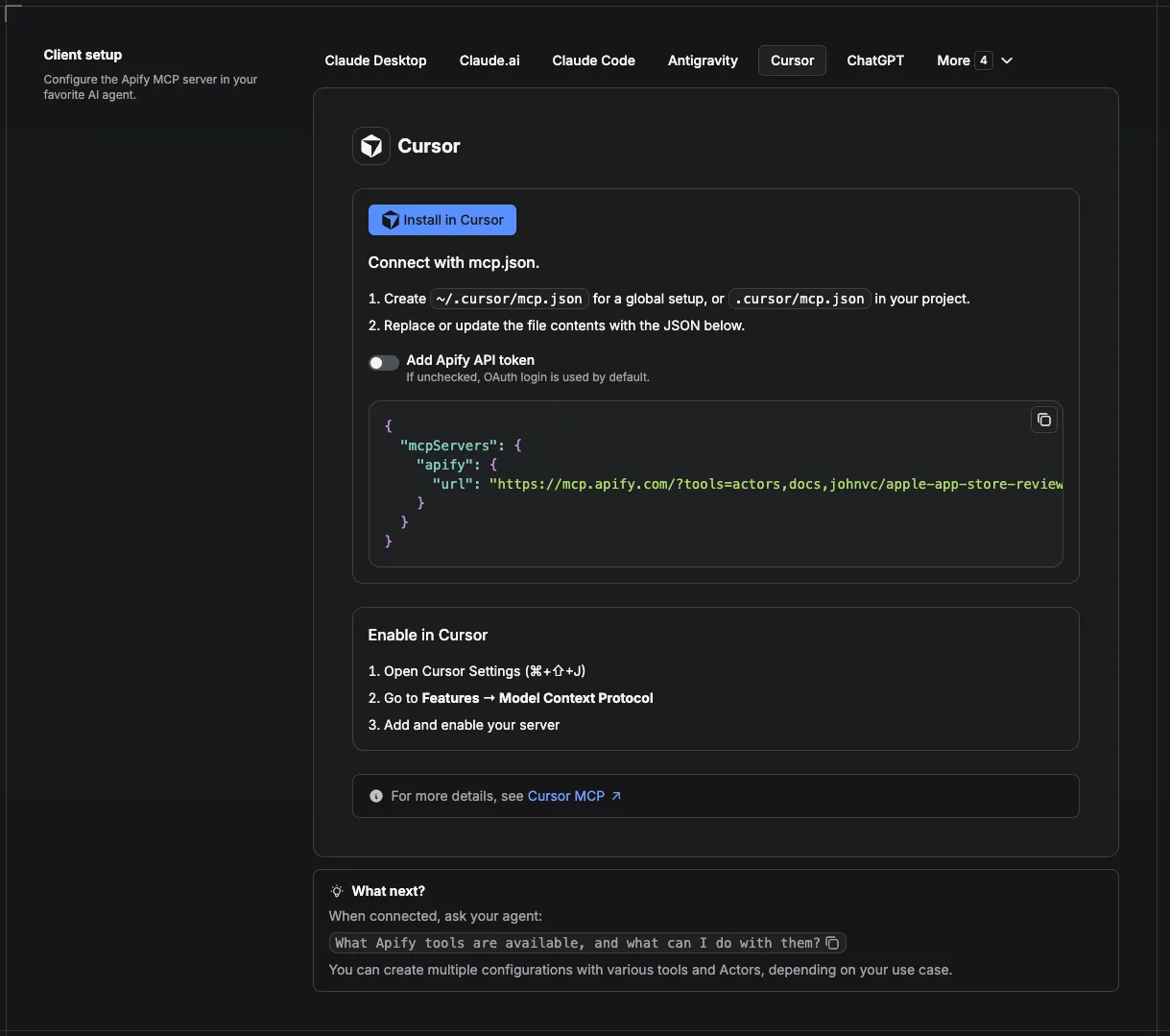
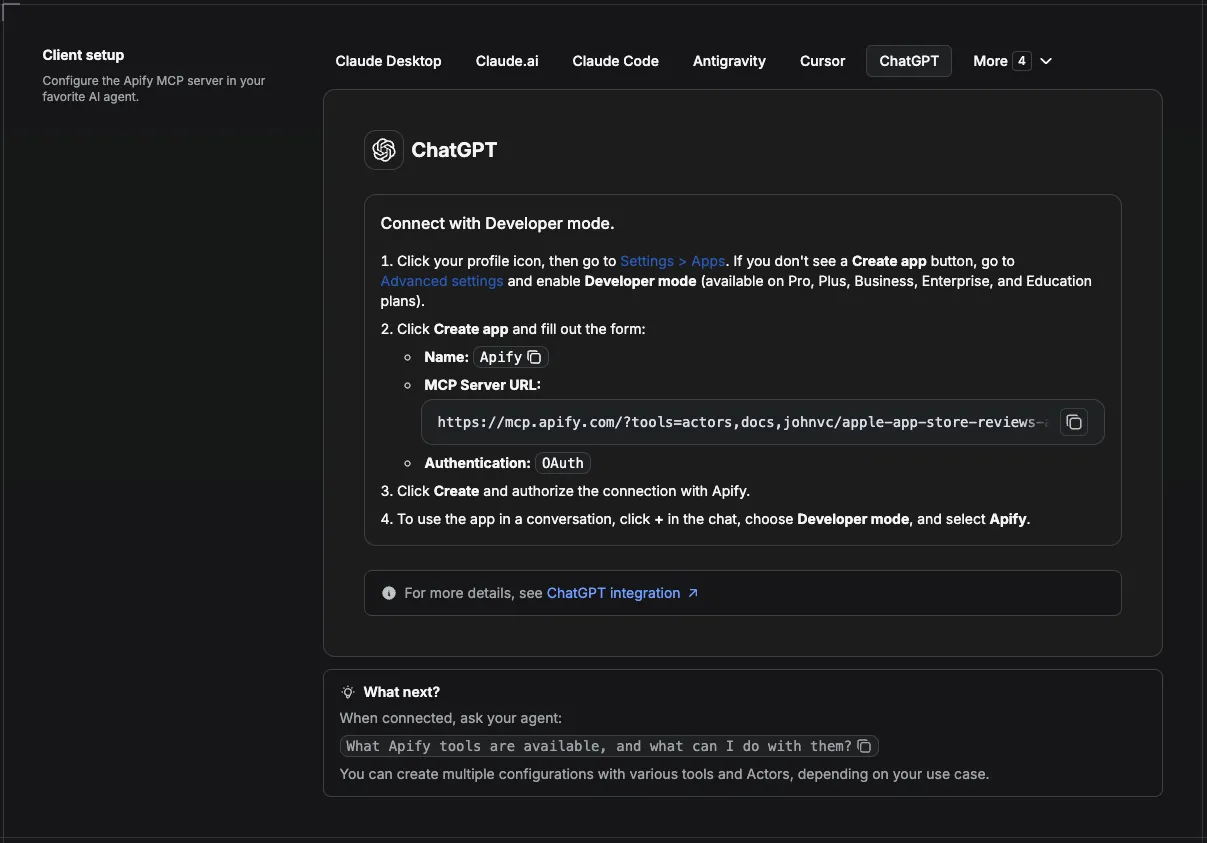
MCP setup, step by step
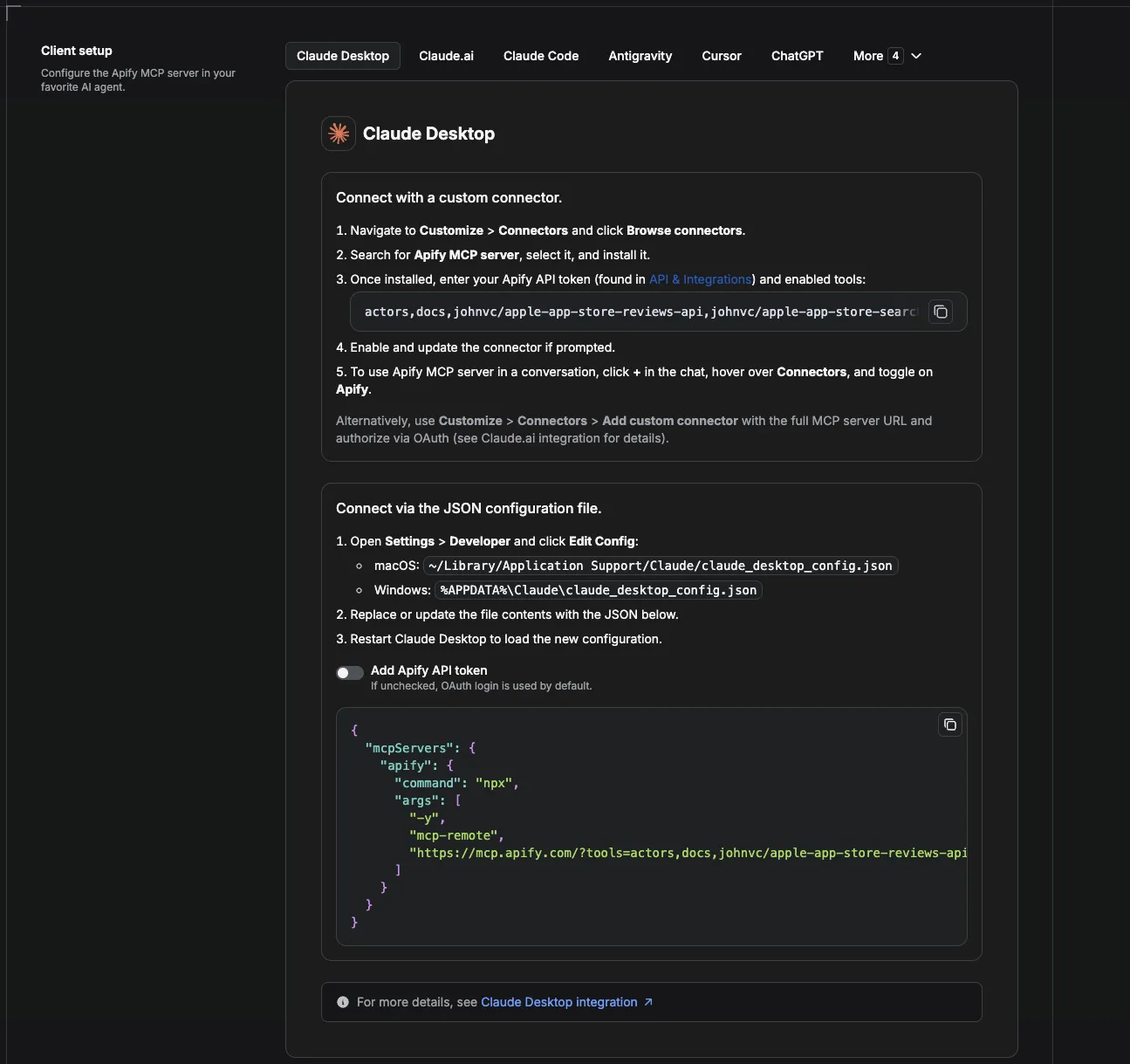
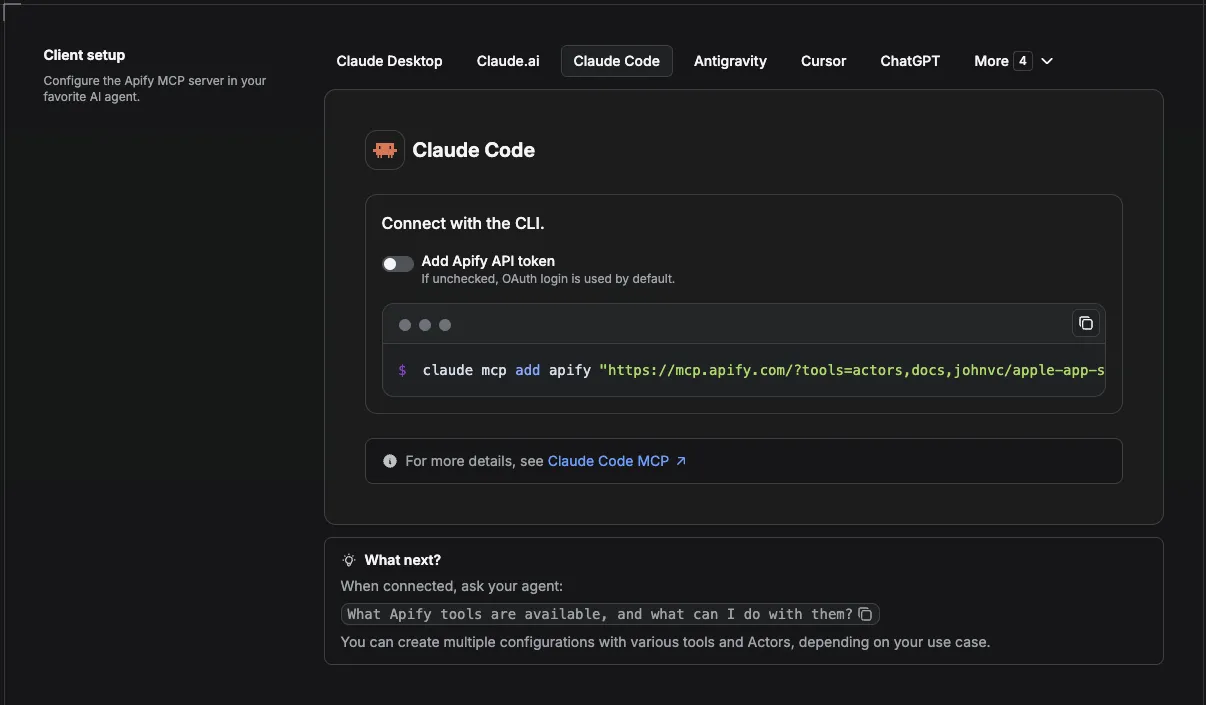
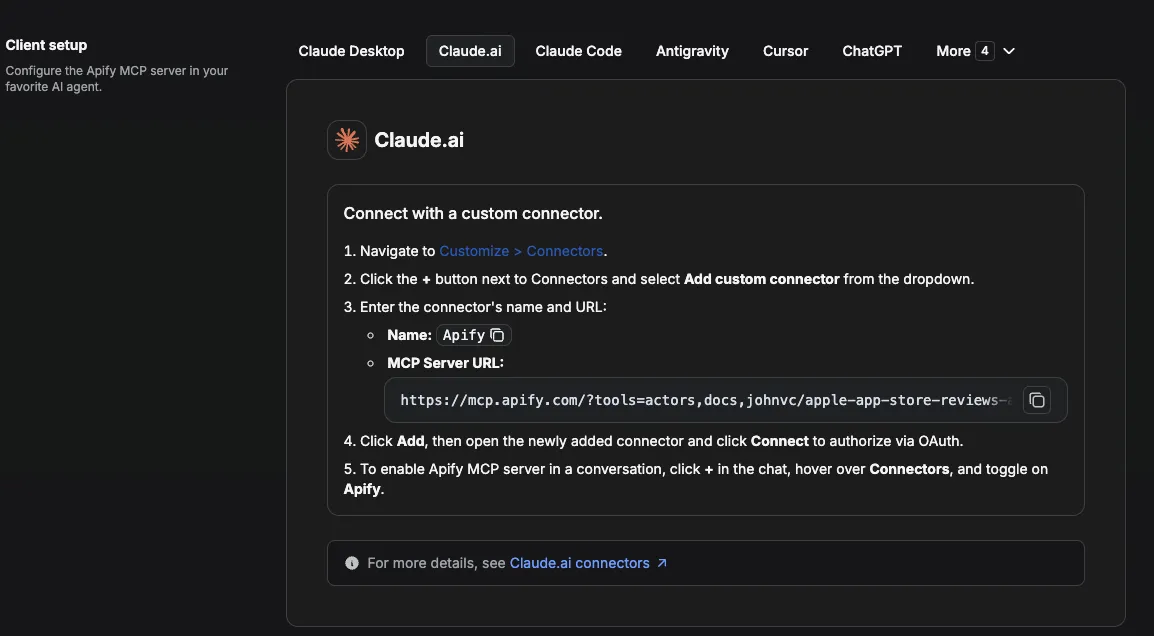
Visual setup guides for each client (source and more assets: ApifyPublicData on GitHub):
Claude Cowork Desktop (free trial)
Claude Code (free trial)
Claude (website)
Cursor
ChatGPT
💸 Pay per run with crypto (x402)
The Google Scholar Lite Actor supports agentic payments via the x402 protocol. AI agents and MCP clients can pay for runs in USDC (on Base) with no Apify account or API token needed: point your agent at the Apify MCP server and it can discover, pay for, and run this Actor autonomously. Read the Apify x402 announcement for details.
🔗 Related Tools
Building an academic research or bibliometrics pipeline? These tools from the same catalog pair well with bulk Scholar paper data:
- Google Scholar API: the premium companion for deep research, adding author profiles (h-index, i10-index), full publication lists, per-article citation history, and co-author network mapping. Reach for it when you need more than bulk paper metadata.
- Google Scholar Case Law API: search court opinions and case law on Google Scholar, for legal research alongside academic literature.
- Google Patents API: structured patent search for prior-art work and R&D that sits next to a literature review.
Alternatives such as nexgendata/google-scholar-scraper exist, but charge around $0.04 per paper (over 25 times the per-paper cost here) and show limited adoption. This Lite API returns clean, structured paper records pay-per-result from $1.50 per 1,000, with no start fee.
FAQ
Does it return full PDF text?
No. It returns the paper's metadata plus a pdfUrl link when one is available. Follow the link to fetch the PDF yourself.
Does it return author profiles or h-index?
No. For author profiles, citation lookups, and co-author expansion, use our premium Google Scholar API.
How many papers per search?
Set maxResultsPerSearch (minimum 10, default 100). Results come in pages of about 10 and a search stops early when the topic runs out of papers, so you only pay for what exists.
Why did I get fewer results than I asked for?
maxResultsPerSearch is a ceiling, not a guarantee. Niche or tightly year-filtered queries simply have fewer matching papers.
Can I search many topics at once?
Yes. Pass multiple searchTerms; each is searched independently and tagged with its source term in the output.
Can I filter by year?
Yes. Set yearFrom and/or yearTo to bound the publication years.
Can I schedule this Google Scholar API?
Yes, and this is where the Actor earns its keep. Any run can be automated on a schedule: save a task with your searchTerms and year filters, then attach a schedule from the Actor's Actions, then Schedule menu. Concrete cron strings: 0 7 * * * for daily at 7 AM, 0 */6 * * * for every six hours, and 0 9 * * 1 for Monday mornings. One schedule can trigger many tasks at once, so a whole set of research topics refreshes on the same timer. See the Integrations section above for the full monitoring recipe.
Should I use an API or a web scraper for Google Scholar?
Both, and this Actor is both. Google Scholar has no official public API, so your options are a fragile do-it-yourself web scraper that fights bot detection, or a clean API endpoint you call yourself. This Actor gives you the second: structured paper records with no quotas, whether you run it from the no-code console or call it programmatically.
Can I integrate this Scholar Scraper with other apps?
Yes. It connects to almost any cloud service through Apify integrations: Make, Zapier, Slack, the n8n integration, and webhooks on ACTOR.RUN.SUCCEEDED for custom actions. See the Integrations section above for full recipes.
Can I use this Actor with the API?
Yes. The Apify API runs the Actor, schedules it, and fetches datasets, and the apify-client package exists for both Node.js and Python. See the Run from the API section above, or the Actor's API tab.
Can I use this Actor through an MCP server?
Yes. Add it as a tool in any MCP client (Claude, Cursor, and others) through the hosted Apify MCP server with the Actor-specific URL https://mcp.apify.com/?tools=actors,docs,johnvc/google-scholar-lite-api. In Claude Code (free trial) or Claude Cowork (free trial) your agent can then answer questions like "find the 50 most-cited papers on diffusion models since 2021" with live data. See the Apify MCP docs.
Does Google Scholar have an API?
Google Scholar itself does not publish an official public API. This Actor gives you the equivalent: a structured endpoint that returns Google Scholar search results as clean JSON, so you get API-style access without maintaining a scraper.
How do I extract data from Google Scholar in bulk?
Pass multiple queries in searchTerms and set maxResultsPerSearch; each query is searched independently and every paper comes back as a row with title, authors, year, citation count, and full-text links. Export the dataset as JSON, CSV, or Excel, or pull it from the API for a downstream pipeline.
Is it legal to scrape Google Scholar?
Scraping publicly available data is broadly permitted in many jurisdictions, though you remain responsible for how you use the results and for respecting the source's terms. For background, see Apify's overview of the legality of web scraping.
How else can I research academic and legal literature?
Pair this Lite API with related tools in the same catalog: the premium Google Scholar API for author profiles and citation graphs, the Google Scholar Case Law API for court opinions, and the Google Patents API for prior-art and patent search.
Featured Tasks
Ready-to-run examples that show this API solving a specific problem. Each opens its own setup so you can run it on your account in one click.
- Export Google Scholar search results to CSV in bulk - bulk Scholar searches exported as rows with title, year, and citations.
- Scrape Google Scholar for a PRISMA systematic review - screening-ready Scholar rows with year filters for PRISMA reviews.
- Bulk Google Scholar search for Claude agents via MCP - batch Scholar searches for Claude research agents via MCP.
- 批量导出谷歌学术检索结果(CSV) - 按关键词批量检索谷歌学术论文: 标题、作者、年份、被引次数与 PDF 链接, 导出 CSV/JSON。
- 文献综述论文检索(按年份筛选) - 按主题与年份范围批量检索学术论文: 标题、期刊、被引次数、全文链接, 一次多个检索词。
🌐 About Alpha OSINT
This Actor is part of Alpha OSINT, toolset of financial and operations data sources and APIs. See the Google Scholar Lite - Cheap Bulk Academic source page for related tools and use cases. For support or requests for this actor, please start a ticket directly on our support page.
Last Updated: 2026.09.07