

Google Travel Explore API | Destination for AI Travel Agents
Pricing
from $0.01 / 1,000 results
Google Travel Explore API | Destination for AI Travel Agents
Discover where you can travel from any airport with Google Travel Explore: destination ideas with flight prices, hotel prices, trip dates, duration, and stops as structured JSON. For travel sites, agencies, and AI travel agents. Pay per destination, MCP-ready.
Pricing
from $0.01 / 1,000 results
Rating
5.0
(1)
Developer

John
Maintained by CommunityActor stats
1
Bookmarked
8
Total users
7
Monthly active users
19 hours ago
Last modified
Categories
Share
Google Travel Explore API | Destination Discovery for AI Travel Agents
Discover where you can travel from any airport and get destination ideas with prices and dates as structured JSON. For one or more departure airports, this Google Travel API returns a ranked list of destinations, each with an estimated round-trip flight price, nightly hotel price, suggested trip dates, flight duration, number of stops, and a link. It is the missing piece for travel content sites, agencies, and AI travel agents that currently stitch this together by hand from flights and hotels.
What you get
One row per destination:
nameandcountryof the destination, plusdestination_airportandgps_coordinatesflight_price(estimated round trip) andhotel_price(estimated nightly)start_dateandend_dateof the suggested tripflight_duration(minutes) andnumber_of_stopsairline/airline_codefor the suggested itinerarylinkto the destination on Google Travel, and athumbnail
Use cases
- Feed an AI travel agent a list of destinations a traveler might love, with prices, in one call
- Power a "where can I go on a budget?" feature on a travel content site
- Build seasonal destination roundups with real prices and dates
- Compare reachable destinations and prices across several home airports
- Seed trip-planning workflows with ranked, priced destination ideas
Input
| Field | Type | Description |
|---|---|---|
departureId | string | A single departure airport code, e.g. JFK, LAX, LHR. Provide this, departureIds, or both. |
departureIds | array of strings | A batch of departure airport codes to explore in one run. Merged with departureId and de-duplicated. |
gl | string | Optional two-letter country code for pricing and localization. Default us. |
hl | string | Optional two-letter language code. Default en. |
maxResultsPerDeparture | integer | Destinations per departure airport. Default 50, maximum 200. |
Example input
Sample output
Pricing
Pay-per-result: a small actor_start fee plus a per-destination charge. The per-destination price scales down with your Apify plan.
| Plan | Per destination | Start fee |
|---|---|---|
| Free | $0.005 | $0.001 |
| Bronze | $0.0042 | $0.001 |
| Silver | $0.0035 | $0.001 |
| Gold | $0.003 | $0.001 |
You only pay for the destinations you receive. No monthly minimum.
How to get started
- Open Google Travel Explore API on the Apify Store.
- Enter a
departureId(or adepartureIdslist of airport codes). - Set
maxResultsPerDeparture, then run the Actor. - Export the dataset as JSON, CSV, or Excel, or pull it from the API.
Prefer code? See johnvc's GitHub for setup guides and code examples.
Want a full walkthrough? The Google Travel Explore API example repo has a Python quick-start plus MCP setup guides for Claude, Cursor, and ChatGPT.
Run from the API
🔌 Integrations: Automate Destination Discovery with the Google Travel API
A single run answers one question: "where can I go from JFK right now?" The real value comes from running it repeatedly, watching how reachable destinations and prices shift week to week, and feeding that Google Travel data into the tools you already use. The native Apify platform integrations let you wire this Actor into your stack in minutes, with no servers or cron jobs of your own.
Tasks + Schedules: register a recurring discovery run
The core pattern is one saved task per home airport, one schedule across all of them.
- Create a task. A saved task is this Actor plus a saved input, so give each origin its own named task, for example "Explore from JFK" with
departureId: "JFK"andmaxResultsPerDeparture: 50. Click Create empty task on the Actor page, fill in the input, and save. - Attach a schedule. Open Schedules in the Apify Console, create a schedule with a standard cron expression, and add your tasks to it. Useful examples:
0 8 * * *(every morning at 8 AM),0 7 * * 1(Mondays at 7 AM),0 6 1 * *(the first of each month). One schedule can trigger many tasks, so a single "weekly destination refresh" schedule can cover every airport you have saved. - Review the history. Each run appends a fresh page of destinations to the task's dataset, so you build a record of how prices and reachable destinations change over time, exportable as JSON, CSV, or Excel whenever you want.
See it working in the featured task Cheapest Places to Fly From New York With Prices.
n8n: build a destination-alert workflow
This Actor ships as a dedicated n8n community node (see the n8n integration section below), so you do not need raw HTTP requests. A typical workflow looks like this:
- Schedule Trigger run every Monday morning.
- Google Travel Explore node explore destinations from your home airport.
- Filter node keep destinations where
flight_priceis below your budget. - Slack or email node send yourself the destination, price, and dates when a cheap trip appears.
Make and Zapier
Prefer Make or Zapier? Both have native Apify integrations, Apify on Make and Apify on Zapier, with "Run Actor" and "Get Dataset Items" actions. The same pattern applies: trigger on a schedule, run this Actor, filter on price, then notify or store the results.
Supabase: store destination history in your own database
Tracking destinations and prices over time means storing them somewhere queryable. Supabase (hosted Postgres) is a good fit, and there are two easy paths:
- No code: in n8n, connect the Google Travel Explore node to the built-in Supabase node to insert a row per destination after each scheduled run.
- A few lines of Python: run the Actor and bulk-insert the flat destination rows into a
travel_destinationstable.
Run this on a schedule (or trigger it from a webhook, below) and you have a growing destination database ready for dashboards, seasonal roundups, or "book now" recommendations.
MCP and AI agents
Apify exposes this Actor through the Apify MCP server, so MCP-compatible AI assistants such as Claude and Cursor can call live destination discovery as a tool and answer questions like "find budget destinations from JFK this summer" with real prices and dates. See the MCP setup section below for the one-click install.
Webhooks: connect anything else
For custom setups, attach an Apify webhook to the ACTOR.RUN.SUCCEEDED event. Every time a scheduled run finishes, Apify POSTs the run details (including the dataset ID) to your endpoint, which can then fetch the destinations and do anything with them: update a Google Sheet, refresh a travel dashboard, or message a channel when a cheap trip appears.
🔌 Use this API from Claude (MCP)
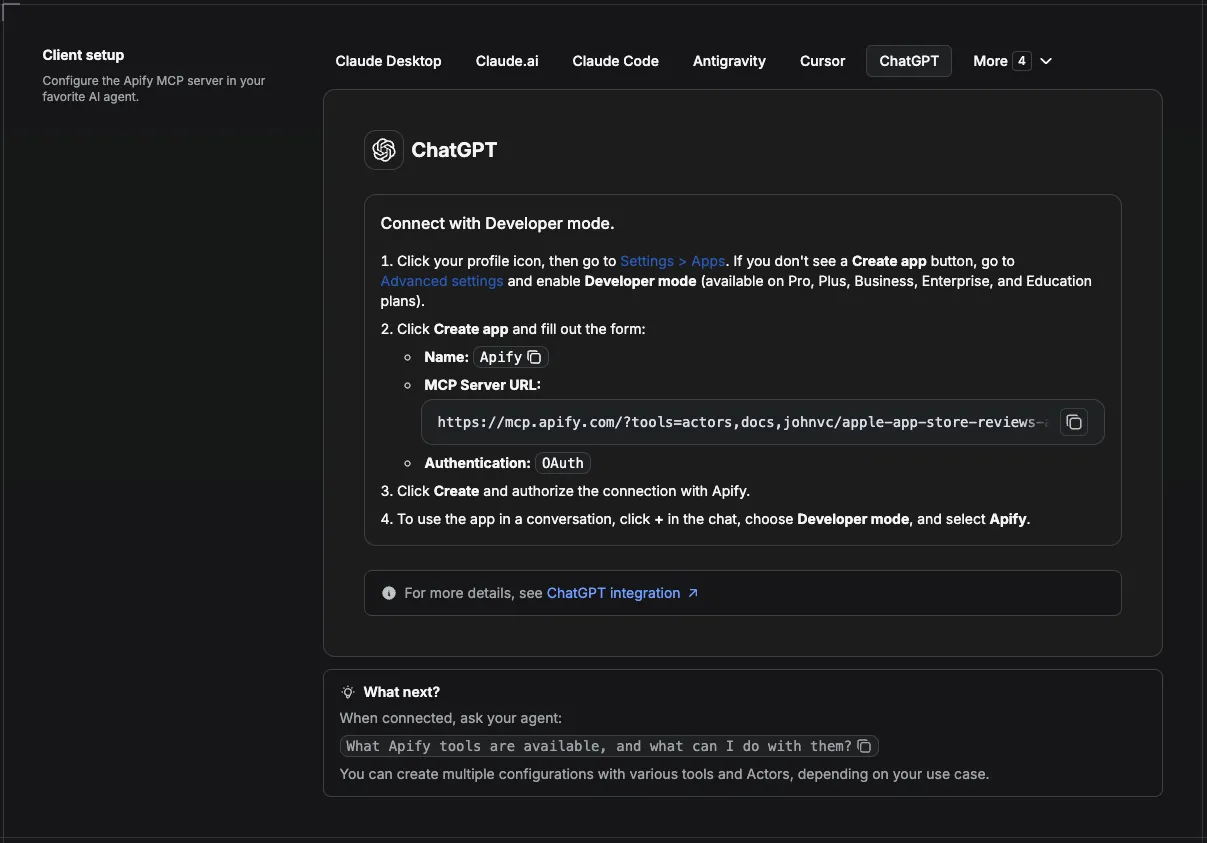
This Actor is compatible with the Model Context Protocol (MCP), so AI agents can call it as a tool. Add it through the hosted Apify MCP server using this Actor-specific URL:
https://mcp.apify.com/?tools=actors,docs,johnvc/google-travel-explore-api
If you run agents from Claude Code (free trial) or Claude Cowork (free trial), add the Apify MCP server and ask it to "find budget destinations from JFK this summer."
Setup walkthrough:
Apify MCP integration docs: https://docs.apify.com/platform/integrations/mcp
MCP setup, step by step
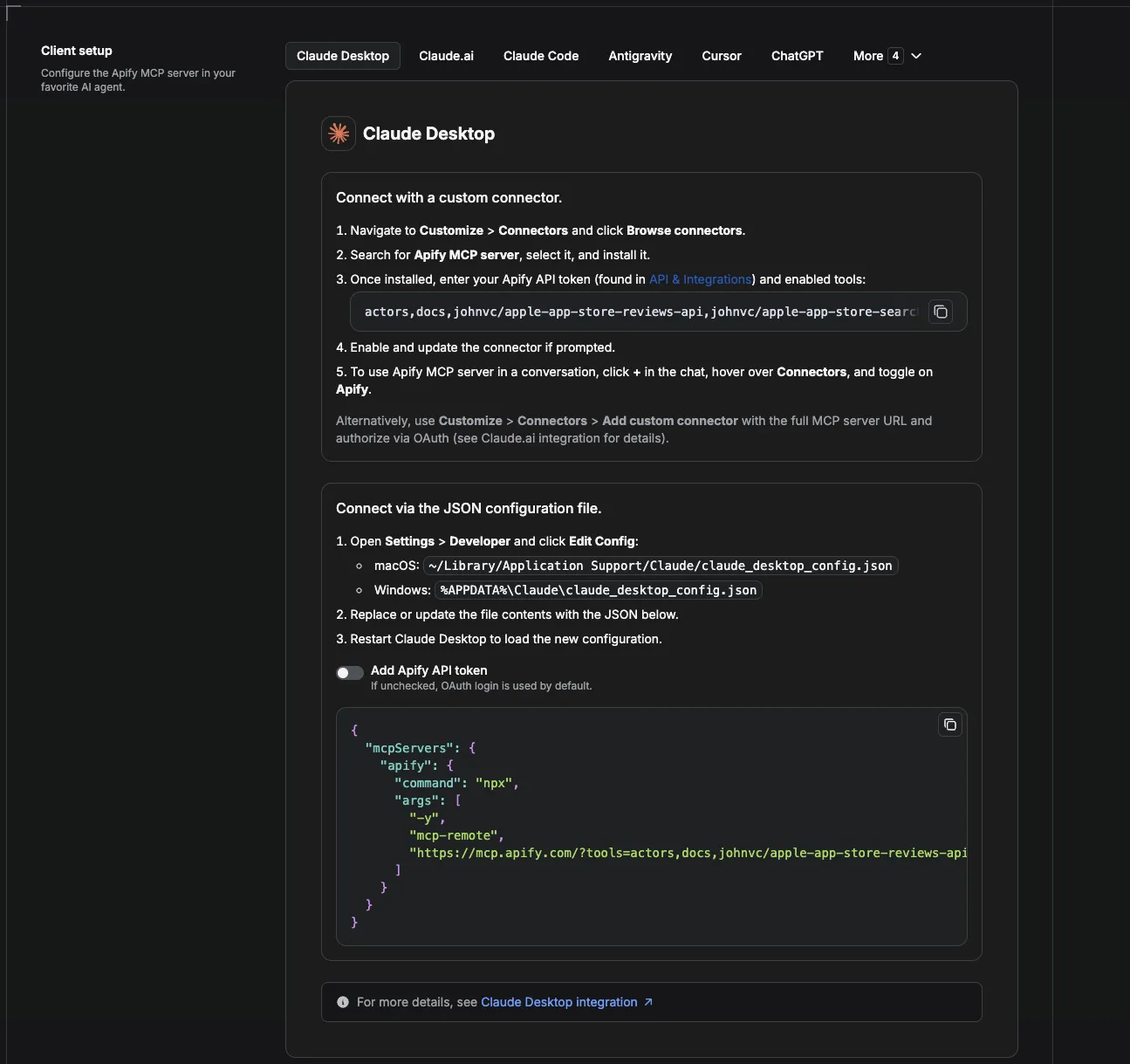
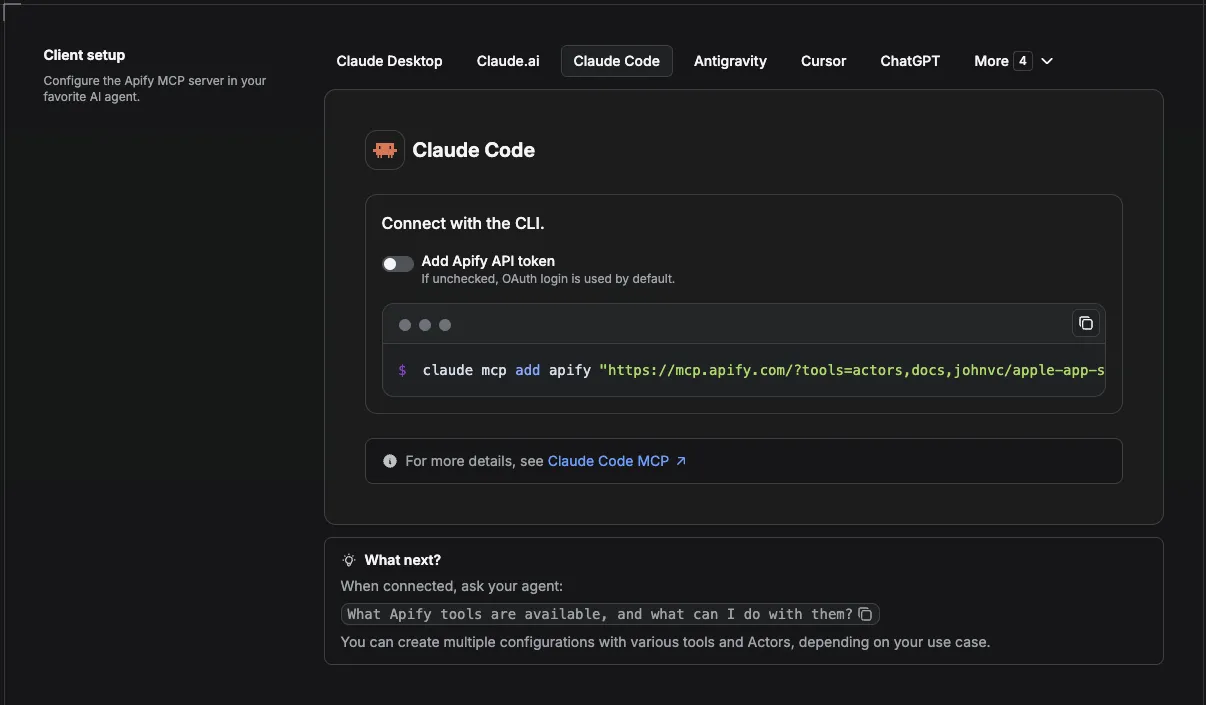
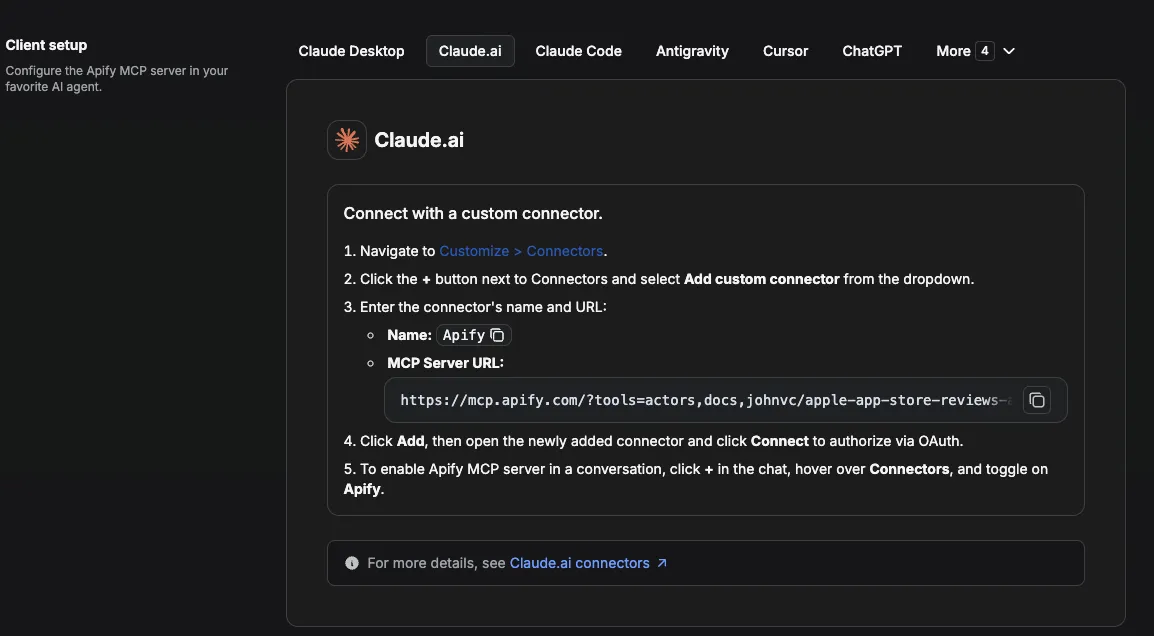
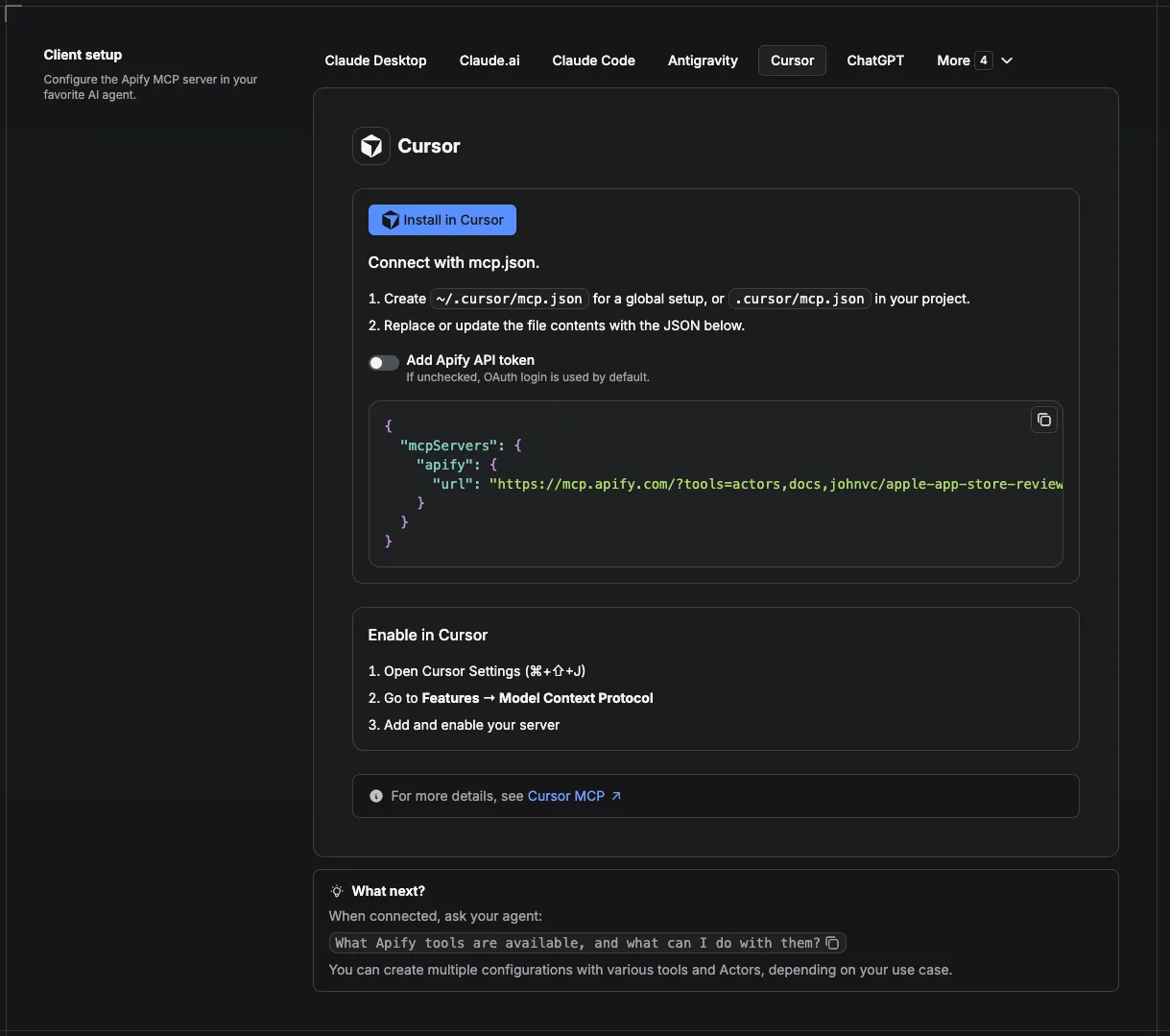
Visual setup guides for each client (source and more assets: ApifyPublicData on GitHub):
Claude Cowork Desktop (free trial)
Claude Code (free trial)
Claude (website)
Cursor
ChatGPT
🔗 Related Tools
Destination discovery is the first step in trip planning. Once a traveler picks a place, these johnvc Actors cover the rest of the journey:
- Google Flights API price the exact route once a destination is chosen, with one-way, round-trip, and multi-city fares.
- Google Hotels Search Scraper pull hotel options and nightly rates for the destination and dates you found here.
- Google Maps Places Scraper find attractions, restaurants, and things to do at the destination.
- Google Events surface concerts, festivals, and local happenings while your traveler is there.
For contrast, a point-to-point flight scraper such as this Google Flights scraper requires you to already name both the origin and the destination, so it cannot surface destinations a traveler has not chosen yet. It also has a smaller user base, no ratings, and a lower published success rate, and was last updated in April 2026. This Actor is built for the opposite job: it ranks destinations you have not picked, then hands off to the tools above for the details.
FAQ
What is a departure ID?
It is the airport you are flying from, given as an IATA code like JFK, LAX, or LHR. You can pass several at once with departureIds.
Are the prices live?
They are Google Travel's current estimated round-trip flight and nightly hotel prices for the suggested dates, in the currency for your gl country.
How many destinations come back?
Up to maxResultsPerDeparture (default 50). A departure point typically surfaces dozens of destination ideas.
Can I explore from several airports at once?
Yes. Pass a departureIds list; each is explored independently and tagged with its departure code.
Can I schedule this Google Travel API to run automatically?
Yes, and this is where the Actor earns its keep. Any run can be automated on a schedule. Create a saved task with your departure input, then attach a schedule from the Actor's Actions, then Schedule menu. Concrete cron examples: 0 8 * * * for daily at 8 AM, 0 7 * * 1 for Mondays at 7 AM, and 0 6 1 * * for the first of each month. One schedule can trigger many tasks at once, so a single "weekly destination refresh" can cover every home airport you have saved. See the Integrations section above for the full monitoring recipe.
Should I use an API or a Web Scraper?
An official travel API is often rate limited, quota bound, and missing the exact fields you need. This Actor gives you the same destination data either as a no-code web scraper you run point-and-click in the console, or as a clean API endpoint you call yourself, with no quotas to manage. If you are weighing a hosted service against building your own web scraper, this Actor is both at once.
Can I integrate this travel Scraper with other apps?
Yes. The Actor connects to almost any cloud service through Apify integrations: Make, Zapier, Slack, Google Drive, and more. For custom actions, attach a webhook on ACTOR.RUN.SUCCEEDED. See the Integrations section above for the full recipes.
Can I use the Google Travel Explore API with the API?
Yes. The Apify API gives programmatic access to run the Actor, schedule it, and fetch datasets, and the apify-client package is available for both Node.js and Python. See the Actor's own API tab for ready-made snippets in several languages.
Can I use this Actor through an MCP Server?
Yes. The Actor can be added as a tool to any MCP client, including Claude and Cursor, through the hosted Apify MCP server. Use the Actor-specific URL https://mcp.apify.com/?tools=actors,docs,johnvc/google-travel-explore-api, then ask your assistant to "find budget destinations from JFK this summer." See the Apify MCP docs for setup.
How do I use Google travel data together for a complete trip?
Destination discovery is step one. Once a traveler picks a destination, price the exact route with the Google Flights API, find rooms with the Google Hotels Search Scraper, map things to do with the Google Maps Places Scraper, and pull local happenings with Google Events. Together they cover the whole trip-planning pipeline.
Is an AI travel chatbot better than Google for planning a trip?
An AI travel agent is only as good as the data it can reach. On its own, a chatbot guesses at prices and availability. Connect this Actor through MCP and it can pull real destinations, flight prices, hotel prices, and travel dates from Google Travel, so its suggestions are grounded in current data instead of memory. That is the gap this Actor fills for travel content sites and AI travel agents.
n8n integration
Available as an n8n community node, n8n-nodes-google-travel-explore-api. In n8n: Settings, Community Nodes, install n8n-nodes-google-travel-explore-api, then use it in any workflow (it also works as an AI Agent tool).
Featured Tasks
Ready-to-run examples that show this API solving a specific problem. Each opens its own setup so you can run it on your account in one click.
- Cheapest Places to Fly From New York With Prices - The cheapest places to fly from New York, as JSON: flight_price, hotel_price, travel dates, and destination airport for each idea.
- Cheapest Places to Fly From Los Angeles With Prices - The cheapest places to fly from Los Angeles, as JSON: flight_price, hotel_price, travel dates, and destination airport for each idea.
- Cheapest Places to Fly From Chicago With Prices - The cheapest places to fly from Chicago, as JSON: flight_price, hotel_price, travel dates, and destination airport for each idea.
- Cheapest Places to Fly From Atlanta With Prices - The cheapest places to fly from Atlanta, as JSON: flight_price, hotel_price, travel dates, and destination airport for each idea.
- Cheapest Places to Fly From Boston With Prices - The cheapest places to fly from Boston, as JSON: flight_price, hotel_price, travel dates, and destination airport for each idea.
- Cheapest Places to Fly From San Francisco With Prices - The cheapest places to fly from San Francisco, as JSON: flight_price, hotel_price, travel dates, and destination airport for each idea.
- Cheapest Places to Fly From Miami With Prices - The cheapest places to fly from Miami, as JSON: flight_price, hotel_price, travel dates, and destination airport for each idea.
- Cheapest Places to Fly From Seattle With Prices - The cheapest places to fly from Seattle, as JSON: flight_price, hotel_price, travel dates, and destination airport for each idea.
- Cheapest Places to Fly From Dallas With Prices - The cheapest places to fly from Dallas, as JSON: flight_price, hotel_price, travel dates, and destination airport for each idea.
- Cheapest Places to Fly From Denver With Prices - The cheapest places to fly from Denver, as JSON: flight_price, hotel_price, travel dates, and destination airport for each idea.
- Cheapest places to fly from Washington DC with prices - Find the cheapest places to fly from Washington DC.
- Cheapest places to fly from Houston with prices - Find the cheapest places to fly from Houston.
- Cheapest places to fly from Phoenix with prices - Find the cheapest places to fly from Phoenix.
- Cheapest places to fly from Las Vegas with prices - Find the cheapest places to fly from Las Vegas.
- Cheapest places to fly from Orlando with prices - Find the cheapest places to fly from Orlando.
- Cheapest places to fly from Philadelphia with prices - Find the cheapest places to fly from Philadelphia.
- Cheapest places to fly from Minneapolis with prices - Find the cheapest places to fly from Minneapolis.
- Cheapest places to fly from Austin with prices - Find the cheapest places to fly from Austin.
- Cheapest places to fly from Nashville with prices - Find the cheapest places to fly from Nashville.
- Cheapest places to fly from Toronto with prices - Find the cheapest places to fly from Toronto.
Last Updated: 2026.07.14


