

OpenTable Reviews API | Restaurant Review Intelligence
Pricing
from $0.01 / 1,000 results
OpenTable Reviews API | Restaurant Review Intelligence
Scrape OpenTable restaurant reviews as structured JSON: review text, dined and submitted dates, the diner's profile, and the full rating breakdown (overall, food, service, ambience, value, noise). For hospitality analytics and restaurant competitive intelligence. Pay per review, MCP-ready.
Pricing
from $0.01 / 1,000 results
Rating
5.0
(1)
Developer

John
Maintained by CommunityActor stats
0
Bookmarked
18
Total users
11
Monthly active users
19 hours ago
Last modified
Categories
Share
The OpenTable Reviews API scrapes OpenTable restaurant reviews as clean structured JSON. Give the API a restaurant and get its reviews, each with the full review text, the dates the diner visited and posted, the diner's public profile, and the complete rating breakdown: overall, food, service, ambience, value, and noise. It is review intelligence for hospitality analytics, restaurant competitive research, and food-media sentiment analysis.
If you need to book a table, use a booking Actor. If you need the review data for analytics, this is the one: it returns the same reviews your competitors are reading, as structured JSON for AI agents.
What you get
One row per review:
content: the full review textrating: the breakdown (overall, food, service, ambience, value, noise)dined_atandsubmitted_attimestampsuser: the diner's name, review count, and locationreview_idand therestaurant_idit belongs to
Enable includeRestaurantSummary to also get one restaurant-level row with the aggregate ratings and total counts.
Use cases
- Track sentiment and ratings for a restaurant or a chain over time
- Benchmark a restaurant against competitors on food, service, and ambience
- Mine reviews for menu, pricing, and experience feedback
- Power restaurant analytics dashboards and food-media research
- Feed an AI agent a restaurant's reviews to summarize themes and complaints
🔌 Integrations: Automate OpenTable Reviews API Monitoring
A single run answers one question ("what are diners saying about this restaurant right now?"). The real value comes from running the OpenTable Reviews API repeatedly, so fresh reviews and rating shifts land in your stack as they post. See the full list of Apify platform integrations.
Tasks and Schedules (the core recipe). Save one task per thing you watch: a single restaurant, or a city watchlist in restaurantIds. Then attach a schedule from the actor's Actions, then Schedule menu. Each run re-pulls the most recent maxResultsPerRestaurant reviews for every restaurant, so you keep a rolling feed; dedupe downstream on review_id to keep only reviews you have not stored yet. Useful cron strings: 0 7 * * * (daily 7 AM), 0 */6 * * * (every 6 hours), 0 9 * * 1 (Mondays). One schedule can trigger many tasks at once. The Monitor OpenTable reviews for San Francisco restaurants task shows the watchlist pattern end to end.
n8n. This API ships an n8n community node (see the n8n integration section below). A four-step monitor: Schedule Trigger, then the OpenTable Reviews API node with your restaurantIds, then a Filter on rating.overall below a threshold, then Slack or email so a low rating pings the team.
Make and Zapier. The same pattern works no-code with Make and Zapier: trigger on a schedule, run the actor, route the new reviews where you need them.
Store the history (Supabase). Send each run's rows into a table so a review and rating history accumulates per venue. No-code: the n8n Actor node, then a Supabase node. Or in Python (each review row carries restaurant_id, review_id, content, dined_at, submitted_at, rating, and user):
MCP and AI agents. Add this API as a tool in Claude or Cursor through the Apify MCP server so an agent can pull a restaurant's reviews and summarize the themes on its own (see the Use this API from Claude section below).
Webhooks. For anything custom, fire an Apify webhook on ACTOR.RUN.SUCCEEDED to push each run's dataset into your own service.
Input
| Field | Type | Description |
|---|---|---|
restaurantId | string | A single restaurant, given as either the OpenTable URL slug (e.g. r/central-park-boathouse-new-york-2) or the full restaurant page URL (e.g. https://www.opentable.com/r/central-park-boathouse-new-york-2). The slug is detected and extracted automatically. Provide this, restaurantIds, or both. |
restaurantIds | array of strings | A batch of restaurants to fetch in one run, each a slug or a full URL. Merged with restaurantId and de-duplicated. All restaurants are fetched in parallel. |
maxResultsPerRestaurant | integer | Reviews per restaurant. Default 30, maximum 500. |
includeRestaurantSummary | boolean | Also return a restaurant-summary row with aggregate ratings. Charged once per restaurant. Default off. |
To find a restaurant, open it on OpenTable and either copy the r/... slug from the URL or just paste the whole page URL - either works.
Example input
Sample output
Pricing
Pay-per-result: a flat $0.008 per review returned. The optional restaurant summary is $0.005 once per restaurant, only when you enable it. No setup fee, no per-run fee, no monthly minimum.
How to get started
- Open OpenTable Reviews API on the Apify Store.
- Enter a
restaurantId(or arestaurantIdslist of OpenTable slugs). - Set
maxResultsPerRestaurant, then run the Actor. - Export the dataset as JSON, CSV, or Excel, or pull it from the API.
Prefer code? See the OpenTable Reviews API example repo for a Python quick-start and MCP setup guides.
Run from the API
🔌 Use this API from Claude (MCP)
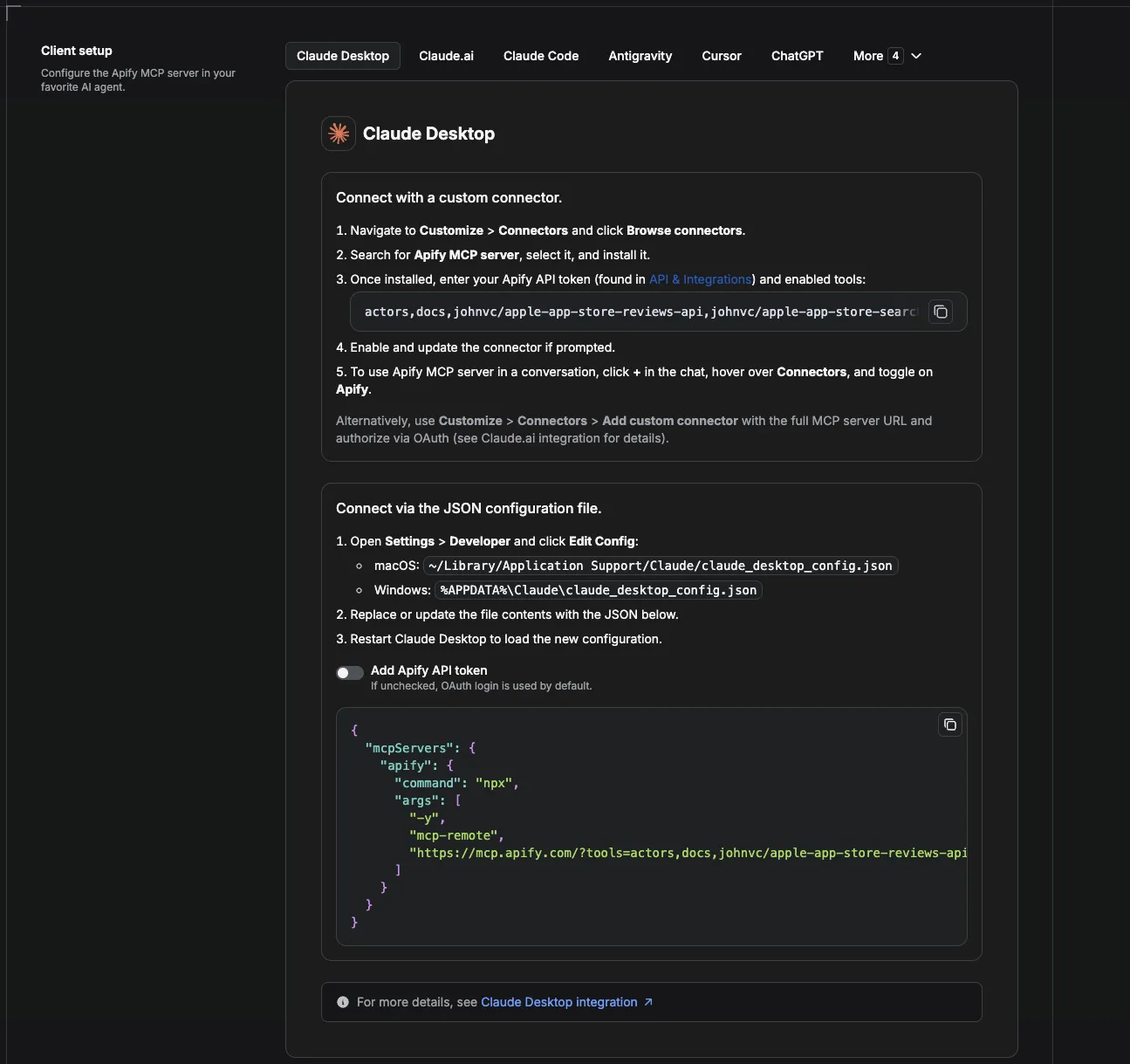
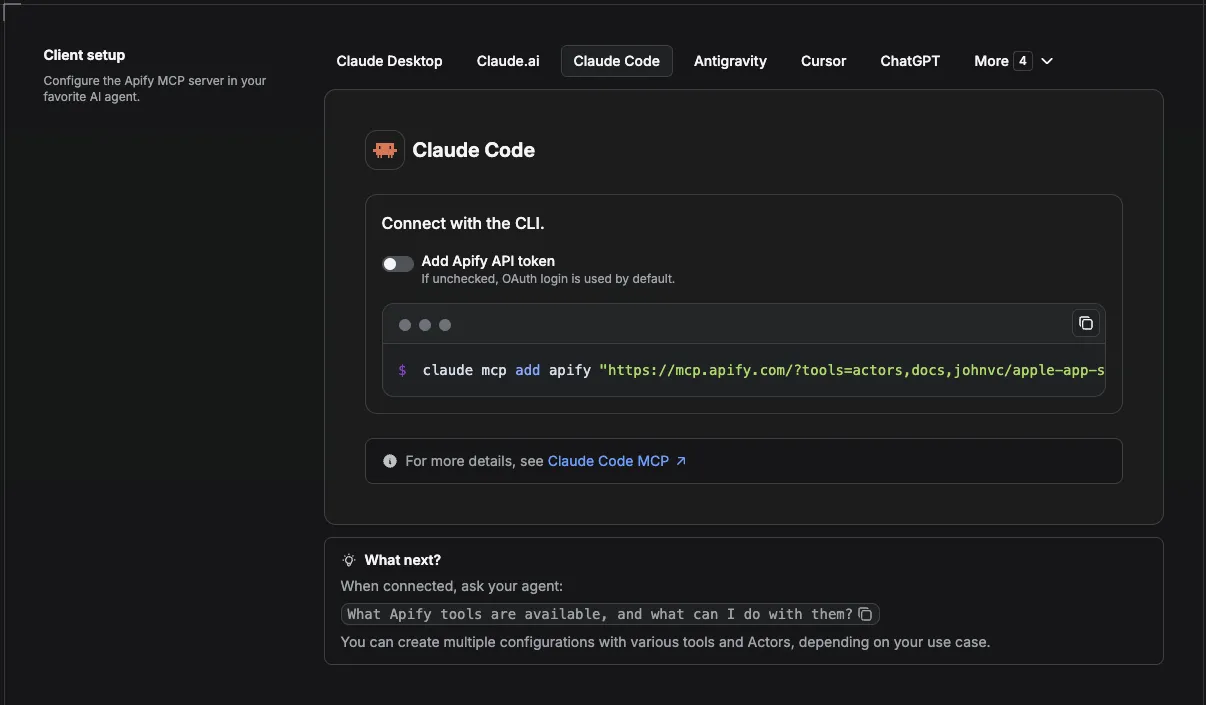
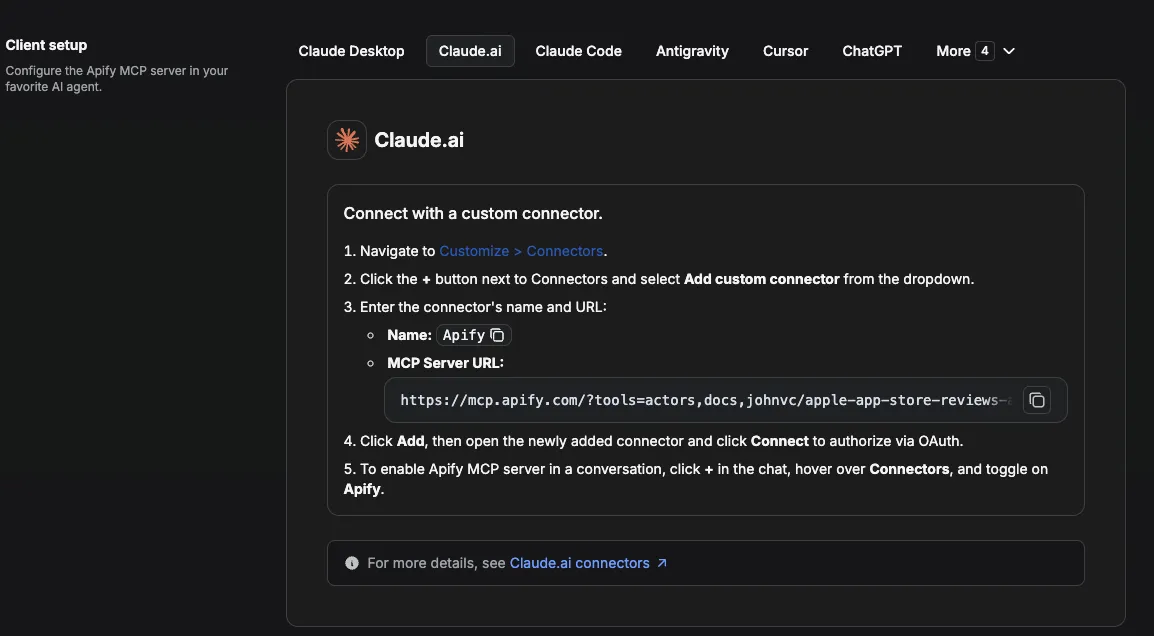
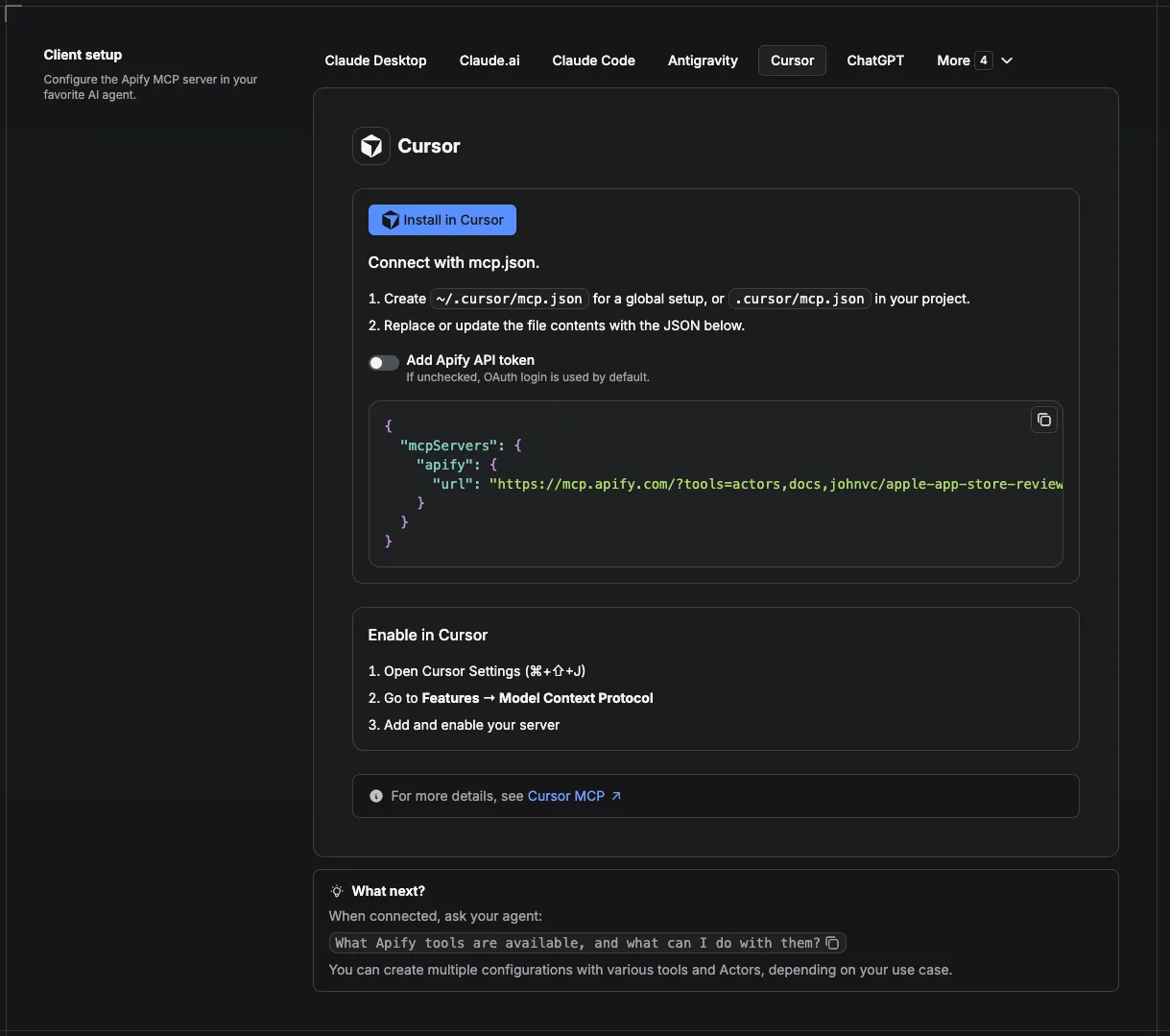
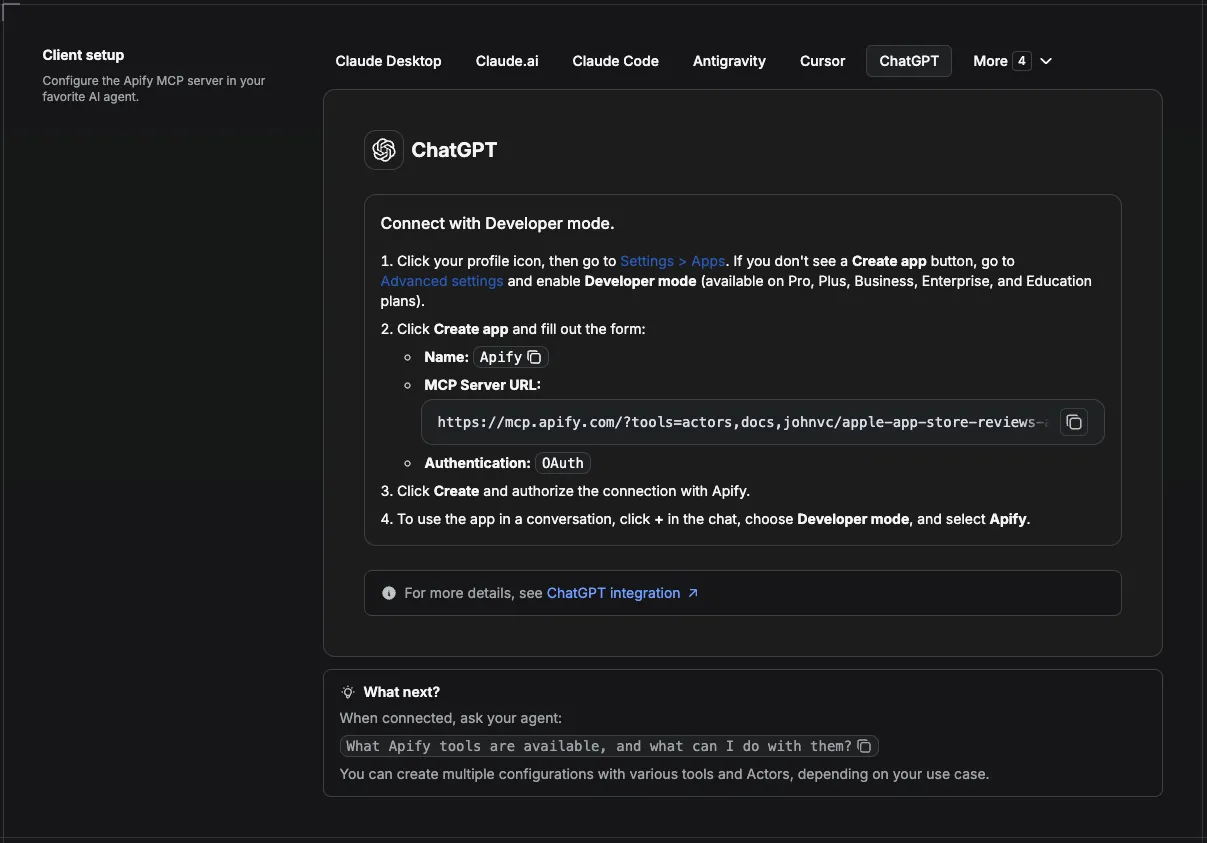
This Actor is compatible with the Model Context Protocol (MCP), so AI agents can call it as a tool. Add it through the hosted Apify MCP server using this Actor-specific URL:
https://mcp.apify.com/?tools=actors,docs,johnvc/opentable-reviews-api
If you run agents from Claude Code (free trial) or Claude Cowork (free trial), add the Apify MCP server and ask it to "pull this restaurant's reviews and summarize the common complaints."
Setup walkthrough:
Apify MCP integration docs: https://docs.apify.com/platform/integrations/mcp
MCP setup, step by step
Visual setup guides for each client (source and more assets: ApifyPublicData on GitHub):
Claude Cowork Desktop (free trial)
Claude Code (free trial)
Claude (website)
Cursor
ChatGPT
🔗 Related Tools
Building a restaurant or local-business review pipeline? These tools from the same catalog pair well with OpenTable review data:
- Yelp Reviews API: pull the same venues' reviews from Yelp so you cover a second major review platform in one pipeline.
- Yelp Business Details API: enrich each restaurant with business details, categories, hours, and contact info to sit alongside the review data.
- Google Maps Places Scraper: find restaurants and pull place-level data (address, coordinates, rating counts) to build the watchlist you feed here.
- Google Maps Contributor Reviews: follow a reviewer's history across Google Maps for a different angle on diner sentiment.
Thinner alternatives such as getdataforme/opentable-reviews-parser-spider exist, but they take only raw review-page URLs, carry no user rating, and show little recent use. This API detects the restaurant slug for you, batches many restaurants in parallel, and returns a documented, per-field rating breakdown as clean JSON.
FAQ
What is a restaurant ID?
It is the OpenTable URL slug, the r/... path for the restaurant. Open the restaurant on OpenTable and copy it from the URL. A full URL also works.
How many reviews come back?
Up to maxResultsPerRestaurant (default 30). The Actor paginates a restaurant's reviews for you.
Does it book tables?
No. This Actor is for review data and analytics. For reservations, use a dedicated OpenTable booking Actor.
Can I research several restaurants at once?
Yes. Pass a restaurantIds list; each is fetched independently and tagged with its restaurant ID.
Can I schedule the OpenTable Reviews API?
Yes, and this is where it earns its keep. Save a task with your restaurantId or restaurantIds watchlist, then attach a schedule from the actor's Actions, then Schedule menu. Common cron strings are 0 7 * * * (daily 7 AM), 0 */6 * * * (every 6 hours), and 0 9 * * 1 (Mondays), and one schedule can drive many tasks at once. Each run re-pulls the latest reviews, so dedupe on review_id to store only new ones. See the Integrations section above for the full monitoring recipe with cron examples and a Supabase snippet.
Should I use an API or a web scraper for restaurant reviews?
Both, and this Actor is both. An official reservation platform offers no public review API, and a plain web scraper returns messy HTML you still have to parse. This Actor gives you the clean, structured result of a purpose-built API: call it yourself, pay per review, no quotas, and get the same JSON whether you pull one restaurant or a whole city watchlist.
Can I integrate the OpenTable Reviews API with other apps?
Yes. It connects to almost any cloud service through Apify integrations: Make, Zapier, Slack, the n8n community node, and webhooks on ACTOR.RUN.SUCCEEDED for custom actions. See the Integrations section above for full recipes.
Can I use the OpenTable Reviews API programmatically?
Yes. The Apify API runs the Actor, schedules it, and fetches datasets, and the apify-client package exists for both Node.js and Python. See the Run from the API section above, or the actor's API tab.
Can I use the OpenTable Reviews API through an MCP server?
Yes. Add it as a tool in any MCP client (Claude, Cursor, and others) through the hosted Apify MCP server with the actor-specific URL https://mcp.apify.com/?tools=actors,docs,johnvc/opentable-reviews-api. In Claude Code (free trial) or Claude Cowork (free trial) your agent can then answer prompts like "pull this restaurant's reviews and summarize the common complaints" with live data. See the Apify MCP docs.
How else can I track restaurant reviews and ratings?
Pair this API with related tools in the same catalog: the Yelp Reviews API to cover a second review platform, the Yelp Business Details API to enrich each venue, and the Google Maps Places Scraper to build the restaurant watchlist you feed here.
Is it legal to scrape OpenTable reviews?
This Actor collects publicly visible reviews and ratings for analytics and research. As with any data collection, use it responsibly and follow the source's terms and applicable law. For background on the topic, see the legality of web scraping.
n8n integration
Available as an n8n community node, n8n-nodes-opentable-reviews-api. In n8n: Settings, Community Nodes, install n8n-nodes-opentable-reviews-api, then use it in any workflow (it also works as an AI Agent tool).
Featured Tasks
Ready-to-run examples that show this API solving a specific problem. Each opens its own setup so you can run it on your account in one click.
- Monitor OpenTable reviews for a list of restaurants - Watch a fixed list of restaurants and pull recent reviews for every venue in one run.
- Monitor OpenTable reviews for San Francisco restaurants - Track a watchlist of San Francisco venues, with review text, dined date, diner profile, and the full rating breakdown.
- Monitor OpenTable reviews for Los Angeles restaurants - Keep tabs on a list of Los Angeles restaurants and their latest reviews.
- Monitor OpenTable reviews for Chicago restaurants - Monitor reviews across a set of Chicago restaurants in a single run.
- Monitor OpenTable reviews for Houston restaurants - Follow a watchlist of Houston restaurants and pull each venue's recent reviews.
- Monitor OpenTable reviews for London restaurants - Track London restaurants and their reviews, with the full per-review rating breakdown.
- Monitor OpenTable reviews for Dubai restaurants - Monitor a list of Dubai restaurants and pull recent reviews for each venue at once.
- Export OpenTable reviews to a spreadsheet - Pull reviews for a set of restaurants and export them to CSV or Excel, with text, dates, diner profile, and ratings.
- Get recent OpenTable reviews for one restaurant - Pull the recent review history for a single restaurant, with the full per-review rating breakdown.
- Export OpenTable Reviews to CSV
- Analyze OpenTable reviews for sentiment analysis - Pull reviews for a set of restaurants to feed a sentiment analysis pipeline, with review text, ratings, dates, and diner profiles.
Last Updated: 2026.07.14


