
TikTok Shop Indonesia Scraper - Products, Prices & Sellers
Pricing
$0.99 / 1,000 results
TikTok Shop Indonesia Scraper - Products, Prices & Sellers
Collect public TikTok Shop Indonesia product listings by category or product URL. Export prices, discounts, ratings, sellers, reviews, and public sold counts. Track price changes across runs. Site security checks can limit results.
Pricing
$0.99 / 1,000 results
Rating
0.0
(0)
Developer

KULQIZ
Maintained by CommunityActor stats
0
Bookmarked
89
Total users
8
Monthly active users
a day ago
Last modified
Categories
Features
Share
TikTok Shop Indonesia Scraper
A scraper for TikTok Shop Indonesia that runs on the real Indonesian storefront (shop-id.tokopedia.com). No proxy or API key to set up: you press Run.
The site shows a security check (a slider puzzle) on most visits. The Actor tries to get past it on its own, but it does not always succeed. When a run is blocked it stops, keeps every product it already collected, and says so in the run status and in the RINGKASAN summary. You are only charged for products that are returned, so a blocked run with no results costs nothing in result fees.
Get prices, discounts, units sold, ratings, sellers, brands, images, and full product detail with reviews. Pay per result at $0.99 per 1,000, so you only pay for products actually returned.
What does TikTok Shop Indonesia Scraper do?
It collects public product listings from TikTok Shop Indonesia and returns them as structured data you can sort, filter, and export. For every product you get the price, original price, discount, rating, review count, units sold, shop name, seller ID, brand, image, and product URL.
You can scrape in two ways:
- By category: visit the homepage and all 28 categories, with an optional subcategory crawl for far more products.
- By product URL (detail mode): paste product links to pull the full description, every image, variants and SKUs, specifications, and customer reviews.
Filter the results by minimum units sold, minimum rating, and price range to keep only the products you care about. You only pay for the products that are returned.
Why scrape TikTok Shop Indonesia?
- Product research and dropshipping: find best-selling, high-rating products before you stock or run ads.
- Price and promo monitoring: track prices, discounts, and units sold across categories over time.
- Competitor and seller analysis: see which shops and products dominate a category.
- Market research: export thousands of TikTok Shop Indonesia products to a spreadsheet and analyze demand by category.
How to scrape TikTok Shop Indonesia (categories and product URLs)
You pick products by category and subcategory, or by pasting product URLs for full detail and reviews. The TikTok Shop Indonesia web storefront has no public keyword search, so this tool is category-based and URL-based.
To scrape a single category, turn off Crawl all categories and paste the category URL (for example https://shop-id.tokopedia.com/c/beauty-personal-care/601450) into Start URL. Every category has its own URL. To get full detail and reviews for specific products, paste their /pdp/... links into Product URLs.
How many products can you scrape?
A run that crawls the homepage and all 28 categories returns about 600 products. Turn on Crawl subcategories to walk 150+ subcategory pages and pull thousands of products in a single run. One category on its own returns roughly 20 to 40 products.
The storefront surfaces popular and ranked products per category, so exact counts vary by category and by what TikTok Shop is showing at the time of the run. Use Maximum products to cap a run, and the units-sold and rating filters to keep only the best-sellers.
How much does it cost?
Pricing is pay per result: $0.99 per 1,000 products returned, about $0.00099 each. You only pay for products that are actually returned. Some real examples:
- A quick test with the default settings (100 products): about $0.10.
- A full sweep of the homepage and all 28 categories (~600 products): about $0.60.
- A deep sweep with subcategories (2,000 products): about $2.00.
- Full detail with reviews for 50 product URLs: about $0.05.
Product detail and reviews are included in the per-product price, so a detail run does not cost extra per review.
What you get
Results come as a clean table you can browse in the Apify Console and export to Excel, CSV, Google Sheets, JSON, or HTML. No coding needed: run it, open the Output tab, and download.
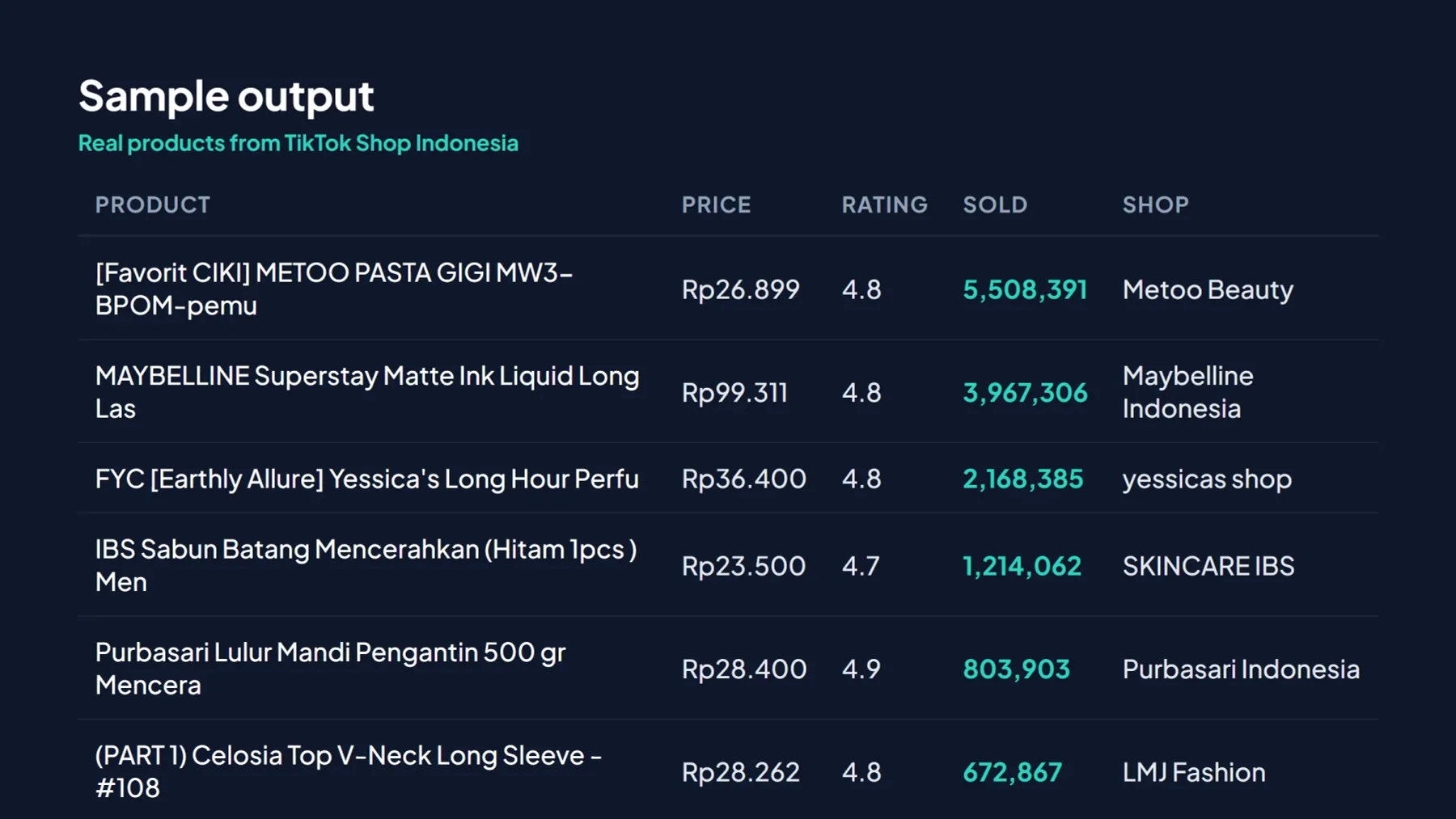
One row per product (JSON example for developers):
Detail runs (via productUrls) add description, images, variants, specifications, and reviews. Export as JSON, CSV, Excel, or HTML, or pull the data through the Apify API.
Input parameters
| Field | Description | Default |
|---|---|---|
crawlCategories | Scrape the homepage and all 28 categories | true |
crawlSubcategories | Also crawl subcategories (150+ pages, far more products) | false |
maxProducts | Stop after this many products (raise it for a full sweep) | 100 |
minSold | Keep only products with at least this many units sold | 0 (off) |
minRating | Keep only products rated at least this, e.g. 4.5 | 0 (off) |
minPrice / maxPrice | Price range filter, in Rupiah | 0 (off) |
productUrls | Product URLs for full detail mode (description, variants, specs, reviews) | empty |
includeReviews / maxReviews | Include customer reviews per product (detail mode) | false / 20 |
monitorMode | Compare with the previous run of the same monitor and write an Indonesian price report | false |
monitorName | Runs with the same name are compared with each other | default |
reportTitle | Title of the HTML report | Laporan Pantau Harga TikTok Shop Indonesia |
timeBudgetSecs | Stop cleanly after this many seconds and keep what was collected (about 10 s per product URL) | 220 |
Example runs
Find best-selling products to source or dropship
Thousands of proven sellers across every category. Sort the Excel export by "Sold" to spot the winners.
Research one category (for example beauty and skincare)
Only that category, best-sellers first. Every category has its own URL.
Find affordable winners (cheap products that still sell)
See who dominates a category (seller and competitor analysis)
Every product with its shop and units sold. Group by "Shop" in your spreadsheet to find the top sellers.
Deep-dive a product: full detail and reviews
Description, all images, variants, specifications, and customer reviews, useful for product ideas and quality checks.
Weekly price monitoring (Indonesian report)
Turn on Price monitoring and give the monitor a name. Each run is compared with the previous run of the same name, and the output is a report in Indonesian:
- previous and current price in IDR, the difference in rupiah and percent
- fetch time of both runs, in WIB
- change in the public "terjual" counter, with its source written on every row (it is the counter shown on TikTok Shop, not official sales data)
- a status per product:
LENGKAP,BARU DIPANTAU,TIDAK LENGKAP(a field could not be read) orTIDAK TERBACA(the product could not be read this run; its previous values are kept)
The first run picks products from the start URL, then opens each product page so the baseline price and sold counter come from the same source later runs use. The set is saved and later runs open those same product pages, so the list does not drift week to week. A product that cannot be read in a run is listed as TIDAK TERBACA ("gagal dicek") with its previous price kept. When a price has not changed, the report shows it as Tetap (Rp0, 0,0%). Schedule the run weekly in Apify (Schedules) to build a history.
Ready-to-run example: Track Beauty Product Prices on TikTok Shop Indonesia. The preset checks up to 30 products.
Each run writes LAPORAN.csv (opens directly in Google Sheets or Excel) and LAPORAN.html to the run's key-value store, and a copy named LAPORAN_TERBARU.csv to a named store whose URL stays the same every week. The run log prints a ready =IMPORTDATA(...) formula for that URL. The dataset holds one row per product that was read; open the Price monitoring view in the Output tab for the table. Cell values such as Turun/Naik/Tetap and the notes stay in Indonesian, matching the report. You are charged only for those rows.
Is it legal to scrape TikTok Shop Indonesia?
This scraper is designed to collect only publicly available product information: prices, discounts, units sold, ratings, shop names, brands, images, product descriptions, and the public reviews shown on a product page. It does not log in, does not touch private accounts, and does not collect personal data about individuals beyond what any shopper sees on the public page.
The data it returns is the kind used for market research, price monitoring, and product research. As with any web scraping, you are responsible for using it in line with applicable laws (including the EU GDPR and Indonesia's Personal Data Protection Law, UU No. 27 of 2022) and the target site's Terms of Service. If you plan to store or process review data that contains names, consult a lawyer about your specific use case.
Use from an AI agent (MCP)
This Actor is available through the Apify MCP server, so AI agents (Claude, GPT, and others) can discover and run it autonomously. Because it is billed per result on Apify's pay-per-event model, agents can pay per call with x402 or Skyfire, with no Apify account or API token required.
Point an MCP client at:
Then ask in plain language, for example: "Find the best-selling beauty products on TikTok Shop Indonesia with a rating above 4.5." The agent discovers this Actor, runs it, receives structured product data (price, units sold, rating, seller), and pays only for the results it returns.
FAQ
Do I need a proxy? No. Runs work without one. The proxy setting stays available if you hit repeated rate limiting.
Will every run succeed? No scraper can promise that. The site shows a security check on most visits, and the Actor does not always get past it. Each run ends with one of four results, written to the run status and the RINGKASAN record:
| Result | Meaning | Run status |
|---|---|---|
LENGKAP | Everything requested was read (in category mode: every page was opened) | Succeeded |
PARSIAL | Some products were read; the reason is given (security check, time limit, pages that failed) | Succeeded |
KOSONG_TERBLOKIR | Nothing was read because the security check was not passed | Failed |
KOSONG | Nothing was read for another reason, such as filters that are too strict or the time limit | Failed only for the time limit |
If a run is blocked, start it again later. You are not charged result fees for products that were not returned.
Is my input checked? Yes. Product URLs must be https://shop-id.tokopedia.com/pdp/... pages, the start URL must be on the same site, and numbers must be in range. Invalid input stops the run before the browser opens and lists every problem in the status message.
Is the data live? Yes. Each run scrapes the storefront at that moment, so you get current prices and units sold.
Can it search by keyword? The TikTok Shop Indonesia web storefront has no public keyword search, so you scrape by category or by product URL.
Can I export to Excel or Google Sheets? Yes. Open the Output tab and download as Excel, CSV, Google Sheets, JSON, or HTML, or pull the data through the Apify API.
Which market does it cover? TikTok Shop Indonesia only (shop-id.tokopedia.com).
Custom work
Need a specific category, product set, or extra field? Send me a message.


