

Realestate [com.au & co.nz] $0.9💰 Search By URLs and Keywords
Pricing
from $0.90 / 1,000 results
Realestate [com.au & co.nz] $0.9💰 Search By URLs and Keywords
💰 Only $0.9💰 Realestate.com.au listings with agent contacts. Input: buy/rent/sold list URLs or direct property pages. Output: one row per listing with flat columns (title, price, agents, images, address) plus full listing and withIdsResponse; includes originalSearchUrl and apiRequestUrl.
Pricing
from $0.90 / 1,000 results
Rating
5.0
(3)
Developer

Muhamed Didovic
Maintained by CommunityActor stats
2
Bookmarked
334
Total users
60
Monthly active users
6 days ago
Last modified
Categories
Features
Share
realestate.com.au + realestate.co.nz Listings
Turn Australian and New Zealand real estate listings into structured data you can actually use. One actor, two countries — property rows with flat columns and the full listing record. NZ rows include broadband / fibre data per address.
🇦🇺🇳🇿 Two markets, one dataset. Filter with the
countrycolumn. 🛰️ Complete records — every field the listing shows, in the same shape on every run. 💰 $0.90 per 1,000 listings. Proxies included; no compute charges.
✨ Why use this scraper?
Tired of AU-only scrapers? Of paying for fields you don't get?
- 🇦🇺🇳🇿 AU and NZ in one run.
realestate.com.auandrealestate.co.nz— every other scraper is one or the other. - 🛰️ Complete, stable rows. Every listing comes back with the same columns, run after run.
- 📡 NZ broadband intel. Every NZ row includes the fibre plans available at that address (speed, monthly price, ONT status).
- 📦 Flat columns + full record on every row. Spreadsheet-friendly columns plus the full listing record (
withIdsResponse/nzListingResponse), so nothing the listing shows is lost. - 🔍 Filter mode. No URL? Pick country / channel / region / district / suburb and the actor builds the search URL for you.
- 🧭 Provenance built-in.
originalSearchUrlandapiRequestUrlper row — auditable and reproducible.
🎯 Use cases
| Team | What they build |
|---|---|
| Real-estate analysts | Price-trend dashboards by suburb, days-on-market, listing-volume tracking |
| Lead-gen / agencies | Agent + agency contact lists with phone, email, profile URL |
| Investment researchers | Cross-market AU vs NZ comparison datasets, yield/rent analysis |
| ISPs / broadband sales | NZ fibre coverage and plan-availability research per address |
| Saved-search monitors | Alerts on new or changed listings for a tracked search URL |
| Auction prep | AU auction-time URLs scraped before each Friday |
| Data warehouses | Schema-stable archives via the full withIdsResponse / nzListingResponse records |
💰 Pricing & free tier
- Cost: $0.90 per 1,000 listings. No minimums, proxies included, no compute charges.
- Free tier (try before you buy):
- Up to 5 listings per run.
- Emails are partially masked (e.g.
j***@example.com). - Apify platform credits also apply — free Apify accounts have a monthly compute budget that effectively caps how often you can run.
Upgrade to a paid Apify plan to remove the per-run cap and reveal full emails.
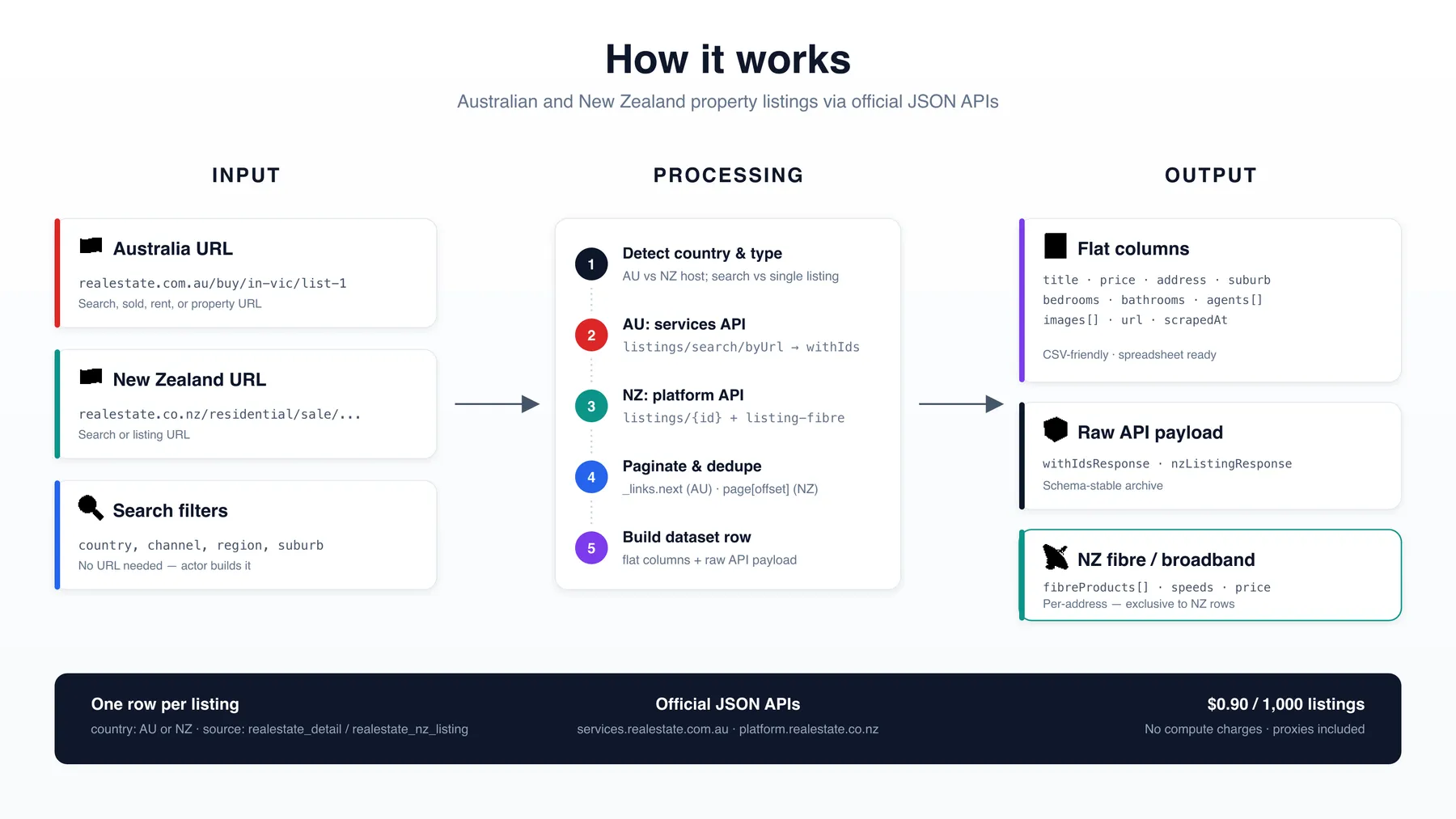
🏗️ How it works
- You provide AU and/or NZ URLs in
startUrls— or usesearchByFiltersto skip URL building. - The actor detects each URL's country and type (search vs single-listing) and routes accordingly.
- AU search: every page of results is collected, and each listing comes back with full details, agents and photos.
- NZ search: every listing in the search is collected, together with the broadband / fibre plans available at its address.
- Each listing becomes one dataset row with flat columns and the full listing record. CSV and JSON files are written to the actor run for download.
🇦🇺 Australian real-estate agent data
Beyond listings, this scraper also powers a curated database of 11,000+ realestate.com.au agents — name, verified email and mobile, agency, and office suburb/state, spanning every Australian state and territory. Ideal for prospecting, CRM enrichment, recruitment, and market mapping.
Interested in a bulk Australian agent lead list? See Support to get in touch for a sample and pricing.
📥 Supported inputs
AU (www.realestate.com.au)
| URL pattern | Behavior |
|---|---|
/buy/..., /rent/..., /sold/... list pages (e.g. …/list-1?…) | Every listing in the search, with full details |
/property-…-{id} or /property-id-{numeric} | Single listing |
/buy/in-…/auction-times-1?auction-date=YYYY-MM-DD | Auction search. Keeps only listings with an auction on that date. Append &auction-date-to=YYYY-MM-DD for an inclusive date range (e.g. all auctions in the next 7 days) |
/rent/in-…/inspection-times-1?inspection-date=YYYY-MM-DD | Open-inspection search. Keeps only listings with an open inspection on that date. Append &inspection-date-to=YYYY-MM-DD for an inclusive date range |
NZ (www.realestate.co.nz)
| URL pattern | Behavior |
|---|---|
/residential/sale/…, /residential/rent/… | Every listing in the search, with fibre data |
/rural/..., /commercial/... (where supported by the mapper) | Same as residential |
| Listing URL with numeric ID as first path segment | Single listing, with fibre data |
Large searches: complete results past ~2,000 listings
A single search returns at most about 2,000 listings. When a search has more, the actor splits it into price ranges automatically, collects each range and removes duplicates, so a single region URL returns the complete set — no manual suburb chunking required. A 2,389-listing region came back complete in about 11 seconds.
For example,
/rent/in-inner+west,+nsw/inspection-times-1?inspection-date=…
(2,389 listings) returns every date-matching listing, not just those in
the first 2,000.
Per-suburb URLs still work and are slightly faster per URL, but are no
longer necessary for coverage. If you do split by suburb, set
includeSurroundingSuburbs: false so each URL returns only its own
suburb (a single-suburb URL like Newtown otherwise pads ~69 listings out
to ~815 with neighbouring suburbs — precise + ~10× faster with the toggle
off). A listing that shows up under several start URLs is saved once.
Unsupported
https://www.realestate.com.au/agent/...— agent profile URLs (not parsed)https://www.realestate.com.au/find-agent/...— find-agent URLs (skipped)- NZ
soldchannel via filter mode (not exposed by the platform) - Any host outside
*.realestate.com.auand*.realestate.co.nz
AU URL examples
https://www.realestate.com.au/buy/between-0-125000-in-melbourne+-+northern+region,+vic/list-1?source=refinementhttps://www.realestate.com.au/rent/property-unit+apartment-villa-in-sydney+cbd,+nsw/list-1?maxBeds=3&source=refinementhttps://www.realestate.com.au/sold/property-land-between-0-50000-in-adelaide+-+greater+region,+sa/list-1?source=refinementhttps://www.realestate.com.au/rent/in-inner+west,+nsw/inspection-times-1?inspection-date=2026-06-10(single day)https://www.realestate.com.au/rent/in-inner+west,+nsw/inspection-times-1?inspection-date=2026-06-10&inspection-date-to=2026-06-16(7-day range)https://www.realestate.com.au/buy/in-southern+region,+qld/auction-times-1?source=refinementhttps://www.realestate.com.au/property-unit-vic-macleod-150434352
NZ URL examples
https://www.realestate.co.nz/residential/sale/auckland/auckland-city/blockhouse-bayhttps://www.realestate.co.nz/residential/rent/wellington/wellington-cityhttps://www.realestate.co.nz/43004474/residential/sale/42-bolton-street-blockhouse-bay
⚙️ Input parameters
| Parameter | Type | Required | Default | Description |
|---|---|---|---|---|
startUrls | array | * | — | AU/NZ search or property URLs. URL mode wins over searchByFilters. |
searchByFilters | object | * | — | Single shared filter (country, channel, cityOrRegion, district, suburb). |
flattenOutput | boolean | No | true | When true, rows include flat columns and the full listing record. When false, just the full record. |
includeSurroundingSuburbs | boolean | No | true | AU only. When false, restricts each search to its named locality (no neighbouring suburbs) — far fewer, more precise results and ~10× faster. Recommended false for per-suburb workflows. |
maxItems | integer | No | 10000 | Maximum listings per listing-search URL. Direct property URLs always fetch one. |
maxConcurrency | integer | No | 100 | Maximum concurrent requests. |
minConcurrency | integer | No | 1 | Minimum concurrent requests. |
maxRequestRetries | integer | No | 100 | Retries per failed request. |
proxy | object | No | — | Optional. Residential proxies recommended. The default works out of the box; leave empty unless you want to use your own proxies. |
* Provide either startUrls or searchByFilters. URL mode wins if both are set.
🚀 Examples
Mixed AU + NZ URLs
NZ filter mode (no URL needed)
Single AU property (one row)
AU sold listings, narrow region, your own proxy settings
AU rent, full record only (no flat columns)
📊 Output overview
Each dataset row is one listing, regardless of whether the start URL was a search or a single property page.
source: "realestate_detail"+country: "AU"— Australian listings.source: "realestate_nz_listing"+country: "NZ"— New Zealand listings.
When flattenOutput: true (default), rows include flat spreadsheet-style columns plus the full listing record (withIdsResponse for AU; nzListingResponse and optional listingFibreResponse for NZ). When false, just the full record + minimal identifiers.
CSV is written from the union of top-level keys; nested payloads survive in JSON only — prefer JSON for complete data.
📦 Output samples
AU sample (realestate_detail, trimmed)
NZ sample (realestate_nz_listing, trimmed)
🗂️ Output fields
Fields are grouped by category. Both AU and NZ rows share most top-level field names so unioned CSV columns work across countries.
Core
| Field | Type | Description |
|---|---|---|
source | string | realestate_detail (AU) or realestate_nz_listing (NZ) |
country | string | AU or NZ |
listingId | string | Listing id on the site |
title | string | Marketing headline |
propertyType | string | e.g. unit, house, House, Land |
status | string | Channel label (AU) / listing-status (NZ) |
channel | string | buy, rent, or sold |
description | string | Plain-text description |
featured | boolean | Featured / showcased flag |
productDepth | string | REA tier (AU); empty for NZ |
scrapedAt | string | ISO timestamp when row was pushed |
url | string | Public listing URL |
url_slug | string | Path slug |
Address
| Field | Type | Description |
|---|---|---|
address | string | Street line |
suburb | string | Suburb |
postcode | string | Postcode |
state | string | State (AU) / region (NZ) |
latitude / longitude | number|null | Coordinates if available |
Property
| Field | Type | Description |
|---|---|---|
bedrooms / bathrooms / carSpaces | number|null | Bedroom, bathroom and parking counts |
propertyFeatures | object | Feature strings grouped by section |
landSize / landSizeUnit | number / string | When available |
inspections | array | Open-home / inspection schedule |
statementOfInformation | string|null | PDF URL (AU only) |
constructionStatus | string | new / established / empty |
Pricing
| Field | Type | Description |
|---|---|---|
price | string | Display string (e.g. $900 per week, Negotiation) |
Inside listing.price | object | Structured { display, … } |
Tier flags (AU parity)
| Field | Type | Description |
|---|---|---|
isSold / isBuy / isRent / isProject | boolean | Channel flags |
tier_signature / tier_midtier / tier_standard | boolean | REA tier flags |
tier_isClassicProject / tier_isSignatureProject / tier_isProject | boolean | Project flags |
isExactMatch / isSurroundingMatch | null | Reserved (search-context only) |
Agency
| Field | Type | Description |
|---|---|---|
agencyName, agencyPhone, agencyEmail, agencyWebsite | string | Office contact |
agencyAddress | string | Single-line address |
agencyAddress_streetAddress / _suburb / _state / _postcode / _raw | string / object | Split address |
agencyProfileUrl, agencyLogo | string|null | Profile + logo URLs |
Agents
| Field | Type | Description |
|---|---|---|
agents[] | array | Each: agentId, name, jobTitle, phoneNumber, emails[], powerProfile, profileUrl, image |
lister | object | First element of agents (NZ convenience) |
🔒 On the free tier,
emailsare masked asj***@example.com.
Images
| Field | Type | Description |
|---|---|---|
images[] | array | Absolute photo URLs (800×600 webp on AU CDN; mediaserver.realestate.co.nz/...crop.800x600.jpg on NZ) |
NZ fibre / broadband (NZ only)
| Field | Type | Description |
|---|---|---|
hasOnt | boolean | ONT (fibre terminator) installed at the address |
currentConnection | string|null | Current connection tier |
standardInstall | boolean | Standard install eligibility |
ontUpgradeLink / standardInstallLink | string | Chorus help URLs |
fibreProductCount | integer | Number of plans |
fibreProducts[] | array | Each: id, name, upSpeedMbps, downSpeedMbps, priceCents, available, requiresOntUpgrade |
fibreStatusCode | integer | Status of the fibre lookup (200 = found, 0 = lookup failed) |
fibreApiRequestUrl | string | Source link for the fibre data (for auditing) |
Provenance / metadata
| Field | Type | Description |
|---|---|---|
originalSearchUrl | string|null | Public search URL that started this branch |
apiRequestUrl | string | Source link for this row (for auditing) |
statusCode | integer | Status of the listing lookup (200 = found) |
flattenOutput | boolean | Echo of the input flag |
Full records
| Field | Type | Description |
|---|---|---|
listing | object | Full listing object (AU and NZ) |
withIdsResponse | object | AU: full listing record with its result count |
nzListingResponse | object | NZ: full listing record |
listingFibreResponse | object|null | NZ: full fibre / broadband record (when found) |
rawResponse | object | NZ: alias of nzListingResponse (compatibility) |
💻 Integrations
Python
JavaScript
📈 Performance
| Metric | Value |
|---|---|
| Throughput (AU search) | ~30–80 listings/min |
| Concurrency | Configurable up to maxConcurrency: 100 |
| Search pages | Up to 500 per search |
| Retries | Automatic on temporary errors |
| Proxy | Works out of the box; your own proxies optional |
💡 Tips for best results
- Test with
maxItems: 10first. Verify the output schema matches your downstream pipeline before running large jobs. - Narrow your AU search URLs. REA's
auction-timesURLs cap at ~80 pages; use a tighter region or filter so important results aren't past the cap. - Leave
proxyempty. The default works out of the box; set it only to use your own proxies. - Prefer URL mode for reproducibility.
searchByFiltersbuilds one URL each run — the URL itself is the source of truth, easier to share and re-run. - Keep
flattenOutput: trueunless you only want the full records. The flat columns make CSV usable without writing a custom flattener. - Consume JSON, not CSV, for nested records.
listing/withIdsResponse/nzListingResponseare dropped from CSV. - Set
maxItemsto what you actually need. It caps charges (and dataset rows) — no point pulling 5,000 listings if you're sampling 100.
❓ FAQ
Can I scrape both AU and NZ listings in one run?
Yes. Provide a mix of realestate.com.au and realestate.co.nz URLs in startUrls and the actor routes each one to the right pipeline. The country column lets you split the dataset afterwards.
Are emails always returned?
Paying users get full emails. Free-tier users get masked emails (j***@example.com) so you can still distinguish senders by domain. Some agency/agent records simply don't expose an email — those come back as empty regardless of plan.
What's listingFibreResponse for?
NZ-only. Each NZ listing also carries the broadband / fibre plans available at that address. If that lookup fails, fibre fields are dropped but the property row is still saved.
Why does my CSV row have empty listing / withIdsResponse columns?
CSV doesn't represent nested objects well. Use the JSON export (data.json) for full records.
Does it support realestate.com.au /agent/ profile URLs?
No. Listing search and direct property URLs only. /agent/... and /find-agent/... are skipped with a log warning.
What about pin.it-style short URLs or non-realestate.com.au mirrors?
Not supported. Hosts must be *.realestate.com.au (AU) or *.realestate.co.nz (NZ).
Can I use searchByFilters for NZ sold listings?
No — NZ sold listings are not available in filter mode. AU sold is supported via filters or URLs.
Does the actor handle pagination? Yes. Every page of a search is collected, up to a safety cap of 500 pages per search.
What's the difference between listing and withIdsResponse (AU)?
withIdsResponse is the full listing record together with its result count. listing is the listing object itself, hoisted for convenience.
Why does the actor return fewer listings than the website shows? It usually doesn't anymore. A single search returns at most about 2,000 listings, so when a search has more, the actor automatically splits it into price ranges and merges the results — reaching ~100% of the set from a single URL. Inspection and auction dates are then matched listing by listing.
Are there auction-time and inspection-time URLs?
Yes — both /buy/…/auction-times-N?auction-date=… and /rent/…/inspection-times-N?inspection-date=… are supported:
- Exact date match. The actor checks each listing's inspection and auction times and keeps only listings with an event on the requested date, before fetching full details, so you're only billed for results that actually match.
- Optional date range. Add
&inspection-date-to=YYYY-MM-DD(or&auction-date-to=…) to widen the match to an inclusive range — useful when you want "any inspection in the next 7 days" rather than a single day.
Heads-up on counts: for some searches the website's /inspection-times-N view shows more listings than the actor returns, because some listings don't carry their inspection times in the listing data. The actor returns every listing with a matching time; widening to a date range usually closes most of the gap.
The website caps these views at ~80 pages, so use a narrow region or filter.
🤖 For AI Agents & LLM Apps
Compact reference for AI agents calling this actor via the Apify MCP server or the Apify API (actor: memo23/realestate-au-listings).
Purpose: Scrapes realestate.com.au (AU) and realestate.co.nz (NZ) into one row per property listing — both countries in one run, with NZ broadband/fibre data per address.
Minimal input:
Filter-mode variant (no URL): { "searchByFilters": { "country": "NZ", "channel": "rent", "cityOrRegion": "Auckland", "district": "Auckland City", "suburb": "Blockhouse Bay" }, "maxItems": 50 }
Output: one dataset row per listing — source, country (AU/NZ), listingId, title, propertyType, price, address, suburb, postcode, state, bedrooms, bathrooms, carSpaces, channel, url, description, latitude, longitude, agencyName, agencyPhone, agencyEmail, agents[] {agentId, name, phoneNumber, emails}, images[], inspections, originalSearchUrl, apiRequestUrl, scrapedAt; full records listing/withIdsResponse (AU) or nzListingResponse/listingFibreResponse (NZ); NZ fibre fields hasOnt, fibreProductCount, fibreProducts[] {name, upSpeedMbps, downSpeedMbps, priceCents, available}.
Behaviors an agent should know:
startUrls(plain string URLs) wins oversearchByFilterswhen both are set;maxItemsapplies per listing-search URL (default 10,000) — always set it.- Billing: $0.90 per 1,000 listings, proxies included, no compute charges. Free Apify tier: max 5 listings per run and masked emails; paid plans get full emails. Opt-in
enrichEmailsis billed per contact email found, never for misses. - AU searches with more than ~2,000 results are auto-split into price ranges and merged — one region URL returns the full set.
- Unsupported:
/agent/...and/find-agent/...URLs, NZsoldchannel via filter mode, any host outside*.realestate.com.au/*.realestate.co.nz. proxyis optional. Residential proxies recommended. The default works out of the box; leave it empty unless you want to use your own proxies.- For precise per-suburb AU results set
includeSurroundingSuburbs: false(defaulttruepads a single suburb with neighbours, ~10x more rows).
⚠️ Disclaimer
This actor is independent and is not affiliated with, endorsed by, or sponsored by REA Group, realestate.com.au Pty Ltd, or Realestate.co.nz Ltd. All trademarks are property of their respective owners. Listings may include personal data (emails, phone numbers) — handle in accordance with your privacy obligations.
📞 Support
- Issues / feature requests: use the Issues tab on this actor in Apify.
- Custom scrapers, integrations, or full datasets: muhamed.didovic@gmail.com
- Author: muhamed-didovic.github.io
🔍 Explore more scrapers
Browse other scrapers from this author or the full Apify Store.
SEO Keywords
realestate.com.au scraper, scrape realestate.com.au, realestate.co.nz scraper, realestate.com.au api, property listings scraper, real estate scraper, rental listings scraper, sold property scraper, buy rent sold listings scraper, property price data, real estate agent contacts, property market analysis, real estate lead generation, listing data export, property data extraction, australia property data, new zealand real estate data, australian real estate intelligence, real estate listings api, apify real estate


