


Vivino Wine Scraper - Ratings, Prices & Vintages
Pricing
from $3.00 / 1,000 results
Vivino Wine Scraper - Ratings, Prices & Vintages
Extract wine data from Vivino: ratings, reviews, prices, vintages, taste profiles. Filter by region (Burgundy, Bordeaux, Champagne...), grape variety, producer. Use it for wine list building, market research, cellar tracking, or producer comparison.
Pricing
from $3.00 / 1,000 results
Rating
5.0
(1)
Developer

MrBridge
Maintained by CommunityActor stats
0
Bookmarked
68
Total users
6
Monthly active users
18 days
Issues response
a day ago
Last modified
Categories
Share
Vivino Wine Scraper
Scrape wine data at scale from Vivino (60M+ users, 12M+ wines). No browser, no account, no API key. HTTP only.
Filter by region (299 appellations, 32 countries), producer, grape, price or rating. Get ratings, prices, taste profiles and year-by-year vintages in JSON, CSV or Excel.
Which wine scraper should I use?
| Need | Best scraper | What it does |
|---|---|---|
| Browse wines by region (Bourgogne, Italy, Napa...) | Vivino Wine Scraper (this one) | Scrape any region, grape, or producer; ratings, prices, taste profiles, vintages |
| Look up specific wines by name or URL | Vivino Wine Data Scraper | Search Vivino by wine name or paste Vivino URLs |
| Critic ratings (Parker, Spectator, Decanter...) | Millesima Wine Scraper | Prices + scores from 18 major critics |
| Grape popularity, scores & prices | Wine-Searcher Grape Scraper | Popularity, critic scores & prices by grape variety on Wine-Searcher |
| Popularity, scores & prices for a known wine list | Wine-Searcher Scraper from List | Wine-Searcher data by wine name, URL or LWIN code |
In short: use this actor to discover wines in a region; use the Vivino Wine Data Scraper when you already know which wines you want.
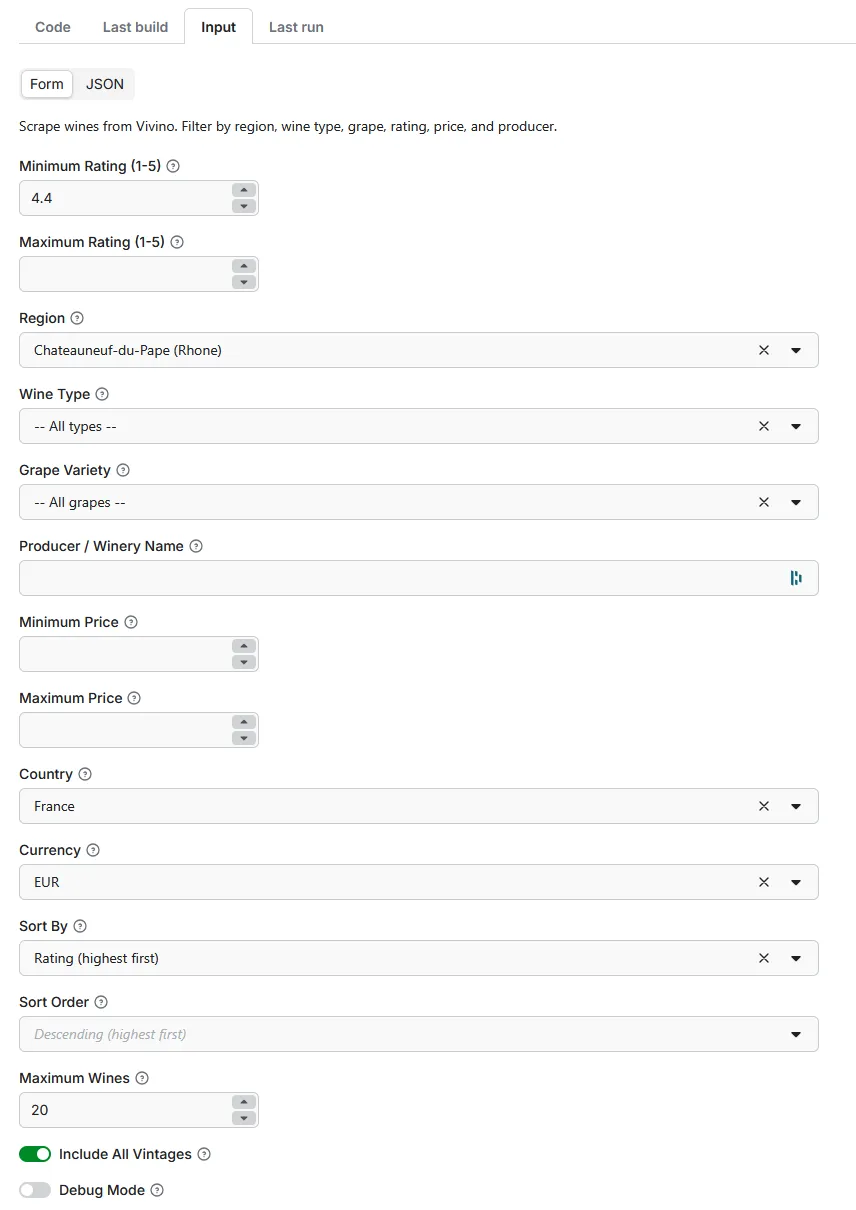
At a glance: input form
Five primary filters at the top of the form, followed by six dedicated sections. Just pick what you need and click Start.
→ See Input Parameters below for the full reference.
Why use this scraper?
Vivino lists 60M+ users and 12M+ wines. Use this scraper for:
- Market research: analyze wine trends, pricing, and consumer preferences
- Inventory monitoring: track ratings and popularity for your wine selection
- Investment analysis: monitor vintage ratings for fine wine investments
- Producer comparison: compare producers and regions side by side
- Cellar tracking: build a database of highly-rated wines to taste
Key features
Pick filters in the UI
No coding required. Pick filters from dropdown menus and click Start.
Filters available
| Filter | Description |
|---|---|
| Region | 299 wine regions across 32 countries: France, Italy, Spain, Portugal, Germany, USA, Argentina, Australia... |
| Sub-regions | Drill down to specific appellations: Meursault, Pauillac, Barolo, Napa Valley, Rioja Alta, and more |
| Wine Type | Red, White, Sparkling, Rosé, Dessert, Fortified |
| Grape Variety | 21 varietals: Pinot Noir, Chardonnay, Cabernet Sauvignon, Syrah, Nebbiolo, Tempranillo... |
| Producer | Search by winery name (partial match supported) |
| Rating | Filter by minimum/maximum Vivino rating (1-5 stars) |
| Price | Set price range in your preferred currency |
Vintage analysis
Enable "Include All Vintages" to get ratings for every vintage year of each wine. Useful for:
- Tracking vintage quality variations
- Finding the best years for a specific wine
- Investment-grade wine analysis
Includes wines without prices
Unlike other scrapers that only return wines with marketplace listings, this scraper uses Vivino's winery API to include all wines, even those not currently for sale.
Input parameters
The input form mirrors the Apify console UI: five primary filters at the top, followed by six grouped option sections.
Primary Filters
| Parameter | Type | Default | Description |
|---|---|---|---|
region | Select | All Regions | Wine region or appellation; 299 regions across 32 countries with sub-regions for France, Italy, and Spain |
wineType | Select | All Types | Red, White, Sparkling, Rose, Dessert, or Fortified |
grape | Select | All Grapes | Grape variety; 21 options: Pinot Noir, Chardonnay, Cabernet Sauvignon, Syrah, Nebbiolo, Tempranillo, and more |
wineryName | Text | - | Producer/winery name. Examples: Coche-Dury, Romanee-Conti, Rayas. Partial match supported. |
maxWines | Number | 10,000 | Maximum wines to scrape (1–10,000). Default fetches all matching wines. Lower for quick tests. |
Rating Range
Filter wines by rating (optional)
| Parameter | Type | Default | Description |
|---|---|---|---|
minRating | Number | 3.5 | Minimum Vivino rating (1–5 stars) |
maxRating | Number | 5 | Maximum Vivino rating (1–5 stars) |
Price Range
Filter wines by price (optional)
| Parameter | Type | Default | Description |
|---|---|---|---|
priceRangeMin | Number | - | Minimum price in selected currency |
priceRangeMax | Number | - | Maximum price in selected currency |
Regional Settings
Configure country and currency for prices
| Parameter | Type | Default | Description |
|---|---|---|---|
countryCode | Select | France | Country for price availability and currency conversion |
currencyCode | Select | EUR | Currency for displaying prices |
Output Settings
Configure sorting order
| Parameter | Type | Default | Description |
|---|---|---|---|
orderBy | Select | Highest Rated | Sort by rating, popularity, price, or discount |
order | Select | Descending | Descending (highest first) or ascending (lowest first) |
Vintage Analysis
Enable to get year-by-year ratings for each wine
| Parameter | Type | Default | Description |
|---|---|---|---|
includeAllVintages | Checkbox | No | Fetch ratings for all vintage years per wine. Creates one row per vintage. Significantly slower, but useful for investment analysis. |
vintageStartYear | Number | 2005 | Start year for vintage scanning (min: 1970) |
Advanced
Developer options
| Parameter | Type | Default | Description |
|---|---|---|---|
debug | Checkbox | No | Enable verbose logging for troubleshooting |
Output data
Each wine record includes:
27 fields per wine, grouped into:
- Identity:
wineName,wineryName,fullName,vintageYear,wineUrl,vintageUrl,imageUrl,wineId,vintageId,wineryId,regionId - Region:
regionName,countryName,wineType,isNatural - Market:
price,currency - Ratings:
rating,ratingsCount - Taste structure:
sweetness,tannin,acidity,intensity,fizziness,alcohol - Taste profile:
tasteProfile(flavor groups with primary/secondary keywords and mention counts) - Metadata:
scrapedAt
Vintage mode (includeAllVintages: true) produces one row per vintage with a year field instead of vintageYear, plus per-vintage rating and ratingsCount.
Usage examples
Example 1: top Burgundy white wines
Find the best-rated white Burgundy wines:
Example 2: specific producer with all vintages
Get all wines and vintages from Domaine de la Romanée-Conti:
Example 3: affordable Châteauneuf-du-Pape
Find value wines under €50:
Example 4: Pinot Noir comparison
Compare Pinot Noir across regions:
Supported regions (299 regions, 32 countries)
The full list is available in the Wine Region dropdown in the Apify console. Coverage by country:
| Country | Regions | Examples |
|---|---|---|
| France | 101 | Bourgogne (Meursault, Puligny-Montrachet, Vosne-Romanée…), Bordeaux (Margaux, Pauillac, Saint-Émilion, Pomerol…), Rhône (Châteauneuf-du-Pape, Côte-Rôtie, Hermitage…), Loire, Champagne, Beaujolais, Alsace, Provence, Languedoc, Jura, Corse |
| Italy | 64 | Piemonte (Barolo, Barbaresco…), Toscana (Brunello di Montalcino, Chianti Classico, Bolgheri…), Veneto (Amarone, Prosecco, Soave), Sicilia (Etna), Lombardia (Franciacorta), Campania, Puglia, Umbria, Friuli |
| Spain | 35 | Rioja, Ribera del Duero, Priorat, Cava, Navarra, Rías Baixas, Jerez |
| Portugal | 9 | Douro, Porto, Alentejo, Dão, Vinho Verde, Madeira |
| Germany | 9 | Mosel, Rheingau, Pfalz, Rheinhessen, Nahe |
| Austria | 7 | Wachau, Kamptal, Burgenland |
| USA | 11 | Napa Valley, Sonoma County, Willamette Valley, Paso Robles, Russian River Valley |
| Argentina | 6 | Mendoza, Uco Valley, Salta, Patagonia |
| Chile | 8 | Maipo Valley, Colchagua Valley, Casablanca Valley |
| Australia | 10 | Barossa Valley, McLaren Vale, Margaret River, Yarra Valley, Hunter Valley |
| New Zealand | 5 | Marlborough, Central Otago, Hawke's Bay |
| South Africa | 8 | Stellenbosch, Swartland, Franschhoek, Hemel-en-Aarde |
| Greece | 5 | Santorini, Naoussa, Nemea |
| + 19 more countries | 21 | Hungary, Georgia, Lebanon, Croatia, Israel, Slovenia, Canada, Brazil, Uruguay, Mexico, UK, Romania, Bulgaria, Moldova, Turkey, Japan, Morocco, India |
France, Italy and Spain include sub-region drill-down (Bourgogne → Meursault, Piemonte → Barolo, Rioja → Rioja Alta…). Selecting a parent region automatically includes its sub-regions.
Pricing
This scraper uses Apify's pay-per-event pricing at $0.003 per wine row extracted (the apify-default-dataset-item event). You pay only for data delivered to the dataset, not for compute time or failed requests.
Cost examples
| Mode | Wines requested | Rows extracted | Cost |
|---|---|---|---|
| Standard | 100 | 100 | $0.30 |
| Standard | 1,000 | 1,000 | $3.00 |
| Standard | 10,000 | 10,000 | $30.00 |
| Vintage mode | 100 | ~1,000 to 2,000 (one row per vintage year, typically 10-20 per wine) | $3 to $6 |
Free tier: the Apify Free plan includes $5 of credits per month, enough for ~1,600 wines in standard mode or ~150 to 300 wines in vintage mode. See the pricing tab for the live billing config.
Speed
- Standard mode: ~2-3 wines/second
- Vintage mode: ~1 wine/minute (checks years from 2005 onward, with early stop on missing data)
Export formats
Download your data in multiple formats:
- JSON: for developers and APIs
- CSV: for Excel and spreadsheets
- Excel: direct .xlsx export
- XML: for legacy systems
Integrate into your workflow
This actor runs on Apify and integrates natively with popular automation platforms and programming languages.
API integration
Call this actor programmatically using the Apify API. Get your API token from Settings → Integrations.
cURL:
Node.js:
Python:
Scheduled runs: automated market monitoring
Set up a schedule in the Apify Console to track regional wine data over time:
- Create a Task with your saved input (region, filters, settings)
- Go to the Schedules tab → Create schedule
- Set a cron expression, e.g.
0 2 * * 1for every Monday at 2 AM UTC
| Schedule | Cron expression | Use case |
|---|---|---|
| Every Monday | 0 2 * * 1 | Weekly regional price report |
| 1st of month | 0 0 1 * * | Monthly market snapshot |
| Daily at 6 AM | 0 6 * * * | Active trading desk |
Webhooks: push results to your system
Get notified when a run completes. No polling needed:
- Go to the actor's Integrations tab in the Apify Console
- Select event: Run succeeded
- Enter your endpoint URL
- Apify sends a POST request with the
datasetIdand run metadata
No-code integrations
Connect this actor to your tools without writing code:
| Platform | What it does | Setup |
|---|---|---|
| Google Sheets | Export wine data to a Google Sheet automatically | Integrations tab → Google Drive |
| Airtable | Sync wines to an Airtable base with field mapping | Integrations tab → Airtable |
| Zapier | Trigger Zaps on run completion → push to 5,000+ apps | Apify Zapier connector |
| Make | Visual workflows: scrape → transform → insert into DB | Apify Make module |
| n8n | Self-hosted workflow automation with Apify trigger node | Apify n8n community node |
For Zapier, Make and n8n setup, see the Apify Integrations docs. Actor ID for run-actor steps: onpKx0FzTy6OfOjXg.
Tips for best results
- Use region filters when searching for specific producers; speeds up the search significantly.
- Start with smaller
maxWinesto test filters before large scrapes. - Enable
includeAllVintagesonly when you need year-by-year data. Slower, but unique signal. - Combine filters for precise results: region + grape + rating range.
- Use
debugmode to see detailed logs if results look unexpected.
Limitations
- Vivino's API may rate-limit requests during high-traffic periods
- Some wines without user reviews may not have rating data
- Vintage data is limited to years with actual user reviews on Vivino
- Price data is only available for wines currently listed for sale
FAQ
How much does it cost per wine?
This scraper uses Apify's pay-per-event pricing at $0.003 per wine extracted (the apify-default-dataset-item event). 100 wines cost $0.30, 1,000 wines cost $3, 10,000 wines cost $30. The free Apify plan includes $5 of monthly credits, enough to extract ~1,600 wines per month at no cost.
Is it legal to scrape Vivino?
Yes, scraping publicly available data is legal in most jurisdictions, as confirmed by the 2022 US Ninth Circuit ruling in hiQ Labs v. LinkedIn. This scraper only reads pages any visitor can see without logging in. No private user data is collected. Review Apify's web scraping legality guide and ensure your specific use case complies with Vivino's Terms of Service and applicable laws (GDPR if you store review text from EU users).
Can I use this scraper via MCP?
The Actor exposes only a trivial Standby status endpoint, not a full MCP server. To use Vivino data inside an MCP workflow, run this scraper through the standard Apify MCP integration by adding mrbridge/vivino-powerful-scraper to your client config.
Why does the default maxWines: 5 give such a small test run?
The prefill is intentionally conservative so the first click on Start costs less than $0.02 and finishes in under a minute. Once you've verified the output shape, bump maxWines to 100, 1,000, or remove the cap entirely.
Can I scrape wines that aren't currently for sale?
Yes. The scraper falls back to the winery API for wines without active price listings, so you still get ratings, taste profile and vintage data. The price field will be null for those entries.
What happens if Vivino rate-limits me?
The scraper handles rate limits with exponential backoff and retries. Sustained 429 errors cause the run to exit gracefully (always SUCCEEDED) with whatever data was already collected. Lower the concurrency or run during off-peak hours if you hit limits repeatedly.
Legal disclaimer
This scraper is intended for personal use, research, and legitimate business purposes. Please respect Vivino's terms of service and rate limits. The data scraped belongs to Vivino and its users.
Support & feedback
- Issues: report bugs or request features on the Actor's Issues tab in Apify Console
- Questions: contact us through Apify support


