

Compass-Compatible Google Maps Reviews Scraper
Pricing
from $0.09 / 1,000 reviews
Compass-Compatible Google Maps Reviews Scraper
[From $0.09/1000] Extract data from thousands of Google Maps locations and businesses, including reviews, reviewer details, images, opening hours, prices & more. Export data, run via API, schedule and monitor runs, or integrate with other tools.
Pricing
from $0.09 / 1,000 reviews
Rating
0.0
(0)
Developer

rainminer
Maintained by CommunityActor stats
0
Bookmarked
5
Total users
2
Monthly active users
3 hours ago
Last modified
Categories
Share
Google Maps Reviews & AI Insights Scraper
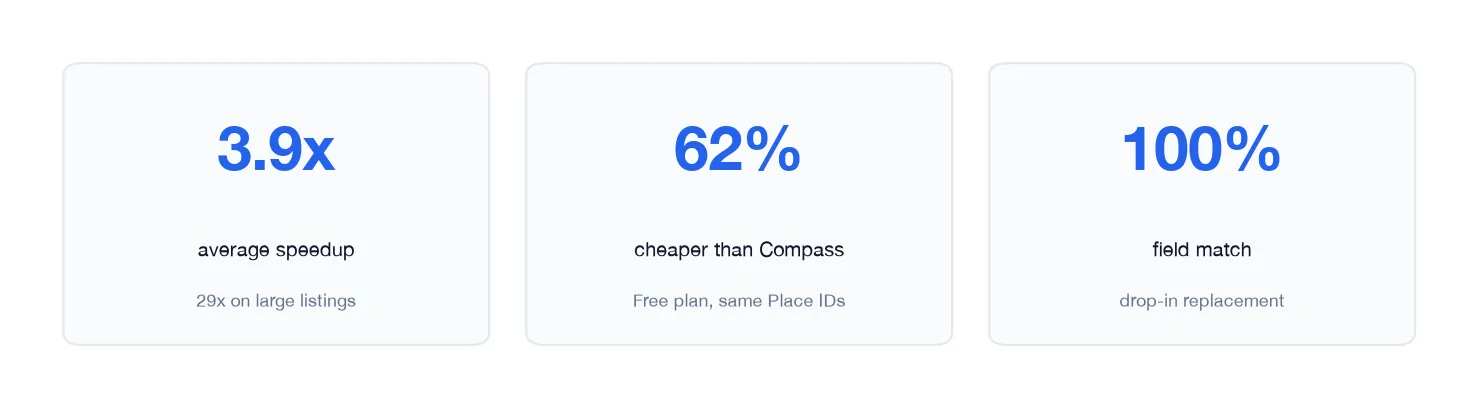
Google Maps Reviews & AI Insights Scraper is a drop-in Google Maps reviews job for teams already on Compass Google Maps Scraper: same Place IDs, same newest-first reviews, same field names on the row you already parse. Paste a Google Maps URL or Place ID and export place details plus a nested reviews array with exact publishedAtDate timestamps and owner replies.
On top of that dump you can turn on two add-ons Compass does not ship: AI themes with evidence quotes, and draft owner replies written like that listing's last 5 responses. No Google account, no official Maps API key.
What does Google Maps Reviews & AI Insights Scraper do?
This Actor scrapes public Google Maps listings you already know. It does not search a city or keyword — you bring the places, it returns structured details, reviews, and optional AI insights.
Give it:
- Google Maps place URLs (
/maps/place,/maps/search,cidlinks, short links) - or Google Place IDs (
ChIJ…)
Get back one dataset row per place: contact fields, coordinates, opening hours, rating, review count, 1–5 star histogram, and nested reviews[] sorted newest first. Field names match Compass crawler-google-places on a subset — existing readers of title, placeId, reviews, stars, text, publishedAtDate, and responseFromOwnerText keep working. When the add-ons are on, the same row also includes reviewThemes and/or draftReplies.
Set Stop after this review date (90 days, 2025-01-01, or an ISO timestamp) to cut the feed as soon as older reviews appear. That is the incremental-sync path for reputation products.
Why switch from Compass Google Maps Scraper?
If your pipeline already calls Compass with placeIds + maxReviews + reviewsSort: "newest", you can point the same payload here. The scrape output is Compass-shaped on purpose so you are not rewriting parsers.
Compass crawler-google-places | This Actor | |
|---|---|---|
| Input | Place IDs, Maps URLs, plus search/discovery | Place IDs and Maps URLs you already have |
| Review order | Newest (when you set it) | Newest by default, with a date cutoff |
| Dataset shape | One place row, nested reviews[] | Same shape, same field names (subset) |
| Speed | Browser-heavy Maps crawl | HTTP-only; a 1,300-review listing finishes in seconds once warm |
| Completeness | Can stop early on a listing | Paginates until Google (or maxReviews) stops |
| AI | Competitor-analysis add-on (other businesses) | Themes + draft owner replies in that listing's voice |
| Google API key | Not required | Not required |
You give up Compass's city/keyword search and the extra place fields we do not emit (imageUrl, likesCount, city, hotel blocks, and similar). You keep the reputation job: newest reviews, exact dates, owner replies, histogram.
Tried on 20 live Compass payloads (same Place IDs, same maxReviews, German listings): every Compass reviewId came back, place fields we emit matched, and review text / stars / dates / owner replies matched. One Compass run returned 1 review on a listing with 52; this Actor returned all 52.
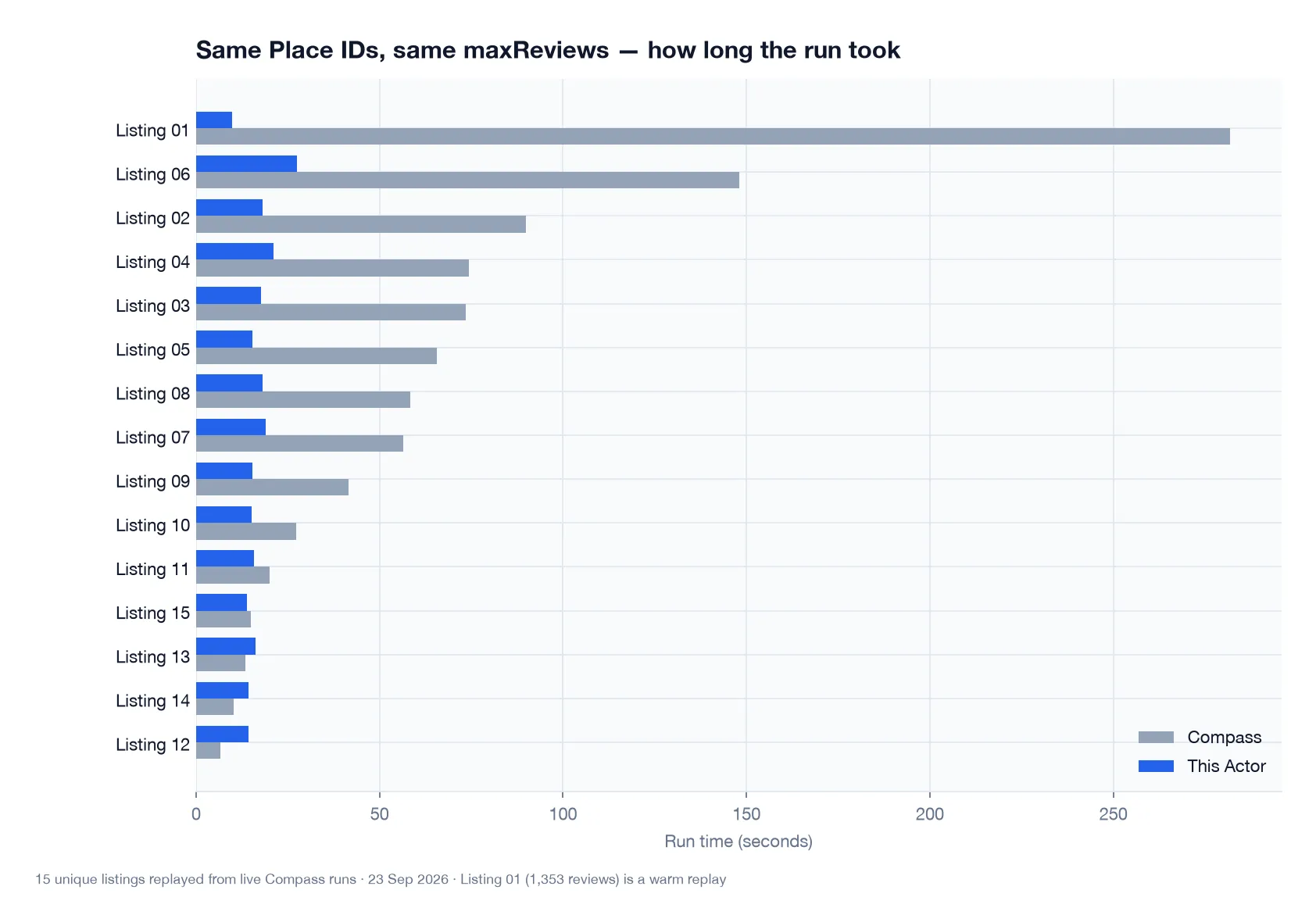
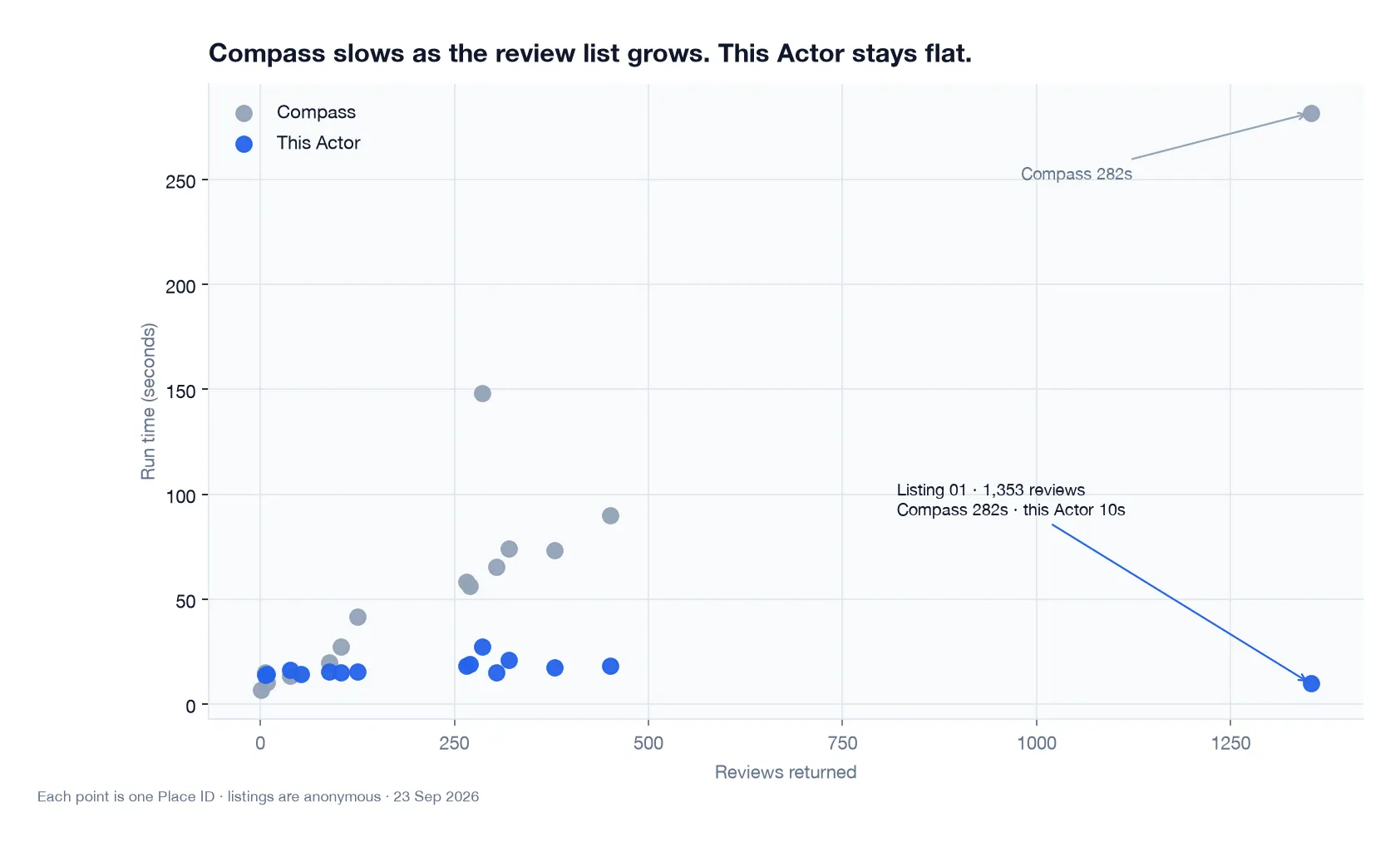
Fifteen unique listings, anonymized. Times are warm Apify cloud runs vs the original Compass durations. Cost is Free-plan PPE on those same Place IDs.
What can this Google Maps reviews scraper do?
- Extract Google Maps place details: title, address, phone, website, categories, coordinates, hours, rating, histogram
- Extract Google Maps reviews newest first: text, stars, exact publish time, reviewer profile fields, owner replies
- Date cutoff so nightly runs only walk what is new
- Accept the same Place IDs or Maps URLs Compass users already send
- Run details-only (
maxReviews: 0) when you need histogram and contact fields without review text - AI themes add-on: recurring topics with evidence quotes, top praise, and complaints
- Draft owner replies add-on: paste-ready replies in the listing's own voice for the star band you pick (3★ = neutral)
- Export JSON, CSV, Excel, XML, or HTML, schedule runs, and pull results through the Apify API or integrations
What Google Maps data can you extract?
| Place | Reviews |
|---|---|
| Title, address, street, postal code, country | Review ID and permalink |
| Phone, website, categories | Reviewer name, profile URL, photo |
| Coordinates, opening hours | Stars, review text, original language |
| Rating, review count, 1–5 star histogram | Exact publishedAtDate (ISO) |
Place ID, feature ID (fid), CID | Owner reply text |
Why scrape Google Maps place details and reviews?
Public Maps listings are the default source for local reputation and store-locator enrichment:
- Reputation monitoring — pull last night's reviews for a fixed venue list
- Incremental sync —
reviewsStartDate: "8 days"instead of re-reading the full history - Lead enrichment — attach phone, address, rating, and histogram to known Place IDs
- Competitive research — compare star mix and recent comments across nearby businesses
- Hotel guest feedback — newest-first reviews for hospitality ops
- Restaurant quality tracking — watch 1–2 star spikes after a menu or staff change
- Agency client reporting — weekly review velocity and owner-reply coverage
- Store locator enrichment — rating and hours on a location directory
- Review-velocity trends — count new reviews per week without a Google API quota
- Owner-reply SLA — draft replies for unanswered 1–3★ reviews in the listing's voice
- Theme mining — recurring praise and complaints with quotes you can show a client
- Reply-queue automation — push drafts into a helpdesk or Sheets column
- Local SEO audits — categories and public review volume
- Market-entry research — recent visitor language for a shortlist of sites
How to scrape Google Maps reviews
- Open this Actor in Apify Console.
- Add Google Maps place URLs and/or Place IDs (the same strings you send Compass).
- Set Max reviews per place (or
0for details only). - Optionally set Stop after this review date (
30 daysor2025-06-01). - Keep Newest sort when you use a date cutoff.
- Optionally turn on AI themes and/or Draft owner replies (off unless you set the flags via API).
- If drafts are on, pick Draft replies for these ratings (3★ = neutral).
- Run and download the dataset. Schedule it, or call it from the Apify API like any other Actor.
maxReviews applies per place. Ten places at maxReviews: 20 return up to 200 reviews.
Input
Provide at least one place URL or Place ID.
| Field | Type | Default | Description |
|---|---|---|---|
startUrls | Array of { url } | — | Google Maps place URLs (/maps/place, /maps/search, /maps?cid=, short links) |
placeIds | Array of strings | — | Google Place IDs (ChIJ… / GhIJ…) |
maxReviews | Integer | 5 | Max reviews per place. 0 = details only (histogram still included) |
reviewsStartDate | String | — | Stop when a review is older than this. 2024-05-03, ISO datetime (UTC), or relative (8 days, 3 months) |
reviewsSort | String | newest | newest, mostRelevant, highestRating, or lowestRating |
includeReviewThemes | Boolean | false | AI themes add-on. Console try-for-free prefills this on. |
includeDraftReplies | Boolean | false | Draft owner replies add-on, styled like the listing's last 5 owner responses. |
draftReplyRatings | String | negativeAndNeutral | Unanswered ratings to draft: negative, negativeAndNeutral, neutral, positiveAndNeutral, positive. 3★ = neutral. |
language | String | en | Google Maps UI language — affects relative dates and opening-hours labels |
proxyConfiguration | Object | Apify Proxy | Recommended on the platform; switch to residential groups if you hit blocks |
The date cutoff needs the default newest sort: the Actor walks newest → oldest and stops at the first review older than reviewsStartDate.
Compass callers: keep placeIds, maxReviews, language, and reviewsSort. Ignore Compass-only flags (maxCrawledPlaces, searchStringsArray, image/leads options). Leave both AI flags off for a scrape-only row.
Output
Each dataset item is one place, with reviews nested on the same row (the shape reputation products already consume). The Output tab has two views: Overview (one row per place) and Reviews (one row per review, with reviewer, stars, text, date, and owner reply).
You can download the dataset in JSON, HTML, CSV, Excel, XML, or via the Apify API.
| Field | Description |
|---|---|
title | Business name |
address | Formatted address, with street, postalCode, state, countryCode |
phone / phoneUnformatted | Public phone when listed; empty string when Google has none |
openingHours | Day and hours pairs (08:00 to 18:00) |
totalScore | Average rating |
reviewsCount | Number of Google reviews on the listing |
reviewsDistribution | Star histogram (oneStar … fiveStar) |
placeId | Google Place ID |
fid | Google feature ID |
reviewThemes | AI themes add-on. Omitted when that add-on is off |
draftReplies | Draft owner replies add-on. Omitted when that add-on is off |
draftReplyStyleExamples | The 5 most recent owner replies used as the voice to copy. Omitted when drafts are off |
reviews | Newest-first review objects with text, stars, exact dates, IDs, links, public reviewer fields, and owner responses |
Does this search Google Maps by keyword?
No. It only scrapes the places you pass as URLs or Place IDs, which keeps runs predictable. For keyword or area search, use a dedicated Google Maps search Actor (including Compass if that is already how you discover places), then feed those Place IDs here.
Related Actors:
- Google Maps Menu Scraper — menu items and prices from listing photos
- Google Maps Review Summary Scraper — Google's own short review-summary text on the listing (not themes or reply drafts)
FAQ
Do I get exact review dates?
Yes. Every review has publishedAtDate as an exact ISO timestamp. That is what makes the date cutoff and incremental runs work.
How many reviews can I get per place?
The feed paginates until Google stops returning pages, so several hundred per place is normal. Set maxReviews to the number you need. Combine with reviewsStartDate for nightly syncs that stop once older reviews appear.
How is this different from Compass Google Maps Reviews Scraper?
Compass Google Maps Reviews Scraper (compass/Google-Maps-Reviews-Scraper) is a raw review dump. Compass Google Maps Scraper (compass/crawler-google-places) is the place crawler most reputation pipelines actually call. This Actor is that place-ID + newest + date-cutoff job, with Compass field names on the fields we return, plus two optional AI add-ons: themes with evidence quotes, and draft owner replies in the listing's voice. Compass's paid competitor analysis compares businesses; it does not draft replies as that owner.
Leave the AI flags off and the row stays scrape-only, so existing Compass parsers can keep reading the same keys.
Can I call this like Compass from the Apify API?
Yes. Same platform: start a run with placeIds (and maxReviews / language / reviewsSort if you set them today), then read the default dataset. One item per place, reviews nested. See the API tab on this Actor for language snippets.
Do I need a Google API key or login?
No. This Actor reads public Maps listing and review pages. There is no Google Cloud key, OAuth, or end-user login.
Do I need a proxy?
Google throttles heavy traffic from single IP ranges. Apify Proxy is enabled by default; if you scrape many places or see repeated empty responses, switch the proxy configuration to residential groups.
Is it legal to scrape Google Maps?
This Actor collects public listing and review information, including public reviewer names and profile fields. Do not process personal data unless you have a legitimate reason. GDPR and similar laws may apply. If you are unsure, consult a lawyer. See also Apify's guidance on scraping.
Where can I get help?
Open an issue on this Actor's Issues tab in Apify Console. Feature requests for extra Compass fields are welcome there too.


